
Your API wants Hannah Brooks’s two orders as one JSON array, not two rows. The PostgreSQL json_agg function does it: json_agg(o.id) turned her rows into [101, 102].
The catch: no input rows gives NULL, not []. An unmatched LEFT JOIN gives [null].
The seven examples run from one column to nested orders. Tested on PostgreSQL 18.6 for Windows, with psql in VS Code.
PostgreSQL JSON_AGG Function Syntax
Here’s the syntax:
json_agg ( anyelement ORDER BY input_sort_columns ) → json
jsonb_agg ( anyelement ORDER BY input_sort_columns ) → jsonb
json_agg_strict ( anyelement ) → json| Argument | Required | What it means |
|---|---|---|
| anyelement | Yes | A column, a whole row or an expression. NULL becomes JSON null. |
| ORDER BY | No | Element order. Without it, the order is unspecified. |
Return value: one json array per group, or NULL when the group has no rows.
Availability: every supported release; the _strict forms need PostgreSQL 16 or later. Unsure which type you need? See my PostgreSQL json vs jsonb comparison.
When to Use the JSON_AGG Function in PostgreSQL
Use JSON_AGG when you need to:
- send a parent row and its children to a Node.js or Python API in one query
- store related rows as JSON you can later sort by a JSON field
- replace the N+1 queries an ORM sends
Run this once. Every example uses these three small tables:
DROP TABLE IF EXISTS order_items, orders, customers;
CREATE TABLE customers (id int PRIMARY KEY, name text, state char(2));
CREATE TABLE orders (id int PRIMARY KEY, customer_id int, total numeric(7,2));
CREATE TABLE order_items (order_id int, sku text, qty int);
INSERT INTO customers VALUES
 (1, 'Hannah Brooks', 'OH'), (2, 'Tyler Reed', 'TX'),
 (3, 'Grace Miller', 'OH'), (4, 'Marcus Bennett', 'CA');
INSERT INTO orders VALUES
 (101, 1, 49.99), (102, 1, 120.00), (103, 2, 15.50), (104, 3, 89.00);
INSERT INTO order_items VALUES
 (101, 'MUG-12', 2), (101, 'TEE-M', 1), (102, 'HOODIE-L', 1);
Example 1: Aggregate a Column into a JSON Array
Let’s start simple. I want every customer name in one array:
SELECT json_agg(name) AS names
FROM customers;
Output:
                               names
-------------------------------------------------------------------
 ["Hannah Brooks", "Tyler Reed", "Grace Miller", "Marcus Bennett"]
(1 row)
This returns one row holding all four names. The order is whatever order PostgreSQL read them in.
Example 2: Turn Rows into JSON Objects (json_agg vs json_build_object)
Now objects. The goal is the Ohio customers, as whole rows and with only id and name:
SELECT json_agg(c) AS whole_rows,
       json_agg(json_build_object('id', id, 'name', name)) AS picked
FROM customers AS c
WHERE state = 'OH';
Output:
                   whole_rows                    |                                   picked
-------------------------------------------------+-----------------------------------------------------------------------------
 [{"id":1,"name":"Hannah Brooks","state":"OH"}, +| [{"id" : 1, "name" : "Hannah Brooks"}, {"id" : 3, "name" : "Grace Miller"}]
  {"id":3,"name":"Grace Miller","state":"OH"}]   |
(1 row)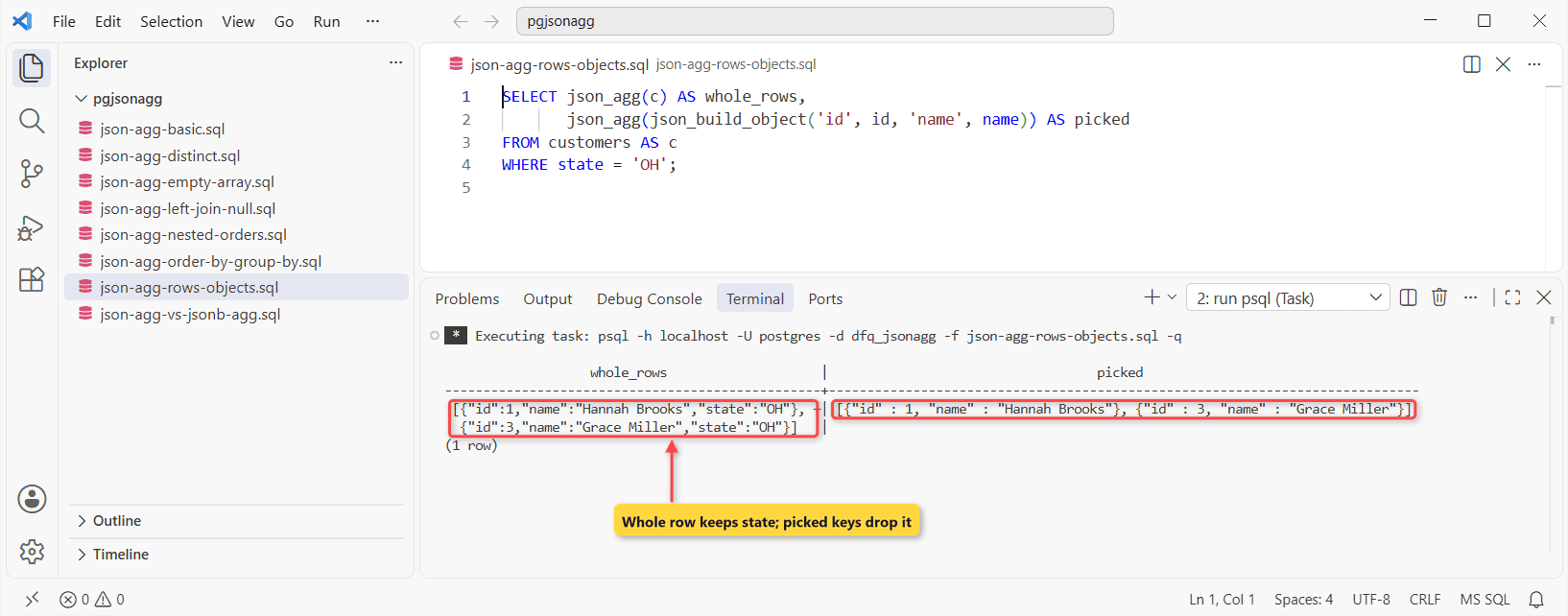
Both return two objects. json_agg(c) keeps every column; json_build_object picks and renames keys.
Example 3: Use JSON_AGG ORDER BY with GROUP BY
Say you need each customer’s order totals, largest first:
SELECT customer_id,
       json_agg(total ORDER BY total DESC) AS totals
FROM orders
GROUP BY customer_id
ORDER BY customer_id;
Output:
 customer_id |     totals
-------------+-----------------
           1 | [120.00, 49.99]
           2 | [15.50]
           3 | [89.00]
(3 rows)
For customer 1, this gives [120.00, 49.99]. ORDER BY inside the call sorts the array; the one at the end sorts rows. More in my PostgreSQL GROUP BY tutorial.
Example 4: Return an Empty Array Instead of NULL
Nobody lives in New York. I want [] back, not NULL:
\pset null '(null)'

SELECT json_agg(name) AS raw,
       COALESCE(json_agg(name), '[]') AS fixed
FROM customers
WHERE state = 'NY';
Output:
  raw   | fixed
--------+-------
 (null) | []
(1 row)
The raw column shows (null); COALESCE gives []. I have a separate tutorial on PostgreSQL COALESCE.
Example 5: Remove [null] from a LEFT JOIN with FILTER
Marcus Bennett has no orders. I want his array empty, not [null]:
\pset null '(null)'

SELECT c.name,
       json_agg(o.id) AS plain,
       json_agg(o.id) FILTER (WHERE o.id IS NOT NULL) AS filtered,
       json_agg_strict(o.id) AS strict
FROM customers c
LEFT JOIN orders o ON o.customer_id = c.id
WHERE c.id IN (1, 4)
GROUP BY c.name;
Output:
      name      |   plain    |  filtered  |   strict
----------------+------------+------------+------------
 Hannah Brooks  | [101, 102] | [101, 102] | [101, 102]
 Marcus Bennett | [null]     | (null)     | []
(2 rows)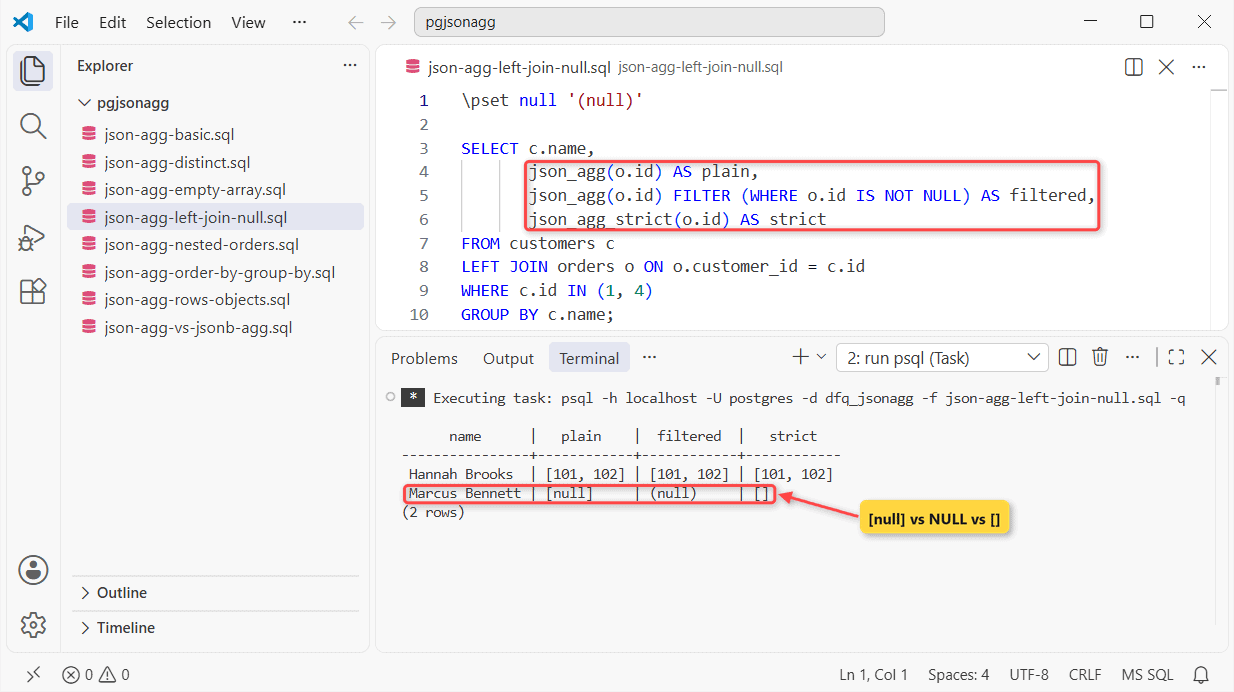
Plain json_agg gives Marcus [null]. FILTER leaves no rows, so it returns NULL (add COALESCE). json_agg_strict returned [] in my run. More on PostgreSQL LEFT JOIN behavior.
Example 6: JSON_AGG DISTINCT (and the json Equality Error)
Two customers live in Ohio. I want each state once:
\set ON_ERROR_STOP off

SELECT json_agg(DISTINCT state) AS states FROM customers;

SELECT json_agg(DISTINCT json_build_object('st', state))
FROM customers;

SELECT jsonb_agg(DISTINCT jsonb_build_object('st', state))
FROM customers;
Output:
       states
--------------------
 ["CA", "OH", "TX"]
(1 row)

psql:json-agg-distinct.sql:6: ERROR:  could not identify an equality operator for type json
LINE 1: SELECT json_agg(DISTINCT json_build_object('st', state))
                                 ^
                 jsonb_agg
--------------------------------------------
 [{"st": "CA"}, {"st": "OH"}, {"st": "TX"}]
(1 row)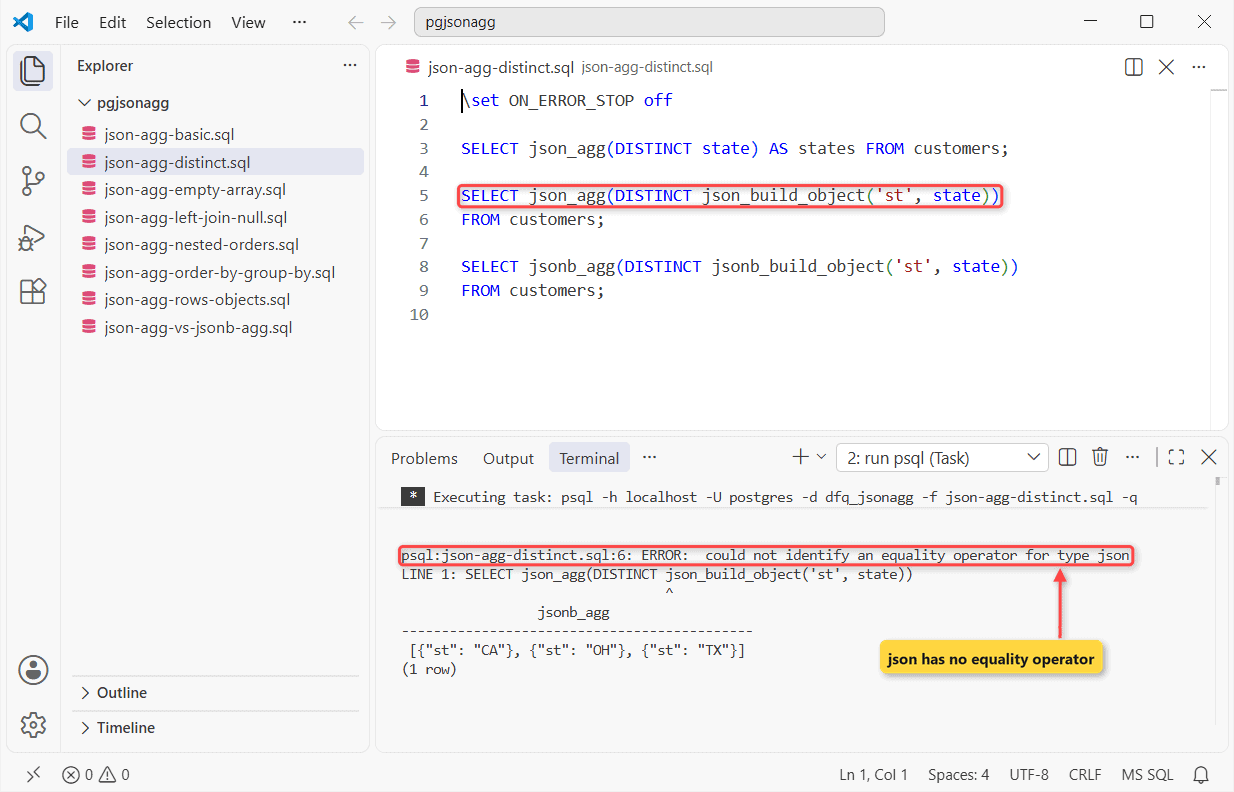
json_agg(DISTINCT state) returns ["CA", "OH", "TX"]. DISTINCT on a json value fails, since json has no equality operator. jsonb_agg works.
Example 7: Build Nested JSON Arrays in PostgreSQL
Last, I want Hannah with her orders, and each order with its SKUs:
SELECT json_build_object(
  'customer', c.name,
  'orders', (SELECT json_agg(json_build_object(
               'id', o.id,
               'items', (SELECT json_agg(i.sku) FROM order_items i
                         WHERE i.order_id = o.id)))
             FROM orders o WHERE o.customer_id = c.id)) AS doc
FROM customers c
WHERE c.id = 1;
Output:
                                                              doc
--------------------------------------------------------------------------------------------------------------------------------
 {"customer" : "Hannah Brooks", "orders" : [{"id" : 101, "items" : ["MUG-12", "TEE-M"]}, {"id" : 102, "items" : ["HOODIE-L"]}]}
(1 row)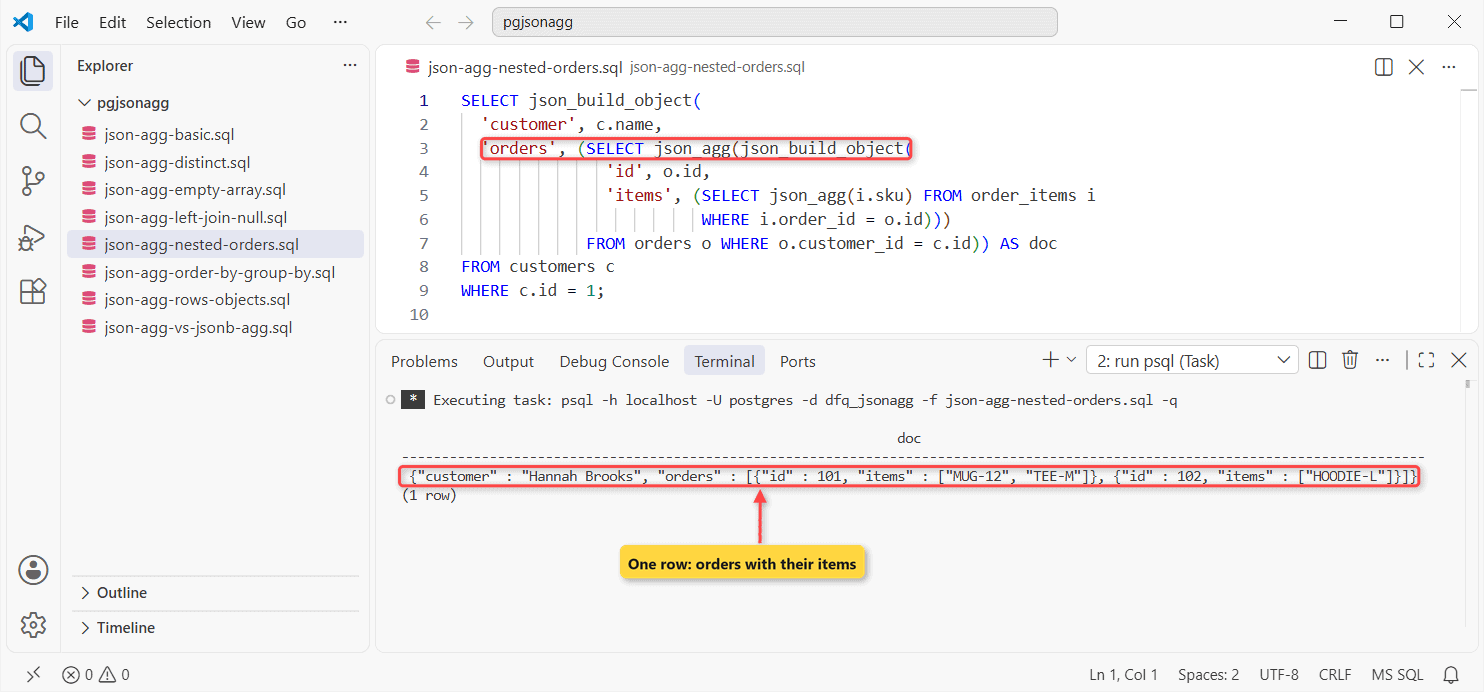
This returns order 101 with MUG-12 and TEE-M, and order 102 with HOODIE-L. Each level is a correlated PostgreSQL subquery, so nothing duplicates. Run it for c.id = 2 and you should see Tyler’s order 103 with "items" : null.
JSON_AGG vs JSONB_AGG vs ARRAY_AGG: Which Should You Use?
Same object, both functions:
SELECT json_agg(json_build_object('state', 'OH', 'city', 'Dayton')) AS j,
       jsonb_agg(jsonb_build_object('state', 'OH', 'city', 'Dayton')) AS jb;
Output:
                   j                   |                 jb
---------------------------------------+-------------------------------------
 [{"state" : "OH", "city" : "Dayton"}] | [{"city": "Dayton", "state": "OH"}]
(1 row)
json_agg kept my key order and spacing; jsonb_agg sorted the keys (city first). array_agg returns a PostgreSQL array for array_length; string_agg returns text.
My rule of thumb: json_agg for APIs, jsonb_agg to store or compare.
Tips & Common Mistakes
- No rows means NULL, not
[]. Wrap the call in COALESCE. - An ORDER BY clause after GROUP BY won’t order the array.
ERROR: could not identify an equality operator for type jsonmeans DISTINCT met a json value. Use jsonb.json_agg(t)ships every column, even hidden ones.
Wrapping Up
The PostgreSQL json_agg function turns rows into a JSON array in one query. Copy Example 5 for parent-child APIs, Example 7 for nesting.
Next step: browse the complete list of PostgreSQL functions or the PostgreSQL 18 aggregate functions docs.
Two PostgreSQL array tutorials that pair well with json_agg:
Frequently Asked Questions
What is the difference between json_agg and json_object_agg?
json_object_agg(key, value) builds one object instead of an array.
Can json_agg run in parallel?
No. It has no partial mode, so parallel workers can’t share it.
What is json_arrayagg in PostgreSQL?
The SQL-standard form (PostgreSQL 16+). It skips NULLs by default.

Kumar Saurabh is a freelance software engineer who builds web and mobile apps with Next.js, React, Flutter and Python. From 2021 to 2024, Saurabh worked as an IT analyst and developer at TSInfo Technologies, writing technical articles on SQL and PostgreSQL. Saurabh writes the PostgreSQL, MySQL, MariaDB and MongoDB tutorials on DatabaseFAQs.com and holds a Master of Computer Applications (MCA) from Chandigarh University.