
Need to split a comma-separated string into an array? The PostgreSQL string_to_array function does it in one call. string_to_array('Ohio,Utah', ',') returns the text[] value {Ohio,Utah}.
The catch from my first run: the spaces after commas stay. 'Texas, Ohio' split into {Texas," Ohio"}, with a hidden leading space.
The seven examples cover arrays, positions, rows, integer casts and odd delimiters. Tested on PostgreSQL 18.6 for Windows.
STRING_TO_ARRAY Function Syntax
Here is the syntax:
string_to_array ( string text, delimiter text [, null_string text ] ) → text[]| Argument | Required | What it means |
|---|---|---|
string | Yes | The text to split. NULL returns NULL. |
delimiter | Yes | The separator (see Example 7 for NULL and empty). |
null_string | No | Pieces equal to this value become NULL. |
Return value: a text[] array, one element per piece, in order.
Availability: every supported release. The companion string_to_table needs PostgreSQL 14 or later.
When to Use the STRING_TO_ARRAY Function
Use STRING_TO_ARRAY when you need to:
- split a comma-separated column into a real array
- pick the second or last item from a delimited value
- convert
'1,2,3'into anint[]before an insert of multiple rows
Every example uses this table of US sales reps. Run it once:
CREATE TABLE sales_reps (
  rep_id    int PRIMARY KEY,
  rep       varchar(20) NOT NULL,
  territory text,
  quotas    text
);
INSERT INTO sales_reps VALUES
 (1, 'Hannah Brooks',  'Ohio,Indiana,Michigan', '120,95,130'),
 (2, 'Tyler Reed',     'Texas, Ohio, Florida',  '80,,75'),
 (3, 'Grace Miller',   'Utah',                  '60'),
 (4, 'Marcus Bennett', '',                      NULL);
Example 1: Split a String into an Array
Let’s start with a literal. I want three states as one array:
SELECT string_to_array('Ohio,Indiana,Michigan', ',') AS states;Output:
         states
-------------------------
 {Ohio,Indiana,Michigan}
(1 row)
That returns {Ohio,Indiana,Michigan}, one value of a PostgreSQL array type.
Example 2: Split a Comma-Separated Column into text[]
Now the territory column. The goal is an array per rep:
SELECT rep, string_to_array(territory, ',') AS states
FROM sales_reps
ORDER BY rep_id;
Output:
      rep       |           states
----------------+----------------------------
 Hannah Brooks  | {Ohio,Indiana,Michigan}
 Tyler Reed     | {Texas," Ohio"," Florida"}
 Grace Miller   | {Utah}
 Marcus Bennett | {}
(4 rows)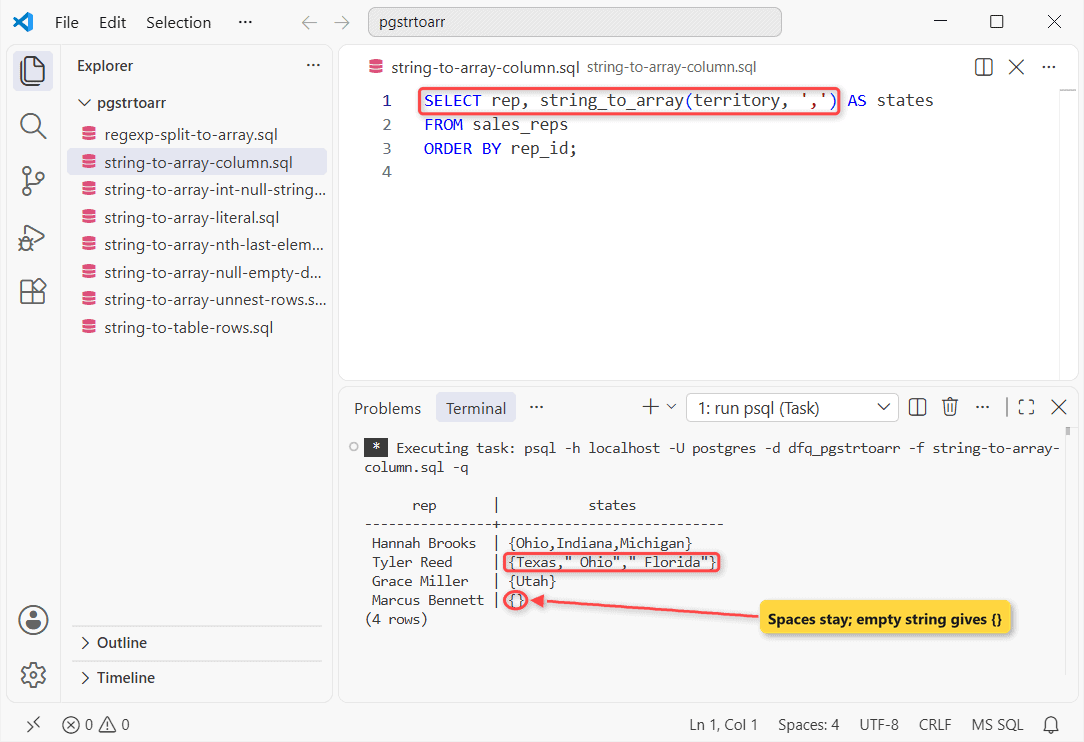
For Tyler Reed, this returns {Texas," Ohio"," Florida"}; the quotes show leading spaces.
Marcus Bennett’s empty string gives {}, not NULL.
Example 3: Get the Nth and Last Element
Say you need each rep’s second and last state. Here’s the query:
\pset null '(null)'

SELECT rep,
       s[2]            AS second_state,
       s[cardinality(s)] AS last_state
FROM sales_reps,
     string_to_array(territory, ',') AS s
ORDER BY rep_id;
Output:
      rep       | second_state | last_state
----------------+--------------+------------
 Hannah Brooks  | Indiana      | Michigan
 Tyler Reed     |  Ohio        |  Florida
 Grace Miller   | (null)       | Utah
 Marcus Bennett | (null)       | (null)
(4 rows)
For Hannah Brooks, it returns Indiana and Michigan. Grace Miller has one state, so s[2] is (null).
cardinality(s) counts the elements. For character positions, use SUBSTRING.
Example 4: Split a String into Rows with unnest
Next, rows. I want Tyler Reed’s states:
SELECT rep, trim(state) AS state
FROM sales_reps,
     unnest(string_to_array(territory, ',')) AS state
WHERE rep_id = 2;
Output:
    rep     |  state
------------+---------
 Tyler Reed | Texas
 Tyler Reed | Ohio
 Tyler Reed | Florida
(3 rows)
You get 3 rows, Texas, Ohio and Florida, because unnest turns each element into a row and trim() strips the leading spaces.
I have a separate guide on PostgreSQL REPLACE if you’d rather strip every space first.
Example 5: Split a String into Rows with string_to_table
The goal is Hannah’s states with their positions, using the PostgreSQL 14 shortcut:
SELECT t.n, t.state
FROM sales_reps,
     string_to_table(territory, ',') WITH ORDINALITY AS t(state, n)
WHERE rep_id = 1;
Output:
 n |  state
---+----------
 1 | Ohio
 2 | Indiana
 3 | Michigan
(3 rows)
That gives 3 rows. Run the SELECT again and you should see Ohio as n = 1.
string_to_table skips the array step. WITH ORDINALITY numbers the rows.
Example 6: Convert to an Integer Array with null_string
Tyler’s quotas are '80,,75', with one missing. I want an int[]:
\set ON_ERROR_STOP off
\set VERBOSITY terse
\pset null '(null)'

SELECT string_to_array(quotas, ',')::int[] AS q
FROM sales_reps WHERE rep_id = 2;
SELECT rep, string_to_array(quotas, ',', '')::int[] AS q
FROM sales_reps WHERE rep_id = 2;
Output:
psql:string-to-array-int-null-string.sql:6: ERROR:  invalid input syntax for type integer: ""
    rep     |      q
------------+--------------
 Tyler Reed | {80,NULL,75}
(1 row)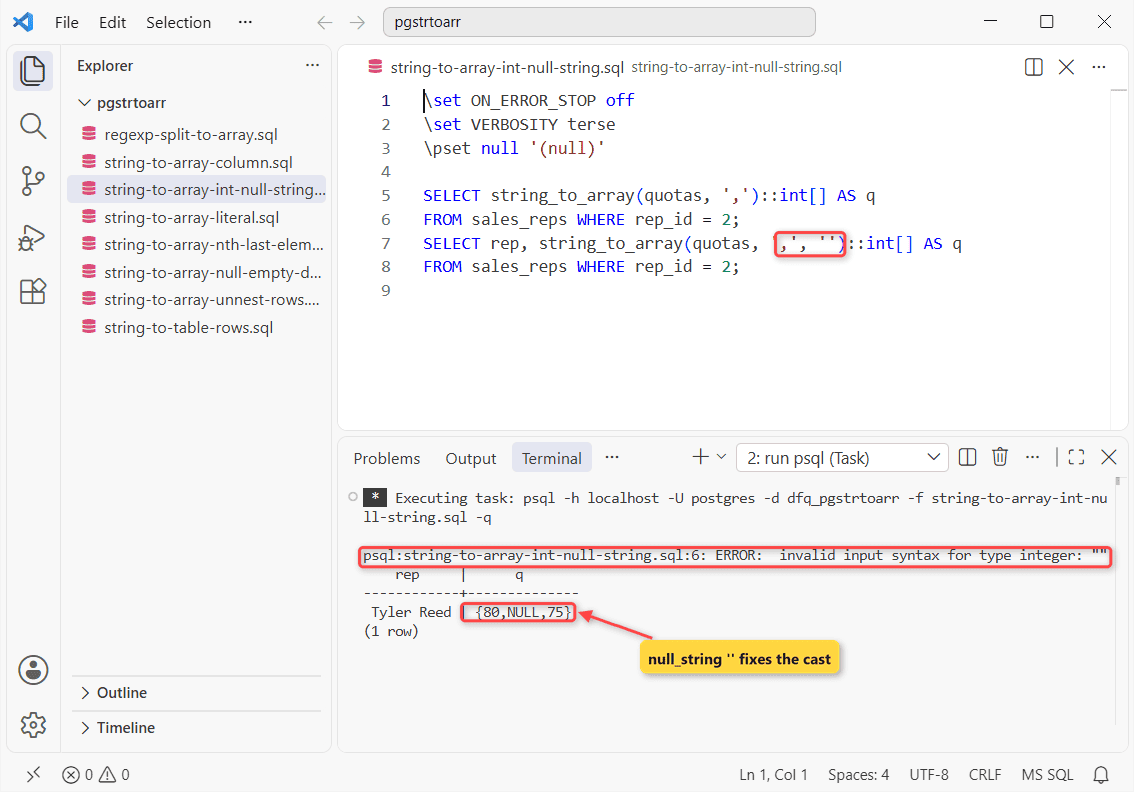
The first query fails with invalid input syntax for type integer: "", while the fix returns {80,NULL,75} because the empty piece became NULL before the cast.
Spaces don’t break the cast; empty pieces do. To add the numbers, see PostgreSQL SUM.
Example 7: Handle a NULL or Empty Delimiter
Last, the odd delimiters. The goal is three edge cases side by side:
\pset null '(null)'

SELECT string_to_array('Ohio,Iowa', NULL) AS null_delim,
       string_to_array('Ohio,Iowa', '')   AS empty_delim,
       string_to_array('', ',')           AS empty_input;
Output:
      null_delim       |  empty_delim  | empty_input
-----------------------+---------------+-------------
 {O,h,i,o,",",I,o,w,a} | {"Ohio,Iowa"} | {}
(1 row)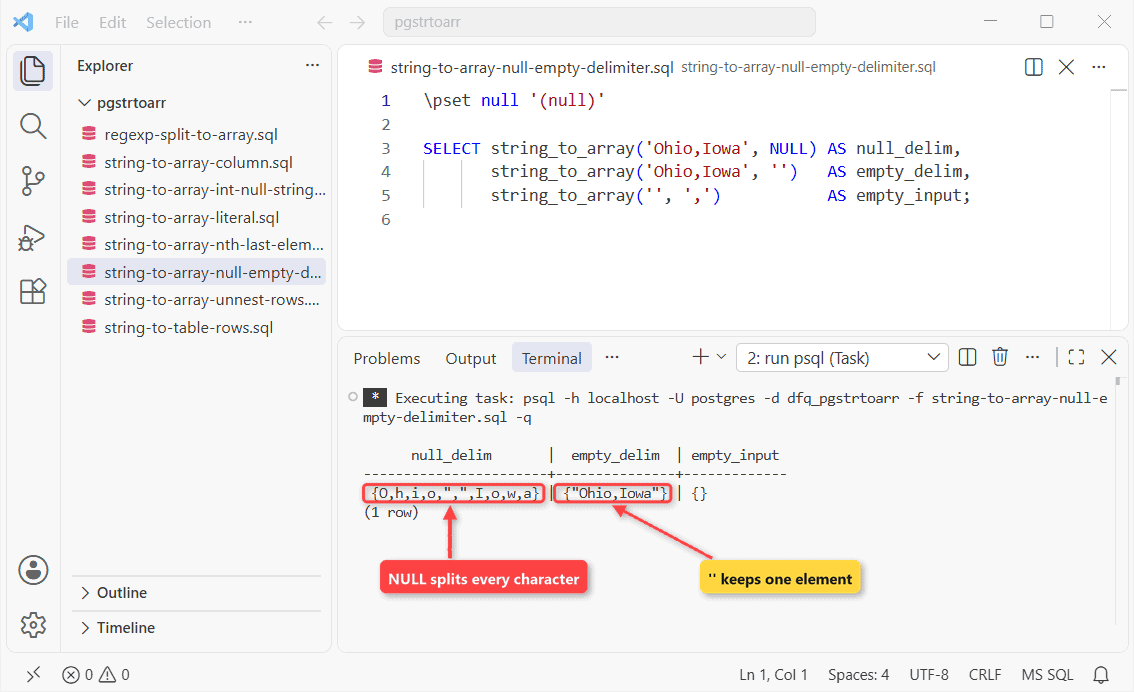
A NULL delimiter returns 9 one-character elements. An empty delimiter returns {"Ohio,Iowa"}.
STRING_TO_ARRAY vs REGEXP_SPLIT_TO_ARRAY: Which Should You Use?
Mixed separators, like commas or semicolons plus spaces, need a pattern:
SELECT regexp_split_to_array('Ohio; Iowa ,Utah', '\s*[,;]\s*') AS states;Output:
      states
------------------
 {Ohio,Iowa,Utah}
(1 row)
It returns {Ohio,Iowa,Utah}, trimmed by the pattern (same syntax as REGEXP_REPLACE). My rule of thumb: string_to_array for one fixed delimiter, regexp_split_to_array when it varies.
Tips & Common Mistakes
- Wrap the call before indexing.
string_to_array('a,b,c', ',')[2]gave mesyntax error at or near "[". - To join it back, use
array_to_stringor string_agg joins it.
Wrapping Up
Use Example 2 for arrays, Example 4 or 5 for rows, and Example 6 before any numeric cast.
Next step: browse the complete list of PostgreSQL functions or the PostgreSQL 18 string functions docs.
More PostgreSQL string tools:
Once the string is split, you usually want to check or flatten the result. My PostgreSQL ARRAY_LENGTH tutorial shows how to count the items (and why an empty array returns NULL), and the PostgreSQL UNNEST function post turns each array element into its own row.
Frequently Asked Questions
How do I check if a value is in a comma-separated string in PostgreSQL?
Use ‘Ohio’ = ANY(string_to_array(territory, ‘,’)), which returns true or false.
What is split_part in PostgreSQL?
split_part(string, delimiter, n) returns one piece as text; negative n counts from the end.
How do I split a string in MySQL or SQL Server?
SQL Server has STRING_SPLIT. MySQL uses SUBSTRING_INDEX.

Kumar Saurabh is a freelance software engineer who builds web and mobile apps with Next.js, React, Flutter and Python. From 2021 to 2024, Saurabh worked as an IT analyst and developer at TSInfo Technologies, writing technical articles on SQL and PostgreSQL. Saurabh writes the PostgreSQL, MySQL, MariaDB and MongoDB tutorials on DatabaseFAQs.com and holds a Master of Computer Applications (MCA) from Chandigarh University.