
MySQL data types come in five families: numeric, date and time, string, JSON and spatial. Here’s one table that uses the types you’ll reach for most days:
CREATE TABLE customers (
  customer_id INT UNSIGNED AUTO_INCREMENT PRIMARY KEY,
  full_name   VARCHAR(40)   NOT NULL,
  state       CHAR(2)       NOT NULL,
  zip_code    CHAR(5)       NOT NULL,
  plan        ENUM('free', 'pro', 'team') NOT NULL DEFAULT 'free',
  is_active   BOOLEAN       NOT NULL DEFAULT TRUE,
  balance     DECIMAL(10,2) NOT NULL DEFAULT 0.00,
  signup_date DATE          NOT NULL,
  last_login  DATETIME      NULL,
  prefs       JSON          NULL
);
Ten columns, nine different types. You’ll see this table again in each section, or a small scratch table when I need to break something on purpose.
Tested on MySQL 8.4.9 Community (the 8.4 LTS line) on Windows 11, run with the mysql client from VS Code. Ranges and byte counts come from the MySQL 8.4 reference manual.
Sample Table for the MySQL Data Type Examples
Six US customers. You run this after the CREATE TABLE above:
INSERT INTO customers
  (full_name, state, zip_code, plan, is_active, balance, signup_date, last_login, prefs)
VALUES
('Hannah Brooks', 'MA', '02134', 'pro', TRUE, 1250.00,
 '2026-01-12', '2026-03-02 08:15:00', '{"newsletter": true, "theme": "dark"}'),
('Tyler Reed', 'OH', '43215', 'free', TRUE, 0.00,
 '2026-02-03', NULL, NULL),
('Grace Miller', 'CA', '94110', 'team', TRUE, 2890.75,
 '2026-02-20', '2026-03-01 17:40:00', '{"newsletter": false}'),
('Marcus Bennett', 'NJ', '07030', 'pro', FALSE, 310.50,
 '2026-03-08', NULL, NULL),
('Olivia Hayes', 'TX', '78701', 'free', TRUE, 640.25,
 '2026-04-15', '2026-04-20 12:05:00', '{"theme": "light"}'),
('Ethan Cole', 'CT', '06103', 'pro', TRUE, 1975.00,
 '2026-05-01', NULL, NULL);
SELECT COUNT(*) AS customers FROM customers;
Row count:
+-----------+
| customers |
+-----------+
|         6 |
+-----------+
New to table syntax? Start with how to create a table in MySQL, then come back here to pick the types.
One setting changes almost every result in this post: sql_mode. My server’s default was STRICT_TRANS_TABLES plus the zero-date checks, so bad values raise errors instead of being quietly clipped.
MySQL Numeric Data Types: Integer Ranges and Storage
Pick the smallest integer that fits your largest real value, then decide if negatives are possible:
| Type | Bytes | Signed range | UNSIGNED range |
|---|---|---|---|
| TINYINT | 1 | -128 to 127 | 0 to 255 |
| SMALLINT | 2 | -32,768 to 32,767 | 0 to 65,535 |
| MEDIUMINT | 3 | -8,388,608 to 8,388,607 | 0 to 16,777,215 |
| INT | 4 | -2,147,483,648 to 2,147,483,647 | 0 to 4,294,967,295 |
| BIGINT | 8 | -263 to 263-1 | 0 to 264-1 (18,446,744,073,709,551,615) |
Now push a value one past the edge. I used --force so the client keeps going after each error:
CREATE TABLE int_test (t TINYINT, tu TINYINT UNSIGNED, n INT(11));
SHOW WARNINGS;
INSERT INTO int_test (t, tu) VALUES (127, 255);
INSERT INTO int_test (t) VALUES (128);
INSERT INTO int_test (tu) VALUES (-1);
SELECT t, tu FROM int_test;
What MySQL returned:
+---------+------+------------------------------------------------------------------------------+
| Level   | Code | Message                                                                      |
+---------+------+------------------------------------------------------------------------------+
| Warning | 1681 | Integer display width is deprecated and will be removed in a future release. |
+---------+------+------------------------------------------------------------------------------+
ERROR 1264 (22003) at line 4: Out of range value for column 't' at row 1
ERROR 1264 (22003) at line 5: Out of range value for column 'tu' at row 1
+------+------+
| t    | tu   |
+------+------+
|  127 |  255 |
+------+------+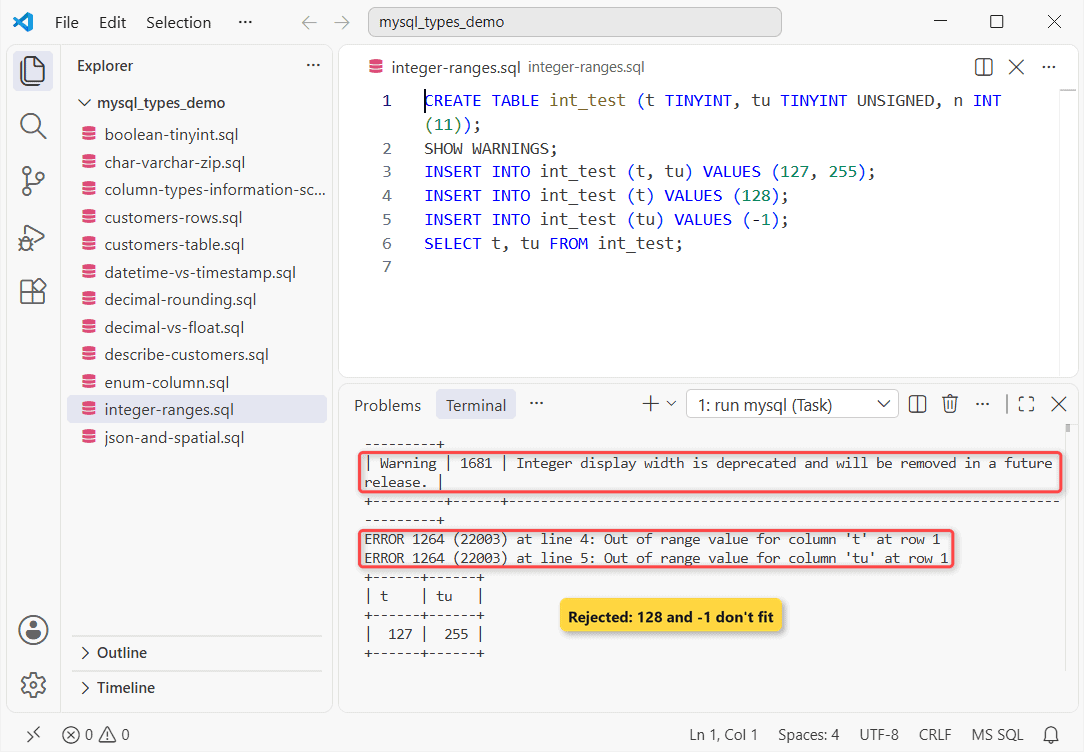
Two things to notice. ERROR 1264 rejected both bad rows, so only 127 and 255 were stored. And INT(11) earned warning 1681: display width on integer types is deprecated in 8.4.
MySQL DECIMAL vs FLOAT and DOUBLE: Which One Rounds?
DECIMAL stores exact digits (up to 65 digits, 30 after the point). FLOAT (4 bytes) and DOUBLE (8 bytes) store binary approximations. Same two amounts, 10 cents and 20 cents, in all three:
CREATE TABLE money_test (d DECIMAL(10,2), f FLOAT, g DOUBLE);
INSERT INTO money_test VALUES (0.10, 0.10, 0.10), (0.20, 0.20, 0.20);
SELECT SUM(d), SUM(f), SUM(g) FROM money_test;
SELECT COUNT(*) AS float_matches FROM money_test WHERE f = 0.1;
What came back:
+--------+---------------------+---------------------+
| SUM(d) | SUM(f)              | SUM(g)              |
+--------+---------------------+---------------------+
|   0.30 | 0.30000000447034836 | 0.30000000000000004 |
+--------+---------------------+---------------------+
+---------------+
| float_matches |
+---------------+
|             0 |
+---------------+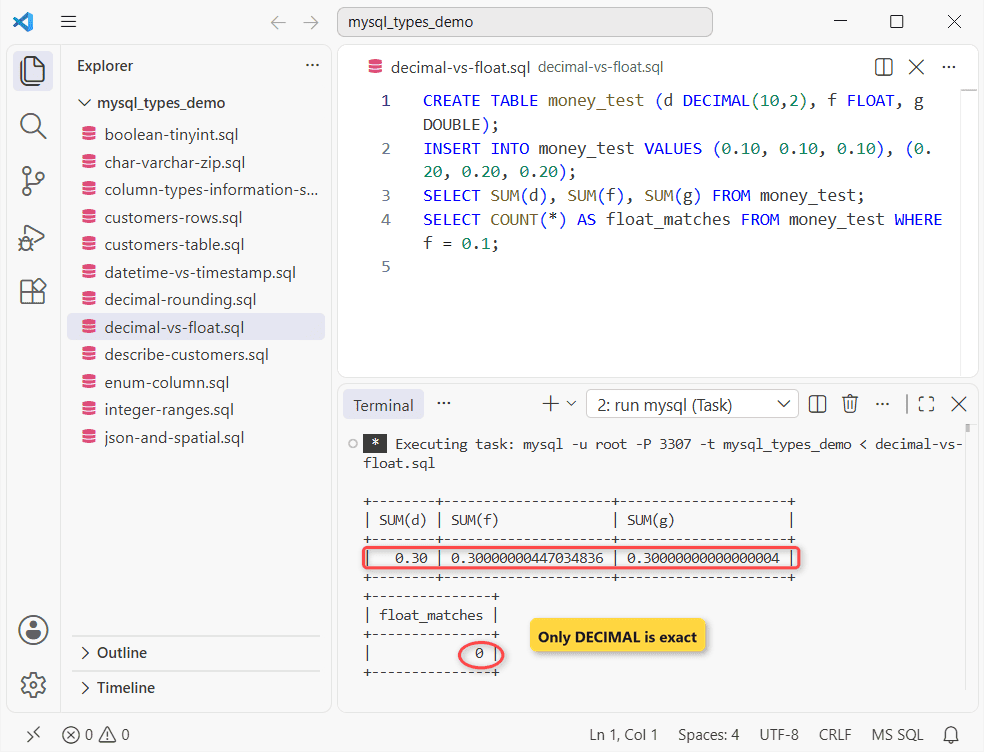
DECIMAL returned 0.30. Exact. FLOAT returned 0.30000000447034836 and DOUBLE 0.30000000000000004, and WHERE f = 0.1 matched zero rows even though I’d just inserted 0.10 into that very column a line earlier.
DECIMAL rounds too, on the way in. Same scratch table:
INSERT INTO money_test (d) VALUES (19.999);
SHOW WARNINGS;
SELECT d FROM money_test WHERE f IS NULL;
Output:
+-------+------+----------------------------------------+
| Level | Code | Message                                |
+-------+------+----------------------------------------+
| Note  | 1265 | Data truncated for column 'd' at row 1 |
+-------+------+----------------------------------------+
+-------+
| d     |
+-------+
| 20.00 |
+-------+
19.999 in a DECIMAL(10,2) became 20.00 with Note 1265, not an error. If a silent cent matters to you, round in your app first.
Pro Tip: FLOAT(M,D) and UNSIGNED on DECIMAL, FLOAT and DOUBLE are deprecated in 8.4. Use plain FLOAT or DOUBLE, and a CHECK constraint to block negative amounts.
MySQL String Data Types: CHAR, VARCHAR, TEXT and BLOB
| Type | Max length | Storage | Use it for |
|---|---|---|---|
| CHAR(M) | 255 characters | M x bytes per character, padded | Fixed codes: state, ZIP |
| VARCHAR(M) | 65,535 bytes (row limit) | Length + 1 or 2 bytes | Names, emails, anything you index |
| TINYTEXT / TEXT | 255 B / 64 KB | Length + 1 / + 2 bytes | Notes, comments |
| MEDIUMTEXT / LONGTEXT | 16 MB / 4 GB | Length + 3 / + 4 bytes | Articles, logs |
| BINARY / VARBINARY / BLOB | Same as the text types | Bytes, no character set | Hashes, files |
You’ll want to watch the parentheses and the ZIP code in this scratch table:
CREATE TABLE str_test (c CHAR(4), v VARCHAR(4), zip_int INT, zip CHAR(5));
INSERT INTO str_test VALUES ('ab  ', 'ab  ', 02134, '02134');
SELECT CONCAT('(', c, ')') AS c, CONCAT('(', v, ')') AS v,
       zip_int, zip FROM str_test;
INSERT INTO str_test (v) VALUES ('Texas');
Result:
+------+--------+---------+-------+
| c    | v      | zip_int | zip   |
+------+--------+---------+-------+
| (ab) | (ab  ) |    2134 | 02134 |
+------+--------+---------+-------+
ERROR 1406 (22001) at line 5: Data too long for column 'v' at row 1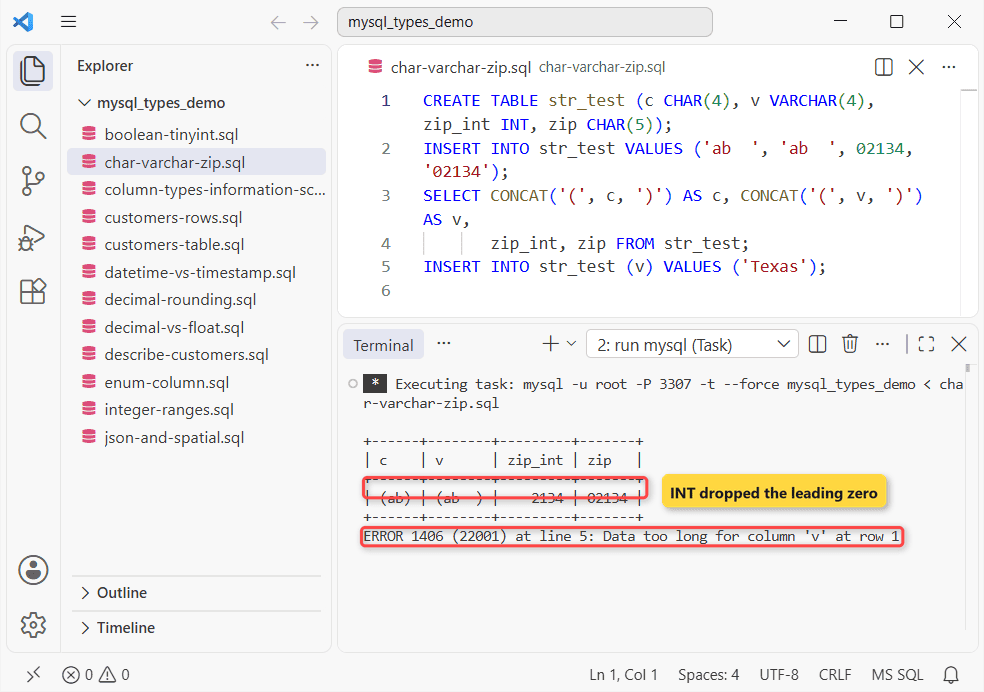
CHAR gave back (ab) because MySQL strips CHAR’s trailing spaces on retrieval; VARCHAR kept them. Boston’s ZIP 02134 came back as 2134 from the INT column. Then 'Texas' in a VARCHAR(4) hit ERROR 1406.
MySQL VARCHAR vs TEXT
Use VARCHAR when you’ll filter, sort or index the column, or want a literal DEFAULT. TEXT columns can’t take a plain index without a prefix length, and they count only 9 to 12 bytes toward the 65,535-byte row limit.
The MariaDB rules are close; MariaDB VARCHAR walks through them on MariaDB 13.
ENUM and SET Columns in MySQL
An ENUM stores one value from a fixed list (1 byte for up to 255 members). Same customers table, sorted by plan:
SELECT DISTINCT plan, plan + 0 AS idx FROM customers ORDER BY plan;
UPDATE customers SET plan = 'premium' WHERE customer_id = 2;
Output:
+------+-----+
| plan | idx |
+------+-----+
| free |   1 |
| pro  |   2 |
| team |   3 |
+------+-----+
ERROR 1265 (01000) at line 2: Data truncated for column 'plan' at row 1
Sorting follows the list order, not the alphabet, and plan + 0 shows the stored index. The typo 'premium' failed with ERROR 1265 because strict mode was on.
SET is ENUM’s cousin: zero or more members from a list of up to 64. Both need an ALTER TABLE to add a value, so if your list changes often, a lookup table wins. More: ENUM with examples.
MySQL DATETIME vs TIMESTAMP (and DATE, TIME, YEAR)
| Type | Range | Bytes |
|---|---|---|
| DATE | 1000-01-01 to 9999-12-31 | 3 |
| TIME | -838:59:59 to 838:59:59 | 3 + fractional |
| DATETIME | 1000-01-01 00:00:00 to 9999-12-31 23:59:59 | 5 + fractional |
| TIMESTAMP | 1970-01-01 00:00:01 to 2038-01-19 03:14:07 UTC | 4 + fractional |
| YEAR | 1901 to 2155 | 1 |
Fractional seconds go up to 6 digits, DATETIME(6), and cost 0 to 3 extra bytes. Here’s the difference that bites when your app servers sit in different time zones: I wrote one value at -05:00 (Eastern), then read it back at -08:00 (Pacific):
CREATE TABLE tz_test (dt DATETIME, ts TIMESTAMP);
SET time_zone = '-05:00';
INSERT INTO tz_test VALUES ('2026-03-15 09:30:00', '2026-03-15 09:30:00');
SET time_zone = '-08:00';
SELECT dt, ts FROM tz_test;
INSERT INTO tz_test (dt) VALUES ('2026-02-30 10:00:00');
INSERT INTO tz_test (ts) VALUES ('2038-01-20 00:00:00');
INSERT INTO tz_test (dt) VALUES ('2038-01-20 00:00:00');
Result:
+---------------------+---------------------+
| dt                  | ts                  |
+---------------------+---------------------+
| 2026-03-15 09:30:00 | 2026-03-15 06:30:00 |
+---------------------+---------------------+
ERROR 1292 (22007) at line 6: Incorrect datetime value: '2026-02-30 10:00:00' for column 'dt' at row 1
ERROR 1292 (22007) at line 7: Incorrect datetime value: '2038-01-20 00:00:00' for column 'ts' at row 1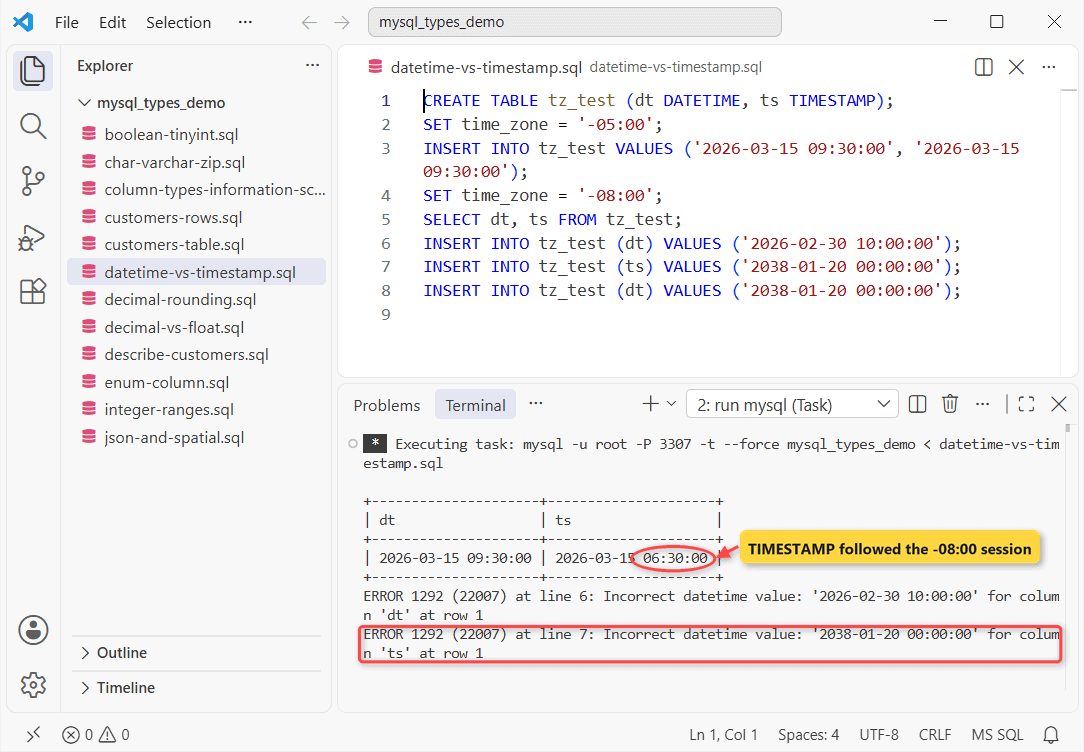
DATETIME didn’t move. TIMESTAMP said 06:30, because MySQL stores it as UTC and converts it back with the session’s time_zone. February 30 failed with ERROR 1292.
The 2038 limit is real: '2038-01-20' was rejected for TIMESTAMP but went into DATETIME without a word. Use DATETIME for contract end dates, birthdays and anything far out; TIMESTAMP columns fit audit stamps.
JSON, BOOLEAN and Spatial Types
JSON validates on insert, and you query it by path. Same customers, one key:
SELECT full_name, prefs->>'$.theme' AS theme
FROM customers WHERE prefs IS NOT NULL;
UPDATE customers SET prefs = '{theme: dark}' WHERE customer_id = 2;
SELECT ST_AsText(ST_GeomFromText('POINT(30.2672 -97.7431)', 4326)) AS austin;
MySQL’s answer:
+---------------+-------+
| full_name     | theme |
+---------------+-------+
| Hannah Brooks | dark  |
| Grace Miller  | NULL  |
| Olivia Hayes  | light |
+---------------+-------+
ERROR 3140 (22032) at line 3: Invalid JSON text: "Missing a name for object member." at position 1 in value for column 'customers.prefs'.
+-------------------------+
| austin                  |
+-------------------------+
| POINT(30.2672 -97.7431) |
+-------------------------+
Grace’s document has no theme key, so she gets NULL. The unquoted {theme: dark} never got in: ERROR 3140. For path functions, see JSON functions with examples.
Spatial types (GEOMETRY, POINT, LINESTRING, POLYGON and their MULTI versions) hold map data with an SRID. With SRID 4326 MySQL reads the point as latitude then longitude, which is why Austin is written 30.2672 first.
BOOLEAN isn’t its own type. It’s a synonym for TINYINT(1), and TRUE and FALSE are just 1 and 0:
CREATE TABLE flag_test (is_active BOOLEAN);
INSERT INTO flag_test VALUES (TRUE), (FALSE), (5);
SELECT is_active, is_active IS TRUE AS truthy FROM flag_test;
Result:
+-----------+--------+
| is_active | truthy |
+-----------+--------+
|         1 |      1 |
|         0 |      0 |
|         5 |      1 |
+-----------+--------+
The 5 went in and counts as true. Want a strict yes/no? Add CHECK (is_active IN (0, 1)).
How to See a Column’s Data Type in MySQL
You can check any table in one line:
DESCRIBE customers;Result:
+-------------+---------------------------+------+-----+---------+----------------+
| Field       | Type                      | Null | Key | Default | Extra          |
+-------------+---------------------------+------+-----+---------+----------------+
| customer_id | int unsigned              | NO   | PRI | NULL    | auto_increment |
| full_name   | varchar(40)               | NO   |     | NULL    |                |
| state       | char(2)                   | NO   |     | NULL    |                |
| zip_code    | char(5)                   | NO   |     | NULL    |                |
| plan        | enum('free','pro','team') | NO   |     | free    |                |
| is_active   | tinyint(1)                | NO   |     | 1       |                |
| balance     | decimal(10,2)             | NO   |     | 0.00    |                |
| signup_date | date                      | NO   |     | NULL    |                |
| last_login  | datetime                  | YES  |     | NULL    |                |
| prefs       | json                      | YES  |     | NULL    |                |
+-------------+---------------------------+------+-----+---------+----------------+
BOOLEAN shows up as tinyint(1), and the INT key shows as int unsigned with no width. In a script, you’d query information_schema.COLUMNS instead:
SELECT COLUMN_NAME, COLUMN_TYPE, CHARACTER_MAXIMUM_LENGTH AS max_len
FROM information_schema.COLUMNS
WHERE TABLE_SCHEMA = 'mysql_types_demo' AND TABLE_NAME = 'customers'
  AND COLUMN_NAME IN ('zip_code', 'plan', 'balance', 'prefs')
ORDER BY ORDINAL_POSITION;
Output:
+-------------+---------------------------+---------+
| COLUMN_NAME | COLUMN_TYPE               | max_len |
+-------------+---------------------------+---------+
| zip_code    | char(5)                   |       5 |
| plan        | enum('free','pro','team') |       4 |
| balance     | decimal(10,2)             |    NULL |
| prefs       | json                      |    NULL |
+-------------+---------------------------+---------+
CHARACTER_MAXIMUM_LENGTH is in characters, so the ENUM reports 4 (the longest member). MariaDB has the same views; show a column’s data type in MariaDB covers SHOW FULL COLUMNS too.
Which MySQL Data Type Should You Use? Quick Picks
| Column | Pick | Why |
|---|---|---|
| Money (USD) | DECIMAL(10,2) | Exact cents; 0.10 + 0.20 = 0.30 |
| Auto ID | INT UNSIGNED AUTO_INCREMENT | 4.29 billion rows; BIGINT UNSIGNED past that |
| Yes/no flag | BOOLEAN | Stored as TINYINT(1), 1 byte |
VARCHAR(255) | Indexable; stores only the real length | |
| US ZIP code | CHAR(5) or VARCHAR(10) for ZIP+4 | INT drops the leading zero |
| Phone number | VARCHAR(20) | Keeps +, dashes and leading zeros |
| Business date/time | DATETIME | No time-zone shift, no 2038 limit |
| Row created/updated | TIMESTAMP | Stored as UTC |
| Settings blob | JSON | Validated, queryable by path |
Porting to Postgres? PostgreSQL data types has no UNSIGNED.
MySQL Data Type Errors and Gotchas From the Run
- ERROR 1264 Out of range value: go one integer size up, or UNSIGNED.
- ERROR 1406 Data too long: widen the VARCHAR or CHAR.
- ERROR 1292 Incorrect datetime value: an impossible date, or a TIMESTAMP past 2038-01-19.
- Note 1265 on DECIMAL: extra decimal places are rounded, not rejected.
- No error at all with sql_mode off. Then MySQL clips and warns, so check
SELECT @@sql_modefirst.
Next step: put these picks into a full schema with the MySQL tutorial. Related reads:
- MySQL vs SQL Server, tested on one table
- If you’re choosing an engine: MariaDB vs MySQL
- Not set up yet? Install MySQL on Windows
- Migrate from MySQL to PostgreSQL
Frequently Asked Questions
What is the maximum size of VARCHAR in MySQL?
65,535 bytes, shared by every column in the row. With utf8mb4 a character can take 4 bytes, so one VARCHAR column tops out near 16,383 characters. Byte math: MySQL’s data type storage requirements page.
What is the difference between FLOAT and DOUBLE in MySQL?
FLOAT is single precision in 4 bytes and DOUBLE is double precision in 8 bytes. If you write FLOAT(p), MySQL picks FLOAT for p from 0 to 24 and DOUBLE for 25 to 53.
How do I change a column’s data type in MySQL?
Use ALTER TABLE customers MODIFY COLUMN zip_code VARCHAR(10) NOT NULL; and restate NOT NULL and DEFAULT, because MODIFY replaces the whole definition. In strict mode, rows that don’t fit make the ALTER fail.
Does MySQL have a UUID data type?
No. Store UUIDs in BINARY(16) with UUID_TO_BIN() and read them back with BIN_TO_UUID(), or in CHAR(36) if you want them readable. The full type list is in the MySQL 8.4 data types chapter.

Kumar Saurabh is a freelance software engineer who builds web and mobile apps with Next.js, React, Flutter and Python. From 2021 to 2024, Saurabh worked as an IT analyst and developer at TSInfo Technologies, writing technical articles on SQL and PostgreSQL. Saurabh writes the PostgreSQL, MySQL, MariaDB and MongoDB tutorials on DatabaseFAQs.com and holds a Master of Computer Applications (MCA) from Chandigarh University.