
MariaDB JSON functions let you build, read, search and change JSON stored in a column. The one you’ll reach for first is JSON_VALUE, which returns one value by path:
SELECT customer,
       JSON_VALUE(doc, '$.city')  AS city,
       JSON_VALUE(doc, '$.total') AS total
FROM orders
WHERE JSON_VALUE(doc, '$.state') = 'TX';
Output:
+-------------+--------+-------+
| customer    | city   | total |
+-------------+--------+-------+
| Alex Wilber | Austin | 42    |
| Lee Gu      | Dallas | 88.25 |
+-------------+--------+-------+
Two Texas orders. I tested this on MariaDB 13.0.2, the rolling release, with the mariadb client on Windows.
MariaDB JSON Functions List (Reference Table)
All 40 functions the MariaDB docs list. If the version’s blank, the docs don’t name a minimum.
| Function | What it does | Needs |
|---|---|---|
| JSON_OBJECT | Object from pairs | |
| JSON_ARRAY | Array from values | |
| JSON_ARRAYAGG | Rows to one array | 10.5 |
| JSON_OBJECTAGG | Rows to one object | |
| JSON_QUOTE | Quotes a string | |
| JSON_EXTRACT | JSON at a path, quoted | |
| JSON_VALUE | Scalar at a path, as text | |
| JSON_QUERY | Object or array at a path | |
| JSON_UNQUOTE | Strips the JSON quotes | |
| JSON_KEYS | Top-level keys | |
| JSON_LENGTH | Number of elements | |
| JSON_DEPTH | Nesting depth | |
| JSON_TYPE | Value type | |
| JSON_CONTAINS | Value is inside | |
| JSON_CONTAINS_PATH | Paths exist | |
| JSON_SEARCH | Path of a string | |
| JSON_EXISTS | Path exists | |
| JSON_OVERLAPS | Docs share an element | 10.9 |
| JSON_SET | Insert or replace | |
| JSON_INSERT | Add if missing | |
| JSON_REPLACE | Change if present | |
| JSON_REMOVE | Delete a path | |
| JSON_ARRAY_APPEND | Append to array | |
| JSON_ARRAY_INSERT | Insert into array | |
| JSON_MERGE_PATCH | Merge, last value wins | 10.2.25 |
| JSON_MERGE_PRESERVE | Merge, keep both | |
| JSON_MERGE | Deprecated, = PRESERVE | |
| JSON_COMPACT | Strips spaces | |
| JSON_DETAILED | Pretty-prints | |
| JSON_PRETTY | Alias of JSON_DETAILED | 10.6.12 / 10.10.3 |
| JSON_LOOSE | Adds spaces | |
| JSON_VALID | Valid JSON? | |
| JSON_NORMALIZE | Sorts keys | 10.7 |
| JSON_EQUALS | Compares as JSON | 10.7 |
| JSON_TABLE | JSON to rows | 10.6 |
| JSON_SCHEMA_VALID | JSON Schema check | 11.1 |
| JSON_KEY_VALUE | Key/value objects | 11.2 |
| JSON_ARRAY_INTERSECT | Items in both arrays | 11.2 |
| JSON_OBJECT_FILTER_KEYS | Keeps listed keys | 11.2 |
| JSON_OBJECT_TO_ARRAY | Object to pairs | 11.2 |
MariaDB JSON Data Type: LONGTEXT Plus a CHECK
Every query below uses these five orders. The doc column’s declared JSON:
DROP TABLE IF EXISTS orders;
CREATE TABLE orders (
  id INT PRIMARY KEY,
  customer VARCHAR(20) NOT NULL,
  ordered DATE NOT NULL,
  doc JSON
);
INSERT INTO orders VALUES
(1, 'Megan Bowen', '2026-10-05',
 '{"city":"Denver","state":"CO","total":129.5,"items":["mug","tee"]}'),
(2, 'Alex Wilber', '2026-10-06',
 '{"city":"Austin","state":"TX","total":42,"items":["mug"]}'),
(3, 'Adele Vance', '2026-10-07',
 '{"city":"Seattle","state":"WA","total":310,"items":["desk"],"rush":true}'),
(4, 'Lee Gu', '2026-10-08',
 '{"city":"Dallas","state":"TX","total":88.25,"items":["tee","cap"]}'),
(5, 'Nestor Wilke', '2026-10-09',
 '{"city":"Miami","state":"FL","total":19.99,"items":["cap"]}');
MariaDB has no binary JSON type. JSON is an alias for LONGTEXT COLLATE utf8mb4_bin with an automatic JSON_VALID check. The proof, then a bad insert:
SELECT c.column_type, k.check_clause
FROM information_schema.COLUMNS c
JOIN information_schema.CHECK_CONSTRAINTS k
  ON k.constraint_schema = c.table_schema
WHERE c.table_schema = 'mariajson_demo'
  AND c.column_name = 'doc';

-- Trailing comma: not valid JSON
INSERT INTO orders VALUES (6, 'Diego Siciliani',
  '2026-10-10', '{"city":"Boise",}');
Result:
+-------------+-------------------+
| column_type | check_clause      |
+-------------+-------------------+
| longtext    | json_valid(`doc`) |
+-------------+-------------------+
--------------
INSERT INTO orders VALUES (6, 'Diego Siciliani',
  '2026-10-10', '{"city":"Boise",}')
--------------

ERROR 4025 (23000) at line 9: CONSTRAINT `orders.doc` failed for `mariajson_demo`.`orders`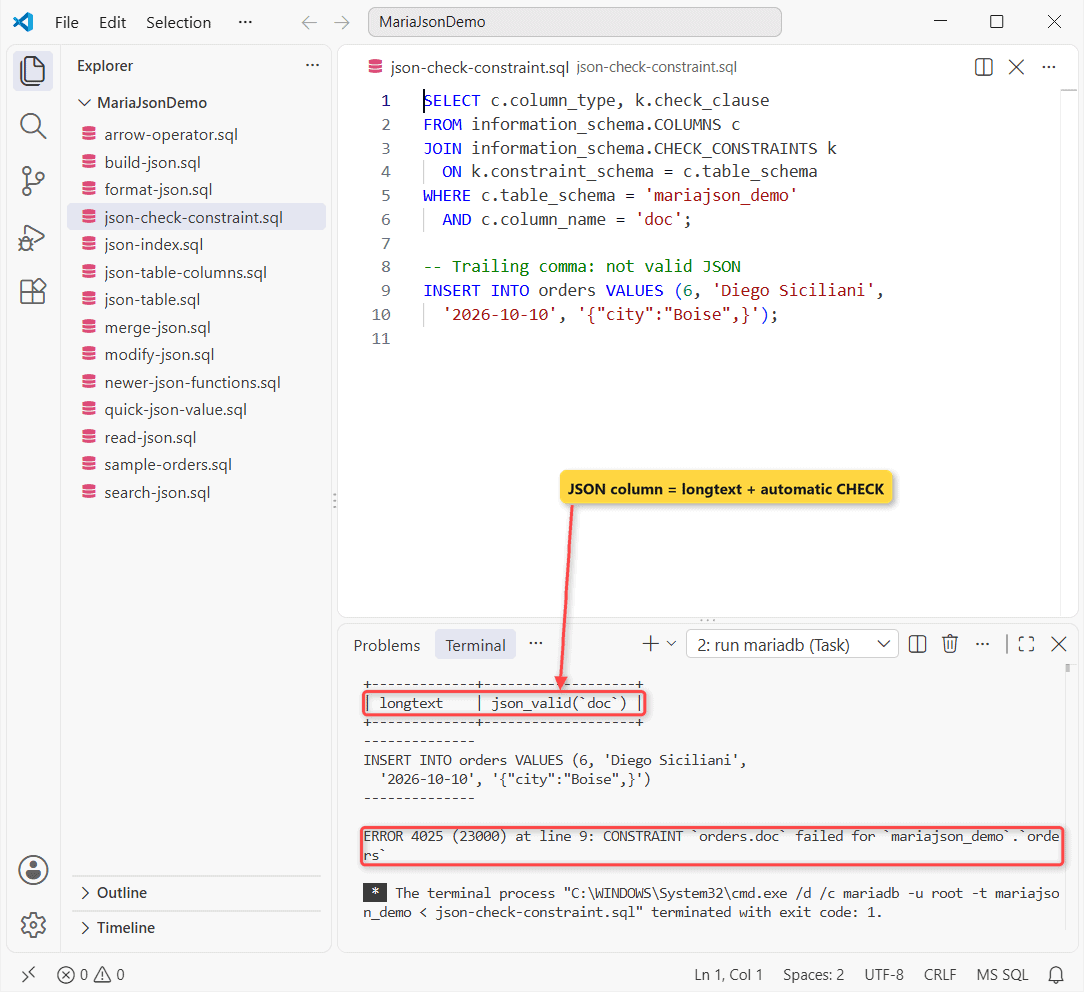
Plain longtext. The trailing comma dies with ERROR 4025. It’s a regular MariaDB CHECK constraint on a text column, which is why your text stays verbatim and a repeated key is visible to functions only in its first copy.
Build JSON: JSON_OBJECT, JSON_ARRAY, JSON_ARRAYAGG, JSON_OBJECTAGG
You can build a document from values, or roll rows up into one:
SELECT JSON_OBJECT('city', 'Boise', 'total', 19.99) AS obj,
       JSON_ARRAY('mug', 2, NULL) AS arr,
       JSON_QUOTE('6" ruler') AS quoted;

SELECT JSON_VALUE(doc, '$.state') AS state,
       JSON_ARRAYAGG(customer ORDER BY customer) AS customers
FROM orders GROUP BY state;

SELECT JSON_OBJECTAGG(customer, JSON_EXTRACT(doc, '$.total')) AS totals
FROM orders WHERE id <= 2;
What MariaDB returned:
+-----------------------------------+------------------+-------------+
| obj                               | arr              | quoted      |
+-----------------------------------+------------------+-------------+
| {"city": "Boise", "total": 19.99} | ["mug", 2, null] | "6\" ruler" |
+-----------------------------------+------------------+-------------+
+-------+--------------------------+
| state | customers                |
+-------+--------------------------+
| CO    | ["Megan Bowen"]          |
| FL    | ["Nestor Wilke"]         |
| TX    | ["Alex Wilber","Lee Gu"] |
| WA    | ["Adele Vance"]          |
+-------+--------------------------+
+-----------------------------------------+
| totals                                  |
+-----------------------------------------+
| {"Megan Bowen":129.5, "Alex Wilber":42} |
+-----------------------------------------+
JSON_ARRAYAGG takes DISTINCT, ORDER BY and LIMIT inside a MariaDB GROUP BY. Rows with the same state land in one array.
What’s the Difference Between JSON_EXTRACT, JSON_VALUE and JSON_QUERY?
I ran five functions on the same order and path:
SELECT JSON_EXTRACT(doc, '$.city') AS ex,
       JSON_UNQUOTE(JSON_EXTRACT(doc, '$.city')) AS unq,
       JSON_VALUE(doc, '$.city') AS val,
       JSON_QUERY(doc, '$.items') AS qry,
       JSON_VALUE(doc, '$.items') AS val_arr
FROM orders WHERE id = 1;

SELECT JSON_KEYS(doc) AS k,
       JSON_LENGTH(doc, '$.items') AS n,
       JSON_DEPTH(doc) AS depth,
       JSON_TYPE(JSON_EXTRACT(doc, '$.total')) AS t
FROM orders WHERE id = 1;
Output:
+----------+--------+--------+---------------+---------+
| ex       | unq    | val    | qry           | val_arr |
+----------+--------+--------+---------------+---------+
| "Denver" | Denver | Denver | ["mug","tee"] | NULL    |
+----------+--------+--------+---------------+---------+
+-------------------------------------+------+-------+--------+
| k                                   | n    | depth | t      |
+-------------------------------------+------+-------+--------+
| ["city", "state", "total", "items"] |    2 |     3 | DOUBLE |
+-------------------------------------+------+-------+--------+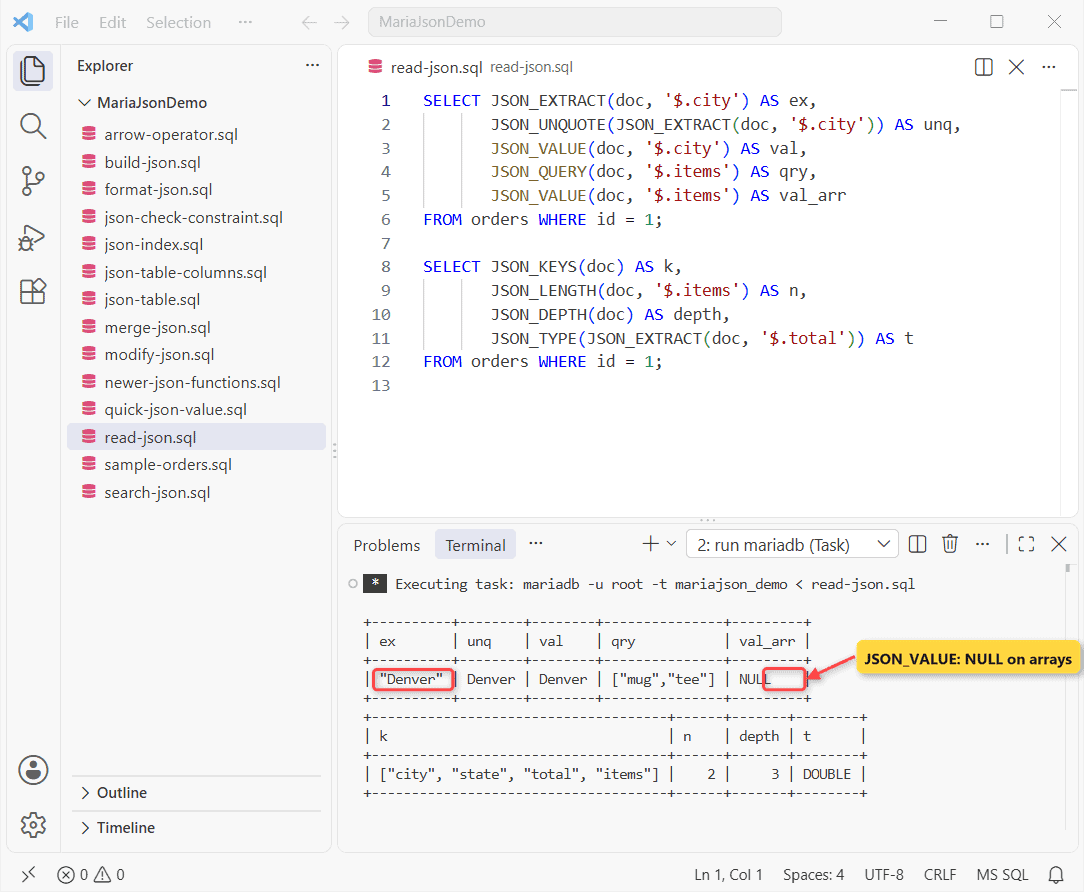
JSON_EXTRACTkeeps the quotes;JSON_UNQUOTEdrops them.JSON_VALUEreturns scalars only. On the items array it gave NULL.JSON_QUERYis the opposite: objects and arrays only.
The second query: four keys, two items, depth 3, total typed DOUBLE. Need a number for math? MariaDB CAST examples show how.
Search JSON: JSON_CONTAINS, JSON_SEARCH, JSON_EXISTS, JSON_OVERLAPS
Five checks per order:
SELECT id,
  JSON_CONTAINS(doc, '"mug"', '$.items') AS has_mug,
  JSON_CONTAINS_PATH(doc, 'all', '$.city', '$.rush') AS all_paths,
  JSON_EXISTS(doc, '$.rush') AS rush,
  JSON_SEARCH(doc, 'one', 'tee') AS tee_path,
  JSON_OVERLAPS(JSON_EXTRACT(doc, '$.items'), '["cap","desk"]') AS cap_desk
FROM orders WHERE id IN (1, 3, 4);
Result:
+----+---------+-----------+------+--------------+----------+
| id | has_mug | all_paths | rush | tee_path     | cap_desk |
+----+---------+-----------+------+--------------+----------+
|  1 |       1 |         0 |    0 | "$.items[1]" |        0 |
|  3 |       0 |         1 |    1 | NULL         |        1 |
|  4 |       0 |         0 |    0 | "$.items[0]" |        1 |
+----+---------+-----------+------+--------------+----------+
Order 1 holds a mug, only Seattle has rush, and both orders 3 and 4 overlap the cap-or-desk list. Each one works in a WHERE clause of any MariaDB SELECT statement.
Modify JSON: JSON_SET, JSON_INSERT, JSON_REPLACE, JSON_REMOVE
JSON_SET in an UPDATE changes the total and adds a coupon in one pass. I ran the rest on a variable:
UPDATE orders
SET doc = JSON_SET(doc, '$.total', 45, '$.coupon', 'FALL26')
WHERE id = 2;
SELECT JSON_VALUE(doc, '$.total') AS total,
       JSON_VALUE(doc, '$.coupon') AS coupon
FROM orders WHERE id = 2;

SET @d = '{"state":"TX","items":["mug"]}';
SELECT JSON_INSERT(@d, '$.state', 'CA', '$.zip', '73301') AS ins,
       JSON_REPLACE(@d, '$.state', 'CA', '$.zip', '73301') AS rep;
SELECT JSON_REMOVE(@d, '$.state') AS rm,
       JSON_ARRAY_APPEND(@d, '$.items', 'cap') AS app,
       JSON_ARRAY_INSERT(@d, '$.items[0]', 'cap') AS ins0;
Output:
+-------+--------+
| total | coupon |
+-------+--------+
| 45    | FALL26 |
+-------+--------+
+---------------------------------------------------+-----------------------------------+
| ins                                               | rep                               |
+---------------------------------------------------+-----------------------------------+
| {"state": "TX", "items": ["mug"], "zip": "73301"} | {"state": "CA", "items": ["mug"]} |
+---------------------------------------------------+-----------------------------------+
+--------------------+------------------------------------------+------------------------------------------+
| rm                 | app                                      | ins0                                     |
+--------------------+------------------------------------------+------------------------------------------+
| {"items": ["mug"]} | {"state": "TX", "items": ["mug", "cap"]} | {"state": "TX", "items": ["cap", "mug"]} |
+--------------------+------------------------------------------+------------------------------------------+
JSON_INSERT only added the missing zip, while JSON_REPLACE only changed the existing state. The MariaDB UPDATE statement guide covers the WHERE side.
JSON_MERGE_PATCH vs JSON_MERGE_PRESERVE
SET @a = '{"state":"TX","zip":"73301","tags":["vip"]}';
SET @b = '{"tags":["new"],"zip":null}';
SELECT JSON_MERGE_PATCH(@a, @b) AS patch,
       JSON_MERGE_PRESERVE(@a, @b) AS preserve;
Result:
+----------------------------------+-----------------------------------------------------------------+
| patch                            | preserve                                                        |
+----------------------------------+-----------------------------------------------------------------+
| {"state": "TX", "tags": ["new"]} | {"state": "TX", "zip": ["73301", null], "tags": ["vip", "new"]} |
+----------------------------------+-----------------------------------------------------------------+
PATCH replaced the tags array and deleted zip, since a null removes the key under RFC 7396. PRESERVE kept both tags and both zips. Skip the deprecated JSON_MERGE.
Format and Compare: JSON_COMPACT, JSON_DETAILED, JSON_VALID, JSON_EQUALS
SELECT JSON_VALID('{"a":1}') AS ok,
       JSON_VALID('{a:1}') AS bad,
       JSON_COMPACT('{ "a": 1, "b": [2, 3] }') AS compact,
       JSON_LOOSE('{"a":1,"b":[2,3]}') AS loose;

SELECT JSON_EQUALS('{"a":1,"b":2}', '{"b":2, "a":1}') AS same,
       JSON_NORMALIZE('{"b":2, "a":1}') AS normalized;
Output:
+------+------+-------------------+-----------------------+
| ok   | bad  | compact           | loose                 |
+------+------+-------------------+-----------------------+
|    1 |    0 | {"a":1,"b":[2,3]} | {"a": 1, "b": [2, 3]} |
+------+------+-------------------+-----------------------+
+------+-----------------------+
| same | normalized            |
+------+-----------------------+
|    1 | {"a":1.0E0,"b":2.0E0} |
+------+-----------------------+
JSON_EQUALS ignores key order and spacing. JSON_NORMALIZE also rewrote 1 as 1.0E0, fine for a unique key but ugly on screen. For indents, use JSON_DETAILED.
JSON_TABLE: Turn a JSON Array Into Rows
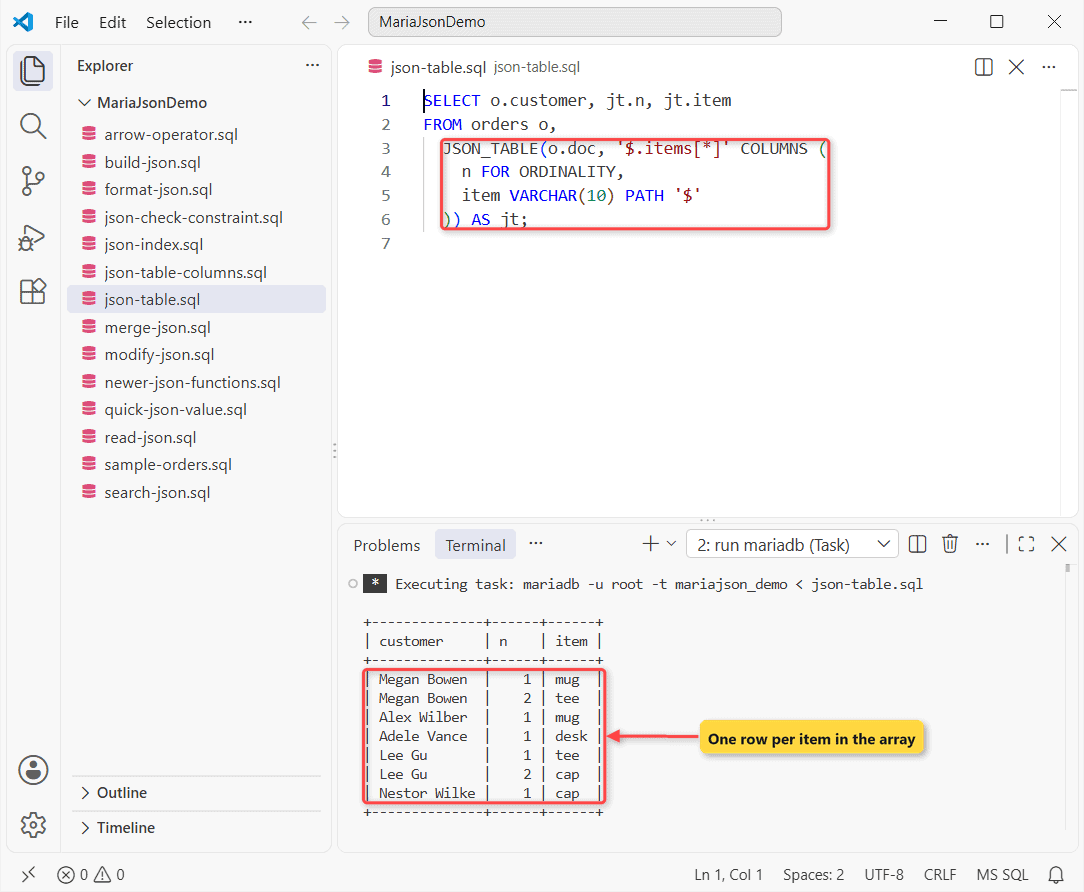
JSON_TABLE (10.6+) is how you join against an array. One row per item:
SELECT o.customer, jt.n, jt.item
FROM orders o,
  JSON_TABLE(o.doc, '$.items[*]' COLUMNS (
    n FOR ORDINALITY,
    item VARCHAR(10) PATH '$'
  )) AS jt;
Output:
+--------------+------+------+
| customer     | n    | item |
+--------------+------+------+
| Megan Bowen  |    1 | mug  |
| Megan Bowen  |    2 | tee  |
| Alex Wilber  |    1 | mug  |
| Adele Vance  |    1 | desk |
| Lee Gu       |    1 | tee  |
| Lee Gu       |    2 | cap  |
| Nestor Wilke |    1 | cap  |
+--------------+------+------+
Now all four column kinds, NESTED PATH included:
SELECT jt.* FROM orders o,
  JSON_TABLE(o.doc, '$' COLUMNS (
    city VARCHAR(10) PATH '$.city',
    rush INT EXISTS PATH '$.rush',
    coupon VARCHAR(8) PATH '$.coupon' DEFAULT 'none' ON EMPTY,
    NESTED PATH '$.items[*]' COLUMNS (item VARCHAR(10) PATH '$')
  )) AS jt
WHERE o.id IN (1, 3);
Rows:
+---------+------+--------+------+
| city    | rush | coupon | item |
+---------+------+--------+------+
| Denver  |    0 | none   | mug  |
| Denver  |    0 | none   | tee  |
| Seattle |    1 | none   | desk |
+---------+------+--------+------+
Denver gets a row per item, Seattle one for its desk, and the missing coupon falls back to none. FORMAT JSON columns need MariaDB 13.1.1. Compare it with how PostgreSQL stores JSON vs JSONB.
How Do You Index a JSON Field in MariaDB?
You can’t index the JSON text itself. Add a virtual generated column with JSON_VALUE, then index it:
ALTER TABLE orders
  ADD state CHAR(2) AS (JSON_VALUE(doc, '$.state')) VIRTUAL,
  ADD INDEX ix_state (state);

EXPLAIN SELECT customer FROM orders WHERE state = 'TX';
EXPLAIN SELECT customer FROM orders
WHERE JSON_VALUE(doc, '$.state') = 'TX';
Output:
+------+-------------+--------+------+---------------+----------+---------+-------+------+-------------+
| id   | select_type | table  | type | possible_keys | key      | key_len | ref   | rows | Extra       |
+------+-------------+--------+------+---------------+----------+---------+-------+------+-------------+
|    1 | SIMPLE      | orders | ref  | ix_state      | ix_state | 9       | const | 2    | Using where |
+------+-------------+--------+------+---------------+----------+---------+-------+------+-------------+
+------+-------------+--------+------+---------------+------+---------+------+------+-------------+
| id   | select_type | table  | type | possible_keys | key  | key_len | ref  | rows | Extra       |
+------+-------------+--------+------+---------------+------+---------+------+------+-------------+
|    1 | SIMPLE      | orders | ALL  | NULL          | NULL | NULL    | NULL | 5    | Using where |
+------+-------------+--------+------+---------------+------+---------+------+------+-------------+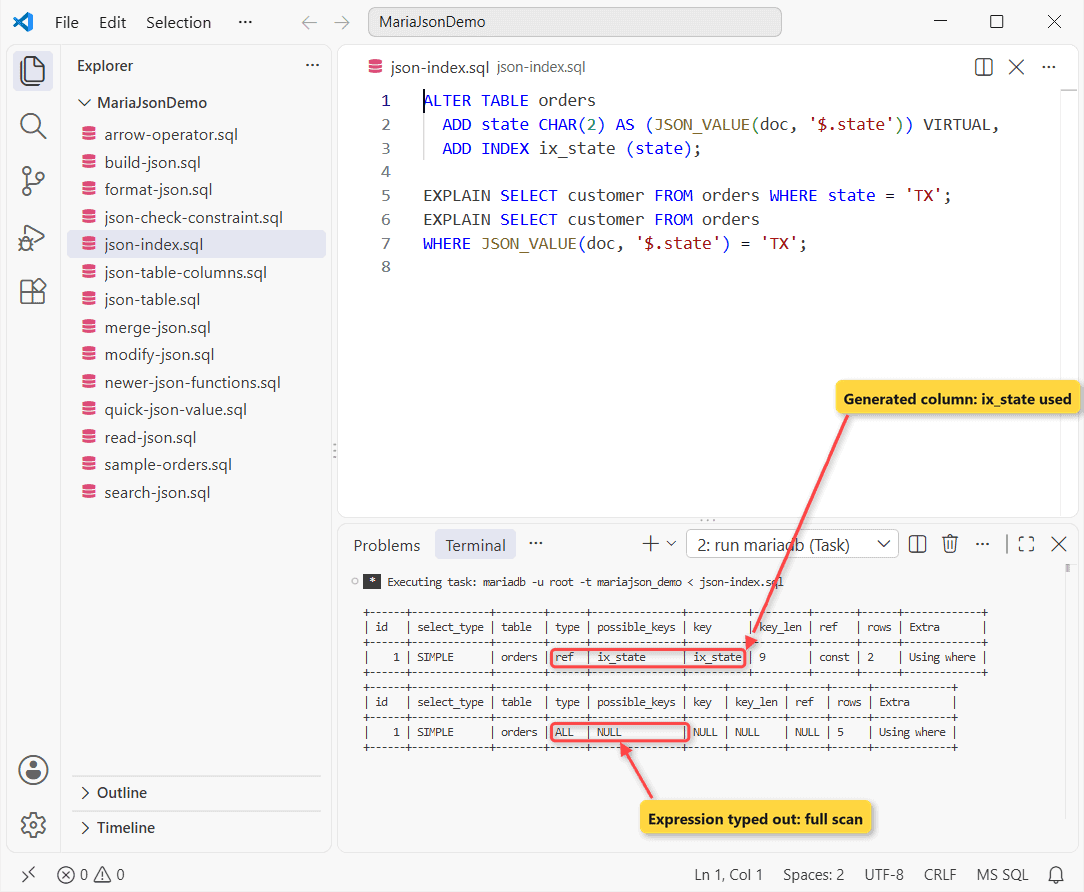
The first EXPLAIN uses ix_state. The second, with the same expression typed into the WHERE clause, scanned all five rows on 13.0.2. More in MariaDB index and MariaDB EXPLAIN.
Newer MariaDB JSON Functions (11.1 and 11.2)
JSON_SCHEMA_VALID needs 11.1 and the rest 11.2, so check the MariaDB version first:
SET @schema = '{"type":"object","required":["state","total"]}';
SELECT JSON_SCHEMA_VALID(@schema, doc) AS valid,
       JSON_SCHEMA_VALID(@schema, '{"state":"TX"}') AS no_total
FROM orders WHERE id = 2;

SELECT JSON_KEY_VALUE(JSON_OBJECT_FILTER_KEYS(doc, '["city","state"]'), '$') AS kv,
       JSON_OBJECT_TO_ARRAY(JSON_OBJECT_FILTER_KEYS(doc, '["city","state"]')) AS pairs
FROM orders WHERE id = 2;

SELECT JSON_ARRAY_INTERSECT(JSON_EXTRACT(a.doc, '$.items'),
                            JSON_EXTRACT(b.doc, '$.items')) AS shared
FROM orders a, orders b WHERE a.id = 1 AND b.id = 4;
Result on 13.0.2:
+-------+----------+
| valid | no_total |
+-------+----------+
|     1 |        0 |
+-------+----------+
+-----------------------------------------------------------------------+---------------------------------------+
| kv                                                                    | pairs                                 |
+-----------------------------------------------------------------------+---------------------------------------+
| [{"key": "city", "value": "Austin"}, {"key": "state", "value": "TX"}] | [["city", "Austin"], ["state", "TX"]] |
+-----------------------------------------------------------------------+---------------------------------------+
+---------+
| shared  |
+---------+
| ["tee"] |
+---------+
Order 2 passes the schema, the stripped copy without a total doesn’t, and Denver and Dallas share only a tee.
MariaDB JSON Gotchas I Hit in the Run
No arrows here. The ->> shorthand you know from MySQL isn’t MariaDB syntax:
-- MySQL shorthand: fails in MariaDB
SELECT doc->>'$.city' AS city FROM orders WHERE id = 1;
Output:
--------------
SELECT doc->>'$.city' AS city FROM orders WHERE id = 1
--------------

ERROR 1064 (42000) at line 2: You have an error in your SQL syntax; check the manual that corresponds to your MariaDB server version for the right syntax to use near '>>'$.city' AS city FROM orders WHERE id = 1' at line 1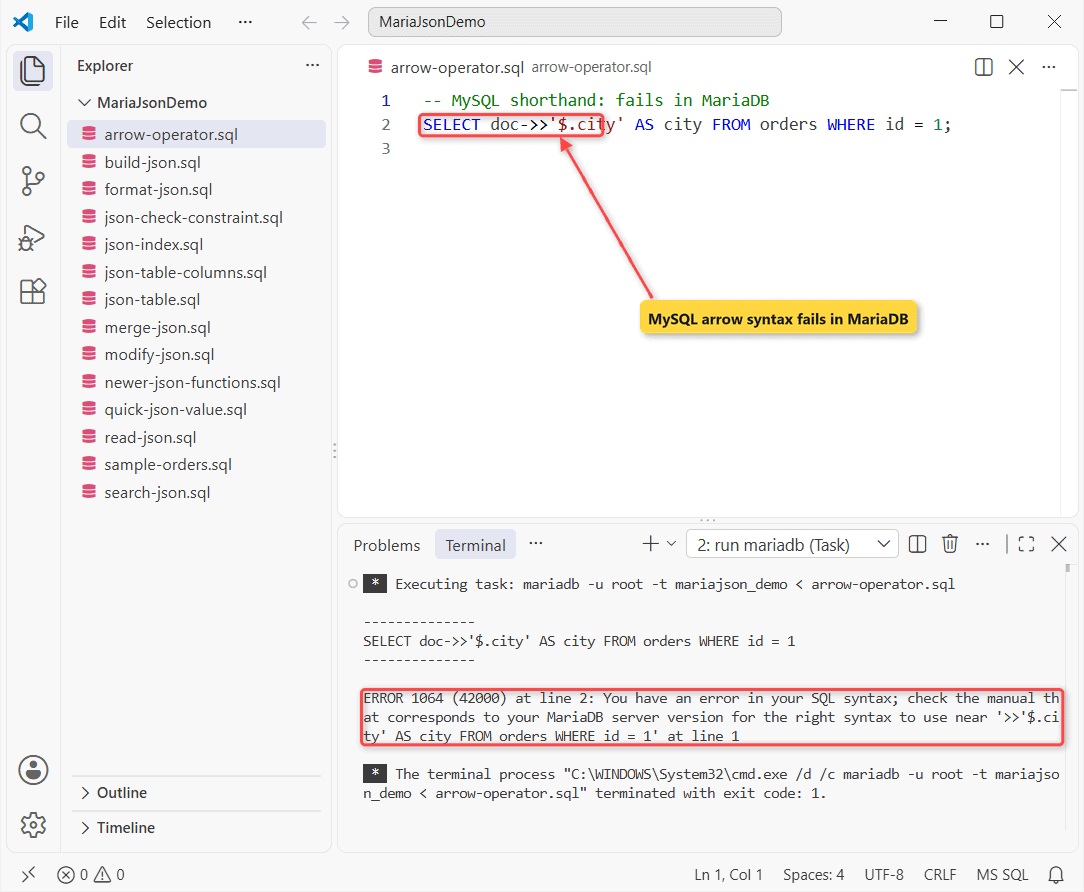
Use JSON_VALUE(doc, '$.city') or JSON_UNQUOTE(JSON_EXTRACT(...)) instead. More in MariaDB error 1064. Two quieter ones:
JSON_CONTAINS(doc, 'mug', '$.items')gave NULL and warning 4038. The candidate must be JSON:'"mug"'.JSON_VALUEreturns text. Totals came back as strings until I switched toJSON_EXTRACT.
Next Step: Insert JSON From Your App
Build the value with JSON_OBJECT in your MariaDB INSERT INTO statement, and MariaDB escapes the quotes for you. Then keep going:
- Load CSV and SQL files into MariaDB
- Wrap a JSON lookup in a MariaDB function
- Sort by a JSON field in PostgreSQL
- Import JSON into MongoDB
Frequently Asked Questions
Is the MariaDB JSON data type the same as MySQL’s JSON?
No. MySQL stores a compact binary form; MariaDB keeps the text, so row-based replication of JSON columns from MySQL to MariaDB fails. Use statement-based replication. See the JSON data type docs.
Can I add JSON validation to an existing LONGTEXT column?
ALTER TABLE t ADD CONSTRAINT j_ok CHECK (JSON_VALID(col));. One bad row fails it with ERROR 4025, so find those first with WHERE NOT JSON_VALID(col).
How do I pretty-print JSON in MariaDB?
Use JSON_DETAILED(doc), or JSON_DETAILED(doc, 2) to set the tab size. See the MariaDB JSON functions reference.

Kumar Saurabh is a freelance software engineer who builds web and mobile apps with Next.js, React, Flutter and Python. From 2021 to 2024, Saurabh worked as an IT analyst and developer at TSInfo Technologies, writing technical articles on SQL and PostgreSQL. Saurabh writes the PostgreSQL, MySQL, MariaDB and MongoDB tutorials on DatabaseFAQs.com and holds a Master of Computer Applications (MCA) from Chandigarh University.