
Use COLUMN_TYPE from information_schema.COLUMNS when a script needs the MariaDB show column data type answer. Use DESCRIBE when you’re just looking:
SELECT COLUMN_NAME, COLUMN_TYPE
FROM information_schema.COLUMNS
WHERE TABLE_SCHEMA = 'df_mariacols' AND TABLE_NAME = 'customers'
  AND COLUMN_NAME IN ('id', 'is_active', 'prefs');
Three columns, three surprises:
+-------------+------------------+
| COLUMN_NAME | COLUMN_TYPE      |
+-------------+------------------+
| id          | int(10) unsigned |
| is_active   | tinyint(1)       |
| prefs       | longtext         |
+-------------+------------------+
That’s my verdict after testing each method on MariaDB 13.0.2. I declared is_active as BOOLEAN and prefs as JSON. Neither survived.
The Sample Tables I Tested On
Every query below reads these two tables:
DROP TABLE IF EXISTS orders, customers;
CREATE TABLE customers (
  id INT UNSIGNED AUTO_INCREMENT PRIMARY KEY,
  full_name VARCHAR(40) NOT NULL COMMENT 'Billing name',
  state CHAR(2) NOT NULL,
  credit DECIMAL(10,2) DEFAULT 0.00,
  is_active BOOLEAN DEFAULT TRUE,
  prefs JSON,
  name_uc VARCHAR(40) AS (UPPER(full_name)) VIRTUAL,
  KEY ix_state (state)
);
CREATE TABLE orders (
  id INT AUTO_INCREMENT PRIMARY KEY,
  customer_id INT UNSIGNED NOT NULL,
  total DECIMAL(10,2) NOT NULL
);
INSERT INTO customers (full_name, state, credit) VALUES
('Megan Bowen', 'CO', 250.00), ('Alex Wilber', 'TX', 0.00);
INSERT INTO orders VALUES (1, 1, 129.50);
SHOW COLUMNS FROM: List Every Column and Its Type
SHOW COLUMNS (or SHOW FIELDS) gives one row per column, with the data type in Type:
SHOW COLUMNS FROM customers;Result:
+-----------+------------------+------+-----+---------+-------------------+
| Field     | Type             | Null | Key | Default | Extra             |
+-----------+------------------+------+-----+---------+-------------------+
| id        | int(10) unsigned | NO   | PRI | NULL    | auto_increment    |
| full_name | varchar(40)      | NO   |     | NULL    |                   |
| state     | char(2)          | NO   | MUL | NULL    |                   |
| credit    | decimal(10,2)    | YES  |     | 0.00    |                   |
| is_active | tinyint(1)       | YES  |     | 1       |                   |
| prefs     | longtext         | YES  |     | NULL    |                   |
| name_uc   | varchar(40)      | YES  |     | NULL    | VIRTUAL GENERATED |
+-----------+------------------+------+-----+---------+-------------------+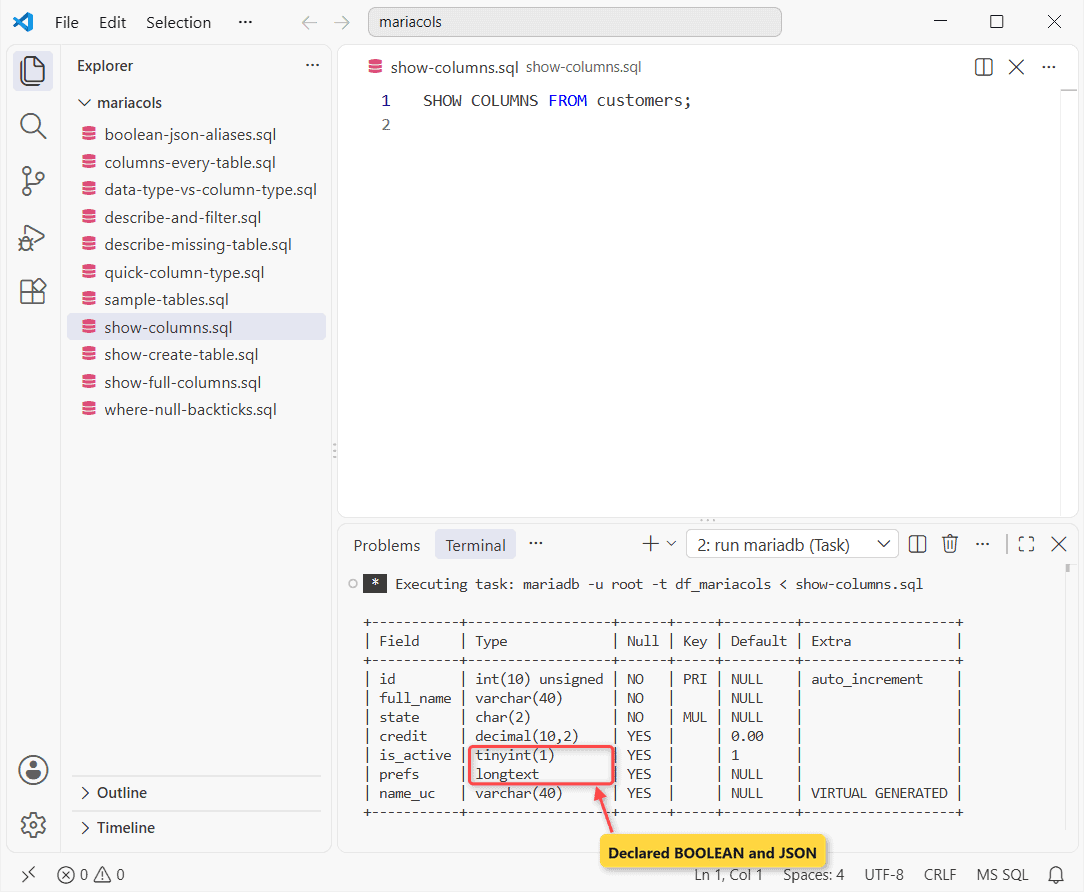
PRI is the primary key. MUL means the column starts a non-unique index, and Extra flags AUTO_INCREMENT plus the virtual generated column.
Filter SHOW COLUMNS With LIKE or WHERE
LIKE matches column names only. WHERE filters on any output field, such as Type:
SHOW COLUMNS FROM customers LIKE 'full%';
SHOW COLUMNS FROM customers WHERE Type LIKE 'decimal%';
Two result sets:
+-----------+-------------+------+-----+---------+-------+
| Field     | Type        | Null | Key | Default | Extra |
+-----------+-------------+------+-----+---------+-------+
| full_name | varchar(40) | NO   |     | NULL    |       |
+-----------+-------------+------+-----+---------+-------+
+--------+---------------+------+-----+---------+-------+
| Field  | Type          | Null | Key | Default | Extra |
+--------+---------------+------+-----+---------+-------+
| credit | decimal(10,2) | YES  |     | 0.00    |       |
+--------+---------------+------+-----+---------+-------+
DESCRIBE customers; returns the identical grid.
SHOW FULL COLUMNS: Collation, Privileges and Comments
FULL adds three fields (vertical -E layout here):
SHOW FULL COLUMNS FROM customers
LIKE 'full_name';
Vertical output:
*************************** 1. row ***************************
     Field: full_name
      Type: varchar(40)
 Collation: utf8mb4_uca1400_ai_ci
      Null: NO
       Key:
   Default: NULL
     Extra:
Privileges: select,insert,update,references
   Comment: Billing name
The column comment appears only here. Privileges is yours, not the column’s.
DATA_TYPE vs COLUMN_TYPE in information_schema.COLUMNS
Scripts break here:
SELECT COLUMN_NAME AS col, DATA_TYPE, COLUMN_TYPE,
       CHARACTER_MAXIMUM_LENGTH AS max_len,
       NUMERIC_PRECISION AS prec, NUMERIC_SCALE AS scale
FROM information_schema.COLUMNS
WHERE TABLE_SCHEMA = 'df_mariacols' AND TABLE_NAME = 'customers'
  AND COLUMN_NAME IN ('id', 'full_name', 'credit', 'prefs');
What came back:
+-----------+-----------+------------------+------------+------+-------+
| col       | DATA_TYPE | COLUMN_TYPE      | max_len    | prec | scale |
+-----------+-----------+------------------+------------+------+-------+
| id        | int       | int(10) unsigned |       NULL |   10 |     0 |
| full_name | varchar   | varchar(40)      |         40 | NULL |  NULL |
| credit    | decimal   | decimal(10,2)    |       NULL |   10 |     2 |
| prefs     | longtext  | longtext         | 4294967295 | NULL |  NULL |
+-----------+-----------+------------------+------------+------+-------+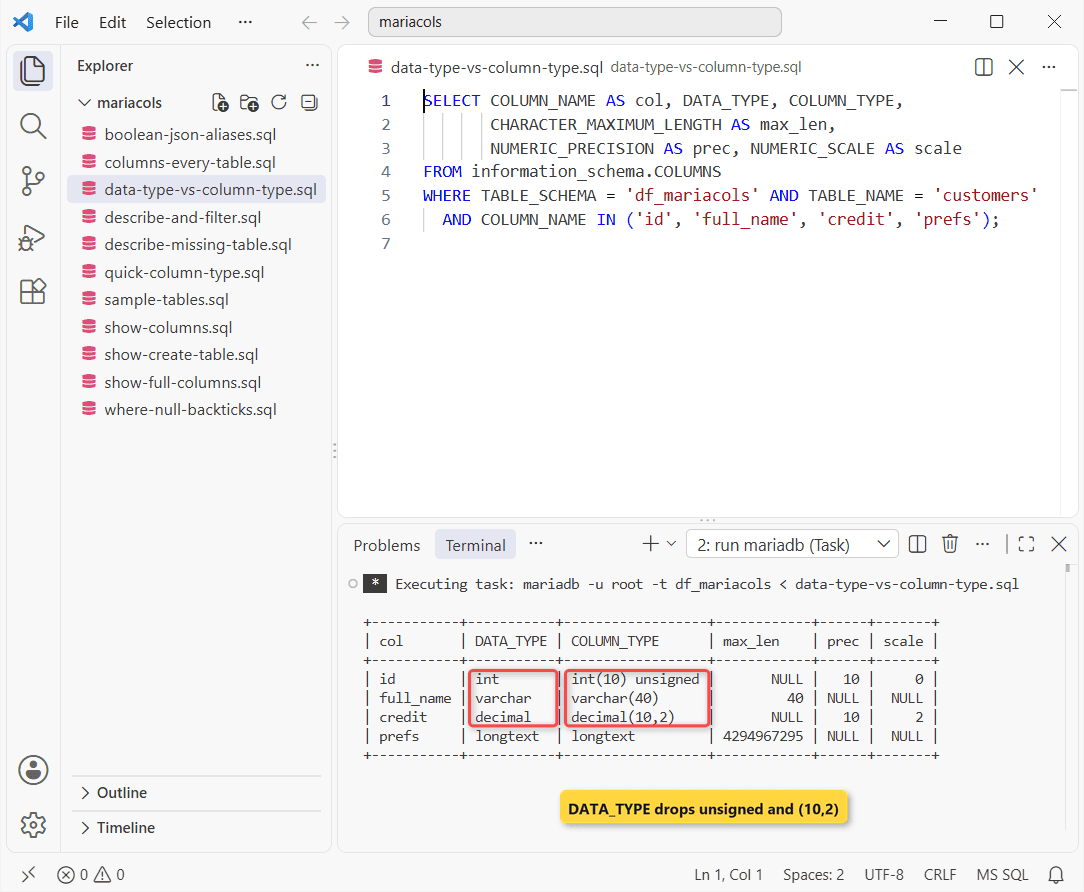
DATA_TYPE lost unsigned and (10,2). Rebuild a table from it and the IDs come back signed.
CHARACTER_MAXIMUM_LENGTH: 40 for VARCHAR(40), 4294967295 for JSON.
Why Does BOOLEAN Show as tinyint(1) and JSON as longtext?
They’re aliases, and MariaDB forgets the name you typed:
SELECT COLUMN_NAME AS col, COLUMN_TYPE
FROM information_schema.COLUMNS
WHERE TABLE_SCHEMA = 'df_mariacols'
  AND COLUMN_NAME IN ('is_active', 'prefs');

SELECT CONSTRAINT_NAME, CHECK_CLAUSE
FROM information_schema.CHECK_CONSTRAINTS
WHERE CONSTRAINT_SCHEMA = 'df_mariacols';
Two result sets:
+-----------+-------------+
| col       | COLUMN_TYPE |
+-----------+-------------+
| is_active | tinyint(1)  |
| prefs     | longtext    |
+-----------+-------------+
+-----------------+---------------------+
| CONSTRAINT_NAME | CHECK_CLAUSE        |
+-----------------+---------------------+
| prefs           | json_valid(`prefs`) |
+-----------------+---------------------+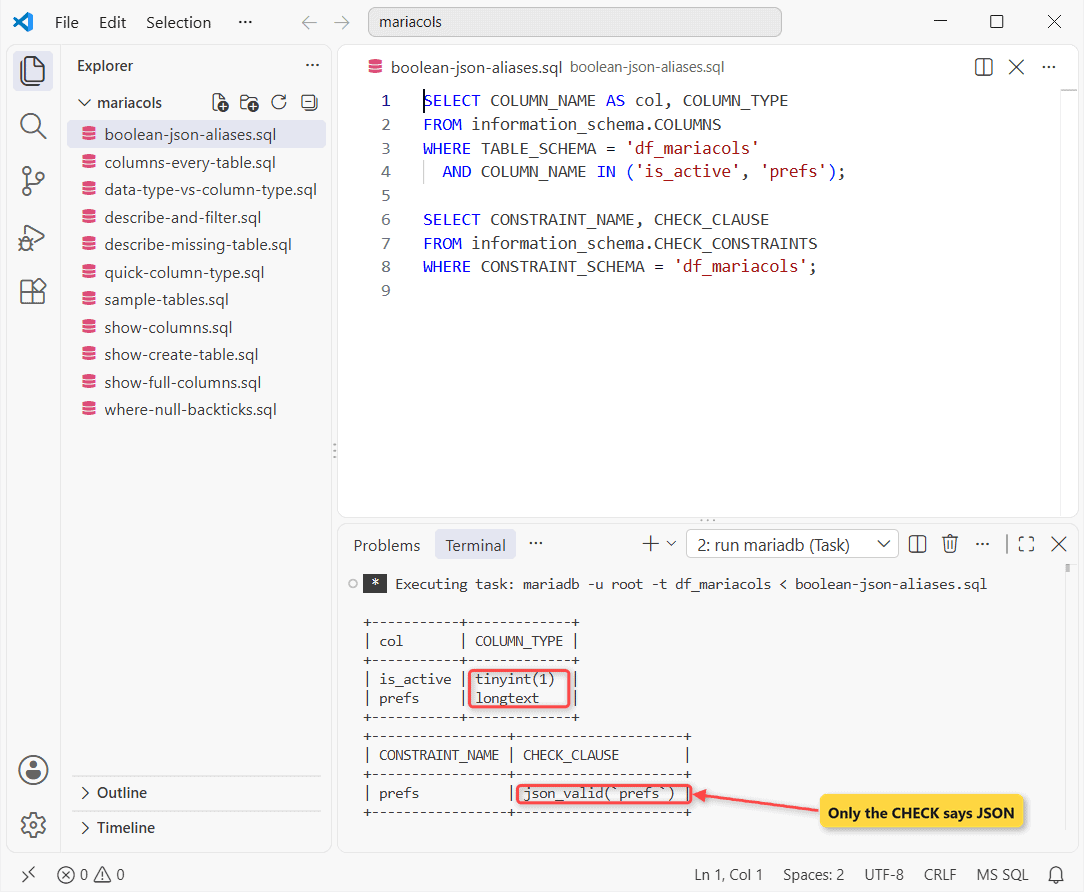
Type alone can’t tell JSON from text; the automatic json_valid() CHECK constraint can (see MariaDB JSON functions).
BOOLEAN is worse. It’s plain TINYINT, so you can’t tell it from a real counter.
List the Columns of Every Table in a Database
Drop the TABLE_NAME filter after you select the database:
SELECT TABLE_NAME AS tbl, COLUMN_NAME AS col, COLUMN_TYPE
FROM information_schema.COLUMNS
WHERE TABLE_SCHEMA = DATABASE()
  AND COLUMN_TYPE LIKE 'decimal%'
ORDER BY TABLE_NAME, ORDINAL_POSITION;
Every money column:
+-----------+--------+---------------+
| tbl       | col    | COLUMN_TYPE   |
+-----------+--------+---------------+
| customers | credit | decimal(10,2) |
| orders    | total  | decimal(10,2) |
+-----------+--------+---------------+
SHOW CREATE TABLE: The Definition You Can Rebuild From
SHOW CREATE TABLE customers;Vertical output:
*************************** 1. row ***************************
       Table: customers
Create Table: CREATE TABLE `customers` (
  `id` int(10) unsigned NOT NULL AUTO_INCREMENT,
  `full_name` varchar(40) NOT NULL COMMENT 'Billing name',
  `state` char(2) NOT NULL,
  `credit` decimal(10,2) DEFAULT 0.00,
  `is_active` tinyint(1) DEFAULT 1,
  `prefs` longtext CHARACTER SET utf8mb4 COLLATE utf8mb4_bin DEFAULT NULL CHECK (json_valid(`prefs`)),
  `name_uc` varchar(40) GENERATED ALWAYS AS (ucase(`full_name`)) VIRTUAL,
  PRIMARY KEY (`id`),
  KEY `ix_state` (`state`)
) ENGINE=InnoDB AUTO_INCREMENT=3 DEFAULT CHARSET=utf8mb4 COLLATE=utf8mb4_uca1400_ai_ci
Only this shows the JSON CHECK and the generated expression (UPPER() became ucase()). Save it before you change a column type or rename a column.
Gotchas I Hit: Unquoted Null and a Missing Table
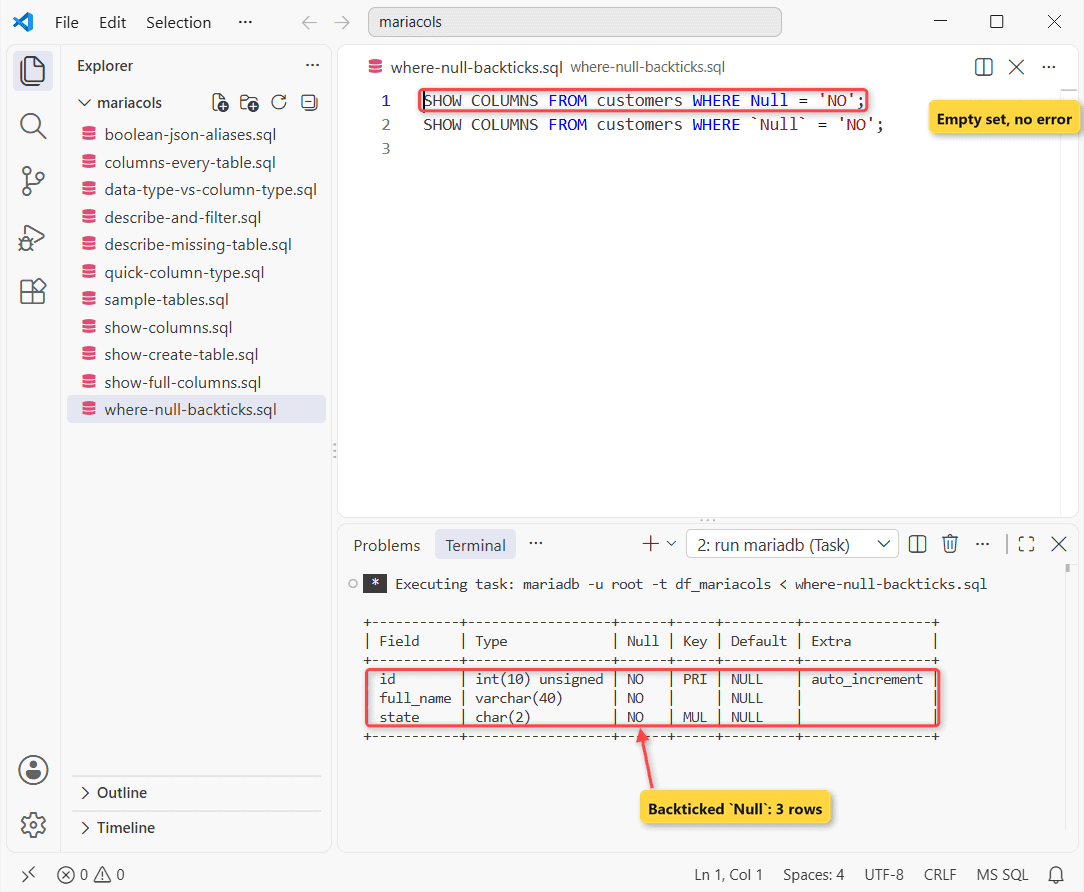
Unquoted, Null is the SQL literal, so the first filter returns an empty set with no error:
SHOW COLUMNS FROM customers WHERE Null = 'NO';
SHOW COLUMNS FROM customers WHERE `Null` = 'NO';
Only one result set printed:
+-----------+------------------+------+-----+---------+----------------+
| Field     | Type             | Null | Key | Default | Extra          |
+-----------+------------------+------+-----+---------+----------------+
| id        | int(10) unsigned | NO   | PRI | NULL    | auto_increment |
| full_name | varchar(40)      | NO   |     | NULL    |                |
| state     | char(2)          | NO   | MUL | NULL    |                |
+-----------+------------------+------+-----+---------+----------------+
A typo fails loudly, at least:
DESCRIBE customer;Error:
--------------
DESCRIBE customer
--------------

ERROR 1146 (42S02) at line 1: Table 'df_mariacols.customer' doesn't exist
Which Column Type Output Can You Trust in a Script?
| Need | Use | Don’t trust |
|---|---|---|
| Exact type for code | COLUMN_TYPE | DATA_TYPE |
| Length, precision | CHARACTER_MAXIMUM_LENGTH, NUMERIC_* | Parsing Type |
| Is it JSON? | CHECK_CONSTRAINTS / SHOW CREATE TABLE | Type = longtext |
| Rebuild it | SHOW CREATE TABLE | SHOW COLUMNS |
My rule of thumb: if code reads the answer, read COLUMN_TYPE, never DATA_TYPE.
That flips for code that also targets SQL Server or PostgreSQL: COLUMN_TYPE is a MariaDB/MySQL extension.
Next Step: Change the MariaDB Column
Wrong type? You can add a column with the right one, copy the data, then drop the old column. More:
- Show tables in MariaDB
- Check a column type in SQL Server
- PostgreSQL: change a column type
- Index a MariaDB column
Frequently Asked Questions
How do I list the columns of a MariaDB table from the command line?
mariadb-show -u root mydb customers prints all nine SHOW FULL COLUMNS fields.
Does SHOW COLUMNS work on views?
Yes. See the SHOW COLUMNS documentation.
Why is the type in SHOW COLUMNS different from my CREATE TABLE?
MariaDB makes silent column changes on CREATE or ALTER. See the COLUMNS table reference.

Kumar Saurabh is a freelance software engineer who builds web and mobile apps with Next.js, React, Flutter and Python. From 2021 to 2024, Saurabh worked as an IT analyst and developer at TSInfo Technologies, writing technical articles on SQL and PostgreSQL. Saurabh writes the PostgreSQL, MySQL, MariaDB and MongoDB tutorials on DatabaseFAQs.com and holds a Master of Computer Applications (MCA) from Chandigarh University.