
A retail startup called me after their support team found two customer accounts with the same email address. Orders, loyalty points, and password resets were split across both records. The developers had checked for duplicates in application code, but two requests arrived at the same moment and both passed the check. The database accepted both rows, because nothing told it not to.
That is the job of a PostgreSQL unique constraint. It makes the database refuse duplicate values, no matter how many apps, scripts, or people write to the table. It is the final safety net, and I add it to every table that has a natural identifier.
This guide shows you how to create and test one, and how to handle NULLs, multi-column keys, and case differences. You will also learn how to add a constraint to a busy production table without blocking writes, and how to run it on Azure Database for PostgreSQL Flexible Server.
What a PostgreSQL Unique Constraint Does
A constraint is a rule that PostgreSQL enforces on every insert and update. A unique constraint says that a column, or a group of columns, cannot repeat across rows.
Behind the scenes, PostgreSQL builds a B-tree index to enforce the rule. An index is a sorted lookup structure that lets the database find rows without scanning the whole table. So a unique constraint gives you two benefits: duplicate protection and fast lookups on that column. It also costs something, because every insert and update must maintain the index.
Many people confuse the unique constraint with the primary key. A primary key is a unique constraint that also forbids NULL, and a table can have only one. A table can have many unique constraints. Review how to add a primary key in PostgreSQL if you need the comparison.
| Feature | Primary key | Unique constraint |
|---|---|---|
| Duplicates allowed | No | No |
| NULL values allowed | No | Yes (by default) |
| Per table | One | Many |
| Can be referenced by foreign key | Yes | Yes |
| Creates an index | Yes | Yes |
The foreign key point matters. A foreign key in another table can reference a unique column, so unique constraints often support relationships. The guide on adding a foreign key in PostgreSQL shows the syntax.
Pro Tip: In my experience, application-side duplicate checks always fail under load. I treat the constraint as the real rule and the app check as a friendly error message.
Create a Unique Constraint on a New Table
Start with a realistic design. Imagine a SaaS app where each tenant (a customer company) has its own users. The same email may exist in two tenants, but never twice in one tenant.
CREATE TABLE public.customersnew
(
    customer_id  BIGINT GENERATED ALWAYS AS IDENTITY PRIMARY KEY,
    tenant_id    INTEGER      NOT NULL,
    email        TEXT         NOT NULL,
    external_ref TEXT,
    created_at   TIMESTAMPTZ  NOT NULL DEFAULT now(),
    CONSTRAINT uq_customers_tenant_email UNIQUE (tenant_id, email)
);
After running the query above, I got the expected output shown in the screenshot below.
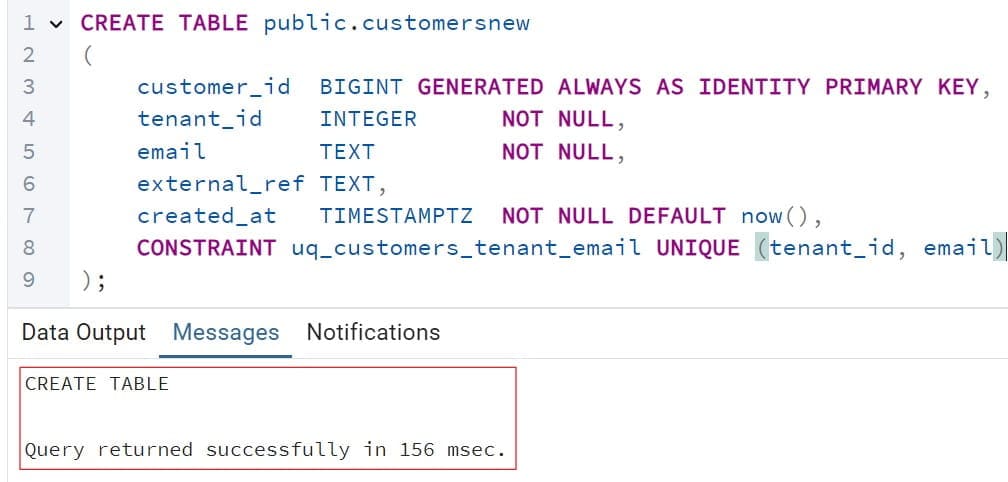
This statement creates a customers table in the public schema, which is a namespace that groups tables and other objects. The GENERATED ALWAYS AS IDENTITY column creates automatic numeric IDs. The named constraint uq_customers_tenant_email covers two columns together. Two rows may share an email only if their tenant_id values differ.
I always name constraints. If you skip the name, PostgreSQL generates one like customers_tenant_id_email_key. That works, but a clear name such as uq_customers_tenant_email makes error messages and migrations easier to read. For more on table creation, see how to create a table in PostgreSQL and the notes on PostgreSQL data types. If you are organizing objects into schemas, read about the PostgreSQL schema.
Test That It Works
Insert a row, then try to insert the same tenant and email again. Learn the basics in inserting into a PostgreSQL table.
INSERT INTO public.customers (tenant_id, email)
VALUES (1, 'ava@example.com');

INSERT INTO public.customers (tenant_id, email)
VALUES (1, 'ava@example.com');
See the screenshot below for reference.
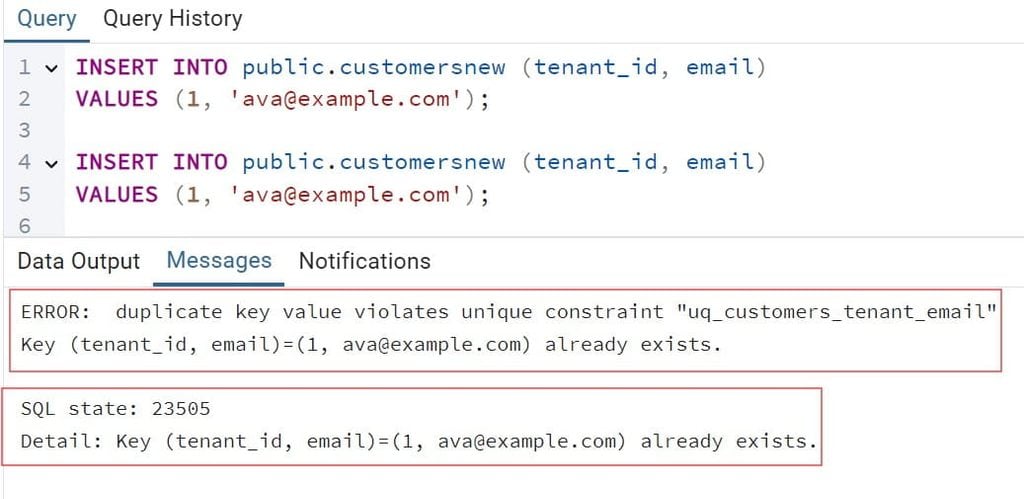
The second statement fails with duplicate key value violates unique constraint "uq_customers_tenant_email". The error carries SQLSTATE code 23505, which apps use to detect this exact problem. The message also shows the conflicting key values in its DETAIL line.
Now insert the same email under tenant 2. It succeeds, because the pair (2, ava@example.com) is new.
Pro Tip: I always test the failure case, not just the success case. A constraint I have never seen reject a row is a constraint I do not trust yet.
Handle NULL Values Correctly
NULL means “unknown,” and PostgreSQL treats each NULL as different from every other NULL. By default, a unique column can hold many NULL rows. That surprises people who expect only one.
ALTER TABLE public.customers
ADD CONSTRAINT uq_customers_external_ref UNIQUE (external_ref);

INSERT INTO public.customers (tenant_id, email, external_ref)
VALUES (1, 'ben@example.com', NULL),
       (1, 'cara@example.com', NULL);
Both inserts succeed, because the two NULLs do not count as duplicates. This is usually what you want for an optional field, like a partner ID that only some customers have.
If you want at most one NULL, PostgreSQL 15 and later supports NULLS NOT DISTINCT:
ALTER TABLE public.customers
DROP CONSTRAINT uq_customers_external_ref,
ADD CONSTRAINT uq_customers_external_ref
    UNIQUE NULLS NOT DISTINCT (external_ref);
This drops the old constraint and creates a new one that treats NULLs as equal. Dropping a constraint removes the protection briefly and drops its index, so run this in a maintenance window or inside one transaction. Check your server version first, because older versions reject this syntax. On Azure Flexible Server, confirm which major versions your region offers.
Pro Tip: I once debugged a “broken” unique constraint that was fine. The column was nullable and the team expected one NULL. Now I decide on NULL behavior while designing the table, and write it in the migration comment.
Add a Unique Constraint to an Existing Table Safely
This is the hardest real-world case. The table already has data, maybe duplicates, and users are writing to it right now. A careless command can freeze your application.
Step 1: Find the Duplicates
Use GROUP BY with the HAVING clause to list repeated values:
SELECT lower(email) AS email_key, COUNT(*) AS copies
FROM public.customers
GROUP BY lower(email)
HAVING COUNT(*) > 1
ORDER BY copies DESC;
This groups rows by lowercase email and keeps only groups with more than one row. The lower() call catches Ava@Example.com and ava@example.com. Run this first, because a constraint cannot be created while duplicates exist.
Step 2: Remove or Merge the Duplicates
This step deletes data. Take a backup first, and review the rows with the business owner. In many cases you should merge records, not delete them. See how to back up a PostgreSQL database before you begin.
BEGIN;

DELETE FROM public.customers
WHERE customer_id IN
(
    SELECT customer_id
    FROM
    (
        SELECT customer_id,
               ROW_NUMBER() OVER
                 (PARTITION BY tenant_id, lower(email)
                  ORDER BY created_at, customer_id) AS rn
        FROM public.customers
    ) AS ranked
    WHERE rn > 1
);

-- Check the result, then COMMIT or ROLLBACK
The window function ROW_NUMBER numbers rows within each duplicate group, oldest first. The outer query deletes every row except number one. Wrapping it in BEGIN lets you inspect the result and ROLLBACK if it looks wrong. The syntax for removing rows is covered in deleting rows in PostgreSQL.
Step 3: Build the Index Without Blocking Writes
A plain ALTER TABLE ... ADD CONSTRAINT ... UNIQUE takes a strong lock and blocks writes while it builds the index. On a large table, that can mean minutes of downtime. Build the index first with the CONCURRENTLY option instead.
CREATE UNIQUE INDEX CONCURRENTLY uq_customers_tenant_email_idx
ON public.customers (tenant_id, email);

ALTER TABLE public.customers
ADD CONSTRAINT uq_customers_tenant_email
UNIQUE USING INDEX uq_customers_tenant_email_idx;
CREATE UNIQUE INDEX CONCURRENTLY builds the index while normal reads and writes continue. It takes longer and uses more I/O, and it cannot run inside a transaction block. The second statement attaches the finished index as a real constraint, which needs only a brief lock. See creating an index in PostgreSQL for options, and ALTER TABLE in PostgreSQL for other changes.
If the concurrent build fails, perhaps because a duplicate slipped in, PostgreSQL leaves an index marked INVALID. Drop it and retry. Check with \d public.customers in psql.
Pro Tip: I once ran a plain ADD CONSTRAINT on a 40-million-row table during lunch. Writes queued up for several minutes. Since then I use the concurrent index method on every table that matters.
Case-Insensitive and Conditional Uniqueness
Plain unique constraints compare exact values. Two real-world cases need more.
Make Email Unique Regardless of Case
A constraint cannot use an expression, but a unique index can. It protects the same way.
CREATE UNIQUE INDEX uq_customers_tenant_lower_email
ON public.customers (tenant_id, lower(email));
This blocks Ava@Example.com when ava@example.com already exists in the same tenant. Your queries must use lower(email) to benefit from the index. Another option is the citext extension, a case-insensitive text type. Extensions must be allowed on your server, and on Azure you must allow-list them first. For case-insensitive searching, also see ILIKE in PostgreSQL.
Allow Duplicates Only for Deleted Rows
Many apps use “soft delete,” which marks a row as deleted instead of removing it. You still want a new account to reuse an old email. A partial index applies only to rows that match a condition.
ALTER TABLE public.customers ADD COLUMN deleted_at TIMESTAMPTZ;

CREATE UNIQUE INDEX uq_customers_active_email
ON public.customers (tenant_id, email)
WHERE deleted_at IS NULL;
This enforces uniqueness only among active customers. Deleted rows can repeat. It also makes the index smaller, which helps speed and storage cost.
Pro Tip: I add the partial index the moment a team says “we soft delete.” Without it, they either block email reuse or drop uniqueness completely, and both choices cause support tickets.
Handle Duplicate Errors in Your Application
A constraint violation is an expected event. Handle it deliberately.
Use ON CONFLICT for Safe Inserts
INSERT INTO public.customers (tenant_id, email, external_ref)
VALUES (1, 'ava@example.com', 'CRM-1001')
ON CONFLICT (tenant_id, email)
DO UPDATE SET external_ref = EXCLUDED.external_ref;
ON CONFLICT turns a failed insert into an upsert, meaning insert-or-update. The columns in parentheses must match a unique constraint or index. EXCLUDED refers to the row you tried to insert. Use DO NOTHING if you simply want to ignore the duplicate. This is atomic, so two simultaneous requests cannot both succeed. For bulk loads, see inserting multiple rows in PostgreSQL, and for changes to existing rows, read about the PostgreSQL UPDATE command.
Catch the Error in Python
import os
import psycopg2
from psycopg2 import errors

conn = psycopg2.connect(
    host=os.environ["PGHOST"],
    dbname=os.environ["PGDATABASE"],
    user=os.environ["PGUSER"],
    password=os.environ["PGPASSWORD"],
    sslmode="require",
)

try:
    with conn, conn.cursor() as cur:
        cur.execute(
            "INSERT INTO public.customers (tenant_id, email) VALUES (%s, %s)",
            (1, "ava@example.com"),
        )
except errors.UniqueViolation:
    print("That email already exists for this tenant.")
The code reads connection details from environment variables, never from source code. sslmode="require" forces an encrypted connection. The UniqueViolation exception maps to SQLSTATE 23505, so the app can show a friendly message. Do not show the raw database error to users, because its DETAIL line contains the conflicting values.
Pro Tip: I log the constraint name, not the full error text, in application logs. It tells me which rule fired without writing customer emails into my logs.
Give the App a Least-Privilege Role
A role is a database identity with permissions. The app should insert and read data, not change table structure.
CREATE ROLE app_customers_rw NOLOGIN;
GRANT USAGE ON SCHEMA public TO app_customers_rw;
GRANT SELECT, INSERT, UPDATE ON public.customers TO app_customers_rw;
This creates a group role with only the access the app needs. It cannot drop the constraint, because it does not own the table and has no ALTER rights. Test with that role: it should insert normally, get a duplicate error on repeats, and be denied when it tries ALTER TABLE. You can review roles with PostgreSQL list users.
Pro Tip: I make a dedicated migration role for schema changes. When the app role cannot alter tables, a stolen app credential cannot silently drop a unique constraint.
Common Errors and Troubleshooting
“Could not create unique index… Key is duplicated.” Duplicates already exist. Run the GROUP BY query, clean the data, and retry.
“Duplicate key value violates unique constraint.” Your insert collided with an existing row. Use ON CONFLICT or catch SQLSTATE 23505 in your app.
“There is no unique or exclusion constraint matching the ON CONFLICT specification.” The columns in ON CONFLICT (...) must match a real unique constraint or unique index. A mismatch in column order or a missing partial-index condition causes this.
Index shows as INVALID. A concurrent build failed. Drop the invalid index and rebuild it.
Uniqueness fails on partitioned tables. Unique constraints on a partitioned table must include the partition key. Redesign the key or enforce uniqueness another way.
Sequence gaps after failed inserts. Identity values are consumed even when an insert fails. Gaps are normal and harmless. Do not try to fill them.
Pro Tip: When a deploy fails on a unique index, I check for in-flight duplicates first, not the migration script. Nine times out of ten, a batch job inserted fresh duplicates during the build.
Frequently Asked Questions
What is the difference between a primary key and a unique constraint in PostgreSQL?
A primary key is unique and cannot contain NULL, and a table can have only one. A unique constraint prevents duplicates but allows NULLs by default, and a table can have many. Both create an index automatically.
Can a PostgreSQL unique constraint allow NULL values?
Yes. By default, PostgreSQL treats each NULL as distinct, so a unique column can contain many NULLs. In PostgreSQL 15 and later, you can use UNIQUE NULLS NOT DISTINCT to allow only one.
How do I add a unique constraint to an existing PostgreSQL table without downtime?
Find and fix duplicates first. Then run CREATE UNIQUE INDEX CONCURRENTLY, and attach it with ALTER TABLE ... ADD CONSTRAINT ... UNIQUE USING INDEX. This avoids a long write lock on busy tables.
How do I make a unique constraint case-insensitive in PostgreSQL?
Create a unique index on lower(column), or use the citext extension. A normal constraint cannot use an expression. Make sure your queries use the same expression so the index is used.
How do I connect to Azure Database for PostgreSQL securely?
Use private access or a private endpoint, require TLS with sslmode=require or stronger, and sign in with Microsoft Entra ID. Keep any remaining passwords in Key Vault. Learn the basics in how to connect to a PostgreSQL database.
You learned how to create, test, and safely add a PostgreSQL unique constraint, and how to handle NULLs, case differences, and duplicate errors on Azure. Let the database enforce uniqueness, build the index concurrently on live tables, and practice a restore before you change data. I hope you found this article helpful.
You May Also Like
- Start with what PostgreSQL is if you are new to the database.
- Study the PostgreSQL architecture to see how storage and processes work.
- Compare VACUUM vs VACUUM FULL to keep indexed tables healthy.
- Read JSON vs JSONB in PostgreSQL before you model flexible data.
- See PostgreSQL vs SQL Server if you are weighing database platforms.

Kumar Saurabh is a freelance software engineer who builds web and mobile apps with Next.js, React, Flutter and Python. From 2021 to 2024, Saurabh worked as an IT analyst and developer at TSInfo Technologies, writing technical articles on SQL and PostgreSQL. Saurabh writes the PostgreSQL, MySQL, MariaDB and MongoDB tutorials on DatabaseFAQs.com and holds a Master of Computer Applications (MCA) from Chandigarh University.