
In this tutorial, I will guide you through the architecture, administration, security models, and lifecycle management of PostgreSQL schemas. Understanding schemas is fundamental to running clean, performant, and secure PostgreSQL clusters.
PostgreSQL Schema
What Is a PostgreSQL Schema?
A PostgreSQL cluster contains one or more named databases. Within each database, you have one or more schemas, and each schema contains database objects such as tables, views, data types, functions, domains, indexes, and operators.
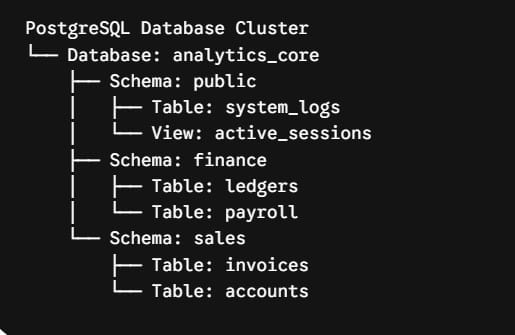
To understand how schemas fit into the broader hierarchy, consider this simple analogy:
- A PostgreSQL Cluster is an entire storage server.
- A Database is a distinct department room within that building. Objects in different databases cannot communicate directly using standard SQL queries without specialized foreign data wrappers (
postgres_fdw). - A Schema is an individual filing cabinet inside a room. Objects in different schemas within the same database can be freely joined, referenced, and queried within the same transaction.
- A Database Object (table, view, function) is a specific folder inside that filing cabinet.
Database vs. Schema Comparison
| Dimension | PostgreSQL Database | PostgreSQL Schema |
| Isolation Level | Completely isolated environment | Logical namespace within a single database |
| Cross-Querying | Requires postgres_fdw or external connections | Standard SQL joins and cross-references |
| Connection Scope | Clients connect directly to a specific database | Clients connect to a database and route queries via search_path |
| Resource Overhead | Higher system catalog and connection overhead | Lightweight metadata separation |
| Backup Granularity | Global or database-wide via pg_dump | Schema-specific backup and restore flags |
Why Use Schemas in PostgreSQL?
- Namespace Collision Prevention: Multiple development teams, microservices, or functional domains can define tables with identical names (such as
users,settings, ortransactions) within the same database without collision. - Multi-Tenancy Architectures: A “schema-per-tenant” model allows SaaS platforms to isolate customer data into dedicated schemas while sharing a single database instance, pooling connection pools, and centralizing backups.
- Granular Role-Based Access Control (RBAC): Privileges can be granted or revoked at the schema boundary, preventing analytical users or third-party reporting tools from accessing sensitive financial or authentication tables.
- Streamlined Maintenance and Migrations: Schemas allow staging tables, analytics models, and ETL ingestion pipelines to run, truncate, or drop namespaces without interfering with core transactional schemas.
The Default Schema: Understanding public
Every newly initialized PostgreSQL database contains a default schema named public.
When you execute a standard statement such as:
SQL
CREATE TABLE employees (
    employee_id INT GENERATED ALWAYS AS IDENTITY PRIMARY KEY,
    first_name VARCHAR(50) NOT NULL,
    last_name VARCHAR(50) NOT NULL
);
PostgreSQL automatically places this table in the public schema because no explicit schema prefix was specified and public is present in the resolution path.
Creating and Managing Schemas
PostgreSQL provides a robust Data Definition Language (DDL) set to manage the lifecycle of schemas.
1. Creating a Schema
To create a new schema, use the CREATE SCHEMA command:
SQL
CREATE SCHEMA finance;If you want to create a schema and establish its owner in a single atomic transaction:
SQL
CREATE SCHEMA sales AUTHORIZATION dev_admin;To avoid errors in automated migration scripts or initialization pipelines when a schema might already exist, include the IF NOT EXISTS clause:
SQL
CREATE SCHEMA IF NOT EXISTS human_resources;2. Creating Objects Directly Within a Schema
To place an object into a specific schema, prefix the object name with the schema identifier, followed by a dot:
SQL
CREATE TABLE finance.general_ledger (
    entry_id INT GENERATED ALWAYS AS IDENTITY PRIMARY KEY,
    account_number VARCHAR(32) NOT NULL,
    debit_amount NUMERIC(14, 2) NOT NULL,
    credit_amount NUMERIC(14, 2) NOT NULL,
    posted_at TIMESTAMPTZ DEFAULT CURRENT_TIMESTAMP
);
You can also create a schema and instantiate multiple tables, views, and index structures within that schema inside a single SQL statement:
SQL
CREATE SCHEMA marketing
    CREATE TABLE campaigns (
        campaign_id INT PRIMARY KEY,
        campaign_name VARCHAR(100) NOT NULL
    )
    CREATE VIEW active_campaigns AS
        SELECT * FROM campaigns;
3. Renaming and Modifying Schemas
To alter the metadata or ownership of an existing schema:
SQL
-- Rename an existing schema
ALTER SCHEMA human_resources RENAME TO talent_acquisition;

-- Transfer schema ownership to another role
ALTER SCHEMA talent_acquisition OWNER TO enterprise_admin;
4. Dropping a Schema
When removing a schema, you have two options depending on whether the namespace contains existing objects:
SQL
-- Drops the schema only if it is completely empty; fails if objects exist
DROP SCHEMA marketing;

-- Drops the schema along with all contained tables, views, functions, and constraints
DROP SCHEMA marketing CASCADE;
Caution:
DROP SCHEMA ... CASCADEimmediately drops all contained objects, including foreign keys and views in other schemas that depend on objects within the target schema. Always review dependencies before running cascading deletions.
Understanding and Configuring search_path
How does PostgreSQL resolve table names when you do not provide an explicit schema prefix? It relies on a configuration setting called the search_path.
The search_path acts like the executable $PATH variable in Unix-like operating systems. It is an ordered list of schemas that PostgreSQL scans sequentially to find the requested relation.
User Query: SELECT * FROM orders;
                   │
                   ▼
       Is orders in Schema 1? ───(Yes)───► Execute Query
                   │ (No)
                   ▼
       Is orders in Schema 2? ───(Yes)───► Execute Query
                   │ (No)
                   ▼
             Error 42P01:
       relation "orders" does not exist
Checking the Current Search Path
To inspect the search path active in your current session:
SQL
SHOW search_path;In a standard PostgreSQL deployment, the default output is:
Plaintext
 search_path
----------------
 "$user", public
"$user": Directs PostgreSQL to look for a schema that matches the name of the currently connected database user (e.g., if connected asjohn_doe, it checks thejohn_doeschema first).public: If no user-specific schema exists, PostgreSQL searches thepublicschema.
Modifying the Search Path
You can set the search_path at multiple configuration scopes:
Session-Level Search Path
Modifies the search path exclusively for the duration of the active connection:
SQL
SET search_path TO sales, finance, public;User-Level Search Path
Persists a default search path whenever a specific role establishes a connection:
SQL
ALTER ROLE reporting_user SET search_path TO analytics, reporting;Database-Level Search Path
Establishes a cluster-wide default for all connections targeting a specific database:
SQL
ALTER DATABASE enterprise_dw SET search_path TO core_marts, staging, public;Cross-Schema Queries and Data Integrity
Objects residing in different schemas inside the same database can reference each other using fully qualified identifiers (schema_name.object_name).
Cross-Schema SQL Joins
SQL
SELECT
    c.customer_name,
    i.invoice_number,
    i.total_due,
    p.payment_status
FROM sales.customers c
JOIN sales.invoices i
    ON c.customer_id = i.customer_id
JOIN finance.payments p
    ON i.invoice_id = p.invoice_id
WHERE p.payment_status = 'CLEARED';
Cross-Schema Foreign Keys
PostgreSQL fully supports relational integrity constraints spanning distinct schemas:
SQL
ALTER TABLE finance.payments
ADD CONSTRAINT fk_payments_invoice
FOREIGN KEY (invoice_id)
REFERENCES sales.invoices (invoice_id)
ON DELETE RESTRICT;
Schema Security and Role-Based Access Control (RBAC)
PostgreSQL implements a layered permission hierarchy. To access or manipulate any object inside a schema, a database role requires two independent levels of authorization:
- Schema-Level Privilege (
USAGEorCREATE): Permission to traverse and interact with the namespace itself. - Object-Level Privilege (
SELECT,INSERT,UPDATE,DELETE): Permission to operate on individual tables, views, or sequences inside that namespace.
Implementing a Secure Multi-Schema Permission Model
Here is an architectural pattern for provisioning a read-only analytics role across specific business schemas:
SQL
-- 1. Create dedicated application schemas
CREATE SCHEMA operations;
CREATE SCHEMA billing;

-- 2. Create the target role
CREATE ROLE data_analyst WITH LOGIN PASSWORD 'SecurePassphraseHere';

-- 3. Grant schema traversal privileges
GRANT USAGE ON SCHEMA operations TO data_analyst;
GRANT USAGE ON SCHEMA billing TO data_analyst;

-- 4. Grant read permissions on existing tables
GRANT SELECT ON ALL TABLES IN SCHEMA operations TO data_analyst;
GRANT SELECT ON ALL TABLES IN SCHEMA billing TO data_analyst;

-- 5. Automatically grant read permissions on future tables
ALTER DEFAULT PRIVILEGES IN SCHEMA operations
GRANT SELECT ON TABLES TO data_analyst;

ALTER DEFAULT PRIVILEGES IN SCHEMA billing
GRANT SELECT ON TABLES TO data_analyst;
Schema Privileges Reference
USAGE: Allows a role to look up objects contained within the schema. WithoutUSAGE, a role cannot read or write to any table in that schema, even if grantedSELECTon all tables.CREATE: Allows a role to create new objects (tables, functions, types) within the schema.ALTER DEFAULT PRIVILEGES: Modifies the baseline access control matrix automatically applied when new tables or functions are generated in the future.
Schema Architecture Patterns
When designing enterprise systems in PostgreSQL, there are three primary architectural patterns for schema deployment:
1. Monolithic Public Schema
- Structure: All relations reside in
public. - Pros: Simplest mental model; zero
search_pathconfiguration required. - Cons: High risk of naming collisions; difficult to partition security boundaries; unmanageable on large teams.
2. Functional Domain Segmentation
- Structure: Schemas are organized by business boundaries (e.g.,
identity,billing,fulfillment,analytics). - Pros: Clean microservice mapping, clear RBAC boundaries, and distinct ownership models.
- Cons: Cross-domain reporting requires explicit schema prefixes and disciplined migration tracking.
3. Schema-Per-Tenant Isolation
- Structure: Each tenant or customer in a SaaS application receives a dedicated schema containing an identical table blueprint (e.g.,
tenant_101.orders,tenant_102.orders). - Pros: Strong data isolation, simple customer data export and deletion, simplified row-level compliance.
- Cons: High catalog overhead when scaling past thousands of schemas; migrations must loop through all tenant namespaces.
Inspecting and Auditing Schemas
To audit existing schemas and their ownership within a PostgreSQL database, use system catalogs or terminal meta-commands.
Using psql Meta-Commands
In the psql command-line utility:
\dn: Lists all user-defined and standard schemas along with their owners.\dn+: Lists all schemas with descriptions and explicit access control lists (ACLs).\dt schema_name.*: Lists all tables located within the specified schema.
Querying the System Catalog via SQL
To retrieve a complete list of non-system schemas programmatically:
SQL
SELECT
    schema_name,
    schema_owner
FROM information_schema.schemata
WHERE schema_name NOT LIKE 'pg_%'
  AND schema_name != 'information_schema'
ORDER BY schema_name;
To list all tables, their host schemas, and table storage parameters:
SQL
SELECT
    table_schema,
    table_name,
    table_type
FROM information_schema.tables
WHERE table_schema NOT IN ('pg_catalog', 'information_schema')
ORDER BY table_schema, table_name;
Best Practices Checklist for PostgreSQL Schemas
To maintain a robust, performant, and secure PostgreSQL schema architecture, follow these guidelines:
- [ ] Avoid Relying on the Default
publicSchema: Build dedicated, domain-specific schemas (core,billing,warehouse) rather than accumulating all tables inpublic. - [ ] Lock Down Schema Creation: Ensure unprivileged roles do not have
CREATEprivileges on thepublicschema or application schemas. - [ ] Always Configure
ALTER DEFAULT PRIVILEGES: Define default object privileges alongside schema creation so that future tables created by migration runners inherit the correct read/write permissions automatically. - [ ] Explicitly Qualify Table References in Application Code: Use fully qualified names (e.g.,
finance.invoices) in critical backend queries to avoid ambiguity caused by session-levelsearch_pathchanges. - [ ] Index and Query Across Schemas Safely: Maintain standard indexing strategies on foreign keys and join columns even when they bridge schema boundaries.
- [ ] Automate Migrations Across Dynamic Schemas: If adopting a schema-per-tenant architecture, maintain deterministic migration scripts that loop reliably over all active tenant namespaces.
You may also like the following articles:

Rajkishore Sahoo is a Microsoft Azure consultant with more than 14 years of hands-on experience building cloud-native data solutions across Azure and AWS, focused on Azure SQL Database, Azure SQL Managed Instance, and the pipelines that connect them to production apps. Day to day, he provisions Azure SQL instances, configures firewalls and connection strings, tunes queries for cloud workloads, and wires databases into Azure Functions and Logic Apps. Read more