
Say your finance lead in Boston wants this month’s customer balances in a spreadsheet, ZIP codes and all.
To export data from SQL Server to Excel, right-click the SSMS results grid and choose Save Results As (SSMS 22.4.1+ saves .xlsx), or script it with bcp, sqlcmd or PowerShell.
The catch is Excel: it turns ZIP code 02118 into 2118 when it opens a CSV. I’ll show which exports kept the zero.
Tested on SQL Server 2025 (17.0.1000.7) Developer, bcp 15.0, PowerShell 7.6.
The Sample Customers Table We’ll Export to Excel
Watch Tyler Reed, Jr. (a comma), Zoë Turner (an accent) and the ZIPs starting with 0.
CREATE TABLE dbo.Customers (
    CustomerID int           PRIMARY KEY,
    FullName   nvarchar(20)  NOT NULL,
    ZipCode    char(5)       NOT NULL,
    SignupDate date          NOT NULL,
    Balance    decimal(10,2) NOT NULL
);
INSERT INTO dbo.Customers VALUES
(1, N'Hannah Brooks',   '02118', '2026-01-14', 1250.00),
(2, N'Tyler Reed, Jr.', '07102', '2026-02-03',   89.50),
(3, N'Zoë Turner',      '78701', '2026-03-22',  410.75),
(4, N'Marcus Bennett',  '04101', '2026-05-09',    0.00),
(5, N'Grace Miller',    '80202', '2026-06-30', 2310.40);
Check your work with SELECT * FROM dbo.Customers;. You should see five rows.
Method 1: Copy or Save the SSMS Results Grid (Recommended for One-Off Exports)
Run your query in SSMS (free, see how to install SSMS), then:
- Right-click the grid, choose Copy with Headers (Ctrl+Shift+C), and paste into cell A1.
- Or choose Save Results As. SSMS 22.4.1 (March 2026) added Excel; older versions save CSV or text.
- In SSMS 22.10.2+, tick the include-column-headers box in that dialog.
How does this work? Copy puts tab-separated text on the clipboard. Excel still guesses types on paste, so format column C as Text first.
Method 2: SQL Server Import and Export Wizard to an Excel File
The wizard writes a real .xlsx. The steps, per Microsoft Learn:
- Right-click the database, then Tasks > Export Data.
- On Choose a Destination, pick Microsoft Excel, a file path and Excel version Microsoft Excel 2016. Keep First row has column names.
- Choose Copy data from one or more tables or views or Write a query, select dbo.Customers, then Finish.
Important: since SSMS 21 and SQL Server 2025 the wizard is 64-bit only. It needs Microsoft.ACE.OLEDB.16.0 from the Access Database Engine 2016 Redistributable.
How does this work? Older SSMS ran a 32-bit wizard that couldn’t see 64-bit providers, which is why Excel vanished from the list for so many people. On my PC, EXEC master.dbo.sp_enum_oledb_providers; listed ACE 12.0 and 16.0.
Method 3: Get Data From SQL Server Database in Excel
For a sheet that refreshes, use Data > Get Data > From Database > From SQL Server Database, enter localhost and DfExcelExport, pick dbo.Customers, Load.
How does this work? Excel keeps a Power Query connection to the same table, so Refresh All reruns it, the way you’d connect Excel to an Oracle database.
Method 4: bcp queryout to a CSV File
bcp is what I’d script for big tables. It has no header option, so echo one first:
@echo off
chcp 65001 >nul
echo CustomerID,FullName,ZipCode,SignupDate,Balance> customers-bcp.csv
bcp "SELECT CustomerID, FullName, ZipCode, SignupDate, Balance FROM dbo.Customers" queryout rows.csv -c -C 65001 -t, -S localhost -T -d DfExcelExport
type rows.csv >> customers-bcp.csv
del rows.csv
type customers-bcp.csv
Output:
Starting copy...

5 rows copied.
Network packet size (bytes): 4096
Clock Time (ms.) Total     : 1      Average : (5000.00 rows per sec.)
CustomerID,FullName,ZipCode,SignupDate,Balance
1,Hannah Brooks,02118,2026-01-14,1250.00
2,Tyler Reed, Jr.,07102,2026-02-03,89.50
3,Zoë Turner,78701,2026-03-22,410.75
4,Marcus Bennett,04101,2026-05-09,.00
5,Grace Miller,80202,2026-06-30,2310.40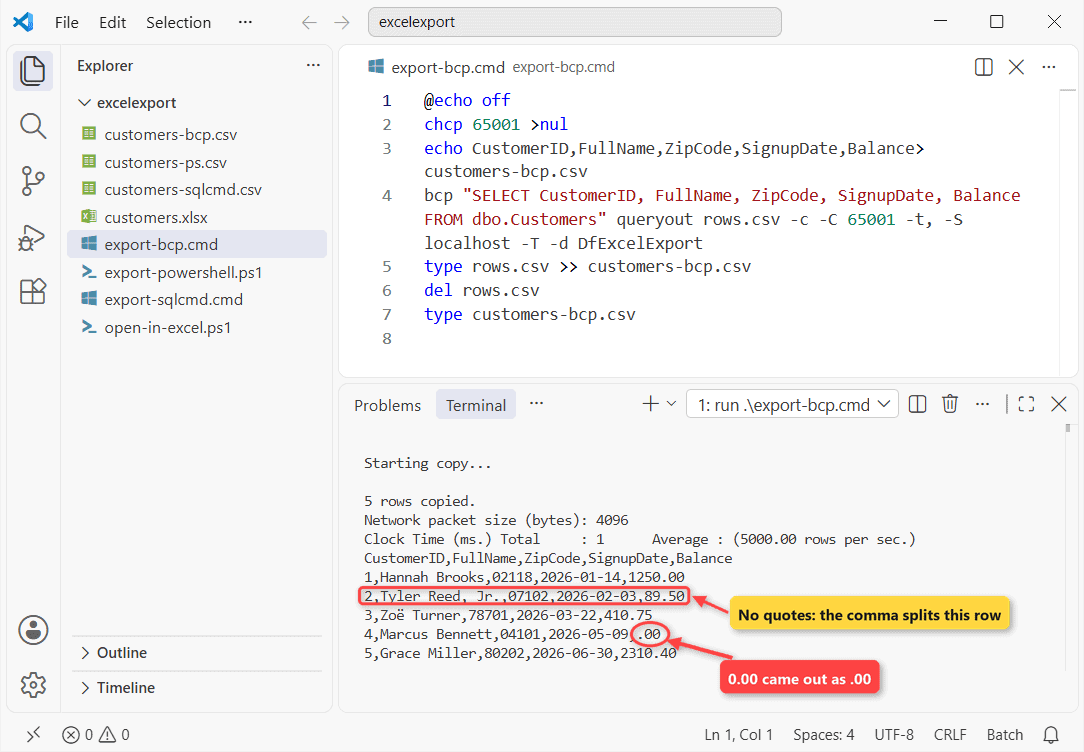
How does this work? -c writes text, -t, sets the comma, -T uses Windows login, -C 65001 writes UTF-8. Clock Time stayed under 20 ms for five rows in every run.
Two catches: bcp doesn’t quote fields, so Tyler’s row has six values, and 0.00 came out as .00. BULK INSERT reads the file back.
Method 5: sqlcmd -s and -W for a Quick CSV
sqlcmd writes the header for you. Same query:
@echo off
chcp 65001 >nul
sqlcmd -S localhost -E -C -d DfExcelExport -s"," -W -f o:65001 -o customers-sqlcmd.csv ^
  -Q "SET NOCOUNT ON; SELECT CustomerID, FullName, ZipCode, SignupDate, Balance FROM dbo.Customers"
type customers-sqlcmd.csv
Output:
CustomerID,FullName,ZipCode,SignupDate,Balance
----------,--------,-------,----------,-------
1,Hannah Brooks,02118,2026-01-14,1250.00
2,Tyler Reed, Jr.,07102,2026-02-03,89.50
3,Zoë Turner,78701,2026-03-22,410.75
4,Marcus Bennett,04101,2026-05-09,.00
5,Grace Miller,80202,2026-06-30,2310.40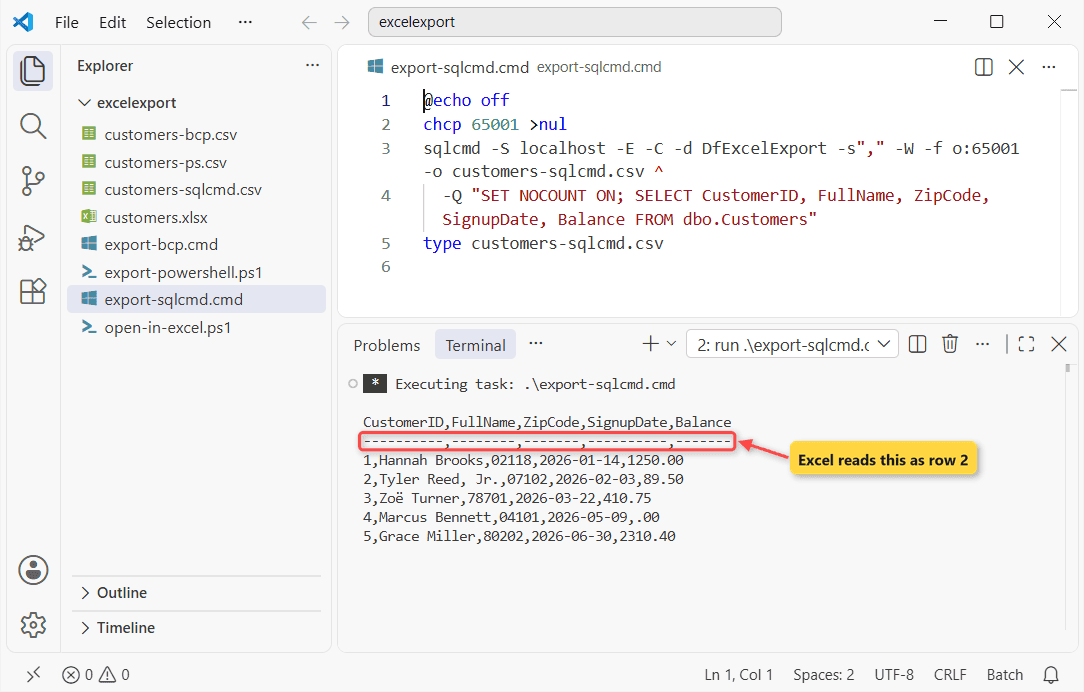
How does this work? -s"," sets the separator, -W trims padding, -f o:65001 writes UTF-8 with a BOM. The dashes line becomes Excel row 2; -h -1 drops both header lines.
Method 6: PowerShell Invoke-Sqlcmd to CSV or a Real .xlsx
I already had the SqlServer and ImportExcel modules (Get-Module -ListAvailable shows yours):
Import-Module SqlServer, ImportExcel
$rows = Invoke-Sqlcmd -ServerInstance localhost -Database DfExcelExport `
  -TrustServerCertificate -Query "SELECT CustomerID, FullName, ZipCode,
  CONVERT(char(10), SignupDate, 23) AS SignupDate, Balance FROM dbo.Customers" |
  Select-Object CustomerID, FullName, ZipCode, SignupDate, Balance
$rows | Export-Csv customers-ps.csv -NoTypeInformation -Encoding utf8BOM
$rows | Export-Excel customers.xlsx -WorksheetName Customers `
  -NoNumberConversion ZipCode -AutoSize
Get-Content customers-ps.csv
Output:
"CustomerID","FullName","ZipCode","SignupDate","Balance"
"1","Hannah Brooks","02118","2026-01-14","1250.00"
"2","Tyler Reed, Jr.","07102","2026-02-03","89.50"
"3","Zoë Turner","78701","2026-03-22","410.75"
"4","Marcus Bennett","04101","2026-05-09","0.00"
"5","Grace Miller","80202","2026-06-30","2310.40"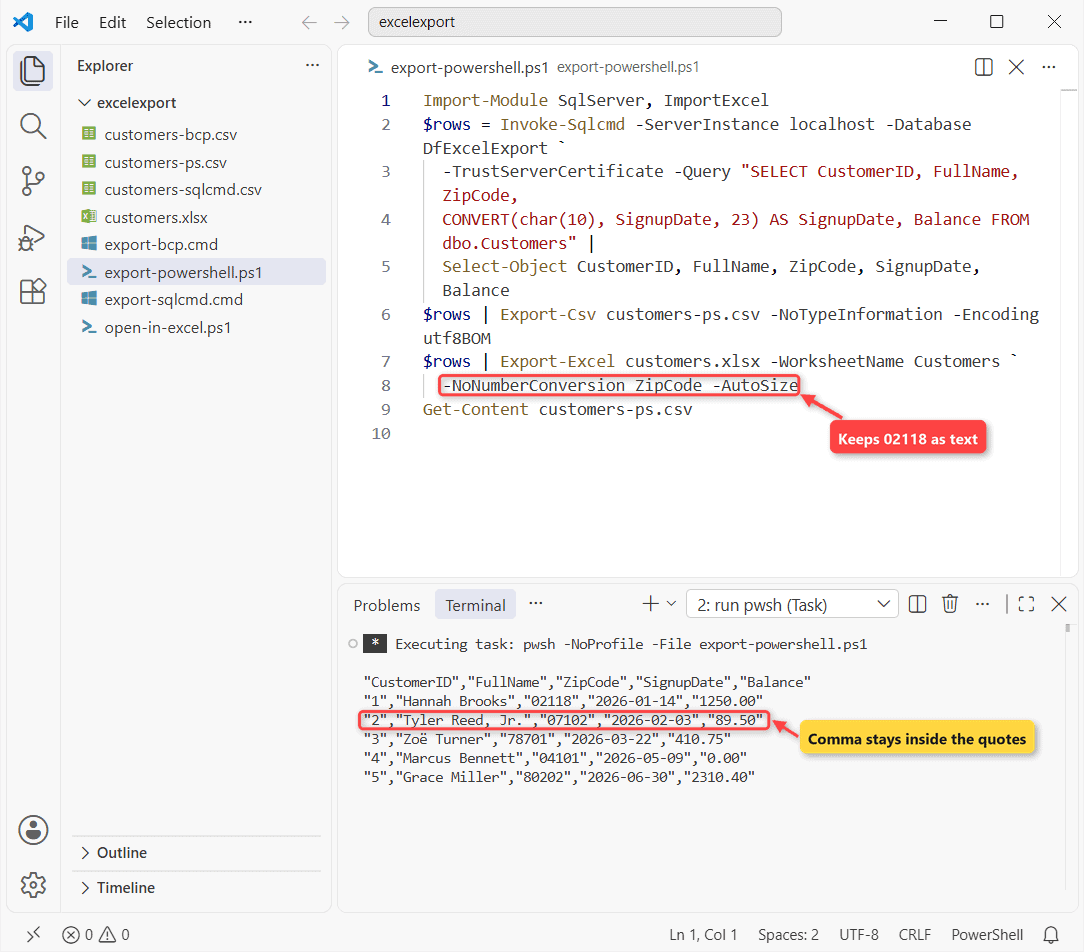
How does this work? Export-Csv quotes fields, so Tyler stays in one cell. Export-Excel writes the .xlsx, and -NoNumberConversion ZipCode keeps ZIPs as text.
Important: without the CONVERT, my dates came out in the PC’s regional format plus 00:00:00 (see convert a datetime to a string).
Why Does Excel Drop Leading Zeros When It Opens a CSV?
I opened the files through Excel’s COM object, with no window, and read the cells:
$xl = New-Object -ComObject Excel.Application
foreach ($f in 'customers-bcp.csv', 'customers-ps.csv', 'customers.xlsx') {
  $ws = $xl.Workbooks.Open((Join-Path $PWD $f)).Worksheets(1)
  '{0,-18} B3={1,-16} C2={2,-6} D2={3,-6} B4={4}' -f $f,
    $ws.Range('B3').Text, $ws.Range('C2').Value2,
    $ws.Range('D2').Value2, $ws.Range('B4').Text
  $ws.Parent.Close($false)
}
$xl.Quit()
What Excel stored:
customers-bcp.csv  B3=Tyler Reed       C2=2118   D2=46036  B4=Zoë Turner
customers-ps.csv   B3=Tyler Reed, Jr.  C2=2118   D2=46036  B4=Zoë Turner
customers.xlsx     B3=Tyler Reed, Jr.  C2=02118  D2=2026-01-14 B4=Zoë Turner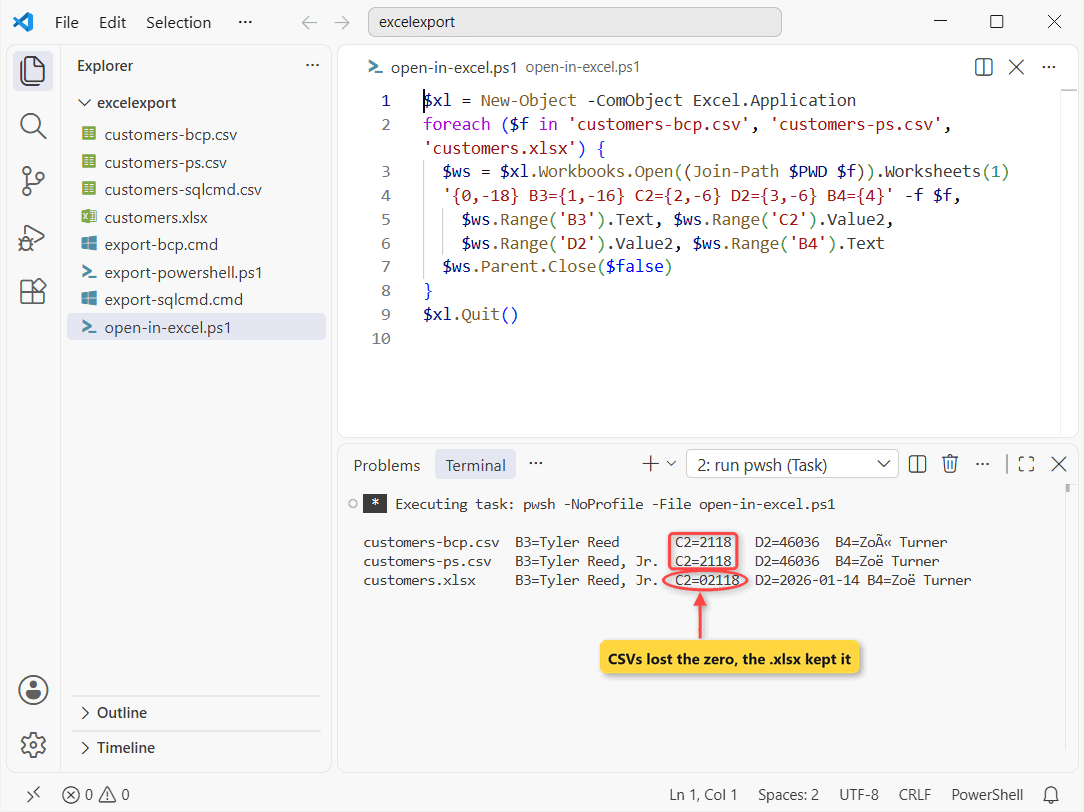
Both CSVs gave 2118, and D2 became 46036, the serial for 01/14/2026. The bcp file had no BOM, so Zoë became Zoë.
For a CSV, use Data > From Text/CSV and set ZipCode to Text; for dates see SQL Server date format.
Export Data From SQL Server to Excel Automatically
Schedule export-powershell.ps1 with Task Scheduler or an Agent CmdExec step (if Agent won’t start).
Skip ACE there: Microsoft doesn’t support it unattended, which rules out OPENROWSET(‘Microsoft.ACE.OLEDB.16.0’, …). That also needs Ad Hoc Distributed Queries enabled, which I left off.
Which Export Method to Pick, and Things to Keep in Mind
| Method | Writes | Best for |
|---|---|---|
| SSMS grid | .xlsx, CSV | One-off |
| Wizard | .xlsx | Whole tables |
| Excel Get Data | Live table | Refreshing reports |
| bcp / sqlcmd | CSV | Big or scripted dumps |
| PowerShell | CSV, .xlsx | Schedules, text kept |
- bcp writes no header or quotes; use
-t"|"for free text. - bcp
-cuses the OEM code page unless you add-C 65001;-wwrites UTF-16. - A worksheet holds 1,048,576 rows.
Next step: on Postgres, read PostgreSQL export table to CSV.
- Export MongoDB to CSV
- INSERT INTO SELECT to stage rows before a bcp run
Frequently Asked Questions
How do I always copy SSMS results with column headers?
Check Include column headers when copying or saving the results under Tools > Options > Query Results > SQL Server > Results to Grid.
Does bcp work with Azure SQL Database?
Yes, but -T isn’t supported; use -G for Microsoft Entra ID, per the bcp utility docs.
Why is long text cut at 255 characters in a wizard export?
The Excel driver treats text as 255-character strings unless a sampled row is longer. PowerShell avoids that.

Shivam Dogra is a cloud database developer and Team Lead at TSInfo Technologies, where he has worked since June 2021. He writes the SQL Server and Oracle tutorials on DatabaseFAQs.com, covering queries, joins, stored procedures, triggers and permissions. Shivam holds a Master of Computer Applications (MCA) from Chandigarh University.