
Dates stored in SQL Server have no display format, so when a report wants 07/04/2026 you have to convert the datetime to a string yourself. The quickest way is CONVERT with a style code:
DECLARE @d datetime = '2026-07-04 14:30';
SELECT CONVERT(varchar(10), @d, 101);   -- 07/04/2026
That returns 07/04/2026. Swap 101 for 23 and you get 2026-07-04; swap it for 112 and you get 20260704.
In this tutorial, I’ll cover every SQL Server convert datetime to string case I use on SQL Server 2025: a style-code table built from a real run, CAST, FORMAT() with culture, datetime2 and datetimeoffset, and the mistakes that quietly cut your strings short.
CONVERT vs CAST vs FORMAT: Datetime to String Syntax
All three functions turn a date into text, but only two of them let you choose the layout:
| Function | Syntax | You control the format with | Returns |
|---|---|---|---|
| CONVERT | CONVERT(varchar(n), date, style) | A style number (101, 112, 120, …) | varchar / nvarchar |
| CAST | CAST(date AS varchar(n)) | Nothing: default style only | varchar / nvarchar |
| FORMAT | FORMAT(date, 'pattern', 'culture') | .NET pattern + culture | nvarchar(4000) |
I reach for CONVERT first because it’s fast and works everywhere. FORMAT (SQL Server 2012+) is the flexible one, and CAST is for when the default is fine. Our SQL Server CONVERT function guide covers its non-date uses.
I’ll use one small dbo.Orders table in a demo database called DfqDateString. Note order 1001, placed on 07/04/2026 at 2:30:15.250 PM:
CREATE TABLE dbo.Orders (
    OrderID  int          PRIMARY KEY,
    Customer nvarchar(15) NOT NULL,
    City     nvarchar(13) NOT NULL,
    PlacedAt datetime     NOT NULL
);
INSERT INTO dbo.Orders (OrderID, Customer, City, PlacedAt) VALUES
(1001, N'Megan Bowen',  N'Seattle',   '2026-07-04 14:30:15.250'),
(1002, N'Alex Wilber',  N'Austin',    '2026-07-04 09:05:00'),
(1003, N'Adele Vance',  N'San Diego', '2026-08-17 18:45:30'),
(1004, N'Lee Gu',       N'New York',  '2026-09-01 07:00:00'),
(1005, N'Nestor Wilke', N'Chicago',   '2026-12-24 23:59:59.997');
SQL Server Date Format Style Codes for CONVERT (Tested Table)
I didn’t want to copy a style list, so I ran every date style against order 1001’s value in one query:
SET NOCOUNT ON;
DECLARE @d datetime = '2026-07-04 14:30:15.250';

SELECT s.Style, CONVERT(varchar(30), @d, s.Style) AS Result
FROM (VALUES (0),(1),(2),(3),(4),(5),(6),(7),(8),(9),(10),(11),(12),(13),(14),(20),(21),(22),(23),(24),(25),(100),(101),(102),(103),(104),(105),(106),(107),(108),(109),(110),(111),(112),(113),(114),(120),(121),(126),(127)) AS s(Style)
ORDER BY s.Style;
Here’s what SQL Server 2025 returned. The short-year column shows the style without the century, when there is one:
| Style | Result (07/04/2026 2:30:15.250 PM) | Short-year style | Standard |
|---|---|---|---|
| 100 | Jul 4 2026 2:30PM | 0: same | Default for datetime |
| 101 | 07/04/2026 | 1: 07/04/26 | U.S. |
| 102 | 2026.07.04 | 2: 26.07.04 | ANSI |
| 103 | 04/07/2026 | 3: 04/07/26 | British/French |
| 104 | 04.07.2026 | 4: 04.07.26 | German |
| 105 | 04-07-2026 | 5: 04-07-26 | Italian |
| 106 | 04 Jul 2026 | 6: 04 Jul 26 | – |
| 107 | Jul 04, 2026 | 7: Jul 04, 26 | – |
| 108 | 14:30:15 | 8: same 24: same | Time, 24-hour |
| 109 | Jul 4 2026 2:30:15:250PM | 9: same | Default + milliseconds |
| 110 | 07-04-2026 | 10: 07-04-26 | USA |
| 111 | 2026/07/04 | 11: 26/07/04 | Japan |
| 112 | 20260704 | 12: 260704 | ISO |
| 113 | 04 Jul 2026 14:30:15:250 | 13: same | Europe default + ms |
| 114 | 14:30:15:250 | 14: same | Time + ms |
| 120 | 2026-07-04 14:30:15 | 20: same | ODBC canonical |
| 121 | 2026-07-04 14:30:15.250 | 21: same 25: same | ODBC + milliseconds |
| 22 | 07/04/26 2:30:15 PM | – | U.S. with AM/PM |
| 23 | 2026-07-04 | – | ISO 8601 date |
| 126 | 2026-07-04T14:30:15.250 | – | ISO 8601 |
| 127 | 2026-07-04T14:30:15.250 | – | ISO 8601 with Z |
Note: styles 0, 9, 13, 20 and 21 already print the four-digit year, so they match their 100-series twins. Style 127 adds the Z only for a datetimeoffset value, which I show further down.
For a narrative walk through the most popular layouts, see our SQL Server date format examples.
CAST Datetime to Varchar (No Style Allowed)
CAST is the ANSI way to get a string, but it doesn’t take a style, so you’ll get each type’s default layout:
SET NOCOUNT ON;
DECLARE @d datetime = '2026-07-04 14:30:15.250';

SELECT CAST(@d AS varchar(19))                     AS FromDatetime,
       CAST(CAST(@d AS datetime2(3)) AS varchar(23)) AS FromDatetime2,
       CAST(CAST(@d AS date) AS varchar(10))         AS FromDate;
Output:
FromDatetime        FromDatetime2           FromDate
------------------- ----------------------- ----------
Jul  4 2026  2:30PM 2026-07-04 14:30:15.250 2026-07-04
The datetime comes back as Jul 4 2026 2:30PM (style 0), while datetime2 and date use the ISO-like style 121. If you need a specific layout, switch to CONVERT.
The same CAST rules apply when you convert an integer to a string in SQL Server.
Convert a Datetime Column to String mm/dd/yyyy (Styles 101, 1, 110)
Same orders table, now converting the PlacedAt column with the U.S. styles:
SET NOCOUNT ON;
SELECT OrderID,
       CONVERT(varchar(10), PlacedAt, 101) AS Style101,
       CONVERT(varchar(8),  PlacedAt, 1)   AS Style1,
       CONVERT(varchar(10), PlacedAt, 110) AS Style110,
       CONVERT(varchar(19), PlacedAt, 100) AS Style100
FROM dbo.Orders;
Output:
OrderID     Style101   Style1   Style110   Style100
----------- ---------- -------- ---------- -------------------
       1001 07/04/2026 07/04/26 07-04-2026 Jul  4 2026  2:30PM
       1002 07/04/2026 07/04/26 07-04-2026 Jul  4 2026  9:05AM
       1003 08/17/2026 08/17/26 08-17-2026 Aug 17 2026  6:45PM
       1004 09/01/2026 09/01/26 09-01-2026 Sep  1 2026  7:00AM
       1005 12/24/2026 12/24/26 12-24-2026 Dec 24 2026 11:59PM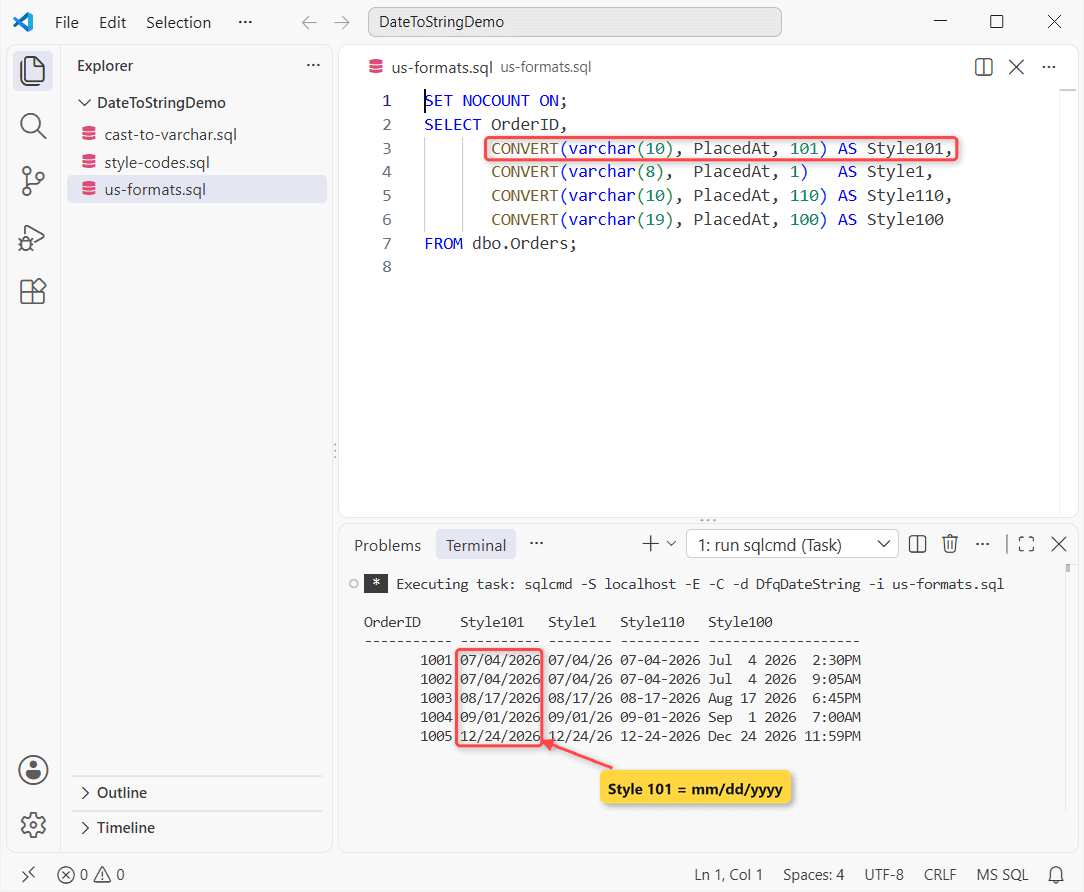
Order 1001 shows 07/04/2026 with 101 but 07/04/26 with style 1. I avoid the two-digit styles: SQL Server reads 49 as 2049 and 50 as 1950 when you convert them back.
Pro Tip: size varchar to the style. Style 101 needs 10 characters and style 100 needs 19. For month names instead of numbers, see how to get the month name from a date.
Convert Date to String yyyy-mm-dd and ISO 8601 (Styles 23, 120, 126)
For files, APIs and anything that has to sort as text, I use the ISO styles on the same column:
SET NOCOUNT ON;
SELECT OrderID,
       CONVERT(varchar(10), PlacedAt, 23)  AS IsoDate,
       CONVERT(varchar(19), PlacedAt, 120) AS Style120,
       CONVERT(varchar(23), PlacedAt, 126) AS Iso8601
FROM dbo.Orders;
Output:
OrderID     IsoDate    Style120            Iso8601
----------- ---------- ------------------- -----------------------
       1001 2026-07-04 2026-07-04 14:30:15 2026-07-04T14:30:15.250
       1002 2026-07-04 2026-07-04 09:05:00 2026-07-04T09:05:00
       1003 2026-08-17 2026-08-17 18:45:30 2026-08-17T18:45:30
       1004 2026-09-01 2026-09-01 07:00:00 2026-09-01T07:00:00
       1005 2026-12-24 2026-12-24 23:59:59 2026-12-24T23:59:59.997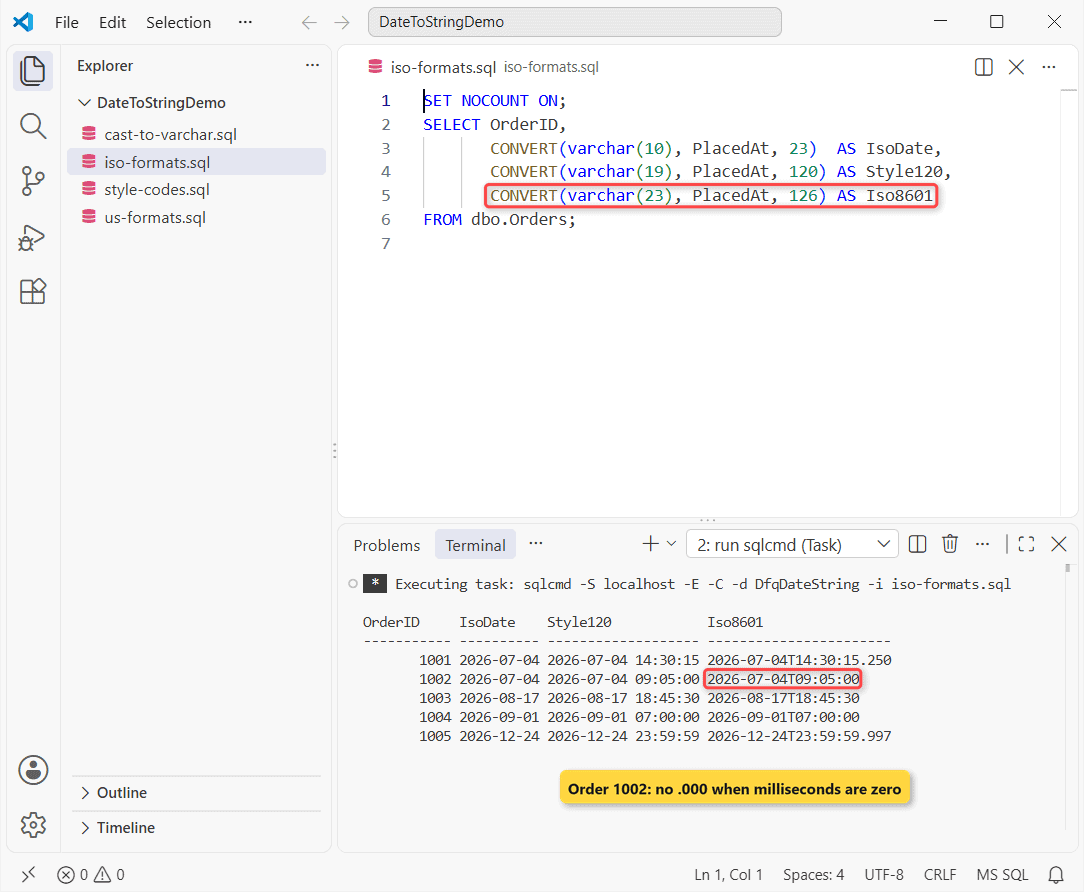
Style 23 gives 2026-07-04, a date-only string. Look at order 1002: style 126 printed 2026-07-04T09:05:00 with no .000, because ISO 8601 output hides zero milliseconds.
If you only want the date part as a real date, not text, convert the datetime to date instead and keep it sortable.
How Do You Get yyyymmddhhmmss in SQL Server?
There’s no style that prints yyyymmddhhmmss, so you glue style 112 to style 108 without its colons, or let FORMAT do it:
SET NOCOUNT ON;
SELECT OrderID,
       CONVERT(varchar(8), PlacedAt, 112) AS yyyymmdd,
       CAST(CONVERT(varchar(8), PlacedAt, 112)
            + REPLACE(CONVERT(varchar(8), PlacedAt, 108), ':', '')
            AS varchar(14)) AS Stamp,   -- REPLACE returns varchar(8000)
       CAST(FORMAT(PlacedAt, 'yyyyMMddHHmmss') AS varchar(14)) AS FormatStamp
FROM dbo.Orders;
Output:
OrderID     yyyymmdd Stamp          FormatStamp
----------- -------- -------------- --------------
       1001 20260704 20260704143015 20260704143015
       1002 20260704 20260704090500 20260704090500
       1003 20260817 20260817184530 20260817184530
       1004 20260901 20260901070000 20260901070000
       1005 20261224 20261224235959 20261224235959
Both build 20260704143015 for order 1001. The CONVERT + REPLACE function version is wordier but much faster on big tables; style 112 alone gives 20260704.
Convert Datetime to a Time-Only String (hh:mm:ss and AM/PM)
Styles 108 and 114 return just the time on a 24-hour clock. If you’d rather show AM/PM, cut the end off style 100 or use FORMAT:
SET NOCOUNT ON;
SELECT OrderID,
       CONVERT(varchar(8),  PlacedAt, 108) AS Time24,
       CONVERT(varchar(12), PlacedAt, 114) AS WithMs,
       LTRIM(RIGHT(CONVERT(varchar(19), PlacedAt, 100), 7))
           AS Time12,
       CAST(FORMAT(PlacedAt, 'hh:mm tt', 'en-US') AS varchar(8))
           AS FormatAmPm
FROM dbo.Orders;
Output:
OrderID     Time24   WithMs       Time12  FormatAmPm
----------- -------- ------------ ------- ----------
       1001 14:30:15 14:30:15:250 2:30PM  02:30 PM
       1002 09:05:00 09:05:00:000 9:05AM  09:05 AM
       1003 18:45:30 18:45:30:000 6:45PM  06:45 PM
       1004 07:00:00 07:00:00:000 7:00AM  07:00 AM
       1005 23:59:59 23:59:59:997 11:59PM 11:59 PM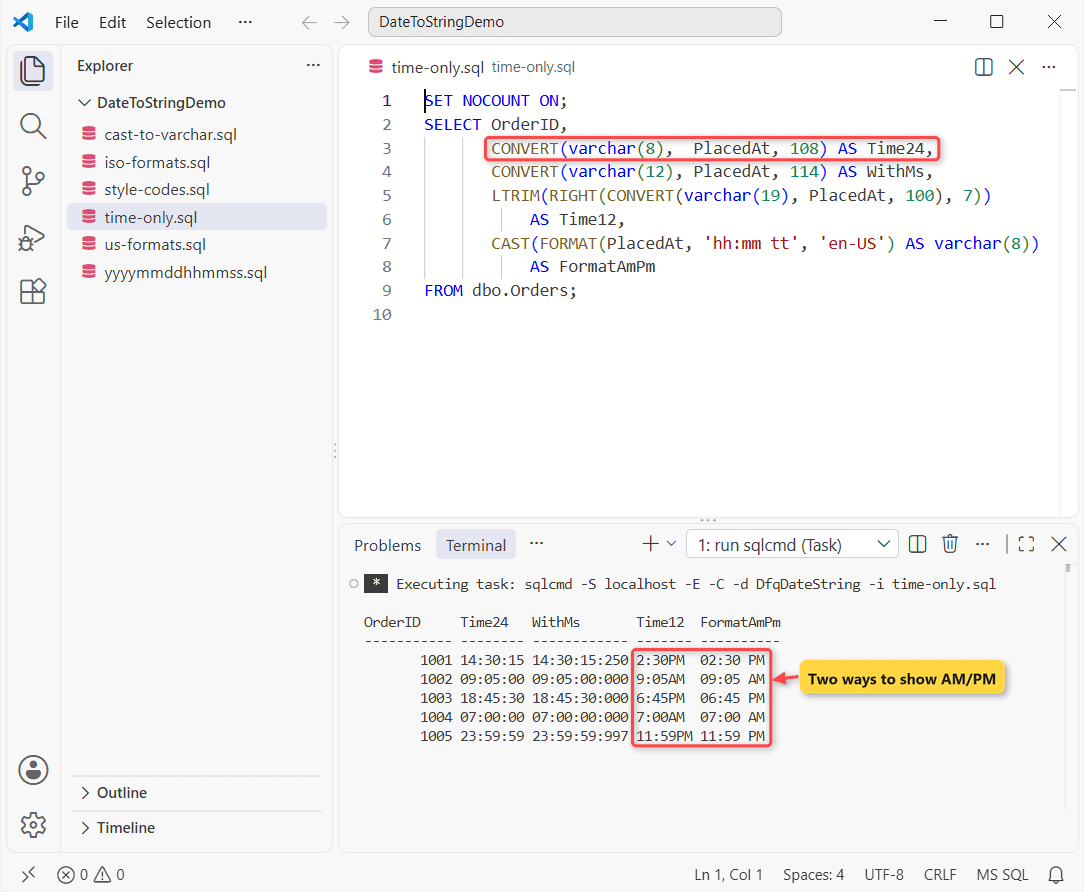
Order 1003 at 6:45 PM shows 18:45:30, 6:45PM and 06:45 PM. FORMAT pads the hour with a zero; the style 100 trick doesn’t.
Important: FORMAT on a time value needs escaped colons, or you get NULL:
SET NOCOUNT ON;
DECLARE @t time(0) = '14:30:15';

SELECT CAST(FORMAT(@t, N'hh:mm')  AS nvarchar(8)) AS Unescaped,
       CAST(FORMAT(@t, N'hh\:mm') AS nvarchar(8)) AS Escaped;
Output:
Unescaped Escaped
--------- --------
NULL      14:30
Need the weekday or quarter instead? Our SQL Server date and time functions guide has DATENAME and DATEPART.
SQL Server FORMAT() for Custom Date Strings and Culture
FORMAT takes a .NET pattern, so you can write layouts no style number has, like 'MM/dd/yyyy hh:mm tt'. Pass the culture every time:
SET NOCOUNT ON;
DECLARE @d datetime = '2026-07-04 14:30:15';
-- FORMAT returns nvarchar(4000); CAST keeps the columns narrow
SELECT p.Pattern,
       CAST(FORMAT(@d, p.Pattern, 'en-US') AS nvarchar(24))
           AS Result
FROM (VALUES (N'MM/dd/yyyy hh:mm tt'), (N'd'), (N'D'),
             (N'MMMM d, yyyy'), (N'ddd, MMM d'),
             (N'yyyy-MM-dd HH:mm')) AS p(Pattern);

SELECT CAST(FORMAT(@d, 'd', 'en-US') AS nvarchar(10)) AS US,
       CAST(FORMAT(@d, 'd', 'en-GB') AS nvarchar(10)) AS UK,
       CAST(FORMAT(@d, 'd', 'de-DE') AS nvarchar(10)) AS Germany;
Output:
Pattern             Result
------------------- ------------------------
MM/dd/yyyy hh:mm tt 07/04/2026 02:30 PM
d                   7/4/2026
D                   Saturday, July 4, 2026
MMMM d, yyyy        July 4, 2026
ddd, MMM d          Sat, Jul 4
yyyy-MM-dd HH:mm    2026-07-04 14:30
US         UK         Germany
---------- ---------- ----------
7/4/2026   04/07/2026 04.07.2026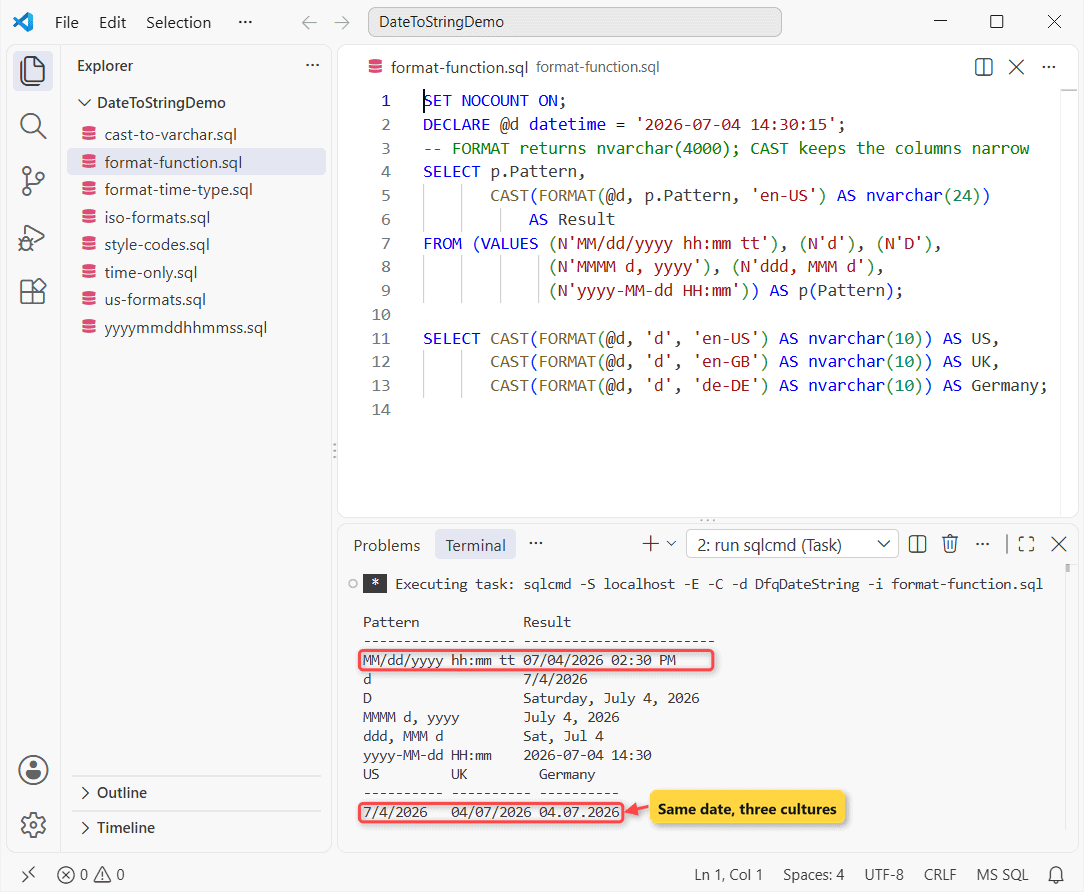
The D pattern spelled out the weekday, and the same date reads 7/4/2026 in en-US but 04/07/2026 in en-GB. In patterns, MM is month, mm is minutes and HH is the 24-hour clock.
Is FORMAT Slower Than CONVERT?
Yes, noticeably. FORMAT runs through the .NET CLR for every row. I timed both on 500,000 generated datetimes:
SET NOCOUNT ON;
DROP TABLE IF EXISTS #DateLoad;
SELECT TOP (500000)
       DATEADD(minute, ROW_NUMBER() OVER (ORDER BY (SELECT NULL)), '2026-01-01') AS PlacedAt
INTO #DateLoad
FROM sys.all_columns AS a CROSS JOIN sys.all_columns AS b;

DECLARE @t datetime2, @x varchar(10), @n nvarchar(10);
SET @t = SYSDATETIME();
SELECT @x = MAX(CONVERT(varchar(10), PlacedAt, 101)) FROM #DateLoad OPTION (MAXDOP 1);
PRINT CONCAT('CONVERT style 101: ', DATEDIFF(ms, @t, SYSDATETIME()), ' ms');

SET @t = SYSDATETIME();
SELECT @n = MAX(FORMAT(PlacedAt, 'MM/dd/yyyy', 'en-US')) FROM #DateLoad OPTION (MAXDOP 1);
PRINT CONCAT('FORMAT MM/dd/yyyy: ', DATEDIFF(ms, @t, SYSDATETIME()), ' ms');
Output:
CONVERT style 101: 1464 ms
FORMAT MM/dd/yyyy: 4789 ms
In my run CONVERT took 1,464 ms and FORMAT took 4,789 ms, about 3.3x as long. Timings vary with the machine and its load, but FORMAT lost every run, so I keep it for small result sets and reports.
For the current date and time, CURRENT_TIMESTAMP in SQL Server works with either function.
Convert datetime2 and datetimeoffset to String (With Time Zone)
The newer types don’t stop at milliseconds, and datetimeoffset keeps its offset. Here’s each one, plus a time zone change on order 1001:
SET NOCOUNT ON;
DECLARE @d2 datetime2(7)      = '2026-07-04 14:30:15.25';
DECLARE @o  datetimeoffset(3) = '2026-07-04 14:30:15.250 -07:00';

SELECT CAST(@d2 AS varchar(27))       AS Dt2Cast,
       CONVERT(varchar(23), @d2, 121) AS Dt2Ms;
SELECT CONVERT(varchar(29), @o, 126) AS Offset126,
       CONVERT(varchar(24), @o, 127) AS Utc127;
SELECT Customer,
       CONVERT(varchar(19),
               PlacedAt AT TIME ZONE 'Pacific Standard Time'
                        AT TIME ZONE 'Eastern Standard Time',
               120) AS EasternTime
FROM dbo.Orders WHERE City = N'Seattle';
Output:
Dt2Cast                     Dt2Ms
--------------------------- -----------------------
2026-07-04 14:30:15.2500000 2026-07-04 14:30:15.250
Offset126                     Utc127
----------------------------- ------------------------
2026-07-04T14:30:15.250-07:00 2026-07-04T21:30:15.250Z
Customer        EasternTime
--------------- -------------------
Megan Bowen     2026-07-04 17:30:15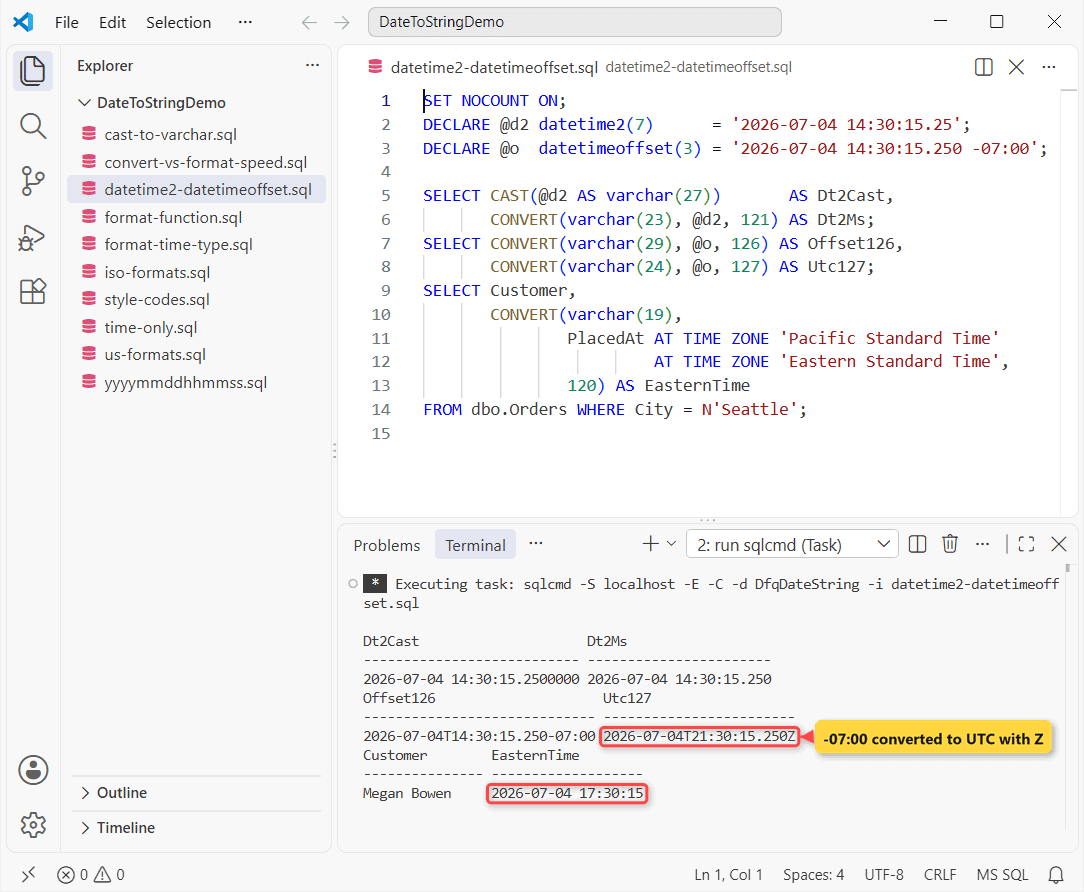
CAST printed all seven datetime2 decimals, while varchar(23) with style 121 trimmed it to milliseconds. Style 127 moved 2:30 PM at -07:00 to 21:30 UTC with a Z.
AT TIME ZONE treated the Seattle time as Pacific and showed it as 5:30 PM Eastern. Compare the types in datetime vs datetime2 in SQL Server.
How Do You Convert a String Back to a Date?
It’s the same call in reverse: you name a date type, and the style tells SQL Server how to read your text:
SET NOCOUNT ON;
SELECT CONVERT(date, '07/04/2026', 101)                    AS FromUs,
       CONVERT(datetime2(0), '2026-07-04T14:30:15', 126)   AS FromIso,
       TRY_CONVERT(date, '07/32/2026', 101)                AS BadDay;
Output:
FromUs           FromIso                                BadDay
---------------- -------------------------------------- ----------------
      2026-07-04                    2026-07-04 14:30:15             NULL
Style 101 read 07/04/2026 as July 4, and TRY_CONVERT returned NULL for July 32 instead of failing. There’s more in SQL Server convert string to date, and the conversion failed when converting date and/or time error fix.
Common Mistakes When You Convert Datetime to Varchar
These four lines all run without an error, which is why they slip into production:
SET NOCOUNT ON;
DECLARE @d datetime       = '2026-07-04 14:30';
DECLARE @o datetimeoffset = '2026-07-04 14:30:15.25 -07:00';
DECLARE @s varchar        = CONVERT(varchar(10), @d, 101);

SELECT CONVERT(varchar, @o, 126)                AS NoLength,
       @s                                       AS OneChar,
       CONVERT(varchar(8), @d, 101)             AS TooShort,
       CONVERT(varchar(10), '2026-07-04', 101)  AS StyleIgnored;
Output:
NoLength                       OneChar TooShort StyleIgnored
------------------------------ ------- -------- ------------
2026-07-04T14:30:15.2500000-07 0       07/04/20 2026-07-04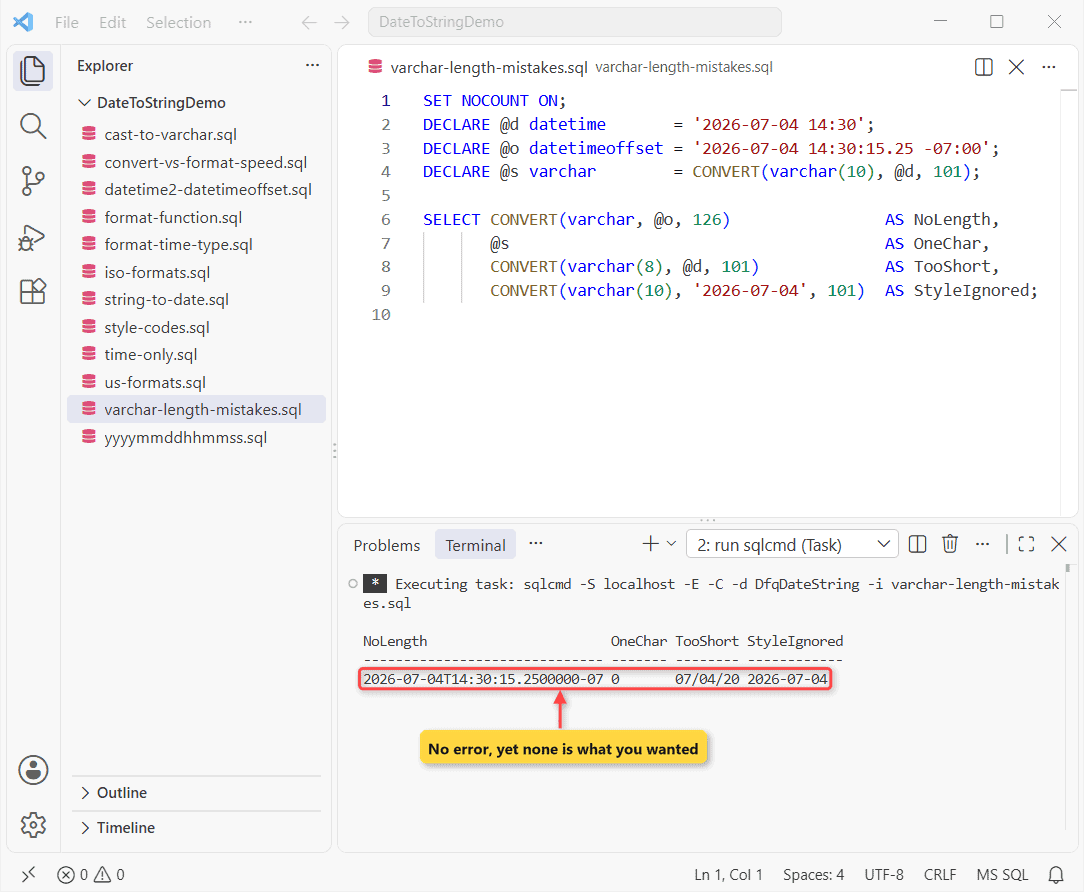
- No length in CONVERT:
varcharmeans 30 characters, so the offset was cut to2026-07-04T14:30:15.2500000-07. - No length in DECLARE:
DECLARE @s varcharis varchar(1), so only0survived. - Too short:
varchar(8)silently cut 07/04/2026 to 07/04/20. - Style ignored: the input was already text, so style 101 did nothing. Check the column data type first.
The session language is the other trap. Under SET LANGUAGE British, FORMAT without a culture and text dates both change meaning:
SET NOCOUNT ON;
DECLARE @d datetime = '2026-07-04 14:30';
SET LANGUAGE British;

SELECT CAST(FORMAT(@d, 'd') AS nvarchar(10))          AS SessionCulture,
       CAST(FORMAT(@d, 'd', 'en-US') AS nvarchar(10)) AS FixedCulture,
       CONVERT(date, '07/04/2026')                    AS UsText,
       CONVERT(datetime, '2026-07-04')                AS DashedText,
       CONVERT(datetime, '20260704')                  AS Unseparated;

SET LANGUAGE us_english;
Output:
Changed language setting to British.
SessionCulture FixedCulture UsText           DashedText              Unseparated
-------------- ------------ ---------------- ----------------------- -----------------------
04/07/2026     7/4/2026           2026-04-07 2026-04-07 00:00:00.000 2026-07-04 00:00:00.000
Changed language setting to us_english.
FORMAT gave 04/07/2026, and both dashed and slashed text became April 7, because datetime follows DATEFORMAT. Only '20260704' stayed July 4, so pass a culture to FORMAT and send text dates as yyyymmdd.
If you format dates in other databases too, these follow the same idea:
- PostgreSQL date to string with TO_CHAR
- Oracle TO_CHAR date formats
- Fixed-length strings from integers in SQL Server
- The last day of the month in SQL Server
Frequently Asked Questions
How do I convert datetime to varchar in SQL Server?
Use CONVERT(varchar(10), your_date, 101) for 07/04/2026, or another style number for a different layout. Always give varchar a length.
How do I get a date as yyyy-mm-dd in SQL Server?
Use CONVERT(varchar(10), your_date, 23), or CAST(your_date AS date) if you want a real date. The full style list is in Microsoft’s CAST and CONVERT reference.
What is the default format when I convert datetime to string?
Style 0, Jul 4 2026 2:30PM, for datetime and smalldatetime. date, datetime2 and datetimeoffset default to style 121, yyyy-mm-dd hh:mi:ss plus fractions.
Why does FORMAT return NULL?
The pattern is invalid for the value, most often unescaped colons with a time value. An invalid culture raises an error instead. See the FORMAT (Transact-SQL) reference.
Should I store dates as strings?
No. Store date, datetime2 or datetimeoffset and convert only when you display or export, so sorting, indexes and date math keep working.

Shivam Dogra is a cloud database developer and Team Lead at TSInfo Technologies, where he has worked since June 2021. He writes the SQL Server and Oracle tutorials on DatabaseFAQs.com, covering queries, joins, stored procedures, triggers and permissions. Shivam holds a Master of Computer Applications (MCA) from Chandigarh University.