
You’ve got a column of full names or emails, and you need one piece of each value. SUBSTRING in SQL Server does that: SUBSTRING(expression, start, length) returns length characters beginning at start, counting the first character as 1.
Quick answer: SELECT SUBSTRING('Hannah Brooks', 1, 6); returns Hannah. Pair it with CHARINDEX when the cut point moves.
SUBSTRING Syntax and the Sample Customers Table
Tested on SQL Server 2025 (17.0.1000.7) Developer, sqlcmd in VS Code. The column examples use this table:
CREATE TABLE dbo.Customers (
    CustID   int          PRIMARY KEY,
    FullName nvarchar(20) NOT NULL,
    Email    varchar(30)  NULL,
    Phone    varchar(12)  NOT NULL
);
INSERT INTO dbo.Customers VALUES
(1, N'Hannah Brooks',  'hannah.brooks@acmeco.com', '614-555-0142'),
(2, N'Tyler Reed',     'treed@ohiomail.net',       '937-555-0188'),
(3, N'Grace Miller',   'grace@millerbakes.com',    '512-555-0127'),
(4, N'Marcus Bennett', NULL,                       '214-555-0163'),
(5, N'Cher',           'cher@example.com',         '303-555-0190');
Cher has no space in her name and Marcus has no email, and I left both in on purpose because they break the naive queries you’ll write later.
SET NOCOUNT ON;
SELECT SUBSTRING('Hannah Brooks', 1, 6)  AS First6,
       SUBSTRING('Hannah Brooks', 8, 6)  AS From8,
       SUBSTRING('Hannah Brooks', 8, 50) AS PastEnd,
       SUBSTRING('Hannah Brooks', 8)     AS NoLength;
Four calls on a literal:
First6 From8  PastEnd       NoLength
------ ------ ------------- -------------
Hannah Brooks Brooks        Brooks
You should see Hannah, then Brooks three times, because a length past the end just stops at the end. Skipping the length is new in SQL Server 2025. Older versions reject it.
How SUBSTRING Handles Start 0, Negative Start and NULL
Edge cases first:
SET NOCOUNT ON;
SELECT SUBSTRING('Hannah', 0, 3)   AS Start0,
       SUBSTRING('Hannah', -2, 5)  AS StartNeg2,
       SUBSTRING('Hannah', 20, 3)  AS PastLen,
       SUBSTRING('Hannah', 2, NULL) AS NullLen,
       SUBSTRING(CAST(NULL AS varchar(10)), 1, 3) AS NullText;
DECLARE @len int = -1, @x varchar(10);
BEGIN TRY
    SET @x = SUBSTRING('Hannah', 1, @len);
END TRY
BEGIN CATCH
    PRINT CONCAT('Msg ', ERROR_NUMBER(), ': ', ERROR_MESSAGE());
END CATCH;
Output:
Start0 StartNeg2 PastLen NullLen NullText
------ --------- ------- ------- --------
Ha     Ha                NULL    NULL
Msg 537: Invalid length parameter passed to the LEFT or SUBSTRING function.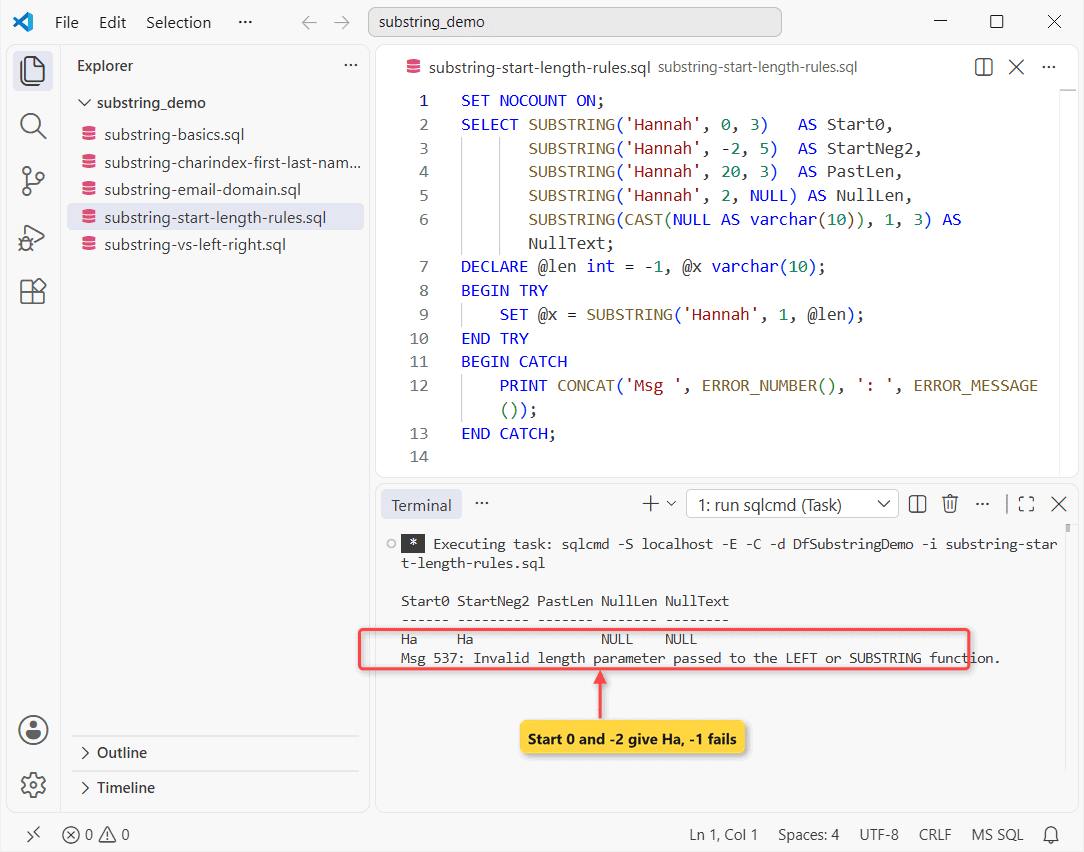
Start 0 with length 3 gave Ha, not Han. Positions before 1 still count, so you get start + length - 1 characters.
Start 20 returns an empty string. NULL in, NULL out.
A negative length from a variable raises Msg 537. My first try used a literal -1 instead, and that failed at compile time with Msg 536, which TRY can’t catch.
Extract the Email Domain (Text After a Delimiter)
CHARINDEX finds the @. SUBSTRING takes what’s before it and after it:
SET NOCOUNT ON;
SELECT Email,
       SUBSTRING(Email, 1, CHARINDEX('@', Email) - 1) AS UserName,
       SUBSTRING(Email, CHARINDEX('@', Email) + 1)    AS Domain
FROM dbo.Customers
WHERE CustID IN (1, 2, 4);
Result:
Email                     UserName                  Domain
------------------------- ------------------------- -------------------------
hannah.brooks@acmeco.com  hannah.brooks             acmeco.com
treed@ohiomail.net        treed                     ohiomail.net
NULL                      NULL                      NULL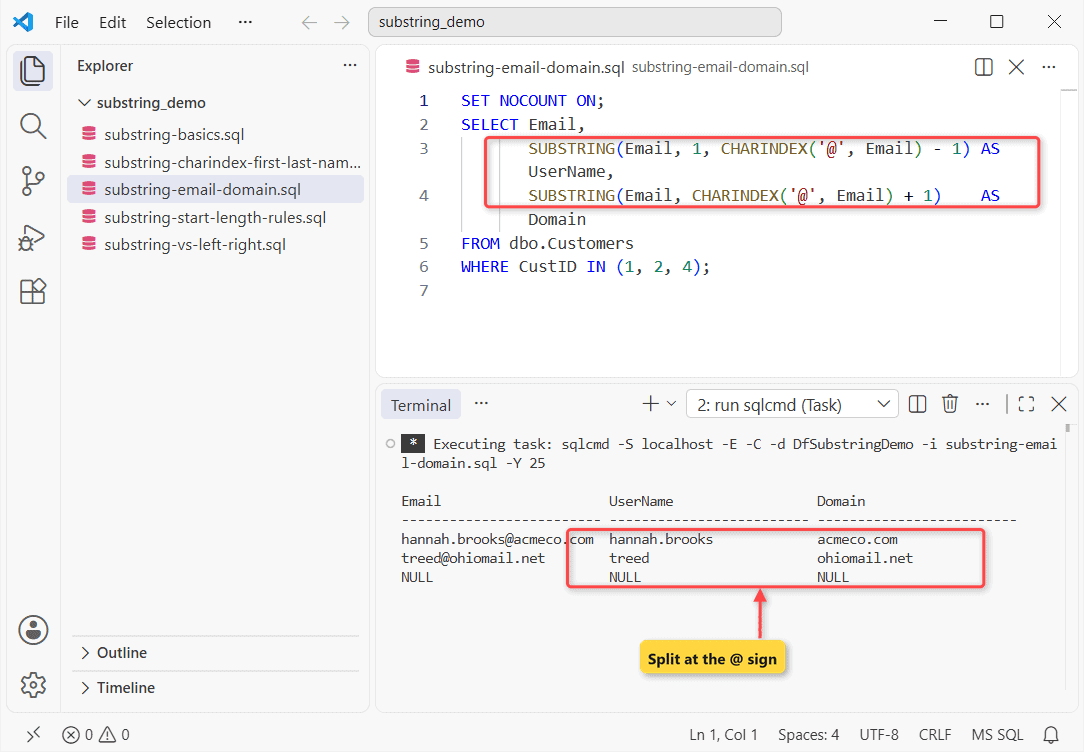
Marcus’s NULL email gives NULL, no error. To list users per domain, use STRING_AGG in SQL Server.
Split First and Last Name With SUBSTRING and CHARINDEX
Same idea with a space, until it meets Cher: CHARINDEX returns 0, the length becomes -1, and the query dies.
SET NOCOUNT ON;
BEGIN TRY
    SELECT SUBSTRING(FullName, 1, CHARINDEX(' ', FullName) - 1)
           AS FirstName
    FROM dbo.Customers WHERE CustID IN (4, 5);
END TRY
BEGIN CATCH
    PRINT CONCAT('Msg ', ERROR_NUMBER(), ': ', ERROR_MESSAGE());
END CATCH;
-- fix: append a space so CHARINDEX never returns 0
SELECT FullName,
  SUBSTRING(FullName, 1, CHARINDEX(' ', FullName + ' ') - 1)
      AS FirstName,
  SUBSTRING(FullName, CHARINDEX(' ', FullName + ' ') + 1, 20)
      AS LastName
FROM dbo.Customers WHERE CustID IN (1, 2, 5);
Output:
FirstName
--------------------
Marcus
Msg 537: Invalid length parameter passed to the LEFT or SUBSTRING function.
FullName             FirstName            LastName
-------------------- -------------------- --------------------
Hannah Brooks        Hannah               Brooks
Tyler Reed           Tyler                Reed
Cher                 Cher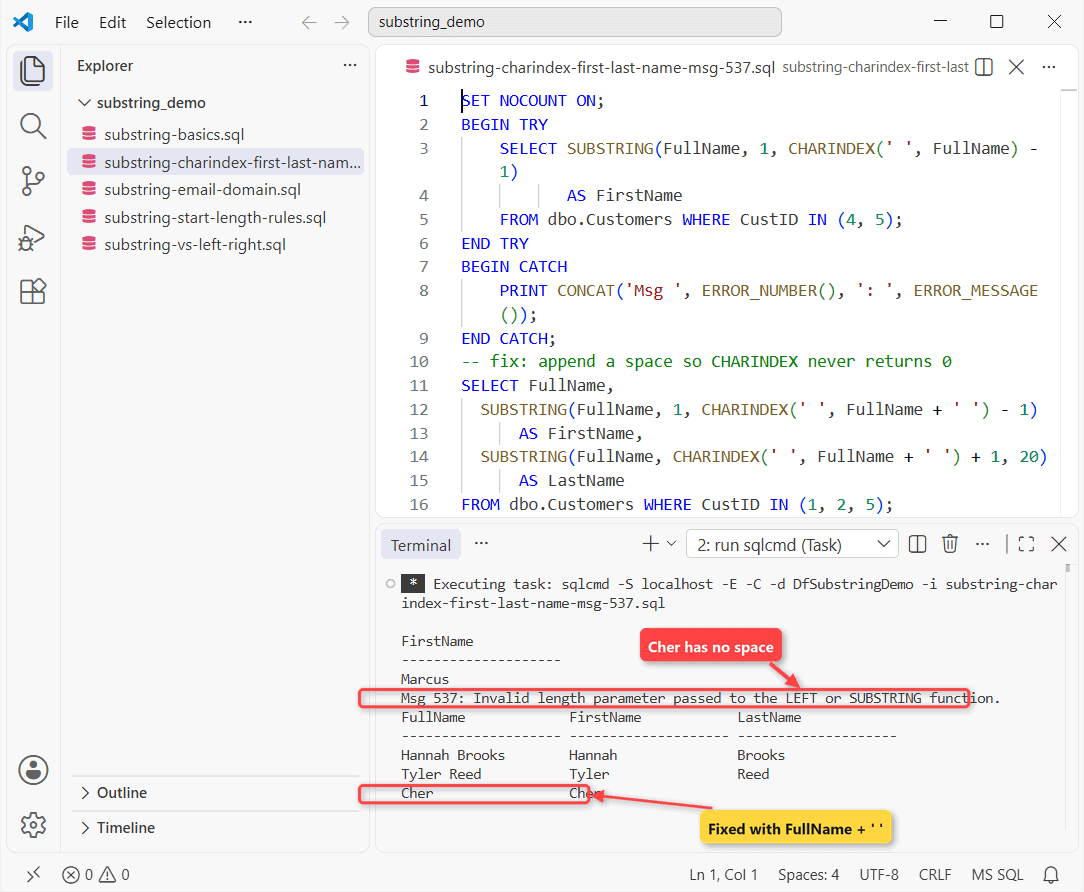
Marcus came back before the error. Appending a space means CHARINDEX always finds one.
Check your work: Cher’s LastName is an empty string, not NULL. To swap text rather than cut it, use REPLACE in SQL Server.
SUBSTRING From the Right vs LEFT and RIGHT
SUBSTRING can’t count from the end. Compute the start with LEN, or use RIGHT:
SET NOCOUNT ON;
SELECT Phone,
       LEFT(Phone, 3)                     AS AreaCode,
       SUBSTRING(Phone, 1, 3)             AS AreaCode2,
       RIGHT(Phone, 4)                    AS Last4,
       SUBSTRING(Phone, LEN(Phone) - 3, 4) AS Last4b
FROM dbo.Customers
WHERE CustID <= 2;
Area code and last four digits, both ways:
Phone        AreaCode AreaCode2 Last4 Last4b
------------ -------- --------- ----- ------
614-555-0142 614      614       0142  0142
937-555-0188 937      937       0188  0188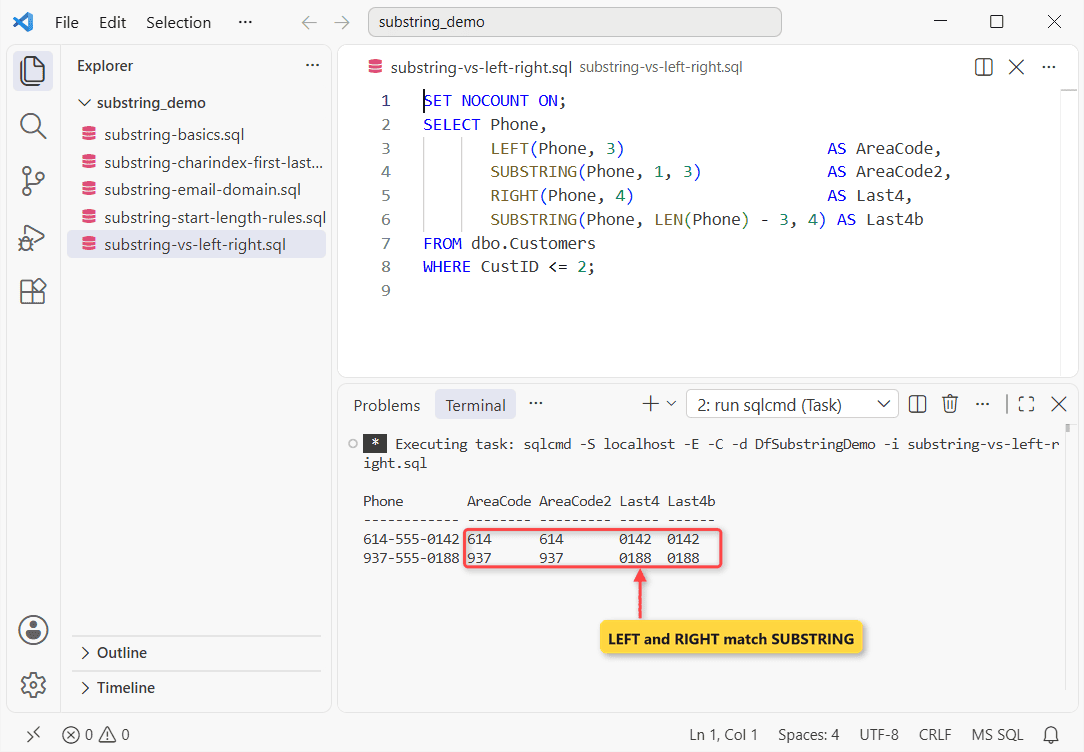
Same values. I’d pick LEFT and RIGHT because they read better at a glance. LEN ignores trailing spaces, so on padded char columns check the column’s data type before doing LEN math.
Does SUBSTRING Work on varbinary, text and ntext?
Yes. For binary, varbinary, text and image, start and length count bytes, and text comes back as varchar, ntext as nvarchar and image as varbinary.
Those old types are deprecated; CONVERT them to the max types.
Common SUBSTRING Errors and How to Fix Them
| Error | Cause | Fix |
|---|---|---|
| Msg 537 | Negative length at run time | Search col + ' ' |
| Msg 536 | Negative literal length | Fix the constant |
| Msg 8116 | Untyped NULL as the string | CAST it to varchar |
Slicing numbers? Do an int-to-string conversion first. Writing a slice into a short column raises string or binary data would be truncated.
Next step: on MariaDB, MariaDB SUBSTRING also accepts a negative start that counts from the end.
- Number the rows you’re slicing with ROW_NUMBER in SQL Server
- Dates need styles, not slicing: convert a datetime to a string
Frequently Asked Questions
Can start and length be bigint?
Yes. Values above 2,147,483,647 need a varchar(max) or varbinary(max) input, per SUBSTRING (Transact-SQL).
Does SUBSTRING in a WHERE clause use an index?
No, it runs on every row. Email LIKE 'grace%' returns the same rows and can seek an index.
Is SUBSTRING case-sensitive?
No, it only counts positions. CHARINDEX compares text and follows the column’s collation.

Shivam Dogra is a cloud database developer and Team Lead at TSInfo Technologies, where he has worked since June 2021. He writes the SQL Server and Oracle tutorials on DatabaseFAQs.com, covering queries, joins, stored procedures, triggers and permissions. Shivam holds a Master of Computer Applications (MCA) from Chandigarh University.