
Your Ohio warehouse exports five shipments, and the ship dates arrive as text like '11/17/2026'. The PostgreSQL to_date function turns them into real dates: to_date('11/17/2026', 'MM/DD/YYYY') returns the date 2026-11-17.
The catch: to_date is lenient. In my run, '11/20/26' with YYYY quietly became the year 26.
The six examples run from a text column to a WHERE filter. Tested on PostgreSQL 18.6 for Windows.
PostgreSQL TO_DATE Function Syntax
Here is the syntax:
to_date ( text, text ) → date| Argument | Required | What it means |
|---|---|---|
| string | Yes | Text to convert. NULL returns NULL. |
| format | Yes | Template showing where each part sits. |
The template patterns you’ll use most:
| Pattern | Matches | Example input |
|---|---|---|
YYYY | 4-digit year | 2026 |
MM / DD | month / day number | 11 / 20 |
Mon / Month | month name | Nov / November |
DY / Day | weekday (ignored) | Fri / Friday |
FX | strict-matching prefix | FXYYYY-MM-DD |
Return value: a date. Any time fields in the string are dropped.
Availability: all supported releases. PostgreSQL 10+ rejects out-of-range fields.
When to Use the TO_DATE Function in PostgreSQL
Use TO_DATE when you need to:
- load
MM/DD/YYYYtext from a CSV or Excel export - parse month names
- filter a text column by date
- clean dates before you insert into a table
Every example uses this shipments table. Run it once:
CREATE TABLE shipments (
  ship_id   int PRIMARY KEY,
  customer  varchar(20),
  ship_txt  text
);
INSERT INTO shipments VALUES
 (1, 'Hannah Brooks',  '10/28/2026'),
 (2, 'Tyler Reed',     '11/03/2026'),
 (3, 'Grace Miller',   '11/17/2026'),
 (4, 'Marcus Bennett', '11/20/2026'),
 (5, 'Olivia Carter',  NULL);
Example 1: Convert an MM/DD/YYYY Text Column to Dates
Let’s start with the common job. I want a date for every ship_txt value:
\pset null '(null)'

SELECT customer, ship_txt,
       to_date(ship_txt, 'MM/DD/YYYY') AS ship_date
FROM shipments
ORDER BY ship_id;
Output:
    customer    |  ship_txt  | ship_date
----------------+------------+------------
 Hannah Brooks  | 10/28/2026 | 2026-10-28
 Tyler Reed     | 11/03/2026 | 2026-11-03
 Grace Miller   | 11/17/2026 | 2026-11-17
 Marcus Bennett | 11/20/2026 | 2026-11-20
 Olivia Carter  | (null)     | (null)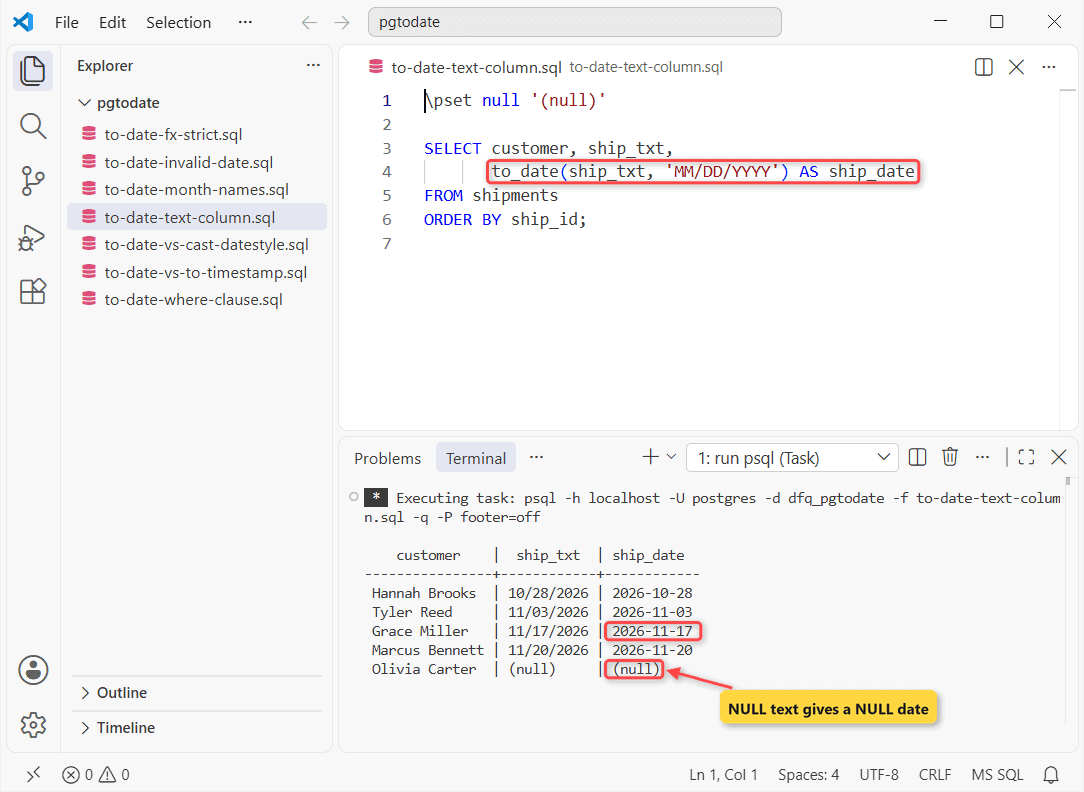
For Grace Miller, this returns 2026-11-17, a true date, while Olivia Carter’s NULL string comes back as (null) without an error.
psql shows ISO order; PostgreSQL date to string changes the display.
Example 2: Convert Month Names to a Date (Mon, Month, DY)
The goal is a date from month-name text:
SELECT to_date('November 20, 2026', 'Month DD, YYYY') AS full_name,
       to_date('Mon Nov 20 2026', 'DY Mon DD YYYY')   AS wrong_weekday;
Output:
 full_name  | wrong_weekday
------------+---------------
 2026-11-20 | 2026-11-20
Both return 2026-11-20. But 11/20/2026 is a Friday, and 'Mon' still passed: to_date reads DY, then ignores it. PostgreSQL DATE_PART gets the real weekday.
Example 3: What Happens with an Invalid Date like 2026-02-30?
Next, I want to see what to_date accepts and refuses:
\set ON_ERROR_STOP off
\set VERBOSITY terse

SELECT to_date('2026/11/20 x', 'YYYY-MM-DD') AS slash_and_junk,
       to_date('11/20/26', 'MM/DD/YYYY')     AS two_digit_year;
SELECT to_date('2026-02-30', 'YYYY-MM-DD');
Output:
 slash_and_junk | two_digit_year
----------------+----------------
 2026-11-20     | 0026-11-20

psql:to-date-invalid-date.sql:6: ERROR:  date/time field value out of range: "2026-02-30"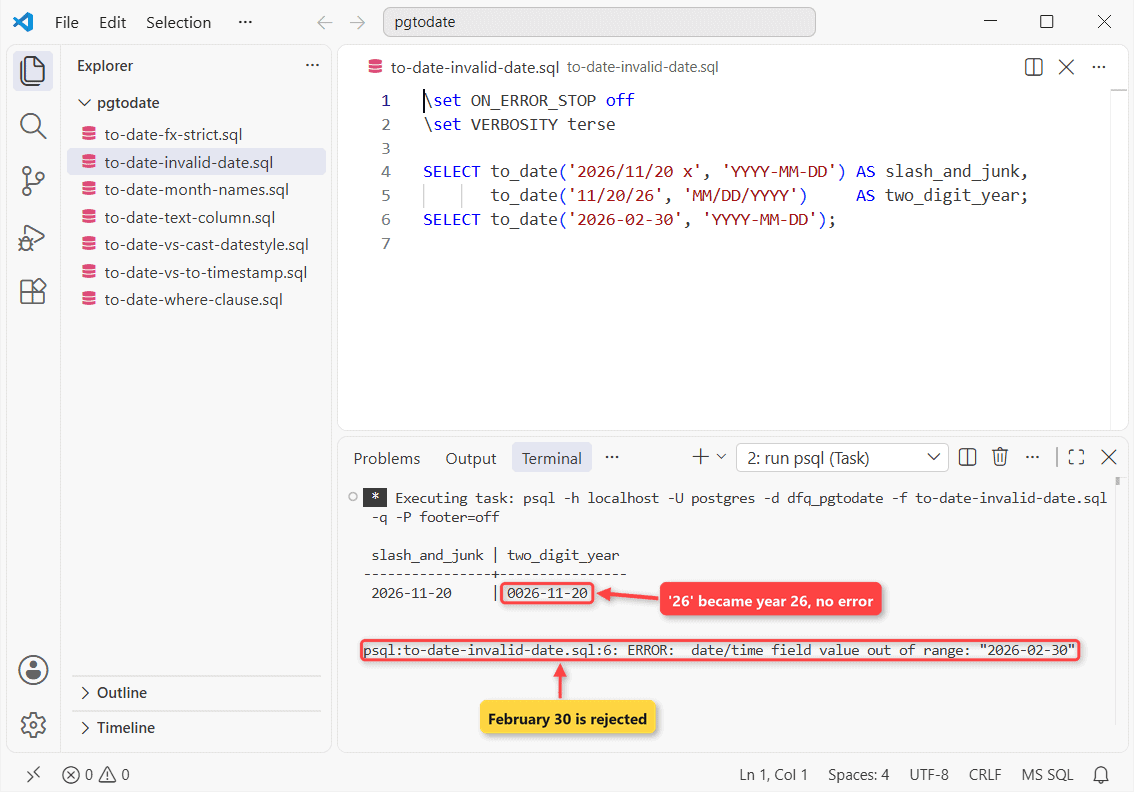
Slashes and junk pass. Worse, '11/20/26' becomes 0026-11-20, with no warning.
February 30 fails with date/time field value out of range: "2026-02-30". Before PostgreSQL 10, it rolled over into March.
Example 4: Strict Date Matching with FX
The goal is to reject a string with an extra space instead of guessing:
\set ON_ERROR_STOP off
\set VERBOSITY terse

SELECT to_date('Nov  20 2026', 'Mon DD YYYY')   AS loose;
SELECT to_date('2026  Nov 20', 'FXYYYY Mon DD');
SELECT to_date('2026 Nov 20', 'FXYYYY Mon DD')  AS strict;
Output:
   loose
------------
 2026-11-20

psql:to-date-fx-strict.sql:5: ERROR:  invalid value "" for "Mon"
   strict
------------
 2026-11-20
Without FX, the double space is skipped. With FX (always first), it fails with invalid value "" for "Mon".
Example 5: Keep the Time with to_timestamp
Say the export carries a pickup time too, and I want to keep it:
SET TimeZone = 'America/New_York';
SELECT to_date('11/20/2026 14:35', 'MM/DD/YYYY HH24:MI') AS to_date,
       to_timestamp('11/20/2026 14:35', 'MM/DD/YYYY HH24:MI')
         AS to_timestamp;
Output:
  to_date   |      to_timestamp
------------+------------------------
 2026-11-20 | 2026-11-20 14:35:00-05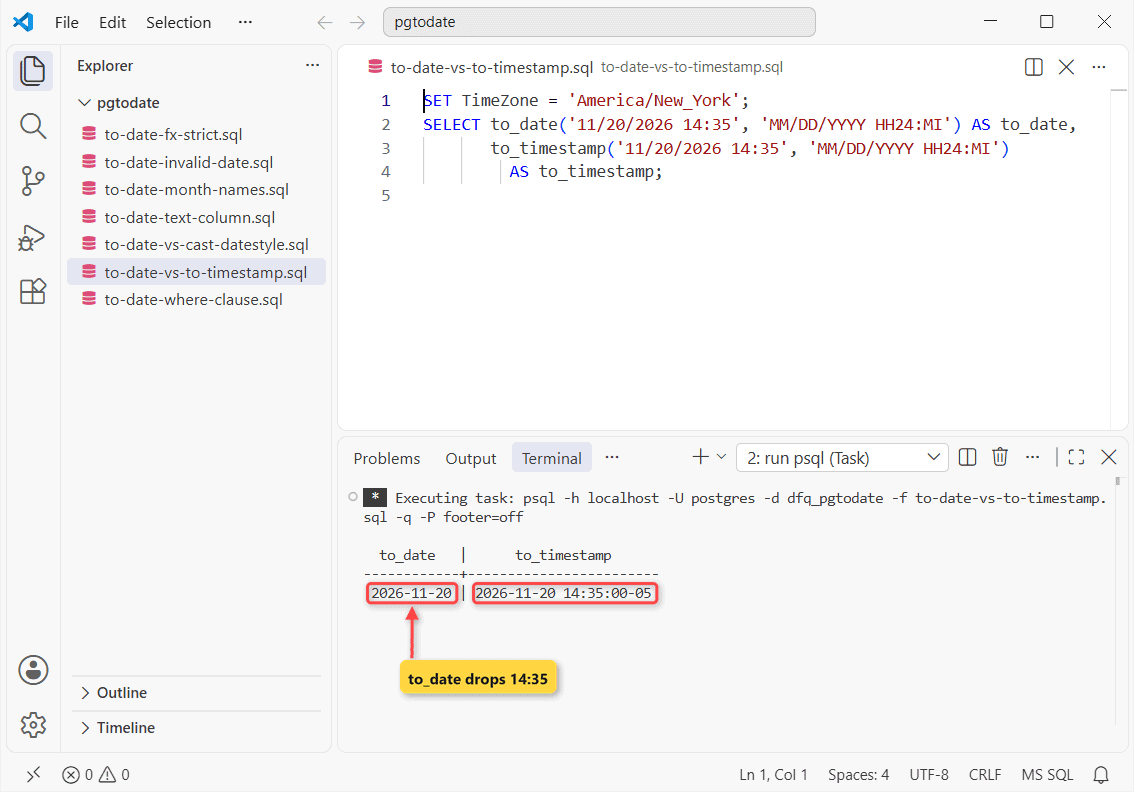
to_date returns 2026-11-20; to_timestamp keeps 14:35:00-05. My PostgreSQL to_timestamp tutorial goes deeper.
Example 6: Filter a Text Column by Date in WHERE
Last, a report. I want November 2026 shipments only:
SELECT customer, ship_txt
FROM shipments
WHERE to_date(ship_txt, 'MM/DD/YYYY')
      BETWEEN date '2026-11-01' AND date '2026-11-30'
ORDER BY ship_id;
Output:
    customer    |  ship_txt
----------------+------------
 Tyler Reed     | 11/03/2026
 Grace Miller   | 11/17/2026
 Marcus Bennett | 11/20/2026
That gives 3 rows. Run the SELECT again and you should see Olivia Carter still missing: NULL fails BETWEEN.
More on ranges in PostgreSQL date between two dates.
TO_DATE vs CAST (::date): Which Should You Use?
A cast follows DateStyle. US servers default to ISO, MDY; a DMY server reads it differently:
SET DateStyle = 'ISO, MDY';
SELECT '11/03/2026'::date AS mdy_cast;
SET DateStyle = 'ISO, DMY';
SELECT '11/03/2026'::date AS dmy_cast,
       to_date('11/03/2026', 'MM/DD/YYYY') AS to_date;
Output:
  mdy_cast
------------
 2026-11-03

  dmy_cast  |  to_date
------------+------------
 2026-03-11 | 2026-11-03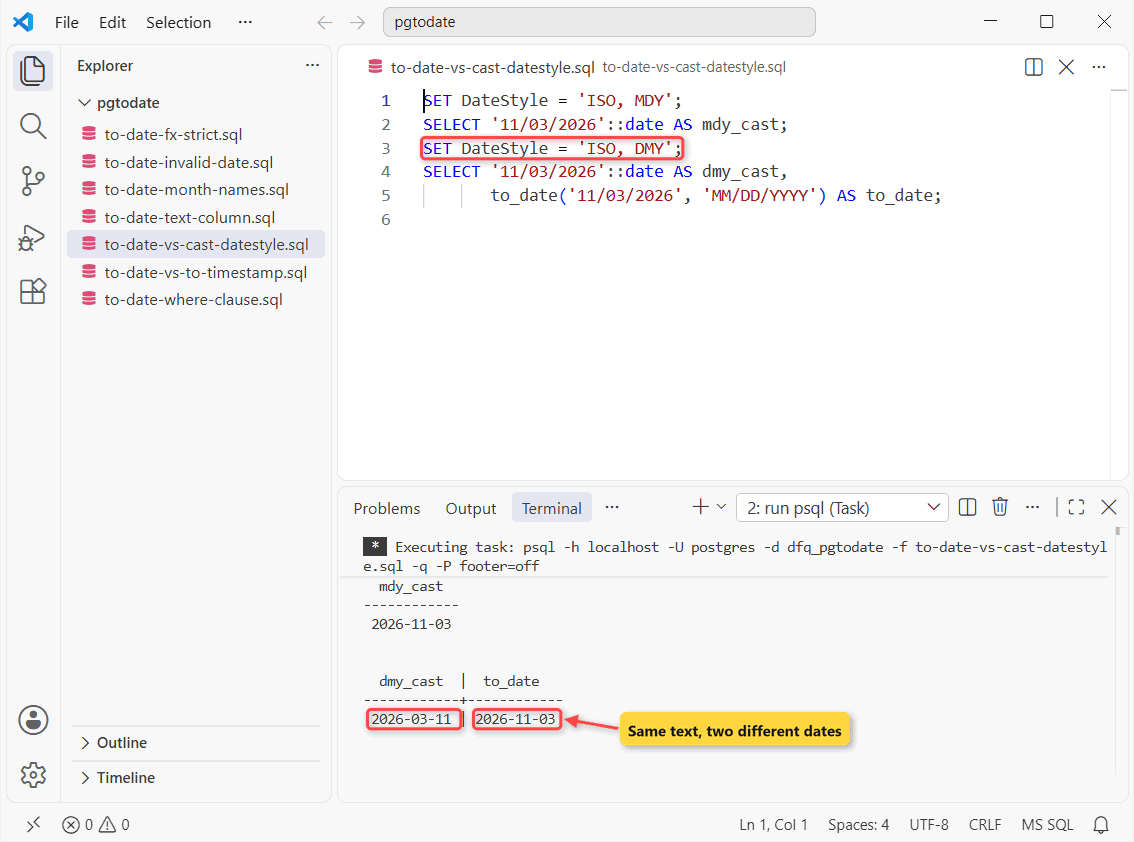
Under DMY, the cast turned 11/03 into March 11; to_date’s template kept November 3.
My rule of thumb: cast ISO strings, use to_date for the rest. Also see casting a timestamp to a date.
Tips & Common Mistakes in PostgreSQL TO_DATE
- Validate before a bulk load: a round trip,
to_char(to_date(s, 'MM/DD/YYYY'), 'MM/DD/YYYY') = s, returned false for'11/20/26'in my test. - An empty string doesn’t error.
to_date('', 'MM/DD/YYYY')returned0001-01-01 BCin my test, so turn blanks into NULL with NULLIF first. - Swapped MM and DD fail silently when both are 12 or less.
- One bad row stops a whole WHERE query, so clean first.
Wrapping Up
The PostgreSQL to_date function reads US-style date text reliably. Copy Example 1 for columns and Example 5 when you need the time.
Next step: browse the complete list of PostgreSQL functions or the PostgreSQL 18 formatting functions.
Two more date posts worth a look:
Frequently Asked Questions
How do I convert a YYYYMMDD number to a date in PostgreSQL?
Cast it to text first: to_date(20261120::text, ‘YYYYMMDD’).
Is PostgreSQL to_date the same as Oracle TO_DATE?
No. Oracle’s DATE includes a time part; PostgreSQL’s date doesn’t.
Does PostgreSQL to_date use the session time zone?
No. A date has no time zone; to_timestamp uses TimeZone.

Kumar Saurabh is a freelance software engineer who builds web and mobile apps with Next.js, React, Flutter and Python. From 2021 to 2024, Saurabh worked as an IT analyst and developer at TSInfo Technologies, writing technical articles on SQL and PostgreSQL. Saurabh writes the PostgreSQL, MySQL, MariaDB and MongoDB tutorials on DatabaseFAQs.com and holds a Master of Computer Applications (MCA) from Chandigarh University.