
Say your support team looks up orders by state all day, in a table of 5,004 orders. A MariaDB index fixes it: CREATE INDEX ix_state ON orders (state); cut that lookup from a full scan to 2 rows read.
Below: single, composite, unique and JSON indexes, EXPLAIN checks, renames, drops and the foreign key error that blocks DROP INDEX.
Tested on MariaDB 13.0.2 (rolling release), InnoDB, mariadb client in VS Code.
The Sample orders Table for Every MariaDB Index Example
Three customers, 5,004 orders, two from Texas. New to this? See how to create a table in MariaDB.
CREATE TABLE customers (
  id INT PRIMARY KEY,
  full_name VARCHAR(30) NOT NULL,
  email VARCHAR(255) NOT NULL
);
CREATE TABLE orders (
  id INT AUTO_INCREMENT PRIMARY KEY,
  customer_id INT NOT NULL,
  city VARCHAR(20) NOT NULL,
  state CHAR(2) NOT NULL,
  order_date DATE NOT NULL,
  total DECIMAL(10,2) NOT NULL,
  details JSON,
  CONSTRAINT fk_orders_customer
    FOREIGN KEY (customer_id) REFERENCES customers (id)
);
INSERT INTO customers VALUES
  (1, 'Megan Bowen', 'megan.bowen@example.com'),
  (2, 'Alex Wilber', 'alex.wilber@example.com'),
  (3, 'Adele Vance', 'adele.vance@example.com');
INSERT INTO orders (customer_id, city, state, order_date, total, details) VALUES
  (1, 'Austin',  'TX', '2026-01-12', 129.99, '{"channel": "web"}'),
  (2, 'Denver',  'CO', '2026-02-03',  58.40, '{"channel": "store"}'),
  (3, 'Seattle', 'WA', '2026-03-21', 310.00, '{"channel": "web"}'),
  (1, 'Dallas',  'TX', '2026-06-09',  45.25, '{"channel": "phone"}');
-- 5,000 filler rows (Sequence engine)
INSERT INTO orders (customer_id, city, state, order_date, total, details)
SELECT 1 + seq % 3, 'Phoenix', 'AZ',
       '2026-01-01' + INTERVAL seq % 300 DAY, 10 + seq % 400, NULL
FROM seq_1_to_5000;

SELECT COUNT(*) AS orders, SUM(state = 'TX') AS tx_orders FROM orders;
Output:
orders	tx_orders
5004	2
Check your work: you should see 5004 and 2.
Method 1: CREATE INDEX on One Column (Recommended)
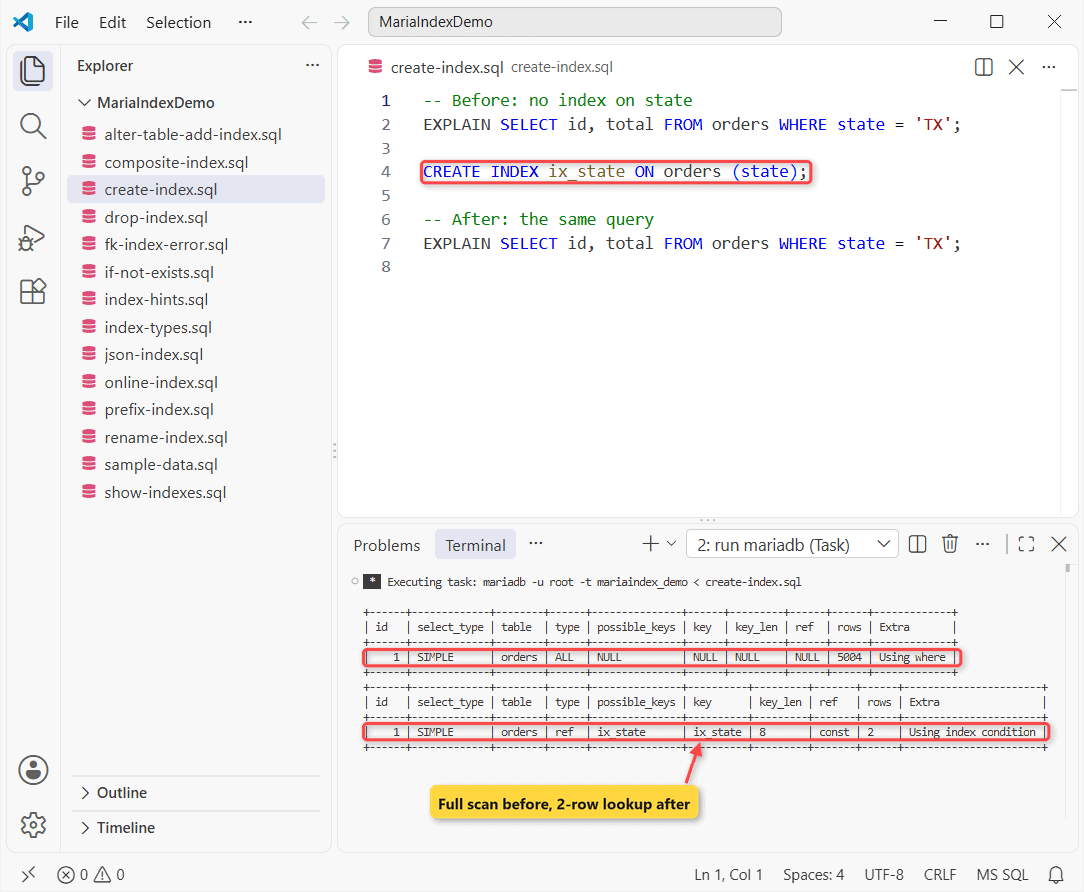
Index the column you filter on most. Same orders table, EXPLAIN before and after:
-- Before: no index on state
EXPLAIN SELECT id, total FROM orders WHERE state = 'TX';

CREATE INDEX ix_state ON orders (state);

-- After: the same query
EXPLAIN SELECT id, total FROM orders WHERE state = 'TX';
Output:
+------+-------------+--------+------+---------------+------+---------+------+------+-------------+
| id   | select_type | table  | type | possible_keys | key  | key_len | ref  | rows | Extra       |
+------+-------------+--------+------+---------------+------+---------+------+------+-------------+
|    1 | SIMPLE      | orders | ALL  | NULL          | NULL | NULL    | NULL | 5004 | Using where |
+------+-------------+--------+------+---------------+------+---------+------+------+-------------+
+------+-------------+--------+------+---------------+----------+---------+-------+------+-----------------------+
| id   | select_type | table  | type | possible_keys | key      | key_len | ref   | rows | Extra                 |
+------+-------------+--------+------+---------------+----------+---------+-------+------+-----------------------+
|    1 | SIMPLE      | orders | ref  | ix_state      | ix_state | 8       | const | 2    | Using index condition |
+------+-------------+--------+------+---------------+----------+---------+-------+------+-----------------------+
How does this work?
Before, you read all 5,004 rows (type ALL). After, it’s ref on ix_state: 2 rows. key_len 8 is CHAR(2) at 4 bytes per utf8mb4 character. The other columns are covered in MariaDB EXPLAIN.
Method 2: Composite Index on Multiple Columns (Order Matters)
Reports filter on state plus a date range. One index covers both, but column order matters.
CREATE INDEX ix_state_dt ON orders (state, order_date);
-- It covers state-only lookups too
DROP INDEX ix_state ON orders;

-- Both columns, left to right
EXPLAIN SELECT id, total FROM orders
WHERE state = 'TX' AND order_date >= '2026-06-01';

-- Skips the first column
EXPLAIN SELECT id, total FROM orders
WHERE order_date >= '2026-06-01';
Output:
+------+-------------+--------+-------+---------------+-------------+---------+------+------+-----------------------+
| id   | select_type | table  | type  | possible_keys | key         | key_len | ref  | rows | Extra                 |
+------+-------------+--------+-------+---------------+-------------+---------+------+------+-----------------------+
|    1 | SIMPLE      | orders | range | ix_state_dt   | ix_state_dt | 11      | NULL | 1    | Using index condition |
+------+-------------+--------+-------+---------------+-------------+---------+------+------+-----------------------+
+------+-------------+--------+------+---------------+------+---------+------+------+-------------+
| id   | select_type | table  | type | possible_keys | key  | key_len | ref  | rows | Extra       |
+------+-------------+--------+------+---------------+------+---------+------+------+-------------+
|    1 | SIMPLE      | orders | ALL  | NULL          | NULL | NULL    | NULL | 5004 | Using where |
+------+-------------+--------+------+---------------+------+---------+------+------+-------------+
How does this work?
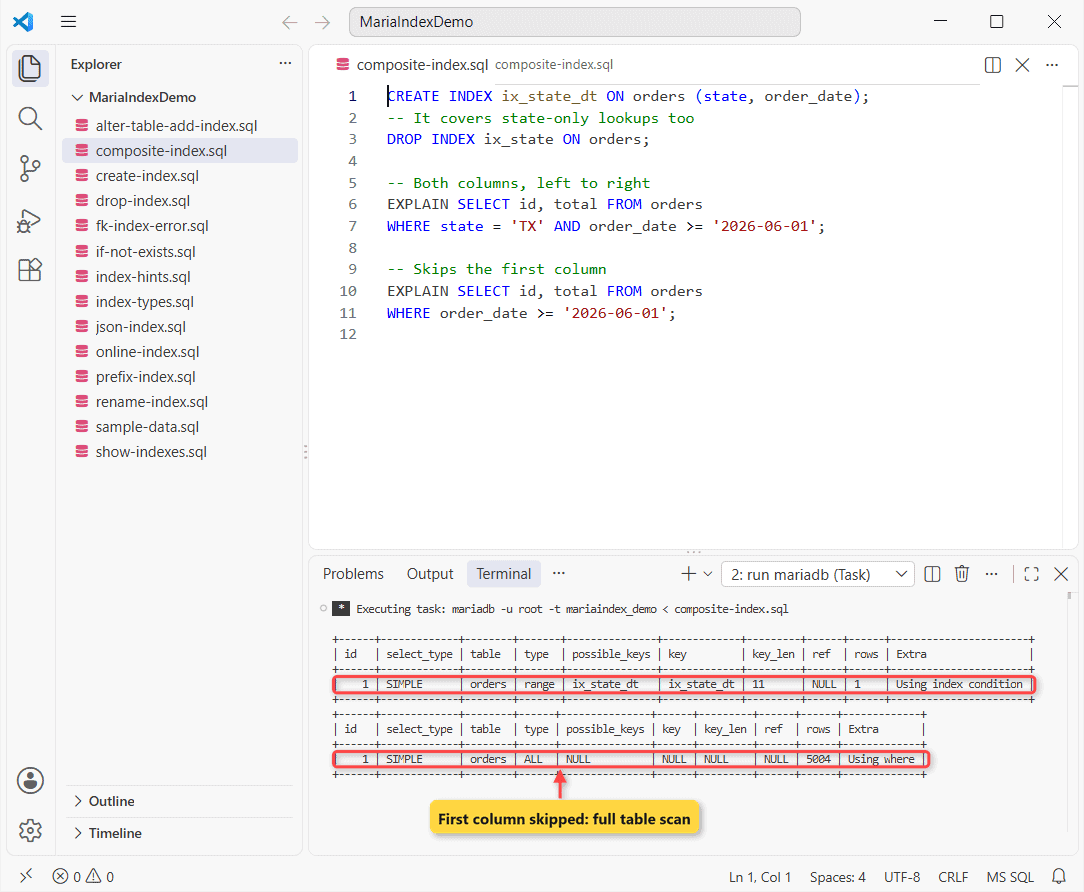
It’s sorted by state, then by date. Query one gives both, so it’s a range read; key_len 11 is 8 + 3 bytes for DATE.
Query two skips state, so the index is useless and you’re back to a full scan (type ALL). Lead with the column you always filter on. Since it also serves state-only lookups, I dropped ix_state.
Method 3: ALTER TABLE ADD INDEX, ADD UNIQUE and ADD PRIMARY KEY
ALTER TABLE does the same job, and it’s the only way you can add a primary key.
ALTER TABLE customers ADD UNIQUE INDEX ux_email (email);
ALTER TABLE orders ADD INDEX ix_city (city);

CREATE TABLE state_tax (state CHAR(2) NOT NULL, rate DECIMAL(4,2));
ALTER TABLE state_tax ADD PRIMARY KEY (state);

INSERT INTO customers VALUES (4, 'Megan B.', 'megan.bowen@example.com');
Output:
--------------
INSERT INTO customers VALUES (4, 'Megan B.', 'megan.bowen@example.com')
--------------

ERROR 1062 (23000) at line 7: Duplicate entry 'megan.bowen@example.com' for key 'ux_email'
How does this work?
Both ADD clauses build B-trees; the unique one rejects duplicates, hence ERROR 1062 (more on MariaDB unique keys). The primary key is always named PRIMARY.
CREATE INDEX IF NOT EXISTS and CREATE OR REPLACE INDEX
Deploy scripts run twice. IF NOT EXISTS turns a duplicate into a note; OR REPLACE rebuilds the index:
CREATE INDEX IF NOT EXISTS ix_state_dt ON orders (state, order_date);
SHOW WARNINGS;

CREATE OR REPLACE INDEX ix_city ON orders (city, state);
Output:
Level	Code	Message
Note	1061	Duplicate key name 'ix_state_dt'
Without it, note 1061 becomes ERROR 1061. The rebuilt ix_city appears in the STATISTICS query below. ALTER TABLE takes it too, like MariaDB ALTER TABLE IF EXISTS.
MariaDB Index Types: BTREE, HASH, FULLTEXT, SPATIAL and VECTOR
B-tree is the default. HASH (MEMORY only, exact matches), FULLTEXT, SPATIAL and VECTOR (11.7+, GA in 11.8) need a keyword:
CREATE TABLE sessions (token CHAR(32) NOT NULL,
  INDEX USING HASH (token)) ENGINE=MEMORY;
CREATE TABLE notes (id INT PRIMARY KEY, body TEXT,
  FULLTEXT INDEX ft_body (body));
CREATE TABLE products (id INT PRIMARY KEY,
  embedding VECTOR(3) NOT NULL, VECTOR INDEX vx_embedding (embedding));

SELECT TABLE_NAME, INDEX_NAME, INDEX_TYPE
FROM information_schema.STATISTICS
WHERE TABLE_SCHEMA = DATABASE()
  AND INDEX_NAME IN ('token', 'ft_body', 'vx_embedding');
Output:
TABLE_NAME	INDEX_NAME	INDEX_TYPE
notes	ft_body	FULLTEXT
products	vx_embedding	VECTOR
sessions	token	HASH
How Do You Show Indexes and Index Statistics in MariaDB?
SHOW INDEX FROM orders; prints 14 columns, so I pick a few from information_schema.STATISTICS, the way you’d show tables in MariaDB.
ANALYZE TABLE orders;

SELECT INDEX_NAME AS Key_name, COLUMN_NAME AS Column_name,
       SEQ_IN_INDEX AS Seq_in_index, NON_UNIQUE AS Non_unique,
       CARDINALITY
FROM information_schema.STATISTICS
WHERE TABLE_SCHEMA = DATABASE() AND TABLE_NAME = 'orders'
ORDER BY INDEX_NAME, SEQ_IN_INDEX;
Output:
+------------------------+---------+----------+----------+
| Table                  | Op      | Msg_type | Msg_text |
+------------------------+---------+----------+----------+
| mariaindex_demo.orders | analyze | status   | OK       |
+------------------------+---------+----------+----------+
+--------------------+-------------+--------------+------------+-------------+
| Key_name           | Column_name | Seq_in_index | Non_unique | CARDINALITY |
+--------------------+-------------+--------------+------------+-------------+
| fk_orders_customer | customer_id |            1 |          1 |           3 |
| ix_city            | city        |            1 |          1 |           5 |
| ix_city            | state       |            2 |          1 |           5 |
| ix_state_dt        | state       |            1 |          1 |           4 |
| ix_state_dt        | order_date  |            2 |          1 |         312 |
| PRIMARY            | id          |            1 |          0 |        5004 |
+--------------------+-------------+--------------+------------+-------------+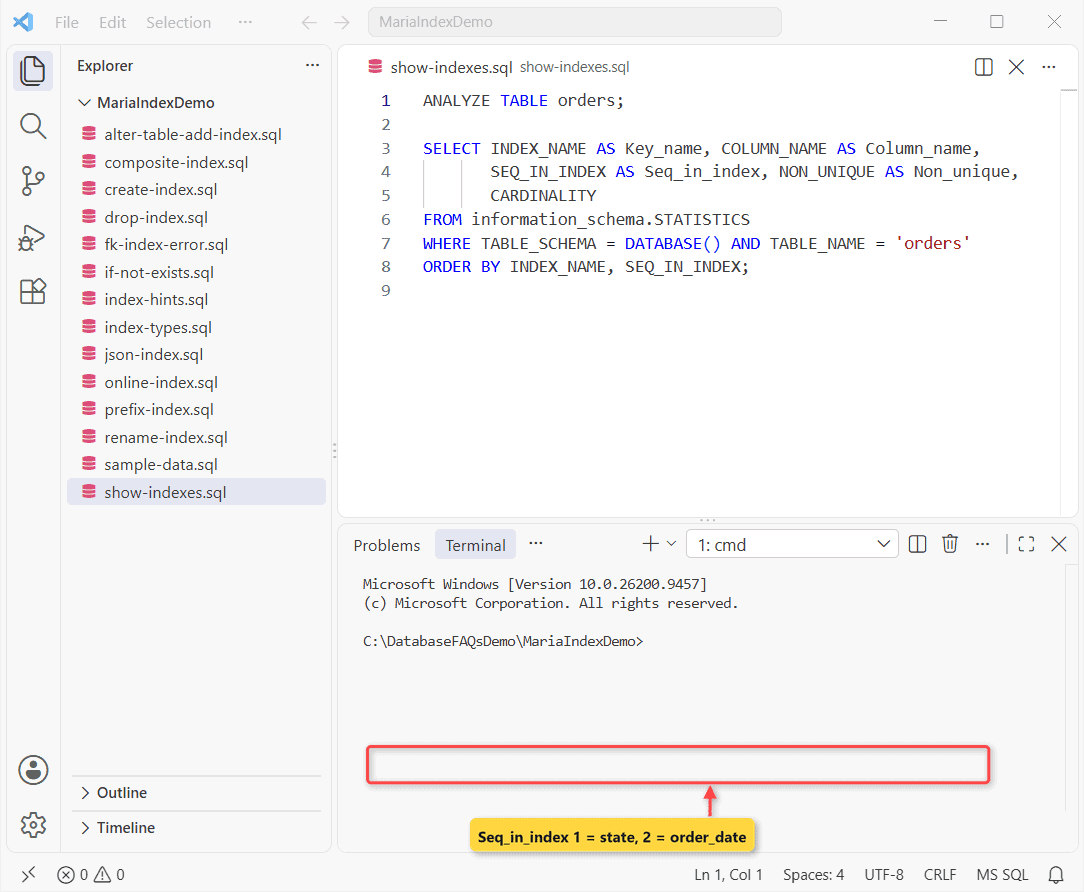
CARDINALITY estimates distinct values; ANALYZE TABLE refreshes it.
Prefix Indexes and the 3072-Byte Key Length Limit
InnoDB caps a key at 3072 bytes. A prefix index lets you keep the first N characters:
CREATE INDEX ix_email20 ON customers (email(20));

CREATE TABLE coupons (code VARCHAR(1000) NOT NULL);
CREATE INDEX ix_code ON coupons (code);
SHOW WARNINGS;
CREATE UNIQUE INDEX ux_code ON coupons (code);

SELECT INDEX_NAME, INDEX_TYPE, SUB_PART
FROM information_schema.STATISTICS
WHERE TABLE_SCHEMA = DATABASE()
  AND INDEX_NAME IN ('ix_email20', 'ix_code', 'ux_code');
Output:
Level	Code	Message
Note	1071	Specified key was too long; max key length is 3072 bytes
INDEX_NAME	INDEX_TYPE	SUB_PART
ux_code	HASH	NULL
ix_code	BTREE	768
ix_email20	BTREE	20
The surprise: ix_code didn’t fail. MariaDB cut it to 768 characters (note 1071), and the unique one became HASH, so it checks the whole VARCHAR value.
Index a JSON Value With a Generated Column
You can’t index inside JSON directly. Same orders table: index a virtual column instead.
ALTER TABLE orders
  ADD COLUMN channel VARCHAR(10)
    AS (JSON_VALUE(details, '$.channel')) VIRTUAL,
  ADD INDEX ix_channel (channel);

EXPLAIN SELECT id, total FROM orders WHERE channel = 'phone';
Output:
id	select_type	table	type	possible_keys	key	key_len	ref	rows	Extra
1	SIMPLE	orders	ref	ix_channel	ix_channel	43	const	1	Using where
EXPLAIN shows ref on ix_channel. Your query must name the column, not the path (see MariaDB JSON functions).
Index Hints: USE INDEX, FORCE INDEX and IGNORE INDEX
Hints override the optimizer for one query. Use them sparingly.
EXPLAIN SELECT id FROM orders IGNORE INDEX (ix_state_dt)
WHERE state = 'TX';
Output:
id	select_type	table	type	possible_keys	key	key_len	ref	rows	Extra
1	SIMPLE	orders	index	NULL	ix_city	90	NULL	5004	Using where; Using index
I expected a table scan; it read ix_city, the only other index holding state. FORCE INDEX pins one index, USE INDEX only suggests.
Build an Index Online With ALGORITHM and LOCK
On a busy table, ask for an in-place build. MariaDB fails at once if it can’t comply:
-- INSTANT can't build an index
ALTER TABLE orders ADD INDEX ix_total (total), ALGORITHM=INSTANT;

ALTER TABLE orders ADD INDEX ix_total (total), ALGORITHM=NOCOPY, LOCK=NONE;
Output:
--------------
ALTER TABLE orders ADD INDEX ix_total (total), ALGORITHM=INSTANT
--------------

ERROR 1846 (0A000) at line 2: ALGORITHM=INSTANT is not supported. Reason: ADD INDEX. Try ALGORITHM=NOCOPY
ERROR 1846 names the fix. NOCOPY with LOCK=NONE then built ix_total without blocking writes.
MariaDB DROP INDEX, DROP INDEX IF EXISTS and ALTER TABLE DROP INDEX
Unused indexes still slow writes:
DROP INDEX ix_city ON orders;
DROP INDEX IF EXISTS ix_city ON orders;

ALTER TABLE customers DROP INDEX ux_email;
ALTER TABLE state_tax DROP PRIMARY KEY;

ALTER TABLE orders DROP PRIMARY KEY;
Output:
--------------
ALTER TABLE orders DROP PRIMARY KEY
--------------

ERROR 1075 (42000) at line 7: Incorrect table definition; there can be only one auto column and it must be defined as a key
IF EXISTS skipped the repeat quietly. Important: ERROR 1075 means orders.id is AUTO_INCREMENT: run MODIFY id INT NOT NULL first.
Fix ERROR 1553: Cannot drop index needed in a foreign key constraint
A foreign key needs an index, and InnoDB built fk_orders_customer for ours:
-- InnoDB created this index for the foreign key
DROP INDEX fk_orders_customer ON orders;

-- Fix: another index that starts with customer_id
ALTER TABLE orders
  ADD INDEX ix_customer_date (customer_id, order_date);

SELECT INDEX_NAME FROM information_schema.STATISTICS
WHERE TABLE_SCHEMA = DATABASE() AND TABLE_NAME = 'orders'
  AND COLUMN_NAME = 'customer_id';
Output:
--------------
DROP INDEX fk_orders_customer ON orders
--------------

ERROR 1553 (HY000) at line 2: Cannot drop index 'fk_orders_customer': needed in a foreign key constraint
+------------------+
| INDEX_NAME       |
+------------------+
| ix_customer_date |
+------------------+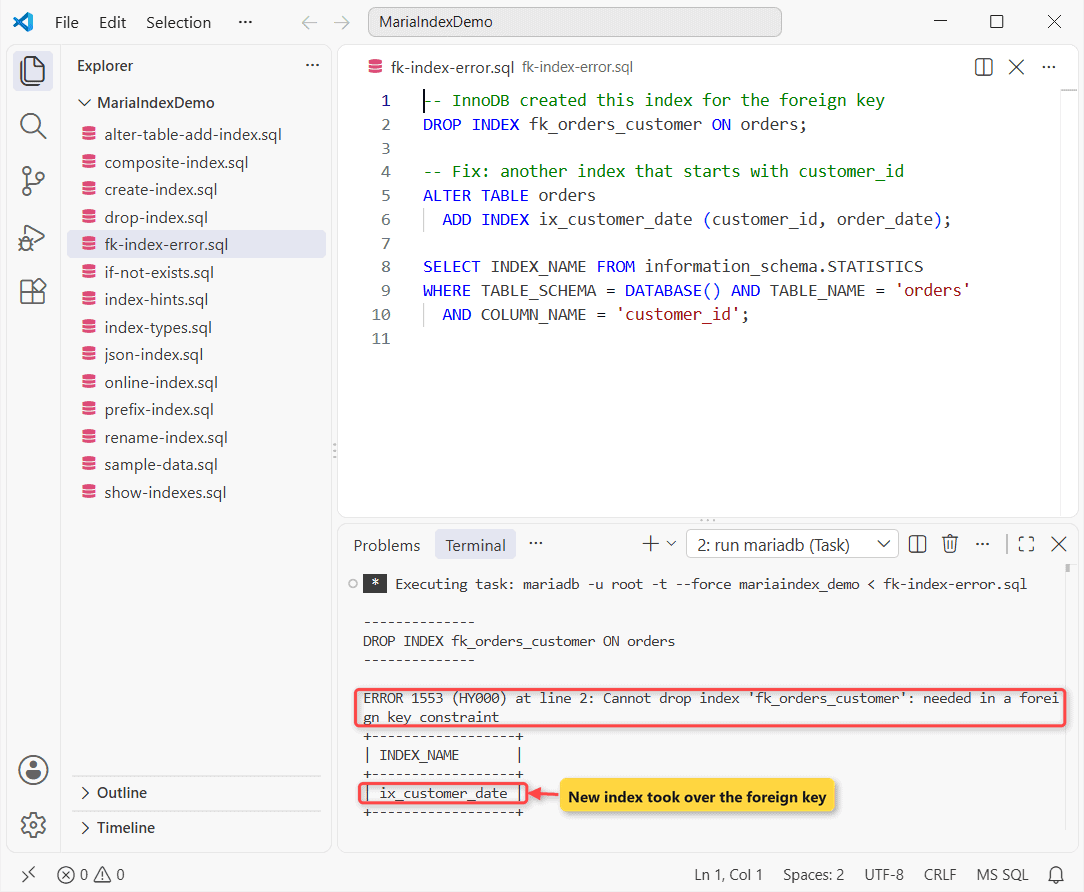
The fix surprised me: once ix_customer_date existed, the old index vanished. To remove the relationship, drop the MariaDB foreign key first.
Rename an Index With ALTER TABLE RENAME INDEX
RENAME INDEX needs MariaDB 10.5.2+; older servers drop and re-add.
ALTER TABLE orders
  RENAME INDEX ix_state_dt TO ix_orders_state_dt;

-- The primary key is always named PRIMARY
ALTER TABLE orders RENAME INDEX `PRIMARY` TO pk_orders;

SELECT DISTINCT INDEX_NAME FROM information_schema.STATISTICS
WHERE TABLE_SCHEMA = DATABASE() AND TABLE_NAME = 'orders'
  AND (INDEX_NAME = 'PRIMARY' OR INDEX_NAME LIKE 'ix_orders%');
Output:
--------------
ALTER TABLE orders RENAME INDEX `PRIMARY` TO pk_orders
--------------

ERROR 1280 (42000) at line 5: Incorrect index name 'PRIMARY'
+--------------------+
| INDEX_NAME         |
+--------------------+
| PRIMARY            |
| ix_orders_state_dt |
+--------------------+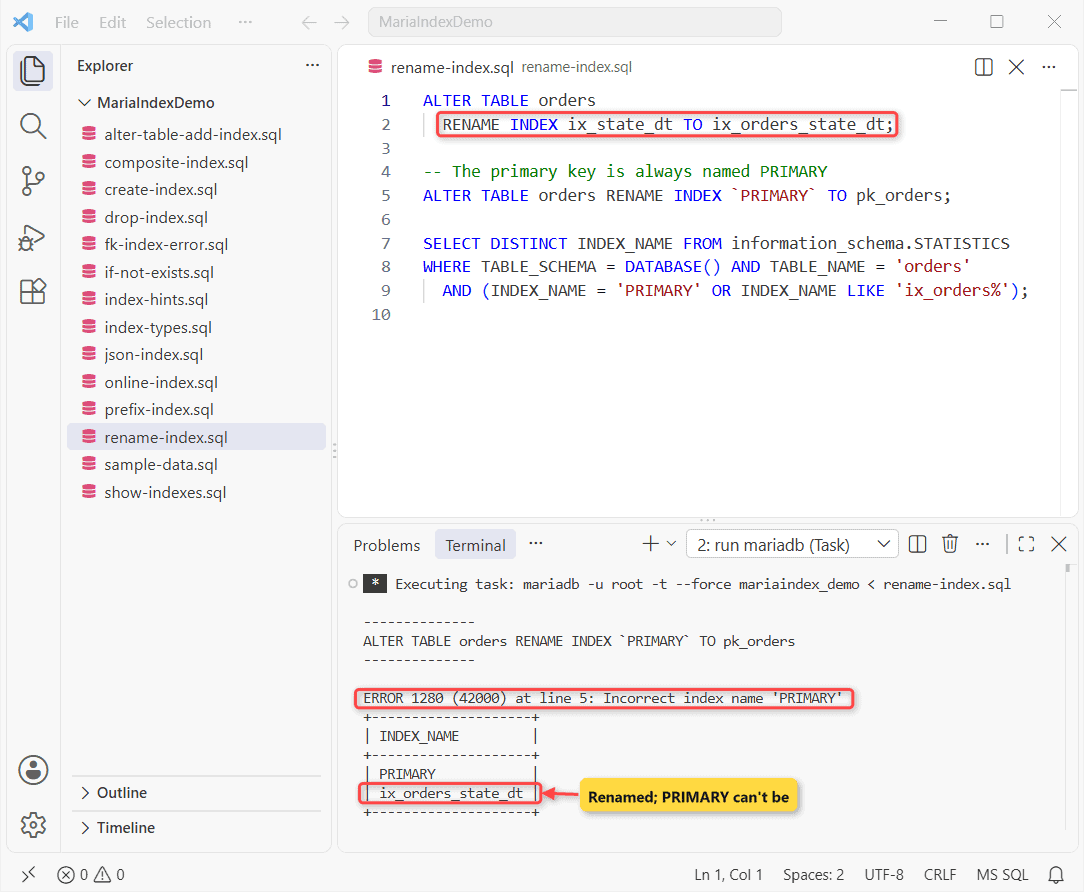
The primary key stays PRIMARY (ERROR 1280). Can you index a view? No, index the tables the MariaDB view reads.
Things to Keep in Mind
- If EXPLAIN shows
keyNULL, the index isn’t helping. Rewrite the WHERE or the index. - RENAME INDEX needs 10.5.2+ and VECTOR 11.7+, so check your MariaDB version.
Where to Go Next With MariaDB Indexes
Next step: EXPLAIN your slowest query. On PostgreSQL? See how to create an index in PostgreSQL. More:
Frequently Asked Questions
How many indexes can a MariaDB table have?
InnoDB allows 64 secondary indexes per table and 32 columns per index.
Can I disable an index without dropping it?
Yes, from MariaDB 10.6: ALTER TABLE orders ALTER INDEX ix_total IGNORED;. See ignored indexes.
Which privilege does CREATE INDEX need?
The INDEX privilege on the table or database, per the CREATE INDEX docs.

Kumar Saurabh is a freelance software engineer who builds web and mobile apps with Next.js, React, Flutter and Python. From 2021 to 2024, Saurabh worked as an IT analyst and developer at TSInfo Technologies, writing technical articles on SQL and PostgreSQL. Saurabh writes the PostgreSQL, MySQL, MariaDB and MongoDB tutorials on DatabaseFAQs.com and holds a Master of Computer Applications (MCA) from Chandigarh University.