
Duplicate rows after a join in SQL Server almost always mean a one-to-many match, not a bug.
The usual fix for distinct in join SQL Server queries is DISTINCT right after SELECT: SELECT DISTINCT c.Customer FROM dbo.Customers AS c JOIN dbo.Orders AS o ON o.CustomerID = c.CustomerID; It collapses the repeats.
My verdict after testing it on 500,000 orders: DISTINCT returns the right rows, but EXISTS is the better habit when you only need the parent table. DISTINCT also hides joins that are wrong, and that’s the bigger risk.
The Sample Tables Behind Every DISTINCT Join Example
Megan Bowen has three orders, Alex Wilber and Diego Siciliani two each, Isaiah Langer none:
CREATE TABLE dbo.Customers (
    CustomerID int PRIMARY KEY, Customer nvarchar(16) NOT NULL, State char(2) NOT NULL);
CREATE TABLE dbo.Products (
    ProductID int PRIMARY KEY, Product nvarchar(16) NOT NULL, Category nvarchar(8) NOT NULL);
CREATE TABLE dbo.Orders (
    OrderID    int PRIMARY KEY,
    CustomerID int NOT NULL REFERENCES dbo.Customers,
    ProductID  int NOT NULL REFERENCES dbo.Products,
    OrderDate  date NOT NULL,
    Total      decimal(10,2) NOT NULL);

INSERT INTO dbo.Customers VALUES
(1, N'Megan Bowen', 'WA'), (2, N'Alex Wilber', 'TX'), (3, N'Adele Vance', 'CA'),
(4, N'Diego Siciliani', 'NY'), (5, N'Lee Gu', 'IL'), (6, N'Isaiah Langer', 'FL');  -- no orders

INSERT INTO dbo.Products VALUES
(10, N'Patio Heater', N'Outdoor'), (11, N'Garden Hose', N'Garden'),
(12, N'Raised Bed Kit', N'Garden'), (13, N'Desk Lamp', N'Home');

INSERT INTO dbo.Orders VALUES
(1001, 1, 11, '2026-09-03',  39.99), (1002, 1, 12, '2026-09-17', 149.00),
(1003, 1, 11, '2026-10-05',  39.99), (1004, 2, 10, '2026-09-08', 229.50),
(1005, 2, 13, '2026-10-12',  54.25), (1006, 3, 12, '2026-09-21', 149.00),
(1007, 4, 13, '2026-10-02',  54.25), (1008, 4, 13, '2026-10-19',  54.25),
(1009, 5, 10, '2026-10-21', 229.50);
Tested on SQL Server 17.0.1000.7 (2025) Standard Developer edition, each .sql file run with sqlcmd in the VS Code terminal.
Why Does a JOIN Return Duplicate Rows in SQL Server?
A join returns one row for every pair that matches the ON condition. Customers to Orders is one-to-many, so each customer appears once per order:
SET NOCOUNT ON;
-- One row per matching order, not per customer
SELECT c.Customer, o.OrderID, o.Total
FROM dbo.Customers AS c
INNER JOIN dbo.Orders AS o
    ON o.CustomerID = c.CustomerID
ORDER BY c.Customer, o.OrderID;
Output:
Customer         OrderID     Total
---------------- ----------- ------------
Adele Vance             1006       149.00
Alex Wilber             1004       229.50
Alex Wilber             1005        54.25
Diego Siciliani         1007        54.25
Diego Siciliani         1008        54.25
Lee Gu                  1009       229.50
Megan Bowen             1001        39.99
Megan Bowen             1002       149.00
Megan Bowen             1003        39.99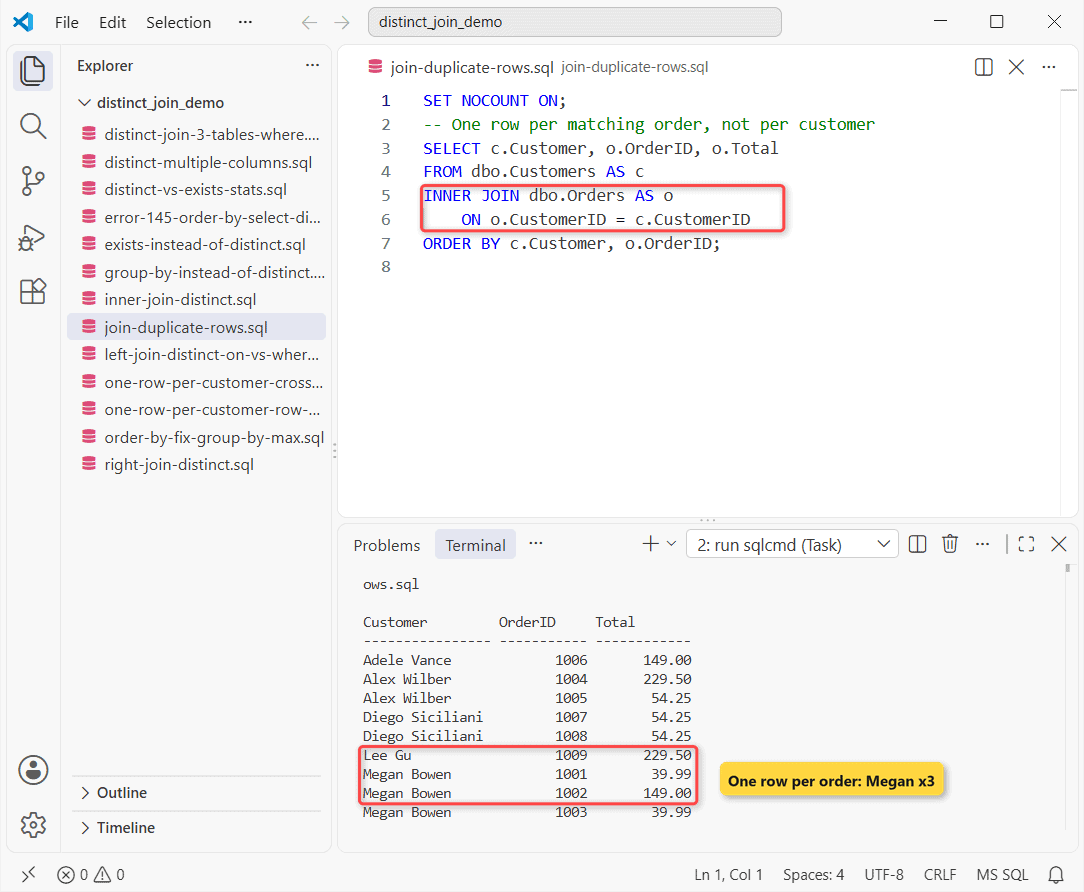
Nine rows for five customers. Isaiah isn’t there at all, since an INNER JOIN in SQL Server drops rows without a match.
Method 1: SELECT DISTINCT With an INNER JOIN
Each customer once, nothing from the orders. Same tables, order columns dropped:
SET NOCOUNT ON;
SELECT DISTINCT c.Customer, c.State
FROM dbo.Customers AS c
INNER JOIN dbo.Orders AS o
    ON o.CustomerID = c.CustomerID
ORDER BY c.Customer;
Output:
Customer         State
---------------- -----
Adele Vance      CA
Alex Wilber      TX
Diego Siciliani  NY
Lee Gu           IL
Megan Bowen      WA
How does this work? SQL Server builds the joined rows first, then DISTINCT removes rows whose selected values match. Megan’s three rows all read “Megan Bowen, WA”, so two go.
You can filter this the usual way too; an INNER JOIN with a WHERE clause runs the WHERE before DISTINCT.
DISTINCT Applies to Every Column in the Join, Not Just One
DISTINCT works on whole rows, never one column. Add one order column to the same query:
SET NOCOUNT ON;
-- DISTINCT compares the whole select list
SELECT DISTINCT c.Customer, o.ProductID
FROM dbo.Customers AS c
INNER JOIN dbo.Orders AS o
    ON o.CustomerID = c.CustomerID
ORDER BY c.Customer, o.ProductID;
Output:
Customer         ProductID
---------------- -----------
Adele Vance               12
Alex Wilber               10
Alex Wilber               13
Diego Siciliani           13
Lee Gu                    10
Megan Bowen               11
Megan Bowen               12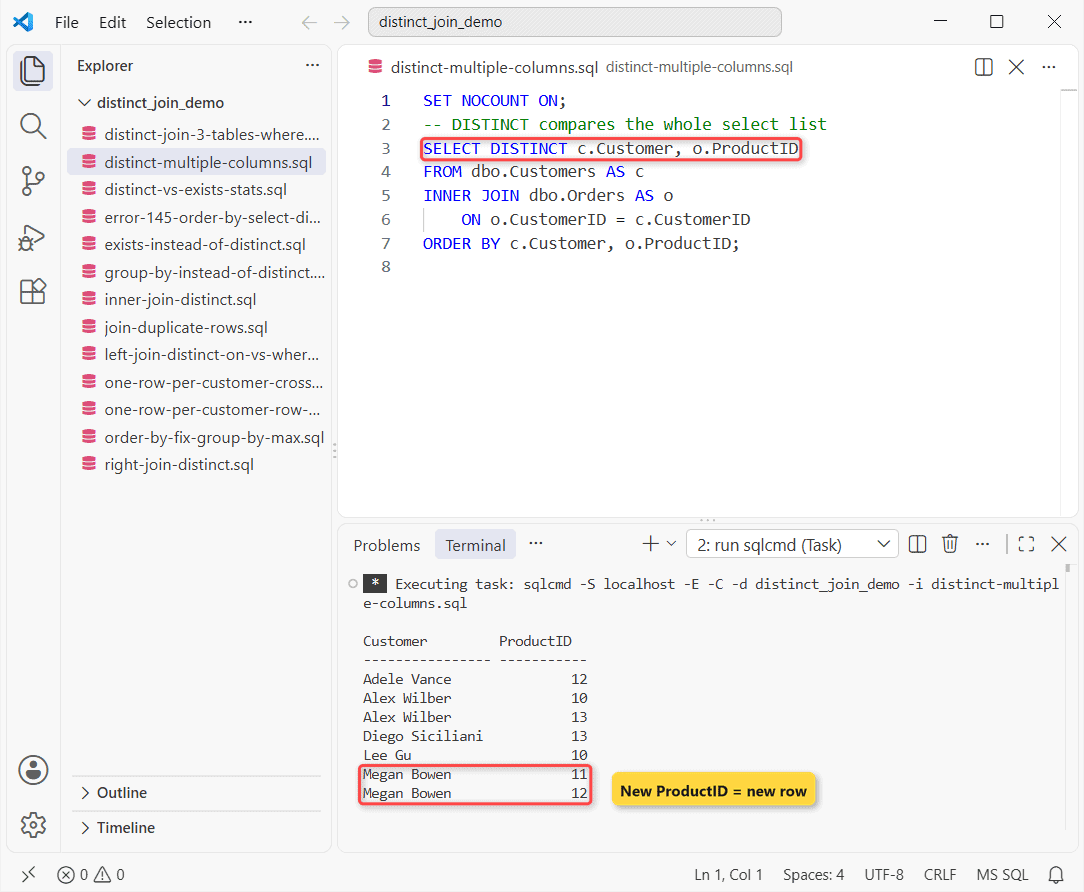
Seven rows. Megan’s two Garden Hose orders (product 11) merged, but her Raised Bed Kit is a different pair, so she’s listed twice. If your “duplicates” survive DISTINCT, you’ve selected a column that differs between them.
Method 2: DISTINCT With a LEFT JOIN (Filter in ON, Not WHERE)
A LEFT JOIN in SQL Server keeps Isaiah too. Here’s each customer’s distinct totals over $100, with the filter in two places:
SET NOCOUNT ON;
-- Filter in ON: customers without a big order stay (NULL)
SELECT DISTINCT c.Customer, o.Total
FROM dbo.Customers AS c
LEFT JOIN dbo.Orders AS o
    ON o.CustomerID = c.CustomerID AND o.Total > 100
ORDER BY c.Customer;

-- Same filter in WHERE: the NULL rows are gone
SELECT DISTINCT c.Customer, o.Total
FROM dbo.Customers AS c
LEFT JOIN dbo.Orders AS o ON o.CustomerID = c.CustomerID
WHERE o.Total > 100
ORDER BY c.Customer;
Output:
Customer         Total
---------------- ------------
Adele Vance            149.00
Alex Wilber            229.50
Diego Siciliani          NULL
Isaiah Langer            NULL
Lee Gu                 229.50
Megan Bowen            149.00
Customer         Total
---------------- ------------
Adele Vance            149.00
Alex Wilber            229.50
Lee Gu                 229.50
Megan Bowen            149.00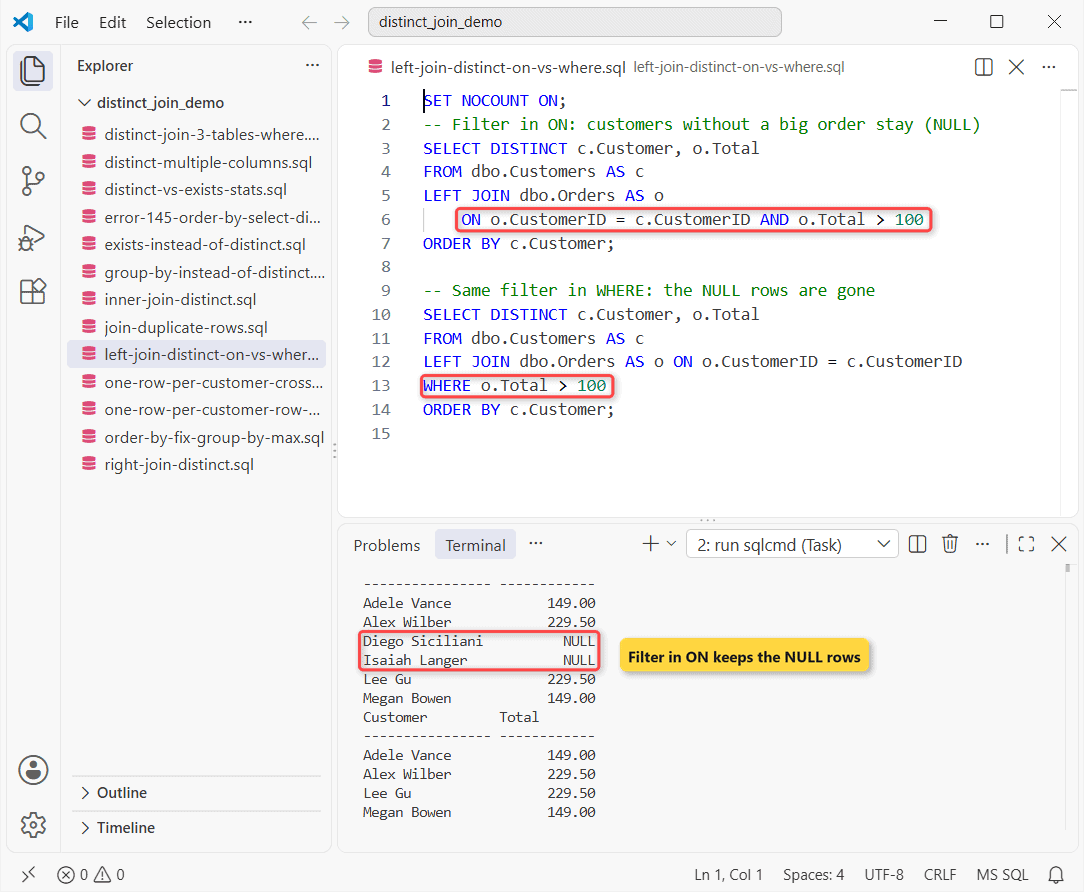
How does this work? In ON, the filter only decides which orders match, so Diego and Isaiah stay with NULL. WHERE runs after the join, and NULL > 100 isn’t true, so they vanish.
The WHERE version is an inner join in disguise (see LEFT OUTER JOIN with a WHERE clause).
RIGHT JOIN With DISTINCT Is Just a LEFT JOIN Flipped
I swapped the tables into a RIGHT JOIN and compared it with the LEFT JOIN using EXCEPT:
SET NOCOUNT ON;
-- RIGHT JOIN with the tables swapped vs the LEFT JOIN above
SELECT COUNT(*) AS Differences FROM (
    SELECT DISTINCT c.Customer, o.Total FROM dbo.Orders AS o
    RIGHT JOIN dbo.Customers AS c ON o.CustomerID = c.CustomerID AND o.Total > 100
    EXCEPT
    SELECT DISTINCT c.Customer, o.Total FROM dbo.Customers AS c
    LEFT JOIN dbo.Orders AS o ON o.CustomerID = c.CustomerID AND o.Total > 100
) AS d;
Output:
Differences
-----------
          0
Zero differences. I’d still write the LEFT JOIN form, since readers expect the kept table first (RIGHT OUTER JOIN vs LEFT OUTER JOIN).
DISTINCT Join Across 3 Tables With a WHERE Clause
Three tables work the same way. Customers who bought anything in Garden:
SET NOCOUNT ON;
-- Customers who bought anything in the Garden category
SELECT DISTINCT c.Customer, c.State
FROM dbo.Customers AS c
INNER JOIN dbo.Orders   AS o ON o.CustomerID = c.CustomerID
INNER JOIN dbo.Products AS p ON p.ProductID  = o.ProductID
WHERE p.Category = N'Garden';
Output:
Customer         State
---------------- -----
Adele Vance      CA
Megan Bowen      WA
Megan’s three Garden orders folded into one line. For bigger chains, see INNER JOIN with multiple tables.
Method 3: GROUP BY Instead of DISTINCT When You Need Counts
GROUP BY c.Customer returns the same rows as SELECT DISTINCT c.Customer, but it can also count. Same orders, customers with more than one:
SET NOCOUNT ON;
SELECT c.Customer, COUNT(*) AS Orders, CAST(SUM(o.Total) AS decimal(10,2)) AS Spent
FROM dbo.Customers AS c
INNER JOIN dbo.Orders AS o ON o.CustomerID = c.CustomerID
GROUP BY c.Customer
HAVING COUNT(*) > 1
ORDER BY Spent DESC;
Output:
Customer         Orders      Spent
---------------- ----------- ------------
Alex Wilber                2       283.75
Megan Bowen                3       228.98
Diego Siciliani            2       108.50
How does this work? GROUP BY makes one row per customer, COUNT and SUM run per group, and HAVING filters groups. DISTINCT on top would add nothing (count rows with a join and GROUP BY).
Method 4: One Join Row per Customer With ROW_NUMBER or CROSS APPLY
“Each customer once, with their latest order” is a job DISTINCT can’t do, because it can’t pick a row:
SET NOCOUNT ON;
WITH Ranked AS (
    SELECT c.Customer, o.OrderID, o.OrderDate,
           ROW_NUMBER() OVER (PARTITION BY c.CustomerID
                              ORDER BY o.OrderDate DESC) AS rn
    FROM dbo.Customers AS c
    INNER JOIN dbo.Orders AS o ON o.CustomerID = c.CustomerID
)
SELECT Customer, OrderID, OrderDate FROM Ranked WHERE rn = 1 ORDER BY Customer;
Output:
Customer         OrderID     OrderDate
---------------- ----------- ----------------
Adele Vance             1006       2026-09-21
Alex Wilber             1005       2026-10-12
Diego Siciliani         1008       2026-10-19
Lee Gu                  1009       2026-10-21
Megan Bowen             1003       2026-10-05
How does this work? ROW_NUMBER restarts at 1 per CustomerID, newest first, and rn = 1 keeps that row. Megan’s latest is 1003, from 10/05/2026. CROSS APPLY with TOP (1) picks the same orders:
SET NOCOUNT ON;
SELECT c.Customer, x.OrderID
FROM dbo.Customers AS c
CROSS APPLY (SELECT TOP (1) o.OrderID
             FROM dbo.Orders AS o
             WHERE o.CustomerID = c.CustomerID
             ORDER BY o.OrderDate DESC) AS x
ORDER BY c.Customer;
Output:
Customer         OrderID
---------------- -----------
Adele Vance             1006
Alex Wilber             1005
Diego Siciliani         1008
Lee Gu                  1009
Megan Bowen             1003
Add a tie-breaker to the ORDER BY if two orders can share a date; the latest record per group in SQL Server post covers ties.
Method 5: EXISTS Instead of JOIN + DISTINCT (Recommended)
If Orders is only there to filter customers, say so with EXISTS:
SET NOCOUNT ON;
SELECT c.Customer, c.State
FROM dbo.Customers AS c
WHERE EXISTS (SELECT 1 FROM dbo.Orders AS o
              WHERE o.CustomerID = c.CustomerID)
ORDER BY c.Customer;
Output:
Customer         State
---------------- -----
Adele Vance      CA
Alex Wilber      TX
Diego Siciliani  NY
Lee Gu           IL
Megan Bowen      WA
How does this work? EXISTS is a semi join: it asks “is there at least one order?” and never multiplies the customer row, so there’s nothing to remove.
IN with a subquery reads the same way; selecting across tables without a join shows both.
Is DISTINCT Slower Than EXISTS in a Join? What I Measured
A common claim: DISTINCT makes SQL Server build every duplicate, then sort them away. I loaded bigger tables to check:
-- 500,000 orders spread over 4,000 of 5,000 customers
CREATE TABLE dbo.BulkOrders (OrderID int PRIMARY KEY, CustomerID int, Total decimal(10,2));
CREATE TABLE dbo.BulkCustomers (CustomerID int PRIMARY KEY, Customer nvarchar(16));
WITH n AS (SELECT TOP (500000) ROW_NUMBER() OVER (ORDER BY (SELECT NULL)) AS n
           FROM sys.all_columns AS a CROSS JOIN sys.all_columns AS b)
INSERT INTO dbo.BulkOrders SELECT n, 1 + (n * 7919) % 4000, (n % 997) * 0.5 FROM n;
INSERT INTO dbo.BulkCustomers
SELECT OrderID, N'Customer ' + CAST(OrderID AS nvarchar(6)) FROM dbo.BulkOrders WHERE OrderID <= 5000;
CREATE INDEX IX_BulkOrders_CustomerID ON dbo.BulkOrders (CustomerID) INCLUDE (Total);
Then I ran “customers with an order over $450” three ways and read the numbers from Query Store (cleared first):
SET NOCOUNT ON; DECLARE @id int;
SELECT @id = c.CustomerID FROM dbo.BulkCustomers AS c                 /*dj-join*/
JOIN dbo.BulkOrders AS o ON o.CustomerID = c.CustomerID WHERE o.Total > 450;
GO
DECLARE @id int;
SELECT DISTINCT @id = c.CustomerID FROM dbo.BulkCustomers AS c        /*dj-distinct*/
JOIN dbo.BulkOrders AS o ON o.CustomerID = c.CustomerID WHERE o.Total > 450;
GO
DECLARE @id int;
SELECT @id = c.CustomerID FROM dbo.BulkCustomers AS c WHERE EXISTS    /*dj-exists*/
 (SELECT 1 FROM dbo.BulkOrders AS o WHERE o.CustomerID = c.CustomerID AND o.Total > 450);
GO
SET QUOTED_IDENTIFIER ON;   -- sqlcmd starts with it OFF; .value() needs ON
SELECT CASE WHEN qt.query_sql_text LIKE '%dj-join*/%' THEN 'JOIN'
            WHEN qt.query_sql_text LIKE '%dj-distinct*/%' THEN 'DISTINCT' ELSE 'EXISTS' END AS Query,
       CAST(rs.last_rowcount AS int) AS RowsOut, CAST(rs.last_logical_io_reads AS int) AS Reads,
       CAST(x.pl.value('(//*:RelOp/@PhysicalOp)[1]', 'varchar(13)') AS varchar(13)) AS PlanTop,
       CAST(x.pl.value('(//*:RelOp/@LogicalOp)[1]', 'varchar(15)') AS varchar(15)) AS JoinType
FROM sys.query_store_query_text AS qt
JOIN sys.query_store_query AS q ON q.query_text_id = qt.query_text_id
JOIN sys.query_store_plan AS p ON p.query_id = q.query_id
JOIN sys.query_store_runtime_stats AS rs ON rs.plan_id = p.plan_id
CROSS APPLY (SELECT CAST(p.query_plan AS xml) AS pl) AS x
WHERE qt.query_sql_text LIKE '%/*dj-%' AND qt.query_sql_text NOT LIKE '%query_store%'
ORDER BY RowsOut DESC, Reads DESC;
Output:
Query    RowsOut     Reads       PlanTop       JoinType
-------- ----------- ----------- ------------- ---------------
JOIN           48096        1451 Merge Join    Inner Join
DISTINCT        4000       17038 Nested Loops  Left Semi Join
EXISTS          4000        1451 Merge Join    Inner Join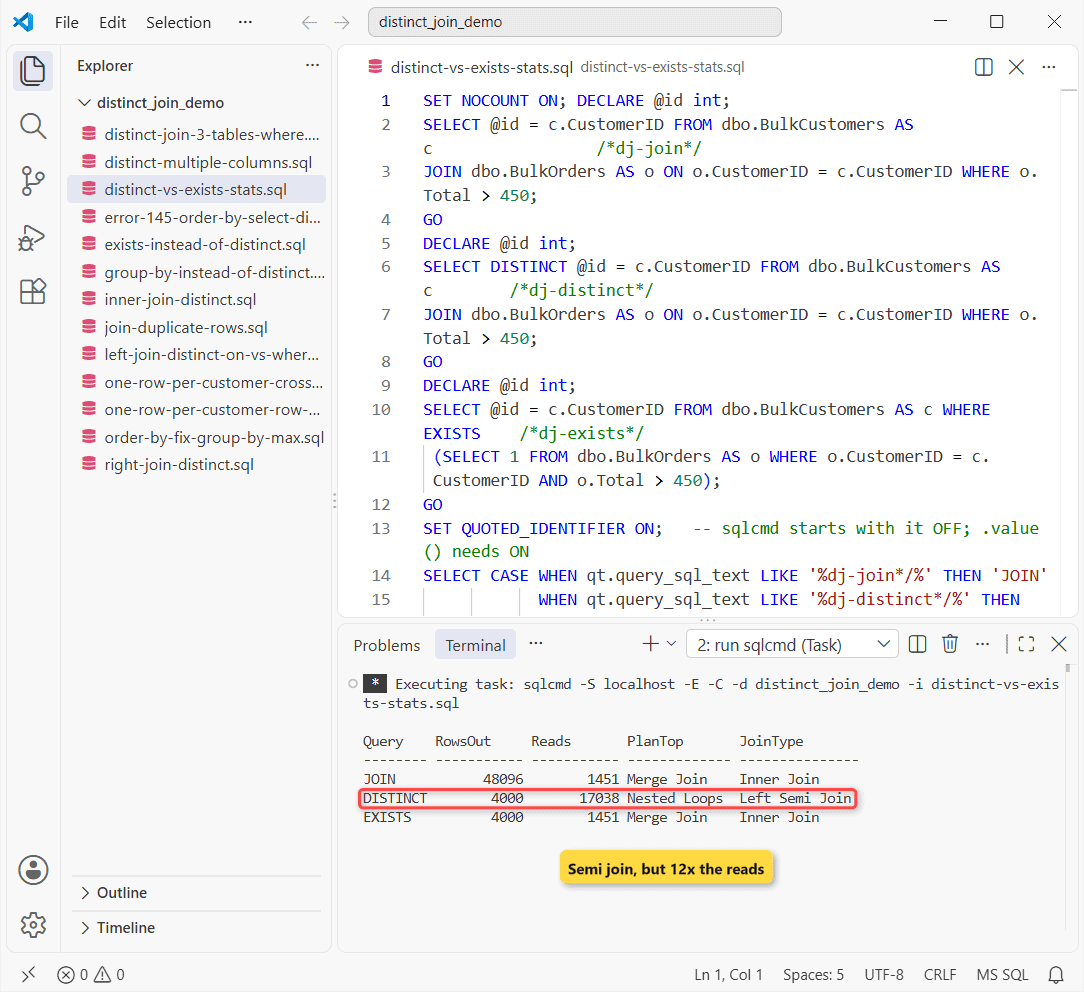
| Query | Rows out | Logical reads | Top plan operator |
|---|---|---|---|
| Plain JOIN | 48,096 | 1,451 | Merge Join (Inner Join) |
| JOIN + DISTINCT | 4,000 | 17,038 | Nested Loops (Left Semi Join) |
| EXISTS | 4,000 | 1,451 | Merge Join (Inner Join) |
The claim didn’t hold. The plain join made 48,096 rows, but the optimizer never built them for DISTINCT: it rewrote the query as a Left Semi Join, the same idea as EXISTS.
It lost on I/O anyway: a seek per customer (17,038 logical reads) against one index scan for EXISTS (1,451). One run, one data shape.
Where the answer flips: select an order column such as o.Total and no semi join is possible, so DISTINCT compares the joined rows.
ORDER BY With SELECT DISTINCT: Error 145
Sorting a DISTINCT join by a column you didn’t select fails. I caught it with TRY…CATCH around sp_executesql, because a compile error in the same batch skips CATCH:
SET NOCOUNT ON;
BEGIN TRY   -- ORDER BY a column that isn't in the DISTINCT list
    EXEC sp_executesql N'SELECT DISTINCT c.Customer FROM dbo.Customers AS c
        JOIN dbo.Orders AS o ON o.CustomerID = c.CustomerID ORDER BY o.OrderDate;';
END TRY
BEGIN CATCH
    PRINT CONCAT('Error ', ERROR_NUMBER(), ': ', ERROR_MESSAGE());
END CATCH;
Output:
Error 145: ORDER BY items must appear in the select list if SELECT DISTINCT is specified.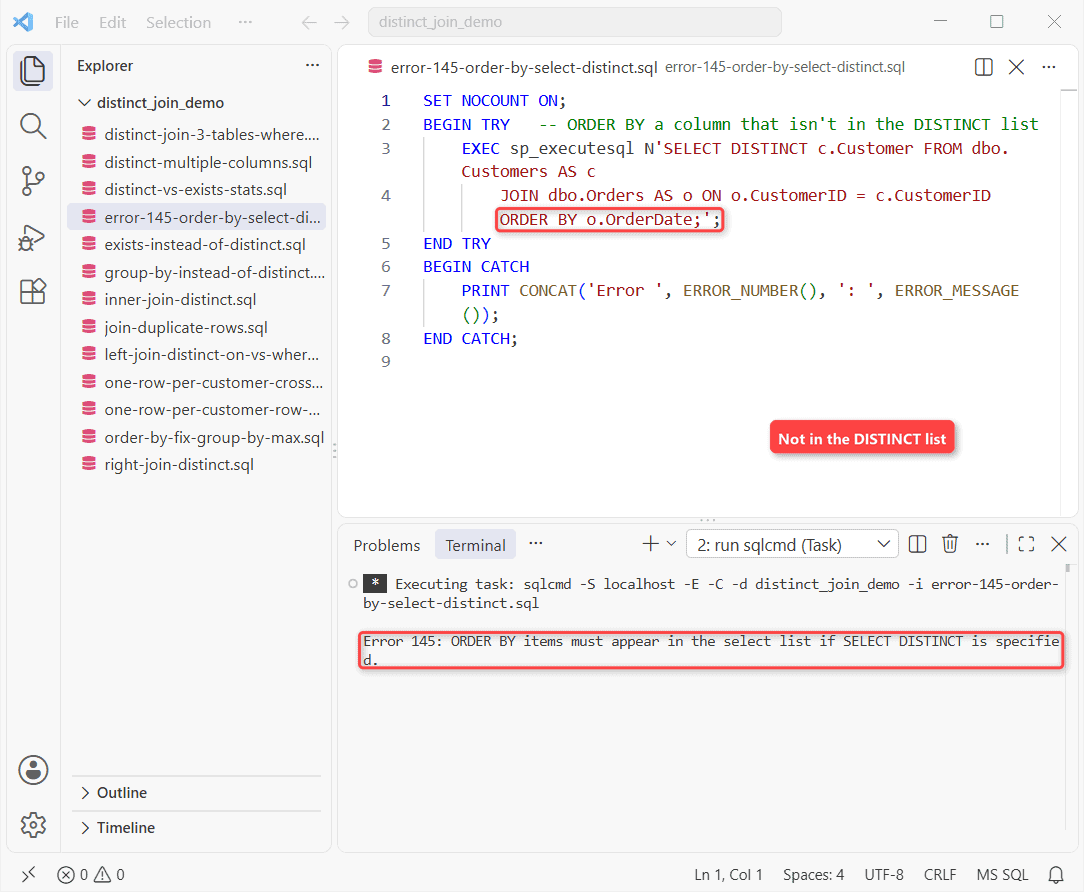
Megan has three order dates, so which one would sort her? Aggregate the date, then sort by the alias:
SET NOCOUNT ON;
SELECT c.Customer, MAX(o.OrderDate) AS LastOrder
FROM dbo.Customers AS c
INNER JOIN dbo.Orders AS o ON o.CustomerID = c.CustomerID
GROUP BY c.Customer
ORDER BY LastOrder DESC;
Output:
Customer         LastOrder
---------------- ----------------
Lee Gu                 2026-10-21
Diego Siciliani        2026-10-19
Alex Wilber            2026-10-12
Megan Bowen            2026-10-05
Adele Vance            2026-09-21
The same TRY…CATCH shape works for logging inside a stored procedure with TRY…CATCH.
Which Method Should You Use for Distinct Join Results?
| You need | Use |
|---|---|
| Parent rows that have a match | EXISTS |
| Unique combos from both tables | SELECT DISTINCT |
| Counts or totals per parent | GROUP BY |
| One full child row per parent | ROW_NUMBER() or CROSS APPLY |
| Every parent, matched or not | LEFT JOIN, filter in ON |
My rule of thumb: use DISTINCT when you really want unique combinations. If it’s there only to hide duplicates, ask why the join multiplies rows first.
Things to Keep in Mind With DISTINCT in a JOIN
- DISTINCT treats NULLs as equal, so two NULL totals become one row.
- Every ORDER BY column must be in the SELECT DISTINCT list (error 145).
- sqlcmd starts with QUOTED_IDENTIFIER OFF; my plan query hit error 1934 until I added
SET QUOTED_IDENTIFIER ON.
If duplicates are your real problem, these go further:
- Delete duplicate rows in SQL Server
- INNER JOIN vs LEFT JOIN
- ROW_NUMBER() in SQL Server
- The same joins in PostgreSQL
Frequently Asked Questions
Does DISTINCT treat NULL values as duplicates?
Yes. The SELECT clause reference says nulls are considered equal for DISTINCT.
How do I count distinct values across a join?
Use COUNT(DISTINCT o.CustomerID). It counts unique non-NULL values, so join duplicates don’t inflate it.
Why does ORDER BY fail with SELECT DISTINCT?
The ORDER BY docs list SELECT DISTINCT among the cases where sort columns must be in the select list.

Shivam Dogra is a cloud database developer and Team Lead at TSInfo Technologies, where he has worked since June 2021. He writes the SQL Server and Oracle tutorials on DatabaseFAQs.com, covering queries, joins, stored procedures, triggers and permissions. Shivam holds a Master of Computer Applications (MCA) from Chandigarh University.