
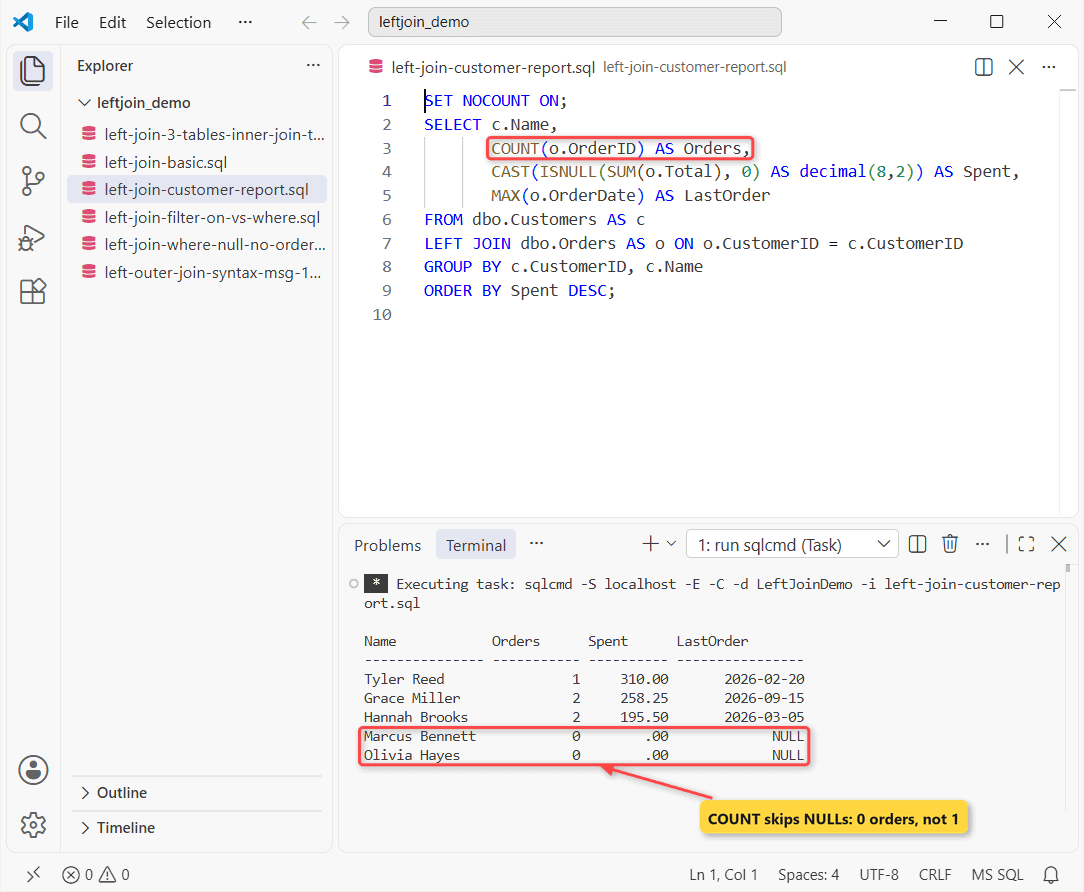
You need every customer and what they’ve spent, including the two who’ve never ordered. A sql server left join keeps every row from the table before LEFT JOIN and returns NULL for the other table’s columns when nothing matches.
The finished report:
Before You Start: The Sample Tables
Tested on: SQL Server 2025 (17.0.1000.7) Developer, sqlcmd in VS Code. Run it in an empty test database:
CREATE TABLE dbo.Customers (CustomerID int PRIMARY KEY,
    Name nvarchar(15));
CREATE TABLE dbo.Orders (OrderID int PRIMARY KEY, CustomerID int,
    OrderDate date, Total decimal(8,2));
CREATE TABLE dbo.Shipments (ShipID int PRIMARY KEY, OrderID int,
    Carrier nvarchar(6));

INSERT INTO dbo.Customers VALUES (1, N'Hannah Brooks'),
    (2, N'Tyler Reed'), (3, N'Grace Miller'),
    (4, N'Marcus Bennett'), (5, N'Olivia Hayes');
INSERT INTO dbo.Orders VALUES (101, 1, '2026-01-12', 120.00),
    (102, 1, '2026-03-05', 75.50), (103, 2, '2026-02-20', 310.00),
    (104, 3, '2026-04-02', 48.25), (105, 3, '2026-09-15', 210.00);
INSERT INTO dbo.Shipments VALUES (1, 101, N'UPS'), (2, 102, N'FedEx'),
    (3, 103, N'USPS'), (4, 104, N'UPS');
Marcus and Olivia have no orders. Order 105 hasn’t shipped.
Step 1: Write a Basic LEFT JOIN
Customers goes first. You keep it in full:
SET NOCOUNT ON;
SELECT c.Name, o.OrderID, o.Total
FROM dbo.Customers AS c
LEFT JOIN dbo.Orders AS o
    ON o.CustomerID = c.CustomerID;
Result:
Name            OrderID     Total
--------------- ----------- ----------
Hannah Brooks           101     120.00
Hannah Brooks           102      75.50
Tyler Reed              103     310.00
Grace Miller            104      48.25
Grace Miller            105     210.00
Marcus Bennett         NULL       NULL
Olivia Hayes           NULL       NULL
Checkpoint: you should see 7 rows. Marcus and Olivia get NULLs. I expected 5, but Hannah and Grace appear twice (two orders each).
Is LEFT JOIN the same as LEFT OUTER JOIN?
Yes. Microsoft’s grammar writes it LEFT [ OUTER ] JOIN, and the count matches Step 1:
SET NOCOUNT ON;
SELECT COUNT(*) AS LeftOuterJoin FROM dbo.Customers AS c
LEFT OUTER JOIN dbo.Orders AS o ON o.CustomerID = c.CustomerID;
BEGIN TRY
    EXEC (N'SELECT c.Name FROM dbo.Customers AS c
            LEFT JOIN dbo.Orders AS o;');
END TRY BEGIN CATCH PRINT CONCAT(N'Msg ', ERROR_NUMBER(), N' ', ERROR_MESSAGE()); END CATCH;
Output:
LeftOuterJoin
-------------
            7
Msg 102 Incorrect syntax near ';'.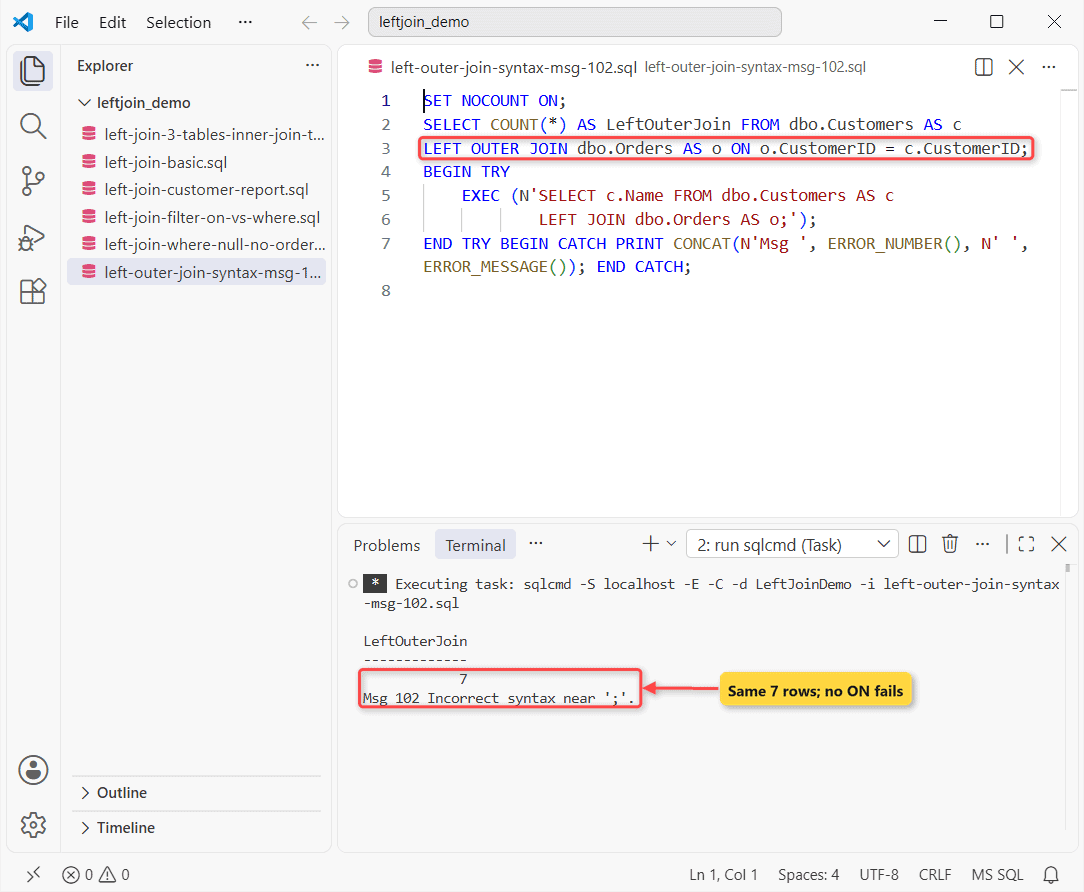
No ON? Msg 102. Every pairing with no condition is a CROSS JOIN.
Step 2: LEFT JOIN WHERE NULL: Who Has No Orders?
Keep rows where the right side is empty. Test its key, which is never NULL on a real match:
SET NOCOUNT ON;
SELECT c.CustomerID, c.Name
FROM dbo.Customers AS c
LEFT JOIN dbo.Orders AS o ON o.CustomerID = c.CustomerID
WHERE o.OrderID IS NULL;
Result:
CustomerID  Name
----------- ---------------
          4 Marcus Bennett
          5 Olivia Hayes
Checkpoint: only Marcus and Olivia. People call this an anti-join.
Step 3: LEFT JOIN 3 Tables Without Losing Rows
Chain another LEFT JOIN; COALESCE shows a dash for no carrier. Then count two INNER JOIN variants:
SET NOCOUNT ON;
SELECT c.Name, o.OrderID, COALESCE(s.Carrier, N'-') AS Carrier
FROM dbo.Customers AS c
LEFT JOIN dbo.Orders AS o ON o.CustomerID = c.CustomerID
LEFT JOIN dbo.Shipments AS s ON s.OrderID = o.OrderID;
SELECT
 (SELECT COUNT(*) FROM dbo.Customers c
  LEFT JOIN dbo.Orders o ON o.CustomerID = c.CustomerID
  INNER JOIN dbo.Shipments s ON s.OrderID = o.OrderID) AS LeftThenInner,
 (SELECT COUNT(*) FROM dbo.Customers c
  LEFT JOIN (dbo.Orders o
    INNER JOIN dbo.Shipments s ON s.OrderID = o.OrderID)
  ON o.CustomerID = c.CustomerID) AS Nested;
Output:
Name            OrderID     Carrier
--------------- ----------- -------
Hannah Brooks           101 UPS
Hannah Brooks           102 FedEx
Tyler Reed              103 USPS
Grace Miller            104 UPS
Grace Miller            105 -
Marcus Bennett         NULL -
Olivia Hayes           NULL -
LeftThenInner Nested
------------- -----------
            4           6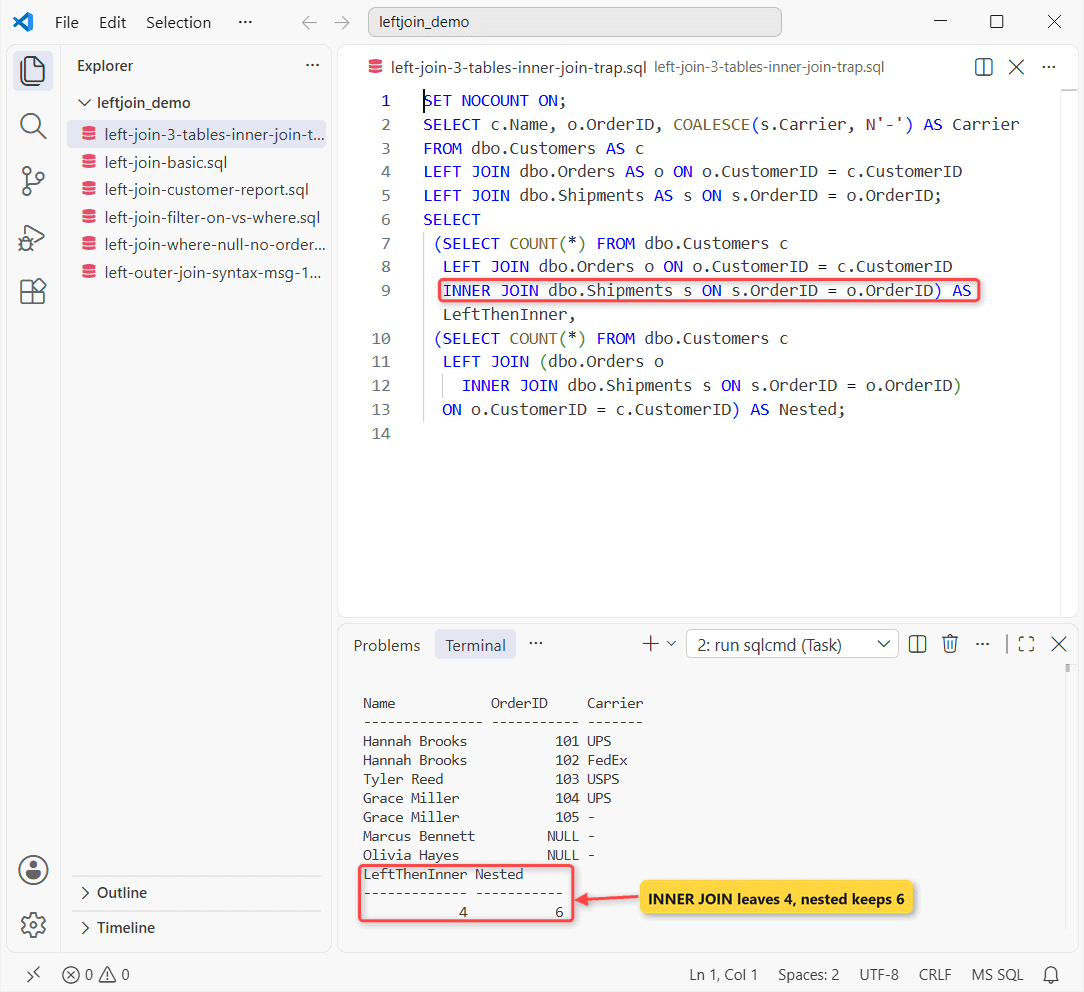
Important: an INNER JOIN at the end drops you to 4. Marcus, Olivia and order 105 have no shipment.
Need shipped orders but every customer? Nest the inner join in parentheses: 6 rows. Compare INNER JOIN on multiple tables.
Step 4: Filter in ON, Not WHERE
Say you only want orders over $100:
SET NOCOUNT ON;
SELECT c.Name, o.Total FROM dbo.Customers AS c
LEFT JOIN dbo.Orders AS o
    ON o.CustomerID = c.CustomerID AND o.Total > 100;
SELECT COUNT(*) AS FilterInWhere FROM dbo.Customers AS c
LEFT JOIN dbo.Orders AS o ON o.CustomerID = c.CustomerID
WHERE o.Total > 100;
Output:
Name            Total
--------------- ----------
Hannah Brooks       120.00
Tyler Reed          310.00
Grace Miller        210.00
Marcus Bennett        NULL
Olivia Hayes          NULL
FilterInWhere
-------------
            3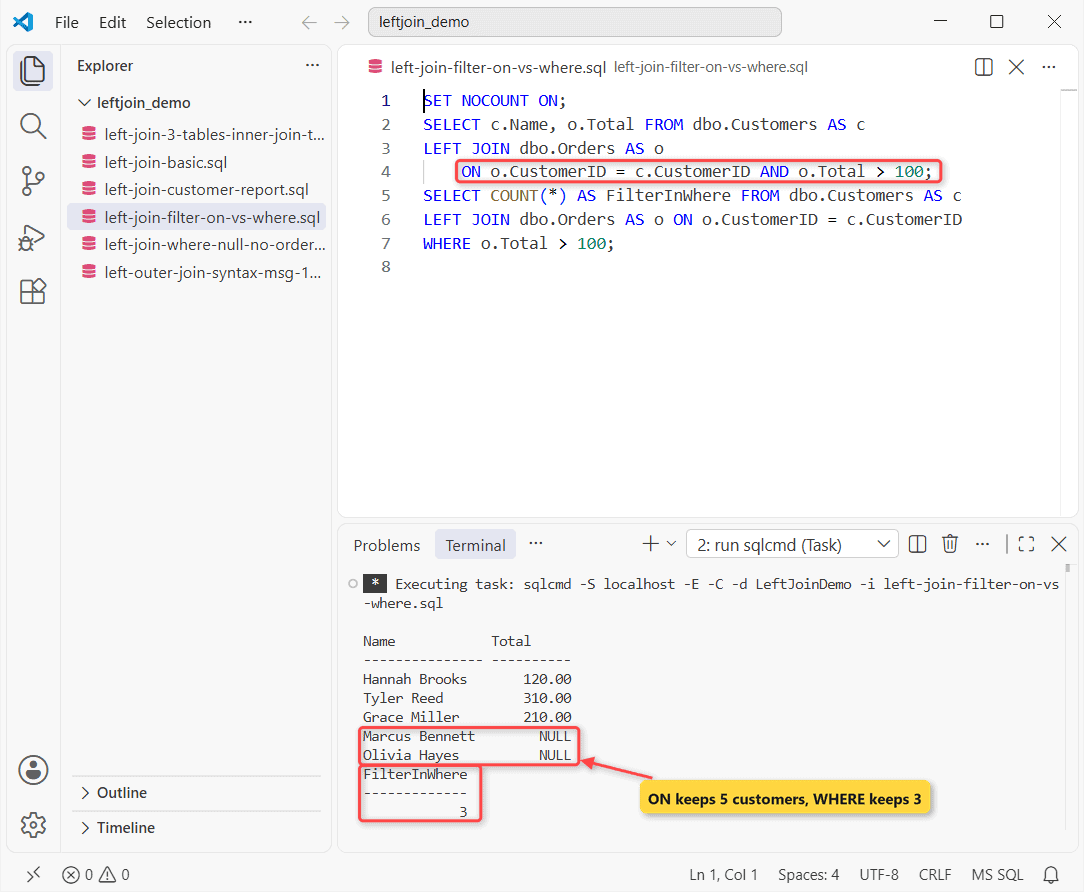
In ON, all five customers stay. In WHERE, it’s 3, because NULL > 100 isn’t true. Per Microsoft’s docs, ON applies before the join and WHERE to its result.
LIKE, BETWEEN and extra join columns follow the same rule. More in LEFT OUTER JOIN with a WHERE clause.
Test the LEFT JOIN Customer Report
Group by customer. COUNT(o.OrderID) skips NULLs and ISNULL turns a missing total into 0:
SET NOCOUNT ON;
SELECT c.Name,
       COUNT(o.OrderID) AS Orders,
       CAST(ISNULL(SUM(o.Total), 0) AS decimal(8,2)) AS Spent,
       MAX(o.OrderDate) AS LastOrder
FROM dbo.Customers AS c
LEFT JOIN dbo.Orders AS o ON o.CustomerID = c.CustomerID
GROUP BY c.CustomerID, c.Name
ORDER BY Spent DESC;
One row per customer:
Name            Orders      Spent      LastOrder
--------------- ----------- ---------- ----------------
Tyler Reed                1     310.00       2026-02-20
Grace Miller              2     258.25       2026-09-15
Hannah Brooks             2     195.50       2026-03-05
Marcus Bennett            0        .00             NULL
Olivia Hayes              0        .00             NULL
Check your work: Hannah is $120.00 + $75.50 = $195.50. COUNT(*) would give Marcus 1. See LEFT JOIN with COUNT.
Troubleshooting LEFT JOIN Results
Rows missing? Recheck Steps 3 and 4. Or see INNER JOIN vs LEFT JOIN.
Where to Take It Next
Next step: RIGHT JOIN in SQL Server, the mirror image. On MariaDB? Try MariaDB LEFT JOIN.
- Both sides kept: SQL Server outer joins
- Repeated rows? DISTINCT in a join
Frequently Asked Questions
How do I get only the latest order per customer?
Use OUTER APPLY (SELECT TOP 1 ... ORDER BY OrderDate DESC). It keeps customers with no rows (FROM clause, APPLY).
Do NULL keys match in a LEFT JOIN?
No. NULL = NULL isn’t true, so a NULL key always comes back unmatched.
Is LEFT JOIN … IS NULL or NOT EXISTS faster?
Neither by default. Per Microsoft’s Joins article, the optimizer can run both as an anti semi join, so they often share a plan. Compare actual plans on your data.

Shivam Dogra is a cloud database developer and Team Lead at TSInfo Technologies, where he has worked since June 2021. He writes the SQL Server and Oracle tutorials on DatabaseFAQs.com, covering queries, joins, stored procedures, triggers and permissions. Shivam holds a Master of Computer Applications (MCA) from Chandigarh University.