
If you need a MariaDB GUI on Windows, use HeidiSQL: the MariaDB installer already put it on your disk. On a Mac or Linux box, or when you also manage PostgreSQL or SQL Server, pick DBeaver Community instead.
That’s my verdict after connecting HeidiSQL 12.20.0.7320 to MariaDB 13.0.2 on Windows 11 and logging every statement it sent. I didn’t install the other tools, so for those I’m going by their official docs, and I’ll say so each time.
I’ll also show the part most GUI roundups skip: a read-only login for the GUI, and what happens when it tries to write.
When the mariadb CLI Is Enough (and When a GUI Pays Off)
A GUI doesn’t do anything the server can’t do from the mariadb client. Every tree, grid and dialog turns into SQL, and later I’ll show you the exact statements HeidiSQL sent.
So the CLI is enough for scripted jobs, backups, and quick checks over SSH. If you’re new to it, this MariaDB primer covers the client.
A GUI pays off when you browse unfamiliar schemas, edit a handful of rows, compare two result sets, or hand read access to someone who won’t write SQL. That last case is where the login matters more than the tool.
The Sample Database We’ll Point Every GUI At
Every example uses one small database, dfq_maria_gui, with five customers and five orders. The orders table has a foreign key, so you can see how a GUI shows relationships.
CREATE TABLE customers (
  customer_id INT PRIMARY KEY,
  full_name   VARCHAR(30) NOT NULL,
  city        VARCHAR(20) NOT NULL,
  state       CHAR(2) NOT NULL
);
CREATE TABLE orders (
  order_id    INT PRIMARY KEY,
  customer_id INT NOT NULL,
  order_date  DATE NOT NULL,
  total       DECIMAL(8,2) NOT NULL,
  FOREIGN KEY (customer_id) REFERENCES customers (customer_id)
);
INSERT INTO customers VALUES
(1, 'Hannah Brooks', 'Austin', 'TX'), (2, 'Tyler Reed', 'Columbus', 'OH'),
(3, 'Grace Miller', 'Denver', 'CO'), (4, 'Marcus Bennett', 'Raleigh', 'NC'),
(5, 'Olivia Carter', 'Tampa', 'FL');
INSERT INTO orders VALUES
(101, 1, '2026-10-02', 120.50), (102, 1, '2026-10-14', 45.25),
(103, 2, '2026-10-20', 80.75), (104, 3, '2026-11-03', 210.00),
(105, 5, '2026-11-05', 64.99);
If you’re building it from scratch, CREATE TABLE in MariaDB walks through the column types.
The Read-Only Login Every GUI Will Use
I don’t connect a GUI as root. One mis-click in a data grid and the change is committed. So the demo login can only read this one database:
CREATE USER 'mg_reader'@'localhost' IDENTIFIED BY 'Reader-Demo-2026';
GRANT SELECT ON dfq_maria_gui.* TO 'mg_reader'@'localhost';
SELECT TABLE_SCHEMA, PRIVILEGE_TYPE
FROM information_schema.SCHEMA_PRIVILEGES
WHERE GRANTEE = "'mg_reader'@'localhost'";
Result:
+---------------+----------------+
| TABLE_SCHEMA  | PRIVILEGE_TYPE |
+---------------+----------------+
| dfq_maria_gui | SELECT         |
+---------------+----------------+
One row: SELECT on dfq_maria_gui and nothing else. I read SCHEMA_PRIVILEGES instead of SHOW GRANTS because SHOW GRANTS prints the password hash. The full account story is in create a database and user in MariaDB.
Method 1: HeidiSQL, the MariaDB GUI Client Already on Windows (Recommended)
Use HeidiSQL when you’re on Windows and the server is MariaDB or MySQL. The MariaDB installer ships it as an optional component, and on my PC it sits in C:\Program Files\Common Files\MariaDBShared\HeidiSQL.
Same mg_reader login, same sample data. HeidiSQL accepts connection details on the command line, so I started it without touching the session manager:
heidisql.exe -d=mg_reader -h=localhost -u=mg_reader -p=Reader-Demo-2026 -P=3306It opened straight into the session and listed the databases mg_reader can see:
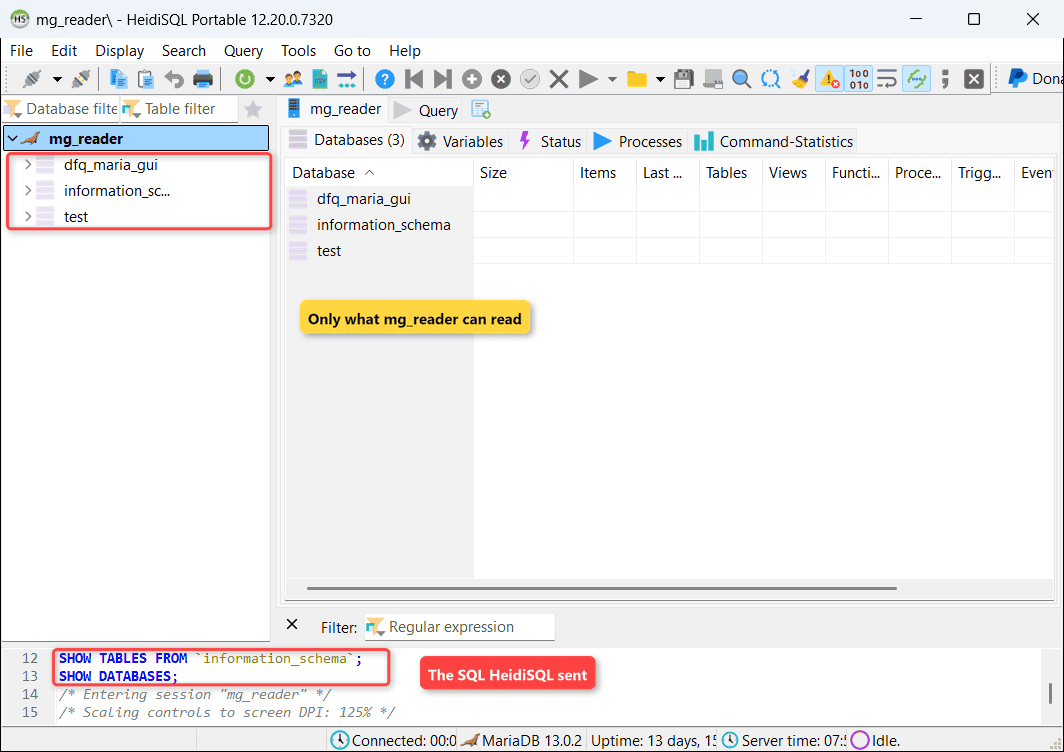
I ran a portable copy of the bundled build (an empty portable_settings.txt next to the exe), so the test didn’t write sessions to the registry.
How does this work?
HeidiSQL is a native Windows program that talks to the server through libmariadb.dll, the same C connector the CLI uses. The -d flag names the session; -h, -u, -p and -P are host, user, password and port.
To see what it really does, I switched on the server’s general log for those few seconds and copied mg_reader’s rows into a table:
SET GLOBAL log_output = 'TABLE';
SET GLOBAL general_log = ON;
-- start HeidiSQL, then connect once with the mariadb CLI
SET GLOBAL general_log = OFF;
SET GLOBAL log_output = 'FILE';
SELECT seq, command_type, statement
FROM gui_log WHERE client = 'HeidiSQL' ORDER BY seq;
SELECT client, statement
FROM gui_log WHERE command_type = 'Connect';Result:
+------+--------------+---------------------------------------+
| seq  | command_type | statement                             |
+------+--------------+---------------------------------------+
|    1 | Connect      | mg_reader@localhost on  using TCP/IP  |
|    2 | Query        | SELECT CONNECTION_ID()                |
|    3 | Query        | SHOW VARIABLES                        |
|    4 | Query        | SET NAMES utf8mb4                     |
|    5 | Query        | SHOW /*!50002 GLOBAL */ STATUS        |
|    6 | Query        | SELECT NOW()                          |
|    7 | Query        | SHOW TABLES FROM `information_schema` |
|    8 | Query        | SHOW DATABASES                        |
+------+--------------+---------------------------------------+
+----------+---------------------------------------+
| client   | statement                             |
+----------+---------------------------------------+
| mariadb  | mg_reader@localhost on  using SSL/TLS |
| HeidiSQL | mg_reader@localhost on  using TCP/IP  |
+----------+---------------------------------------+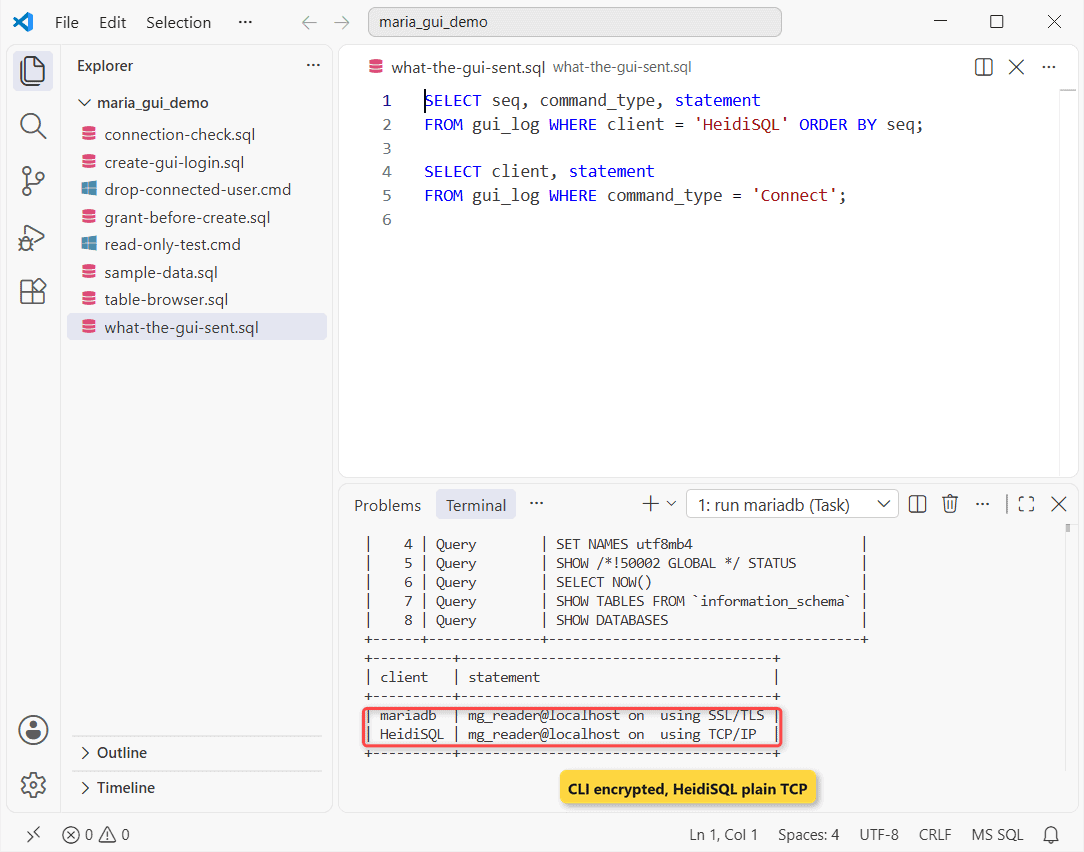
No magic. The Databases tab is SHOW DATABASES, and the server info comes from SHOW VARIABLES and SHOW GLOBAL STATUS.
Turn the general log back off afterward, since it records every statement from every client. MariaDB logs explains each log type.
Important: look at the Connect lines. My mariadb CLI connection used SSL/TLS, but the HeidiSQL session went over plain TCP/IP, because SSL is a per-session setting there and new sessions start with it off.
Method 2: DBeaver Community for Mac, Linux and Mixed Engines
Use DBeaver when you’re not on Windows, or when one tool has to cover MariaDB plus PostgreSQL, SQL Server and others. Community Edition is free and open source; some sign-in options, such as Kerberos and AWS IAM, are marked PRO-only in DBeaver’s docs.
I didn’t install it for this test. These steps follow DBeaver’s MariaDB driver page:
- On the Connect to a database page, search for MariaDB and select it.
- Choose Connect by Host, then enter Host, Port (3306 by default) and Database (
dfq_maria_guifor the sample). - Pick username/password authentication and enter the mg_reader login.
- Use Driver Settings if you need a specific driver version, then test and save.
How does this work?
DBeaver is a Java app, so it connects through the MariaDB JDBC driver instead of libmariadb. The Show all databases option controls whether the navigator lists everything mg_reader can see or only dfq_maria_gui.
Its ER diagram view reads the same foreign key metadata I query later, which is why the orders-to-customers link would show up as a line.
Method 3: phpMyAdmin, a Browser-Based MariaDB GUI
Use phpMyAdmin when the database sits on a web host and port 3306 isn’t open to you. It’s a PHP app that runs on the server side, so your browser is the client.
Its requirements page lists a web server (Apache, nginx or IIS), PHP 7.2.5 or newer, and MySQL 5.5+ or MariaDB 5.5+. I didn’t install it here.
How does this work?
Your browser never talks to MariaDB. phpMyAdmin connects from the web server, usually to localhost, and renders the results as HTML. That’s why it works through a firewall that blocks 3306, and why it’s another public login page to keep patched.
If you’d rather open the port, read how to enable remote access in MariaDB first.
Does MySQL Workbench Work With MariaDB?
It connects, but I wouldn’t rely on it. Oracle builds and tests Workbench against MySQL Server, and in its bug tracker Oracle has said MariaDB isn’t a supported server. Connecting to MariaDB triggers an “Incompatible/nonstandard server version or connection protocol detected” warning.
You can click Continue Anyway, and plain queries usually run. The admin screens are the risky part, because MariaDB has drifted from MySQL for years.
MariaDB vs MySQL lists where they differ. For daily work, use a tool that names MariaDB as a supported server.
Other MariaDB GUI Tools Worth a Look
I haven’t run these; each one documents MariaDB support:
- Beekeeper Studio: open source, Windows, macOS and Linux, with a paid edition on top.
- dbForge Studio for MariaDB: a commercial Windows IDE from Devart, listed in the MariaDB docs.
- Navicat for MariaDB and TablePlus: paid native apps, popular on macOS.
MariaDB GUI Clients Compared
| Tool | Platforms | Cost | Ships with MariaDB | Tested here |
|---|---|---|---|---|
| HeidiSQL | Windows (newer Linux, macOS builds) | Free | Yes (Windows installer) | Yes, 12.20.0.7320 |
| DBeaver Community | Windows, macOS, Linux | Free (PRO is paid) | No | No, docs only |
| phpMyAdmin | Any browser (PHP server) | Free | No | No, docs only |
| MySQL Workbench | Windows, macOS, Linux | Free | No | No; MariaDB not supported |
| Beekeeper Studio | Windows, macOS, Linux | Free + paid | No | No, docs only |
The column that matters most is the last one. Most lists rank ten tools they never connected; I’d rather tell you which one I watched on the wire.
What a MariaDB GUI Table Browser Runs Under the Hood
When you expand a database in any GUI, it reads information_schema. Same sample data, now through the views a table browser uses:
SELECT TABLE_NAME, TABLE_ROWS, ENGINE
FROM information_schema.TABLES
WHERE TABLE_SCHEMA = DATABASE()
ORDER BY TABLE_NAME;

SELECT COLUMN_NAME, COLUMN_TYPE, IS_NULLABLE, COLUMN_KEY
FROM information_schema.COLUMNS
WHERE TABLE_SCHEMA = DATABASE() AND TABLE_NAME = 'orders'
ORDER BY ORDINAL_POSITION;
Result:
+------------+------------+--------+
| TABLE_NAME | TABLE_ROWS | ENGINE |
+------------+------------+--------+
| customers  |          5 | InnoDB |
| gui_log    |         10 | InnoDB |
| orders     |          5 | InnoDB |
+------------+------------+--------+
+-------------+--------------+-------------+------------+
| COLUMN_NAME | COLUMN_TYPE  | IS_NULLABLE | COLUMN_KEY |
+-------------+--------------+-------------+------------+
| order_id    | int(11)      | NO          | PRI        |
| customer_id | int(11)      | NO          | MUL        |
| order_date  | date         | NO          |            |
| total       | decimal(8,2) | NO          |            |
+-------------+--------------+-------------+------------+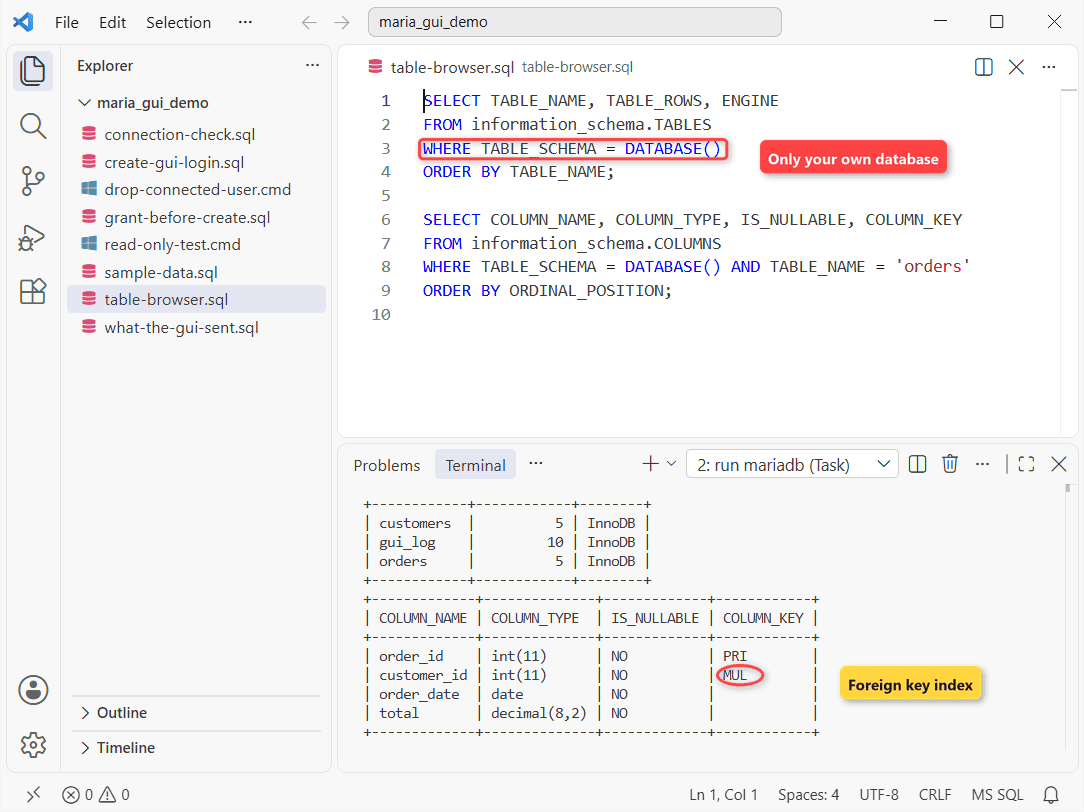
The MUL key on customer_id is the foreign key index; that’s what a diagram turns into a line. TABLE_ROWS is an InnoDB estimate, so don’t treat a GUI’s row count as exact; COUNT in MariaDB gives the real number.
I filtered on DATABASE() on purpose. Other demo databases on this server have tables with the same names, and a browser query without that filter would mix them.
For the CLI versions of these lists, see show tables in MariaDB.
Connect Any MariaDB GUI Client: Host, Port, User and SSL
Every client asks for the same five things. Here’s how they map to the sample setup:
| GUI field | Sample value | Where to check it |
|---|---|---|
| Host | localhost or the server’s DNS name | Your hosting panel or DBA |
| Port | 3306 | SELECT @@port |
| User / password | mg_reader | SHOW GRANTS |
| Database | dfq_maria_gui | SHOW DATABASES |
| SSL / TLS | On for anything non-local | SHOW SESSION STATUS LIKE ‘Ssl_version’ |
After you connect, run this in the GUI’s query tab. It confirms you reached the server and account you meant (I ran it as root from the CLI):
SELECT VERSION(), @@port, CURRENT_USER();
SHOW SESSION STATUS LIKE 'Ssl_version';
Result:
+----------------+--------+----------------+
| VERSION()      | @@port | CURRENT_USER() |
+----------------+--------+----------------+
| 13.0.2-MariaDB |   3306 | root@localhost |
+----------------+--------+----------------+
+---------------+---------+
| Variable_name | Value   |
+---------------+---------+
| Ssl_version   | TLSv1.3 |
+---------------+---------+
My session came back with TLSv1.3. The MariaDB docs say 11.4 and later turn TLS on automatically, with certificates generated in memory at startup, so a missing certificate isn’t a reason to switch SSL off.
If the port doesn’t answer at all, test it before blaming the GUI: ping the MariaDB port shows how.
Test the Read-Only GUI Login: SELECT Works, Writes Fail
Same mg_reader login and the same sample rows. This script reads Texas customers, tries one UPDATE, then lists the databases it can see:
@echo off
mariadb -u mg_reader --password=Reader-Demo-2026 -t dfq_maria_gui -e "SELECT full_name, city FROM customers WHERE state = 'TX'"
mariadb -u mg_reader --password=Reader-Demo-2026 dfq_maria_gui -e "UPDATE customers SET city = 'Dallas' WHERE customer_id = 1"
mariadb -u mg_reader --password=Reader-Demo-2026 -t -e "SHOW DATABASES"
exit /b 0
Output:
+---------------+--------+
| full_name     | city   |
+---------------+--------+
| Hannah Brooks | Austin |
+---------------+--------+
--------------
UPDATE customers SET city = 'Dallas' WHERE customer_id = 1
--------------

ERROR 1142 (42000) at line 1: UPDATE command denied to user 'mg_reader'@'localhost' for table `dfq_maria_gui`.`customers`
+--------------------+
| Database           |
+--------------------+
| dfq_maria_gui      |
| information_schema |
| test               |
+--------------------+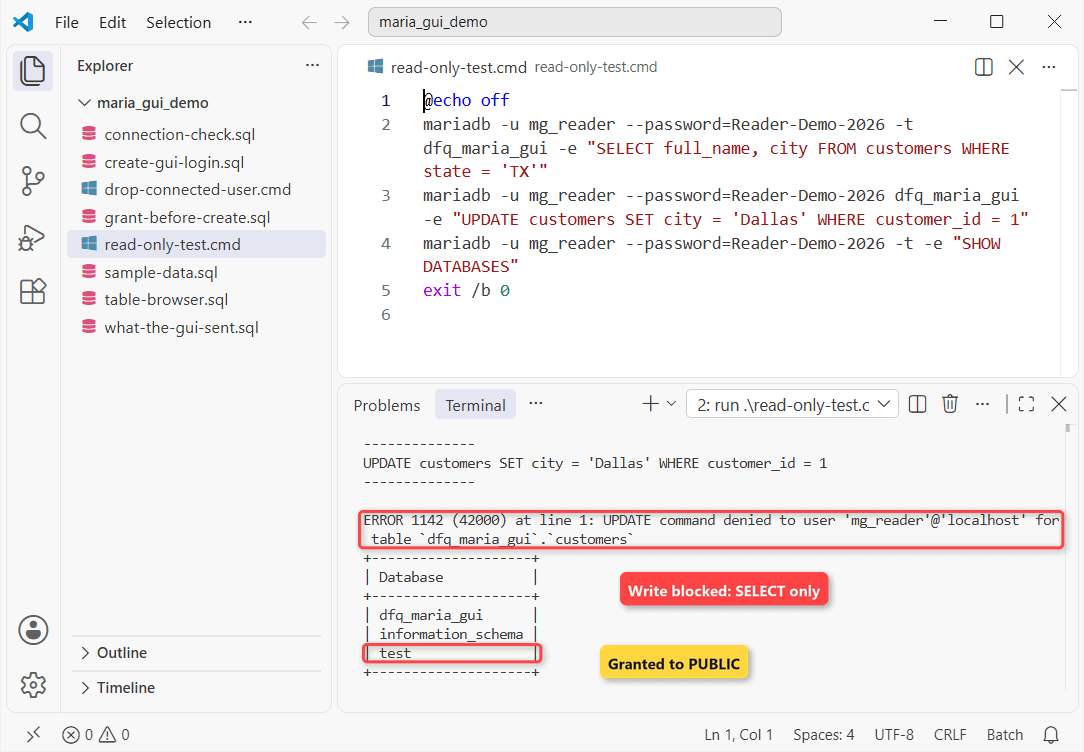
That ERROR 1142 is exactly what a GUI shows when someone edits a grid cell and clicks save. The server refuses it, whatever the tool.
The test database surprised me. It isn’t from my GRANT: mysql.db on this server grants PUBLIC, meaning every account, rights on test and test_%.
Drop those grants if nobody uses them. To audit who else can log in, show users in MariaDB.
Common Mistakes When Setting Up a GUI Login
GRANT Before CREATE USER: ERROR 1133
Older guides grant first and let the server create the account. MariaDB 13’s default sql_mode includes NO_AUTO_CREATE_USER, so that fails:
GRANT SELECT ON dfq_maria_gui.* TO 'mg_temp'@'localhost';Error:
ERROR 1133 (28000) at line 1: Can't find any matching row in the user tableCreate the user first, then grant. GRANT ALL PRIVILEGES in MariaDB covers wider grants, but a GUI login rarely needs them.
Dropping the Login While a GUI Tab Is Open: Note 4227
This one doesn’t fail, which is the problem. I kept an mg_reader session sleeping and dropped the account from root:
@echo off
start /b mariadb -u mg_reader --password=Reader-Demo-2026 -N -e "SELECT SLEEP(4) AS still_open"
ping -n 2 127.0.0.1 >nul
mariadb -u root -t -e "DROP USER 'mg_reader'@'localhost'; SHOW WARNINGS"
ping -n 5 127.0.0.1 >nul
exit /b 0
Output:
+-------+------+------------------------------------------------------------------------------------------------------------------------+
| Level | Code | Message                                                                                                                |
+-------+------+------------------------------------------------------------------------------------------------------------------------+
| Note  | 4227 | Dropped users 'mg_reader'@'localhost' have active connections. Use KILL CONNECTION if they should not be used anymore. |
+-------+------+------------------------------------------------------------------------------------------------------------------------+
0
The DROP succeeds, and the 0 at the end is the old session finishing its SLEEP afterward. A GUI window left open keeps reading until it disconnects. Kill the session too, as remove a user in MariaDB shows.
Which MariaDB GUI Should You Use?
| Your situation | Pick | Why |
|---|---|---|
| Windows, MariaDB only | HeidiSQL | Already installed, fast, small |
| macOS or Linux | DBeaver Community | Cross-platform, free |
| MariaDB plus PostgreSQL or SQL Server | DBeaver Community | One tool, many drivers |
| Hosted server, 3306 closed | phpMyAdmin | Runs on the server, browser only |
| Already on MySQL Workbench | Switch for admin work | MariaDB isn’t a supported server |
My rule of thumb: pick the tool by platform, then spend your effort on the login. A read-only account matters more than which GUI you chose.
Where the answer flips: if your team lives in one IDE (VS Code, JetBrains), its database plugin may beat any standalone GUI. Re-check after a big MariaDB release, since GUIs lag behind new server features.
Things to Keep in Mind
- Root in a GUI: one grid edit commits. Give the GUI its own login with only what it needs.
- SSL is per session in HeidiSQL: my session went over plain TCP/IP. Turn it on for remote servers.
- Row counts are estimates: the table list shows TABLE_ROWS. Run COUNT(*) when the number matters.
- The general log isn’t free: it records everything. Use it for a few seconds, then turn it off.
- Old versions differ: check your MariaDB version before trusting a GUI’s feature list.
Next Step
Next step: give your GUI login a real job, such as exporting a report table or importing a CSV into MariaDB, while it stays read-only on everything else.
Other engines have their own GUI questions:
Frequently Asked Questions
Does MariaDB have its own official GUI?
No. MariaDB ships HeidiSQL with the Windows installer, but its HeidiSQL page calls it third-party software that MariaDB doesn’t test or support.
Is HeidiSQL available for Mac or Linux?
Yes, now. The HeidiSQL download page lists 12.22 builds for Linux (.deb, .rpm, Flatpak) and an arm64 macOS app. The copy bundled with MariaDB 13.0 on my Windows PC was 12.20.
Can I use phpMyAdmin with MariaDB 11 or 13?
Yes. The phpMyAdmin requirements only set a floor of MariaDB 5.5, plus PHP 7.2.5 or newer on the web server.
How do I connect a MariaDB GUI over SSH?
Most desktop clients have an SSH tab: enter the SSH host and key, then use 127.0.0.1 and 3306 as the database host and port. HeidiSQL uses plink.exe, which ships in its folder.

Kumar Saurabh is a freelance software engineer who builds web and mobile apps with Next.js, React, Flutter and Python. From 2021 to 2024, Saurabh worked as an IT analyst and developer at TSInfo Technologies, writing technical articles on SQL and PostgreSQL. Saurabh writes the PostgreSQL, MySQL, MariaDB and MongoDB tutorials on DatabaseFAQs.com and holds a Master of Computer Applications (MCA) from Chandigarh University.