
Your LEFT JOIN should list every customer. Add a 2026 filter in WHERE and one vanishes.
Quick answer: in a SQL Server inner join with where clause, the join condition goes in ON and the filter in WHERE. INNER JOIN returns the same rows either way. LEFT JOIN doesn’t.
SELECT c.Name, o.OrderID, o.Amount
FROM dbo.Customers AS c
INNER JOIN dbo.Orders AS o ON o.CustomerID = c.CustomerID
WHERE c.State = 'WA';What You Need Before You Start
Tested on: Microsoft SQL Server 2025 (RTM) - 17.0.1000.7, in VS Code. Sample tables:
CREATE TABLE dbo.Regions (State char(2) PRIMARY KEY, Region nvarchar(8));
CREATE TABLE dbo.Customers (CustomerID int PRIMARY KEY,
    Name nvarchar(12), State char(2));
CREATE TABLE dbo.Orders (OrderID int PRIMARY KEY, CustomerID int,
    OrderDate date, Amount decimal(8,2));
INSERT INTO dbo.Regions VALUES ('WA', N'West'), ('CA', N'West'),
    ('TX', N'South'), ('IL', N'Midwest');
INSERT INTO dbo.Customers VALUES (1, N'Megan Bowen', 'WA'),
    (2, N'Alex Wilber', 'TX'), (3, N'Adele Vance', 'CA'),
    (4, N'Lee Gu', 'IL');
INSERT INTO dbo.Orders VALUES
    (101, 1, '2026-01-15', 250), (102, 1, '2026-03-02', 120),
    (103, 2, '2026-02-10', 900), (104, 3, '2025-12-20',  75),
    (105, 3, '2026-04-05', 430), (106, 4, '2025-11-11',  60);
Step 1: Compare ON vs WHERE (Same for INNER, Not for LEFT)
I ran one 2026 filter in five placements (new to joins? see how INNER JOIN matches rows):
SET NOCOUNT ON;
SELECT 'INNER, in WHERE' AS Query, COUNT(*) AS RowsBack
FROM dbo.Customers c JOIN dbo.Orders o ON o.CustomerID = c.CustomerID
WHERE o.OrderDate >= '20260101'
UNION ALL SELECT 'INNER, in ON', COUNT(*)
FROM dbo.Customers c JOIN dbo.Orders o ON o.CustomerID = c.CustomerID
    AND o.OrderDate >= '20260101'
UNION ALL SELECT 'LEFT, in WHERE', COUNT(*)
FROM dbo.Customers c LEFT JOIN dbo.Orders o ON o.CustomerID = c.CustomerID
WHERE o.OrderDate >= '20260101'
UNION ALL SELECT 'LEFT, in ON', COUNT(*)
FROM dbo.Customers c LEFT JOIN dbo.Orders o ON o.CustomerID = c.CustomerID
    AND o.OrderDate >= '20260101'
UNION ALL SELECT 'Comma join, WHERE', COUNT(*)
FROM dbo.Customers c, dbo.Orders o
WHERE o.CustomerID = c.CustomerID AND o.OrderDate >= '20260101';
Query RowsBack
----------------- -----------
INNER, in WHERE 4
INNER, in ON 4
LEFT, in WHERE 4
LEFT, in ON 5
Comma join, WHERE 4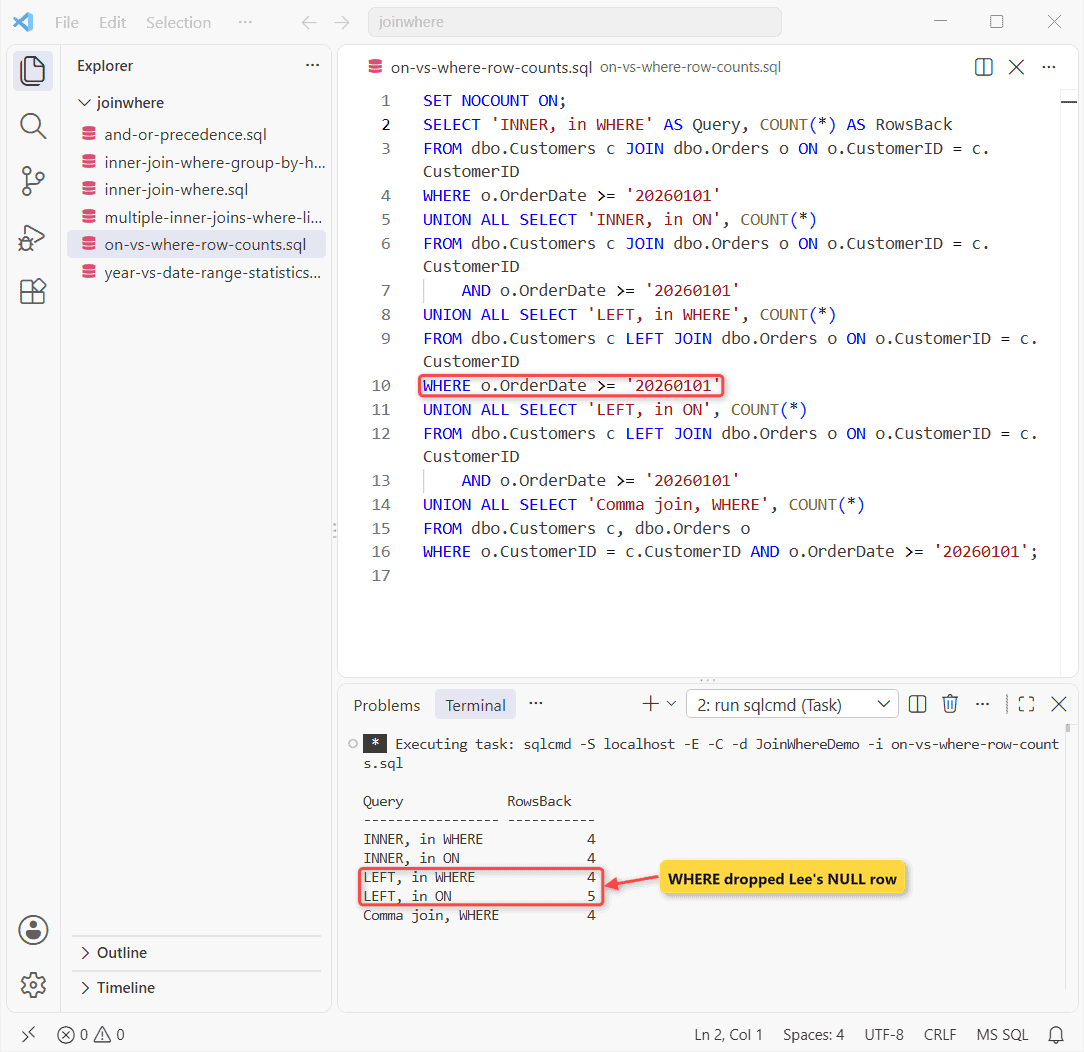
Why it happens: WHERE runs after the join, so Lee, with no 2026 order, reaches it holding a NULL date that never passes.
Fix: right-table filters go in ON (LEFT OUTER JOIN with WHERE clause).
Step 2: Multiple Inner Joins With WHERE and LIKE
One JOIN per table, one WHERE. Query two skips an alias on purpose:
SET NOCOUNT ON;
SELECT c.Name, r.Region, o.OrderID, o.Amount
FROM dbo.Orders AS o
INNER JOIN dbo.Customers AS c ON c.CustomerID = o.CustomerID
INNER JOIN dbo.Regions   AS r ON r.State = c.State
WHERE r.Region = N'West' AND c.Name LIKE N'A%';
BEGIN TRY
    EXEC sys.sp_executesql N'SELECT CustomerID FROM dbo.Customers c
        JOIN dbo.Orders o ON o.CustomerID = c.CustomerID;';
END TRY
BEGIN CATCH
    PRINT CONCAT(N'Msg ', ERROR_NUMBER(), N': ', ERROR_MESSAGE());
END CATCH;
Name Region OrderID Amount
------------ -------- ----------- ----------
Adele Vance West 104 75.00
Adele Vance West 105 430.00
Msg 209: Ambiguous column name 'CustomerID'.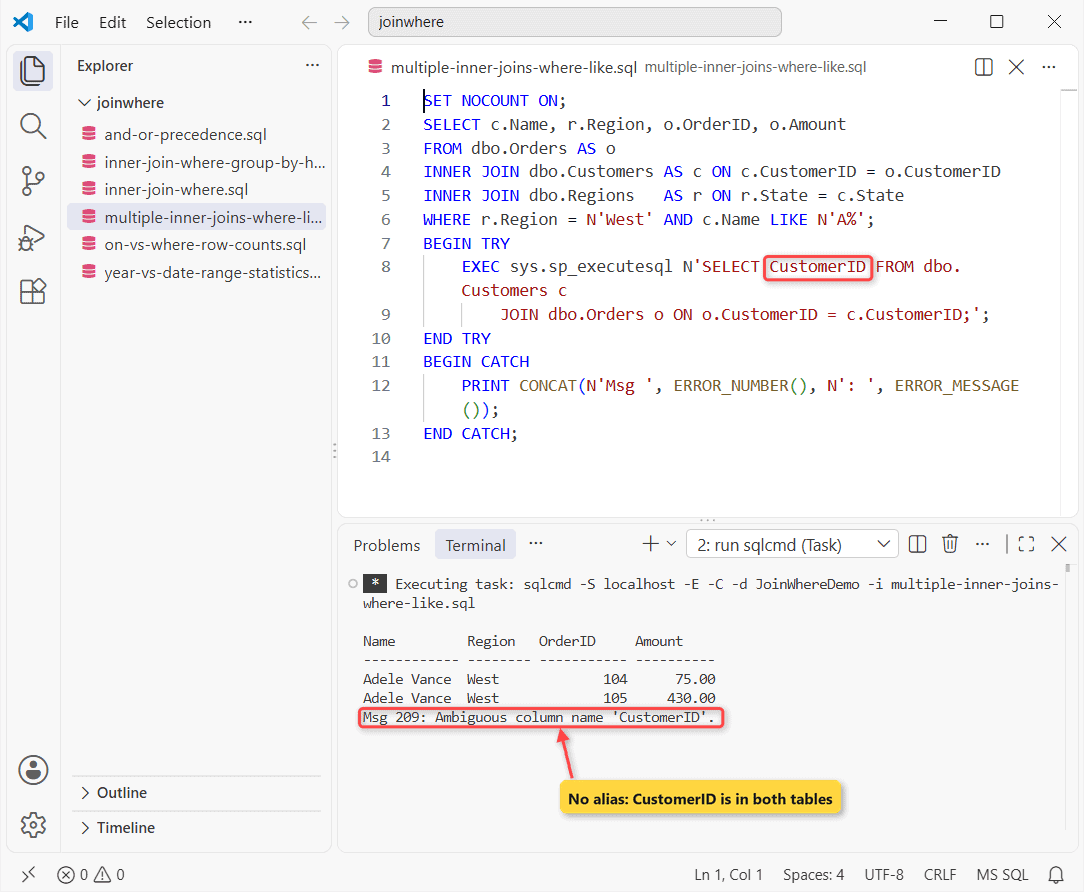
Msg 209: the column is in both tables. Write c.CustomerID (more multi-table joins).
Step 3: Multiple Conditions in WHERE (AND/OR Trap)
AND binds before OR, so NoParens means WA, or CA over $200:
SET NOCOUNT ON;
SELECT SUM(IIF(c.State = 'WA' OR c.State = 'CA' AND o.Amount > 200, 1, 0)) AS NoParens,
       SUM(IIF((c.State = 'WA' OR c.State = 'CA') AND o.Amount > 200, 1, 0)) AS Parens
FROM dbo.Customers c JOIN dbo.Orders o ON o.CustomerID = c.CustomerID;
NoParens Parens
----------- -----------
3 2Megan’s $120 order sneaks in.
Step 4: INNER JOIN With WHERE, GROUP BY and HAVING
WHERE filters rows first. HAVING filters groups:
SET NOCOUNT ON;
SELECT c.State, COUNT(*) AS Orders
FROM dbo.Orders AS o
INNER JOIN dbo.Customers AS c ON c.CustomerID = o.CustomerID
WHERE o.OrderDate >= '20260101'
GROUP BY c.State
HAVING COUNT(*) >= 2;
State Orders
----- -----------
WA 2TX and CA had one order each, so HAVING dropped them. See COUNT with JOIN and GROUP BY.
Step 5: YEAR() in WHERE vs a Date Range
Date functions like YEAR() block an index seek. On 20,000 rows I got:
SET NOCOUNT ON;
SET STATISTICS IO ON;
SELECT COUNT(*) AS YearFn FROM dbo.OrderHistory
WHERE YEAR(OrderDate) = 2026;
SELECT COUNT(*) AS DateRange FROM dbo.OrderHistory
WHERE OrderDate >= '20260101' AND OrderDate < '20270101';
YearFn
-----------
5380
Table 'OrderHistory'. Scan count 1, logical reads 45, physical reads 0, page server reads 0, read-ahead reads 0, page server read-ahead reads 0, lob logical reads 0, lob physical reads 0, lob page server reads 0, lob read-ahead reads 0, lob page server read-ahead reads 0.
DateRange
-----------
5380
Table 'OrderHistory'. Scan count 1, logical reads 15, physical reads 0, page server reads 0, read-ahead reads 0, page server read-ahead reads 0, lob logical reads 0, lob physical reads 0, lob page server reads 0, lob read-ahead reads 0, lob page server read-ahead reads 0.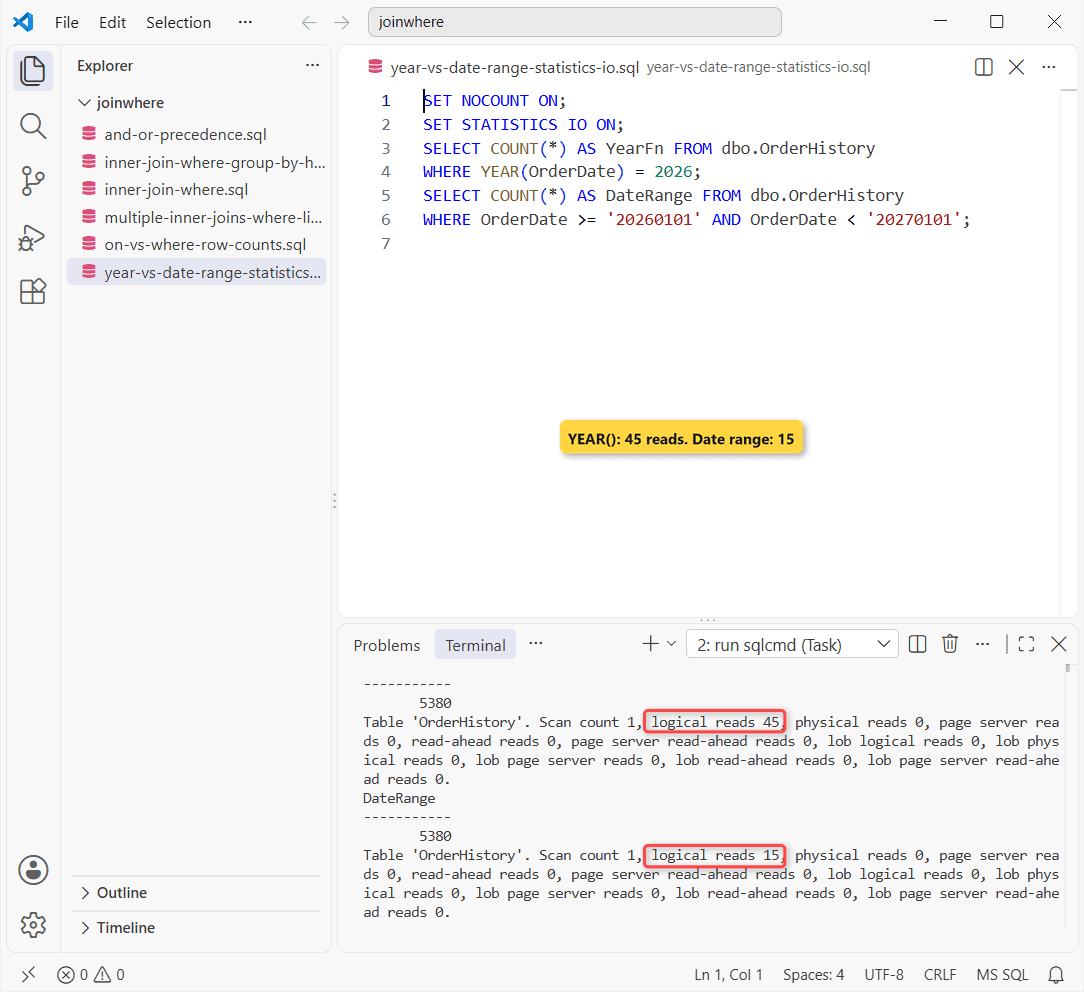
45 reads vs 15, same 5,380 rows, same inside a join. Use the range.
Is a Comma Join With WHERE the Same as INNER JOIN?
Yes: the comma row in Step 1 returned 4. Without WHERE, it’s all 24 pairs.
That’s a cross join. Outer joins have no comma form (FULL OUTER JOIN with WHERE).
Cheat Sheet: Where the Filter Goes
| Join | Filter in ON | Filter in WHERE |
|---|---|---|
| INNER | Same rows | Same rows |
| LEFT, right table | Keeps left rows | Drops unmatched |
Common Mistakes to Avoid If It Still Fails
- Lost LEFT JOIN rows: filter in ON.
- Msg 209: add the alias.
- Extra rows: parenthesize OR.
Next Steps
Try LEFT JOIN with COUNT next. Related:
Frequently Asked Questions
Is ON faster than WHERE for an INNER JOIN?
No, same plan. Microsoft just prefers them in FROM (Joins (SQL Server)).
In what order does SQL Server process JOIN and WHERE?
FROM, ON, JOIN, WHERE, GROUP BY, HAVING, SELECT. So WHERE can’t use a SELECT alias.
Does WHERE behave the same with RIGHT JOIN?
Yes, mirrored: a WHERE filter on the left table drops them.

Shivam Dogra is a cloud database developer and Team Lead at TSInfo Technologies, where he has worked since June 2021. He writes the SQL Server and Oracle tutorials on DatabaseFAQs.com, covering queries, joins, stored procedures, triggers and permissions. Shivam holds a Master of Computer Applications (MCA) from Chandigarh University.