
You have a Departments table and an Employees table. You want every department in the report, even the one nobody works in yet.
Quick answer: a right join in SQL Server returns every row from the table after RIGHT JOIN plus the matching rows from the table before it. Where nothing matches, the left table’s columns come back NULL.
SELECT d.DeptName, e.Name
FROM dbo.Employees AS e
RIGHT JOIN dbo.Departments AS d
    ON e.DeptID = d.DeptID;
You should see seven rows. Legal has no employees, so its Name is NULL:
DeptName   Name
---------- ---------------
Sales      Hannah Brooks
Sales      Tyler Reed
Finance    Grace Miller
Finance    Ethan Carter
IT         Marcus Bennett
IT         Olivia Hayes
Legal      NULL

(7 rows affected)The Sample Tables Used in Every Example
Tested on: Microsoft SQL Server 2025 (RTM) - 17.0.1000.7 Developer, run with sqlcmd in VS Code. Every query below reuses this script. Run it once in an empty test database.
CREATE TABLE dbo.Offices (OfficeID int PRIMARY KEY,
    City nvarchar(10), State char(2));
CREATE TABLE dbo.Departments (DeptID int PRIMARY KEY,
    DeptName nvarchar(10), OfficeID int NULL);
CREATE TABLE dbo.Employees (EmpID int PRIMARY KEY, Name nvarchar(15),
    DeptID int NULL, HireDate date, Salary decimal(9,2));

INSERT INTO dbo.Offices VALUES (1, N'Columbus', 'OH'),
    (2, N'Austin', 'TX'), (3, N'Denver', 'CO');
INSERT INTO dbo.Departments VALUES (10, N'Sales', 1),
    (20, N'Finance', 2), (30, N'IT', NULL), (40, N'Legal', 3);
INSERT INTO dbo.Employees VALUES
    (1, N'Hannah Brooks',  10, '2024-03-04', 68000),
    (2, N'Tyler Reed',     10, '2026-02-09', 61000),
    (3, N'Grace Miller',   20, '2025-07-14', 74000),
    (4, N'Marcus Bennett', 30, '2026-04-20', 92000),
    (5, N'Olivia Hayes',   30, '2023-11-06', 88000),
    (6, N'Ethan Carter',   20, '2026-06-01', 70500),
    (7, N'Chloe Turner', NULL, '2026-09-28', 58000);
Three gaps are there on purpose: Legal has no employees, IT has no office, and Chloe Turner (hired 09/28/2026) isn’t in a department yet.
Those gaps are what SQL Server outer joins are for.
RIGHT JOIN vs RIGHT OUTER JOIN: Same Syntax in SQL Server
The OUTER keyword is optional. The FROM clause grammar on Microsoft Learn writes it as RIGHT [ OUTER ] JOIN. This script counts both forms, then tries two broken queries inside TRY…CATCH:
SET NOCOUNT ON;
SELECT COUNT(*) AS RightJoin FROM dbo.Employees AS e
RIGHT JOIN dbo.Departments AS d ON e.DeptID = d.DeptID;
SELECT COUNT(*) AS RightOuterJoin FROM dbo.Employees AS e
RIGHT OUTER JOIN dbo.Departments AS d ON e.DeptID = d.DeptID;
BEGIN TRY
    EXEC (N'SELECT d.DeptName FROM dbo.Employees AS e
            RIGHT OUTER JOIN dbo.Departments AS d;');
END TRY BEGIN CATCH PRINT CONCAT(N'No ON: Msg ', ERROR_NUMBER(), N' ', ERROR_MESSAGE()); END CATCH;
BEGIN TRY
    EXEC (N'SELECT DeptID FROM dbo.Employees AS e
            RIGHT JOIN dbo.Departments AS d ON e.DeptID = d.DeptID;');
END TRY BEGIN CATCH PRINT CONCAT(N'Ambiguous: Msg ', ERROR_NUMBER(), N' ', ERROR_MESSAGE()); END CATCH;
Output:
RightJoin
-----------
          7
RightOuterJoin
--------------
             7
No ON: Msg 102 Incorrect syntax near ';'.
Ambiguous: Msg 209 Ambiguous column name 'DeptID'.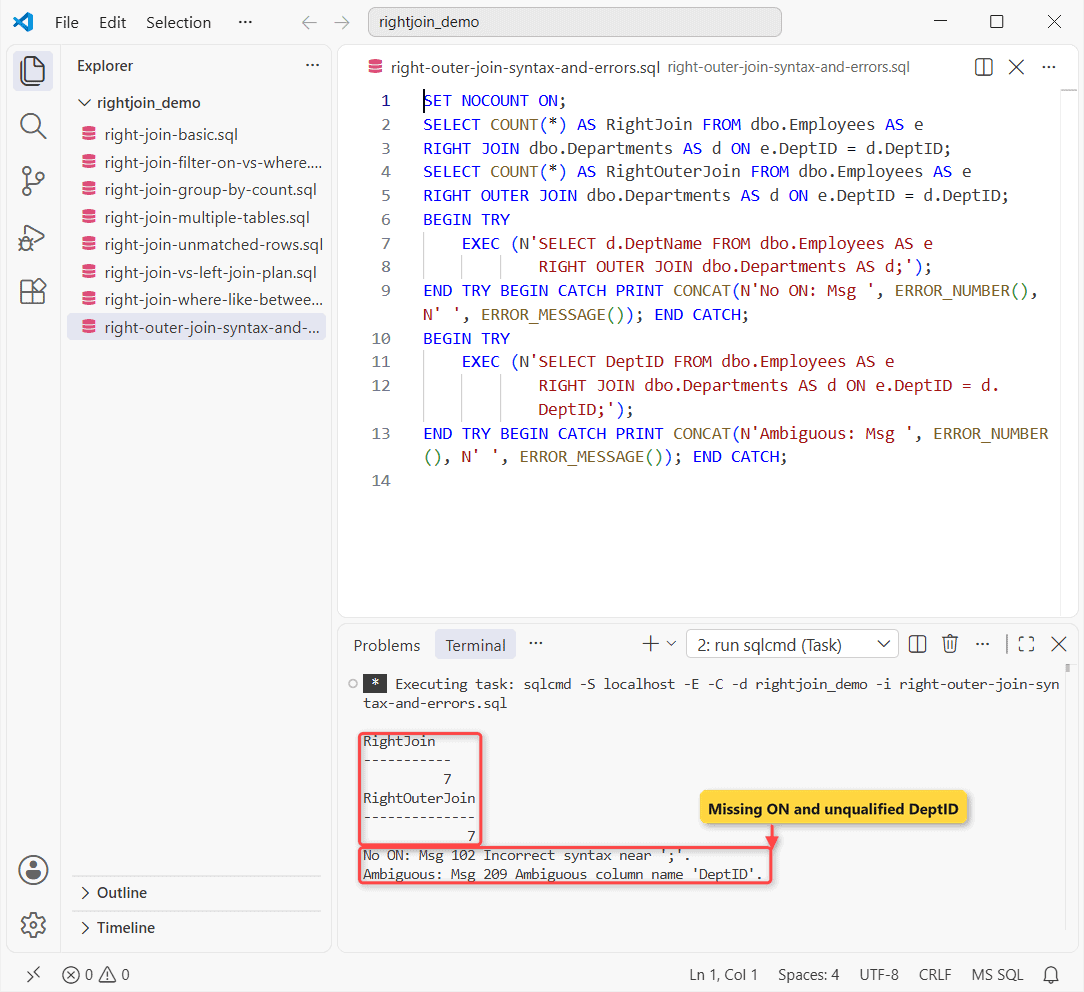
Both forms return 7 rows.
The two errors are the ones you’ll hit most. A right join without ON is a syntax error (Msg 102). And DeptID exists in both tables, so it needs an alias (Msg 209).
The mirror image, which keeps every row from the first table, is the LEFT JOIN in SQL Server.
How Do You Find Rows With No Match in a RIGHT JOIN?
Add WHERE <left key> IS NULL. Unmatched right-side rows are the only ones where the left table’s key is NULL:
SET NOCOUNT ON;
SELECT d.DeptID, d.DeptName
FROM dbo.Employees AS e
RIGHT JOIN dbo.Departments AS d ON e.DeptID = d.DeptID
WHERE e.EmpID IS NULL;
Result:
DeptID      DeptName
----------- ----------
         40 Legal
Check your work: Legal (40) is the only department without staff, and it’s the only row back.
Test a column that’s never NULL on a real match, like the primary key e.EmpID.
RIGHT JOIN vs LEFT JOIN in SQL Server
Any right join can be written as a left join. Swap the two tables and change the keyword. I ran both forms and then asked the plan cache for each statement’s query_plan_hash:
SET NOCOUNT ON;
SELECT COUNT(*) AS RightForm, COUNT(e.EmpID) AS Matched
FROM dbo.Employees AS e
RIGHT JOIN dbo.Departments AS d ON e.DeptID = d.DeptID;
SELECT COUNT(*) AS LeftForm, COUNT(e.EmpID) AS Matched
FROM dbo.Departments AS d
LEFT JOIN dbo.Employees AS e ON e.DeptID = d.DeptID;
SELECT CAST(LEFT(q.txt, 30) AS nvarchar(30)) AS Statement, s.query_plan_hash
FROM sys.dm_exec_query_stats AS s
CROSS APPLY (SELECT SUBSTRING(t.text, s.statement_start_offset/2 + 1, 60)
    AS txt FROM sys.dm_exec_sql_text(s.sql_handle) AS t) AS q
WHERE q.txt LIKE 'SELECT COUNT(*) AS %Form, COUNT(e.EmpID)%';
Output:
RightForm   Matched
----------- -----------
          7           6
LeftForm    Matched
----------- -----------
          7           6
Statement                      query_plan_hash
------------------------------ ------------------
SELECT COUNT(*) AS RightForm,  0xE08251BA48388435
SELECT COUNT(*) AS LeftForm, C 0xE08251BA48388435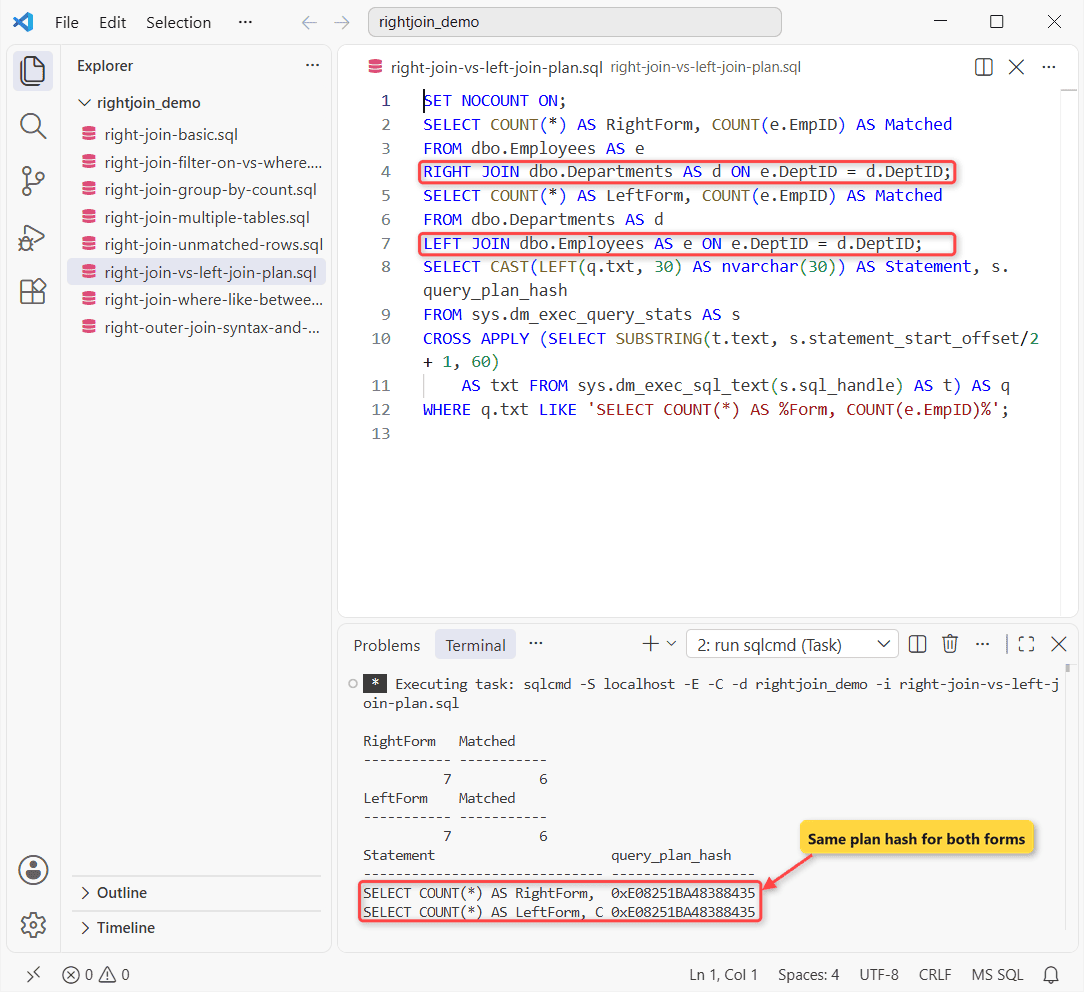
Both return 7 rows (6 matched), and the plan hash is identical. So there’s no speed reason to prefer one. Most teams write LEFT JOIN because the table you keep comes first, and it reads top to bottom.
The side-by-side with diagrams is in RIGHT OUTER JOIN vs LEFT OUTER JOIN.
Filter a RIGHT JOIN: ON vs WHERE
Say you only want employees hired in 2026. You can put that condition in ON or in WHERE, and you get different answers:
SET NOCOUNT ON;
-- filter in ON: every department stays
SELECT d.DeptName, e.Name, e.HireDate
FROM dbo.Employees AS e
RIGHT JOIN dbo.Departments AS d
    ON e.DeptID = d.DeptID AND e.HireDate >= '2026-01-01'
ORDER BY d.DeptID;
-- same filter in WHERE: unmatched departments vanish
SELECT d.DeptName, e.Name, e.HireDate
FROM dbo.Employees AS e
RIGHT JOIN dbo.Departments AS d ON e.DeptID = d.DeptID
WHERE e.HireDate >= '2026-01-01'
ORDER BY d.DeptID;
Output:
DeptName   Name            HireDate
---------- --------------- ----------------
Sales      Tyler Reed            2026-02-09
Finance    Ethan Carter          2026-06-01
IT         Marcus Bennett        2026-04-20
Legal      NULL                        NULL
DeptName   Name            HireDate
---------- --------------- ----------------
Sales      Tyler Reed            2026-02-09
Finance    Ethan Carter          2026-06-01
IT         Marcus Bennett        2026-04-20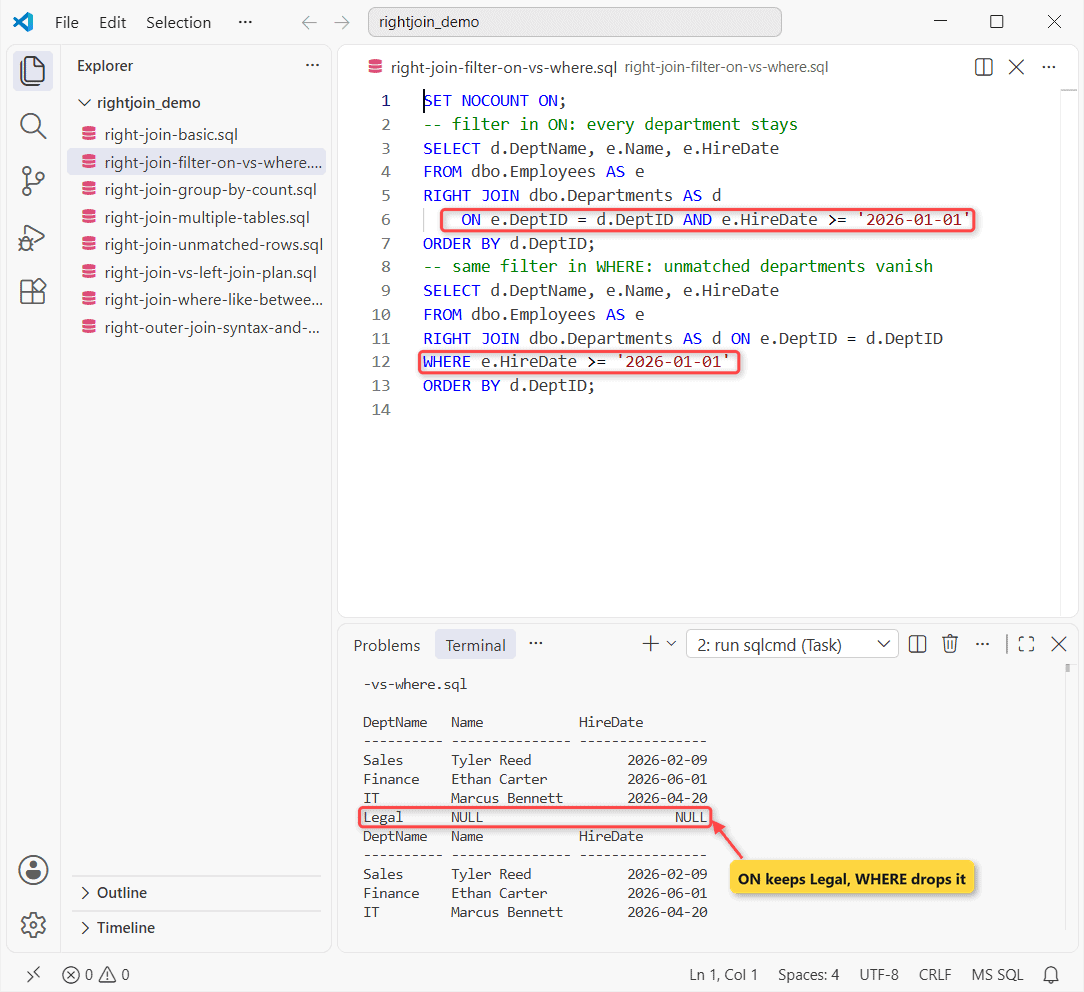
With the filter in ON, all four departments stay. Legal shows NULLs, and Grace and Hannah aren’t matched because they joined before 2026.
With the filter in WHERE, Legal disappears. Its HireDate is NULL, and NULL >= '2026-01-01' isn’t true. Microsoft’s docs say it plainly: ON predicates apply before the join, WHERE applies to the joined result.
That’s also how you join on multiple conditions: chain them with AND inside ON. The same rule for left joins is in LEFT OUTER JOIN with a WHERE clause.
RIGHT JOIN Multiple Tables in SQL Server
Each join works on the result of the joins before it, so when you chain two right joins, the last table in the chain is the one SQL Server keeps in full:
SET NOCOUNT ON;
SELECT o.City, d.DeptName, e.Name
FROM dbo.Offices AS o
RIGHT JOIN dbo.Departments AS d ON o.OfficeID = d.OfficeID
RIGHT JOIN dbo.Employees AS e ON e.DeptID = d.DeptID;
-- add an INNER JOIN after the RIGHT JOIN
SELECT COUNT(*) AS AfterInnerJoin
FROM dbo.Departments AS d
RIGHT JOIN dbo.Employees AS e ON e.DeptID = d.DeptID
INNER JOIN dbo.Offices AS o ON o.OfficeID = d.OfficeID;
Output:
City       DeptName   Name
---------- ---------- ---------------
Columbus   Sales      Hannah Brooks
Columbus   Sales      Tyler Reed
Austin     Finance    Grace Miller
NULL       IT         Marcus Bennett
NULL       IT         Olivia Hayes
Austin     Finance    Ethan Carter
NULL       NULL       Chloe Turner
AfterInnerJoin
--------------
             4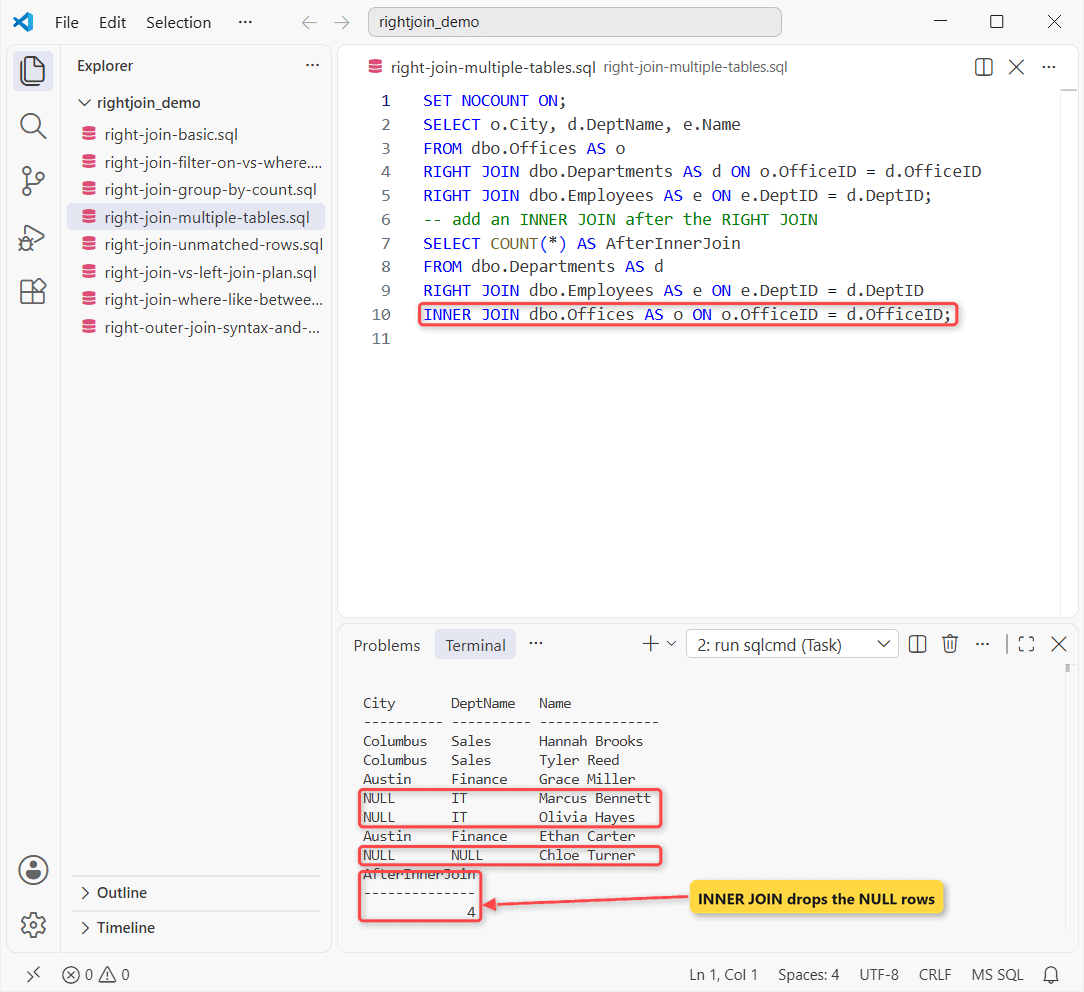
All seven employees are there. IT has no office, so Marcus and Olivia get a NULL city. Chloe gets two NULLs.
Then the count drops to 4. Why? The second query adds an INNER JOIN Offices after the right join, and that inner join needs d.OfficeID to match an office.
Chloe’s row has a NULL there, and so do the two IT rows. If you need an inner join in the chain, put it before the outer join or make it a right join too.
Compare LEFT OUTER JOIN on multiple tables and INNER JOIN on multiple tables.
Right join with WHERE, LIKE, BETWEEN and YEAR
WHERE filters the joined result. This one mixes a name pattern, a salary range and a hire year:
SET NOCOUNT ON;
SELECT d.DeptName, e.Name, e.Salary
FROM dbo.Employees AS e
RIGHT JOIN dbo.Departments AS d ON e.DeptID = d.DeptID
WHERE e.Name LIKE N'%er%'
   OR e.Salary BETWEEN 85000 AND 95000
   OR YEAR(e.HireDate) = 2023;
Result:
DeptName   Name            Salary
---------- --------------- -----------
Sales      Tyler Reed         61000.00
Finance    Grace Miller       74000.00
Finance    Ethan Carter       70500.00
IT         Marcus Bennett     92000.00
IT         Olivia Hayes       88000.00
Tyler, Grace and Ethan match LIKE N'%er%', Marcus matches the salary range, and Olivia was hired in 2023.
Chloe Turner also contains “er”, but she isn’t here. Departments is the kept table, and she has no department. Legal is gone too, because WHERE filters out its NULL row.
RIGHT JOIN With GROUP BY and COUNT
Counting per department is a common reason to write a right join. Watch which COUNT you use:
SET NOCOUNT ON;
SELECT d.DeptName,
       COUNT(*)        AS CountStar,
       COUNT(e.EmpID)  AS Employees,
       SUM(e.Salary)   AS Payroll
FROM dbo.Employees AS e
RIGHT JOIN dbo.Departments AS d ON e.DeptID = d.DeptID
GROUP BY d.DeptName
ORDER BY Employees DESC, d.DeptName;
One row per department, Legal included:
DeptName   CountStar   Employees   Payroll
---------- ----------- ----------- ----------------------------------------
Finance              2           2                                144500.00
IT                   2           2                                180000.00
Sales                2           2                                129000.00
Legal                1           0                                     NULL
COUNT(*) says Legal has 1 row, which is true: the NULL-padded row. COUNT(e.EmpID) skips NULLs, so it gives the 0 you actually want. SUM returns NULL for Legal; wrap it in ISNULL(SUM(e.Salary), 0) if your report needs $0.00.
Payroll checks out: Finance is $74,000 + $70,500 = $144,500. The same pattern with a left join is in LEFT JOIN with COUNT.
Common Mistakes With RIGHT JOIN
| What you see | Why | Fix |
|---|---|---|
| Msg 102 Incorrect syntax near ‘;’ | RIGHT JOIN without ON | Add ON left.key = right.key |
| Msg 209 Ambiguous column name | Same column in both tables | Prefix it with the alias |
| Unmatched rows vanish | WHERE filter on a left-table column | Move the filter into ON |
| Fewer rows after a 3rd table | INNER JOIN after the RIGHT JOIN | Make it a RIGHT JOIN or reorder |
| Count of 1 for an empty group | COUNT(*) counts the NULL row | COUNT(left_table.key) |
Want every row paired with every row and no ON? That’s a CROSS JOIN.
Where to Go Next After RIGHT JOIN
Next step: if you write right joins mainly to count or total things, COUNT with JOIN and GROUP BY goes further. Working in PostgreSQL too? PostgreSQL joins covers the same RIGHT JOIN there.
- Number rows inside each joined group: ROW_NUMBER with a join
- When duplicates show up after a join: DISTINCT in a join
- Keep unmatched rows from both sides with a FULL OUTER JOIN and WHERE
Frequently Asked Questions
Does RIGHT JOIN work in Azure SQL Database?
Yes. The same RIGHT [OUTER] JOIN syntax applies to Azure SQL Database, Azure SQL Managed Instance, Azure Synapse Analytics and Fabric Data Warehouse (FROM clause plus JOIN).
How many tables can one RIGHT JOIN query use?
Microsoft documents a limit of 256 table sources in a statement, though memory and query complexity can lower it.
Can I use RIGHT JOIN in an UPDATE or DELETE?
Yes. The FROM clause, including joined tables, is available on SELECT, UPDATE and DELETE. Test the join as a SELECT first so you can see which rows will change.
Do NULL keys match in a RIGHT JOIN?
No. NULL = NULL isn’t true, so a NULL join key never matches.

Shivam Dogra is a cloud database developer and Team Lead at TSInfo Technologies, where he has worked since June 2021. He writes the SQL Server and Oracle tutorials on DatabaseFAQs.com, covering queries, joins, stored procedures, triggers and permissions. Shivam holds a Master of Computer Applications (MCA) from Chandigarh University.