
CURRENT_TIMESTAMP in SQL Server returns the server’s current local date and time as a datetime. It’s the ANSI name for GETDATE(), and you write it without parentheses:
SELECT CURRENT_TIMESTAMP AS RightNow; -- yyyy-mm-dd hh:mi:ss.mmmMy runs: SQL Server 2025 Developer (17.0.1000.7) through sqlcmd in VS Code. A raw local clock value means little on your machine, so I show types, ages and UTC values instead.
What Does CURRENT_TIMESTAMP Return?
A datetime, scale 3, exactly like GETDATE(). I asked SQL_VARIANT_PROPERTY about each current-time function:
SET NOCOUNT ON;
SELECT f.Fn,
       CAST(SQL_VARIANT_PROPERTY(f.v, 'BaseType') AS varchar(14)) AS ReturnType,
       CAST(SQL_VARIANT_PROPERTY(f.v, 'Scale') AS int)            AS Scale
FROM (VALUES
  ('CURRENT_TIMESTAMP',   CAST(CURRENT_TIMESTAMP AS sql_variant)),
  ('GETDATE()',           GETDATE()),
  ('SYSDATETIME()',       SYSDATETIME()),
  ('SYSDATETIMEOFFSET()', SYSDATETIMEOFFSET()),
  ('GETUTCDATE()',        GETUTCDATE()),
  ('CURRENT_DATE',        CURRENT_DATE)) AS f(Fn, v);
What came back:
Fn                  ReturnType     Scale
------------------- -------------- -----------
CURRENT_TIMESTAMP   datetime                 3
GETDATE()           datetime                 3
SYSDATETIME()       datetime2                7
SYSDATETIMEOFFSET() datetimeoffset           7
GETUTCDATE()        datetime                 3
CURRENT_DATE        date                     0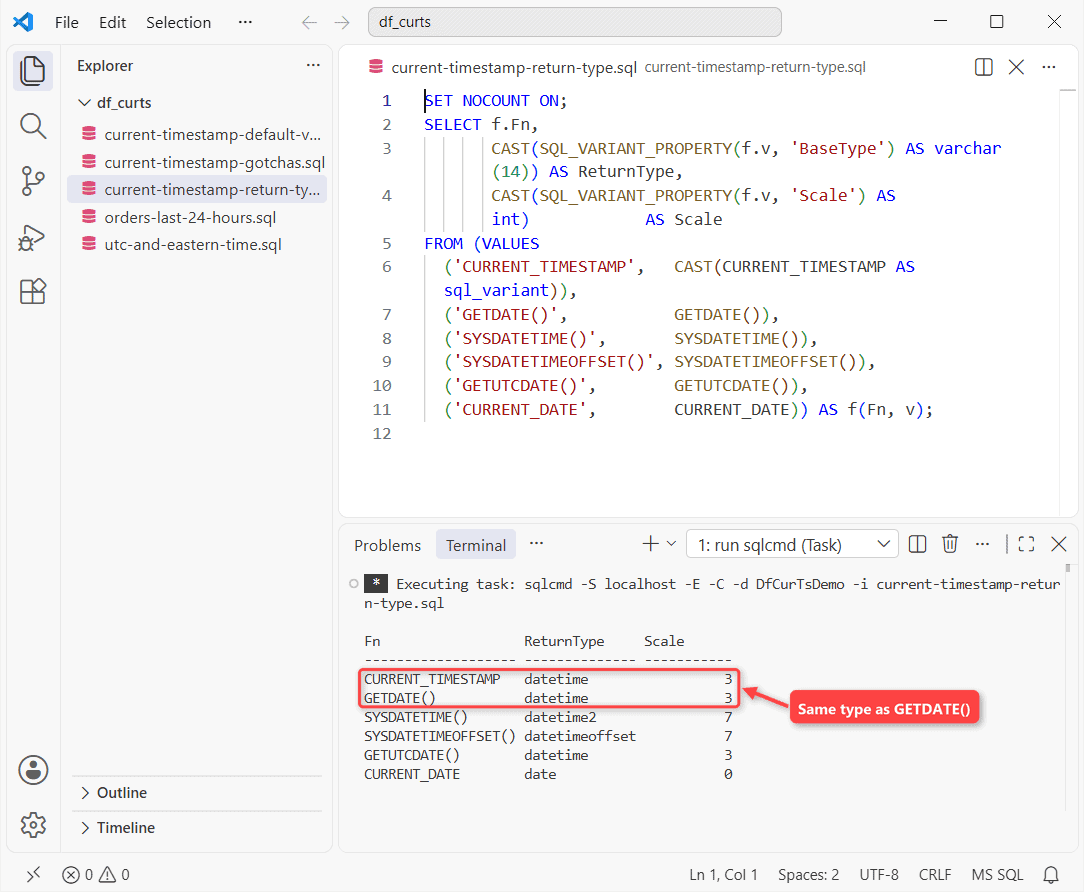
datetime is accurate to about 0.00333 seconds, so values end in .000, .003 or .007. Need more? Use SYSDATETIME() for datetime2(7); the datetime vs datetime2 comparison covers the storage side.
Use CURRENT_TIMESTAMP as a Column Default Value
The main job: stamp each row on insert. The sample table’s CreatedAt column has DEFAULT CURRENT_TIMESTAMP:
CREATE TABLE dbo.Orders (
    OrderId   int IDENTITY(1,1) PRIMARY KEY,
    Customer  nvarchar(15)  NOT NULL,
    City      varchar(10)   NOT NULL,
    Total     decimal(10,2) NOT NULL,
    CreatedAt datetime NOT NULL
        CONSTRAINT DF_Orders_CreatedAt DEFAULT CURRENT_TIMESTAMP
);
INSERT INTO dbo.Orders (Customer, City, Total, CreatedAt) VALUES
(N'Tyler Reed',     'Austin',  89.99, DATEADD(hour, -2,  CURRENT_TIMESTAMP)),
(N'Grace Miller',   'Boston',  45.50, DATEADD(hour, -5,  CURRENT_TIMESTAMP)),
(N'Marcus Bennett', 'Phoenix', 310.00, DATEADD(hour, -20, CURRENT_TIMESTAMP)),
(N'Kayla Parker',   'Denver',  72.25, DATEADD(hour, -30, CURRENT_TIMESTAMP)),
(N'Jordan Cole',    'Seattle', 18.75, DATEADD(hour, -50, CURRENT_TIMESTAMP));
Insert a row without CreatedAt and the default fills it:
SET NOCOUNT ON;
INSERT INTO dbo.Orders (Customer, City, Total)
VALUES (N'Hannah Brooks', 'Denver', 129.99);

SELECT Customer,
       DATEDIFF(second, CreatedAt, CURRENT_TIMESTAMP) AS SecondsOld
FROM dbo.Orders
WHERE Customer = N'Hannah Brooks';

SELECT CAST(definition AS varchar(20)) AS definition
FROM sys.default_constraints
WHERE name = 'DF_Orders_CreatedAt';
Result:
Customer        SecondsOld
--------------- -----------
Hannah Brooks             0
definition
--------------------
(getdate())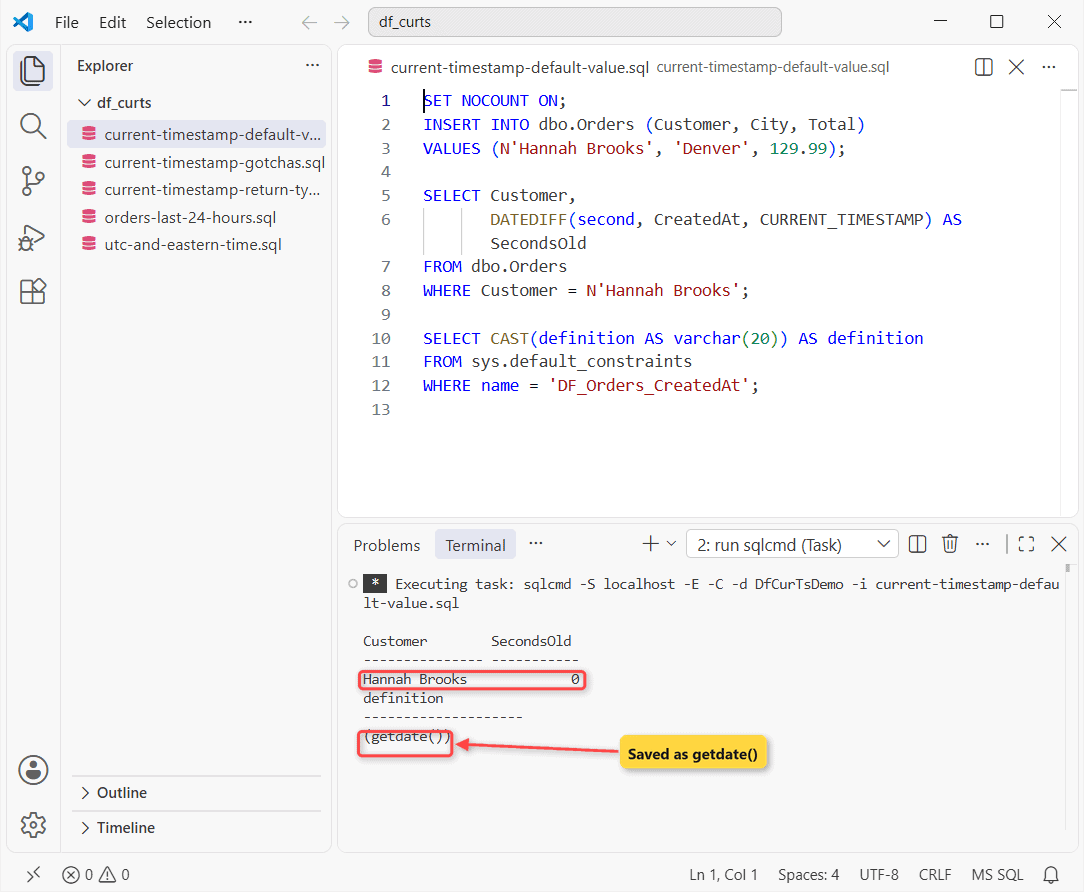
Zero seconds old, but SQL Server saved the default as (getdate()), so scripted tables show GETDATE, not the name you typed. Existing table? See ALTER TABLE ADD COLUMN with a default.
Filter the Last 24 Hours With CURRENT_TIMESTAMP and DATEADD
Subtract from CURRENT_TIMESTAMP with DATEADD in the WHERE clause:
SET NOCOUNT ON;
SELECT Customer, City, Total,
       DATEDIFF(minute, CreatedAt, CURRENT_TIMESTAMP) / 60 AS HoursAgo
FROM dbo.Orders
WHERE CreatedAt >= DATEADD(hour, -24, CURRENT_TIMESTAMP)
ORDER BY CreatedAt DESC;
Three of five orders qualify:
Customer        City       Total        HoursAgo
--------------- ---------- ------------ -----------
Tyler Reed      Austin            89.99           2
Grace Miller    Boston            45.50           5
Marcus Bennett  Phoenix          310.00          20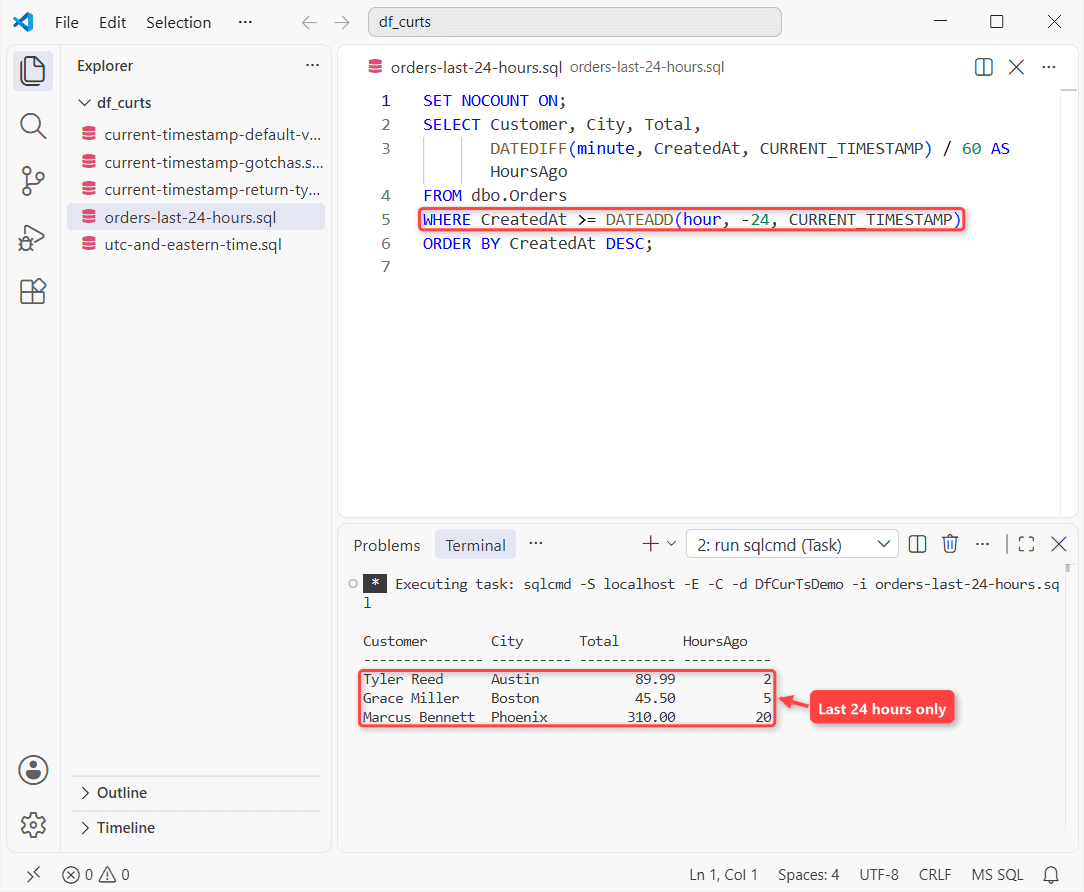
The 30- and 50-hour-old orders drop out. Keep CreatedAt bare on the left so an index can seek. For “today”, compare to CAST(CURRENT_TIMESTAMP AS date); more patterns are in SQL Server datetime functions.
CURRENT_TIMESTAMP vs GETDATE, SYSDATETIME and the Others
| Function | Returns | Use it when |
|---|---|---|
| CURRENT_TIMESTAMP | datetime, local | You want ANSI-style code |
| GETDATE() | datetime, local | Same value, T-SQL name |
| SYSDATETIME() | datetime2(7), local | You need sub-millisecond precision |
| GETUTCDATE() / SYSUTCDATETIME() | datetime / datetime2(7), UTC | Servers span time zones |
| SYSDATETIMEOFFSET() | datetimeoffset(7) | You need the offset stored too |
| CURRENT_DATE | date | Date only (SQL Server 2025+) |
CURRENT_TIMESTAMP and GETDATE() return the same value from the same OS clock, so the choice is naming. Pick one and stay consistent.
Get UTC and Eastern Time With AT TIME ZONE
For audit columns I’d store UTC and convert on read. GETUTCDATE() vs SYSUTCDATETIME(), then Eastern time wrong and right:
SET NOCOUNT ON;
SELECT GETUTCDATE()     AS GetUtcDate,
       SYSUTCDATETIME() AS SysUtcDateTime;

DECLARE @u  datetime2(0) = SYSUTCDATETIME(),
        @et sysname      = 'Eastern Standard Time';
SELECT CONVERT(varchar(26), @u AT TIME ZONE @et, 120) AS Wrong,
       CONVERT(varchar(26), @u AT TIME ZONE 'UTC'
                               AT TIME ZONE @et, 120) AS Eastern;
Two result sets:
GetUtcDate              SysUtcDateTime
----------------------- --------------------------------------
2026-10-31 08:15:14.350            2026-10-31 08:15:14.3532189
Wrong                      Eastern
-------------------------- --------------------------
2026-10-31 08:15:14 -04:00 2026-10-31 04:15:14 -04:00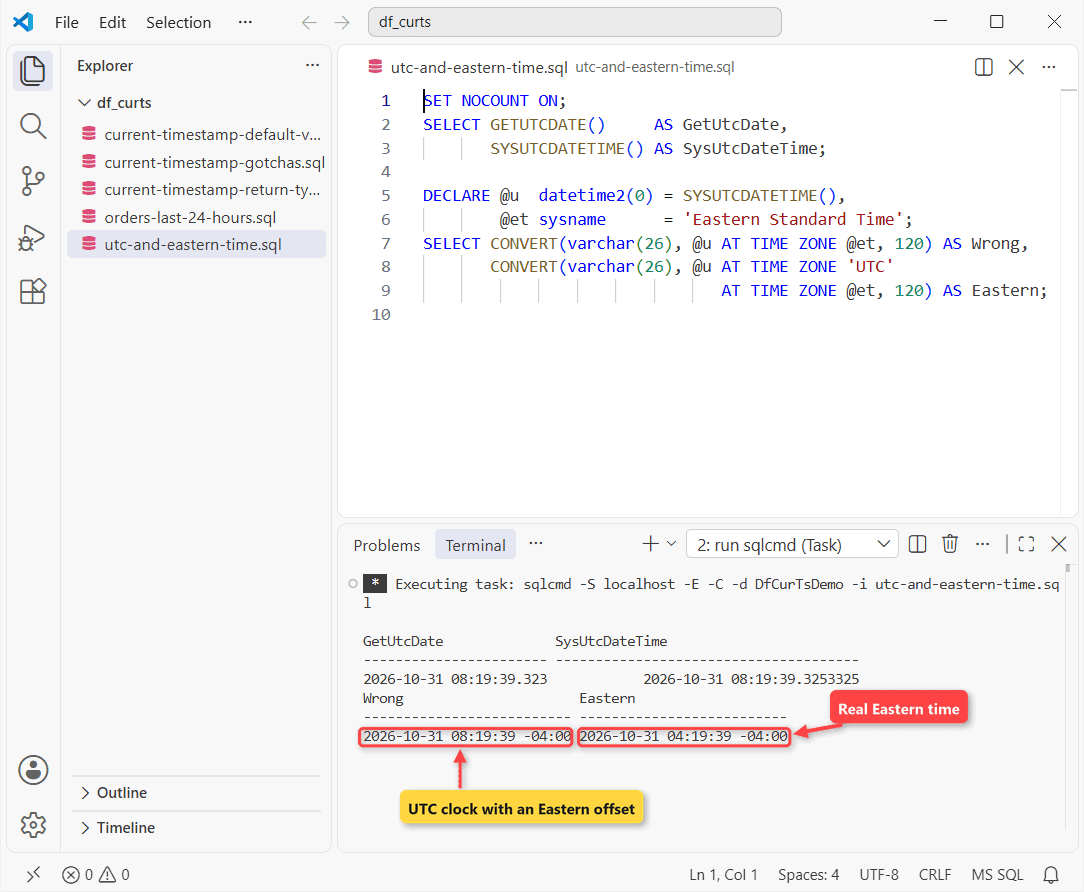
Same instant, 3 vs 7 decimals. Wrong just bolts -04:00 onto the UTC clock, because AT TIME ZONE treats a value without an offset as already in that zone.
Say AT TIME ZONE 'UTC' first. CONVERT style 120 just keeps the output narrow.
Gotchas: Parentheses and the timestamp Data Type
Two errors I triggered:
SET NOCOUNT ON;
BEGIN TRY EXEC (N'SELECT CURRENT_TIMESTAMP();'); END TRY
BEGIN CATCH PRINT CONCAT('Msg ', ERROR_NUMBER(), ': ', ERROR_MESSAGE()); END CATCH;

BEGIN TRY
  EXEC (N'CREATE TABLE dbo.Bad (Id int,
          Stamp timestamp DEFAULT CURRENT_TIMESTAMP);');
END TRY
BEGIN CATCH PRINT CONCAT('Msg ', ERROR_NUMBER(), ': ', ERROR_MESSAGE()); END CATCH;

CREATE TABLE dbo.Versioned (Id int, Stamp rowversion);
SELECT CAST(name AS varchar(8)) AS name,
       CAST(TYPE_NAME(system_type_id) AS varchar(10)) AS StoredAs, max_length
FROM sys.columns WHERE object_id = OBJECT_ID('dbo.Versioned');
What sqlcmd printed:
Msg 102: Incorrect syntax near ')'.
Msg 1750: Could not create constraint or index. See previous errors.
name     StoredAs   max_length
-------- ---------- ----------
Id       int                 4
Stamp    timestamp           8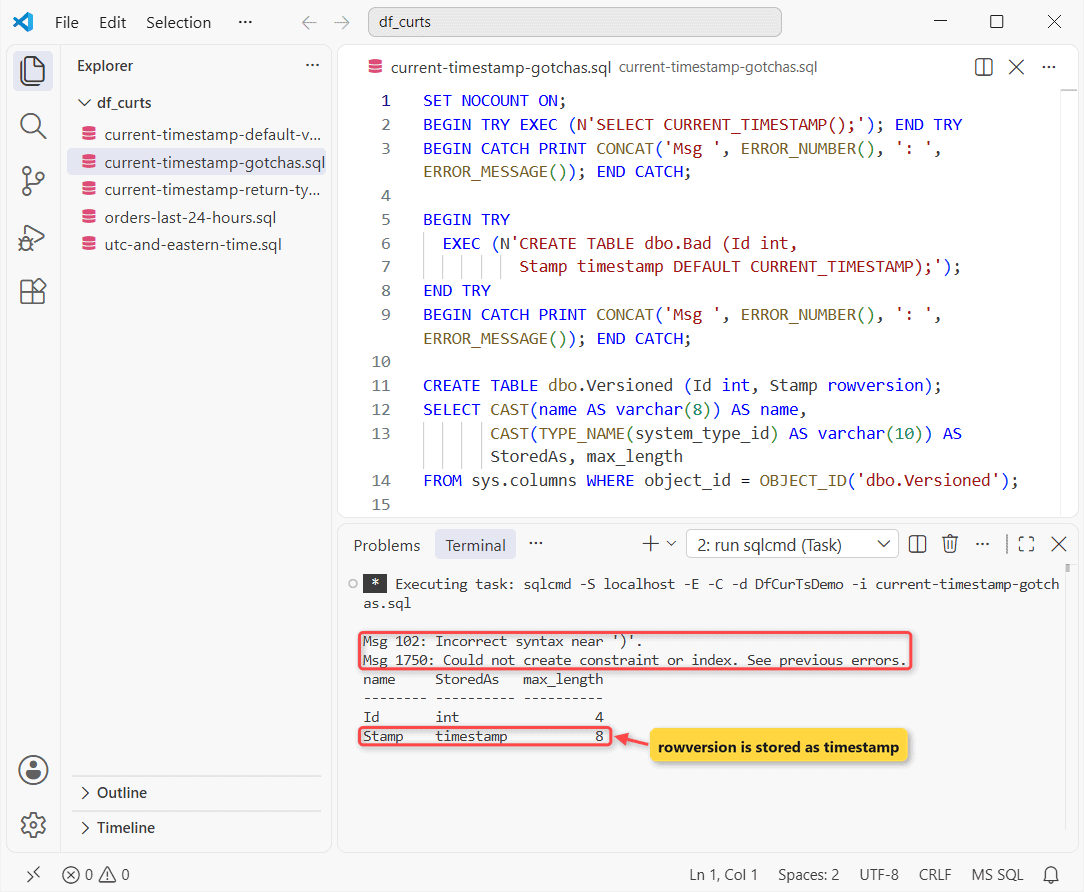
- Msg 102:
CURRENT_TIMESTAMP()fails. - Msg 1750 (run it bare and Msg 1755 comes first: “Defaults cannot be created on columns of data type timestamp”). timestamp is rowversion, an 8-byte counter, not a date.
- sys.columns still calls a rowversion column timestamp. Store clock values in datetime2.
Next step: convert the datetime to a date when you group by day. On Postgres, read PostgreSQL CURRENT_TIMESTAMP; it returns timestamptz there.
- For reports: SQL Server date format
- Datetime to string for log file names
- MariaDB: MariaDB TIMESTAMP
Frequently Asked Questions
Is CURRENT_TIMESTAMP deterministic in SQL Server?
No. It’s nondeterministic, so per the CURRENT_TIMESTAMP reference you can’t index views or computed columns that use it.
Does CURRENT_TIMESTAMP update the column when a row is updated?
No. A DEFAULT fires only on INSERT. For a modified-at column, set it in the UPDATE statement or in an AFTER UPDATE trigger.
What time zone does CURRENT_TIMESTAMP use on Azure SQL Database?
UTC by default. Azure SQL Database lets you change the time zone at the database or session level, and the function then returns that local time.
Can I use CURRENT_TIMESTAMP in a stored procedure parameter default?
No. Parameter defaults must be constants, so default the parameter to NULL and use COALESCE(@d, CURRENT_TIMESTAMP) inside the procedure.

Shivam Dogra is a cloud database developer and Team Lead at TSInfo Technologies, where he has worked since June 2021. He writes the SQL Server and Oracle tutorials on DatabaseFAQs.com, covering queries, joins, stored procedures, triggers and permissions. Shivam holds a Master of Computer Applications (MCA) from Chandigarh University.