
Here’s how you create view in MariaDB: put CREATE VIEW name AS in front of the SELECT you keep retyping, then query the view like a table. Here’s the finished one we’ll build, sales per state with GROUP BY and HAVING:
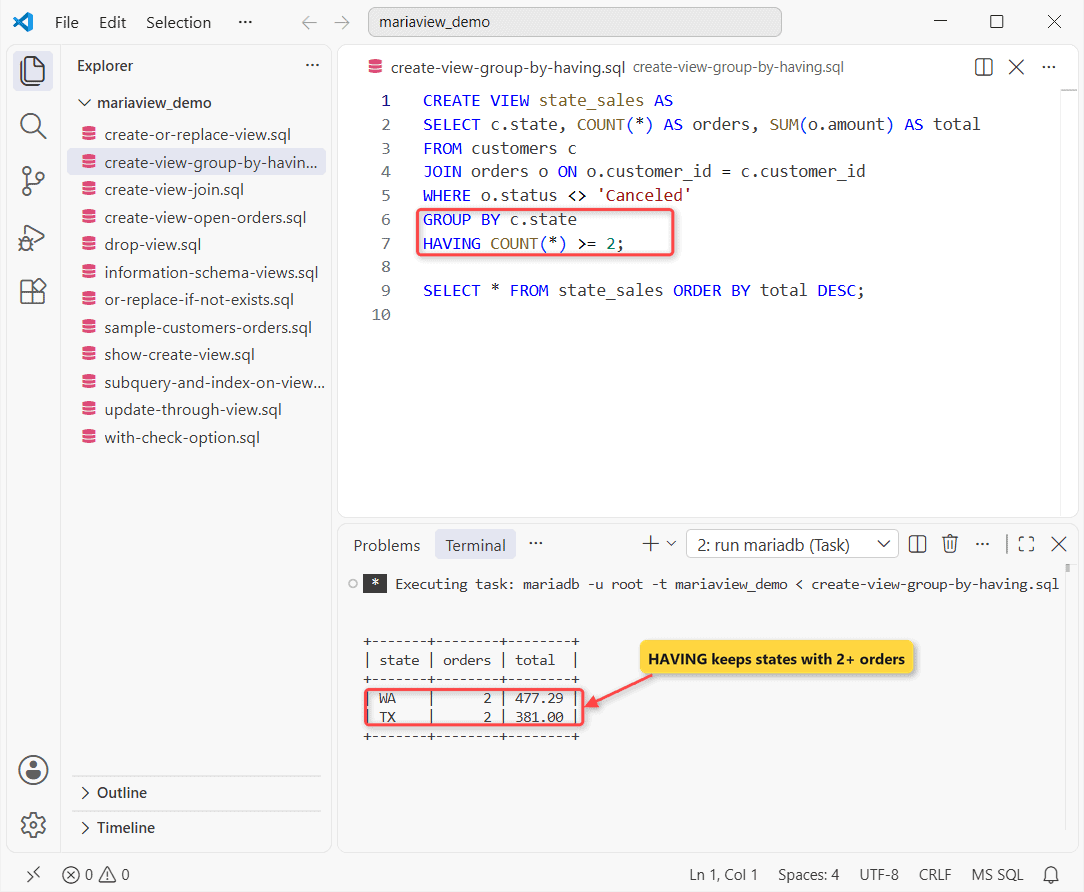
Test setup: MariaDB 13.0.2 on Windows 11, the mariadb command-line client, five customers and six orders. Every output below comes from that run.
Before You Start: Sample Tables for the MariaDB Views
You need the CREATE VIEW privilege plus SELECT on the columns a view reads. I ran everything as root against these two tables:
CREATE TABLE customers (
  customer_id INT PRIMARY KEY,
  name  VARCHAR(16) NOT NULL,
  state CHAR(2) NOT NULL
);
CREATE TABLE orders (
  order_id    INT PRIMARY KEY,
  customer_id INT NOT NULL,
  amount      DECIMAL(8,2) NOT NULL,
  status      VARCHAR(9) NOT NULL,
  ordered_at  DATE NOT NULL
);
INSERT INTO customers VALUES
(1,'Hannah Brooks','TX'), (2,'Tyler Reed','CA'),
(3,'Grace Miller','WA'), (4,'Marcus Bennett','NY'),
(5,'Olivia Carter','TX');
INSERT INTO orders VALUES
(101,1,249.00,'Shipped','2026-09-14'),
(102,2,89.50,'Pending','2026-10-02'),
(103,1,132.00,'Pending','2026-10-05'),
(104,3,412.30,'Shipped','2026-10-09'),
(105,4,15.75,'Canceled','2026-10-12'),
(106,3,64.99,'Pending','2026-10-20');
New to the DDL? Here’s how to create a table in MariaDB.
Step 1: Create a View in MariaDB with CREATE VIEW
The first view keeps only pending orders, a filter that could just as well be LIKE patterns or a date range. Then I ran the same CREATE again with IF NOT EXISTS:
CREATE VIEW open_orders AS
SELECT order_id, customer_id, amount
FROM orders
WHERE status = 'Pending';

SELECT * FROM open_orders;

CREATE VIEW IF NOT EXISTS open_orders AS SELECT 1;
SHOW WARNINGS;
Two result sets:
+----------+-------------+--------+
| order_id | customer_id | amount |
+----------+-------------+--------+
|      102 |           2 |  89.50 |
|      103 |           1 | 132.00 |
|      106 |           3 |  64.99 |
+----------+-------------+--------+
+-------+------+------------------------------------+
| Level | Code | Message                            |
+-------+------+------------------------------------+
| Note  | 1050 | Table 'open_orders' already exists |
+-------+------+------------------------------------+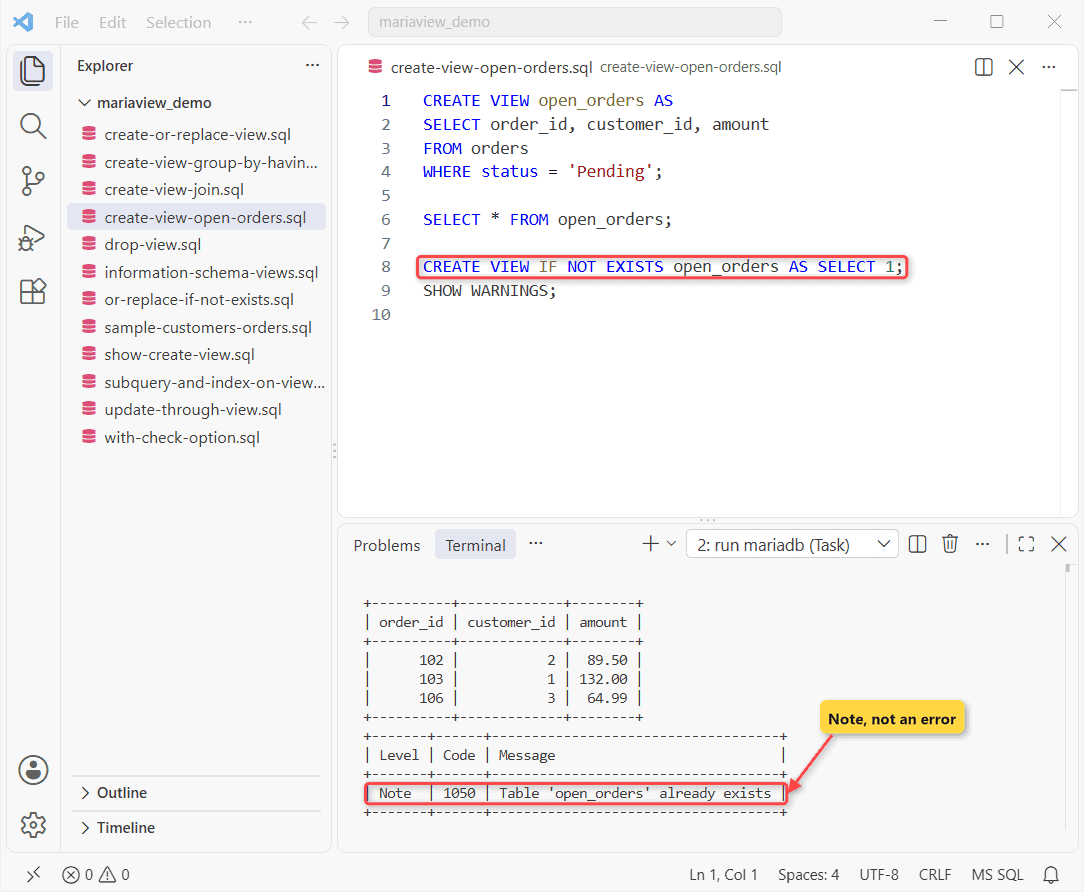
Checkpoint: three rows (102, 103, 106) and Note 1050, not an error. The second CREATE changed nothing.
Step 2: Build a MariaDB View with JOIN and LEFT JOIN
This one hides a join. It uses a LEFT JOIN in MariaDB so customers without orders stay in:
CREATE VIEW customer_orders AS
SELECT c.name, c.state, o.order_id, o.amount
FROM customers c
LEFT JOIN orders o ON o.customer_id = c.customer_id;

SELECT name, order_id, amount
FROM customer_orders WHERE state = 'TX';
Texas only:
+---------------+----------+--------+
| name          | order_id | amount |
+---------------+----------+--------+
| Hannah Brooks |      101 | 249.00 |
| Hannah Brooks |      103 | 132.00 |
| Olivia Carter |     NULL |   NULL |
+---------------+----------+--------+
Checkpoint: Olivia Carter shows with NULLs. With a plain JOIN she’d be gone.
Step 3: Create a View with GROUP BY and HAVING in MariaDB
Now the summary from the top: orders and total per state, no canceled orders, two or more orders per state. Same MariaDB GROUP BY as by hand:
CREATE VIEW state_sales AS
SELECT c.state, COUNT(*) AS orders, SUM(o.amount) AS total
FROM customers c
JOIN orders o ON o.customer_id = c.customer_id
WHERE o.status <> 'Canceled'
GROUP BY c.state
HAVING COUNT(*) >= 2;

SELECT * FROM state_sales ORDER BY total DESC;
Output:
+-------+--------+--------+
| state | orders | total  |
+-------+--------+--------+
| WA    |      2 | 477.29 |
| TX    |      2 | 381.00 |
+-------+--------+--------+
Checkpoint: WA $477.29 and TX $381.00. CA and NY drop out at HAVING.
Step 4: Change a MariaDB View with CREATE OR REPLACE VIEW
I wanted the order date in open_orders. CREATE OR REPLACE swaps the stored SELECT statement in place:
CREATE OR REPLACE VIEW open_orders AS
SELECT order_id, customer_id, amount, ordered_at
FROM orders
WHERE status = 'Pending';

SELECT * FROM open_orders LIMIT 1;
First row:
+----------+-------------+--------+------------+
| order_id | customer_id | amount | ordered_at |
+----------+-------------+--------+------------+
|      102 |           2 |  89.50 | 2026-10-02 |
+----------+-------------+--------+------------+
When the view exists, this acts like ALTER VIEW, and you also need the DROP privilege on it. My first try combined both clauses:
CREATE OR REPLACE VIEW IF NOT EXISTS open_orders AS
SELECT order_id FROM orders;
Error:
ERROR 1221 (HY000) at line 1: Incorrect usage of OR REPLACE and IF NOT EXISTSPick one: OR REPLACE when your script should always win, IF NOT EXISTS when it must never touch a view that’s already live.
Test the Views: Is a MariaDB View Updatable?
Two UPDATEs; –force keeps the client going after an error:
UPDATE open_orders SET amount = 95.00
WHERE order_id = 102;
SELECT order_id, amount FROM open_orders
WHERE order_id = 102;

UPDATE state_sales SET total = 0
WHERE state = 'WA';
Output:
ERROR 1288 (HY000) at line 6: The target table state_sales of the UPDATE is not updatable
+----------+--------+
| order_id | amount |
+----------+--------+
|      102 |  95.00 |
+----------+--------+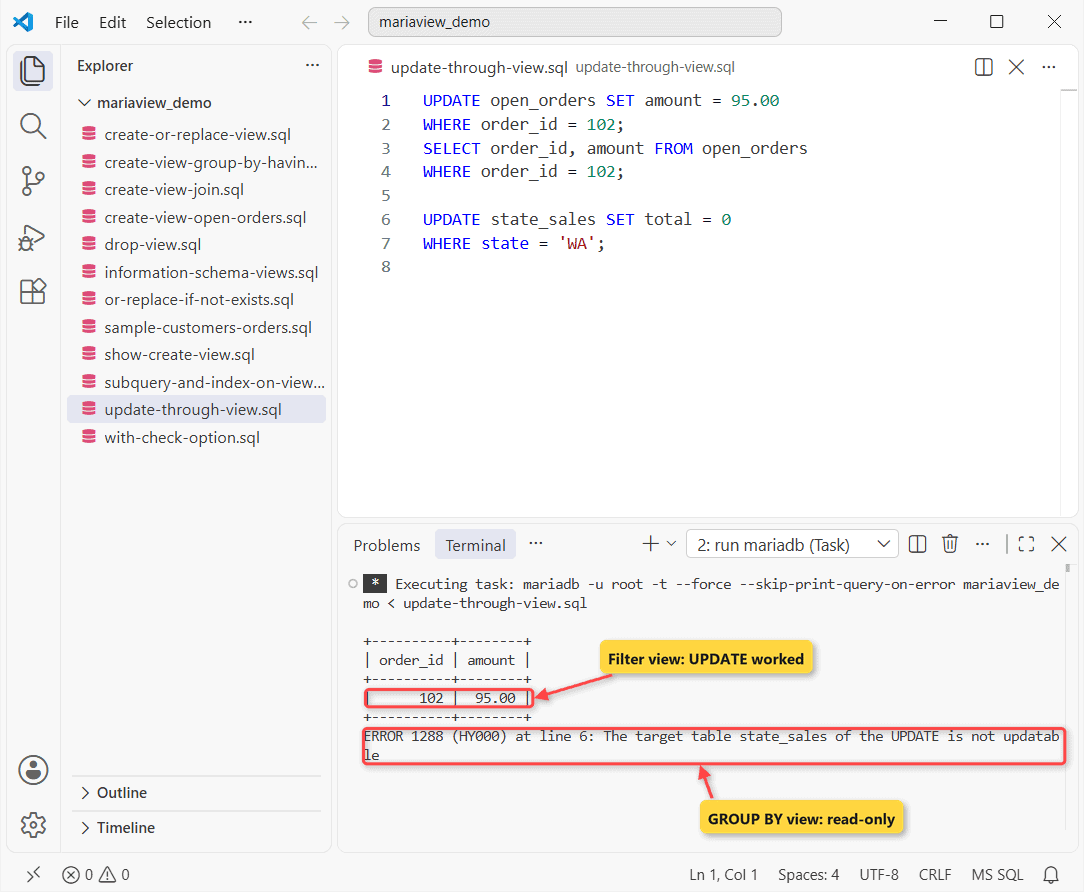
What this tells me: the plain filter view passed the MariaDB UPDATE to orders, so 102 is now $95.00. state_sales has GROUP BY, so there’s no single row to change.
Note: the docs list the other blockers: HAVING, DISTINCT, UNION, aggregates, outer joins and ALGORITHM=TEMPTABLE.
WITH CHECK OPTION
Can an update push a row out of the view? Not with this option:
CREATE VIEW pending_only AS
SELECT order_id, status FROM orders
WHERE status = 'Pending'
WITH CHECK OPTION;

UPDATE pending_only SET status = 'Shipped'
WHERE order_id = 103;
Error:
ERROR 1369 (44000) at line 6: CHECK OPTION failed `mariaview_demo`.`pending_only`Order 103 would leave pending_only, so MariaDB refused. Without the option, the row just disappears from the view. CASCADED is the default.
ALGORITHM, SQL SECURITY and information_schema.VIEWS
ALGORITHM=MERGE folds the view’s SELECT into your query. TEMPTABLE builds a temporary result first. UNDEFINED, the default, lets MariaDB pick.
SQL SECURITY DEFINER (the default) runs the view with its creator’s privileges; INVOKER checks yours. I added one of each kind, then read the catalog:
CREATE ALGORITHM = TEMPTABLE VIEW open_orders_tmp AS
SELECT order_id, amount FROM orders;
CREATE SQL SECURITY INVOKER VIEW open_orders_inv AS
SELECT order_id, amount FROM open_orders;
CREATE VIEW all_states AS
SELECT state FROM customers UNION SELECT 'FL';

SELECT TABLE_NAME, SECURITY_TYPE AS sec,
  IS_UPDATABLE AS upd, CHECK_OPTION AS chk
FROM information_schema.VIEWS
WHERE TABLE_SCHEMA = 'mariaview_demo'
ORDER BY TABLE_NAME;
Output:
+-----------------+---------+-----+----------+
| TABLE_NAME      | sec     | upd | chk      |
+-----------------+---------+-----+----------+
| all_states      | DEFINER | NO  | NONE     |
| customer_orders | DEFINER | YES | NONE     |
| open_orders     | DEFINER | YES | NONE     |
| open_orders_inv | INVOKER | YES | NONE     |
| open_orders_tmp | DEFINER | NO  | NONE     |
| pending_only    | DEFINER | YES | CASCADED |
| state_sales     | DEFINER | NO  | NONE     |
+-----------------+---------+-----+----------+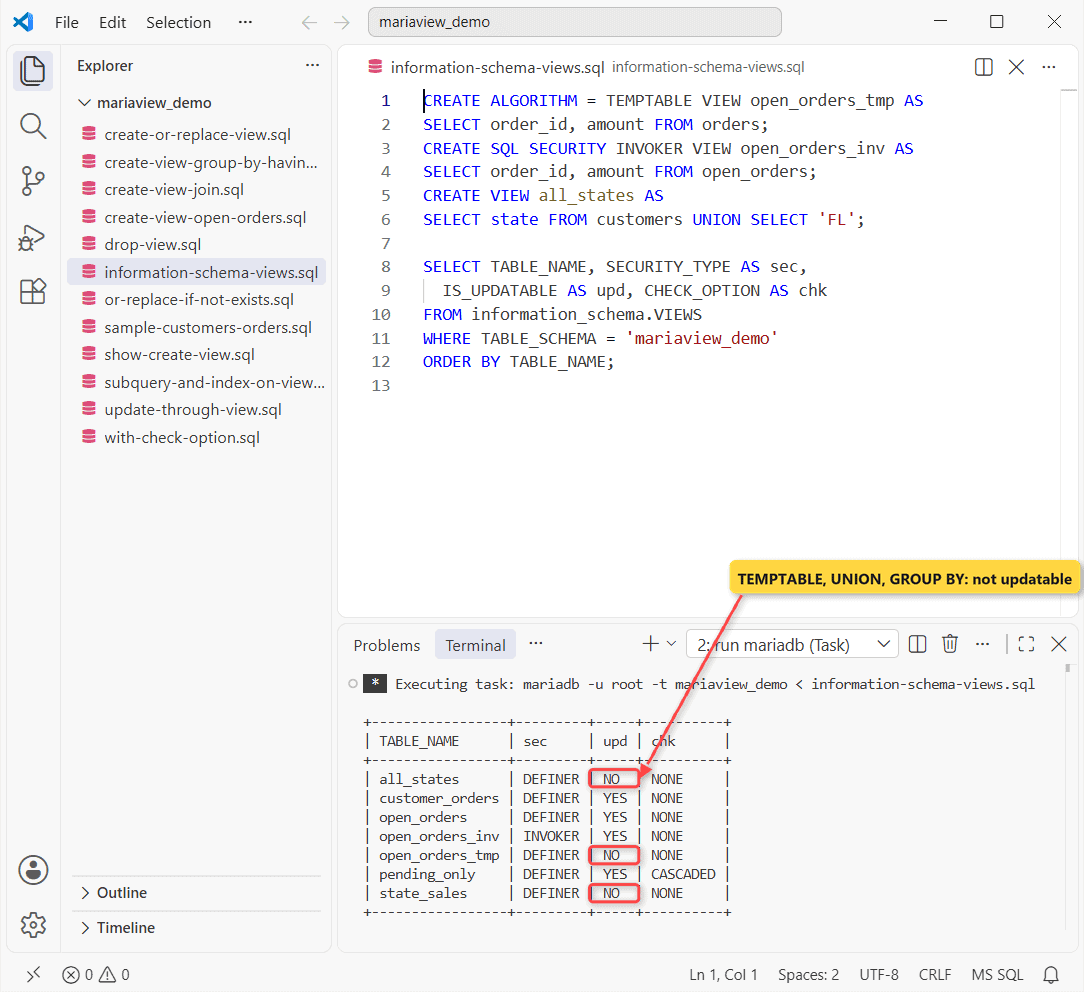
What this tells me: TEMPTABLE, UNION and GROUP BY each made a view read-only. For the full plan, run EXPLAIN in MariaDB on a query against the view.
SHOW CREATE VIEW
SHOW CREATE VIEW open_orders;Vertical output (-E):
*************************** 1. row ***************************
                View: open_orders
         Create View: CREATE ALGORITHM=UNDEFINED DEFINER=`root`@`localhost` SQL SECURITY DEFINER VIEW `open_orders` AS select `orders`.`order_id` AS `order_id`,`orders`.`customer_id` AS `customer_id`,`orders`.`amount` AS `amount`,`orders`.`ordered_at` AS `ordered_at` from `orders` where `orders`.`status` = 'Pending'
character_set_client: utf8mb4
collation_connection: utf8mb4_uca1400_ai_ci
MariaDB stored the rewritten query with every column spelled out. That’s why a SELECT * view never picks up columns added later.
Troubleshooting: What Tripped Me Up with MariaDB Views
Two old claims, retested:
CREATE VIEW big_orders AS
SELECT t.order_id FROM
  (SELECT order_id FROM orders WHERE amount > 100) t;
SELECT * FROM big_orders;

CREATE INDEX ix_amount ON open_orders (amount);
Output:
ERROR 1347 (HY000) at line 6: 'mariaview_demo.open_orders' is not of type 'BASE TABLE'
+----------+
| order_id |
+----------+
|      101 |
|      103 |
|      104 |
+----------+
The subquery in FROM worked on 13.0.2. The index failed with ERROR 1347, because a view stores no rows. Put the index on the base table instead; MERGE views use it.
Remove a MariaDB View with DROP VIEW
DROP VIEW takes a list and IF EXISTS, like DROP TABLE in MariaDB:
DROP VIEW IF EXISTS open_orders_tmp, open_orders_inv, big_orders;No output means all three are gone; the base tables stay.
My Takeaways on MariaDB Views
- Test the plain SELECT first, then wrap it.
- Check IS_UPDATABLE before writing through a view.
- Use WITH CHECK OPTION on filter views that take writes.
- OR REPLACE plus IF NOT EXISTS is ERROR 1221.
Results could differ on 10.x servers. I only ran 13.0.2.
Where to Take It Next
Pick the next job for your views:
- Rename a view in MariaDB
- Wrap view queries in a stored procedure
- SQL Server’s indexed views, for comparison
Frequently Asked Questions
What privileges do I need to create a view in MariaDB?
CREATE VIEW on the view, some privilege on each column it selects, and DROP if you use OR REPLACE.
Can a MariaDB view use a temporary table?
No. The definition can’t refer to a TEMPORARY table, and there are no TEMPORARY views (MariaDB CREATE VIEW docs).
Can I add a trigger to a view?
No. MariaDB doesn’t allow triggers on views. Put the trigger on the base table.

Kumar Saurabh is a freelance software engineer who builds web and mobile apps with Next.js, React, Flutter and Python. From 2021 to 2024, Saurabh worked as an IT analyst and developer at TSInfo Technologies, writing technical articles on SQL and PostgreSQL. Saurabh writes the PostgreSQL, MySQL, MariaDB and MongoDB tutorials on DatabaseFAQs.com and holds a Master of Computer Applications (MCA) from Chandigarh University.