
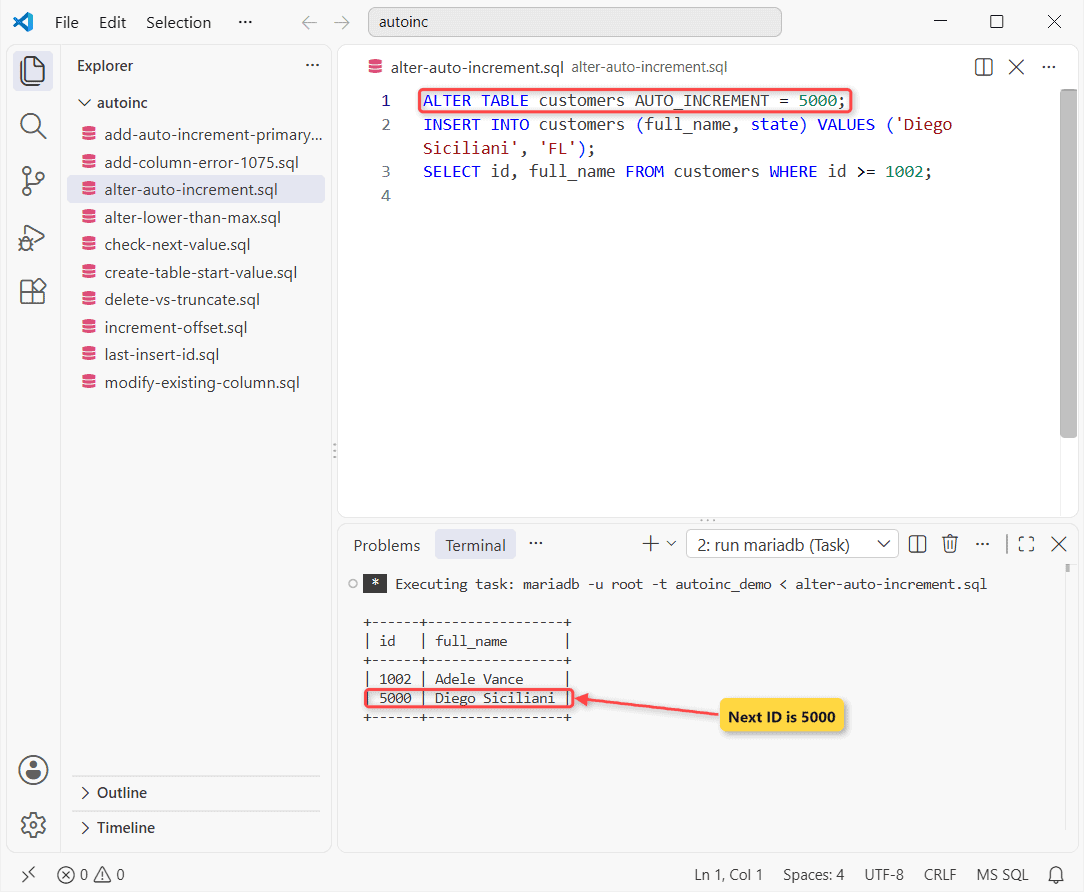
Want the next ID to be 5000? That’s the whole MariaDB set auto increment value job, one ALTER TABLE:
ALTER TABLE customers AUTO_INCREMENT = 5000;
INSERT INTO customers (full_name, state) VALUES ('Diego Siciliani', 'FL');
SELECT id, full_name FROM customers WHERE id >= 1002;
Next insert:
+------+-----------------+
| id   | full_name       |
+------+-----------------+
| 1002 | Adele Vance     |
| 5000 | Diego Siciliani |
+------+-----------------+
Tested on MariaDB 13.0.2 with InnoDB tables.
Set the Start Value in CREATE TABLE
Put AUTO_INCREMENT = n after the column list. This is the sample table every query below resets to (the AUTO_INCREMENT overview covers the column rules):
DROP TABLE IF EXISTS customers, leads;
CREATE TABLE customers (
  id INT UNSIGNED AUTO_INCREMENT PRIMARY KEY,
  full_name VARCHAR(25) NOT NULL,
  state CHAR(2) NOT NULL
) AUTO_INCREMENT = 1000;
INSERT INTO customers (full_name, state) VALUES
('Megan Bowen', 'CO'), ('Alex Wilber', 'TX'), ('Adele Vance', 'WA');
SELECT id, full_name, state FROM customers;
Three rows, starting at 1000:
+------+-------------+-------+
| id   | full_name   | state |
+------+-------------+-------+
| 1000 | Megan Bowen | CO    |
| 1001 | Alex Wilber | TX    |
| 1002 | Adele Vance | WA    |
+------+-------------+-------+
The column is also the primary key. Skip the key and you get error 1075 (below).
Check the Current AUTO_INCREMENT Value
Read information_schema.TABLES. It shows the NEXT value, not the last one used:
SELECT TABLE_NAME, AUTO_INCREMENT
FROM information_schema.TABLES
WHERE TABLE_SCHEMA = 'autoinc_demo' AND TABLE_NAME = 'customers';
Result:
+------------+----------------+
| TABLE_NAME | AUTO_INCREMENT |
+------------+----------------+
| customers  |           1003 |
+------------+----------------+
SHOW TABLE STATUS has it too, buried among 17 other fields.
What If the New Value Is Lower Than MAX(id)?
MariaDB ignores it, no warning. I asked for 10 on a table whose highest ID is 1002:
ALTER TABLE customers AUTO_INCREMENT = 10;
SELECT AUTO_INCREMENT FROM information_schema.TABLES
WHERE TABLE_SCHEMA = 'autoinc_demo' AND TABLE_NAME = 'customers';
Still 1003:
+----------------+
| AUTO_INCREMENT |
+----------------+
|           1003 |
+----------------+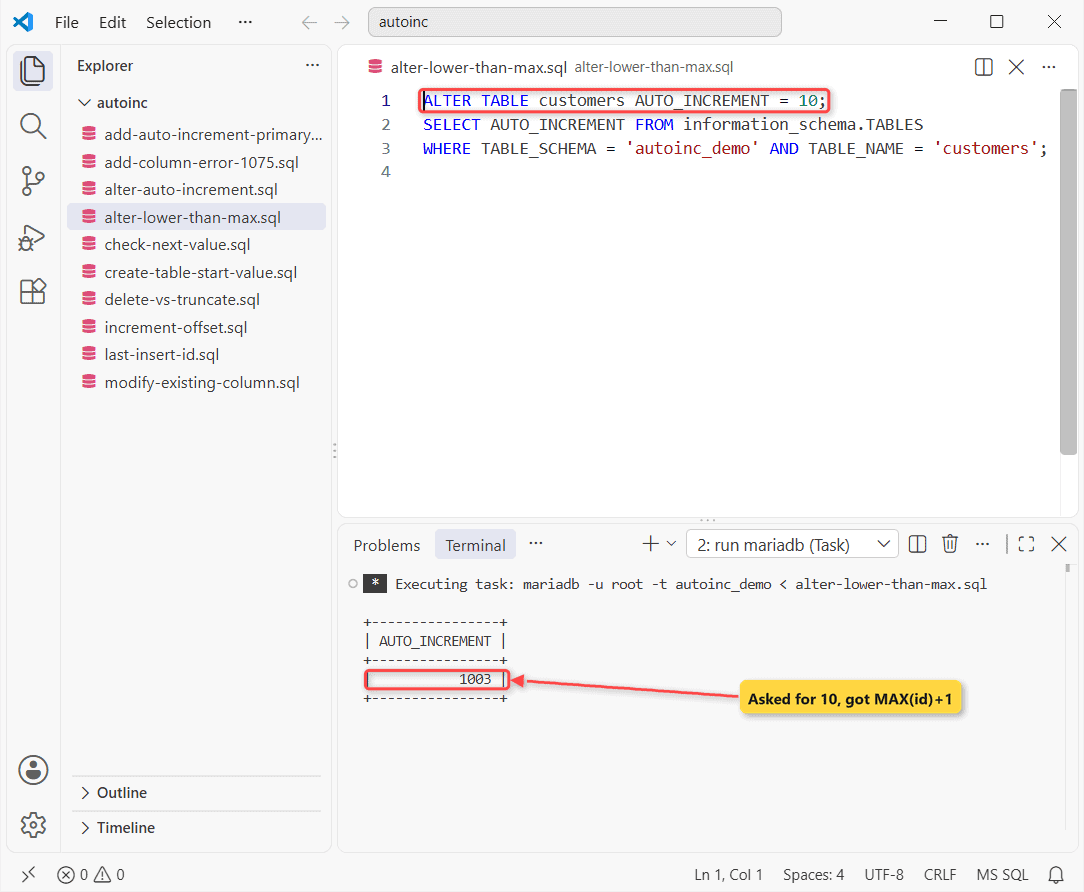
Per the MariaDB docs, the next insert gets your value or MAX(id) + 1, whichever is higher. No gap reuse.
Reset Auto Increment: DELETE vs TRUNCATE
DELETE keeps the counter. TRUNCATE TABLE resets it:
DELETE FROM customers;
INSERT INTO customers (full_name, state) VALUES ('Isaiah Langer', 'OR');
SELECT id AS after_delete FROM customers;
TRUNCATE TABLE customers;
INSERT INTO customers (full_name, state) VALUES ('Isaiah Langer', 'OR');
SELECT id AS after_truncate FROM customers;
Same insert, twice:
+--------------+
| after_delete |
+--------------+
|         1003 |
+--------------+
+----------------+
| after_truncate |
+----------------+
|              1 |
+----------------+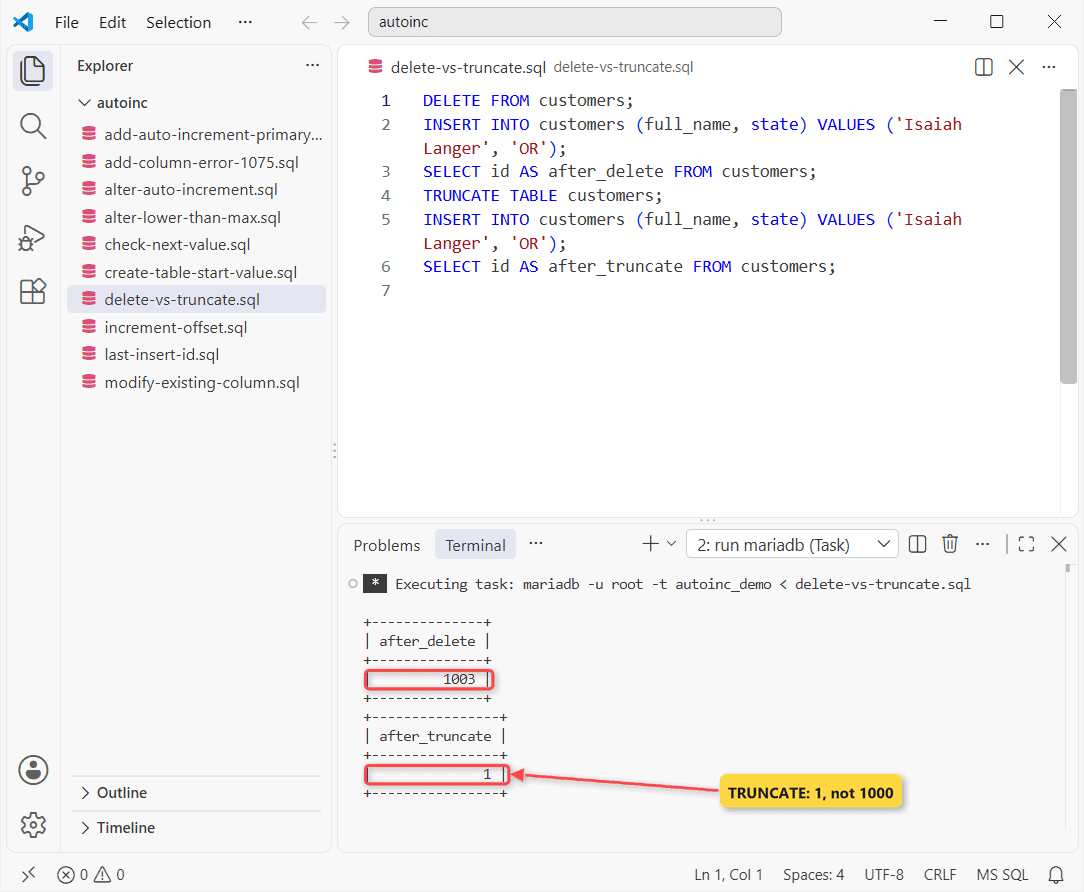
The catch I didn’t expect: TRUNCATE went back to 1, not to the 1000 from CREATE TABLE. Re-run the ALTER after it.
Add an AUTO_INCREMENT Column to an Existing Table
Here’s a legacy leads table with two rows and no ID. The obvious ADD COLUMN fails:
ALTER TABLE leads ADD COLUMN id INT AUTO_INCREMENT FIRST;Error:
--------------
ALTER TABLE leads ADD COLUMN id INT AUTO_INCREMENT FIRST
--------------

ERROR 1075 (42000) at line 1: Incorrect table definition; there can be only one auto column and it must be defined as a key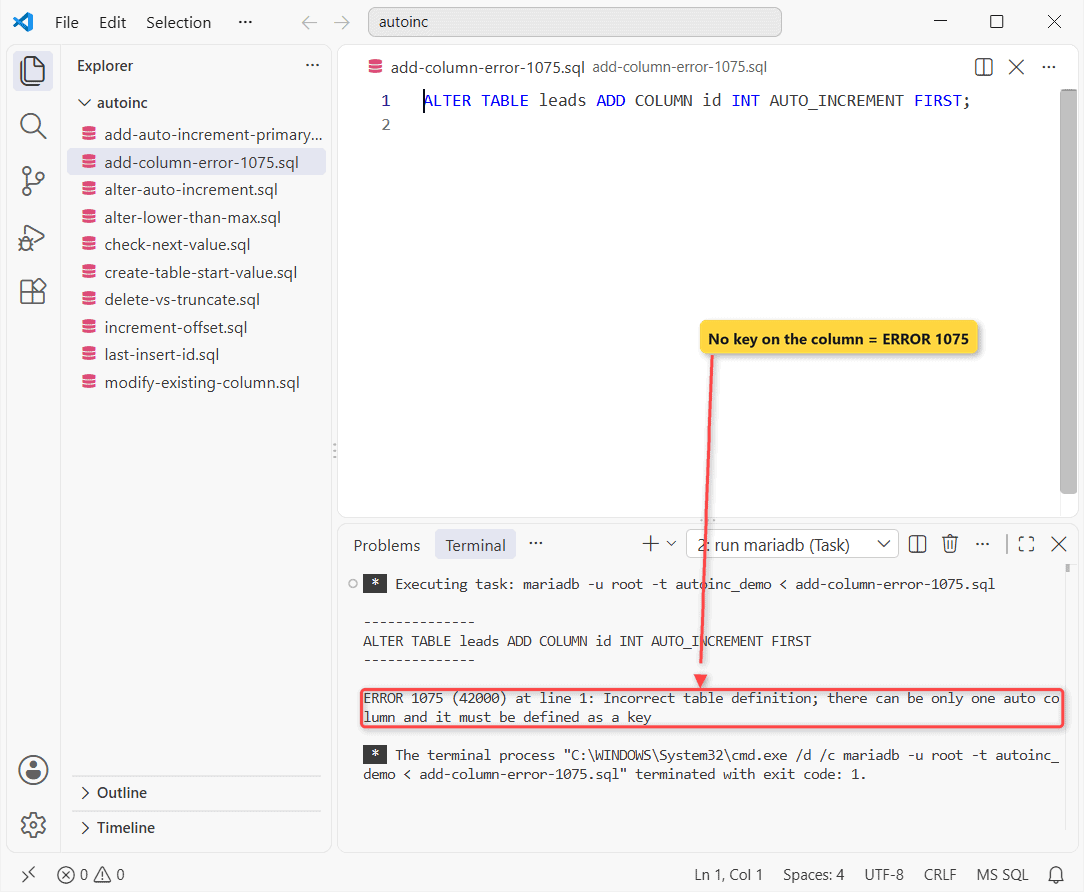
Fix: Add the Auto Increment Column as Primary Key
Declare the key in the same statement. FIRST puts the column at the front:
ALTER TABLE leads
  ADD COLUMN id INT UNSIGNED AUTO_INCREMENT PRIMARY KEY FIRST;
SELECT * FROM leads;
Existing rows got numbers:
+----+---------------+--------+
| id | full_name     | city   |
+----+---------------+--------+
|  1 | Lee Gu        | Denver |
|  2 | Lynne Robbins | Austin |
+----+---------------+--------+
Old rows got 1 and 2. A UNIQUE key also satisfies the rule.
Make an Existing Column AUTO_INCREMENT With MODIFY
Already have an ID column? Change the column with MODIFY:
ALTER TABLE states
  MODIFY state_id INT NOT NULL AUTO_INCREMENT PRIMARY KEY;
INSERT INTO states (name) VALUES ('Iowa');
SELECT * FROM states;
Iowa got 10:
+----------+------+
| state_id | name |
+----------+------+
|        5 | Ohio |
|        9 | Utah |
|       10 | Iowa |
+----------+------+
Old IDs kept their values.
Variations: auto_increment_increment and auto_increment_offset
These set the step and the starting point, mainly for multi-primary replication:
SET SESSION auto_increment_increment = 10, auto_increment_offset = 5;
INSERT INTO customers (full_name, state) VALUES ('Joni Sherman', 'IL'), ('Nestor Wilke', 'GA');
SELECT id, full_name FROM customers WHERE id > 1002;
Step of 10, offset 5:
+------+--------------+
| id   | full_name    |
+------+--------------+
| 1005 | Joni Sherman |
| 1015 | Nestor Wilke |
+------+--------------+
Each ID fits 5 + 10k. Session only.
LAST_INSERT_ID() and SET insert_id
Two gotchas in one script, after a multi-row INSERT:
INSERT INTO customers (full_name, state) VALUES ('Joni Sherman', 'IL'), ('Nestor Wilke', 'GA');
SELECT LAST_INSERT_ID();
SET insert_id = 7000;
INSERT INTO customers (full_name, state) VALUES ('Grady Archie', 'AZ');
SELECT LAST_INSERT_ID();
Two result sets:
+------------------+
| LAST_INSERT_ID() |
+------------------+
|             1003 |
+------------------+
+------------------+
| LAST_INSERT_ID() |
+------------------+
|             7000 |
+------------------+
The two-row insert returned 1003, the FIRST row’s ID. SET insert_id forced 7000 for this session only.
Gotcha: ALTER TABLE AUTO_INCREMENT = @variable
You’ll hit this in scripts: ALTER TABLE customers AUTO_INCREMENT = @n threw ERROR 1064. The table option takes a literal only, so build the statement as a string and run it with PREPARE and EXECUTE.
Need one counter shared across several tables? Use a MariaDB sequence instead.
Next Step: Load Rows Into the Table
With the counter set, copy rows in with INSERT INTO … SELECT. More:
- Add a MariaDB unique key
- Auto increment in PostgreSQL
- SQL Server identity columns
- Auto-increment IDs in MongoDB
Frequently Asked Questions
Does the AUTO_INCREMENT value survive a MariaDB restart?
Yes for InnoDB since MariaDB 10.2.4. Older versions rebuilt it from MAX(id) + 1 at startup. See the AUTO_INCREMENT docs.
How do I get the next AUTO_INCREMENT value before inserting?
You don’t, safely. Two sessions can read the same number. Insert first, then call LAST_INSERT_ID(); it’s per connection, so there’s no race.
Can an AUTO_INCREMENT column hold negative numbers?
Only if you insert them yourself. In my test, an explicit -5 in a signed INT column went in, and the next generated ID was still 1.

Kumar Saurabh is a freelance software engineer who builds web and mobile apps with Next.js, React, Flutter and Python. From 2021 to 2024, Saurabh worked as an IT analyst and developer at TSInfo Technologies, writing technical articles on SQL and PostgreSQL. Saurabh writes the PostgreSQL, MySQL, MariaDB and MongoDB tutorials on DatabaseFAQs.com and holds a Master of Computer Applications (MCA) from Chandigarh University.