
ERROR 1005: Can’t create table … (errno: 150 “Foreign key constraint is incorrectly formed”). Your data is fine. The definition is wrong, and one warning tells you which part.
Quick answer: a MariaDB foreign key is a constraint that makes a child column match a parent key. Declare it in CREATE TABLE or add it later. Only InnoDB enforces it:
ALTER TABLE orders ADD CONSTRAINT fk_orders_customer
  FOREIGN KEY (customer_id) REFERENCES customers (id)
ON DELETE SET NULL ON UPDATE CASCADE;What You Need Before You Start
Tested on MariaDB 13.0.2 on Windows 11, InnoDB, default collation utf8mb4_uca1400_ai_ci. You need ALTER and REFERENCES privileges. orders came from an old import, so it has no foreign key yet, and order 5 points at a customer who doesn’t exist.
CREATE TABLE customers (
  id INT AUTO_INCREMENT PRIMARY KEY,
  name VARCHAR(20) NOT NULL,
  state CHAR(2) NOT NULL
);
INSERT INTO customers (name, state) VALUES
  ('Hannah Brooks', 'TX'), ('Tyler Reed', 'OH'),
  ('Grace Miller', 'WA'), ('Marcus Bennett', 'GA');
CREATE TABLE orders (
  id INT AUTO_INCREMENT PRIMARY KEY,
  customer_id INT NULL,
  total DECIMAL(8,2) NOT NULL
);
INSERT INTO orders (customer_id, total) VALUES
  (1, 84.50), (2, 129.99), (2, 42.00), (3, 18.25), (9, 60.00);
SELECT VERSION();
Result:
+----------------+
| VERSION()      |
+----------------+
| 13.0.2-MariaDB |
+----------------+
Step 1: Create a Table With a FOREIGN KEY Constraint
Put the constraint at the end of the column list, the same way you create any MariaDB table. The last insert is wrong on purpose:
CREATE TABLE addresses (
  id INT AUTO_INCREMENT PRIMARY KEY,
  customer_id INT NOT NULL,
  city VARCHAR(20) NOT NULL,
  CONSTRAINT fk_addr_customer FOREIGN KEY (customer_id)
    REFERENCES customers (id)
    ON DELETE CASCADE ON UPDATE CASCADE
);
INSERT INTO addresses (customer_id, city) VALUES
  (1, 'Austin'), (2, 'Columbus'), (2, 'Dayton');
SELECT COUNT(*) AS saved FROM addresses;

INSERT INTO addresses (customer_id, city) VALUES (7, 'Reno');
What came back:
+-------+
| saved |
+-------+
|     3 |
+-------+
--------------
INSERT INTO addresses (customer_id, city) VALUES (7, 'Reno')
--------------

ERROR 1452 (23000) at line 13: Cannot add or update a child row: a foreign key constraint fails (`df_mariafk`.`addresses`, CONSTRAINT `fk_addr_customer` FOREIGN KEY (`customer_id`) REFERENCES `customers` (`id`) ON DELETE CASCADE ON UPDATE CASCADE)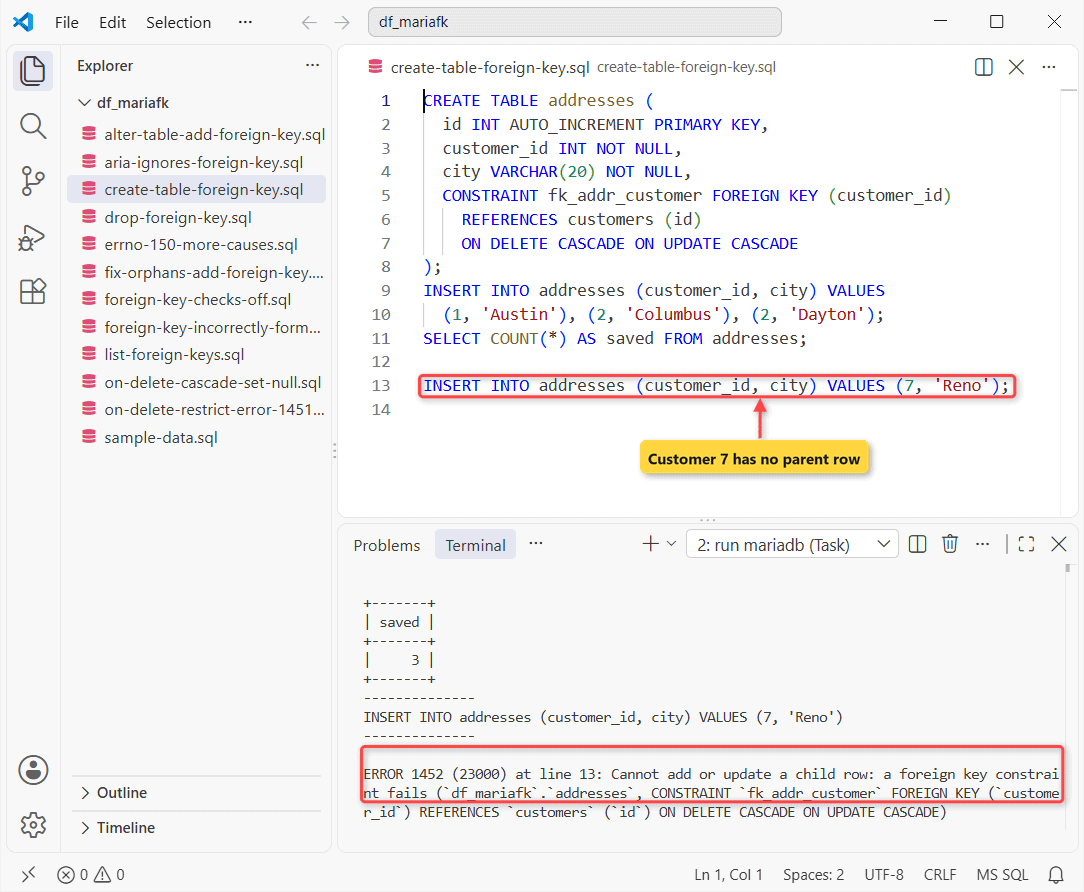
ERROR 1452. Customer 7 doesn’t exist, so the row never lands. Insert the parent first.
Step 2: ALTER TABLE ADD FOREIGN KEY on an Existing Table
ADD FOREIGN KEY checks every existing row:
ALTER TABLE orders ADD CONSTRAINT fk_orders_customer
  FOREIGN KEY (customer_id) REFERENCES customers (id)
  ON DELETE SET NULL ON UPDATE CASCADE;

SELECT o.id, o.customer_id, o.total
FROM orders o
LEFT JOIN customers c ON c.id = o.customer_id
WHERE o.customer_id IS NOT NULL AND c.id IS NULL;
Two results:
--------------
ALTER TABLE orders ADD CONSTRAINT fk_orders_customer
  FOREIGN KEY (customer_id) REFERENCES customers (id)
  ON DELETE SET NULL ON UPDATE CASCADE
--------------

ERROR 1452 (23000) at line 1: Cannot add or update a child row: a foreign key constraint fails (`df_mariafk`.`#sql-alter-b7ec-d8a-0`, CONSTRAINT `fk_orders_customer` FOREIGN KEY (`customer_id`) REFERENCES `customers` (`id`) ON DELETE SET NULL ON UPDATE CASCADE)
+----+-------------+-------+
| id | customer_id | total |
+----+-------------+-------+
|  5 |           9 | 60.00 |
+----+-------------+-------+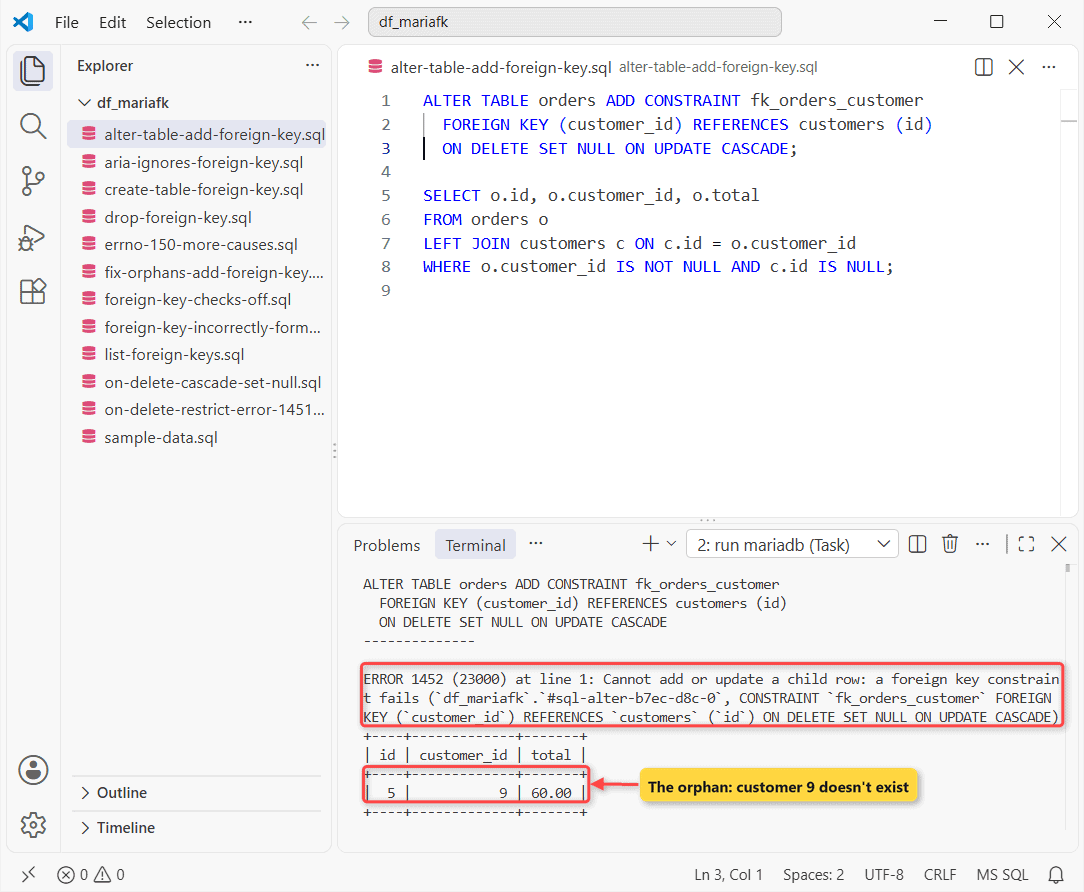
Why it happens: order 5 references customer 9, who doesn’t exist, and the #sql-alter-... table in the message is only the temporary copy ALTER builds. The LEFT JOIN lists every orphan.
So UPDATE orphans to NULL or a real customer, or delete them. I picked NULL:
UPDATE orders SET customer_id = NULL WHERE id = 5;
ALTER TABLE orders ADD CONSTRAINT fk_orders_customer
  FOREIGN KEY (customer_id) REFERENCES customers (id)
  ON DELETE SET NULL ON UPDATE CASCADE;
ALTER TABLE orders ADD FOREIGN KEY IF NOT EXISTS
  fk_orders_customer (customer_id) REFERENCES customers (id);
SHOW WARNINGS;
Confirm it’s fixed:
+-------+------+-----------------------------------------+
| Level | Code | Message                                 |
+-------+------+-----------------------------------------+
| Note  | 1061 | Duplicate key name 'fk_orders_customer' |
+-------+------+-----------------------------------------+
No error, so the key exists. The IF NOT EXISTS rerun just raised Note 1061.
Step 3: ON DELETE CASCADE, SET NULL and ON UPDATE CASCADE
addresses cascades both ways; orders sets NULL on delete. I deleted Tyler Reed, renumbered Hannah Brooks:
DELETE FROM customers WHERE id = 2;
UPDATE customers SET id = 101 WHERE id = 1;

SELECT customer_id, city FROM addresses;
SELECT id, customer_id, total FROM orders;
After the two statements:
+-------------+--------+
| customer_id | city   |
+-------------+--------+
|         101 | Austin |
+-------------+--------+
+----+-------------+--------+
| id | customer_id | total  |
+----+-------------+--------+
|  1 |         101 |  84.50 |
|  2 |        NULL | 129.99 |
|  3 |        NULL |  42.00 |
|  4 |           3 |  18.25 |
|  5 |        NULL |  60.00 |
+----+-------------+--------+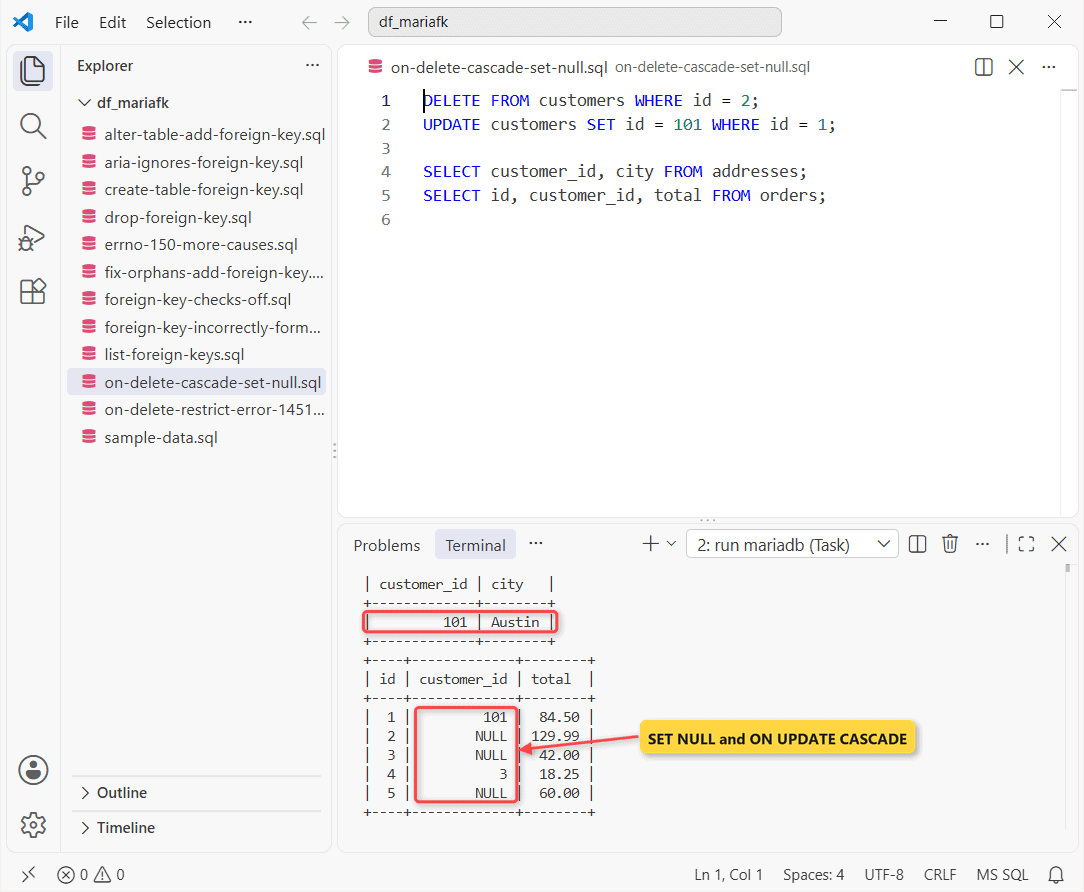
Tyler’s addresses are gone, his two orders stayed with a NULL customer, and both of Hannah’s child rows now say 101. Pick CASCADE only where losing child rows is the point.
What Does ON DELETE RESTRICT Do? ERROR 1451
RESTRICT is the default; NO ACTION is a synonym. I tried ON DELETE SET DEFAULT too:
CREATE TABLE loyalty_cards (
  card_no CHAR(8) PRIMARY KEY,
  customer_id INT NULL DEFAULT 4,
  FOREIGN KEY (customer_id) REFERENCES customers (id)
    ON DELETE SET DEFAULT
);
INSERT INTO loyalty_cards VALUES ('LC-30001', 3);

DELETE FROM customers WHERE id = 3;
Result:
--------------
DELETE FROM customers WHERE id = 3
--------------

ERROR 1451 (23000) at line 9: Cannot delete or update a parent row: a foreign key constraint fails (`df_mariafk`.`loyalty_cards`, CONSTRAINT `1` FOREIGN KEY (`customer_id`) REFERENCES `customers` (`id`))
The CREATE gave no warning, yet deleting Grace Miller hit ERROR 1451 and the message shows no ON DELETE clause at all, because InnoDB silently drops SET DEFAULT. Also, the unnamed constraint got the name 1.
A parent with children also refused DROP TABLE (1451) and TRUNCATE TABLE (ERROR 1701).
Step 4: Fix “Foreign key constraint is incorrectly formed” (errno 150)
The ERROR 1005 line never says what’s wrong. SHOW WARNINGS does, so run it right after:
CREATE TABLE payments (
  customer_id INT UNSIGNED NOT NULL,
  amount DECIMAL(8,2) NOT NULL,
  FOREIGN KEY (customer_id) REFERENCES customers (id)
);
SHOW WARNINGS LIMIT 1\G
Output:
--------------
CREATE TABLE payments (
  customer_id INT UNSIGNED NOT NULL,
  amount DECIMAL(8,2) NOT NULL,
  FOREIGN KEY (customer_id) REFERENCES customers (id)
)
--------------

ERROR 1005 (HY000) at line 1: Can't create table `df_mariafk`.`payments` (errno: 150 "Foreign key constraint is incorrectly formed")
*************************** 1. row ***************************
  Level: Warning
   Code: 150
Message: Create  table `df_mariafk`.`payments` with foreign key (customer_id) constraint failed. Field type or character set for column 'customer_id' does not match referenced column 'id'.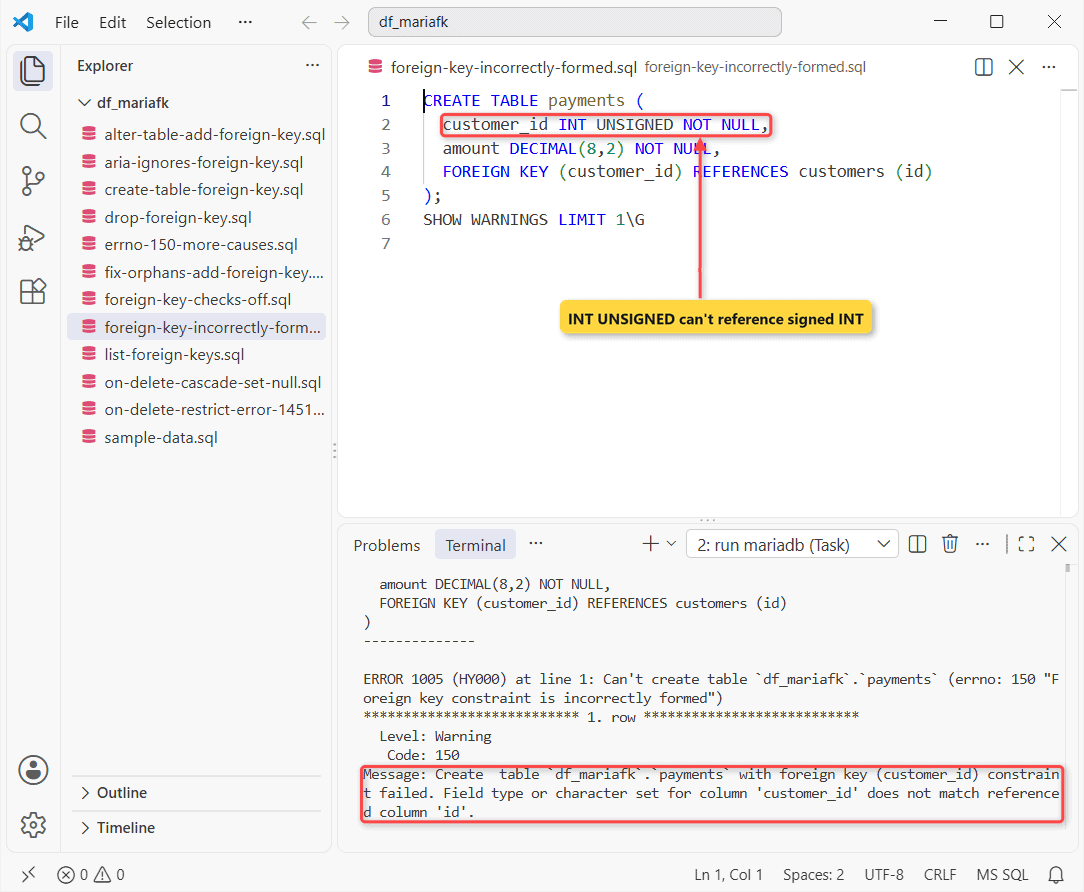
Signedness counts. INT UNSIGNED can’t point at INT; plain INT fixed it. Two more:
CREATE TABLE store_visits (
  state CHAR(2) NOT NULL,
  FOREIGN KEY (state) REFERENCES customers (state)
);
SHOW WARNINGS LIMIT 1;

CREATE TABLE coupons (code VARCHAR(10) PRIMARY KEY);
CREATE TABLE redemptions (
  code VARCHAR(10) CHARACTER SET latin1 NOT NULL,
  FOREIGN KEY (code) REFERENCES coupons (code)
);
Output:
--------------
CREATE TABLE store_visits (
  state CHAR(2) NOT NULL,
  FOREIGN KEY (state) REFERENCES customers (state)
)
--------------

ERROR 1005 (HY000) at line 1: Can't create table `df_mariafk`.`store_visits` (errno: 150 "Foreign key constraint is incorrectly formed")
+---------+------+-------------------------------------------------------------------------------------------------------------------------------------------------------------------------------------------+
| Level   | Code | Message                                                                                                                                                                                   |
+---------+------+-------------------------------------------------------------------------------------------------------------------------------------------------------------------------------------------+
| Warning |  150 | Create  table `df_mariafk`.`store_visits` with foreign key (state) constraint failed. There is no index in the referenced table where the referenced columns appear as the first columns. |
+---------+------+-------------------------------------------------------------------------------------------------------------------------------------------------------------------------------------------+
--------------
CREATE TABLE redemptions (
  code VARCHAR(10) CHARACTER SET latin1 NOT NULL,
  FOREIGN KEY (code) REFERENCES coupons (code)
)
--------------

ERROR 1005 (HY000) at line 8: Can't create table `df_mariafk`.`redemptions` (errno: 150 "Foreign key constraint is incorrectly formed")- No index on the parent column: add one, ideally a unique key.
- Character set or collation mismatch: the same warning as above. Make both columns identical.
- A partitioned parent. My test said the table was “not found in the data dictionary”.
Can You Turn Off Foreign Key Checks for a Load?
Yes. SET FOREIGN_KEY_CHECKS = 0 speeds up big CSV imports, but nothing rechecks the data afterward:
SET FOREIGN_KEY_CHECKS = 0;
INSERT INTO addresses (customer_id, city) VALUES (99, 'Boise');
ALTER TABLE addresses MODIFY customer_id BIGINT NOT NULL;
SET FOREIGN_KEY_CHECKS = 1;

SELECT a.id, a.customer_id, a.city
FROM addresses a
LEFT JOIN customers c ON c.id = a.customer_id
WHERE c.id IS NULL;
What I got:
--------------
ALTER TABLE addresses MODIFY customer_id BIGINT NOT NULL
--------------

ERROR 1832 (HY000) at line 3: Cannot change column 'customer_id': used in a foreign key constraint 'fk_addr_customer'
+----+-------------+-------+
| id | customer_id | city  |
+----+-------------+-------+
|  4 |          99 | Boise |
+----+-------------+-------+
Boise is now an orphan. The type change still hit ERROR 1832. Run the LEFT JOIN after loads.
Only InnoDB Enforces Foreign Keys (Aria and MyISAM Ignore Them)
Aria and MyISAM parse the FOREIGN KEY clause, keep the index and silently drop the constraint:
CREATE TABLE notes (
  customer_id INT NOT NULL,
  body VARCHAR(20),
  FOREIGN KEY (customer_id) REFERENCES customers (id)
) ENGINE=Aria;
INSERT INTO notes VALUES (99, 'No such customer');

SELECT COUNT(*) AS rows_saved,
  (SELECT COUNT(*) FROM information_schema.REFERENTIAL_CONSTRAINTS
   WHERE CONSTRAINT_SCHEMA = 'df_mariafk'
     AND TABLE_NAME = 'notes') AS fks_on_notes
FROM notes;
Count:
+------------+--------------+
| rows_saved | fks_on_notes |
+------------+--------------+
|          1 |            0 |
+------------+--------------+
Orphan saved, zero constraints. Convert with ENGINE=InnoDB first.
Step 5: List Foreign Keys From information_schema
Same information_schema views. Filter on the schema; without it I got other databases’ tables too:
SELECT k.TABLE_NAME, k.CONSTRAINT_NAME, k.COLUMN_NAME, r.DELETE_RULE
FROM information_schema.KEY_COLUMN_USAGE k
JOIN information_schema.REFERENTIAL_CONSTRAINTS r
  USING (CONSTRAINT_SCHEMA, CONSTRAINT_NAME, TABLE_NAME)
WHERE k.TABLE_SCHEMA = 'df_mariafk';
Output:
+------------+--------------------+-------------+-------------+
| TABLE_NAME | CONSTRAINT_NAME    | COLUMN_NAME | DELETE_RULE |
+------------+--------------------+-------------+-------------+
| addresses  | fk_addr_customer   | customer_id | CASCADE     |
| orders     | fk_orders_customer | customer_id | SET NULL    |
+------------+--------------------+-------------+-------------+
Step 6: DROP FOREIGN KEY (the Index Stays)
Drop by constraint name, like other MariaDB constraints:
ALTER TABLE addresses DROP FOREIGN KEY fk_addr_customer;
ALTER TABLE addresses DROP FOREIGN KEY IF EXISTS fk_addr_customer;
SHOW WARNINGS;
SELECT INDEX_NAME, COLUMN_NAME FROM information_schema.STATISTICS
WHERE TABLE_SCHEMA = 'df_mariafk' AND TABLE_NAME = 'addresses';
Output:
+-------+------+-----------------------------------------------------------------+
| Level | Code | Message                                                         |
+-------+------+-----------------------------------------------------------------+
| Note  | 1091 | Can't DROP FOREIGN KEY `fk_addr_customer`; check that it exists |
+-------+------+-----------------------------------------------------------------+
+------------------+-------------+
| INDEX_NAME       | COLUMN_NAME |
+------------------+-------------+
| PRIMARY          | id          |
| fk_addr_customer | customer_id |
+------------------+-------------+
The constraint is gone, the index fk_addr_customer isn’t. Drop it separately if nothing uses it.
To rename one, RENAME CONSTRAINT gave me ERROR 1064. DROP FOREIGN KEY old, ADD CONSTRAINT new ... in one ALTER worked.
Foreign Key Error Cheat Sheet
| Error | When I got it | Fix |
|---|---|---|
| 1452 | Child insert or ADD FOREIGN KEY with orphans | Insert the parent, or fix orphans first |
| 1451 | DELETE or DROP TABLE on a parent | CASCADE, SET NULL, or delete children first |
| 1005 (errno 150) | Type, sign, index, collation, partition | SHOW WARNINGS, then match the columns |
| 1832 | MODIFY a key column’s type | Drop the key, change both columns, re-add |
Common Mistakes to Avoid
ADD CONSTRAINT IF NOT EXISTS fk_x FOREIGN KEYis ERROR 1064. Unlike other ALTER TABLE IF EXISTS forms, it goes after FOREIGN KEY.
If it still fails: errno 150 means the definition (SHOW WARNINGS). 1452 means the data (the LEFT JOIN). No error and no enforcement? Check the engine.
Next Steps
Two-column keys point at a compound parent key; see MariaDB primary keys. On PostgreSQL, the same job is adding a foreign key in PostgreSQL.
Two more for this schema:
- Speed up joins on key columns: MariaDB indexes
- Wrap a parent and child insert together: MariaDB transactions
Frequently Asked Questions
Can a MariaDB foreign key column have a default value?
Yes, but the default must exist in the parent. I gave customer_id DEFAULT 77, and an insert that used it failed with ERROR 1452.
Does a MariaDB foreign key allow NULL?
Yes. A row with a NULL in any key column isn’t checked, per the MariaDB foreign keys docs. Use NOT NULL when every child needs a parent.
Does MyISAM support foreign keys in MariaDB?
No. My MyISAM test table accepted the FOREIGN KEY clause, but SHOW CREATE TABLE listed only KEY `customer_id`, no CONSTRAINT line.

Kumar Saurabh is a freelance software engineer who builds web and mobile apps with Next.js, React, Flutter and Python. From 2021 to 2024, Saurabh worked as an IT analyst and developer at TSInfo Technologies, writing technical articles on SQL and PostgreSQL. Saurabh writes the PostgreSQL, MySQL, MariaDB and MongoDB tutorials on DatabaseFAQs.com and holds a Master of Computer Applications (MCA) from Chandigarh University.