
The MariaDB delete row statement is one line: DELETE FROM orders WHERE id = 108; Leave out the WHERE and the whole table empties. My first filtered delete, on a non-key column, removed nothing: ERROR 1175, safe update mode.
Quick answer: filter on the primary key, read ROW_COUNT() afterward, and wrap anything bigger in START TRANSACTION so ROLLBACK can undo it.
Tested on MariaDB 13.0.2 (rolling release), InnoDB, Windows 11, mariadb client in VS Code.
Sample Data for Every MariaDB DELETE Example
Five customers, eight 2026 orders, one foreign key (see how to create a table in MariaDB). Each script starts here:
CREATE TABLE customers (
  id INT PRIMARY KEY,
  full_name VARCHAR(20) NOT NULL,
  state CHAR(2) NOT NULL
);
CREATE TABLE orders (
  id INT PRIMARY KEY,
  customer_id INT NOT NULL,
  order_date DATE NOT NULL,
  total DECIMAL(8,2) NOT NULL,
  CONSTRAINT fk_orders_customer
    FOREIGN KEY (customer_id) REFERENCES customers (id)
);
INSERT INTO customers VALUES
  (1, 'Megan Bowen', 'TX'), (2, 'Alex Wilber', 'CO'),
  (3, 'Adele Vance', 'WA'), (4, 'Lee Gu', 'TX'),
  (5, 'Diego Siciliani', 'CA');
INSERT INTO orders VALUES
  (101, 1, '2026-01-08', 129.99), (102, 2, '2026-01-19',  58.40),
  (103, 3, '2026-02-02', 310.00), (104, 4, '2026-02-14',  45.25),
  (105, 5, '2026-03-03',  89.00), (106, 1, '2026-03-21',  24.50),
  (107, 3, '2026-04-11', 415.75), (108, 5, '2026-05-06',  12.99);
SELECT VERSION(), COUNT(*) AS orders FROM orders;
Result:
+----------------+--------+
| VERSION()      | orders |
+----------------+--------+
| 13.0.2-MariaDB |      8 |
+----------------+--------+
MariaDB DELETE FROM Syntax: Delete One Row by Key
Point the WHERE at the primary key and only that row goes:
DELETE FROM orders WHERE id = 108;
SELECT ROW_COUNT() AS deleted;
ROW_COUNT() says:
+---------+
| deleted |
+---------+
|       1 |
+---------+
One row. A WHERE that matches nothing isn’t an error, it just reports 0, so check the count. And WHERE id = 25 AND id = 28 is never true; for two rows write WHERE id IN (25, 28).
ERROR 1175: Why MariaDB Refuses a DELETE in Safe Update Mode
Why it happens: the client was started with --safe-updates (alias --i-am-a-dummy), which sets sql_safe_updates = 1. A DELETE must then filter on a key column or carry a LIMIT. total isn’t indexed, so it was blocked.
-- the client was started with --safe-updates
DELETE FROM orders WHERE total < 50;

-- Fix: filter on the key, or cap it with LIMIT
DELETE FROM orders WHERE total < 50 LIMIT 5;
SELECT ROW_COUNT() AS deleted;
The client printed:
--------------
DELETE FROM orders WHERE total < 50
--------------

ERROR 1175 (HY000) at line 2: You are using safe update mode and you tried to update a table without a WHERE that uses a KEY column
+---------+
| deleted |
+---------+
|       3 |
+---------+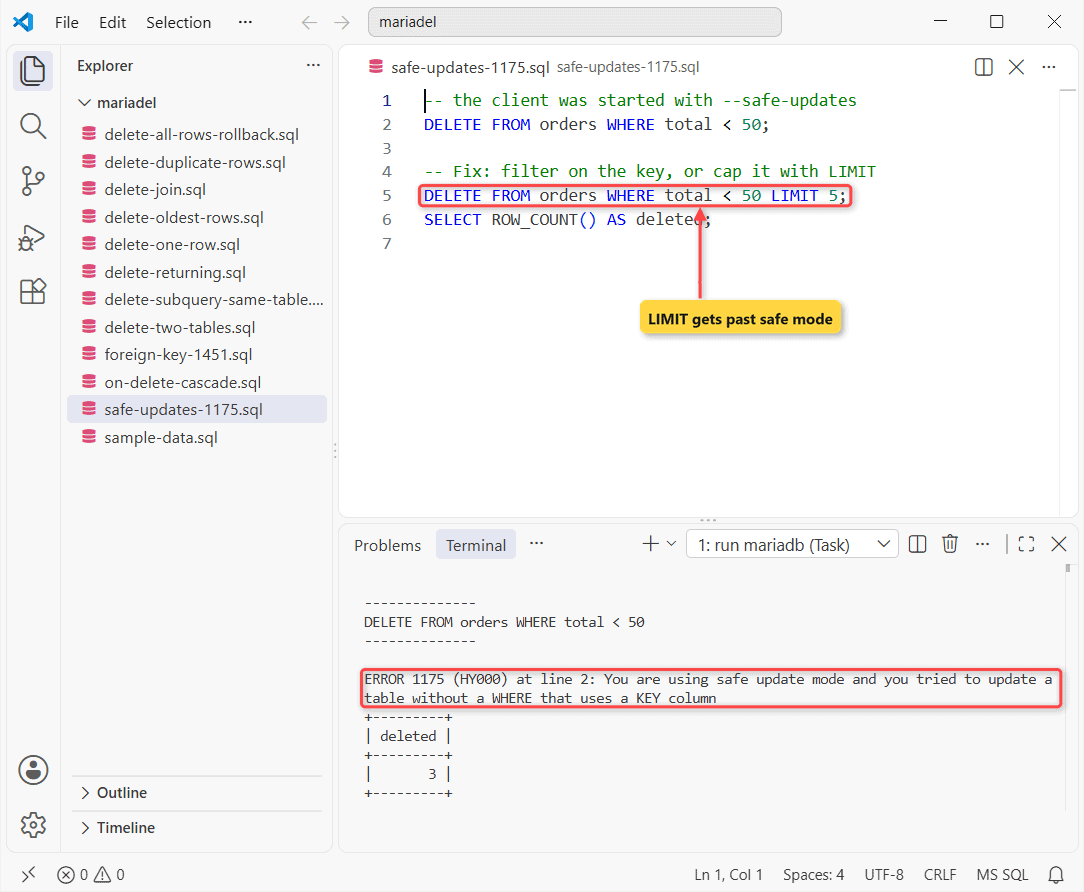
Fixes, safest first: filter on a key (WHERE id IN (...)); add a LIMIT, which deleted the 3 orders under $50; or, risky, SET sql_safe_updates = 0; for the session.
ERROR 1451: Delete a Row Referenced by a Foreign Key
Alex Wilber (customer 2) has an order, and the MariaDB foreign key has no ON DELETE action, so InnoDB blocks the parent delete. Fix 1 removes the children first, inside one transaction:
DELETE FROM customers WHERE id = 2;

-- Fix 1: children first, in one transaction
START TRANSACTION;
DELETE FROM orders WHERE customer_id = 2;
DELETE FROM customers WHERE id = 2;
COMMIT;
SELECT COUNT(*) AS alex_rows FROM customers WHERE id = 2;
What came back:
--------------
DELETE FROM customers WHERE id = 2
--------------

ERROR 1451 (23000) at line 1: Cannot delete or update a parent row: a foreign key constraint fails (`df_mariadel`.`orders`, CONSTRAINT `fk_orders_customer` FOREIGN KEY (`customer_id`) REFERENCES `customers` (`id`))
+-----------+
| alex_rows |
+-----------+
|         0 |
+-----------+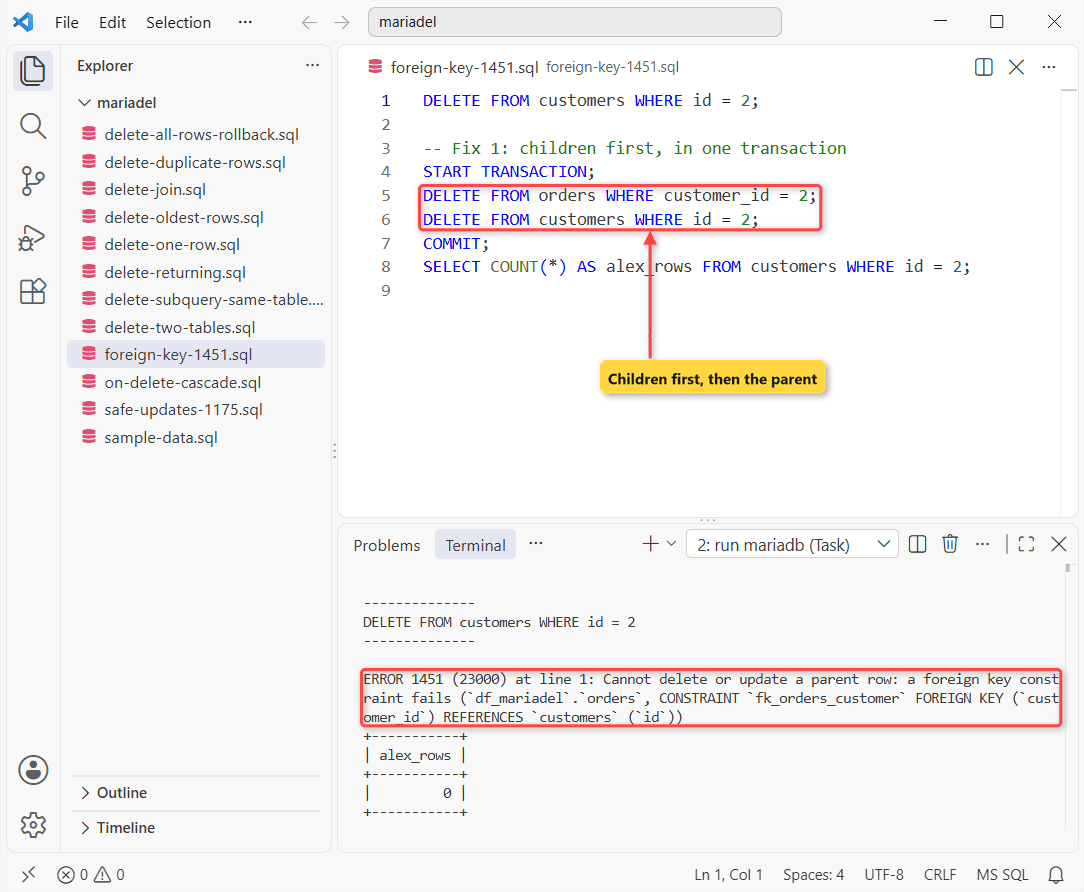
Confirm it’s fixed: alex_rows is 0. Fix 2 (risky, it deletes child rows silently from now on) rebuilds the constraint with ON DELETE CASCADE:
ALTER TABLE orders DROP FOREIGN KEY fk_orders_customer;
ALTER TABLE orders ADD CONSTRAINT fk_orders_customer
  FOREIGN KEY (customer_id) REFERENCES customers (id)
  ON DELETE CASCADE;

DELETE FROM customers WHERE id = 3;
SELECT COUNT(*) AS adele_orders FROM orders WHERE customer_id = 3;
Result:
+--------------+
| adele_orders |
+--------------+
|            0 |
+--------------+
Adele Vance’s two orders went with her. Use CASCADE only where a child row means nothing without its parent.
MariaDB DELETE With JOIN (Multi-Table Delete)
Name the alias to delete from before FROM, then join as in a SELECT. This removes every order placed by a Texas customer:
DELETE o
FROM orders o
JOIN customers c ON c.id = o.customer_id
WHERE c.state = 'TX';
SELECT ROW_COUNT() AS deleted;
Result:
+---------+
| deleted |
+---------+
|       3 |
+---------+
Three orders gone: Megan Bowen’s two and Lee Gu’s one. The customers table is untouched.
Deleting From Two Tables at Once Can Still Hit ERROR 1451
Old posts suggest DELETE c, o FROM ... for a parent and its children. My run failed:
DELETE c, o
FROM customers c
JOIN orders o ON o.customer_id = c.id
WHERE c.id = 5;
The error:
--------------
DELETE c, o
FROM customers c
JOIN orders o ON o.customer_id = c.id
WHERE c.id = 5
--------------

ERROR 1451 (23000) at line 1: Cannot delete or update a parent row: a foreign key constraint fails (`df_mariadel`.`orders`, CONSTRAINT `fk_orders_customer` FOREIGN KEY (`customer_id`) REFERENCES `customers` (`id`))
InnoDB checks the key row by row, and MariaDB doesn’t promise to touch the children first. Use CASCADE or two statements. ORDER BY and LIMIT in a multi-table DELETE need MariaDB 11.8.1+.
DELETE With ORDER BY and LIMIT: Remove the Oldest Rows
To delete the first or oldest rows, sort them with ORDER BY and cap the count:
DELETE FROM orders ORDER BY order_date LIMIT 2;

SELECT MIN(order_date) AS oldest_left FROM orders;
Result:
+-------------+
| oldest_left |
+-------------+
| 2026-02-02  |
+-------------+
Both January orders are gone. Without ORDER BY, LIMIT takes whatever rows come first.
DELETE … RETURNING and Subqueries on the Same Table
RETURNING (MariaDB 10.0.5+, single-table only) prints the rows as it deletes them, handy for logging:
DELETE FROM orders WHERE total > 300
RETURNING id, customer_id, total;
Deleted rows:
+-----+-------------+--------+
| id  | customer_id | total  |
+-----+-------------+--------+
| 103 |           3 | 310.00 |
| 107 |           3 | 415.75 |
+-----+-------------+--------+
A subquery may read the table you’re deleting from (MariaDB 10.3.1+; MySQL raises ERROR 1093):
DELETE FROM orders
WHERE total < (SELECT AVG(total) FROM orders);
SELECT ROW_COUNT() AS deleted;
Result:
+---------+
| deleted |
+---------+
|       6 |
+---------+
The average is $135.74, so 6 of 8 orders were below it and deleted.
How Do You Delete Duplicate Rows in MariaDB?
Self-join on the email and delete the higher id. The lowest id survives:
CREATE TABLE subscribers (
  id INT PRIMARY KEY, email VARCHAR(30) NOT NULL);
INSERT INTO subscribers VALUES
  (1, 'megan.bowen@example.com'), (2, 'alex.wilber@example.com'),
  (3, 'megan.bowen@example.com'), (4, 'lee.gu@example.com'),
  (5, 'alex.wilber@example.com'), (6, 'megan.bowen@example.com');

DELETE s1 FROM subscribers s1
JOIN subscribers s2
  ON s1.email = s2.email AND s1.id > s2.id;
SELECT ROW_COUNT() AS deleted;

SELECT id, email FROM subscribers ORDER BY id;
Result:
+---------+
| deleted |
+---------+
|       3 |
+---------+
+----+-------------------------+
| id | email                   |
+----+-------------------------+
|  1 | megan.bowen@example.com |
|  2 | alex.wilber@example.com |
|  4 | lee.gu@example.com      |
+----+-------------------------+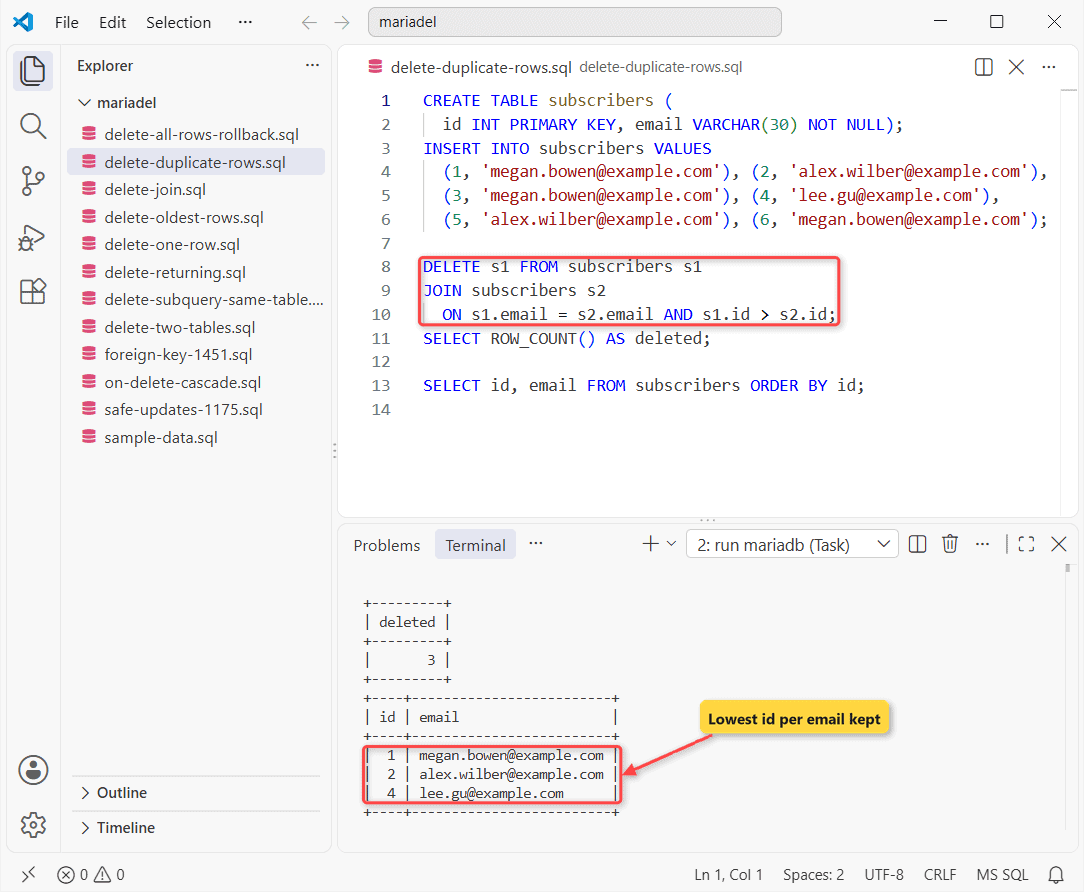
Three copies went. Add a unique key next, or they’ll be back.
Delete All Rows, Then Undo It With ROLLBACK
Plain DELETE FROM orders; empties the table. Inside a MariaDB transaction you get one chance to change your mind:
START TRANSACTION;
DELETE FROM orders;
SELECT COUNT(*) AS after_delete FROM orders;

ROLLBACK;
SELECT COUNT(*) AS after_rollback FROM orders;
Counts:
+--------------+
| after_delete |
+--------------+
|            0 |
+--------------+
+----------------+
| after_rollback |
+----------------+
|              8 |
+----------------+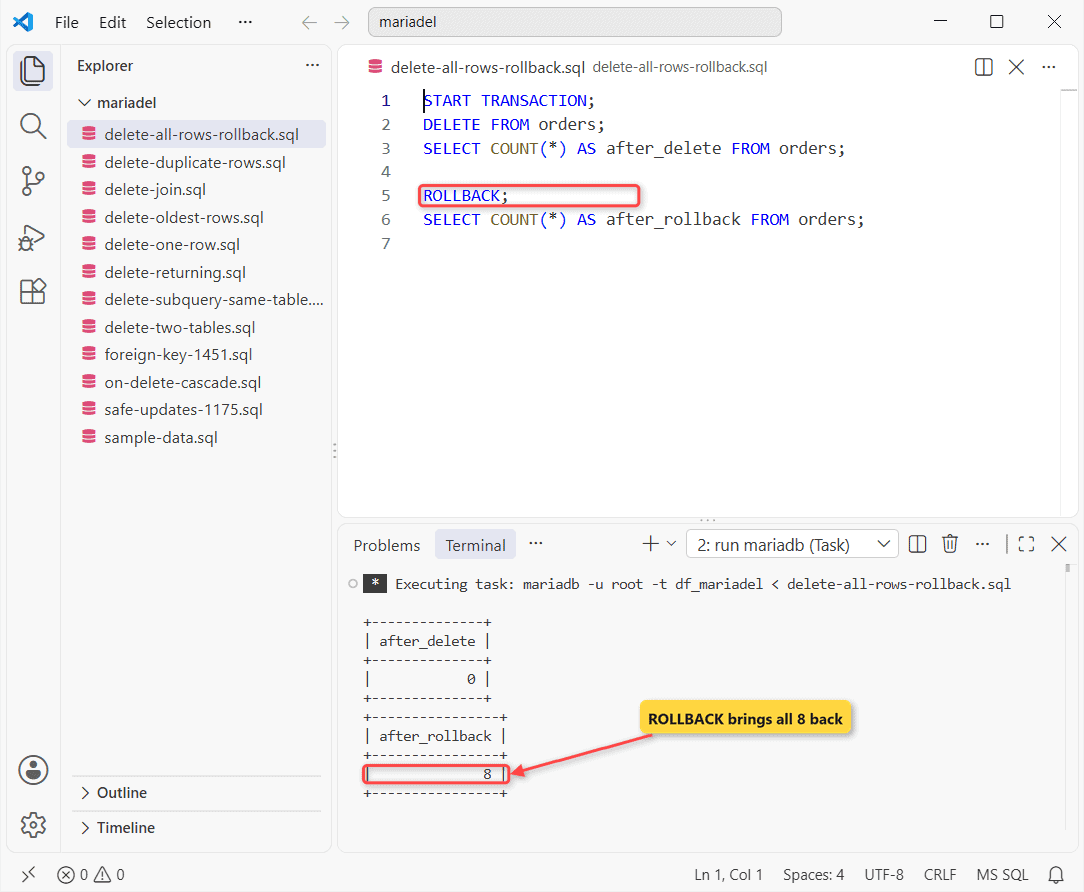
After COMMIT you need a MariaDB backup. For a full wipe, TRUNCATE TABLE is faster, but it resets AUTO_INCREMENT, skips DELETE triggers and can’t be rolled back.
If the MariaDB DELETE Still Fails
- ERROR 1175: you’re in safe mode. Add a key filter or LIMIT.
- ERROR 1451: child rows exist. Delete them first, or add ON DELETE CASCADE.
- 0 rows deleted: run the WHERE as a SELECT and compare the values (trailing spaces, wrong date format).
To stop it coming back, run every DELETE as a SELECT first.
Next step: change rows instead of removing them with MariaDB UPDATE. On PostgreSQL, see delete a row in PostgreSQL.
More DELETE Tutorials
- In SQL Server: delete duplicate rows
- DELETE with JOIN in SQL Server
- Before you delete: check if rows exist in MariaDB
Frequently Asked Questions
Does DELETE free disk space in MariaDB?
Not right away. InnoDB marks the space reusable inside the table file; OPTIMIZE TABLE rebuilds the table and returns it when innodb_file_per_table is ON.
Does DELETE fire triggers in MariaDB?
Yes, BEFORE DELETE and AFTER DELETE triggers run once per deleted row. CASCADE deletes don’t fire the child table’s triggers.
How do I delete rows in batches on a big MariaDB table?
Repeat DELETE ... WHERE ... LIMIT 10000 until ROW_COUNT() returns 0, so each transaction stays short. Syntax details are on the MariaDB DELETE docs.

Kumar Saurabh is a freelance software engineer who builds web and mobile apps with Next.js, React, Flutter and Python. From 2021 to 2024, Saurabh worked as an IT analyst and developer at TSInfo Technologies, writing technical articles on SQL and PostgreSQL. Saurabh writes the PostgreSQL, MySQL, MariaDB and MongoDB tutorials on DatabaseFAQs.com and holds a Master of Computer Applications (MCA) from Chandigarh University.