
Your hotel’s night audit wants one row per night, even nights nobody booked. For a postgres date range like that, run generate_series() over two dates and cast each value with ::date:
SELECT d::date AS night
FROM generate_series(date '2026-11-01', date '2026-11-03', interval '1 day') AS d;
Three nights back from psql:
   night
------------
 2026-11-01
 2026-11-02
 2026-11-03
(3 rows)
I ran everything below on PostgreSQL 18.6 on Windows, session time zone America/New_York. Here’s what we’re building:
Before You Start: the bookings table with a daterange column
One range column per stay, not two date columns (PostgreSQL 9.2+). Background: the PostgreSQL data types overview.
CREATE TABLE bookings (
  booking_id int PRIMARY KEY,
  room       int NOT NULL,
  guest      varchar(20) NOT NULL,
  stay       daterange NOT NULL,
  rate       numeric(7,2) NOT NULL
);
INSERT INTO bookings VALUES
 (1, 101, 'Megan Bowen',     '[2026-11-01,2026-11-04)', 189.00),
 (2, 102, 'Alex Wilber',     '[2026-11-02,2026-11-03)', 149.00),
 (3, 101, 'Adele Vance',     '[2026-11-04,2026-11-06)', 189.00),
 (4, 103, 'Lee Gu',          '[2026-11-03,2026-11-06)', 229.00),
 (5, 102, 'Diego Siciliani', '[2026-11-07,2026-11-09)', 149.00);
Step 1: Generate a list of dates with generate_series
There’s no date version of generate_series, so the return type surprised me:
SELECT d, pg_typeof(d) AS type
FROM generate_series(date '2026-10-31', date '2026-11-02', interval '1 day') AS d;
Output:
           d            |           type
------------------------+--------------------------
 2026-10-31 00:00:00-04 | timestamp with time zone
 2026-11-01 00:00:00-04 | timestamp with time zone
 2026-11-02 00:00:00-05 | timestamp with time zone
(3 rows)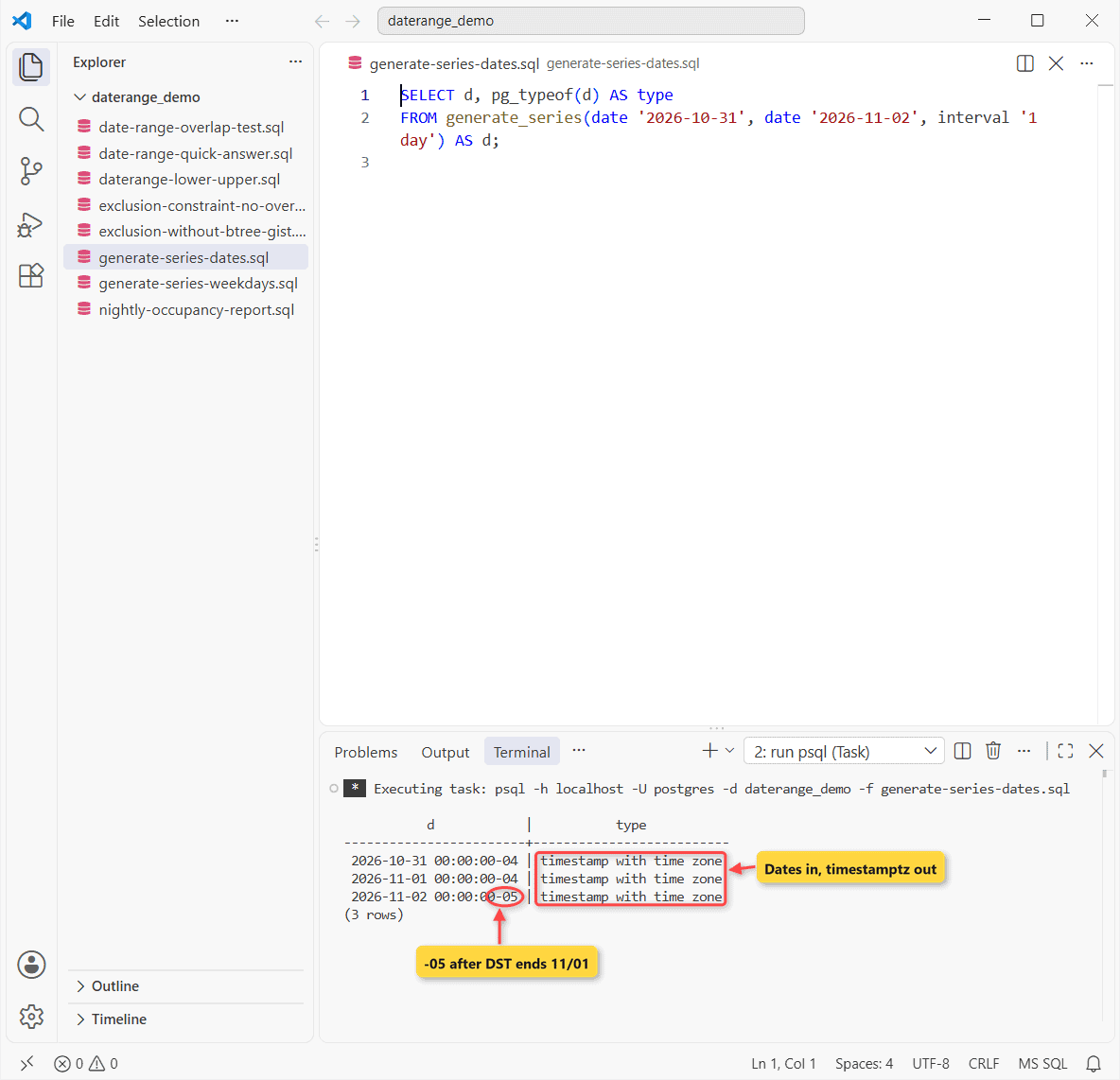
Checkpoint: you should see timestamp with time zone, and the offset jumps from -04 to -05 because New York leaves daylight saving time on 11/01/2026. More on casting a PostgreSQL timestamp to a date.
Business days only:
SELECT d::date AS weekday
FROM generate_series(date '2026-11-05', date '2026-11-10', interval '1 day') AS d
WHERE extract(isodow FROM d) < 6;
Output:
  weekday
------------
 2026-11-05
 2026-11-06
 2026-11-09
 2026-11-10
(4 rows)
For weeks or months, swap in interval '1 week' or interval '1 month'. Hourly slots need a timestamp start. See the PostgreSQL generate_series reference.
Step 2: Read a postgresql daterange with lower(), upper() and @>
Your first guest, Megan, checks in 11/01 and out 11/04.
SELECT stay, lower(stay) AS check_in, upper(stay) AS check_out,
       upper(stay) - lower(stay) AS nights
FROM bookings
WHERE booking_id = 1;

SELECT daterange('2026-11-01', '2026-11-03', '[]') AS closed,
       daterange('2026-11-01', NULL) AS open_ended,
       '[2026-11-01,2026-11-04)'::daterange
         @> date '2026-11-04' AS has_nov_4;
Output:
          stay           |  check_in  | check_out  | nights
-------------------------+------------+------------+--------
 [2026-11-01,2026-11-04) | 2026-11-01 | 2026-11-04 |      3
(1 row)

         closed          |  open_ended   | has_nov_4
-------------------------+---------------+-----------
 [2026-11-01,2026-11-04) | [2026-11-01,) | f
(1 row)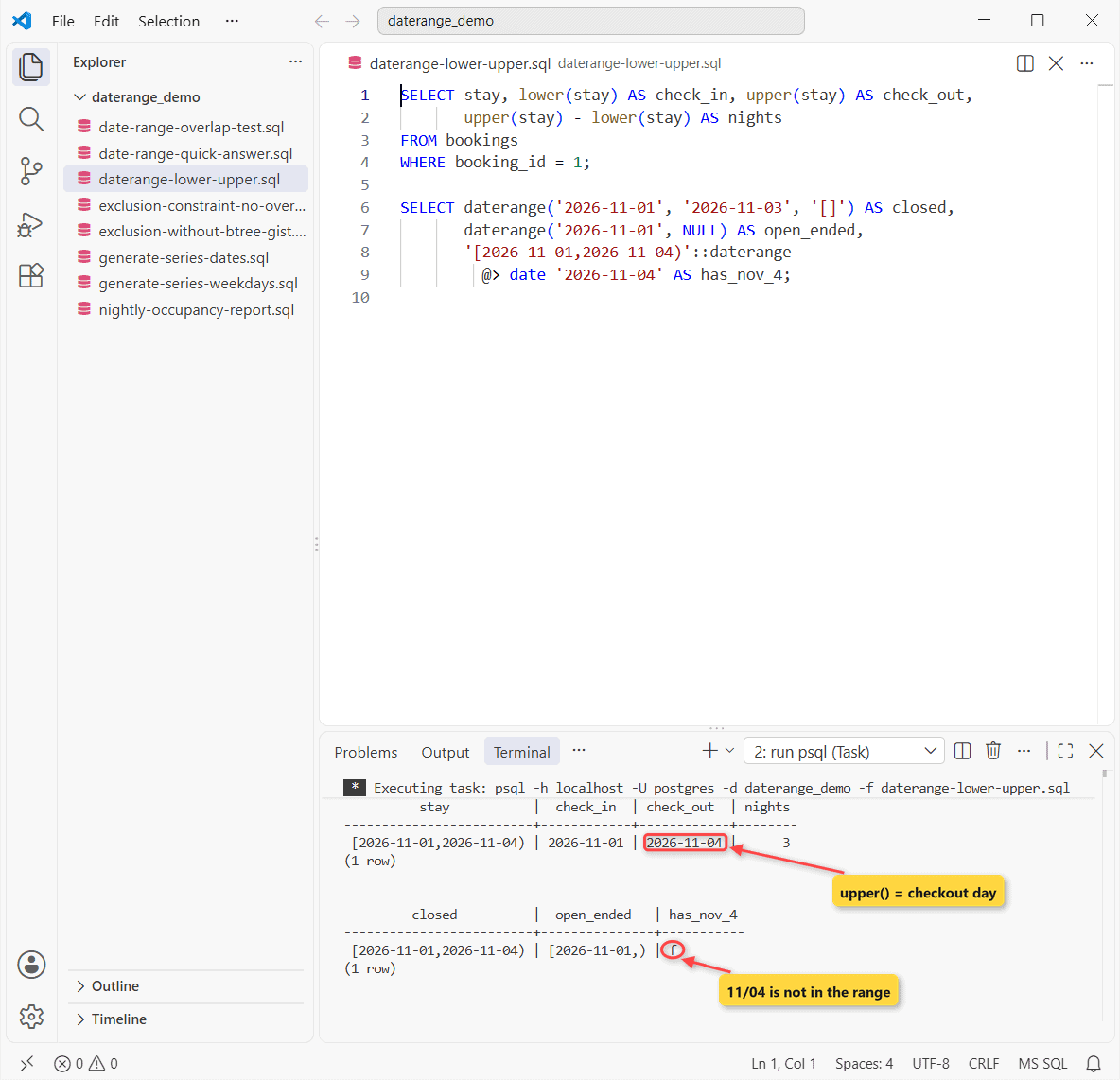
Checkpoint: upper() returns 2026-11-04 and the stay counts 3 nights, and because every daterange is stored as [), my [] input came back as [2026-11-01,2026-11-04). A NULL bound means no end.
Step 3: Fill the gaps with a LEFT JOIN against the date series
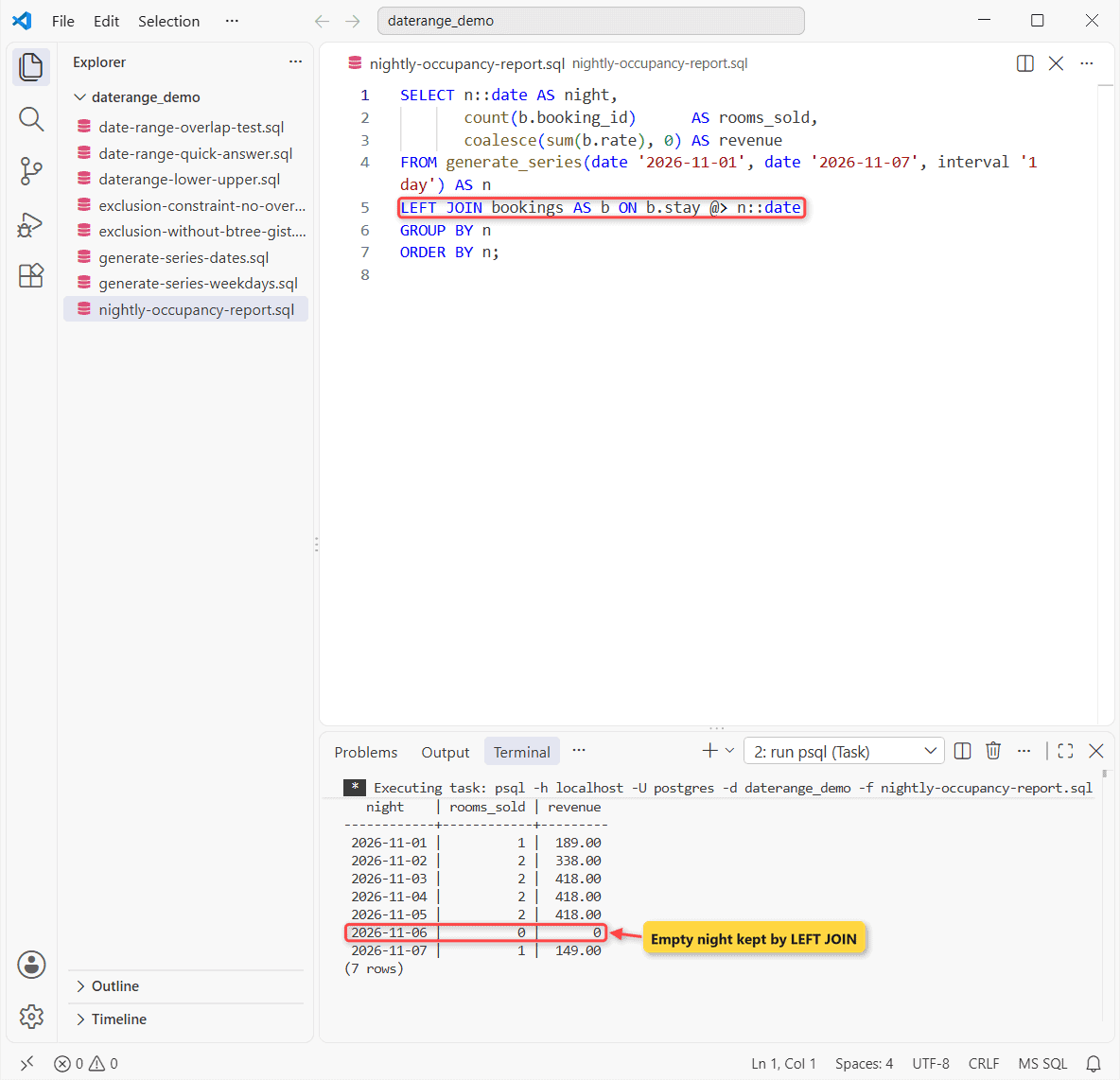
The LEFT JOIN keeps nights with no booking:
SELECT n::date AS night,
       count(b.booking_id)      AS rooms_sold,
       coalesce(sum(b.rate), 0) AS revenue
FROM generate_series(date '2026-11-01', date '2026-11-07', interval '1 day') AS n
LEFT JOIN bookings AS b ON b.stay @> n::date
GROUP BY n
ORDER BY n;
Output:
   night    | rooms_sold | revenue
------------+------------+---------
 2026-11-01 |          1 |  189.00
 2026-11-02 |          2 |  338.00
 2026-11-03 |          2 |  418.00
 2026-11-04 |          2 |  418.00
 2026-11-05 |          2 |  418.00
 2026-11-06 |          0 |       0
 2026-11-07 |          1 |  149.00
(7 rows)
Check your work: 11/06 shows 0 rooms and $0, while 11/03 shows $418.00 because rooms 101 and 103 were both occupied that night. Count b.booking_id, not *, or empty nights show 1 (PostgreSQL GROUP BY).
Step 4: Block date range overlap in Postgres with an exclusion constraint
A PostgreSQL unique constraint can’t stop two stays from overlapping. An exclusion constraint can. Add btree_gist for the integer room:
CREATE EXTENSION btree_gist;
ALTER TABLE bookings ADD CONSTRAINT no_double_booking
  EXCLUDE USING gist (room WITH =, stay WITH &&);

INSERT INTO bookings VALUES
 (6, 101, 'Lynne Robbins', '[2026-11-03,2026-11-05)', 189.00);
Output and error:
CREATE EXTENSION
ALTER TABLE
psql:exclusion-constraint-no-overlap.sql:6: ERROR:  conflicting key value violates exclusion constraint "no_double_booking"
DETAIL:  Key (room, stay)=(101, [2026-11-03,2026-11-05)) conflicts with existing key (room, stay)=(101, [2026-11-01,2026-11-04)).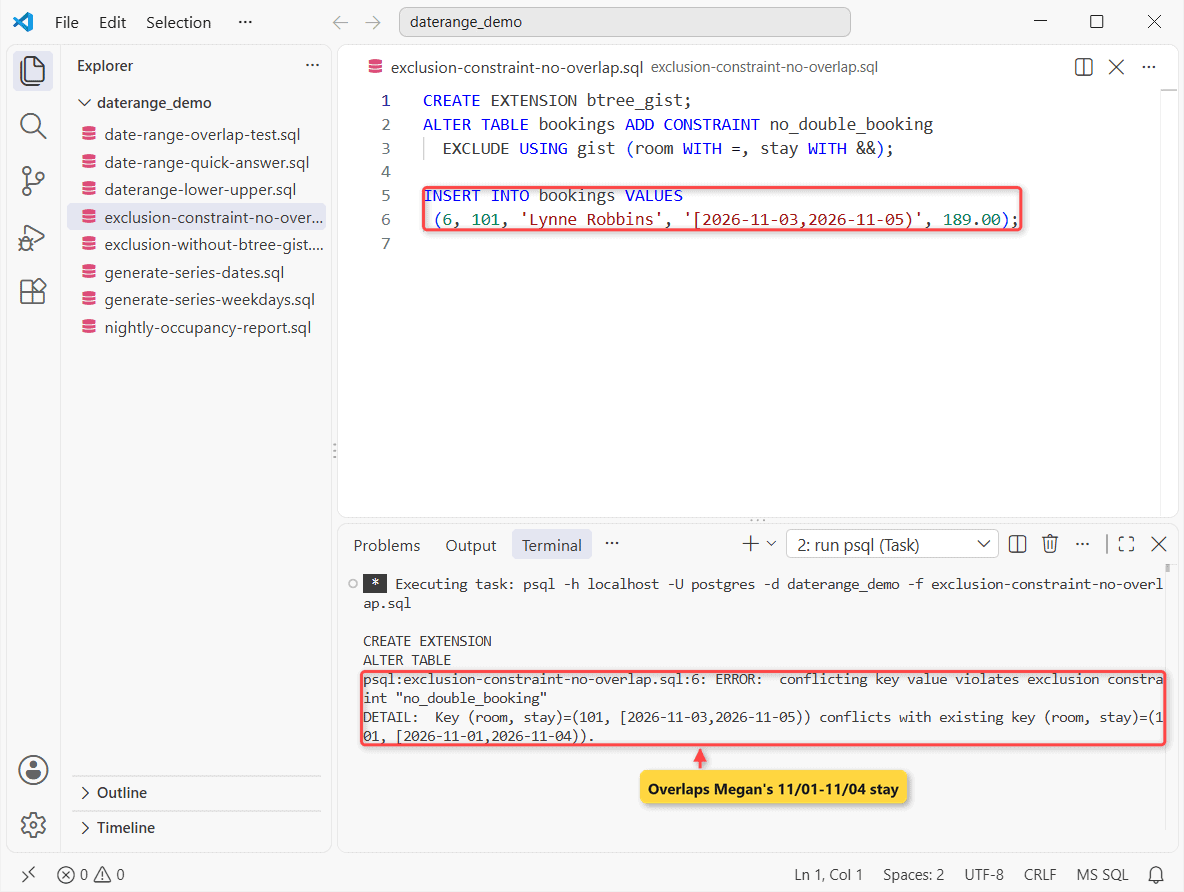
Test the date range overlap check with &&
Lynne now checks in 11/06, the day Adele leaves. Which rooms are busy on 11/05 and 11/06?
INSERT INTO bookings VALUES
 (6, 101, 'Lynne Robbins', '[2026-11-06,2026-11-08)', 189.00);

SELECT room, guest, stay
FROM bookings
WHERE stay && daterange('2026-11-05', '2026-11-07')
ORDER BY room;
Output:
INSERT 0 1
 room |     guest     |          stay
------+---------------+-------------------------
  101 | Adele Vance   | [2026-11-04,2026-11-06)
  101 | Lynne Robbins | [2026-11-06,2026-11-08)
  103 | Lee Gu        | [2026-11-03,2026-11-06)
(3 rows)
It went in. Touching [) ranges don’t overlap. For plain date columns, see PostgreSQL dates between two dates.
Why does the date range exclusion constraint error without btree_gist?
Skip CREATE EXTENSION btree_gist and the ALTER fails:
ALTER TABLE bookings ADD CONSTRAINT no_double_booking
  EXCLUDE USING gist (room WITH =, stay WITH &&);
Error:
psql:exclusion-without-btree-gist.sql:2: ERROR:  data type integer has no default operator class for access method "gist"
HINT:  You must specify an operator class for the index or define a default operator class for the data type.
Important: your last night is upper(stay) - 1. And the older (start, end) OVERLAPS (start, end) works on loose dates, but can’t back a constraint.
Date range variations to try next
Next step: wrap the report in a function with two date parameters, like a PostgreSQL function that returns a table. On a big table, add a GiST index on stay (PostgreSQL CREATE INDEX).
Related reading:
Frequently Asked Questions
Does generate_series include the end date?
Yes, if a step lands exactly on it. Start after stop returns zero rows.
What is a multirange in PostgreSQL?
Since PostgreSQL 14, every range type has a multirange, so datemultirange holds several non-overlapping date ranges in one value. Try range_agg(stay).
Is the daterange upper bound inclusive?
No. daterange is a discrete type, so PostgreSQL rewrites it to the canonical [) form: lower included, upper excluded (PostgreSQL 18 range types docs).

Kumar Saurabh is a freelance software engineer who builds web and mobile apps with Next.js, React, Flutter and Python. From 2021 to 2024, Saurabh worked as an IT analyst and developer at TSInfo Technologies, writing technical articles on SQL and PostgreSQL. Saurabh writes the PostgreSQL, MySQL, MariaDB and MongoDB tutorials on DatabaseFAQs.com and holds a Master of Computer Applications (MCA) from Chandigarh University.