
In this SQL Server tutorial, we will learn about “SQL Server First Day Of Month” where we will discuss how to get the first day of the month from the table. We will understand and learn some examples so that you can understand the concept much better. Here is the complete list of topics that we will cover.
SQL Server First Day Of Month
In this SQL Server section, we will learn and understand how to use the DATEADD function to find the first day of the month from the table by the query. And which will be explained with the help of an illustrated example.
In SQL Server, the DATEADD function is used to add a number for the specified part of the input value and it returns a modified value. Here is the syntax of the DATEADD function by the following query:
SYNTAX:
SELECT expression, DATEADD(YOUR_DATE_PART, VALUE, INPUT_VALUE) FROM TABLE_NAME;The syntax explanation:
- The YOUR_DATE_PART is a portion of the DATE that is passed to the DATEADD function, which adds the number to the date.
- VALUE is an integer value appended to the INPUT_VALUE’s YOUR_DATE_PART. If we use a decimal or float integer number, the DATEADD function will truncate the decimal fraction part. In this scenario, it will round the number.
- The input DATE is a direct data value or a phrase that resolves to a DATETIME, DATE, DATETIMEOFFSET, SMALLATETIME, TIME or DATETIME2 value.
Here’s an example of how to use the SQL Server DATEADD function to discover the first day of the month using the query:
EXAMPLE:
USE SQLSERVERGUIDES;

SELECT DATEADD(DAY,-13,CURRENT_TIMESTAMP) RESULT,STUDENT_FIRSTNAME,STUDENT_LASTNAME
FROM HARVARD_UNIVERSITY;
As we see in the above query, the SELECT statement is utilized to retrieve all records of the STUDENT_FIRSTNAME and STUDENT_LASTNAME columns from the HARVARD_UNIVERSITY table.
The DATEADD function is used with the CURRENT_TIMESTAMP column to find the first day of the month from the HARVARD_UNIVERSITY table.
As we see in the DATEADD function, to find the first day of the month, we have used the negative sign as a -13 value which will get the first day of the month from the HARVARD_UNIVERSITY table.

We hope that you have understood the subtopic “SQL Server First Day Of Month” by using the DATEADD function on the table by the query. For better understanding, we have used an example and explained it in depth.
Read: SQL Server Last Day Of Month
SQL Server First day Of Month Without Time
Here we will learn and understand how to use the SQL Server CURRENT_TIMESTAMP and DATEADD functions to find the first day of the month without time from the table by the following query:
EXAMPLE:
USE  SQLSERVERGUIDES;

SELECT STUDENT_FIRSTNAME,STUDENT_LASTNAME,
CONVERT(VARCHAR,DATEADD(DAY,-14,CURRENT_TIMESTAMP),102) AS RESULT
FROM HARVARD_UNIVERSITY;
In this preceding query, the SELECT statement retrieves all records of the STUDENT_FIRSTNAME and STUDENT_LASTNAME columns from the HARVARD_UNIVERSITY table.
The DATEADD function is used on the CURRENT_TIMESTAMP column to find the first day of the current month from the HARVARD_UNIVERSITY table. And to get the result set in the output, we have used the CONVERT function in the HARVARD_UNIVERSITY table.
To shorter the function_name, we have used the ALIAS clause with AS keyword and given the name as RESULT for the output column_name. In this SQL Server, we don’t use the ALIAS clause to shorter the function name and just randomly put the column_name as the RESULT column. Then also the query will be executed properly without any error.

We hope that you have understood how to use the SQL Server CURRENT_TIMESTAMP and DATEADD functions for finding the first day of the current month from the table by the query. We have used a verified example and explained it in an abysm.
Read: SQL Server Datetime functions examples
SQL Server Get First Day Of Month From YYYYMMDD
We will learn and understand how to use the SQL Server CONVERT and DATEADD function to find the first day of the month in the form of YYYYMMDD in the table by the following query:
EXAMPLE:
USE SQLSERVERGUIDES;

SELECT CONVERT(VARCHAR,DATEADD(DAY,-13,CURRENT_TIMESTAMP),112) AS RESULT_AS_YYYYMMDD,
STUDENT_FIRSTNAME,STUDENT_LASTNAME
FROM HARVARD_UNIVERSITY;
As we see in the above query, the SELECT statement retrieves all records of the STUDENT_FIRSTNAME and STUDENT_LASTNAME columns from the HARVARD_UNIVERSITY table. The DATEADD function is used to extract the first day of the month by using the CURRENT_TIMESTAMP in the function.
As we see, the CURRENT_TIMESTAMP parameter provides today’s date as 2022-06-14, and to reach the first day of the month, we have to put the value as -13 in the DATEADD function. To return the integer value as a string value, we have used the CONVERT function to convert the DATEADD function with the VARCHAR data type and format_number as 112.
To shorter the function_name, we have used the ALIAS clause with the AS keyword and given the name RESULT_AS_YYYYMMDD for the output column_name. If you want, you can the ALIAS clause or not. It all depends upon you based on the function shorter name for the output column_name.

We hope that you have understood the subtopic “SQL Get First Day of Month From YYYYMMDD” of the table by the query. For better understanding, we have used an example and explained it in depth.
Read: SQL Server Convert Datetime to String
SQL Server Get First Day Of Month From Timestamp
In this section, we will learn and understand how to use the SQL Server CURRENT_TIMESTAMP and DATE_ADD functions to find the first day of the month from the table by the query. And which will be explained with the help of an illustrated example.
The SQL Server CURRENT_TIMESTAMP function is used to extract the current date and time for the user. Here is an illustrated example of the SQL Server CURRENT_TIMESTAMP and DATE_ADD functions to find the first day of the month by the following query:
EXAMPLE:
USE SQLSERVERGUIDES;

SELECT STUDENT_FIRSTNAME,STUDENT_LASTNAME,DATEADD(DAY,-13,CURRENT_TIMESTAMP) AS RESULT
FROM HARVARD_UNIVERSITY;
In this above query, we have used the SELECT statement to retrieve all records of the STUDENT_FIRSTNAME and STUDENT_LASTNAME columns from the HARVARD_UNIVERSITY table.
The DATEADD function is used to extract the first day of the month by using the CURRENT_TIMESTAMP in the function of the HARVARD_UNIVERSITY table.
As to shorter the function_name, we have used the ALIAS clause with the AS keyword and given the name as RESULT for the output column_name.
The SELECT statement will retrieve all records from the HARVARD_UNIVERSITY table only when the function and column_name records come for the output result set.

We hope that you have understood how to use the SQL Server CURRENT_TIMESTAMP and DATEADD functions to find the first day of the month from the table by the query. For a better explanation, we have used an illustrated example and explained it in depth.
Read: SQL Server Convert Datetime to date
SQL Server First Day of Previous Month
In this section, we will learn and understand how to use the SQL Server CURRENT_TIMESTAMP and DATEADD functions on the first day of the previous month from the table by the query. And which will be explained with the help of a demonstrated example.
EXAMPLE:
USE SQLSERVERGUIDES;

SELECT STUDENT_FIRSTNAME,STUDENT_LASTNAME,DATEADD(DAY,-44,CURRENT_TIMESTAMP) AS RESULT
FROM HARVARD_UNIVERSITY;
As we see in the above query, the SELECT statement retrieves all records of the STUDENT_FIRSTNAME and STUDENT_LASTNAME columns from the HARVARD_UNIVERSITY table.
The DATEADD function is used on the CURRENT_TIMESTAMP column to find the first day of the previous month by putting a negative value of -44 in the function.
To shorter the function_name, we have used the ALIAS clause with the AS keyword and given the name as RESULT for the output column_name.
This means that today’s date is 2022-06-14 and to get the last day of the previous month, we will use the little mind calculation of maths for getting the DAY value.
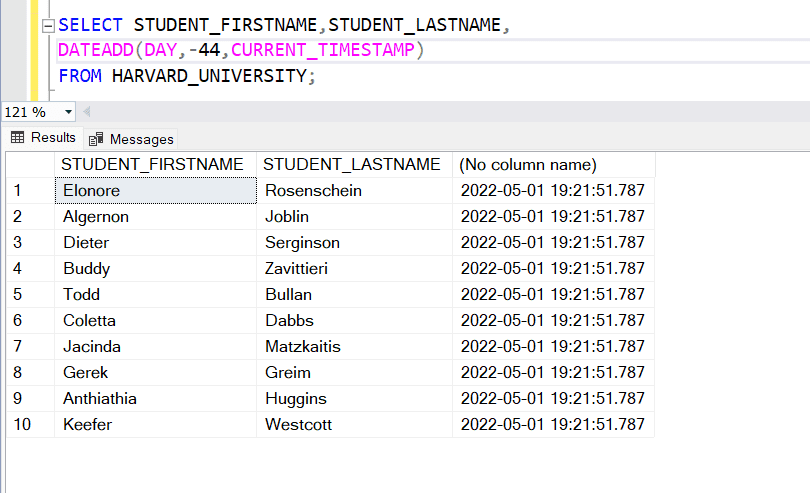
We hope that you have understood how to use the SQL Server CURRENT_TIMESTAMP and DATEADD functions to find the first day of the last month from the table by the query. For a better acquaintance of the subtopic, we have used an example and clarified it in depth.
Read: View SQL Server Error Logs
SQL Server First Day of 2 Months Ago
We will learn and understand how to use the SQL Server DATEADD function to find the first day of 2 Months Ago from the table by the query. And which will be explained with the help of an illustrated example.
EXAMPLE:
USE SQLSERVERGUIDES;

SELECT DATEADD(DAY,-75,CURRENT_TIMESTAMP) RESULT,STUDENT_FIRSTNAME,STUDENT_LASTNAME
FROM HARVARD_UNIVERSITY;
The SELECT statement is used in the preceding query to retrieve all records from the HARVARD_UNIVERSITY table for the STUDENT_FIRSTNAME and STUDENT_LASTNAME columns. Using the CURRENT_TIMESTAMP function inside the function of the HARVARD_UNIVERSITY database, the DATEADD function is used to extract the beginning day of the last two months from the table.
As the CURRENT_TIMESTAMP function provides value as 2022-06-15. So to go backward for the first day of 2 months we have to use little maths. To go on the first day of this month, -14 then for the previous month we have to use the -31 days and same more previous month we have to use the 30 days. Then we will reach 1st April 2022 only in the proper way.

We hope that you have understood the subtopic “SQL Server First Day of 2 Month Ago”. For better interpretation, we have used a norm and exemplified it in profoundness.
Read: How to view table in SQL Server
SQL Server First Day of Month 12 Months Ago
We will learn and understand how to use the SQL Server DATEADD function to find the first day of the month back 1 year ago from the table by the query. And which will be explained with the help of an illustrated example.
EXAMPLE:
USE SQLSERVERGUIDES;

SELECT DATEADD(DAY,-530,CURRENT_TIMESTAMP) RESULT,STUDENT_FIRSTNAME,STUDENT_LASTNAME
FROM HARVARD_UNIVERSITY;
The SELECT statement is used in the preceding query to retrieve all records from the HARVARD_UNIVERSITY table for the STUDENT_FIRSTNAME and STUDENT_LASTNAME columns.
Using the CURRENT_TIMESTAMP function inside the function of the HARVARD_UNIVERSITY database, the DATEADD function is used to extract the beginning day of the last twelve months from the table.
The CURRENT_TIMESTAMP function provides the current date value as 2022-06-15. To reach 6 months by days it will take a negative value of -165 days and reach 1 year it will take 365 days.
So, when to find the first day of 1 year ago from today then it will use the negative value as -530 in the DATEADD function from the HARVARD_UNIVERSITY table.

From the query, we hope you comprehended the subtopic “SQL Server First Day Month of 12 Months Ago.” We’ve given an example and gone over it in detail to help you understand.
Read: How to see view definition in SQL Server
SQL Server Get the First Day of Next Month
We’ll go over how to utilize the SQL Server DATEADD function to get the beginning day of the next month from a table using a query. And which will be demonstrated with the aid of an illustration.
EXAMPLE:
USE SQLSERVERGUIDES;

SELECT DATEADD(DAY,16,CURRENT_TIMESTAMP) RESULT,STUDENT_FIRSTNAME,STUDENT_LASTNAME
FROM HARVARD_UNIVERSITY;
For the STUDENT_FIRSTNAME and STUDENT_LASTNAME columns, the SELECT statement is used in the preceding query to retrieve all records from the HARVARD_UNIVERSITY table.
The DATEADD function is used to extract the commencement day of the following months from the table using the CURRENT TIMESTAMP function within the HARVARD_UNIVERSITY database’s function.
The CURRENT_TIMESTAMP function provides the current date value as 2022-06-15. And to reach next month’s first day we have to just add 16 days in the DATEADD function from the HARVARD_UNIVERSITY table.
This month carries 30 days only and to reach it on the first day of next month we need to add 15 (this month)+1(next month) =16 days in the DATEADD function.

We hope that you have understood how to use the SQL Server DATEADD function to find the first day of the next month from the table by the query. And which will be explained with the help of an illustrated example.
Read: View in SQL Server
SQL Server First Day of Next Month From GetDate
We will learn and understand how to use the SQL Server DATEADD and GETDATE functions on the first day of the next month from the table by the query. And which will be explained with the help of an illustrated example.
EXAMPLE:
USE SQLSERVERGUIDES;

SELECT DATEADD(DAY,16,GETDATE()) RESULT,
STUDENT_ID,
STUDENT_FIRSTNAME,STUDENT_LASTNAME
FROM HARVARD_UNIVERSITY;
In this preceding query, the SELECT statement retrieves all records of the STUDENT_ID, STUDENT_FIRSTNAME, and STUDENT_LASTNAME columns from the HARVARD_UNIVERSITY table.
The DATEADD function is used to add 16 days to the GETDATE function which helps to find the first day of the next month from the HARVARD_UNIVERSITY table.
We have used the ALIAS clause with the AS keyword to shorter the function name as RESULT for the output column_name.

We hope that you have understood how to use the SQL Server DATEADD and GETDATE functions to find the first day of the next month from the table by the query. For a better understanding of the concept, we have used an example and explained it in depth.
Read: Arithmetic operators in SQL Server
You may also like to read the following SQL Server tutorials.
- Introduction to SQL Server Trigger
- SQL Server function return table
- SQL Server bulk insert from CSV file
- SQL Server scheduled stored procedure
- SQL Server stored procedure case statement
So, in this tutorial, we have learned how to get the First Day of Month in SQL Server and we also covered the following set of topics:
- SQL Server First Day Of Month
- SQL Server First day Of Month Without Time
- SQL Server Get First Day Of Month From YYYYMM
- SQL Server Get First Day Of Month From Timestamp
- SQL Server First Day of Previous Month
- SQL Server First Day of 2 Months Ago
- SQL Server First Day of Month 12 Months Ago
- SQL Server First Day of Next Month
- SQL Server First day of Next Month From GetDate

Rajkishore Sahoo is a Microsoft Azure consultant with more than 14 years of hands-on experience building cloud-native data solutions across Azure and AWS, focused on Azure SQL Database, Azure SQL Managed Instance, and the pipelines that connect them to production apps. Day to day, he provisions Azure SQL instances, configures firewalls and connection strings, tunes queries for cloud workloads, and wires databases into Azure Functions and Logic Apps. Read more