
Here we will learn and understand how to use the SQL Server EOMONTH function to find the last day of the month from the table by the query. And which will be explained with the help of a demonstrated example.
SQL Server Last Day Of Month
The SQL Server EOMONTH function is used to return the last day of the month by a specified date with an optional offset. Here is the syntax of the SQL Server EOMONTH function by the following query:
SYNTAX:
USE SQLSERVERGUIDES;

SELECT EXPRESSIONS, EOMONTH(YOUR_START_DATE, [OFFSET]) FROM TABLE_NAME;
The syntax explanation:
- YOUR_START_DATE is a date expression that evaluates the date. The EOMONTH function is used to return the last day of the month from the given date.
- The OFFSET parameter is an integer that specified the number of months that adds to the YOUR_START_DATE.
Let’s see an illustrated example of the SQL Server EOMONTH function which will help to find the last day of the month from the table by the following query:
EXAMPLE:
USE SQLSERVERGUIDES;

SELECT STUDENT_FIRSTNAME,STUDENT_LASTNAME,EOMONTH(STUDENT_ADMITDATE)  LAST_DAY_OFMONTH
FROM HARVARD_UNIVERSITY;
In this preceding query, the SELECT statement retrieves all records of the STUDENT_FIRSTNAME and STUDENT_LASTNAME columns from the HARVARD_UNIVERSITY table.
The EOMONTH function is used on the STUDENT_ADMITDATE column to find the last day of the month from the HARVARD_UNIVERSITY table.
As to shorter the function_name, we have given the name LAST_DAY_OFMONTH for the output column_name. We don’t use the ALIAS clause with the AS keyword in the query, so don’t get confused that it has worked properly.
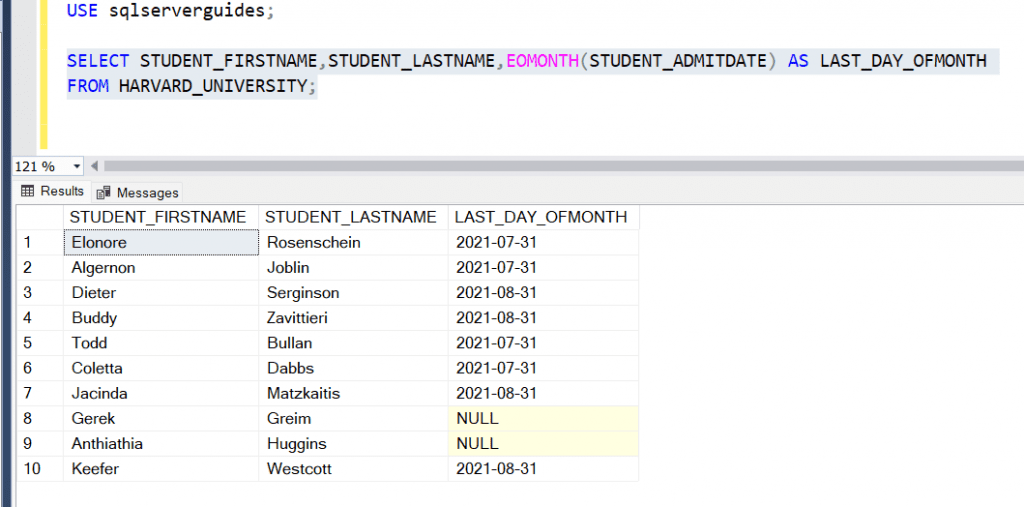
We hope that you have understood the subtopic “SQL Server Last Day of Month” by using the EOMONTH function on the table by the query. For a better exposition, we used an illustration and presented it in depth.
SQL Server Last Day Of Month 2008
In this section, we will learn and understand how to use the SQL Server 2008 with the DATEADD, DATEDIFF, and GETDATE functions which will help to find the last day of the month from the table by the query. And which will be explained with the help of an illustrated example.
The SQL Server GETDATE function is used to extract the system’s current date and time and which will be in the format of YYYY-MM-DD HH:MM:SS: MMMM for the table. And the DATEDIFF function is used to extract the DATE value by having the difference between two dates.
Here we will use all these functions i.e; DATEADD, DATEDIFF, and GETDATE functions to find the last day of the month by using the below following query:
EXAMPLE:
USE SQLSERVERGUIDES;

SELECT DATEADD(s, -1, DATEADD(mm, DATEDIFF(m, 0, GETDATE()), 0)) AS Last_Day_of_Last_Month,
STUDENT_FIRSTNAME, STUDENT_LASTNAME
from HARVARD_UNIVERSITY;
As we see in the above query, the SELECT statement retrieves all records of the STUDENT_FIRSTNAME and STUDENT_LASTNAME columns from the HARVARD_UNIVERSITY table.
The DATEADD function is used on the second which should be less than 60 i.e; 59 for the last day of the month. The DATEDIFF function is used to find the difference between two dates that are within the empty month as a parameter and the CURENT_DATE ie; 2022-06-15.
The sub-function as DATEDIFF will help to find the month value by the difference between the two dates. The sub-function as the DATEADD function will help to find the month value for the last month. And the main function of the DATEADD function will help to find the last day of the last month with less than 1 second for the output result set.

We hope that you have understood the subtopic “SQL Server Last Day Of Month 2008” by the query. For better understanding, we have used an example and explained it in depth.
SQL Server Last Day of Previous Month
We will learn and understand how to use the SQL Server CURRENT_TIMESTAMP and EOMONTH functions to find the last day of the previous month from the table by the following query:
EXAMPLE:
USE SQLSERVERGUIDES;

SELECT STUDENT_FIRSTNAME,STUDENT_LASTNAME,EOMONTH(CURRENT_TIMESTAMP,-1)  LAST_DAY_OFMONTH
FROM HARVARD_UNIVERSITY;
In this preceding query, the SELECT statement is used to retrieve all records of the STUDENT_FIRSTNAME and STUDENT_LASTNAME columns from the HARVARD_UNIVERSITY table.
The EOMONTH function is used to extract the last day of the previous month by using the CURRENT_TIMESTAMP and -1 value for changing it to the previous month otherwise it will extract the current month’s last day from the HARVARD_UNIVERSITY table.
To shorter the function_name, we haven’t used the ALIAS clause with the AS keyword and given the name as LAST_DAY_OFMONTH for the output column_name. Just don’t worry if the ALIAS clause hasn’t been used in the query then also query will be executed without any error.
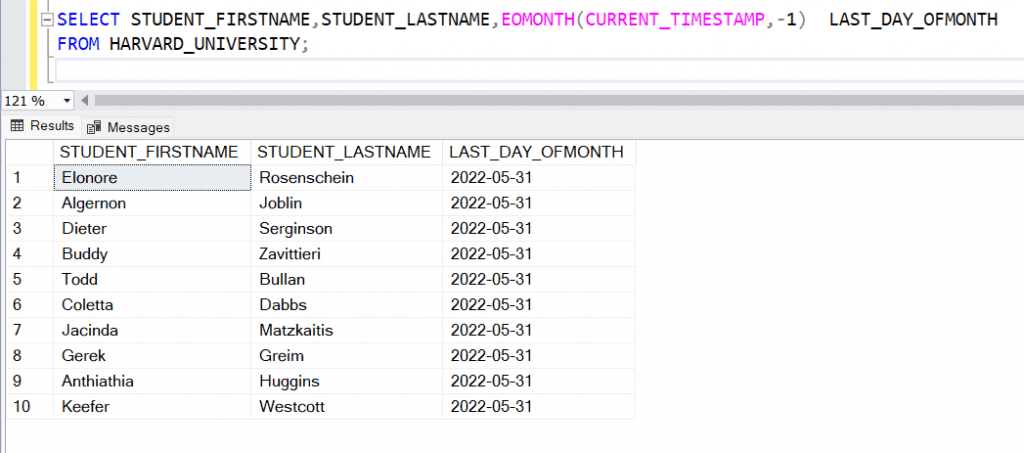
We hope that you have understood how to use the SQL Server CURRENT_TIMESTAMP and EOMONTH functions are used to find the last day of the previous month from the table by the query. For easy understanding of the concept, we used an illustration and described it in depth.
SQL Server Last Day of Given Month
In this SQL Server section, we will learn and understand how to use the SQL Server EOMONTH, DATEADD, and CURRENT_TIMESTAMP functions to find the last day of a given month from the table by the query. And which will be explained with the help of an illustrated example.
The CURRENT_TIMESTAMP function is used to provide the current date and time. And the EOMONTH function is used to return the last day of the month of a specified date and with the offset. Here is an example of the SQL Server EOMONTH and CURRENT_TIMESTAMP functions to find the last day of a given month by the following query:
EXAMPLE:
USE SQLSERVERGUIDES;

SELECT DATEADD(DAY,16,CURRENT_TIMESTAMP) AS RESULT,
EOMONTH(CURRENT_TIMESTAMP) AS LAST_DAY
STUDENT_FIRSTNAME,STUDENT_LASTNAME
FROM HARVARD_UNIVERSITY;- In this preceding query, the SELECT statement is used to retrieve all records of the STUDENT_FIRSTNAME and STUDENT_LASTNAME columns from the HARVARD_UNIVERSITY table.
- The DATEADD function is used to extract the LAST DAY value of this month by using the DAY keyword and CURRENT_TIMESTAMP function in the HARVARD_UNIVERSITY table.
- The EOMONTH function is used to extract the last day of this month by using the CURRENT_TIMESTAMP function in the HARVARD_UNIVERSITY table by the query.
- To shorter the function_name, we have used the ALIAS clause with the AS keyword and given the names RESULT and LAST_DAY for the DATEADD and EOMONTH functions for the result set.

We hope that you have understood the concept of the subtopic “SQL Server Last Day of the Month” from the query. For a better explanation, we have used an example and explained it in depth.
SQL Server Get Last Day of Month From Month And Year
We will learn and understand how to use the STORE PROCEDURE method to find the last day of the month by using the MONTH and YEAR in the table by the query. And which will be explained with the help of an illustrated example.
The SQL Server stored procedure is a logical unit made up of one or more pre-compiled SQL statements. It’s saved in the database server as an object. It is a database-created and stored subroutine or subprogram written in a common computing language. In SQL Server, every procedure has a name, parameter lists, and Transact-SQL statements. The stored procedures are stored as named objects in SQL Database Server.
Triggers, other procedures, and applications like Java, Python, and PHP can all be used to call the procedures. Almost all relational database systems can be supported by it.
Here we will use the STORE PROCEDURE method on the table by the following query:
EXAMPLE:
USE sqlserverguides;

GO
  CREATE PROCEDURE HARVARDUNIVERSITY
   ( @month TINYINT= 06,@year SMALLINT = 2022)
	AS
	BEGIN
SELECT EOMONTH(DATEFROMPARTS(@year,@month,1))
END;

EXEC HARVARDUNIVERSITY;
In this preceding query, we use the CREATE PROCEDURE statement with the name HARVARD UNIVERSITY and the parameter as MONTH and YEAR. The data type used in the MONTH and YEAR is TINYINT and SMALLINT and the given value is 06 AND 2022.
In the BEGIN statement, the SELECT statement is used with the EOMONTH function. The EOMONTH function is used to find the last day of the month from the DATEFROMPART function. The DATEFROMPARTS function is used to part the year and month value and give the last day of the month value in DATE.
Once the STORE PROCEDURE function is created, to execute procedure_name as HARVARD UNIVERSITY then we will use the EXEC statement to do it.
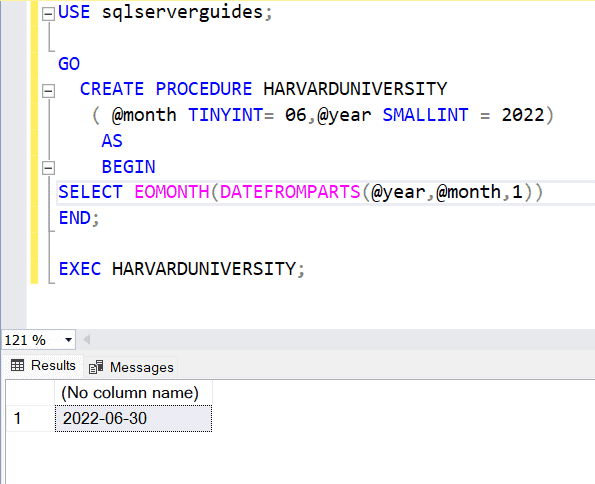
We hope that you have understood that we have used the STORE PROCEDURE method to calculate the last day of the month from the table by the query. We have used an example and explained it in-depth, for better understanding.
Conclusion
This article discussed SQL Server Last Day Of Month as mentioned in this article.
You may also like following the articles below.
- SQL Server First Day Of Month
- How to find who created a stored procedure in SQL Server
- How to find who modified a stored procedure in SQL Server

Rajkishore Sahoo is a Microsoft Azure consultant with more than 14 years of hands-on experience building cloud-native data solutions across Azure and AWS, focused on Azure SQL Database, Azure SQL Managed Instance, and the pipelines that connect them to production apps. Day to day, he provisions Azure SQL instances, configures firewalls and connection strings, tunes queries for cloud workloads, and wires databases into Azure Functions and Logic Apps. Read more