
To give a user full control of one database, run GRANT ALL PRIVILEGES ON app_db.* TO 'app'@'localhost';. That’s the whole answer for MariaDB grant all privileges, and it takes effect right away.
Quick answer: create the account with CREATE USER first, then GRANT. Use db.* for one database and *.* only for an admin. You don’t need FLUSH PRIVILEGES.
Tested on MariaDB 13.0.2 on Windows.
What You Need Before You Start
- A login with GRANT OPTION, usually
root. New to the client? See how to use MariaDB. - A database. Ours is
dfq_mariagrant, with five customers such as Hannah Brooks in Denver.
Step 1: Create the User and GRANT ALL PRIVILEGES on One Database
On MariaDB 13 the default sql_mode includes NO_AUTO_CREATE_USER, so create the account before you grant:
CREATE USER 'dfq_gr_app'@'localhost' IDENTIFIED BY 'Str0ng!Pass2026';

GRANT ALL PRIVILEGES ON dfq_mariagrant.* TO 'dfq_gr_app'@'localhost';

SHOW GRANTS FOR 'dfq_gr_app'@'localhost';
Output:
Grants for dfq_gr_app@localhost
GRANT USAGE ON *.* TO `dfq_gr_app`@`localhost` IDENTIFIED BY PASSWORD '*3D0648AA420BB2FB183A1A465F9B587976C95B3F'
GRANT ALL PRIVILEGES ON `dfq_mariagrant`.* TO `dfq_gr_app`@`localhost`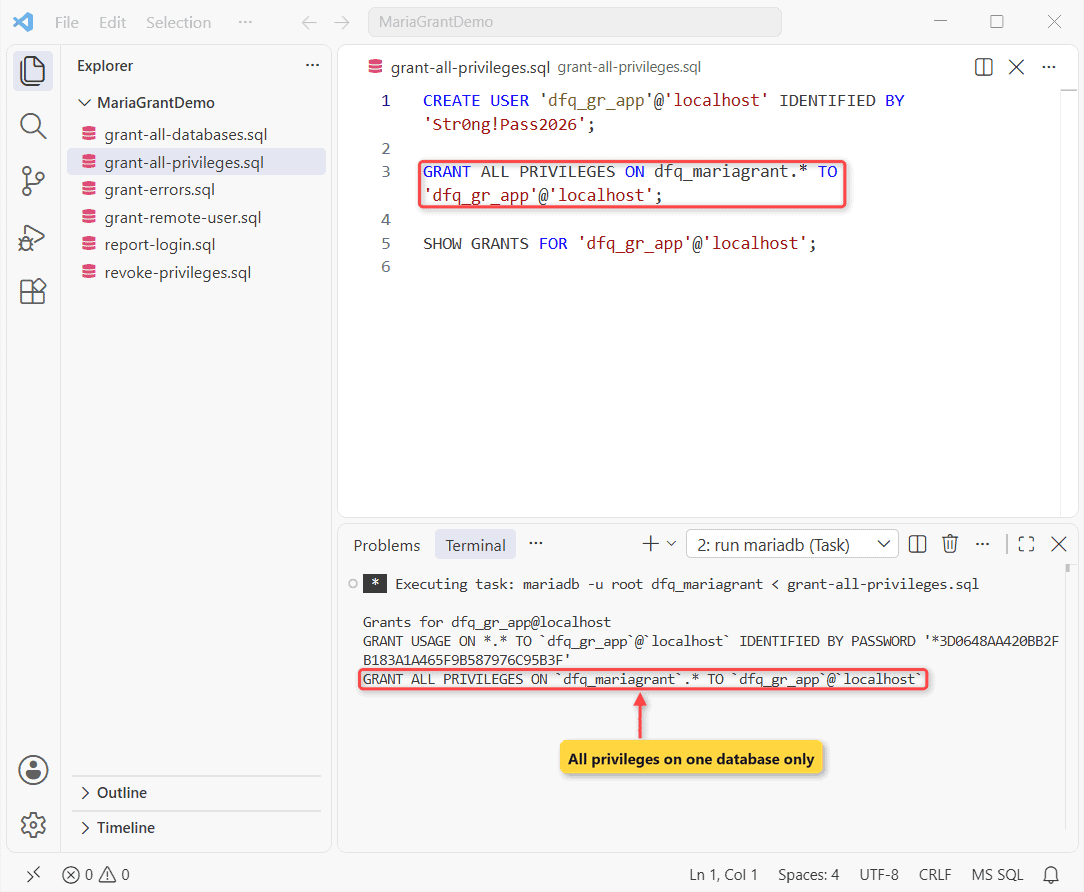
Check your work with SHOW GRANTS. You should see USAGE ON *.*, which means the account can log in with no global rights, plus ALL PRIVILEGES on our database, including tables created later.
For an existing user, skip CREATE USER and just run the GRANT; if you still need the database itself, follow create a MariaDB database and user first and come back here.
Step 2: Grant Remote Access With ‘user’@’%’
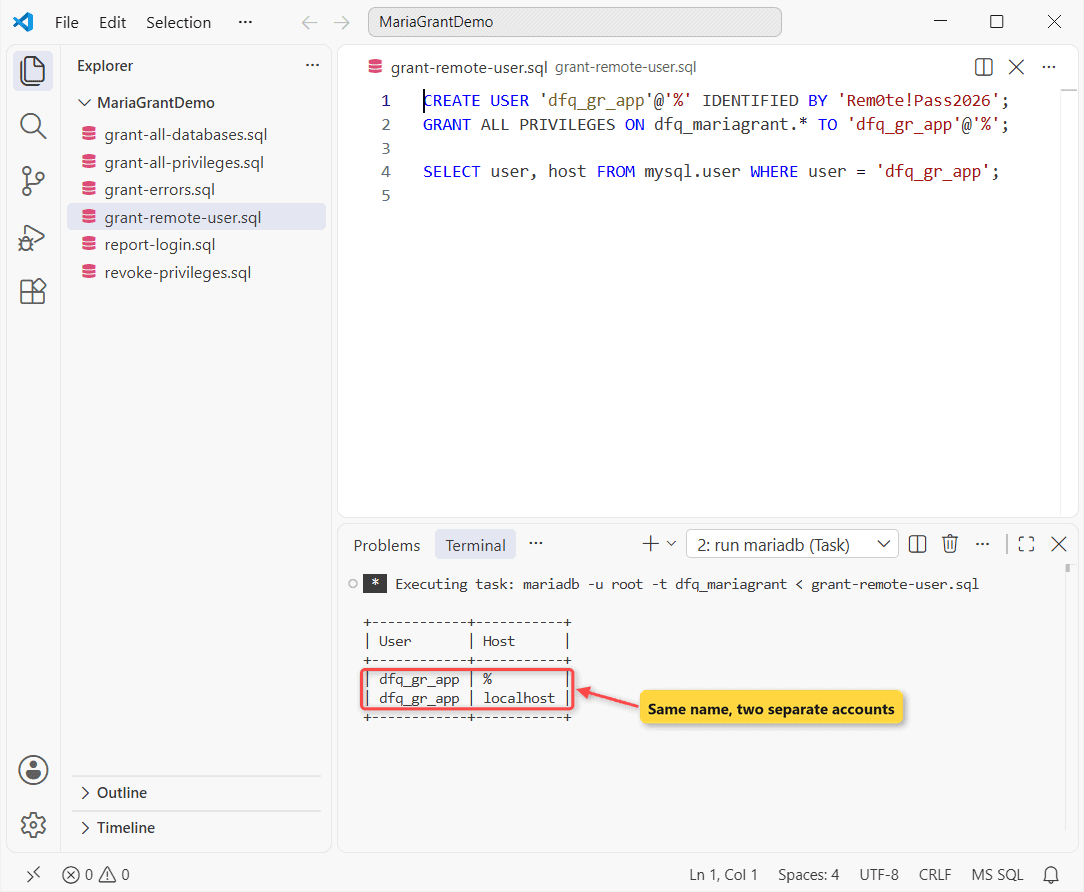
This trips people up. 'dfq_gr_app'@'%' is a different account from @'localhost', with its own password:
CREATE USER 'dfq_gr_app'@'%' IDENTIFIED BY 'Rem0te!Pass2026';
GRANT ALL PRIVILEGES ON dfq_mariagrant.* TO 'dfq_gr_app'@'%';

SELECT user, host FROM mysql.user WHERE user = 'dfq_gr_app';
Output:
+------------+-----------+
| User       | Host      |
+------------+-----------+
| dfq_gr_app | %         |
| dfq_gr_app | localhost |
+------------+-----------+
Swap '%' for an address or subnet such as '10.0.5.%' when you can. The server must also listen on the network; see enable remote access in MariaDB.
Step 3: Grant Read-Only Access With GRANT SELECT
A reporting login only reads, so it gets SELECT and nothing else:
CREATE USER 'dfq_gr_report'@'localhost' IDENTIFIED BY 'Rep0rt!Pass2026';
GRANT SELECT ON dfq_mariagrant.* TO 'dfq_gr_report'@'localhost';
Then log in as that account and try a read and a write:
mariadb -u dfq_gr_report --password=Rep0rt!Pass2026 -t dfq_mariagrant < report-login.sqlSELECT CURRENT_USER(), COUNT(*) AS customers FROM customers;
INSERT INTO customers (full_name, city, state)
VALUES ('Ethan Ward', 'Phoenix', 'AZ');Output:
+-------------------------+-----------+
| CURRENT_USER()          | customers |
+-------------------------+-----------+
| dfq_gr_report@localhost |         5 |
+-------------------------+-----------+
--------------
INSERT INTO customers (full_name, city, state)
VALUES ('Ethan Ward', 'Phoenix', 'AZ')
--------------

ERROR 1142 (42000) at line 2: INSERT command denied to user 'dfq_gr_report'@'localhost' for table `dfq_mariagrant`.`customers`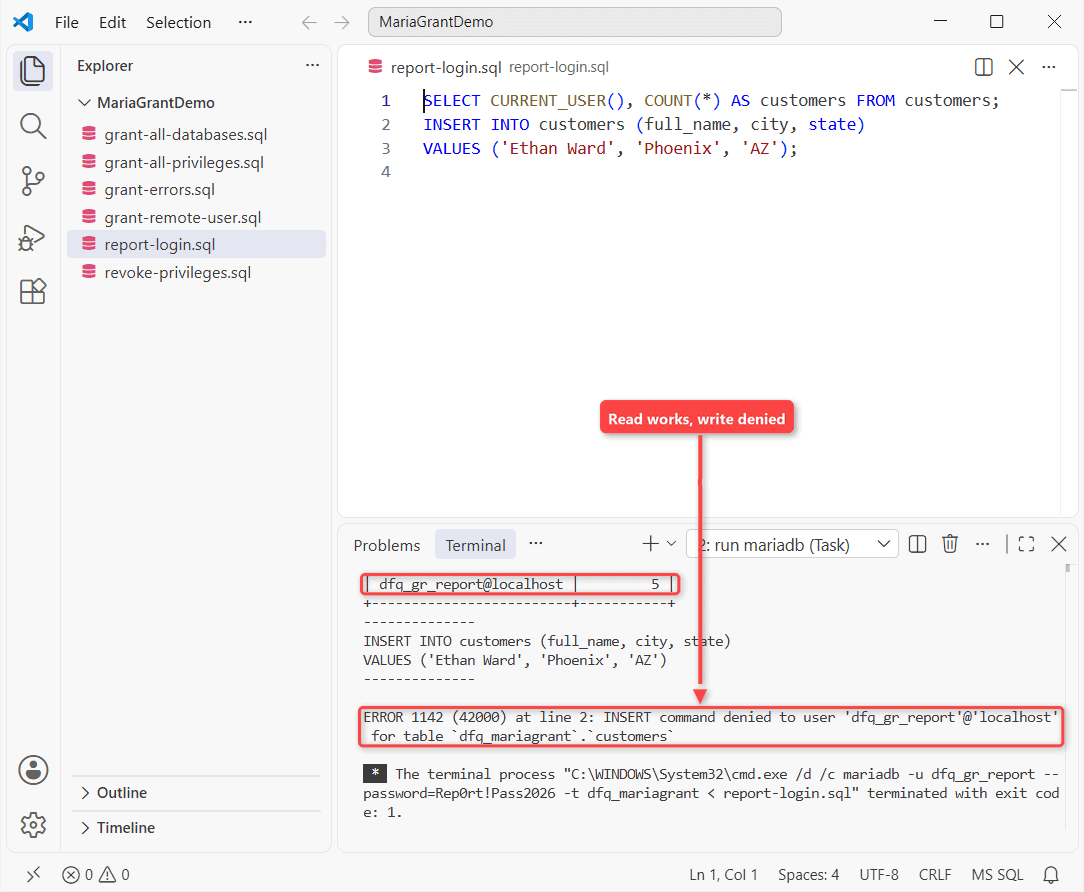
The count of 5 proves the read works. ERROR 1142 proves the write is blocked. I run this test for every new account.
Step 4: Grant All Privileges on All Databases (*.*)
*.* reaches every schema you’d see when you list MariaDB databases, so only a DBA should get it. Add WITH GRANT OPTION if it must grant to others, since ALL PRIVILEGES leaves it out:
CREATE USER 'dfq_gr_dba'@'localhost' IDENTIFIED BY 'Dba!Pass2026';
GRANT ALL PRIVILEGES ON *.* TO 'dfq_gr_dba'@'localhost' WITH GRANT OPTION;
SHOW GRANTS FOR 'dfq_gr_dba'@'localhost';
Output:
Grants for dfq_gr_dba@localhost
GRANT ALL PRIVILEGES ON *.* TO `dfq_gr_dba`@`localhost` IDENTIFIED BY PASSWORD '*A5CFFD5CCC605B79807729681DE5E2EF71D74352' WITH GRANT OPTION
Step 5: Take Privileges Back With REVOKE
To narrow the app account to data changes only, revoke and grant the smaller set:
REVOKE ALL PRIVILEGES ON dfq_mariagrant.* FROM 'dfq_gr_app'@'localhost';
GRANT SELECT, INSERT, UPDATE, DELETE ON dfq_mariagrant.* TO 'dfq_gr_app'@'localhost';
SHOW GRANTS FOR 'dfq_gr_app'@'localhost';
Output:
Grants for dfq_gr_app@localhost
GRANT USAGE ON *.* TO `dfq_gr_app`@`localhost` IDENTIFIED BY PASSWORD '*3D0648AA420BB2FB183A1A465F9B587976C95B3F'
GRANT SELECT, INSERT, UPDATE, DELETE ON `dfq_mariagrant`.* TO `dfq_gr_app`@`localhost`
MariaDB GRANT Cheat Sheet
| Goal | Statement |
|---|---|
| Everything on one database | GRANT ALL PRIVILEGES ON db.* TO 'u'@'localhost'; |
| Read-only | GRANT SELECT ON db.* TO 'u'@'localhost'; |
| Admin | GRANT ALL ON *.* TO 'u'@'localhost' WITH GRANT OPTION; |
| Check | SHOW GRANTS FOR 'u'@'localhost'; |
Fix Common Errors: ERROR 1064 and ERROR 1133
Three mistakes in one script:
GRANT ALL PRIVILEGES ON sales-db.* TO 'dfq_gr_app'@'localhost';
GRANT ALL PRIVILEGES ON dfq_mariagrant.* TO dfq_gr_app@%;
GRANT SELECT ON dfq_mariagrant.* TO 'dfq_gr_nobody'@'localhost';
-- Fixed: backticks for the name, quotes around user and host
GRANT ALL PRIVILEGES ON `dfq_mariagrant`.* TO 'dfq_gr_app'@'localhost';
Output:
--------------
GRANT ALL PRIVILEGES ON sales-db.* TO 'dfq_gr_app'@'localhost'
--------------

ERROR 1064 (42000) at line 1: You have an error in your SQL syntax; check the manual that corresponds to your MariaDB server version for the right syntax to use near '-db.* TO 'dfq_gr_app'@'localhost'' at line 1
--------------
GRANT ALL PRIVILEGES ON dfq_mariagrant.* TO dfq_gr_app@%
--------------

ERROR 1064 (42000) at line 2: You have an error in your SQL syntax; check the manual that corresponds to your MariaDB server version for the right syntax to use near '%' at line 1
--------------
GRANT SELECT ON dfq_mariagrant.* TO 'dfq_gr_nobody'@'localhost'
--------------

ERROR 1133 (28000) at line 3: Can't find any matching row in the user table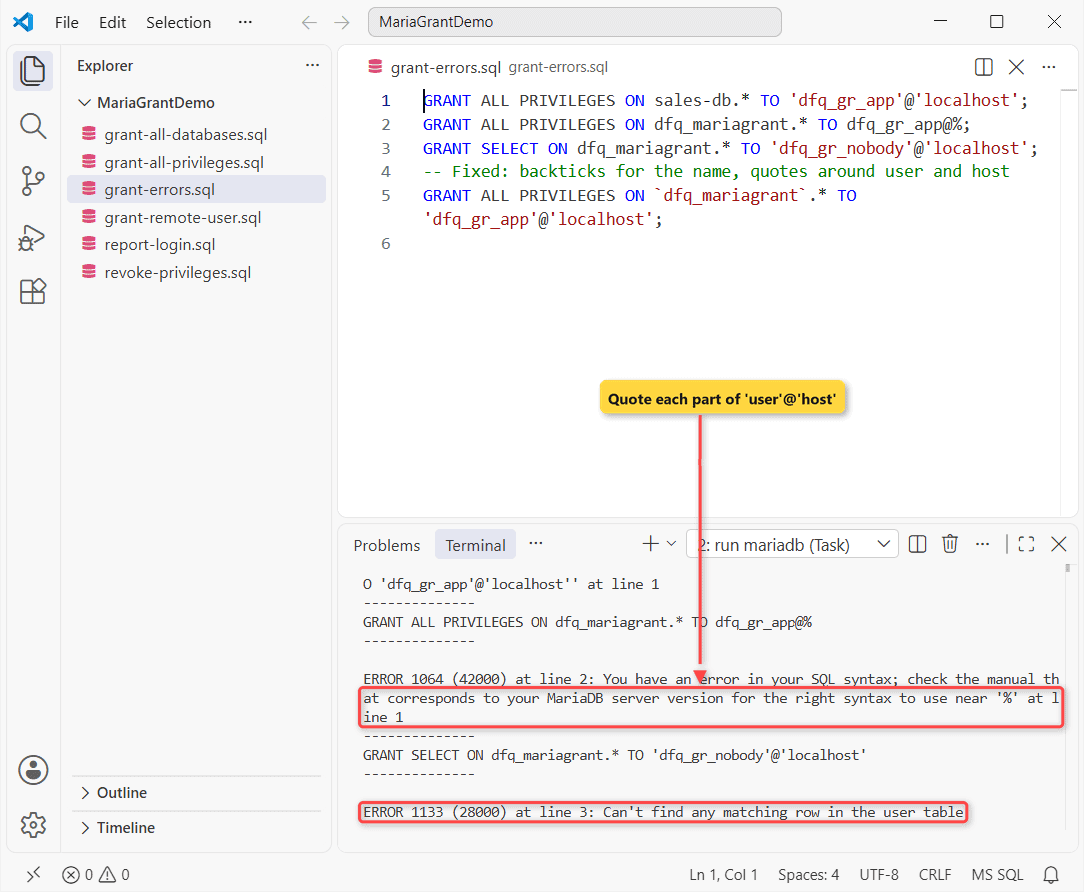
A hyphenated name needs backticks, and 'user'@'host' needs quotes around each part. ERROR 1133 means the account doesn’t exist. More causes are in MariaDB error 1064.
Do You Need FLUSH PRIVILEGES After GRANT?
No. FLUSH PRIVILEGES reloads the grant tables, which only matters after editing them by hand, and global grants reach new connections. The one real use is the MariaDB root password reset with skip-grant-tables.
Common Mistakes to Avoid
Don’t hand an app *.*; it includes the mysql schema. To audit old accounts, show users in MariaDB.
Next Steps
Clean up accounts you no longer need with MariaDB remove user. On SQL Server, the same job is covered in SQL Server user permissions.
Where to go next, we’d suggest:
Frequently Asked Questions
Does GRANT create the user automatically in MariaDB?
Not on its own. With NO_AUTO_CREATE_USER, a bare GRANT gave me ERROR 1133, but GRANT ... IDENTIFIED BY 'pw' still created the account. See the MariaDB GRANT docs.
Can I grant privileges on a single table?
Yes: GRANT SELECT ON db.customers TO 'u'@'localhost';. Column grants work too: GRANT SELECT (full_name) ON db.customers.
Is GRANT ALL the same as GRANT ALL PRIVILEGES?
Yes. ALL is accepted as a short form, and neither includes GRANT OPTION.

Kumar Saurabh is a freelance software engineer who builds web and mobile apps with Next.js, React, Flutter and Python. From 2021 to 2024, Saurabh worked as an IT analyst and developer at TSInfo Technologies, writing technical articles on SQL and PostgreSQL. Saurabh writes the PostgreSQL, MySQL, MariaDB and MongoDB tutorials on DatabaseFAQs.com and holds a Master of Computer Applications (MCA) from Chandigarh University.