
You’ve got an orders table with a MariaDB date column, and you need to show it as 10/31/2026, count days between two dates, or pull last month’s rows. Here’s all three ideas in one query:
SELECT customer,
       DATE_FORMAT(order_date, '%m/%d/%Y') AS ordered,
       DATEDIFF('2026-12-31', order_date) AS days_left
FROM orders
WHERE order_date >= '2026-11-01';
Three orders from November on:
+-----------------+------------+-----------+
| customer        | ordered    | days_left |
+-----------------+------------+-----------+
| Lee Gu          | 11/02/2026 |        59 |
| Nestor Wilke    | 11/30/2026 |        31 |
| Diego Siciliani | 12/15/2026 |        16 |
+-----------------+------------+-----------+
Quick answer: store days in a DATE column, show them with DATE_FORMAT, do math with DATE_ADD and DATEDIFF, and filter with >= start AND < next day. Tested on MariaDB 13.0.2, session time zone set to New York.
MariaDB DATE Type: Range, Storage and Zero Dates
Most examples use these six orders, with one DATE and one DATETIME column:
DROP TABLE IF EXISTS orders;
CREATE TABLE orders (
  id INT PRIMARY KEY,
  customer VARCHAR(16) NOT NULL,
  order_date DATE NOT NULL,
  shipped_at DATETIME NULL
);
INSERT INTO orders VALUES
(1, 'Megan Bowen',  '2026-10-01', '2026-10-02 09:15:00'),
(2, 'Alex Wilber',  '2026-10-14', '2026-10-15 16:40:00'),
(3, 'Adele Vance',  '2026-10-30', '2026-10-31 18:05:00'),
(4, 'Lee Gu',       '2026-11-02', '2026-11-04 11:30:00'),
(5, 'Nestor Wilke', '2026-11-30', NULL),
(6, 'Diego Siciliani', '2026-12-15', NULL);
A DATE is a day with no time: 1000-01-01 to 9999-12-31 in the docs, 3 bytes each. The odd value is the zero date. The default sql_mode allows it; NO_ZERO_DATE doesn’t:
DROP TABLE IF EXISTS zd;
CREATE TABLE zd (d DATE);
-- default sql_mode: the zero date is accepted
INSERT INTO zd VALUES ('0000-00-00');
SELECT d FROM zd;

SET sql_mode = CONCAT(@@sql_mode, ',NO_ZERO_DATE');
INSERT INTO zd VALUES ('0000-00-00');
The client printed:
+------------+
| d          |
+------------+
| 0000-00-00 |
+------------+
--------------
INSERT INTO zd VALUES ('0000-00-00')
--------------

ERROR 1292 (22007) at line 8: Incorrect date value: '0000-00-00' for column `date_demo`.`zd`.`d` at row 1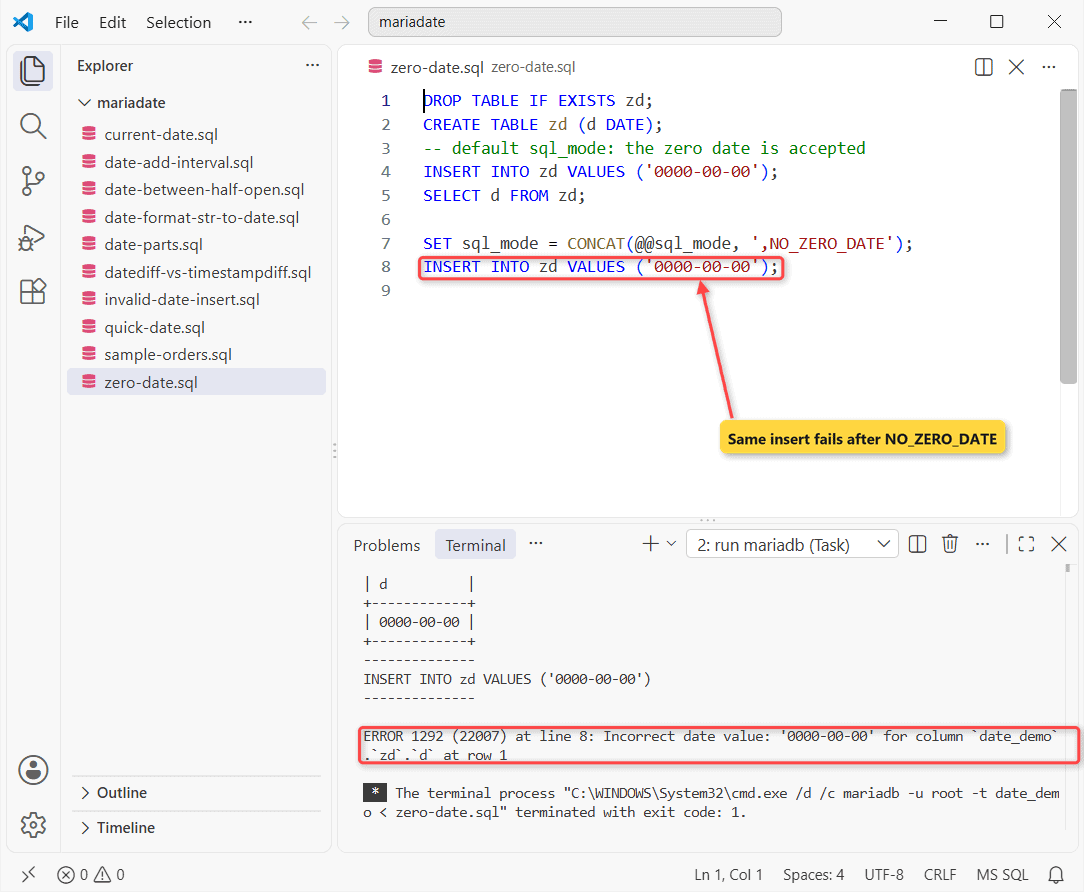
If you need “no date yet”, use NULL, as in allowing NULL in a MariaDB date column.
Format a MariaDB Date With DATE_FORMAT and STR_TO_DATE
DATE_FORMAT turns a date into a string. STR_TO_DATE goes the other way. Same row, Adele’s order:
SELECT DATE_FORMAT(order_date, '%m/%d/%Y') AS us,
       DATE_FORMAT(order_date, '%W, %M %e, %Y') AS long_form,
       CAST(order_date AS CHAR) AS as_text
FROM orders WHERE id = 3;

SELECT STR_TO_DATE('10/31/2026', '%m/%d/%Y') AS parsed,
       STR_TO_DATE('31/10/2026', '%m/%d/%Y') AS wrong_order;
Two result sets:
+------------+--------------------------+------------+
| us         | long_form                | as_text    |
+------------+--------------------------+------------+
| 10/30/2026 | Friday, October 30, 2026 | 2026-10-30 |
+------------+--------------------------+------------+
+------------+-------------+
| parsed     | wrong_order |
+------------+-------------+
| 2026-10-31 | NULL        |
+------------+-------------+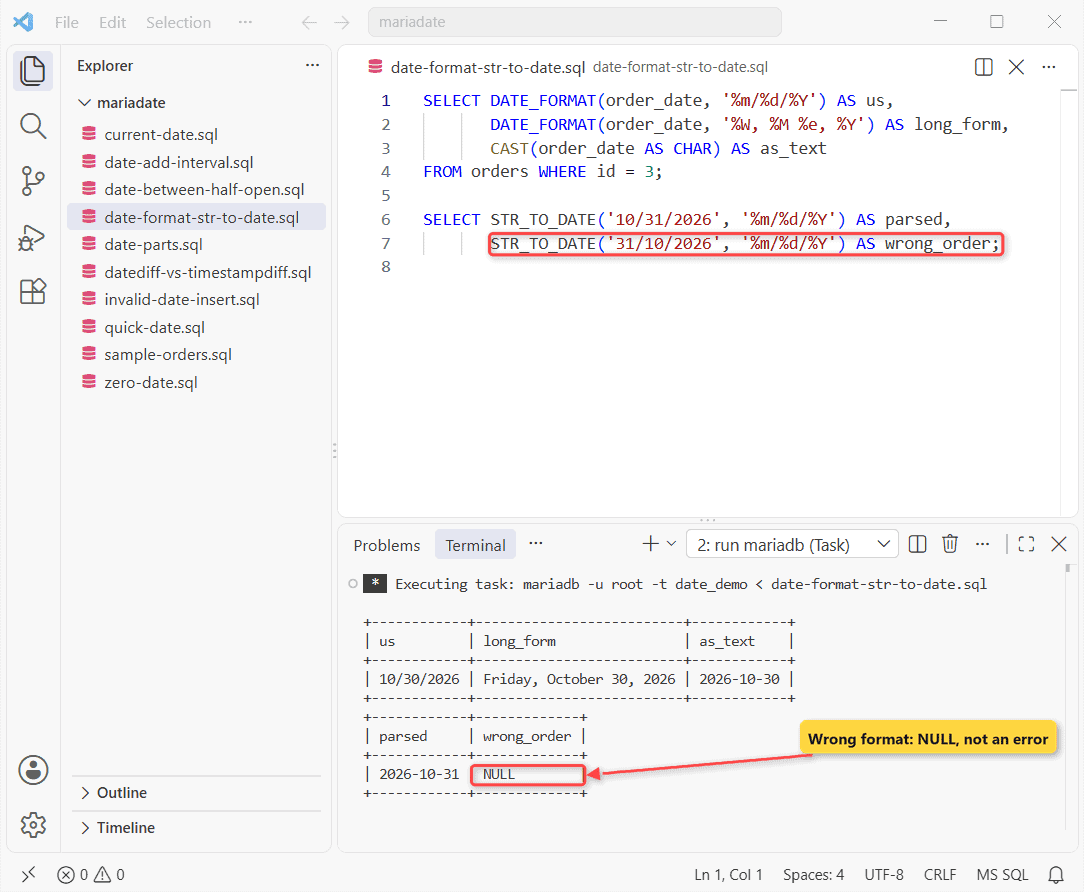
Check the result: wrong_order is NULL, since there’s no month 31. Specifiers are in MariaDB DATE_FORMAT, parsing in MariaDB STR_TO_DATE, and plain date to string is CAST(... AS CHAR).
CURDATE vs NOW vs SYSDATE: Which Current Date Should You Use?
Set the session time zone first. SET time_zone = 'America/New_York' failed for me with ERROR 1298 (no time zone tables on Windows). An offset works:
SET time_zone = '-04:00';   -- New York, daylight time
SELECT CURDATE() AS today, NOW() AS stmt_start,
       SLEEP(2) AS s, SYSDATE() AS at_call;
Two seconds apart:
+------------+---------------------+---+---------------------+
| today      | stmt_start          | s | at_call             |
+------------+---------------------+---+---------------------+
| 2026-10-28 | 2026-10-28 13:09:05 | 0 | 2026-10-28 13:09:07 |
+------------+---------------------+---+---------------------+
NOW() is fixed at the start of the statement; SYSDATE() moved 2 seconds with the sleep. CURRENT_DATE is a synonym for CURDATE(). Use CURDATE() for a DATE column and NOW() for a MariaDB DATETIME or TIMESTAMP column.
MariaDB Date Comparison, BETWEEN and Greater Than
A DATE compares cleanly with a string like '2026-11-01'. A DATETIME will bite you:
-- the end date means midnight
SELECT id, shipped_at FROM orders
WHERE shipped_at BETWEEN '2026-10-15' AND '2026-10-31';

-- half-open range
SELECT id, shipped_at FROM orders
WHERE shipped_at >= '2026-10-15'
  AND shipped_at <  '2026-11-01';
One row, then two:
+----+---------------------+
| id | shipped_at          |
+----+---------------------+
|  2 | 2026-10-15 16:40:00 |
+----+---------------------+
+----+---------------------+
| id | shipped_at          |
+----+---------------------+
|  2 | 2026-10-15 16:40:00 |
|  3 | 2026-10-31 18:05:00 |
+----+---------------------+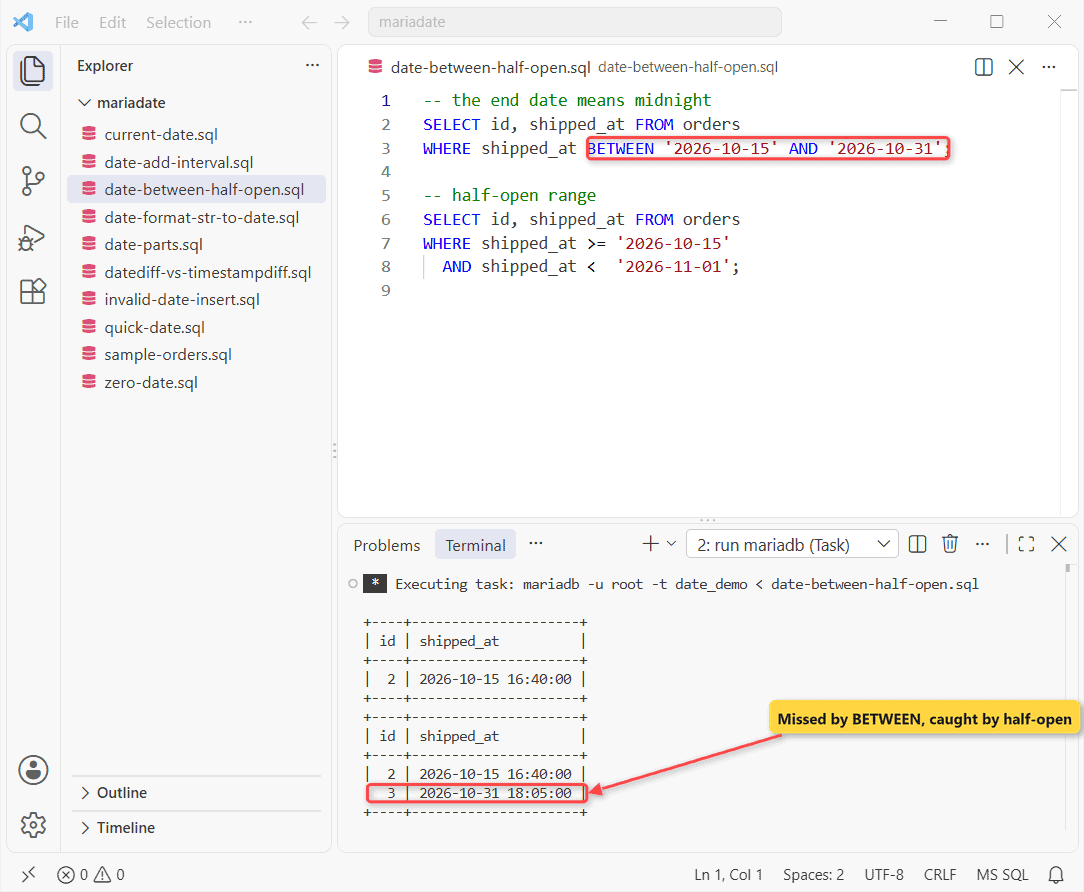
BETWEEN ... '2026-10-31' means midnight, so Adele’s 6:05 PM shipment vanished. The half-open range caught both, and it can still use an index.
On a plain DATE, the quick query at the top shows the pattern: order_date >= '2026-11-01' returned orders 4-6. More on MariaDB BETWEEN and MariaDB date greater than.
Add and Subtract Dates: DATE_ADD, DATE_SUB, ADDDATE and INTERVAL
SELECT DATE_ADD('2026-01-31', INTERVAL 1 MONTH) AS plus_month,
       DATE_SUB('2026-03-01', INTERVAL 1 DAY) AS minus_day,
       ADDDATE('2026-10-28', 30) AS adddate_30,
       '2026-10-28' + INTERVAL 2 WEEK AS plus_2w;
Four dates back:
+------------+------------+------------+------------+
| plus_month | minus_day  | adddate_30 | plus_2w    |
+------------+------------+------------+------------+
| 2026-02-28 | 2026-02-28 | 2026-11-27 | 2026-11-11 |
+------------+------------+------------+------------+
Look at plus_month: Jan 31 plus a month is 2026-02-28. MariaDB clamps to the last valid day. A bare number in ADDDATE means days, while + INTERVAL is shorthand for DATE_ADD (day recipes: MariaDB add days to a date).
DATEDIFF vs TIMESTAMPDIFF in MariaDB
Watch your argument order. I mix it up too:
SELECT customer,
       DATEDIFF(shipped_at, order_date) AS days,
       TIMESTAMPDIFF(HOUR, order_date, shipped_at) AS hours
FROM orders WHERE id IN (3, 4);

SELECT DATEDIFF('2026-03-01', '2026-02-28') AS d,
       TIMESTAMPDIFF(MONTH, '2026-01-31', '2026-02-28') AS m;
What came back:
+-------------+------+-------+
| customer    | days | hours |
+-------------+------+-------+
| Adele Vance |    1 |    42 |
| Lee Gu      |    2 |    59 |
+-------------+------+-------+
+------+------+
| d    | m    |
+------+------+
|    1 |    0 |
+------+------+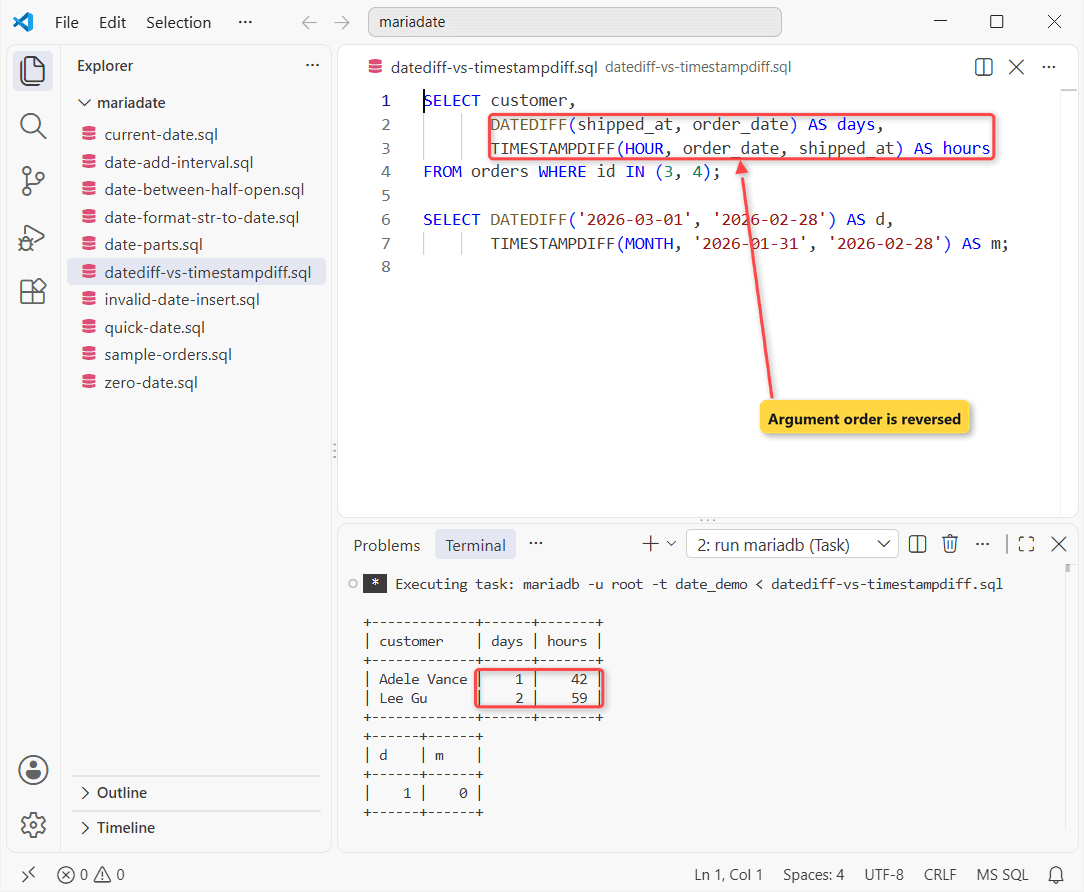
DATEDIFF(end, start)ignores time and returns days. 2026 isn’t a leap year, so Feb 28 to Mar 1 is 1.TIMESTAMPDIFF(unit, start, end)counts full units. Jan 31 to Feb 28 is 0 months, not 1.
More cases in MariaDB DATEDIFF and the difference between two dates in MariaDB.
Get Parts of a Date: DAY, DAYNAME, DAYOFWEEK, MONTH, YEAR, LAST_DAY
SELECT order_date, DAY(order_date) AS d,
       DAYNAME(order_date) AS name, DAYOFWEEK(order_date) AS dow,
       MONTH(order_date) AS m, YEAR(order_date) AS y,
       LAST_DAY(order_date) AS month_end
FROM orders WHERE id IN (1, 4);
Two rows:
+------------+------+----------+------+------+------+------------+
| order_date | d    | name     | dow  | m    | y    | month_end  |
+------------+------+----------+------+------+------+------------+
| 2026-10-01 |    1 | Thursday |    5 |   10 | 2026 | 2026-10-31 |
| 2026-11-02 |    2 | Monday   |    2 |   11 | 2026 | 2026-11-30 |
+------------+------+----------+------+------+------+------------+
DAYOFWEEK starts at Sunday = 1, so Thursday is 5. LAST_DAY gives the month end, handy in a MariaDB GROUP BY report by month.
MariaDB Date Functions Reference Table
| Task | Function | Example result |
|---|---|---|
| Today’s date | CURDATE(), CURRENT_DATE | 2026-10-28 |
| Date part of a DATETIME | DATE(dt) | 2026-10-31 |
| Date to string | DATE_FORMAT(d, fmt) | 10/31/2026 |
| String to date | STR_TO_DATE(s, fmt) | 2026-10-31 |
| Add / subtract | DATE_ADD, DATE_SUB, ADDDATE, SUBDATE | 2026-02-28 |
| Days between | DATEDIFF(end, start) | 1 |
| Month end | LAST_DAY(d) | 2026-10-31 |
Common Mistakes With MariaDB Dates
The default sql_mode is strict, so a bad date is an error, not a warning:
INSERT INTO orders VALUES
(7, 'Lynne Robbins', '2026-02-30', NULL);
The error:
--------------
INSERT INTO orders VALUES
(7, 'Lynne Robbins', '2026-02-30', NULL)
--------------

ERROR 1292 (22007) at line 1: Incorrect date value: '2026-02-30' for column `date_demo`.`orders`.`order_date` at row 1
Run SELECT COUNT(*) FROM orders; to verify: still six rows. The other traps were BETWEEN on a DATETIME and a NULL from a mismatched STR_TO_DATE format (for type conversion, see MariaDB CAST).
Next Step: Insert and Sort MariaDB Dates
Next step: load real dates with MariaDB INSERT INTO, then sort by them. Related reading:
- Sort rows by date with MariaDB ORDER BY
- Block bad dates with a CHECK constraint
- The same date comparisons in PostgreSQL
Frequently Asked Questions
How do I default a MariaDB DATE column to today?
Use an expression default: order_date DATE NOT NULL DEFAULT (CURDATE()). Expression defaults need MariaDB 10.2.1 or later.
What’s the difference between DATE, DATETIME and TIMESTAMP in MariaDB?
DATE has no time. DATETIME stores the value as typed. TIMESTAMP converts to UTC on write and back to the session time zone on read, and its range ends in 2038 (2106 from MariaDB 11.5). See the TIMESTAMP docs.
Why doesn’t CURDATE() match my local date?
It uses the session time zone, which defaults to the server’s. Set time_zone per session, or load the time zone tables with mariadb-tzinfo-to-sql on Linux for names like America/New_York. All functions: the MariaDB date and time functions reference.

Kumar Saurabh is a freelance software engineer who builds web and mobile apps with Next.js, React, Flutter and Python. From 2021 to 2024, Saurabh worked as an IT analyst and developer at TSInfo Technologies, writing technical articles on SQL and PostgreSQL. Saurabh writes the PostgreSQL, MySQL, MariaDB and MongoDB tutorials on DatabaseFAQs.com and holds a Master of Computer Applications (MCA) from Chandigarh University.