
Before you rename a column or drop a table, you need every procedure that touches it. To find text in a stored procedure in SQL Server, search the definition column of sys.sql_modules with LIKE.
The shortcuts people grab first let you down: INFORMATION_SCHEMA.ROUTINES only sees the first 4,000 characters, and a plain text match can’t tell a comment from real code.
Quick answer: SELECT name FROM sys.procedures WHERE OBJECT_DEFINITION(object_id) LIKE N'%dbo.Orders%'; lists every procedure whose text contains dbo.Orders.
In this tutorial, I’ll show you how I handle the SQL Server find text in stored procedure job on SQL Server 2025, and how to find a procedure by its name or by the table it uses.
The Sample Orders Database and Stored Procedures
Everything runs in a demo database, DfqFindProc, with six procedures that each show one search behavior:
CREATE TABLE dbo.Orders (
    OrderID  int PRIMARY KEY,
    State    char(2),
    Total    decimal(10,2),
    Status   nvarchar(10)
);
CREATE TABLE dbo.Customers (CustomerID int PRIMARY KEY, Name nvarchar(20));
GO
CREATE SCHEMA sales;
GO
CREATE OR ALTER PROCEDURE dbo.usp_GetOrdersByState
    @State char(2)
AS
    SELECT OrderID, Total
    FROM dbo.Orders
    WHERE [State] = @State AND Status = N'Pending';
GO
CREATE PROCEDURE dbo.usp_GetOrderTotals
AS
    SELECT State, SUM(Total) AS Revenue
    FROM dbo.Orders GROUP BY State;
GO
CREATE PROCEDURE sales.usp_FlagLargeOrders
AS
    UPDATE dbo.Orders SET Status = N'Review'
    WHERE Status = N'Pending' AND Total > 500;
GO
CREATE PROCEDURE dbo.usp_GetCustomers
AS
    -- v1 also read dbo.Orders; now customers only
    SELECT CustomerID, Name FROM dbo.Customers;
GO
CREATE PROCEDURE dbo.usp_CountByState
    @State char(2)
AS
    EXEC sys.sp_executesql
        N'SELECT COUNT(*) FROM dbo.Orders WHERE State = @s',
        N'@s char(2)', @s = @State;
GO
-- 4,000+ characters before dbo.Orders
DECLARE @sql nvarchar(max) = N'CREATE PROCEDURE dbo.usp_BigReport AS' + NCHAR(10)
    + REPLICATE(CAST(N'-- totals by [State]' + NCHAR(10) AS nvarchar(max)), 200)
    + N'SELECT COUNT(*) AS Orders FROM dbo.Orders;';
EXEC sys.sp_executesql @sql;
Two are traps: a comment-only mention and dynamic SQL. New to procedures? See how to create a stored procedure in SQL Server.
How Do You Find Text in a Stored Procedure in SQL Server?
Query sys.sql_modules. Its definition column is nvarchar(max), so it’s the whole body, not a slice:
SELECT CAST(OBJECT_SCHEMA_NAME(object_id) + '.'
          + OBJECT_NAME(object_id) AS nvarchar(28))
       AS ModuleName
FROM sys.sql_modules
WHERE definition LIKE N'%dbo.Orders%'
ORDER BY ModuleName;
Output:
ModuleName
----------------------------
dbo.usp_BigReport
dbo.usp_CountByState
dbo.usp_GetCustomers
dbo.usp_GetOrdersByState
dbo.usp_GetOrderTotals
sales.usp_FlagLargeOrders

(6 rows affected)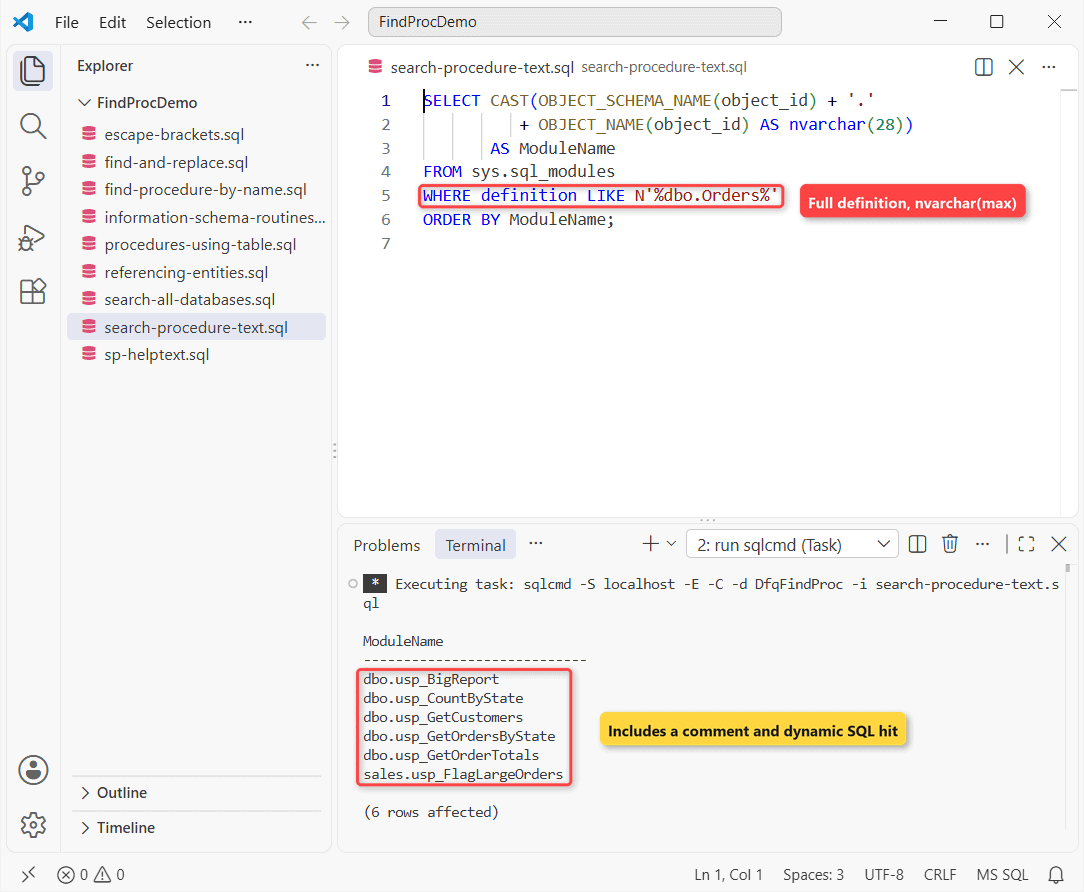
Six procedures match; views, functions and triggers would show up too. The CAST just keeps sqlcmd’s columns narrow.
Escape [ and _ When You Search Stored Procedure Text
In LIKE, [State] is a character class matching one S, t, a or e. Write a literal [ as [[]:
SET NOCOUNT ON;
SELECT COUNT(*) AS Unescaped FROM sys.procedures
WHERE OBJECT_DEFINITION(object_id) LIKE N'%[State]%';

SELECT COUNT(*) AS Escaped FROM sys.procedures
WHERE OBJECT_DEFINITION(object_id) LIKE N'%[[]State]%';
Output:
Unescaped
-----------
          6
Escaped
-----------
          2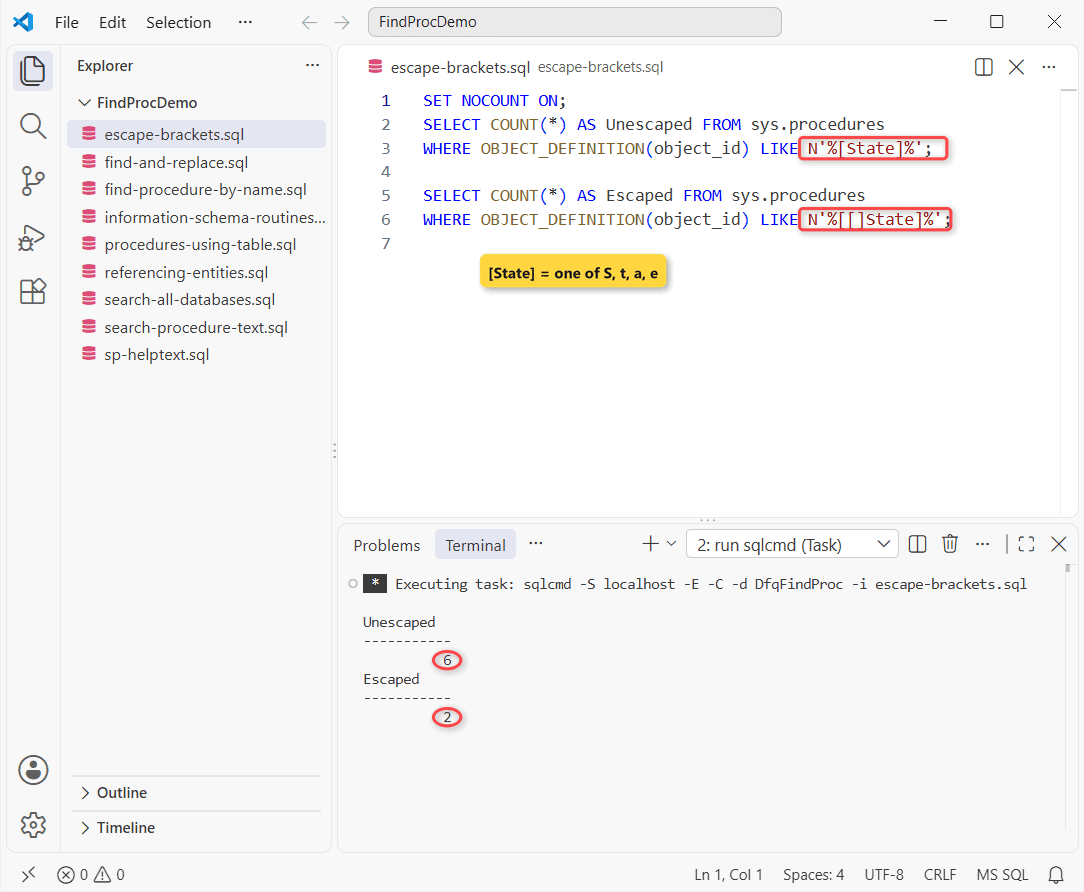
Unescaped, all six match; escaped, only the two that really contain [State]. Underscore matches any one character too, so write usp_ as usp[_].
Why INFORMATION_SCHEMA.ROUTINES Misses Text in Long Procedures
ROUTINE_DEFINITION is nvarchar(4000): only the first 4,000 characters. usp_BigReport mentions dbo.Orders after that point:
SELECT CAST(ROUTINE_NAME AS nvarchar(20)) AS ProcName,
       LEN(ROUTINE_DEFINITION) AS RoutineDefLen,
       LEN(OBJECT_DEFINITION(OBJECT_ID(ROUTINE_NAME))) AS FullLen,
       CASE WHEN ROUTINE_DEFINITION LIKE N'%dbo.Orders%'
            THEN 'found' ELSE 'missed' END AS Search
FROM INFORMATION_SCHEMA.ROUTINES
WHERE ROUTINE_NAME IN (N'usp_BigReport', N'usp_GetOrderTotals');
Output:
ProcName             RoutineDefLen FullLen              Search
-------------------- ------------- -------------------- ------
usp_BigReport                 4000                 4280 missed
usp_GetOrderTotals             123                  123 found

(2 rows affected)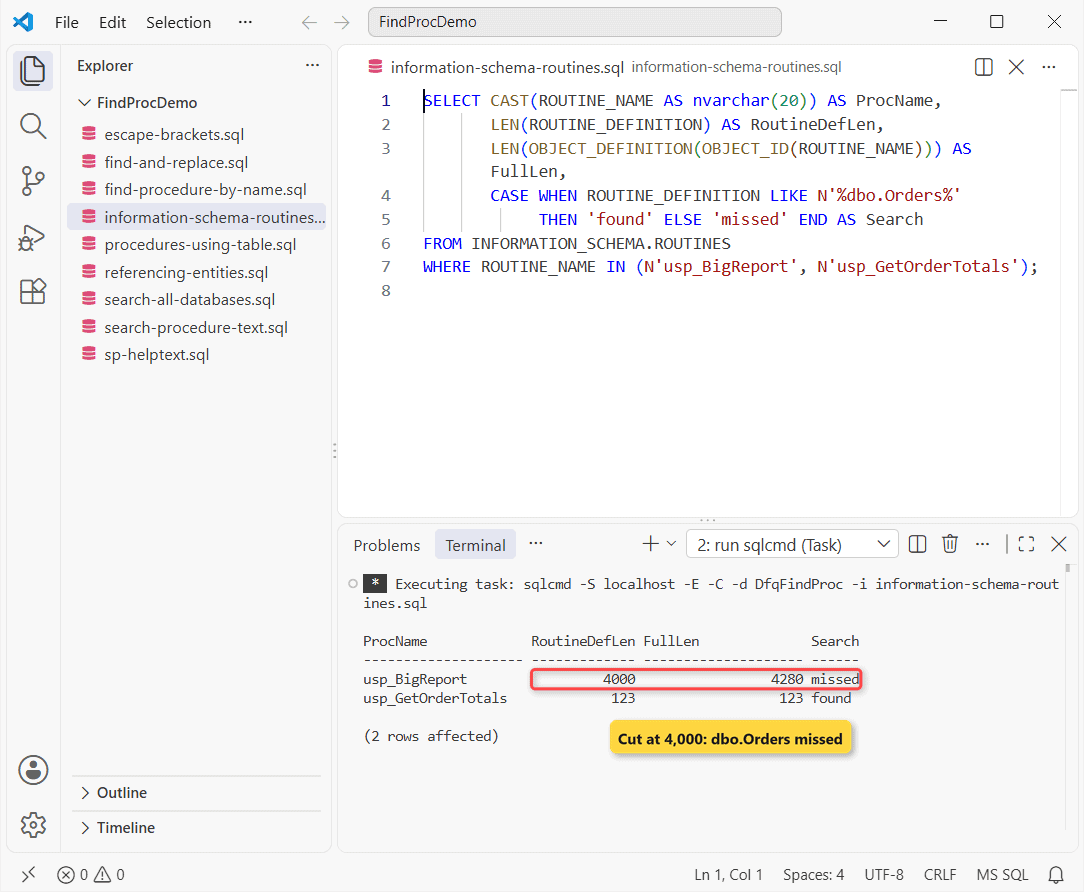
The 4,280-character procedure is cut at 4,000, so the search misses it. Use this view for names and dates, not for text.
Show the Full Stored Procedure Text With sp_helptext
To read a match, sp_helptext returns the definition in rows of up to 255 characters (-h -1 hides the header):
EXEC sys.sp_helptext N'dbo.usp_GetOrdersByState';Output:
CREATE   PROCEDURE dbo.usp_GetOrdersByState
    @State char(2)
AS
    SELECT OrderID, Total
    FROM dbo.Orders
    WHERE [State] = @State AND Status = N'Pending';
Notice the gap after CREATE: SQL Server stores CREATE OR ALTER as CREATE plus spaces. Here’s how to view a stored procedure in SQL Server from SSMS.
Find a Stored Procedure by Name in SQL Server
Filter sys.procedures on name and show the schema, so you can call it by its schema-qualified name:
SET NOCOUNT ON;
SELECT CAST(SCHEMA_NAME(schema_id) AS nvarchar(6)) AS [Schema],
       CAST(name AS nvarchar(24)) AS ProcName
FROM sys.procedures
WHERE name LIKE N'%Order%'
ORDER BY name;

SELECT CAST(name AS nvarchar(24)) AS GetProcs
FROM sys.procedures
WHERE name LIKE N'usp[_]Get%';       -- [_] = a real underscore
Output:
Schema ProcName
------ ------------------------
sales  usp_FlagLargeOrders
dbo    usp_GetOrdersByState
dbo    usp_GetOrderTotals
GetProcs
------------------------
usp_GetCustomers
usp_GetOrdersByState
usp_GetOrderTotals
Three names contain Order, including sales.usp_FlagLargeOrders. For one exact name, OBJECT_ID(N'sales.usp_FlagLargeOrders', N'P') returns NULL if it doesn’t exist.
A clear stored procedure naming convention makes this easy.
Find Stored Procedures That Use a Table (sys.sql_expression_dependencies)
To ask which procedures depend on dbo.Orders, query the dependencies SQL Server records at create time:
SELECT CAST(OBJECT_SCHEMA_NAME(referencing_id) + '.'
          + OBJECT_NAME(referencing_id) AS nvarchar(28))
       AS UsesOrders
FROM sys.sql_expression_dependencies
WHERE referenced_id = OBJECT_ID(N'dbo.Orders')
ORDER BY UsesOrders;
Output:
UsesOrders
----------------------------
dbo.usp_BigReport
dbo.usp_GetOrdersByState
dbo.usp_GetOrderTotals
sales.usp_FlagLargeOrders

(4 rows affected)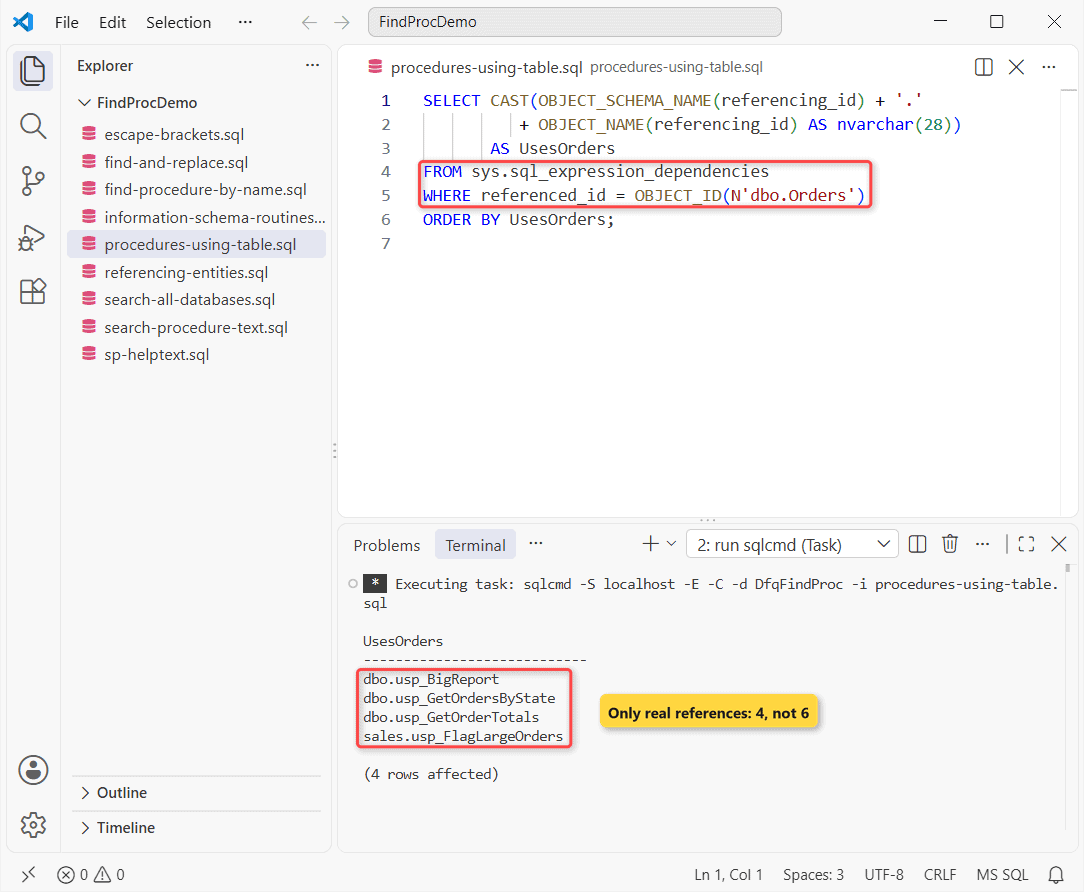
Four, not six. sp_depends is deprecated; Microsoft points you to sys.dm_sql_referencing_entities, which returned the same four rows:
SELECT referencing_schema_name, referencing_entity_name
FROM sys.dm_sql_referencing_entities(N'dbo.Orders', N'OBJECT');
Run one of these before you drop a stored procedure or a table.
Common Mistakes: Comments, Dynamic SQL and Renamed Procedures
usp_GetCustomersmentions Orders only in a comment: text search reports it, dependencies don’t.usp_CountByStatereads Orders in a dynamic SQL string: only text search sees it.sp_renamedoesn’t updatedefinition, so text search shows the old name.
So I run both searches and compare. To change a name safely, rename a stored procedure by dropping and recreating it.
Search Stored Procedures Across All Databases
Catalog views cover one database. sp_MSforeachdb is undocumented and unsupported, so I loop over sys.databases with three-part names:
SET NOCOUNT ON;
DECLARE @hits TABLE (DbName nvarchar(20), ProcName nvarchar(28));
DECLARE @db sysname, @sql nvarchar(max);
DECLARE dbs CURSOR LOCAL FAST_FORWARD FOR
    SELECT name FROM sys.databases
    WHERE state_desc = N'ONLINE'
      AND name LIKE N'DfqFindProc%';   -- remove to search all
OPEN dbs; FETCH NEXT FROM dbs INTO @db;
WHILE @@FETCH_STATUS = 0
BEGIN
    SET @sql = N'SELECT @db, p.name
      FROM ' + QUOTENAME(@db) + N'.sys.procedures AS p
      JOIN ' + QUOTENAME(@db) + N'.sys.sql_modules AS m ON m.object_id = p.object_id
      WHERE m.definition LIKE @pattern;';
    INSERT INTO @hits
    EXEC sys.sp_executesql @sql, N'@db sysname, @pattern nvarchar(200)',
         @db = @db, @pattern = N'%SELECT OrderID%';
    FETCH NEXT FROM dbs INTO @db;
END;
CLOSE dbs; DEALLOCATE dbs;
SELECT DbName, ProcName FROM @hits ORDER BY DbName;
Output:
DbName               ProcName
-------------------- ----------------------------
DfqFindProc          usp_GetOrdersByState
DfqFindProcArchive   usp_ExportOrders
It found one procedure in each demo database. OBJECT_DEFINITION and DB_NAME() read the current database, so don’t use them inside the loop. Here’s how to find the database name in SQL Server.
Find and Replace Text in a Stored Procedure
Read the definition, REPLACE the text, turn the first CREATE into ALTER, and execute it:
DECLARE @def nvarchar(max) =
    OBJECT_DEFINITION(OBJECT_ID(N'dbo.usp_GetOrdersByState'));

SET @def = REPLACE(@def, N'N''Pending''', N'N''Open''');
SET @def = STUFF(@def, CHARINDEX(N'CREATE', @def), 6, N'ALTER');
PRINT LEFT(@def, 42);
EXEC sys.sp_executesql @def;

SELECT CASE WHEN OBJECT_DEFINITION(OBJECT_ID(
         N'dbo.usp_GetOrdersByState')) LIKE N'%N''Open''%'
       THEN 'updated' ELSE 'unchanged' END AS Result;
Output:
ALTER   PROCEDURE dbo.usp_GetOrdersByState
Result
---------
updated

(1 rows affected)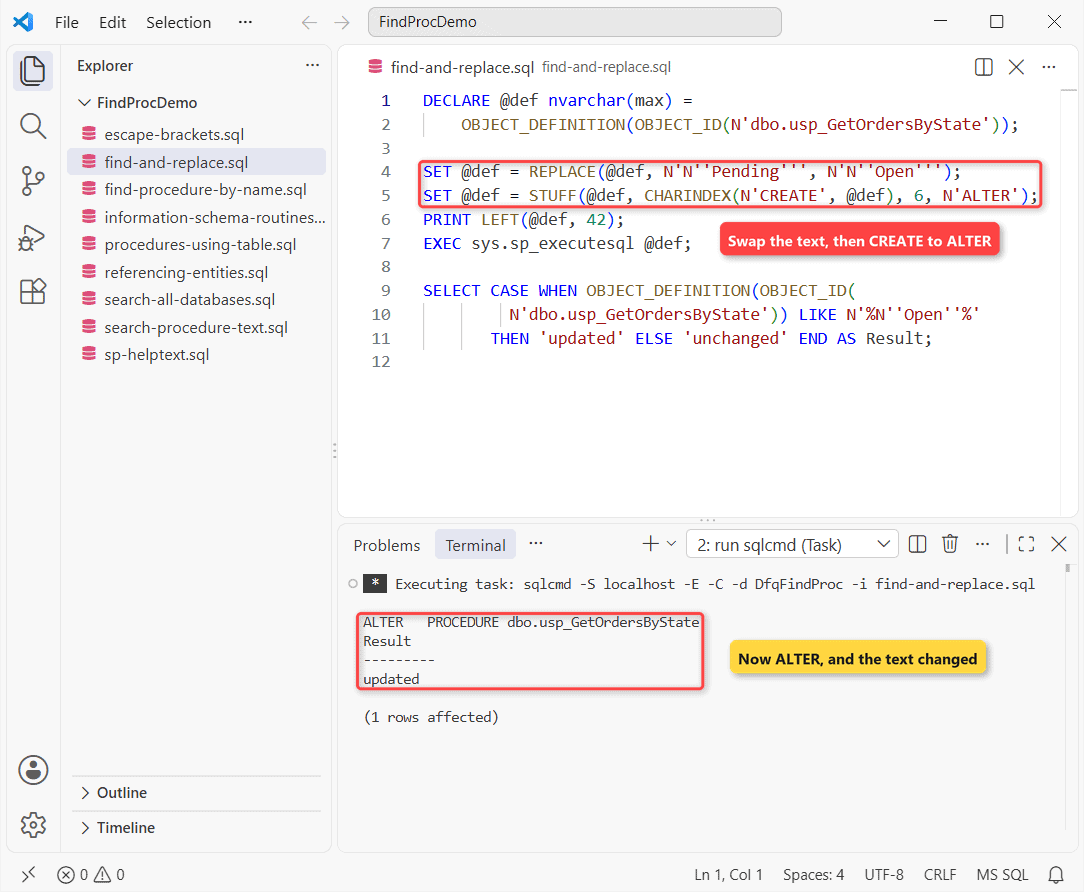
Important: run the stored text unchanged and you’ll get Msg 2714, since it starts with CREATE.
The SQL Server REPLACE function guide has more patterns; review the text before you alter the stored procedure.
Find Stored Procedures in SSMS: Filter and View Dependencies
- In Object Explorer, expand
DfqFindProc> Programmability > Stored Procedures. - Right-click it > Filter > Filter Settings, set Name Contains
Order, select OK. - For table usage, right-click
dbo.Orders> View Dependencies > Objects that depend on [Orders].
Which Method Should You Use to Find a Stored Procedure?
| Goal | Use |
|---|---|
| Text in the code | sys.sql_modules, escaped LIKE |
| Procedure by name | sys.procedures |
| Procedures using a table | sys.sql_expression_dependencies + text search |
| Every database | Loop over sys.databases |
Still cleaning up old procedures? These are the next stops:
- Find who created a stored procedure
- Check stored procedure execution history
- Fix Could not find stored procedure
- Execute a stored procedure with parameters
Frequently Asked Questions
Is the search in sys.sql_modules case-sensitive?
It follows the database collation; the default SQL_Latin1_General_CP1_CI_AS isn’t. Otherwise add COLLATE Latin1_General_CI_AS.
Can I search stored procedures, views and functions together?
Yes. sys.sql_modules holds them all; filter by OBJECTPROPERTY or sys.objects.type. See the sys.sql_modules reference.
How do I find which tables a stored procedure uses?
Filter sys.sql_expression_dependencies on referencing_id instead and read referenced_entity_name.
Why does my text search miss an encrypted procedure?
Its definition is NULL, so nothing matches. Dependency views still list it, as the sys.sql_expression_dependencies docs describe.

Shivam Dogra is a cloud database developer and Team Lead at TSInfo Technologies, where he has worked since June 2021. He writes the SQL Server and Oracle tutorials on DatabaseFAQs.com, covering queries, joins, stored procedures, triggers and permissions. Shivam holds a Master of Computer Applications (MCA) from Chandigarh University.