
To add SQL Server stored procedure parameters, list them after the procedure name: an @name, a data type, and = value if the parameter should be optional.
CREATE PROCEDURE dbo.usp_CustomersByState
    @State      char(2),              -- required
    @MinBalance decimal(8,2) = 0      -- optional
AS ...
Tested on SQL Server 2025 (17.0.1000.7) Standard Developer edition through sqlcmd, server collation SQL_Latin1_General_CP1_CI_AS.
Below: defaults, a NULL catch-all search, OUTPUT, table-valued parameters, and the real Msg 201 and 8144 errors.
The Sample Customers Table
Every procedure here reads this table in a demo database called df_spparam. Lee Gu and Adele Vance have no email, which matters for the optional-parameter steps.
CREATE TABLE dbo.Customers (
    CustomerID int          NOT NULL PRIMARY KEY,
    FullName   nvarchar(16) NOT NULL,
    City       nvarchar(12) NOT NULL,
    State      char(2)      NOT NULL,
    Email      varchar(20)  NULL,
    Balance    decimal(8,2) NOT NULL
);
INSERT INTO dbo.Customers VALUES
(1, N'Megan Bowen',     N'Seattle',   'WA', 'megan@example.com',  1250.00),
(2, N'Alex Wilber',     N'Austin',    'TX', 'alex@example.com',     89.99),
(3, N'Adele Vance',     N'San Diego', 'CA', NULL,                  640.50),
(4, N'Diego Siciliani', N'Dallas',    'TX', 'diego@example.com',  2310.75),
(5, N'Lee Gu',          N'Buffalo',   'NY', NULL,                    0.00),
(6, N'Nestor Wilke',    N'Houston',   'TX', 'nestor@example.com',  415.20),
(7, N'Isaiah Langer',   N'Chicago',   'IL', 'isaiah@example.com',  975.00);
Method 1: Input Parameters With Data Types (Recommended)
Same Customers table. The procedure takes a required state and an optional minimum balance. If creating the stored procedure itself is new to you, start there.
CREATE OR ALTER PROCEDURE dbo.usp_CustomersByState
    @State      char(2),
    @MinBalance decimal(8,2) = 0
AS
BEGIN
    SET NOCOUNT ON;
    SELECT FullName, City, Balance
    FROM dbo.Customers
    WHERE State = @State AND Balance >= @MinBalance;
END;
GO

EXEC dbo.usp_CustomersByState 'TX';
EXEC dbo.usp_CustomersByState @MinBalance = 400, @State = 'TX';
Output:
FullName         City         Balance
---------------- ------------ ----------
Alex Wilber      Austin            89.99
Diego Siciliani  Dallas          2310.75
Nestor Wilke     Houston          415.20
FullName         City         Balance
---------------- ------------ ----------
Diego Siciliani  Dallas          2310.75
Nestor Wilke     Houston          415.20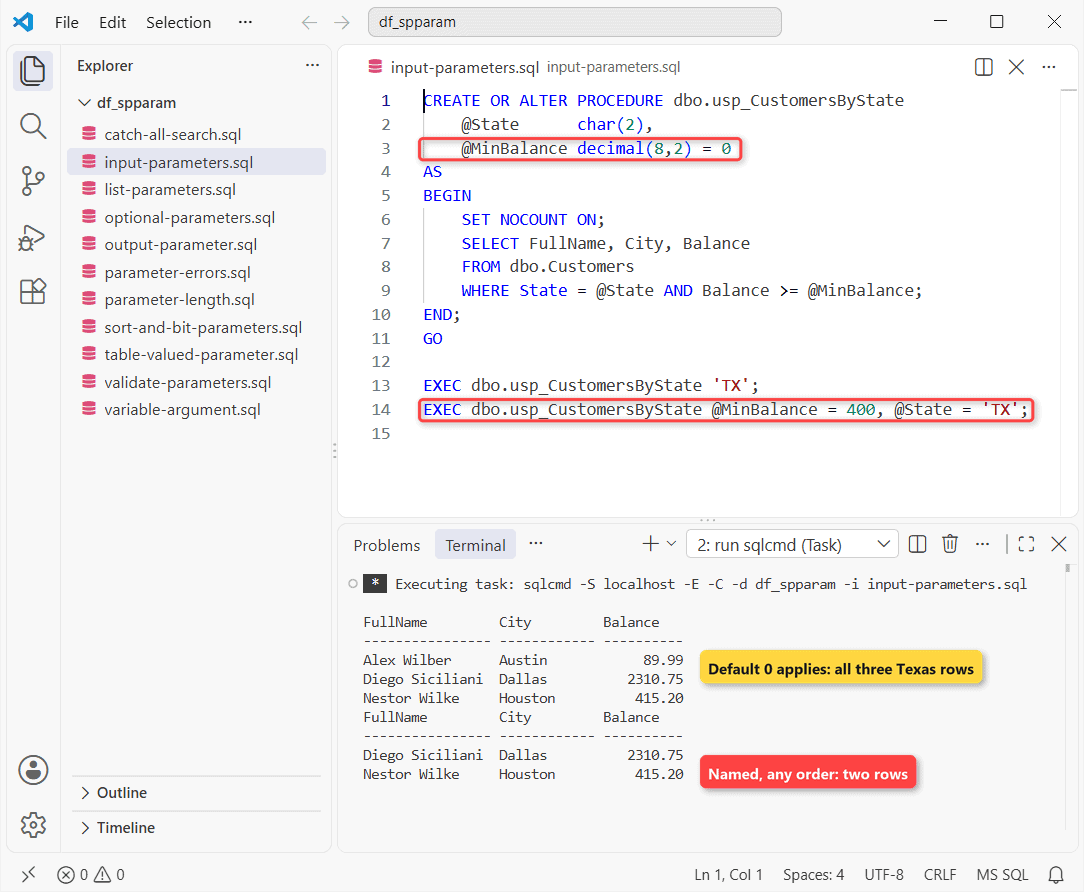
How does this work? The first call passes 'TX' by position and skips @MinBalance, so the default 0 applies. You get all three Texas customers.
The second call names both parameters, in reverse order. Named arguments can go in any order. Only Diego and Nestor clear $400.
Pass DEFAULT as a value to use the default explicitly. More calling styles are in how to execute a stored procedure in SQL Server.
Why Does an nvarchar Parameter Cut Off My Text?
A parameter’s length is part of its type. Pass a longer string and SQL Server trims it without an error:
CREATE OR ALTER PROCEDURE dbo.usp_EchoCity
    @City5    nvarchar(5),
    @NoLength nvarchar
AS
    SELECT @City5 AS City5, @NoLength AS NoLength;
GO

EXEC dbo.usp_EchoCity N'San Diego', N'San Diego';
Output:
City5 NoLength
----- --------
San D S

(1 rows affected)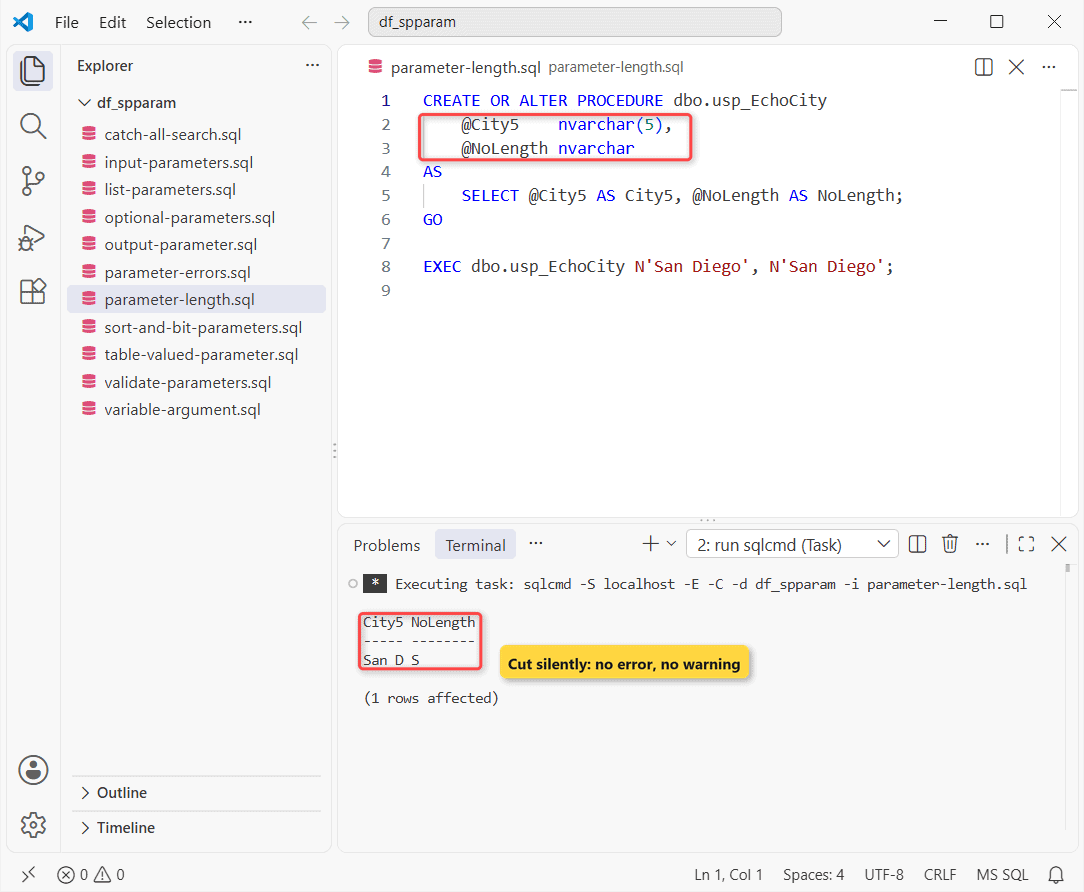
How does this work? nvarchar(5) keeps “San D”. Plain nvarchar with no length means nvarchar(1), so you get “S”. No warning either way.
That’s the gotcha I’d check first when a procedure stores half a name. Match the parameter to the column (nvarchar(12) for City) and alter the stored procedure if it’s off.
Method 2: Optional Parameters in a SQL Server Stored Procedure
A parameter with a default is optional. On the same table, this insert procedure makes Email and Balance optional:
CREATE OR ALTER PROCEDURE dbo.usp_AddCustomer
    @ID      int,
    @Name    nvarchar(16),
    @City    nvarchar(12),
    @State   char(2),
    @Email   varchar(20)  = NULL,
    @Balance decimal(8,2) = 0
AS
    SET NOCOUNT ON;
    INSERT INTO dbo.Customers
    VALUES (@ID, @Name, @City, @State, @Email, @Balance);
GO

EXEC dbo.usp_AddCustomer 8, N'Grady Archie', N'Denver', 'CO';
SELECT FullName, Email, Balance
FROM dbo.Customers WHERE CustomerID = 8;
Output:
FullName         Email                Balance
---------------- -------------------- ----------
Grady Archie     NULL                        .00

(1 rows affected)
How does this work? The call passes four values. @Email falls back to NULL and @Balance to 0, so Grady Archie lands with no email and a $0.00 balance.
Some older guides default Email to 'N/A'; don’t copy that. A fake string breaks Email IS NULL checks; NULL means “not given”. The full insert pattern is in a stored procedure for INSERT.
Important: a default must be a constant or NULL. @Since date = GETDATE() won’t compile; default to NULL and set it inside the body.
Method 3: NULL Default Parameters for a Catch-All Search
Give every filter a NULL default and the caller passes only the ones it needs. Same Customers rows:
CREATE OR ALTER PROCEDURE dbo.usp_SearchCustomers
    @State      char(2)      = NULL,
    @City       nvarchar(12) = NULL,
    @MinBalance decimal(8,2) = NULL
AS
    SET NOCOUNT ON;
    SELECT FullName, City, Balance
    FROM dbo.Customers
    WHERE (State = @State OR @State IS NULL)
      AND (City = @City OR @City IS NULL)
      AND (Balance >= @MinBalance OR @MinBalance IS NULL)
    OPTION (RECOMPILE);
GO

EXEC dbo.usp_SearchCustomers @State = 'TX', @MinBalance = 400;
EXEC dbo.usp_SearchCustomers @City = N'Seattle';
Output:
FullName         City         Balance
---------------- ------------ ----------
Diego Siciliani  Dallas          2310.75
Nestor Wilke     Houston          415.20
FullName         City         Balance
---------------- ------------ ----------
Megan Bowen      Seattle         1250.00
How does this work? State = @State OR @State IS NULL turns a filter off when its parameter is NULL. The first call returns Diego and Nestor; the second returns Megan Bowen alone.
So here’s the catch: without OPTION (RECOMPILE), SQL Server caches one plan for the first set of values and reuses it for every combination, often a scan. RECOMPILE builds a plan per call with the real values.
On seven rows you won’t see a difference; on millions you will. Swap in dynamic SQL for heavy search pages (stored procedure for search functionality).
Method 4: Check Parameters for NULL and Validate With THROW
Same procedure name, now with @State defaulting to NULL so the body can reject a missing value with its own message:
CREATE OR ALTER PROCEDURE dbo.usp_CustomersByState
    @State      char(2)      = NULL,
    @MinBalance decimal(8,2) = 0
AS
BEGIN
    SET NOCOUNT ON;
    IF @State IS NULL
        THROW 50001, N'@State is required.', 1;
    IF @MinBalance < 0
        THROW 50002, N'@MinBalance can''t be negative.', 1;
    SELECT FullName, Balance FROM dbo.Customers
    WHERE State = @State AND Balance >= @MinBalance;
END;
GO

EXEC dbo.usp_Try N'EXEC dbo.usp_CustomersByState;';
EXEC dbo.usp_Try N'EXEC dbo.usp_CustomersByState ''NY'', -5;';
Output:
Msg 50001: @State is required.
Msg 50002: @MinBalance can't be negative.
How does this work? Each IF runs before the SELECT. THROW stops the procedure with error 50001 or 50002, and the caller’s CATCH prints it.
Why not declare the parameter NOT NULL? T-SQL only accepts that on natively compiled procedures, which is where the NOT NULL parameters error comes from. More on TRY…CATCH in a stored procedure.
Method 5: SQL Server Stored Procedure OUTPUT Parameter
Mark the parameter OUTPUT in the procedure and again in the call:
CREATE OR ALTER PROCEDURE dbo.usp_StateTotal
    @State char(2),
    @Total decimal(10,2) OUTPUT
AS
    SELECT @Total = SUM(Balance)
    FROM dbo.Customers WHERE State = @State;
GO

SET NOCOUNT ON;
DECLARE @t decimal(10,2);
EXEC dbo.usp_StateTotal 'TX', @t OUTPUT;
SELECT @t AS TexasTotal;
Output:
TexasTotal
------------
     2815.94
How does this work? The three Texas balances add up to $2,815.94, and that value comes back in @t. Drop OUTPUT from the call and @t stays NULL.
Multiple OUTPUT values and their gotchas get their own post: SQL Server stored procedure OUTPUT parameter. For a status code, use a stored procedure return value instead.
Method 6: Table-Valued Parameter (READONLY) for a List of Values
Need to pass an array, like a list of states? Create a table type, fill a variable of that type, and pass it:
DROP PROCEDURE IF EXISTS dbo.usp_CustomersInStates;
DROP TYPE IF EXISTS dbo.StateList;
GO
CREATE TYPE dbo.StateList AS TABLE (State char(2) PRIMARY KEY);
GO
CREATE PROCEDURE dbo.usp_CustomersInStates
    @States dbo.StateList READONLY
AS
    SELECT c.FullName, c.State
    FROM dbo.Customers AS c
    JOIN @States AS s ON s.State = c.State;
GO

SET NOCOUNT ON;
DECLARE @pick dbo.StateList;
INSERT INTO @pick VALUES ('WA'), ('CA');
EXEC dbo.usp_CustomersInStates @States = @pick;
Output:
FullName         State
---------------- -----
Megan Bowen      WA
Adele Vance      CA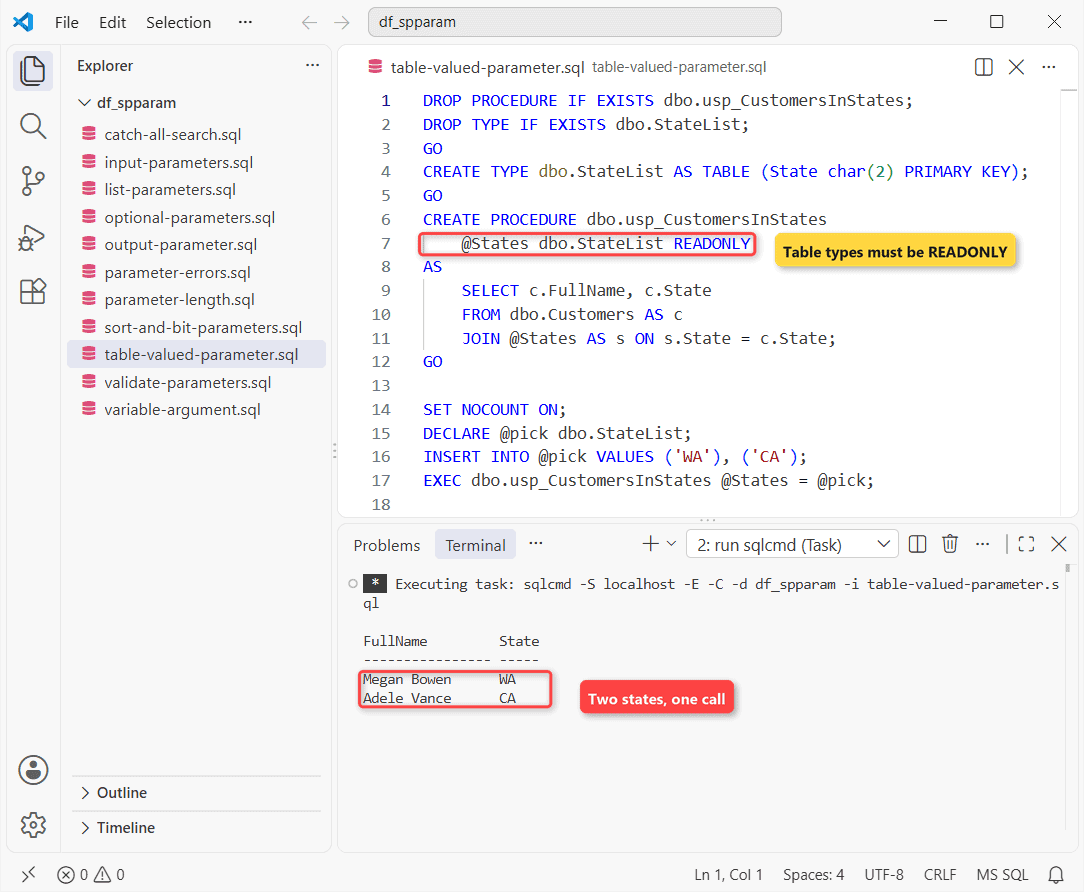
How does this work? @States behaves like a read-only table, so the JOIN keeps the WA and CA customers. Leave out READONLY and CREATE PROCEDURE fails with Msg 352.
For a quick comma list, STRING_SPLIT(@List, ',') works too (SQL Server 2016+), but you lose typing and the primary key.
Variations: bit (Boolean) and Sort Order Parameters
SQL Server has no boolean type, so use bit. A parameter can’t stand in for a column name, so sort with CASE:
CREATE OR ALTER PROCEDURE dbo.usp_CustomersSorted
    @SortBy   varchar(10) = 'Name',
    @HasEmail bit         = 0
AS
    SET NOCOUNT ON;
    SELECT FullName, Balance
    FROM dbo.Customers
    WHERE @HasEmail = 0 OR Email IS NOT NULL
    ORDER BY CASE WHEN @SortBy = 'Balance' THEN Balance END DESC,
             FullName;
GO

EXEC dbo.usp_CustomersSorted @SortBy = 'Balance', @HasEmail = 1;
Output:
FullName         Balance
---------------- ----------
Diego Siciliani     2310.75
Megan Bowen         1250.00
Isaiah Langer        975.00
Nestor Wilke         415.20
Alex Wilber           89.99
Five customers have an email, highest balance first. The CASE statement in a stored procedure post has more patterns.
List a Stored Procedure’s Parameters With sys.parameters
Want to see what a procedure expects before you call it? Query the catalog view:
SET NOCOUNT ON;
SELECT CAST(name AS varchar(12))                    AS Param,
       CAST(TYPE_NAME(user_type_id) AS varchar(8))  AS DataType,
       max_length, is_output, has_default_value
FROM sys.parameters
WHERE object_id = OBJECT_ID(N'dbo.usp_SearchCustomers')
ORDER BY parameter_id;
Output:
Param        DataType max_length is_output has_default_value
------------ -------- ---------- --------- -----------------
@State       char              2         0                 0
@City        nvarchar         24         0                 0
@MinBalance  decimal           5         0                 0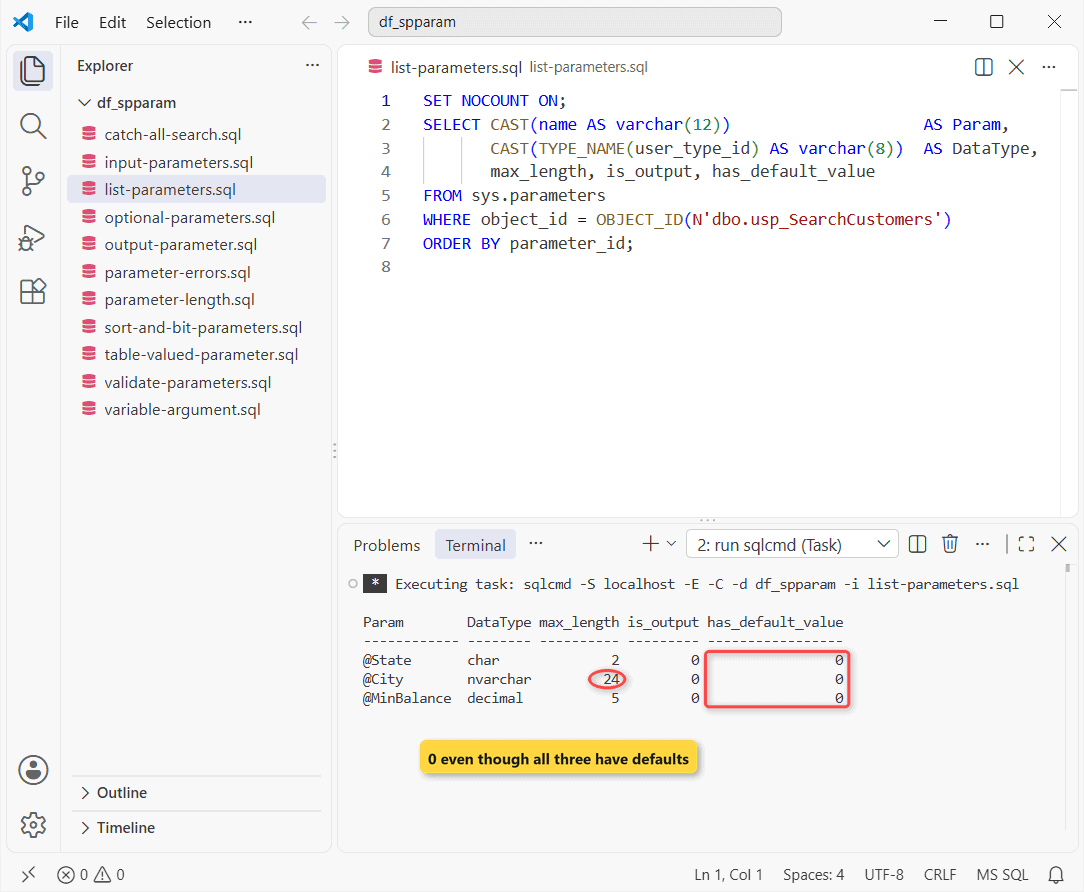
Two surprises from this run. max_length is bytes, so nvarchar(12) shows 24. And has_default_value is 0 for all three; SQL Server tracks defaults there only for CLR procedures.
EXEC sp_help 'dbo.usp_SearchCustomers'; lists the same names, types and order. To read the actual default values, view the stored procedure definition.
Gotchas: Msg 201, Msg 8144 and Other Parameter Errors
Each bad call runs through a tiny TRY…CATCH wrapper so the error text prints instead of stopping the script:
CREATE OR ALTER PROCEDURE dbo.usp_Try @sql nvarchar(200)
AS
BEGIN TRY EXEC (@sql); END TRY
BEGIN CATCH
    PRINT CONCAT('Msg ', ERROR_NUMBER(), ': ', ERROR_MESSAGE());
END CATCH;
GO

EXEC dbo.usp_Try N'EXEC dbo.usp_CustomersByState;';
EXEC dbo.usp_Try N'EXEC dbo.usp_CustomersByState ''TX'', 0, 1;';
EXEC dbo.usp_Try N'EXEC dbo.usp_CustomersByState @Sate = ''TX'';';
EXEC dbo.usp_Try N'EXEC dbo.usp_CustomersByState @State = ''TX'', 0;';
EXEC dbo.usp_Try N'EXEC dbo.usp_CustomersByState UPPER(''tx'');';
Output:
Msg 201: Procedure or function 'usp_CustomersByState' expects parameter '@State', which was not supplied.
Msg 8144: Procedure or function usp_CustomersByState has too many arguments specified.
Msg 201: Procedure or function 'usp_CustomersByState' expects parameter '@State', which was not supplied.
Msg 119: Must pass parameter number 2 and subsequent parameters as '@name = value'. After the form '@name = value' has been used, all subsequent parameters must be passed in the form '@name = value'.
Msg 102: Incorrect syntax near 'tx'.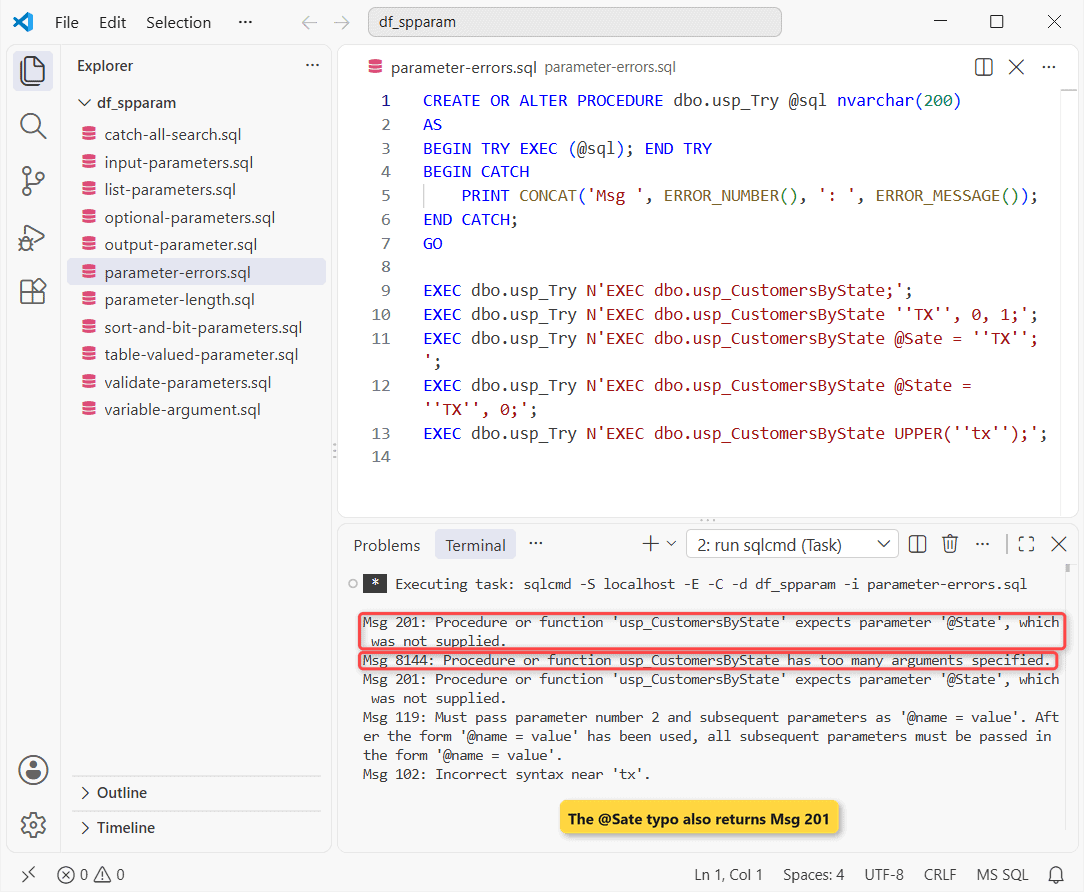
Line by line: no @State gives 201, and a third value gives 8144. A positional value after a named one gives 119.
The misspelled @Sate surprised me. I expected Msg 8145, but SQL Server reported the missing @State first, so you see 201 again.
The last one is a syntax error: arguments must be constants or variables, never a function call. A typo in the procedure name is a different error, covered in Could not find stored procedure.
The fix is a variable. I also typed the parameter name as @STATE:
DECLARE @s char(2) = UPPER('wa');
EXEC dbo.usp_CustomersByState @STATE = @s;
Output:
FullName         City         Balance
---------------- ------------ ----------
Megan Bowen      Seattle         1250.00
It works. Names follow the case-insensitive collation on my server; under a CS collation you’d have to match the case exactly.
Which Parameter Type Should You Use?
| You need | Use |
|---|---|
| A value in | Input parameter, typed like the column |
| A value the caller can skip | Default value, usually NULL |
| Optional search filters | NULL defaults + OPTION (RECOMPILE) |
| A value back | OUTPUT parameter |
| A list of rows | Table-valued parameter, READONLY |
Things to Keep in Mind
- Give every string parameter a length that matches its column; overflow is cut silently.
- Default optional parameters to NULL, not
'N/A'. - Pass a variable, never
GETDATE()orUPPER(), as an argument. - Once you name one argument, name all the ones after it (Msg 119).
Next step: test the stored procedure in SQL Server with edge values. On Postgres? See create a stored procedure in PostgreSQL.
Related reads if you’re still here:
- Pass parameters to a view (and why you can’t)
- SELECT from a stored procedure
- IF ELSE in a stored procedure
- Temp tables inside procedures
Frequently Asked Questions
How many parameters can a SQL Server stored procedure have?
Up to 2,100. Each needs a name that starts with @, a data type and a direction, as Microsoft’s Specify parameters page lists.
What is the maximum length of a stored procedure parameter?
varchar(max), nvarchar(max) and varbinary(max) parameters hold up to 2^31-1 bytes (about 2 GB). Fixed lengths top out at 8,000 bytes, so nvarchar(4000).
What happens if I don’t pass a table-valued parameter?
The call doesn’t fail with Msg 201. SQL Server passes an empty table, so the procedure just returns no rows.
Can a parameter hold a table or column name?
No. Parameters replace constant values only. For a dynamic table name, build the statement with QUOTENAME() and run it through sp_executesql. The CREATE PROCEDURE reference states the rule.

Shivam Dogra is a cloud database developer and Team Lead at TSInfo Technologies, where he has worked since June 2021. He writes the SQL Server and Oracle tutorials on DatabaseFAQs.com, covering queries, joins, stored procedures, triggers and permissions. Shivam holds a Master of Computer Applications (MCA) from Chandigarh University.