
If you’ve tried to install PostgreSQL on Linux from your distro’s package, you’ve probably got an older major version than 18. The fix is the project’s PGDG repository: apt install postgresql-18 on Ubuntu or Debian, dnf install postgresql18-server on RHEL and Rocky Linux.
Why? Each distro freezes one PostgreSQL version for its whole lifetime. The PGDG repository carries every supported version, and 18.7 is the current minor.
There’s no Linux machine on my test PC, so the install commands come from postgresql.org’s download pages, checked 11/15/2026. I ran the SQL after the install for real on PostgreSQL 18.6.
Which Method Should You Use to Install PostgreSQL on Linux?
For a new server I’d take the PGDG repository. You choose the major version, and normal apt or dnf updates bring each minor release.
| Method | Version you get | Use it when |
|---|---|---|
| Distro package | Whatever the release froze (RHEL 9: 16, 15 or 13) | An older major is fine |
| PGDG repository | Any supported major: 18, 17, 16, 15 | New servers (recommended) |
| Build from source | Any | You need custom build options |
Skip 14: its final release, 14.25, shipped 11/12/2026. See the PostgreSQL latest version dates and the PostgreSQL system requirements.
Method 1: Install PostgreSQL 18 on Ubuntu or Debian with the PGDG Apt Repository (Recommended)
This covers Ubuntu 22.04 through 26.10 and Debian 12 and 13. The download page’s script adds the repository and its signing key, then you install the server:
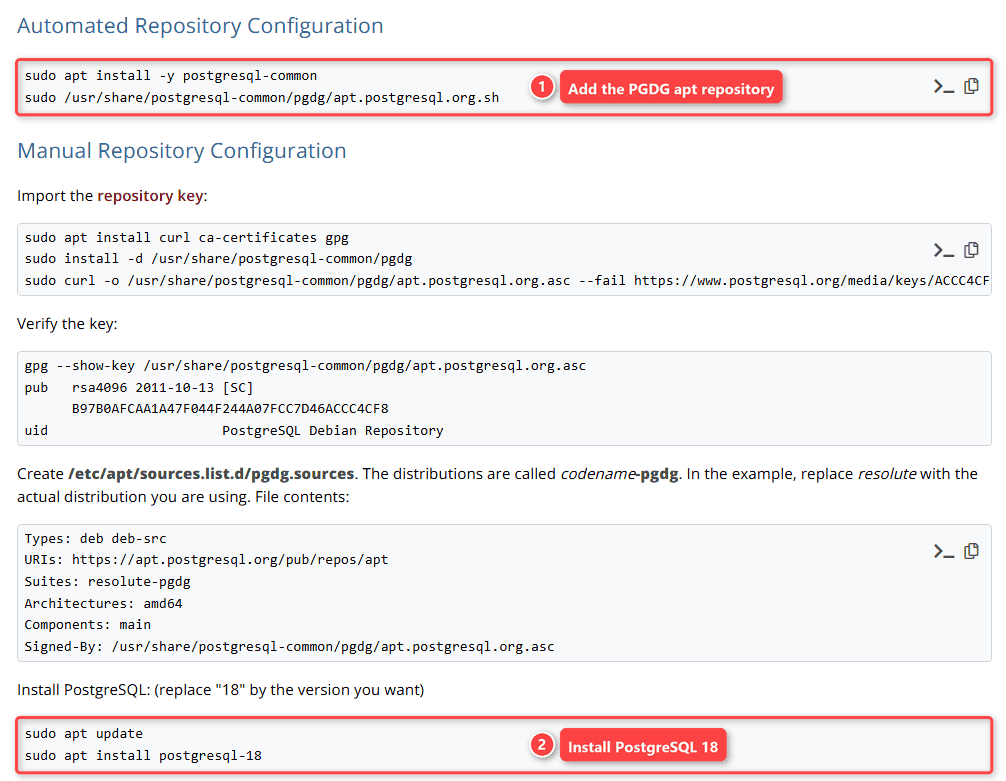
sudo apt install -y postgresql-common
sudo /usr/share/postgresql-common/pgdg/apt.postgresql.org.sh
sudo apt update
sudo apt install postgresql-18
How does this work?
The script writes an apt source for your release’s codename (noble-pgdg on Ubuntu 24.04) and installs the key. The same page lists a manual setup, a key file plus a pgdg.sources file, if you’d rather skip the script.
Installing postgresql-18 also creates a cluster called 18/main and starts it, like pg_createcluster 18 main --start. Config lives in /etc/postgresql/18/main/. To restart Postgres later, use systemctl.
Method 2: Install PostgreSQL 18 on RHEL, Rocky Linux, AlmaLinux or Fedora with dnf
On the Red Hat page, pick your platform and PostgreSQL 18. For RHEL, Rocky or AlmaLinux 9 on x86_64, it prints:
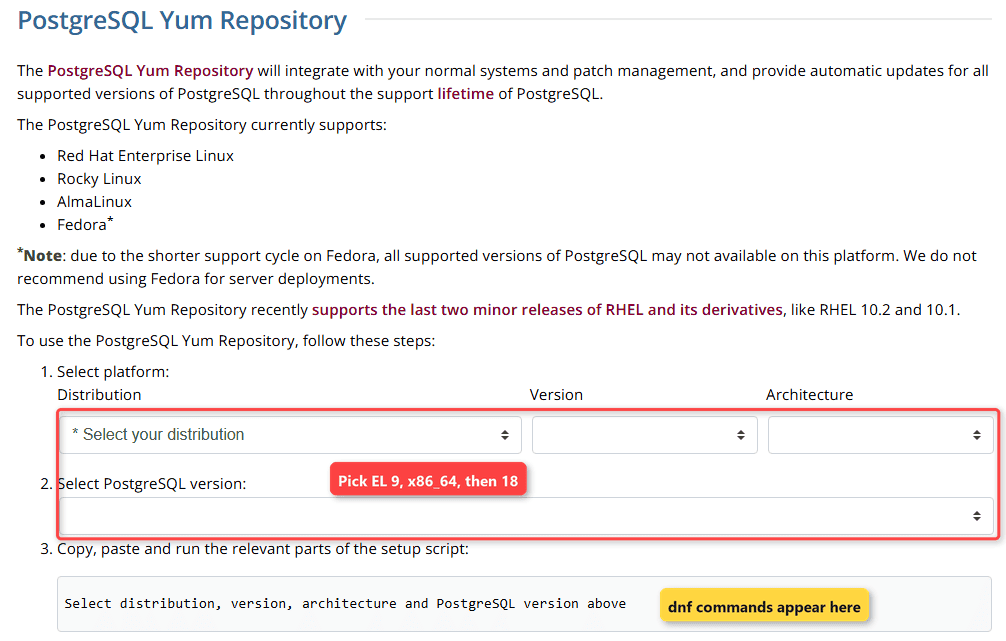
sudo dnf install -y https://download.postgresql.org/pub/repos/yum/reporpms/EL-9-x86_64/pgdg-redhat-repo-latest.noarch.rpm
sudo dnf install -y postgresql18-server
sudo /usr/pgsql-18/bin/postgresql-18-setup initdb
sudo systemctl enable postgresql-18
sudo systemctl start postgresql-18
For EL 10, change EL-9 to EL-10. On EL 8, run sudo dnf -qy module disable postgresql before the install so the built-in module doesn’t win.
How does this work?
Red Hat policy says a package mustn’t initialize a database or enable a service by itself. So nothing runs yet. Skip initdb and there’s no cluster to start.
The data directory, with postgresql.conf and pg_hba.conf, is /var/lib/pgsql/18/data, and the service is postgresql-18. Running the distro’s server already? Uninstall the old PostgreSQL first so both don’t want port 5432.
Check the PostgreSQL Service and Log In with sudo -u postgres psql
sudo systemctl status postgresql       # postgresql-18 on RHEL
psql --version
pg_lsclusters                          # Debian/Ubuntu only
You should see the service reported as active. Then log in as the postgres superuser the install created:
sudo -u postgres psqlNo password prompt? That’s peer authentication: on a local connection, PostgreSQL takes your Linux user name from the kernel. Ubuntu uses peer locally and scram-sha-256 over TCP/IP.
Now check the server. I ran this in VS Code on my Windows test box, and the same query works on Linux:
psql -h localhost -U postgres -d pglinux_demo -f check-server.sqlHere’s check-server.sql:
SELECT current_setting('server_version')      AS version,
       current_setting('port')                AS port,
       current_setting('listen_addresses')    AS listen,
       current_setting('password_encryption') AS pw_hashing;
Output:
 version | port | listen |  pw_hashing
---------+------+--------+---------------
 18.6    | 5432 | *      | scram-sha-256
(1 row)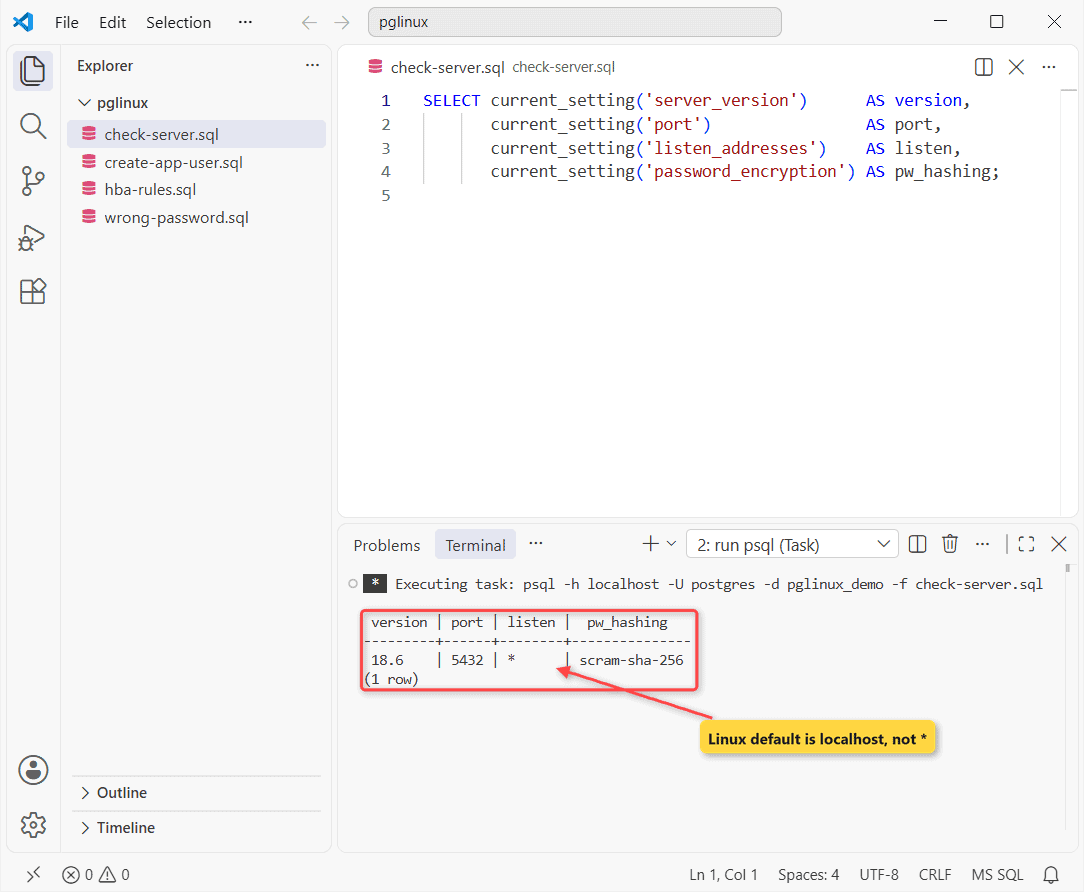
Version, port and scram-sha-256 match a Linux 18 install. listen_addresses doesn’t: the Windows installer set *, while Linux defaults to localhost. Here are more ways to check the PostgreSQL version.
Create a PostgreSQL User and Database for Your App
Don’t run your app as postgres. Give it a login role and a database it owns (the password is a demo value):
psql -h localhost -U postgres -d pglinux_demo -f create-app-user.sqlHere’s create-app-user.sql:
CREATE ROLE app_user LOGIN PASSWORD 'Maple-Trail-2026';
CREATE DATABASE inventory_app OWNER app_user;
SELECT rolname, left(rolpassword, 14) AS stored_as
FROM pg_authid WHERE rolname = 'app_user';
-- check your work: log in as the new role (demo password)
\connect "host=localhost dbname=inventory_app user=app_user password=Maple-Trail-2026"
SELECT current_user, current_database(), system_user;
Output:
CREATE ROLE
CREATE DATABASE
 rolname  |   stored_as
----------+----------------
 app_user | SCRAM-SHA-256$
(1 row)

You are now connected to database "inventory_app" as user "app_user".
 current_user | current_database |      system_user
--------------+------------------+------------------------
 app_user     | inventory_app    | scram-sha-256:app_user
(1 row)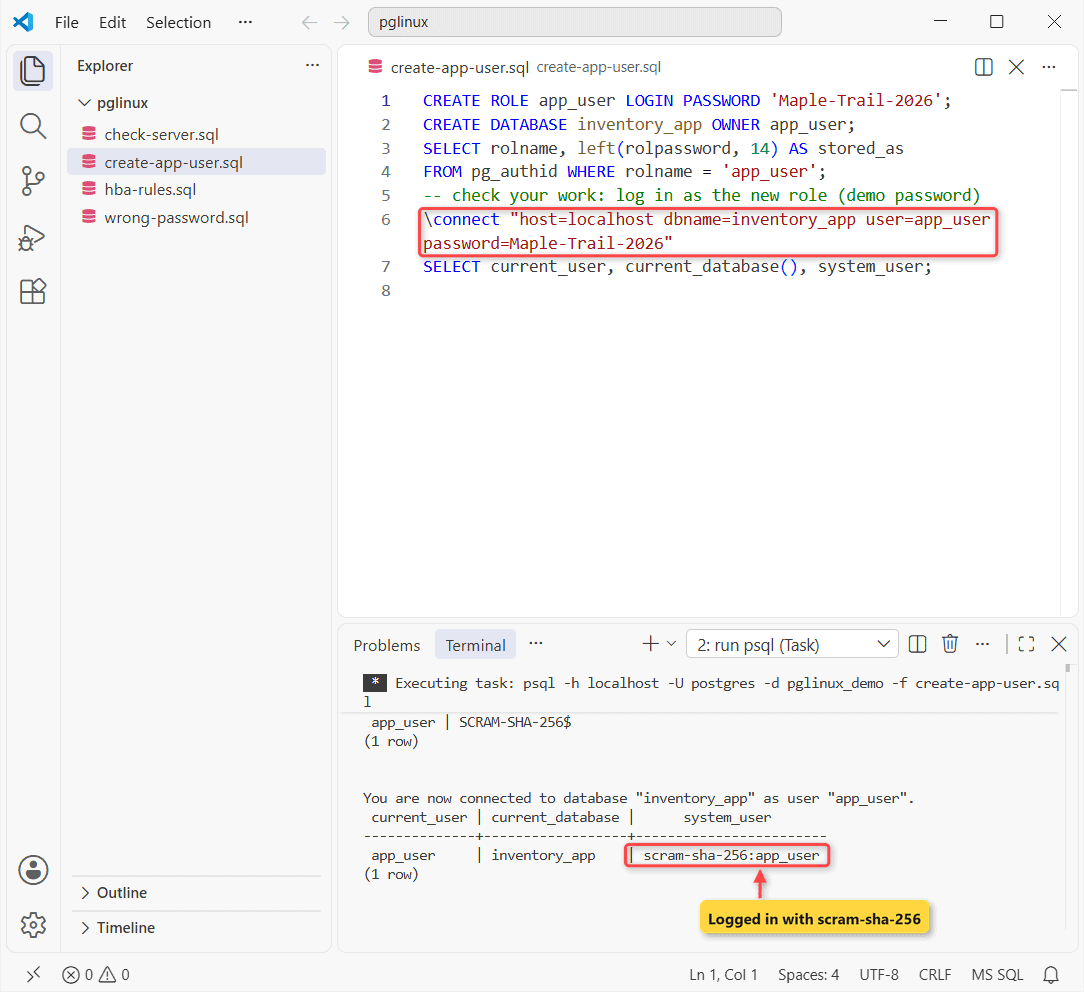
How does this work?
OWNER app_user gives the role full control of inventory_app, so you don’t need GRANT ALL. SCRAM-SHA-256$ means the password was hashed.
The \connect line is the check-your-work step: system_user returns scram-sha-256:app_user, so the login went through pg_hba.conf. Normally psql prompts for the password.
To change a PostgreSQL user password later, use ALTER ROLE.
Allow Remote PostgreSQL Connections: listen_addresses, pg_hba.conf, Firewall
listen_addresses picks the network interfaces; pg_hba.conf decides who logs in, from where, and how. These are the rules my server loaded:
psql -h localhost -U postgres -d pglinux_demo -f hba-rules.sqlHere’s hba-rules.sql:
SELECT line_number AS line, type, database, user_name,
       address, auth_method
FROM pg_hba_file_rules
WHERE NOT 'replication' = ANY (database)
ORDER BY line_number;
Output:
 line | type  | database | user_name |  address  |  auth_method
------+-------+----------+-----------+-----------+---------------
  113 | local | {all}    | {all}     |           | scram-sha-256
  115 | host  | {all}    | {all}     | 127.0.0.1 | scram-sha-256
  117 | host  | {all}    | {all}     | ::1       | scram-sha-256
(3 rows)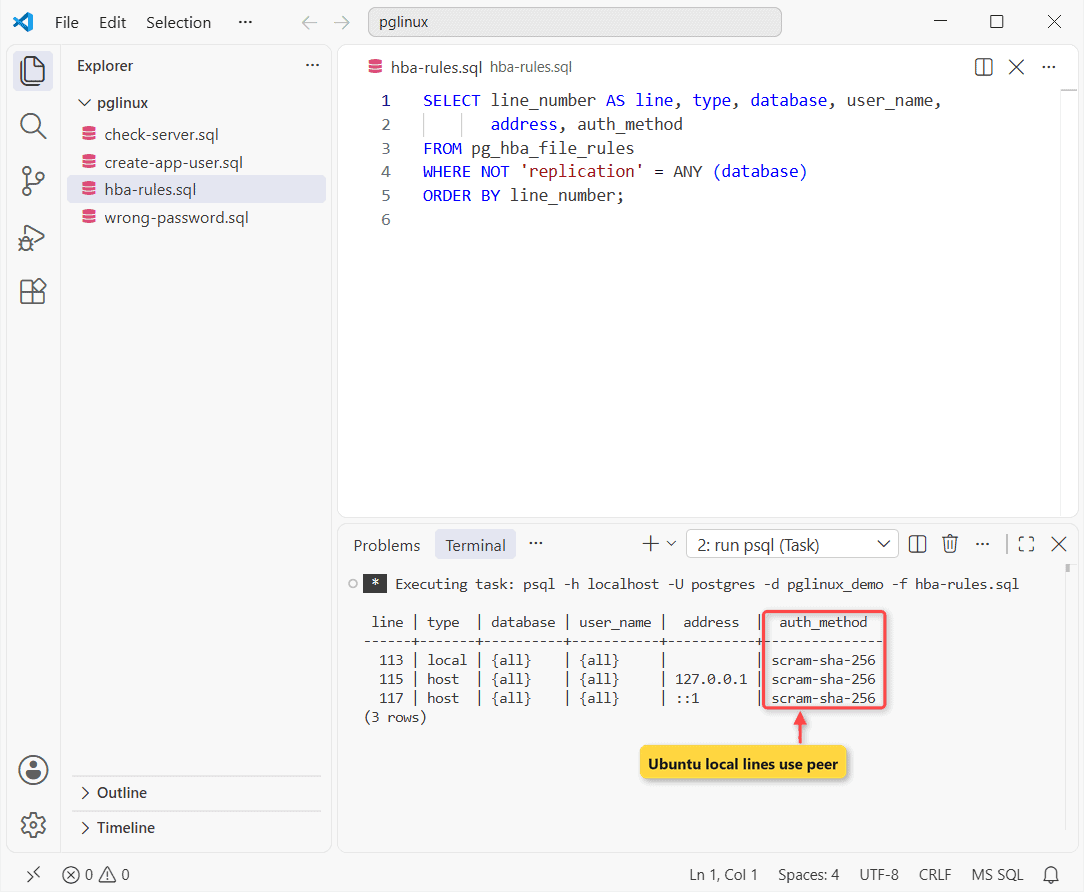
The first matching line wins. No fall-through. On Ubuntu, the local lines say peer instead.
On Linux, set this in postgresql.conf, then add a pg_hba.conf line (type, database, user, address, method) in the same folder:
listen_addresses = '*'

host    inventory_app    app_user    192.168.1.0/24    scram-sha-256
Important: ‘*’ listens on every network interface, so that pg_hba.conf line and the firewall rule below are the only things standing between the server and anyone who can reach it.
listen_addresses needs a restart; a pg_hba.conf edit needs only a reload. The PostgreSQL listen_addresses guide covers other values.
sudo systemctl restart postgresql
sudo -u postgres psql -c "SELECT pg_reload_conf();"
Then open TCP 5432 for that subnet with ufw (Ubuntu) or firewalld’s postgresql service (RHEL family):
sudo ufw allow proto tcp from 192.168.1.0/24 to any port 5432

sudo firewall-cmd --permanent --add-service=postgresql
sudo firewall-cmd --reload
Common Errors After a PostgreSQL Linux Install
Peer authentication failed for user
You’ll get this message (from the PostgreSQL 18 source) when psql -U app_user runs as your own Linux account:
FATAL: Peer authentication failed for user "app_user"Connect over TCP instead: psql -h localhost -U app_user inventory_app.
Connection refused
The docs’ example:
psql: error: connection to server at "server.joe.com" (123.123.123.123), port 5432 failed: Connection refused
        Is the server running on that host and accepting TCP/IP connections?
The service is down, listen_addresses is still localhost, or a firewall blocks 5432. See could not connect to the PostgreSQL server.
password authentication failed for user
I triggered this one with a wrong password on the same setup:
psql -h localhost -U postgres -d pglinux_demo -f wrong-password.sqlHere’s wrong-password.sql:
\connect "host=localhost dbname=inventory_app user=app_user password=Wrong-Pass-1"Output:
psql:wrong-password.sql:1: error: \connect: connection to server at "localhost" (::1), port 5432 failed: FATAL: password authentication failed for user "app_user"A pg_hba.conf line matched; the password didn’t. Fixes: PostgreSQL password authentication failed.
Things to Keep in Mind
- Service names differ: postgresql on Debian/Ubuntu, postgresql-18 for PGDG builds on RHEL.
- RHEL won’t start a server you never ran initdb for.
- A listen_addresses change needs a restart, not a reload.
- Never put trust on a host line in pg_hba.conf: anyone gets in without a password.
Where to go next: create a table in PostgreSQL inside inventory_app, then schedule a PostgreSQL database backup.
Setting up somewhere else? These pick up from here:
- PostgreSQL installation on Windows
- Installing MariaDB instead
- Connecting to PostgreSQL from apps and tools
- What PostgreSQL is, if you’re still deciding
Frequently Asked Questions
Can I run two PostgreSQL versions on one Linux server?
Yes. On Debian and Ubuntu each version gets its own cluster: the first takes port 5432, the next free one 5433. pg_lsclusters shows which is which.
Which PostgreSQL version does Rocky Linux install by default?
Per postgresql.org, RHEL, Rocky and AlmaLinux 10 ship 16; version 9 offers 16, 15 and 13 as modules. Fedora 43 and 44 ship 18.
How do I upgrade PostgreSQL on Linux to a newer major version?
On Debian and Ubuntu, pg_upgradecluster migrates a cluster. Elsewhere, use pg_upgrade or a dump and restore; see the pg_upgrade documentation.

Kumar Saurabh is a freelance software engineer who builds web and mobile apps with Next.js, React, Flutter and Python. From 2021 to 2024, Saurabh worked as an IT analyst and developer at TSInfo Technologies, writing technical articles on SQL and PostgreSQL. Saurabh writes the PostgreSQL, MySQL, MariaDB and MongoDB tutorials on DatabaseFAQs.com and holds a Master of Computer Applications (MCA) from Chandigarh University.