
Equi join isn’t a separate SQL Server keyword, and it isn’t faster or slower than the INNER JOIN you already write.
Quick answer: an equi join in SQL Server is any join whose condition compares columns with =. INNER JOIN … ON a.id = b.id is one, and so is the old comma list with the = in WHERE. I measured both to the same plan.
SELECT c.Name, o.OrderID, o.Amount
FROM dbo.Customers AS c
INNER JOIN dbo.Orders AS o ON o.CustomerID = c.CustomerID;
Six rows come back, one per order, because every order has a customer:
Name            OrderID     Amount
--------------- ----------- ----------
Hannah Brooks           101     240.00
Hannah Brooks           102      85.50
Tyler Reed              103    1200.00
Grace Miller            104     410.00
Grace Miller            105      60.00
Marcus Bennett          106     735.00

(6 rows affected)How I Tested the Equi Join Examples
Tested on: Microsoft SQL Server 2025 (RTM) - 17.0.1000.7, database compatibility level 170, sqlcmd in VS Code. Every query below runs against this one script: five customers (Olivia has no orders), six orders, three price bands and two stores.
CREATE TABLE dbo.Customers (CustomerID int PRIMARY KEY,
    Name nvarchar(15), State char(2));
CREATE TABLE dbo.Orders (OrderID int PRIMARY KEY, CustomerID int,
    OrderDate date, Amount decimal(8,2));
CREATE TABLE dbo.PriceBands (Band nvarchar(6),
    MinAmount decimal(8,2), MaxAmount decimal(8,2));
CREATE TABLE dbo.StoreStock (StoreID int, SKU varchar(8), OnHand int);
CREATE TABLE dbo.StorePrices (StoreID int, SKU varchar(8), Price decimal(6,2));

INSERT INTO dbo.Customers VALUES (1, N'Hannah Brooks', 'OH'),
    (2, N'Tyler Reed', 'TX'), (3, N'Grace Miller', 'CO'),
    (4, N'Marcus Bennett', 'GA'), (5, N'Olivia Hayes', 'OR');
INSERT INTO dbo.Orders VALUES
    (101, 1, '2026-01-12', 240.00), (102, 1, '2026-02-03',   85.50),
    (103, 2, '2026-02-17', 1200.00), (104, 3, '2026-03-08', 410.00),
    (105, 3, '2026-04-21',  60.00), (106, 4, '2026-05-02', 735.00);
INSERT INTO dbo.PriceBands VALUES (N'Small', 0, 99.99),
    (N'Medium', 100, 499.99), (N'Large', 500, 99999.99);
INSERT INTO dbo.StoreStock VALUES (10, 'MUG-01', 40), (10, 'CAP-02', 12),
    (20, 'MUG-01', 25), (20, 'CAP-02', 30);
INSERT INTO dbo.StorePrices VALUES (10, 'MUG-01', 12.99), (10, 'CAP-02', 18.50),
    (20, 'MUG-01', 13.49), (20, 'CAP-02', 17.99);
You’ll notice the tables are tiny. The claims I test here are about syntax, row counts and plan shape, not raw speed, so 5 rows prove as much as 5 million.
Is an Equi Join the Same as an Inner Join?
For the comma form, yes, and I didn’t take that on faith. I ran the explicit INNER JOIN … ON and the comma + WHERE version, then asked the plan cache for each statement’s query_plan_hash:
SET NOCOUNT ON;
SELECT COUNT(*) AS RowsBack, SUM(o.Amount) AS Total
FROM dbo.Customers AS c
INNER JOIN dbo.Orders AS o ON o.CustomerID = c.CustomerID;
SELECT COUNT(*) AS RowsBack, SUM(o.Amount) AS Total
FROM dbo.Customers AS c, dbo.Orders AS o
WHERE o.CustomerID = c.CustomerID;
SELECT COUNT(*) AS NoWhere FROM dbo.Customers AS c, dbo.Orders AS o;
SELECT IIF(q.txt LIKE '%INNER JOIN%', 'INNER JOIN ON', 'comma + WHERE')
       AS Form, s.query_plan_hash
FROM sys.dm_exec_query_stats AS s
CROSS APPLY (SELECT SUBSTRING(t.text, s.statement_start_offset/2 + 1, 100)
    AS txt FROM sys.dm_exec_sql_text(s.sql_handle) AS t) AS q
WHERE q.txt LIKE 'SELECT COUNT(*) AS RowsBack%dbo.Customers AS c%';
What came back:
RowsBack    Total
----------- ----------------------------------------
          6                                  2730.50
RowsBack    Total
----------- ----------------------------------------
          6                                  2730.50
NoWhere
-----------
         30
Form          query_plan_hash
------------- ------------------
INNER JOIN ON 0x882F292CA1DD81AE
comma + WHERE 0x882F292CA1DD81AE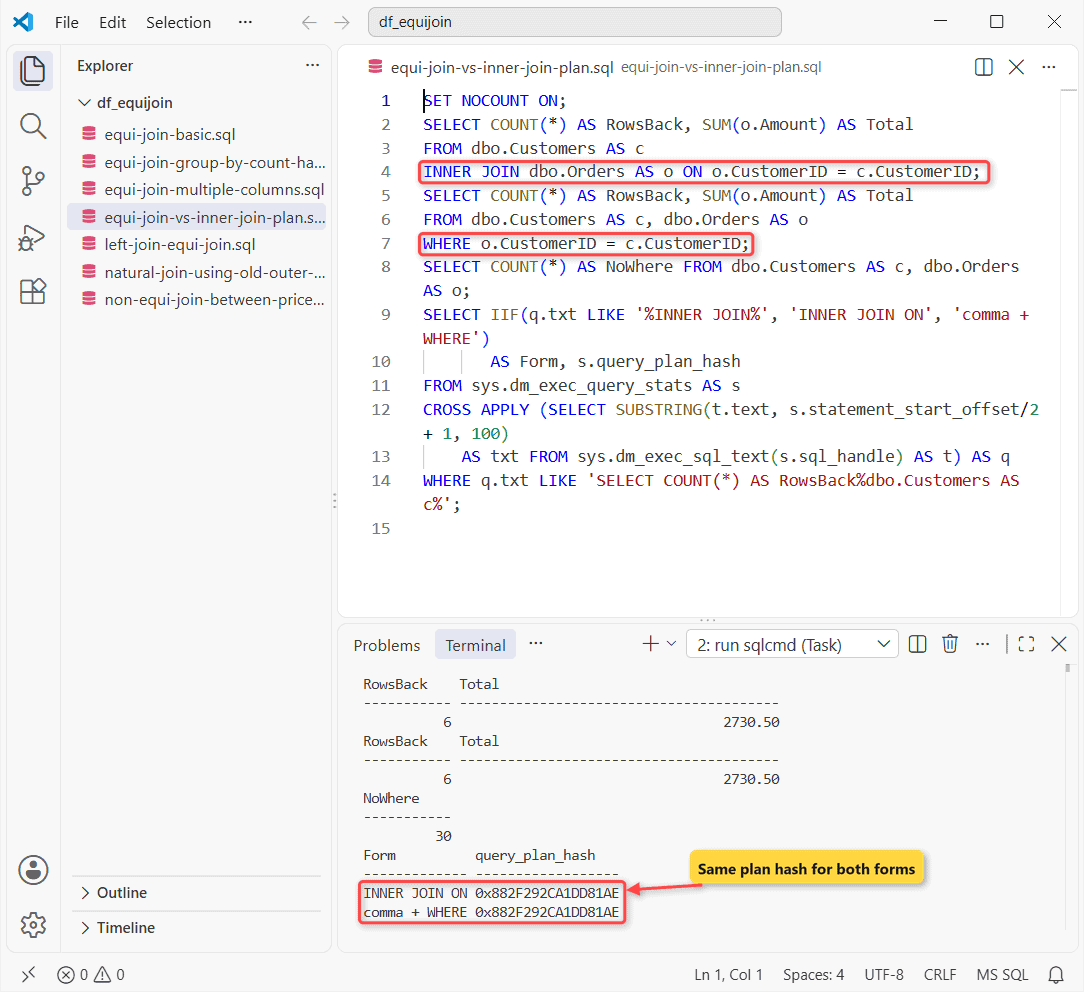
| Form | Rows | Total | query_plan_hash |
|---|---|---|---|
| INNER JOIN … ON | 6 | $2,730.50 | same |
| Comma + WHERE | 6 | $2,730.50 | same |
The query text hashes differ, the plan hash doesn’t. The optimizer turns both into one logical inner join before it picks an operator, so you won’t find a performance argument for either form.
The terms can trip you up. Every equi join written with INNER JOIN is an inner join, but an inner join isn’t always an equi join. Put >= or BETWEEN in ON and it’s a non-equi inner join.
If inner joins are new to you, start with how INNER JOIN matches rows.
Verdict: use INNER JOIN … ON when you write new code. Microsoft calls it the preferred method, and it keeps the join condition apart from your filters (more on that in INNER JOIN with a WHERE clause).
Equi Join vs Natural Join: SQL Server Has No NATURAL JOIN
Textbooks put natural join next to equi join, since it’s an equi join on every same-named column. Oracle, MySQL and PostgreSQL accept it. I tried it, plus USING and the pre-2005 *= outer join, on SQL Server 2025:
SET NOCOUNT ON;
BEGIN TRY
    EXEC (N'SELECT c.Name FROM dbo.Customers c NATURAL JOIN dbo.Orders o;');
END TRY BEGIN CATCH PRINT CONCAT(N'NATURAL: Msg ', ERROR_NUMBER(), N' ', ERROR_MESSAGE()); END CATCH;
BEGIN TRY
    EXEC (N'SELECT c.Name FROM dbo.Customers c JOIN dbo.Orders o USING (CustomerID);');
END TRY BEGIN CATCH PRINT CONCAT(N'USING:   Msg ', ERROR_NUMBER(), N' ', ERROR_MESSAGE()); END CATCH;
BEGIN TRY
    EXEC (N'SELECT c.Name FROM dbo.Customers c, dbo.Orders o
            WHERE c.CustomerID *= o.CustomerID;');
END TRY BEGIN CATCH PRINT CONCAT(N'*=:      Msg ', ERROR_NUMBER(), N' ', ERROR_MESSAGE()); END CATCH;
-- no alias: NATURAL quietly becomes the alias of Customers
SELECT COUNT(*) AS RowsBack FROM dbo.Customers NATURAL
JOIN dbo.Orders ON Orders.CustomerID = NATURAL.CustomerID;
Messages:
NATURAL: Msg 102 Incorrect syntax near 'NATURAL'.
USING:   Msg 102 Incorrect syntax near 'USING'.
*=:      Msg 102 Incorrect syntax near '*='.
RowsBack
-----------
          6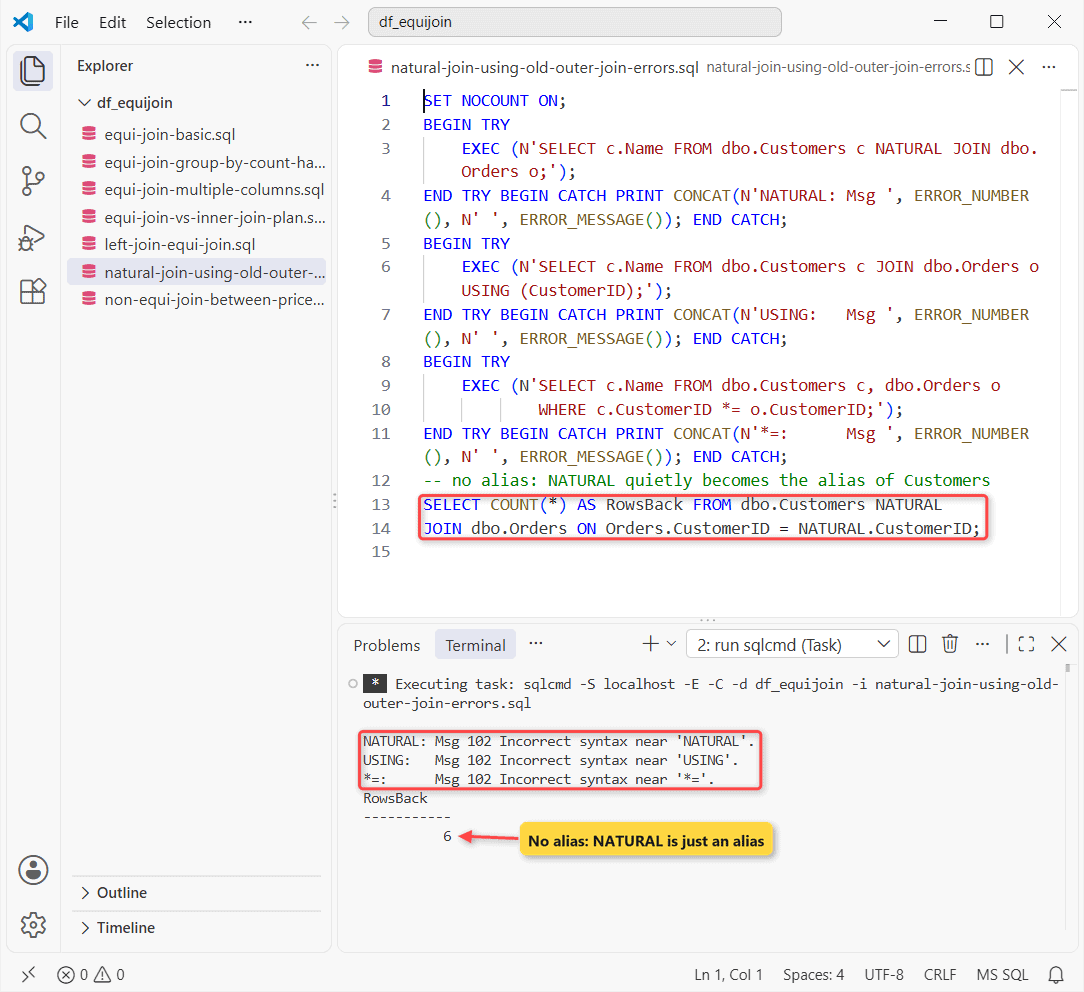
All three are plain syntax errors, Msg 102.
The last query is the surprise. With no alias, SQL Server reads NATURAL as the alias for Customers, so Customers NATURAL JOIN Orders ON ... runs and returns 6 rows. It’s an ordinary inner join that only looks like a natural one.
The fix for all three is the same: spell out ON a.col = b.col for every key column. For a PostgreSQL comparison, PostgreSQL joins covers NATURAL and USING where they do exist.
The old *= outer join syntax is gone
Legacy code sometimes still carries WHERE a.id *= b.id for a left join. SQL Server 2025 supports compatibility levels 100 through 170, and I got the same Msg 102 at level 100 and at 170.
Rewrite it as LEFT JOIN … ON, which is still an equi join, as the next sections show.
Equi Join on Multiple Columns (Composite Key)
Both stores sell the same two SKUs at different prices, so the real key is (StoreID, SKU). Join on SKU alone and each stock row matches two price rows:
SET NOCOUNT ON;
SELECT COUNT(*) AS SkuOnly FROM dbo.StoreStock AS s
JOIN dbo.StorePrices AS p ON p.SKU = s.SKU;
SELECT s.StoreID, s.SKU, s.OnHand, p.Price,
       s.OnHand * p.Price AS StockValue
FROM dbo.StoreStock AS s
JOIN dbo.StorePrices AS p
  ON p.StoreID = s.StoreID AND p.SKU = s.SKU
ORDER BY s.StoreID, s.SKU;
Result:
SkuOnly
-----------
          8
StoreID     SKU      OnHand      Price    StockValue
----------- -------- ----------- -------- -------------------
         10 CAP-02            12    18.50              222.00
         10 MUG-01            40    12.99              519.60
         20 CAP-02            30    17.99              539.70
         20 MUG-01            25    13.49              337.25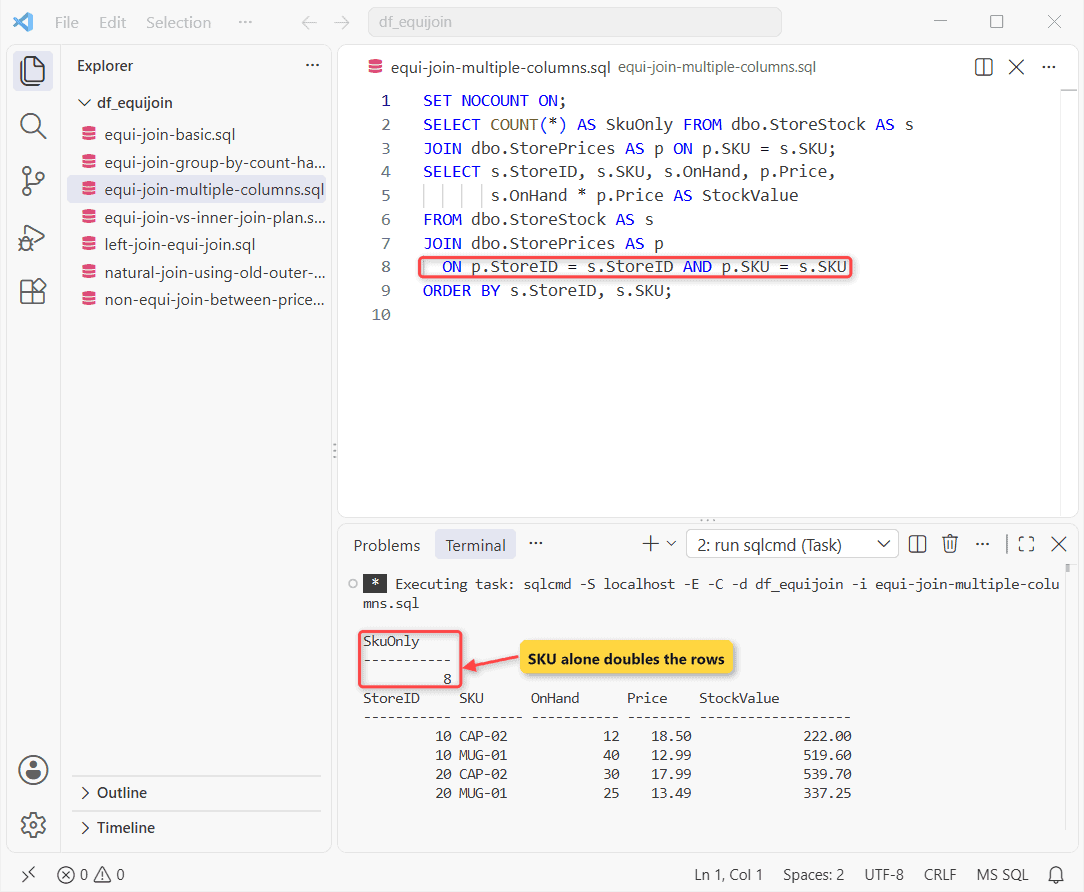
SKU only gives 8 rows, double the 4 real ones, and any SUM over them doubles too. Matching both columns with AND gives one price per stock row: store 10’s mugs are worth $519.60 and store 20’s $337.25.
That’s the general rule for duplicate rows after a join: the key on one side isn’t unique for the columns you joined on. Adding DISTINCT hides the symptom, and DISTINCT in a join shows when it’s safe and when it isn’t.
Non-Equi Join in SQL Server: Price Bands With BETWEEN
A non-equi join uses >, >=, <> or BETWEEN instead of =. The classic real case is a lookup by range, like putting each order into a price band:
SET NOCOUNT ON;
SELECT o.OrderID, o.Amount, b.Band
FROM dbo.Orders AS o
JOIN dbo.PriceBands AS b
  ON o.Amount BETWEEN b.MinAmount AND b.MaxAmount
ORDER BY o.Amount;
BEGIN TRY
    EXEC (N'SELECT o.OrderID FROM dbo.Orders o JOIN dbo.PriceBands b
        ON o.Amount >= b.MinAmount OPTION (HASH JOIN);');
END TRY BEGIN CATCH PRINT CONCAT(N'Msg ', ERROR_NUMBER(), N': ', ERROR_MESSAGE()); END CATCH;
Output:
OrderID     Amount     Band
----------- ---------- ------
        105      60.00 Small
        102      85.50 Small
        101     240.00 Medium
        104     410.00 Medium
        106     735.00 Large
        103    1200.00 Large
Msg 8622: Query processor could not produce a query plan because of the hints defined in this query. Resubmit the query without specifying any hints and without using SET FORCEPLAN.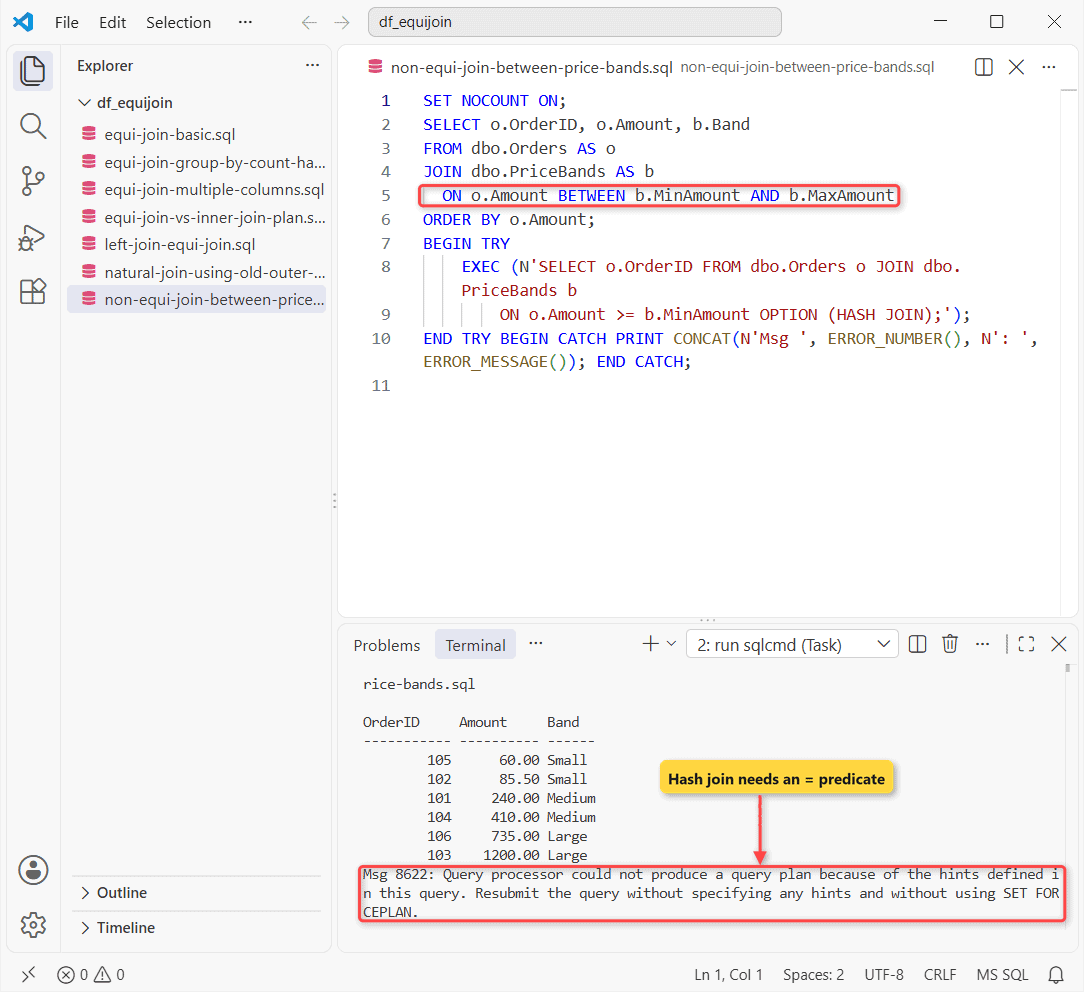
Each order lands in exactly one band because the ranges don’t overlap: two Small, two Medium, two Large. If two bands overlapped, an order would match both and show up twice.
The second statement is the part most posts skip. Hash and merge joins need at least one equality predicate, so forcing HASH JOIN on a range condition fails with Msg 8622.
A non-equi join leaves the optimizer one choice, nested loops, which is why big range joins get slow.
Is a LEFT JOIN With = Still an Equi Join?
Yes. Equi describes the operator in the condition, not the join type. This LEFT JOIN uses = and keeps Olivia, who has no orders:
SET NOCOUNT ON;
SELECT c.Name, o.OrderID, o.Amount
FROM dbo.Customers AS c
LEFT JOIN dbo.Orders AS o ON o.CustomerID = c.CustomerID
WHERE c.State IN ('CO', 'OR');
Rows:
Name            OrderID     Amount
--------------- ----------- ----------
Grace Miller            104     410.00
Grace Miller            105      60.00
Olivia Hayes           NULL       NULL
Grace has two matches; Olivia gets one row of NULLs. An inner equi join would have dropped her, and INNER JOIN vs LEFT JOIN measures that difference on more rows. RIGHT and FULL joins with = count as equi joins too.
Equi Join With GROUP BY, COUNT, HAVING and ORDER BY
Your join doesn’t change how aggregates work; it only decides which rows reach GROUP BY. Here’s orders per customer, kept only when there are two or more, sorted by spend, then a LIKE filter with ORDER BY:
SET NOCOUNT ON;
SELECT c.Name, COUNT(*) AS Orders, SUM(o.Amount) AS Spent
FROM dbo.Customers AS c
JOIN dbo.Orders AS o ON o.CustomerID = c.CustomerID
GROUP BY c.Name
HAVING COUNT(*) >= 2
ORDER BY Spent DESC;
SELECT c.Name, o.OrderID, o.Amount
FROM dbo.Customers AS c, dbo.Orders AS o
WHERE o.CustomerID = c.CustomerID AND c.Name LIKE N'G%'
ORDER BY o.OrderDate DESC;
Output:
Name            Orders      Spent
--------------- ----------- ----------------------------------------
Grace Miller              2                                   470.00
Hannah Brooks             2                                   325.50
Name            OrderID     Amount
--------------- ----------- ----------
Grace Miller            105      60.00
Grace Miller            104     410.00
Hannah spent $325.50 over two orders and Grace $470.00, so Grace sorts first; Tyler and Marcus fail the HAVING test with one order each. For counts that keep zero-order customers, see LEFT JOIN with COUNT.
The old posts on this topic had an ORDER BY example with a comma list and no WHERE. That isn’t an equi join at all. The NoWhere count above shows it: 30 rows, every customer paired with every order, a cross join.
Where the Equi Join Answer Flips
“Equi join and inner join are the same” holds for the comma form with every key in WHERE. It changes when:
- You forget one predicate in the comma list. ON is required after INNER JOIN, so that typo can’t happen there.
- You need an outer join. Only
LEFT/RIGHT/FULL JOIN … ONcan express it now. - The condition is a range. Then it’s a non-equi join and the plan options shrink to nested loops.
- The join key isn’t unique. The syntax is fine, the row count isn’t.
Common Errors With Equi Joins and How to Fix Them
| Symptom | Cause | Fix |
|---|---|---|
| Msg 102 near ‘NATURAL’ or ‘USING’ | Syntax SQL Server doesn’t have | Write ON a.col = b.col |
| Msg 102 near ‘*=’ | Old outer join operator | LEFT JOIN … ON |
| Msg 8622 with a join hint | Hash/merge forced on a range join | Drop the hint or add an = predicate |
| Twice the expected rows | Key not unique on one side | Join on every key column |
Joining three or more tables? The same rules apply per pair, as joining multiple tables shows.
My Rule of Thumb for Equi Joins
Write every equi join as JOIN … ON with all key columns, and keep WHERE for filters. I’d re-test the plan-hash check only if a future version changes how the optimizer simplifies joins. Related reading:
- When a table joins itself on =: SQL Server self join
- COUNT with JOIN and GROUP BY
Frequently Asked Questions
Do equi join columns need the same name or data type?
No to the name. The types must be compatible or implicitly convertible; otherwise CAST one side (Joins (SQL Server)).
Do NULL values match in an equi join?
No. NULL = NULL isn’t true, so rows with NULL keys never match. Only an outer join keeps them, padded with NULLs.
Is an equi join faster than a non-equi join?
Usually, on large tables. Merge join needs equality columns to sort on, and hash join needs an equality key, so a pure range join can only use nested loops.
Can an equi join use a WHERE clause and an ON clause together?
Yes. Put the = key match in ON and filters in WHERE. For LEFT JOIN, a WHERE filter on the right table removes the NULL rows.

Shivam Dogra is a cloud database developer and Team Lead at TSInfo Technologies, where he has worked since June 2021. He writes the SQL Server and Oracle tutorials on DatabaseFAQs.com, covering queries, joins, stored procedures, triggers and permissions. Shivam holds a Master of Computer Applications (MCA) from Chandigarh University.