
One statement does the job. To create database in SQL Server, connect to the instance and run CREATE DATABASE with a name; every setting you skip is copied from the model database:
CREATE DATABASE CreateDbDemoSales;That gave me an 8 MB data file, an 8 MB log, FULL recovery and Query Store already switched on. The rest of this page is what I learned pushing past the one-liner.
CREATE DATABASE With Defaults: What You Get From model
My test setup: SQL Server 2025 (17.0.1000.7) Standard Developer edition on Windows 11, Windows authentication, sqlcmd in VS Code. I ran each script connected to master, which is where CREATE DATABASE belongs.
The first script creates the database and lines it up against model in sys.databases:
CREATE DATABASE CreateDbDemoSales;
GO
SET NOCOUNT ON;
SELECT CAST(name AS varchar(17)) AS name,
       CAST(recovery_model_desc AS varchar(8)) AS recovery,
       compatibility_level AS compat,
       CAST(collation_name AS varchar(28)) AS collation,
       is_query_store_on AS qs_on,
       CAST(CASE WHEN owner_sid = SUSER_SID() THEN 'me'
                 ELSE SUSER_SNAME(owner_sid) END AS varchar(5)) AS owner
FROM sys.databases
WHERE name IN (N'model', N'CreateDbDemoSales');
sqlcmd printed:
name              recovery compat collation                    qs_on owner
----------------- -------- ------ ---------------------------- ----- -----
model             FULL        170 SQL_Latin1_General_CP1_CI_AS     1 sa
CreateDbDemoSales FULL        170 SQL_Latin1_General_CP1_CI_AS     1 me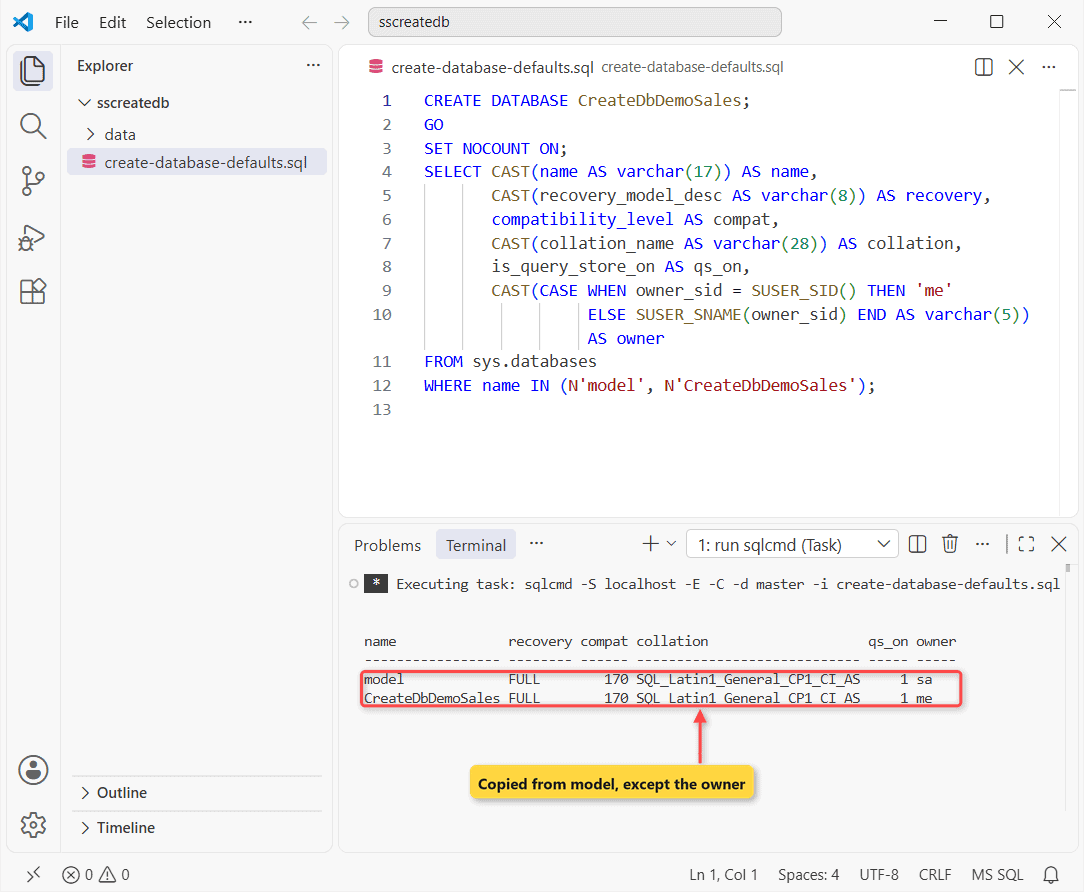
What this tells me: the new row is a copy of model. Compatibility level 170 is the SQL Server 2025 level, and qs_on = 1 means Query Store is on by default, which started with SQL Server 2022.
The owner is the one difference. It’s whoever ran the statement (my login, printed as me here), while model belongs to sa.
FULL recovery is the trap. Once you take the first full backup, the log keeps growing until you back it up too. For a dev database, switch to SIMPLE; for production, plan the log backups in SQL Server.
Where Did SQL Server Put the Files? Default Location and Size
Nothing in the short statement says where the files go. The instance’s default paths decide, and sys.master_files shows the result:
SET NOCOUNT ON;
SELECT CAST(SERVERPROPERTY('InstanceDefaultDataPath') AS varchar(70)) AS default_data_path;
SELECT CAST(DB_NAME(database_id) AS varchar(17)) AS db,
       CAST(RIGHT(physical_name, CHARINDEX('\', REVERSE(physical_name)) - 1)
            AS varchar(25)) AS file_name,
       size / 128 AS size_mb,
       growth / 128 AS growth_mb,
       max_size
FROM sys.master_files
WHERE database_id IN (DB_ID(N'model'), DB_ID(N'CreateDbDemoSales'));
Output:
default_data_path
----------------------------------------------------------------------
C:\Program Files\Microsoft SQL Server\MSSQL17.MSSQLSERVER\MSSQL\DATA\
db                file_name                 size_mb     growth_mb   max_size
----------------- ------------------------- ----------- ----------- -----------
model             model.mdf                           8          64          -1
model             modellog.ldf                        8          64          -1
CreateDbDemoSales CreateDbDemoSales.mdf               8          64          -1
CreateDbDemoSales CreateDbDemoSales_log.ldf           8          64   268435456
Both files landed in the instance’s DATA folder at 8 MB with 64 MB autogrowth. The data file grows until the disk is full (max_size = -1). The new log stops at 268,435,456 pages (2 TB), though model’s own log shows -1.
One surprise: the CREATE DATABASE reference says a missing LOG ON gets 25% of the data files or 512 KB. I got 8 MB, the size of model’s log, so model wins when it’s bigger.
Once the database fills up, here’s how to check database size in SQL Server.
Create a Database With a File Location, Initial Size and Autogrowth
For anything real, I name the files, pick the folder and size them for the data I expect (Microsoft’s advice is to make data files as large as you can predict). ON PRIMARY describes the data file, LOG ON the log:
CREATE DATABASE CreateDbDemoApp
ON PRIMARY
    (NAME = CreateDbDemoApp_data,
     FILENAME = 'C:\DatabaseFAQsDemo\sscreatedb\data\CreateDbDemoApp.mdf',
     SIZE = 128MB, MAXSIZE = 10GB, FILEGROWTH = 64MB)
LOG ON
    (NAME = CreateDbDemoApp_log,
     FILENAME = 'C:\DatabaseFAQsDemo\sscreatedb\data\CreateDbDemoApp_log.ldf',
     SIZE = 32MB, FILEGROWTH = 64MB);
My first run failed:
Msg 5123, Level 16, State 1, Server YOUR-SERVER, Line 1
CREATE FILE encountered operating system error 5(Access is denied.) while attempting to open or create the physical file 'C:\DatabaseFAQsDemo\sscreatedb\data\CreateDbDemoApp.mdf'.
Msg 1802, Level 16, State 4, Server YOUR-SERVER, Line 1
CREATE DATABASE failed. Some file names listed could not be created. Check related errors.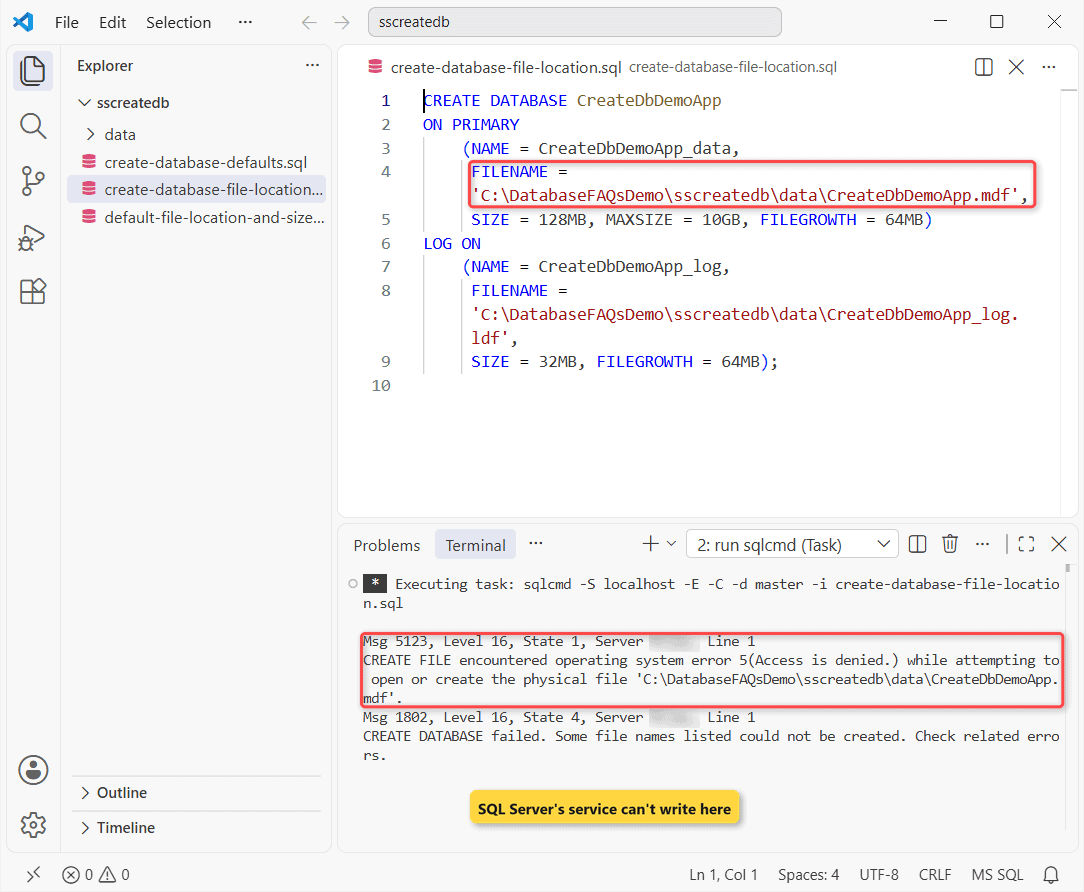
I’d made C:\DatabaseFAQsDemo\sscreatedb\data private to my Windows account, the way folders under C:\Users are. That’s the catch: SQL Server creates the file, not you, so its service account needs rights on the folder. The folder must also exist already.
Grant the SQL Server Service Account Access to the Folder
First find the account the engine runs as:
SET NOCOUNT ON;
SELECT CAST(servicename AS varchar(30)) AS servicename,
       CAST(service_account AS varchar(25)) AS service_account
FROM sys.dm_server_services;
Output:
servicename                    service_account
------------------------------ -------------------------
SQL Server (MSSQLSERVER)       NT Service\MSSQLSERVER
SQL Server Agent (MSSQLSERVER) NT Service\SQLSERVERAGENT
Then grant it full control on that one folder from a PowerShell prompt you own:
icacls 'C:\DatabaseFAQsDemo\sscreatedb\data' /grant 'NT SERVICE\MSSQLSERVER:(OI)(CI)F'icacls replied:
processed file: C:\DatabaseFAQsDemo\sscreatedb\data
Successfully processed 1 files; Failed processing 0 files
The same create-database-file-location.sql ran cleanly on the second try. Here’s where the files ended up:
SET NOCOUNT ON;
SELECT CAST(type_desc AS varchar(4)) AS type,
       CAST(physical_name AS varchar(59)) AS physical_name,
       CAST(size / 128 AS varchar(4)) AS size,
       CAST(growth / 128 AS varchar(6)) AS growth,
       CAST(CASE max_size WHEN -1 THEN -1 ELSE max_size / 128 END
            AS varchar(7)) AS max_mb
FROM sys.master_files
WHERE database_id = DB_ID(N'CreateDbDemoApp');
Output:
type physical_name                                               size growth max_mb
---- ----------------------------------------------------------- ---- ------ -------
ROWS C:\DatabaseFAQsDemo\sscreatedb\data\CreateDbDemoApp.mdf     128  64     10240
LOG  C:\DatabaseFAQsDemo\sscreatedb\data\CreateDbDemoApp_log.ldf 32   64     2097152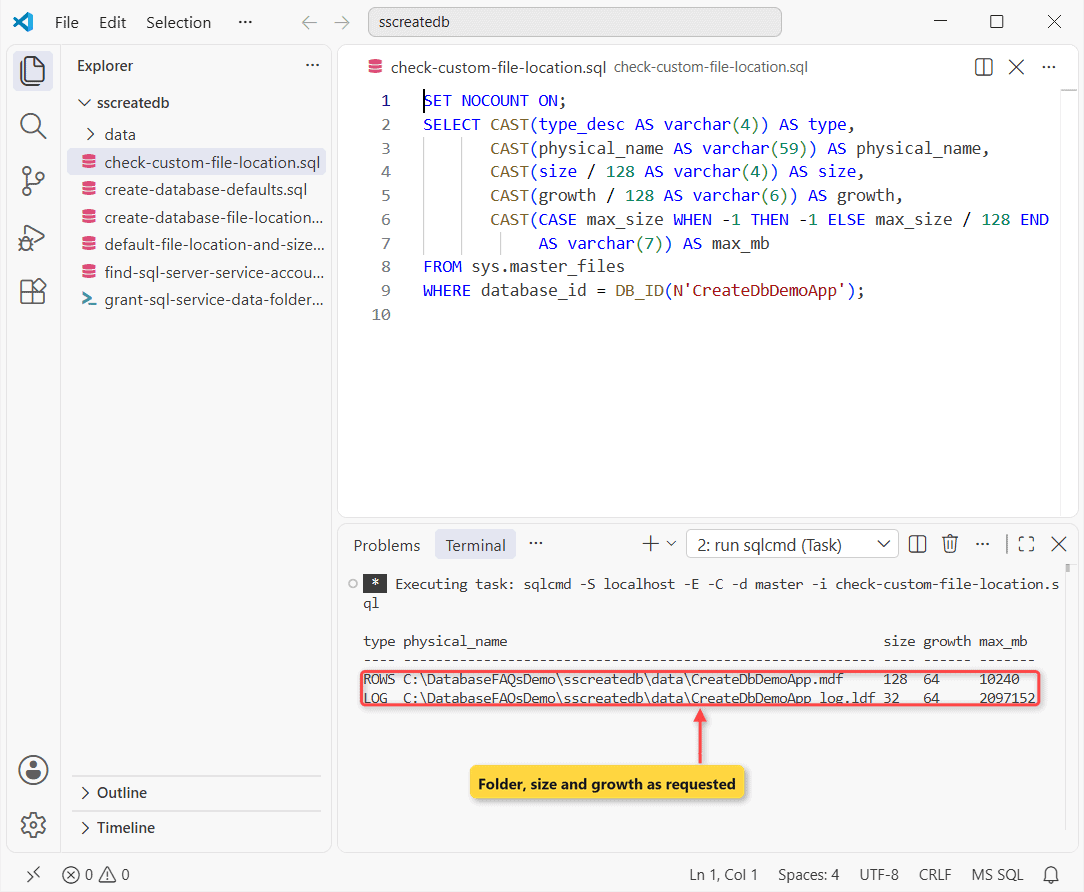
SIZE, FILEGROWTH and MAXSIZE came through exactly (all in MB): 128 MB data capped at 10,240 MB, a 32 MB log. Units default to MB; need to relocate them later? See how to move SQL Server database files.
Set the Database Collation With COLLATE
Leave COLLATE out and the database takes the instance collation, SQL_Latin1_General_CP1_CI_AS on my US-English install. Writing it out pins the behavior, even on a server set up differently:
CREATE DATABASE CreateDbDemoUS
    COLLATE SQL_Latin1_General_CP1_CI_AS;
CREATE DATABASE CreateDbDemoUtf8
    COLLATE Latin1_General_100_CI_AS_SC_UTF8;
GO
SET NOCOUNT ON;
SELECT CAST(name AS varchar(17)) AS name,
       CAST(collation_name AS varchar(34)) AS collation_name
FROM sys.databases
WHERE name LIKE N'CreateDbDemo%';
Output:
name              collation_name
----------------- ----------------------------------
CreateDbDemoUS    SQL_Latin1_General_CP1_CI_AS
CreateDbDemoUtf8  Latin1_General_100_CI_AS_SC_UTF8
The second database uses a UTF-8 collation, which needs SQL Server 2019 or later. Pick collation at create time; changing it later doesn’t convert columns you’ve already created.
How Do You Create a Database Only If It Doesn’t Exist?
SQL Server has no CREATE DATABASE IF NOT EXISTS, unlike MySQL. Run the plain statement twice and you get Msg 1801, so I check DB_ID() first:
SET NOCOUNT ON;
BEGIN TRY
    CREATE DATABASE CreateDbDemoSales;
END TRY
BEGIN CATCH
    SELECT CAST(ERROR_NUMBER() AS varchar(5)) AS error,
           CAST(ERROR_MESSAGE() AS varchar(78)) AS message;
END CATCH;
IF DB_ID(N'CreateDbDemoSales') IS NULL
    CREATE DATABASE CreateDbDemoSales;
ELSE
    PRINT 'CreateDbDemoSales already exists, skipped.';
Result:
error message
----- ------------------------------------------------------------------------------
1801  Database 'CreateDbDemoSales' already exists. Choose a different database name.
CreateDbDemoSales already exists, skipped.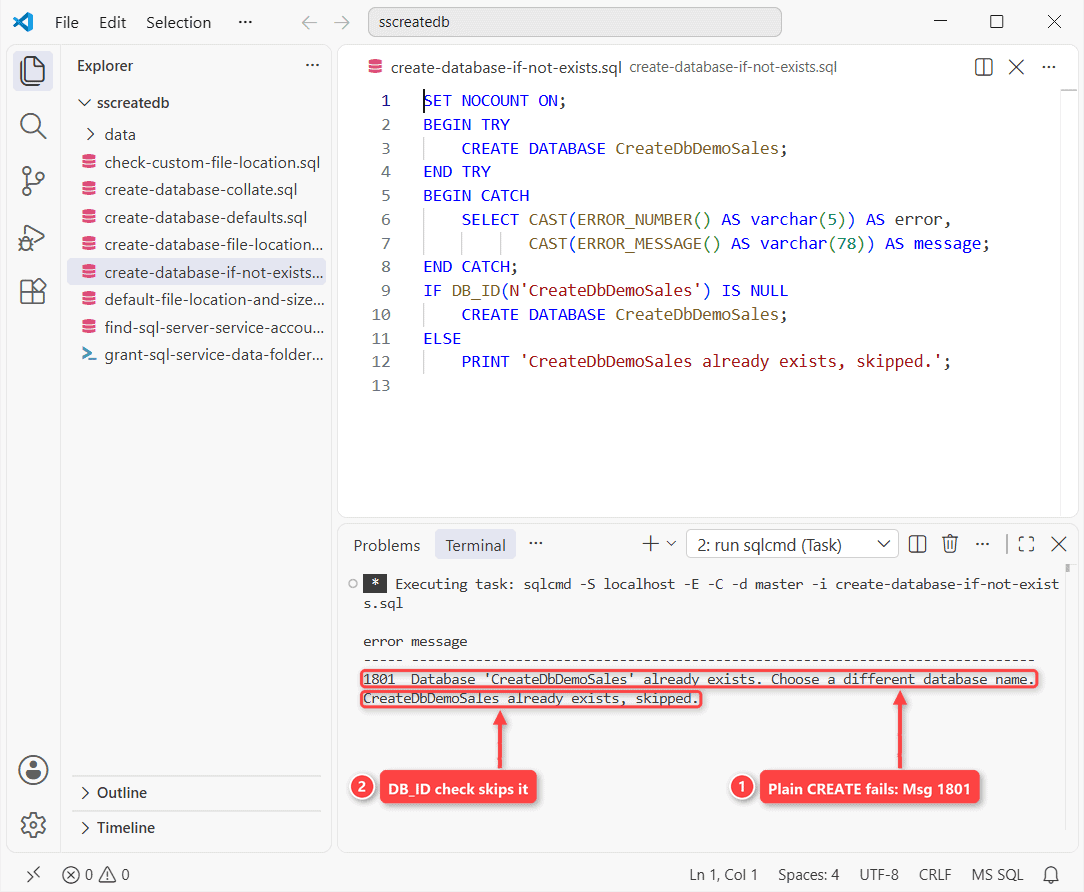
DB_ID(N'name') returns NULL when no database has that name, so the IF works as a create-if-missing guard in deployment scripts. The reverse, DROP DATABASE IF EXISTS, does exist (SQL Server 2016+), same as DROP TABLE IF EXISTS.
Database Names With Spaces or Brackets
Names follow identifier rules and can be up to 128 characters. Anything with a space or a symbol needs square brackets, and a closing bracket inside the name is doubled:
CREATE DATABASE [CreateDbDemo Sales 2026];
CREATE DATABASE [CreateDbDemo[West]]];
GO
SET NOCOUNT ON;
SELECT CAST(name AS varchar(23)) AS name,
       CAST(QUOTENAME(name) AS varchar(26)) AS quoted
FROM sys.databases
WHERE name LIKE N'CreateDbDemo %' OR name LIKE N'CreateDbDemo[[]%';
Output:
name                    quoted
----------------------- --------------------------
CreateDbDemo Sales 2026 [CreateDbDemo Sales 2026]
CreateDbDemo[West]      [CreateDbDemo[West]]]
QUOTENAME() produces that escaped form for you, handy in dynamic SQL. I still avoid spaces; every script after that has to remember the brackets. To list what’s there, find the database name in SQL Server.
Create a New Database in SSMS (New Database Dialog)
SSMS gets you to the same statement through a dialog. These steps follow Microsoft Learn and match SSMS 21:
- In Object Explorer, connect to the instance and expand it.
- Right-click Databases and select New Database….
- On the General page, type the database name. Select OK now to take every default.
- Still on General, select (…) next to Owner to change it, and edit the Initial Size, Autogrowth and Path cells in the Database files grid.
- On the Options page, choose the collation, recovery model and compatibility level.
- On the Filegroups page, select Add to create another filegroup.
- Select OK, then right-click Databases and choose Refresh to see it.
Before you select OK, open the Script drop-down at the top of the dialog. SSMS writes the CREATE DATABASE it would run into a query window, which is a quick way to learn the T-SQL above.
On SQL Server 2019, the dialog and steps are the same. You’ll see compatibility level 150, and Query Store isn’t on by default there. Next, build your first table with SSMS Table Designer.
Who Owns the New Database, and Who Can Create One?
Creating one takes CREATE DATABASE permission in master, or CREATE ANY DATABASE, or ALTER ANY DATABASE (the dbcreator role has it). Since the creator becomes the owner, many teams hand ownership to sa:
SET NOCOUNT ON;
SELECT CASE WHEN owner_sid = SUSER_SID() THEN 'my login' END AS owner_before
FROM sys.databases WHERE name = N'CreateDbDemoSales';
ALTER AUTHORIZATION ON DATABASE::CreateDbDemoSales TO sa;
SELECT CAST(SUSER_SNAME(owner_sid) AS varchar(11)) AS owner_after
FROM sys.databases WHERE name = N'CreateDbDemoSales';
Output:
owner_before
------------
my login
owner_after
-----------
sa
Ownership changed without touching any data. The old keeper post also set up a login, user and db_owner membership right after this step; read up on SQL Server user permissions before you grant db_owner, then list the users in the database to check.
Common CREATE DATABASE Errors I Hit
Two more came from this script, caught with TRY…CATCH in SQL Server:
SET NOCOUNT ON;
BEGIN TRY
    BEGIN TRANSACTION;
    CREATE DATABASE CreateDbDemoTran;
    COMMIT;
END TRY
BEGIN CATCH
    IF @@TRANCOUNT > 0 ROLLBACK;
    SELECT ERROR_NUMBER() AS error,
           CAST(ERROR_MESSAGE() AS varchar(75)) AS message;
END CATCH;
CREATE DATABASE CreateDbDemoTiny
    ON (NAME = CreateDbDemoTiny_data,
        FILENAME = 'C:\DatabaseFAQsDemo\sscreatedb\data\CreateDbDemoTiny.mdf',
        SIZE = 4MB);
SELECT size / 128 AS size_mb FROM sys.master_files
WHERE database_id = DB_ID(N'CreateDbDemoTiny') AND type = 0;
Output:
error       message
----------- ---------------------------------------------------------------------------
        226 CREATE DATABASE statement not allowed within multi-statement transaction.
size_mb
-----------
          8
The first is a hard rule: CREATE DATABASE only runs in autocommit mode. The second surprised me. I asked for 4 MB, the docs say the primary file can’t be smaller than model’s, and SQL Server quietly gave me 8 MB, no error.
| What I did | What came back | Fix |
|---|---|---|
| Custom folder without rights | Msg 5123, OS error 5, then Msg 1802 | Grant the service account on the folder |
| Ran the CREATE twice | Msg 1801 already exists | IF DB_ID(N’…’) IS NULL |
| Wrapped it in BEGIN TRANSACTION | Msg 226 | Run it on its own |
| SIZE = 12.5MB | Msg 102 Incorrect syntax near ‘12.5’ | Whole numbers only (use KB) |
| SIZE = 4MB | No error, 8 MB file | Size at least model’s 8 MB |
My takeaways:
- Write the full statement with file names, sizes and growth for any database you’ll keep.
- Check model first; every default you skip comes from it.
- Grant the service account on custom folders before you run CREATE DATABASE.
- Guard deployment scripts with DB_ID() and keep the CREATE out of transactions.
Results differ if someone changed model on your server, or on Express, where the recovery model default depends on the edition. Doing this in PostgreSQL? Here’s how to create a database in PostgreSQL.
Same job on other platforms, plus one SQL Server extra:
- MariaDB has the IF NOT EXISTS clause: MariaDB CREATE DATABASE
- In the cloud: create a single database in Azure SQL
- Create a database in MySQL
- Storing files next to rows? Enable FILESTREAM in SQL Server
Frequently Asked Questions
How do I create a database in SQL Server Express?
Use the same CREATE DATABASE statement or SSMS dialog. Express caps each database at 50 GB in SQL Server 2025 (per the SQL Server 2025 editions page), up from 10 GB in earlier versions.
How many databases can I create on one SQL Server instance?
Up to 32,767 per instance, and each database can hold up to 32,767 files and 32,767 filegroups, per the CREATE DATABASE reference.
How do I rename a database after creating it?
Run ALTER DATABASE CreateDbDemoSales MODIFY NAME = SalesDemo; from master. Only the name changes: the .mdf and .ldf file names and the logical file names stay as they were.
Can I create a database from a .bak backup file?
Yes. RESTORE DATABASE creates the database from the backup, and WITH MOVE puts its files in new folders when the original paths don’t exist on your server.

Shivam Dogra is a cloud database developer and Team Lead at TSInfo Technologies, where he has worked since June 2021. He writes the SQL Server and Oracle tutorials on DatabaseFAQs.com, covering queries, joins, stored procedures, triggers and permissions. Shivam holds a Master of Computer Applications (MCA) from Chandigarh University.