
Unlike most string functions, a PostgreSQL regexp_match call returns an array, not text. regexp_match(note, 'ORD-(\d+)') gives back {1042} for the first match, or NULL when nothing matches.
The other surprise: it never returns more than one match. Add the g flag and PostgreSQL throws an error that sends you to regexp_matches.
The five examples below go from a bare call to US phone numbers, every match with regexp_matches, and rows with no match. Tested on PostgreSQL 18.6 for Windows.
REGEXP_MATCH Function Syntax
Here is the syntax for both functions:
regexp_match ( string text, pattern text [, flags text ] ) → text[]
regexp_matches ( string text, pattern text [, flags text ] ) → setof text[]| Argument | Required | What it means |
|---|---|---|
string | Yes | The text to search. NULL gives NULL. |
pattern | Yes | A POSIX regex. Each capture group becomes one array element. |
flags | No | i ignores case. g works only in regexp_matches. |
Return value: it’s one text[], or NULL for no match. regexp_matches returns zero or more text[] rows.
Availability: regexp_match needs PostgreSQL 10 or later. Its arrays start at 1, like every array type in PostgreSQL data types.
When to Use the REGEXP_MATCH Function
Use REGEXP_MATCH when you need to:
- pull an order number or SKU out of free-text notes
- split a US phone number into its three parts
- grab a ZIP code from an address line
- test and capture at once (PostgreSQL LIKE covers plain yes/no tests)
You’ll reuse one small table of US support tickets. Run this once:
CREATE TABLE support_tickets (
  ticket_id int PRIMARY KEY,
  customer  varchar(20) NOT NULL,
  note      text NOT NULL
);
INSERT INTO support_tickets VALUES
 (1, 'Hannah Brooks',  'Call (614) 555-0142 about ORD-1042, ZIP 43215'),
 (2, 'Tyler Reed',     'Box for ord-2207 arrived crushed, Austin TX 78701'),
 (3, 'Grace Miller',   'Refund ORD-3110 and ORD-3115. Phone 312-555-0199'),
 (4, 'Marcus Bennett', 'Thanks, all good now!'),
 (5, 'Olivia Carter',  'Text 206.555.0177, Seattle WA 98101-2034');
Example 1: Return the First Regex Match as an Array
Let’s start with the bare call on the note column. I want the first order code in each note:
\pset null '(null)'

SELECT ticket_id,
       regexp_match(note, 'ORD-\d+') AS first_order
FROM support_tickets
ORDER BY ticket_id;
Output:
 ticket_id | first_order
-----------+-------------
         1 | {ORD-1042}
         2 | (null)
         3 | {ORD-3110}
         4 | (null)
         5 | (null)
(5 rows)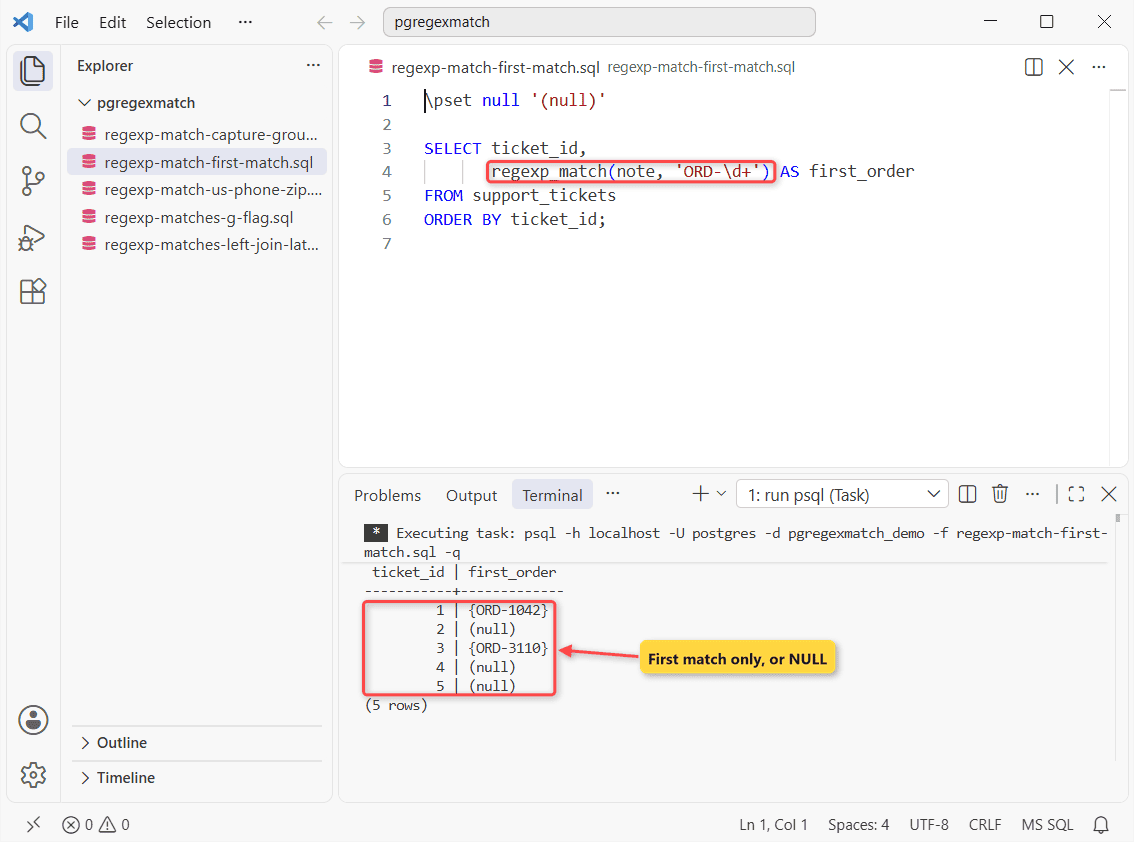
Ticket 1 returns {ORD-1042}, while tickets 2, 4 and 5 return NULL.
The braces mark a text[]. Why is ticket 2 NULL?
Its note says ord-2207 in lowercase, and matching stays case-sensitive until you pass the i flag that Example 4 uses. Ticket 3 has two codes, but only the first comes back.
Example 2: Extract One Capture Group with (regexp_match(…))[1]
Now plain text instead of an array. The goal is just the digits after ORD-.
Run it, then the same call without the outer parentheses:
SELECT ticket_id,
       (regexp_match(note, 'ORD-(\d+)'))[1] AS order_no
FROM support_tickets
WHERE note ~ 'ORD-\d+';

SELECT regexp_match(note, 'ORD-(\d+)')[1]
FROM support_tickets;
Output:
 ticket_id | order_no
-----------+----------
         1 | 1042
         3 | 3110
(2 rows)

psql:regexp-match-capture-group.sql:7: ERROR:  syntax error at or near "["
LINE 1: SELECT regexp_match(note, 'ORD-(\d+)')[1]
                                              ^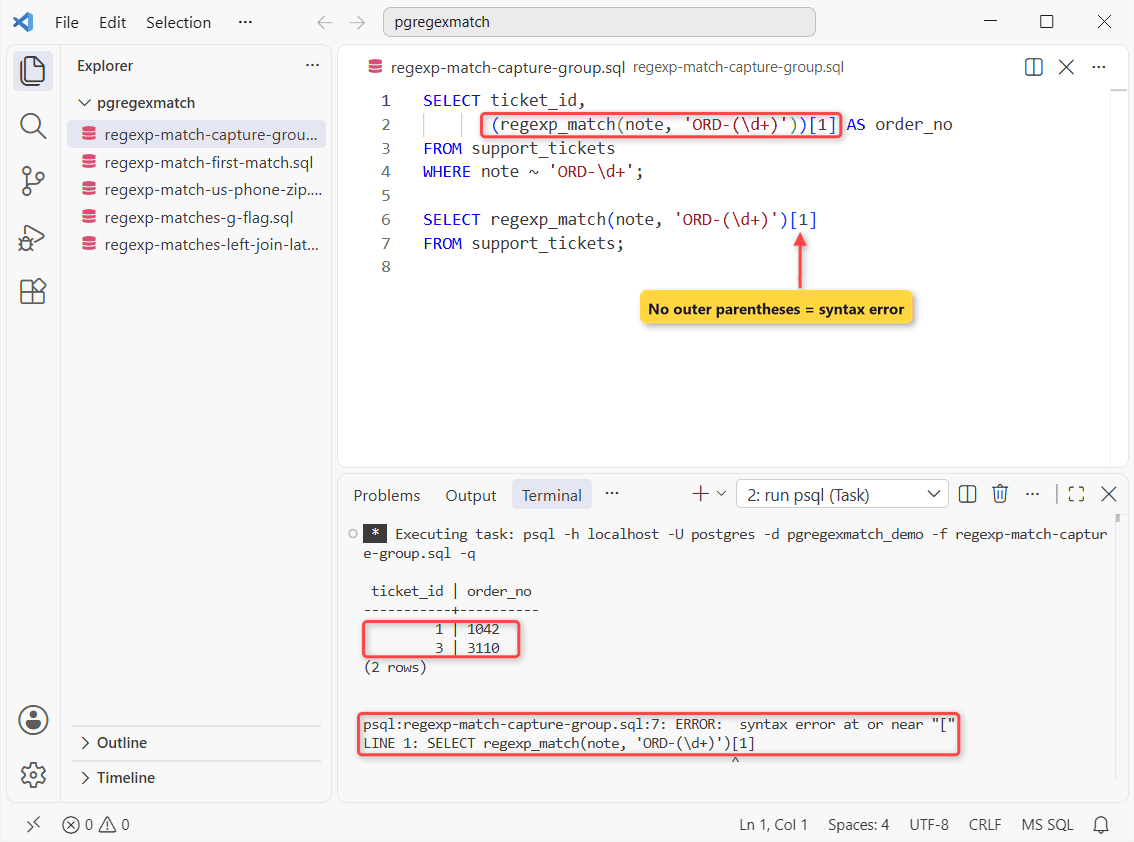
Ticket 1 gives 1042 and ticket 3 gives 3110. The second query fails with syntax error at or near "[".
The group in ORD-(\d+) holds the digits, so [1] is the order number. PostgreSQL won’t subscript a function result unless the whole call sits in its own parentheses, so the extra pair isn’t decoration.
I have a separate guide on the PostgreSQL WHERE clause and its ~ test.
Example 3: Parse US Phone Numbers and ZIP Codes with regexp_match
Tickets 1, 3 and 5 write phones three ways. Say you need the three phone parts plus the ZIP code:
\pset null '(null)'

SELECT customer,
       regexp_match(note, '\(?(\d{3})\)?[-. ]?(\d{3})[-.](\d{4})') AS phone,
       (regexp_match(note, '\m(\d{5})(?:-\d{4})?\M'))[1] AS zip
FROM support_tickets
WHERE ticket_id IN (1, 3, 5);
Output:
   customer    |     phone      |  zip
---------------+----------------+--------
 Hannah Brooks | {614,555,0142} | 43215
 Grace Miller  | {312,555,0199} | (null)
 Olivia Carter | {206,555,0177} | 98101
(3 rows)
Hannah Brooks gets {614,555,0142} and ZIP 43215. Grace Miller’s ZIP is NULL. Her note doesn’t have one.
Here’s how this query works:
\(?,\)?and[-. ]?accept (614) 555-0142, 312-555-0199 and 206.555.0177 alike.(?:-\d{4})?doesn’t capture, so the ZIP+4 suffix 2034 never becomes an element.\mand\Mare word boundaries.
To print 614-555-0142 back, pass the elements to the PostgreSQL format function.
Example 4: Get Every Match with regexp_matches and the g Flag
Ticket 3 holds two order codes. I want one row per order code, in any letter case.
The second query tries regexp_match with the same flag:
SELECT ticket_id,
       regexp_matches(note, 'ORD-(\d+)', 'gi') AS order_no
FROM support_tickets
ORDER BY ticket_id;

SELECT regexp_match(note, 'ORD-(\d+)', 'g')
FROM support_tickets;
Output:
 ticket_id | order_no
-----------+----------
         1 | {1042}
         2 | {2207}
         3 | {3110}
         3 | {3115}
(4 rows)

psql:regexp-matches-g-flag.sql:7: ERROR:  regexp_match() does not support the "global" option
HINT:  Use the regexp_matches function instead.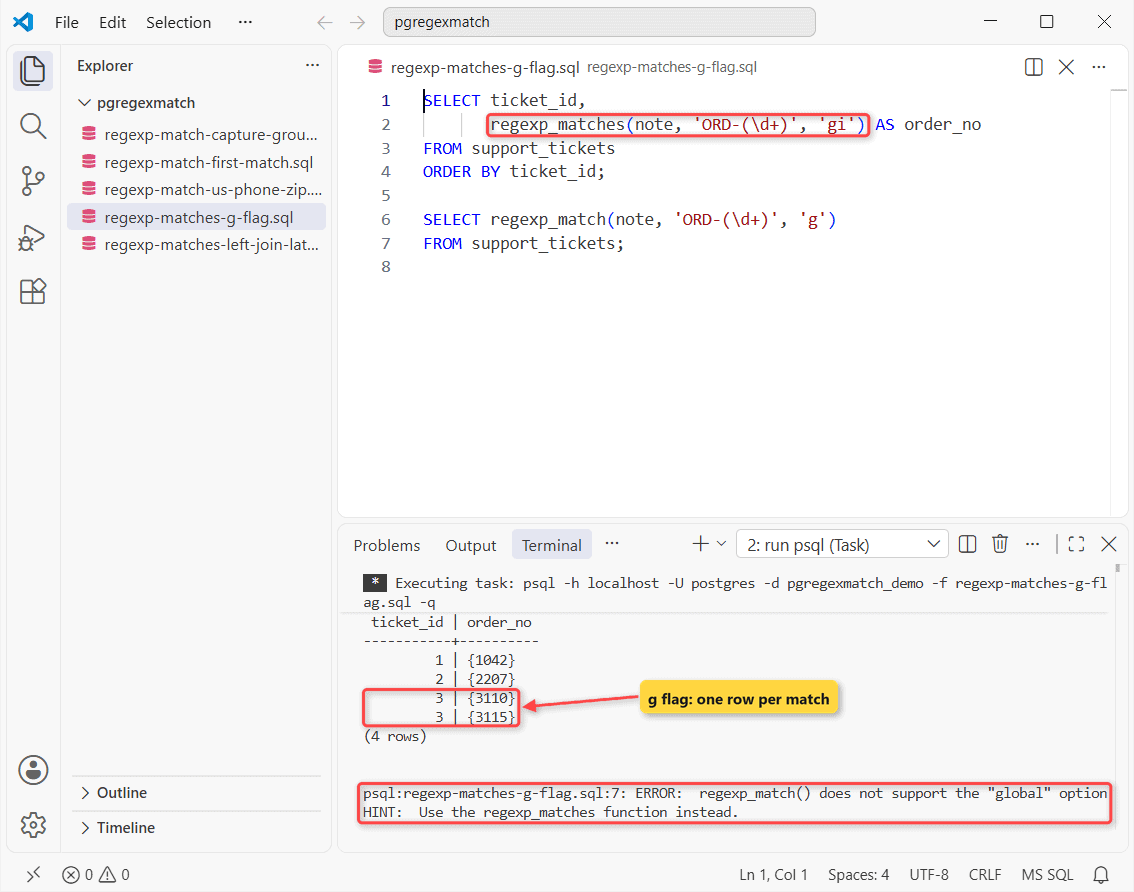
The first query returns 4 rows, ticket 3 twice. The second fails: regexp_match() does not support the "global" option.
g makes regexp_matches emit one row per match, and i caught ord-2207. Run the first SELECT again and you should see ticket IDs 1, 2, 3, 3. Tickets 4 and 5 are gone.
Example 5: Why Do Rows Disappear with regexp_matches?
Tickets 4 and 5 vanished in Example 4. Here’s the fix. The goal is every ticket, with NULL where there’s no order code:
\pset null '(null)'

SELECT t.ticket_id, m.hit[1] AS order_no
FROM support_tickets AS t
LEFT JOIN LATERAL
     regexp_matches(t.note, 'ORD-(\d+)', 'gi') AS m(hit) ON true
ORDER BY t.ticket_id;
Output:
 ticket_id | order_no
-----------+----------
         1 | 1042
         2 | 2207
         3 | 3110
         3 | 3115
         4 | (null)
         5 | (null)
(6 rows)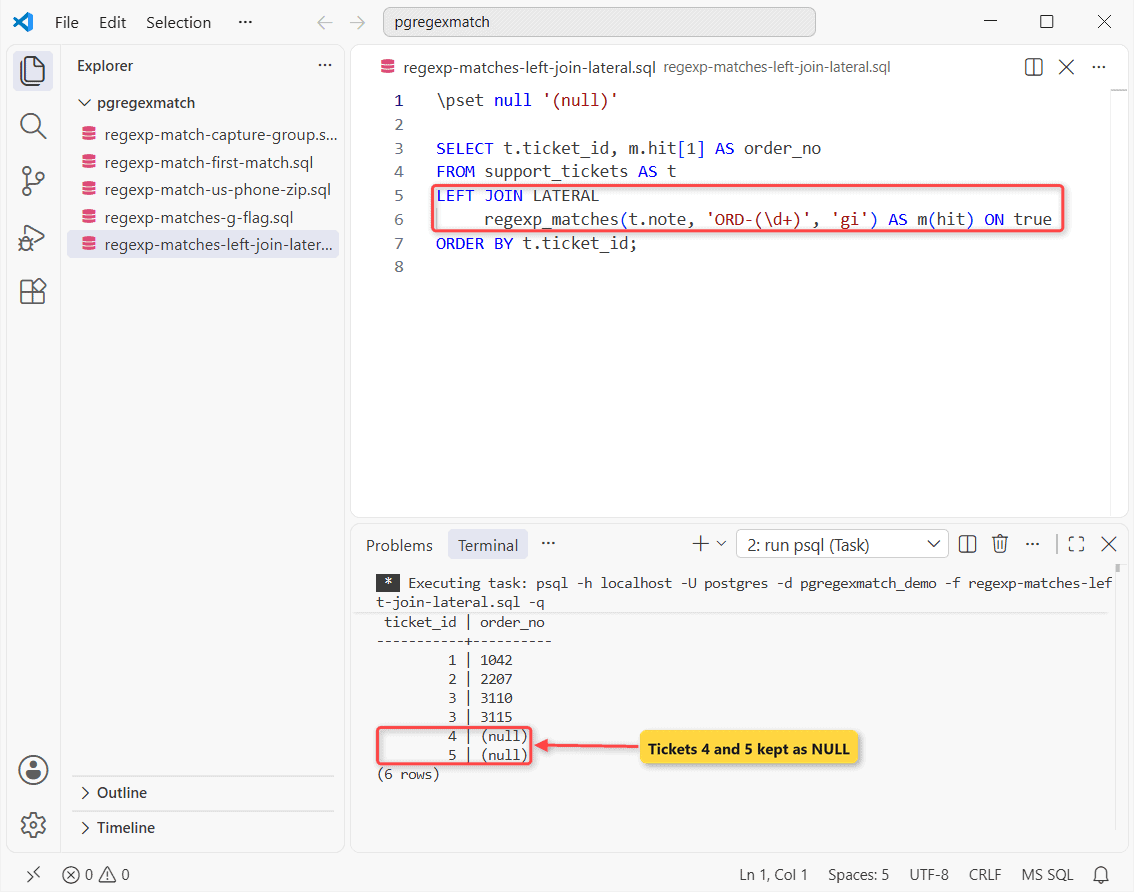
That returns 6 rows, and tickets 4 and 5 show (null).
A set-returning function with no rows drops the whole ticket from the SELECT list. LEFT JOIN LATERAL ... ON true keeps it.
I have a separate guide on PostgreSQL joins if LATERAL is new.
Tips & Common Mistakes
- Both functions are strict. A NULL note returns NULL, the same as no match.
- A scalar subquery around regexp_matches with
ggave memore than one row returned by a subquery used as an expressionon ticket 3. - On PostgreSQL 15+,
regexp_substr(note, 'ORD-(\d+)', 1, 1, 'i', 1)returned plain 1042. No subscript. - An unanchored
note ~ 'ORD-\d+'can’t use a B-tree index; a pg_trgm GIN index can (see PostgreSQL CREATE INDEX).
Wrapping Up
Most of the time you want Example 2: (regexp_match(col, 'pattern'))[1]. For every match, copy Example 5.
Next step: rewrite what you matched with PostgreSQL regexp_replace, or browse the complete list of PostgreSQL functions and the PostgreSQL 18 pattern matching docs.
Other PostgreSQL text tutorials you may also like:
- PostgreSQL REPLACE for plain substrings
- PostgreSQL LENGTH and character counts
- PostgreSQL CONCAT for joining text
- PostgreSQL subqueries explained
Frequently Asked Questions
What is the difference between regexp_match and regexp_matches?
regexp_match returns one text[] or NULL. regexp_matches returns rows, one per match with g. regexp_match came later, in PostgreSQL 10.
How do I check if a string matches a regex in PostgreSQL?
Use the ~ operator, or ~* to ignore case. PostgreSQL 15 also added regexp_like(string, pattern).
How do I count regex matches in PostgreSQL?
On PostgreSQL 15+, use regexp_count(string, pattern). Before that, count the rows from regexp_matches with g.

Kumar Saurabh is a freelance software engineer who builds web and mobile apps with Next.js, React, Flutter and Python. From 2021 to 2024, Saurabh worked as an IT analyst and developer at TSInfo Technologies, writing technical articles on SQL and PostgreSQL. Saurabh writes the PostgreSQL, MySQL, MariaDB and MongoDB tutorials on DatabaseFAQs.com and holds a Master of Computer Applications (MCA) from Chandigarh University.