
If you need an orders query to run from an app, a job and a teammate’s script, save it as a stored procedure. The SQL Server create stored procedure syntax is short: CREATE PROCEDURE dbo.usp_Name AS BEGIN ... END;, alone in its batch.
Most first tries break that batch rule or fail on the second run. You’ll hit both errors on purpose.
Tested on SQL Server 2025 (17.0.1000.7) Developer edition, with sqlcmd.
What Is a Stored Procedure in SQL Server?
It’s named T-SQL saved in a database: you call it by name, pass parameters, and get back rows, OUTPUT values or a status code. Unlike a function, it can change data. Why use one?
- Reuse: one definition, called anywhere with
EXEC. - Security: users get EXECUTE without SELECT on the table.
- Less traffic: the app sends a one-line call.
The Sample Orders Table for Every Procedure
The procedures below read this table in a demo database called CreateProcDemo:
CREATE TABLE dbo.Orders (
    OrderID  int           NOT NULL CONSTRAINT PK_Orders PRIMARY KEY,
    Customer nvarchar(16)  NOT NULL,
    State    char(2)       NOT NULL,
    Total    decimal(8,2)  NOT NULL
);
INSERT INTO dbo.Orders (OrderID, Customer, State, Total) VALUES
(1001, N'Megan Bowen',     'WA',  245.50),
(1002, N'Alex Wilber',     'TX',   89.99),
(1003, N'Adele Vance',     'CA', 1210.00),
(1004, N'Diego Siciliani', 'TX',  432.75),
(1005, N'Lee Gu',          'NY',   67.20),
(1006, N'Nestor Wilke',    'TX',  158.00);
You’ll see the three Texas orders a lot. They total $680.74.
Method 1: CREATE PROCEDURE and Your First Procedure (Recommended)
This drops any old copy, creates the procedure and runs it:
DROP PROCEDURE IF EXISTS dbo.usp_GetOrders;
GO
CREATE PROCEDURE dbo.usp_GetOrders
AS
BEGIN
    SET NOCOUNT ON;
    SELECT OrderID, Customer, Total
    FROM dbo.Orders;
END;
GO

EXEC dbo.usp_GetOrders;
Output:
OrderID     Customer         Total
----------- ---------------- ----------
       1001 Megan Bowen          245.50
       1002 Alex Wilber           89.99
       1003 Adele Vance         1210.00
       1004 Diego Siciliani      432.75
       1005 Lee Gu                67.20
       1006 Nestor Wilke         158.00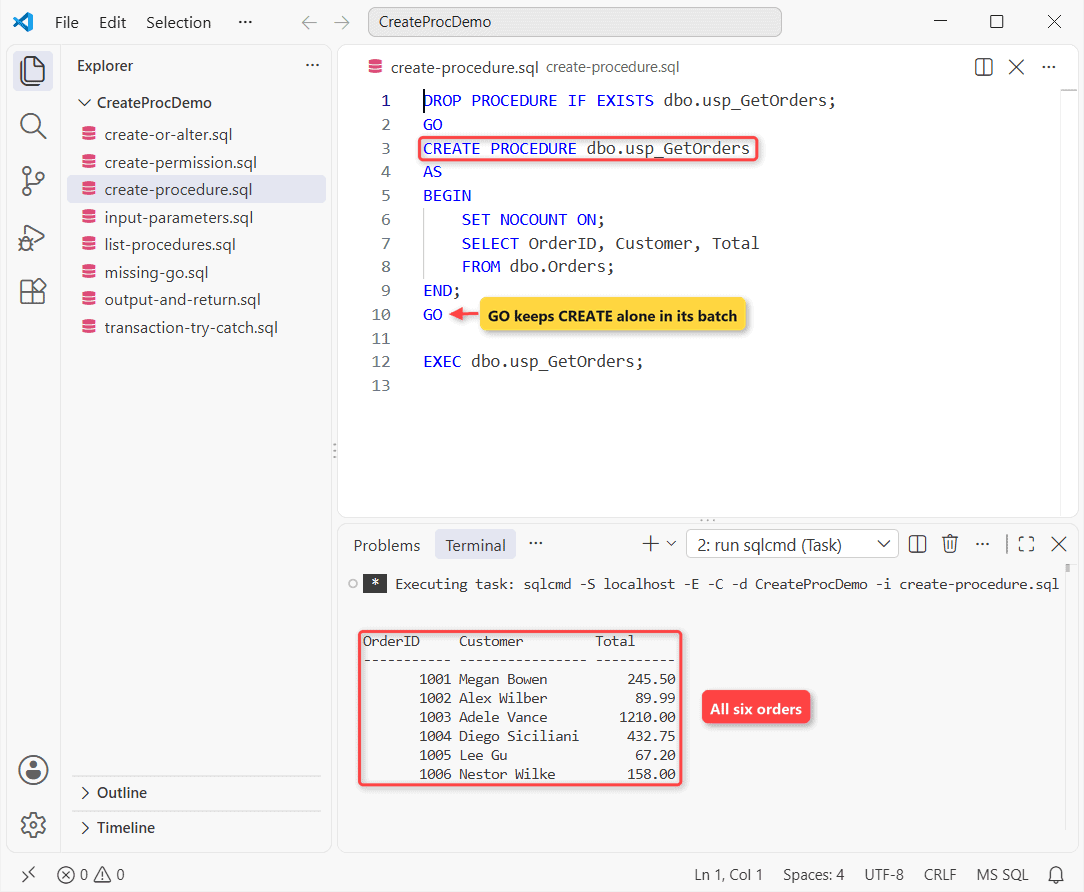
How does this work? Each GO ends a batch, so CREATE PROCEDURE sits alone in the middle one.
The last batch runs it. You should see six orders.
SET NOCOUNT ON hides “(6 rows affected)”; Microsoft says it has no measurable speed gain today. Always write the schema, and skip the sp_ prefix (see our stored procedure naming convention).
Why Does CREATE PROCEDURE Fail With Msg 111?
Delete the GO under the DROP line and run it again:
DROP PROCEDURE IF EXISTS dbo.usp_GetOrders;
CREATE PROCEDURE dbo.usp_GetOrders
AS
    SELECT OrderID, Customer FROM dbo.Orders;
Output:
Msg 111, Level 15, State 1, Server YOUR-SERVER, Procedure usp_GetOrders, Line 4
'CREATE/ALTER PROCEDURE' must be the first statement in a query batch.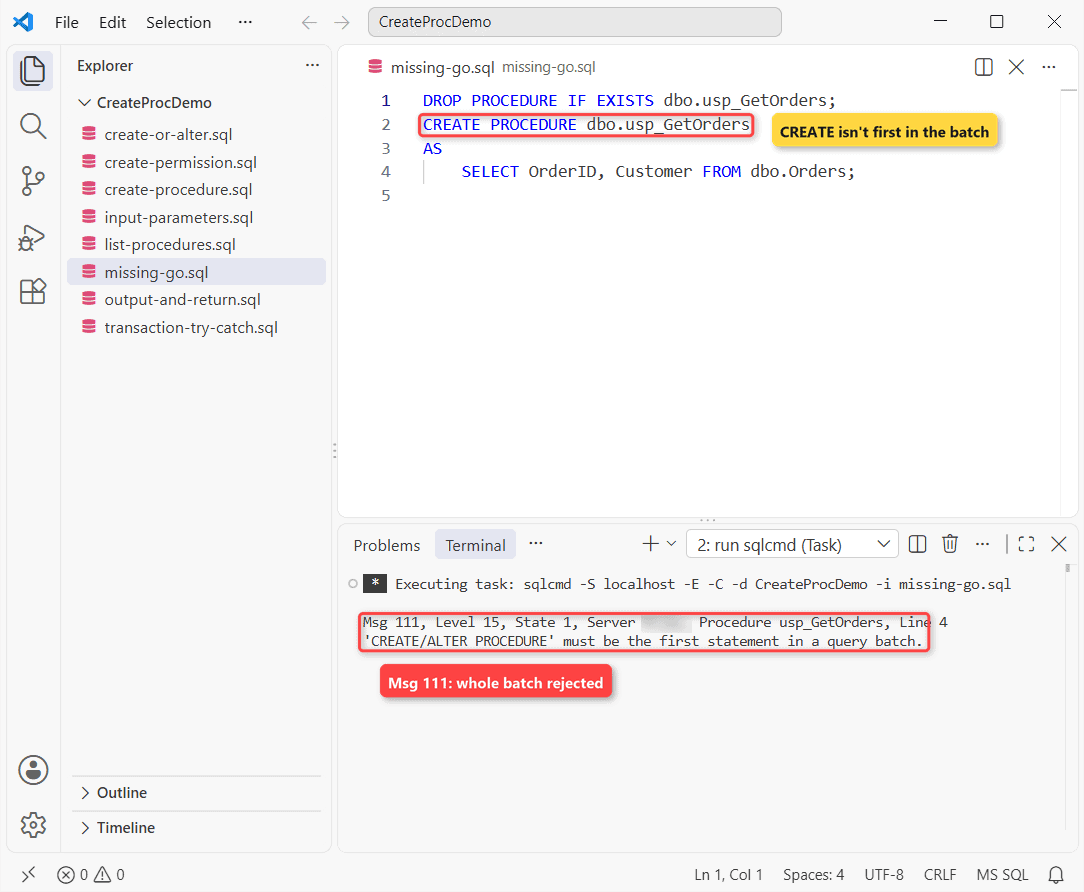
Important: nothing ran, not even the DROP. SQL Server rejects the batch while parsing, so TRY…CATCH can’t catch it. Put the GO back.
Method 2: Create a Procedure With Input Parameters and Defaults
Same orders table, now filtered. @State is required; @MinTotal defaults to 0:
CREATE OR ALTER PROCEDURE dbo.usp_OrdersByState
    @State    char(2),
    @MinTotal decimal(8,2) = 0
AS
BEGIN
    SET NOCOUNT ON;
    SELECT OrderID, Customer, Total
    FROM dbo.Orders
    WHERE State = @State AND Total >= @MinTotal;
END;
GO

EXEC dbo.usp_OrdersByState @State = 'TX';
EXEC dbo.usp_OrdersByState @State = 'TX', @MinTotal = 200;
Output:
OrderID     Customer         Total
----------- ---------------- ----------
       1002 Alex Wilber           89.99
       1004 Diego Siciliani      432.75
       1006 Nestor Wilke         158.00
OrderID     Customer         Total
----------- ---------------- ----------
       1004 Diego Siciliani      432.75
How does this work? The first call skips @MinTotal and gets all three Texas orders.
The second passes 200. Only Diego Siciliani’s $432.75 order is left.
Defaults must be constants or NULL, so = GETDATE() fails. More in SQL Server stored procedure parameters.
Method 3: OUTPUT Parameter vs RETURN Code
An OUTPUT parameter hands back a value. RETURN hands back an integer status, 0 for success by convention:
CREATE OR ALTER PROCEDURE dbo.usp_StateRevenue
    @State   char(2),
    @Revenue decimal(10,2) OUTPUT
AS
BEGIN
    SELECT @Revenue = SUM(Total)
    FROM dbo.Orders WHERE State = @State;
    IF @Revenue IS NULL RETURN 1;   -- no orders
    RETURN 0;
END;
GO

SET NOCOUNT ON;
DECLARE @rev decimal(10,2), @rc int;
EXEC @rc = dbo.usp_StateRevenue 'TX', @rev OUTPUT;
SELECT @rc AS Status, @rev AS TxRevenue;
EXEC @rc = dbo.usp_StateRevenue 'OH', @rev OUTPUT;
SELECT @rc AS OhioStatus;
Output:
Status      TxRevenue
----------- ------------
          0       680.74
OhioStatus
-----------
          1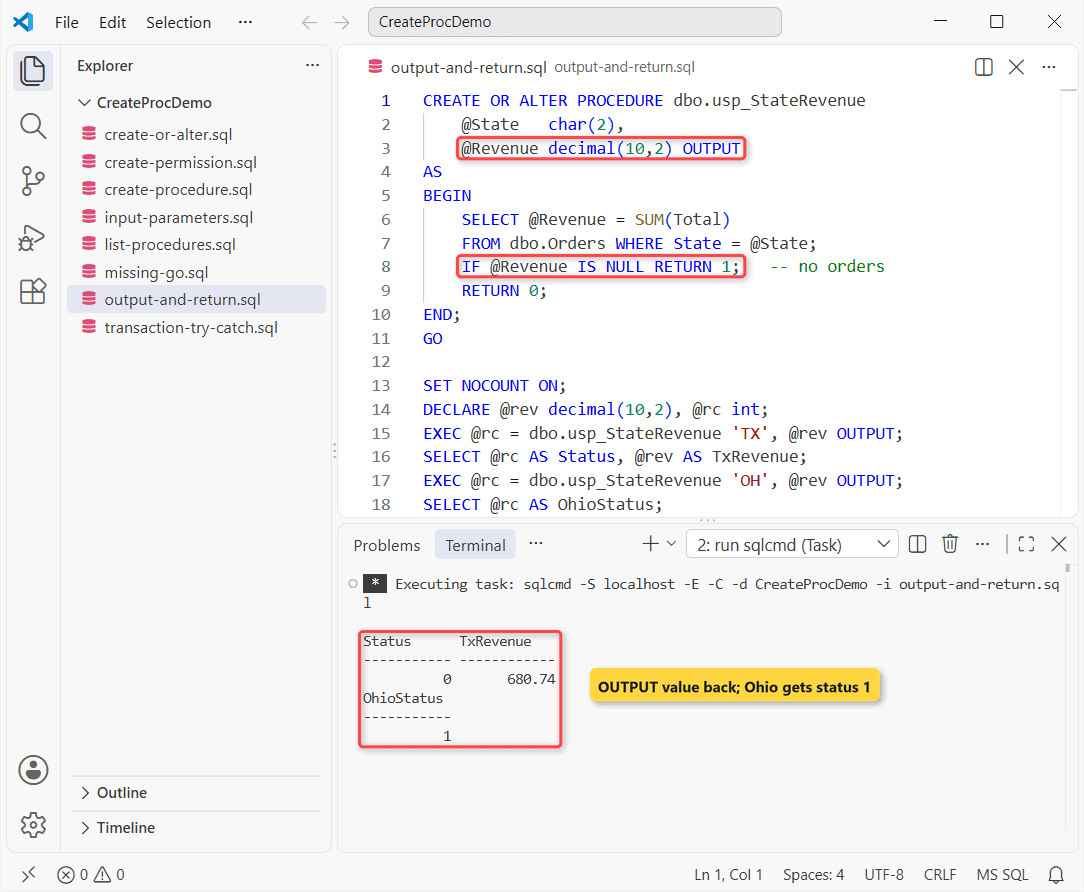
How does this work? Texas gets status 0 and $680.74.
Ohio has no orders, so RETURN 1 exits early. Leave OUTPUT off the call and the variable never changes.
Method 4: CREATE OR ALTER PROCEDURE (SQL Server 2016 SP1+)
A second plain CREATE fails. I wrapped it in EXEC() so TRY…CATCH can print the error:
BEGIN TRY
    EXEC (N'CREATE PROCEDURE dbo.usp_GetOrders AS SELECT 1;');
END TRY
BEGIN CATCH
    PRINT CONCAT('Msg ', ERROR_NUMBER(), ': ', ERROR_MESSAGE());
END CATCH;
GO

CREATE OR ALTER PROCEDURE dbo.usp_GetOrders
AS
BEGIN
    SET NOCOUNT ON;
    SELECT OrderID, Customer, Total
    FROM dbo.Orders WHERE Total >= 400;
END;
GO

EXEC dbo.usp_GetOrders;
Output:
Msg 2714: There is already an object named 'usp_GetOrders' in the database.
OrderID     Customer         Total
----------- ---------------- ----------
       1003 Adele Vance         1210.00
       1004 Diego Siciliani      432.75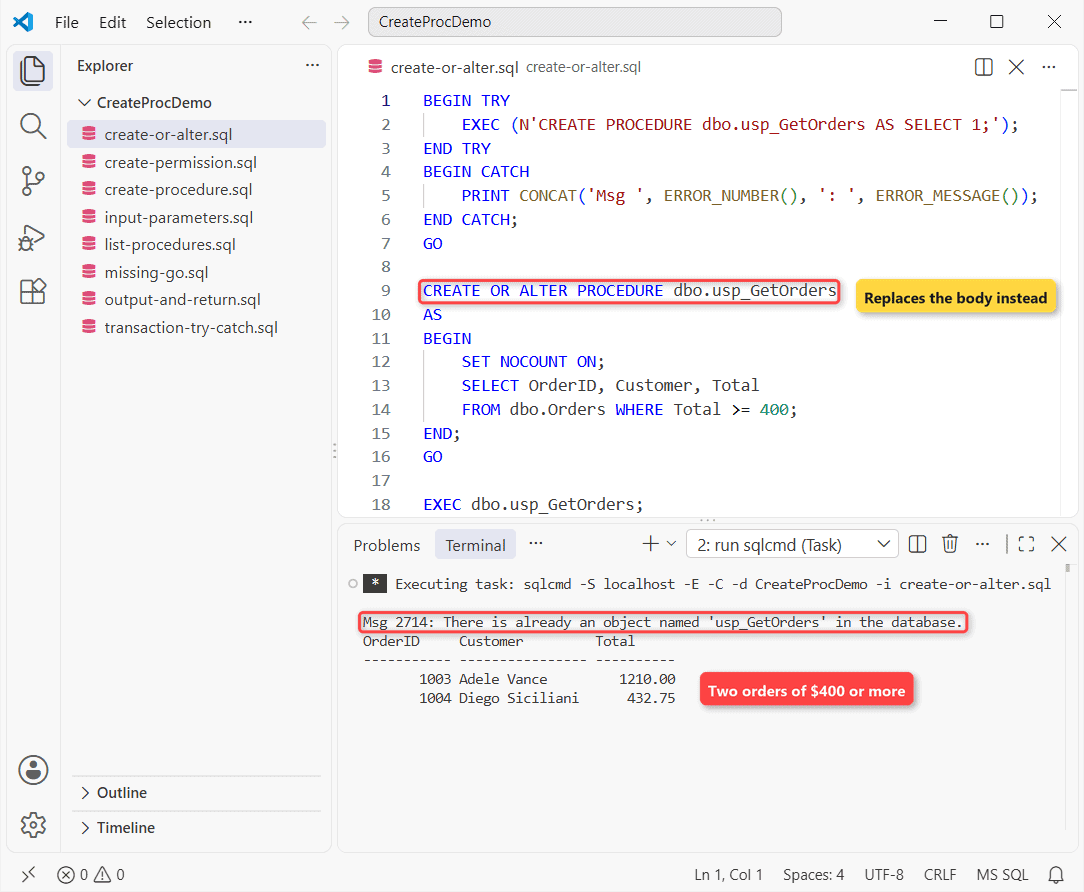
How does this work? Msg 2714 first. Then CREATE OR ALTER keeps the permissions, swaps the body, and you should see the two orders of $400 or more.
On builds before 2016 SP1, alter the stored procedure instead.
Method 5: A Stored Procedure With a Transaction and TRY…CATCH
Same table again. This one inserts an order inside a transaction, and the second call reuses order 1007 so you can watch the rollback:
CREATE OR ALTER PROCEDURE dbo.usp_AddOrder
    @ID int, @Name nvarchar(16),
    @State char(2), @Total decimal(8,2)
AS
SET NOCOUNT ON;
BEGIN TRY
    BEGIN TRANSACTION;
    INSERT INTO dbo.Orders VALUES (@ID, @Name, @State, @Total);
    COMMIT;
END TRY
BEGIN CATCH
    IF @@TRANCOUNT > 0 ROLLBACK;
    PRINT CONCAT('Msg ', ERROR_NUMBER(), ': ', ERROR_MESSAGE());
    RETURN 1;
END CATCH;
GO

EXEC dbo.usp_AddOrder 1007, N'Isaiah Langer', 'IL', 312.15;
EXEC dbo.usp_AddOrder 1007, N'Isaiah Langer', 'IL', 312.15;
Output:
Msg 2627: Violation of PRIMARY KEY constraint 'PK_Orders'. Cannot insert duplicate key in object 'dbo.Orders'. The duplicate key value is (1007).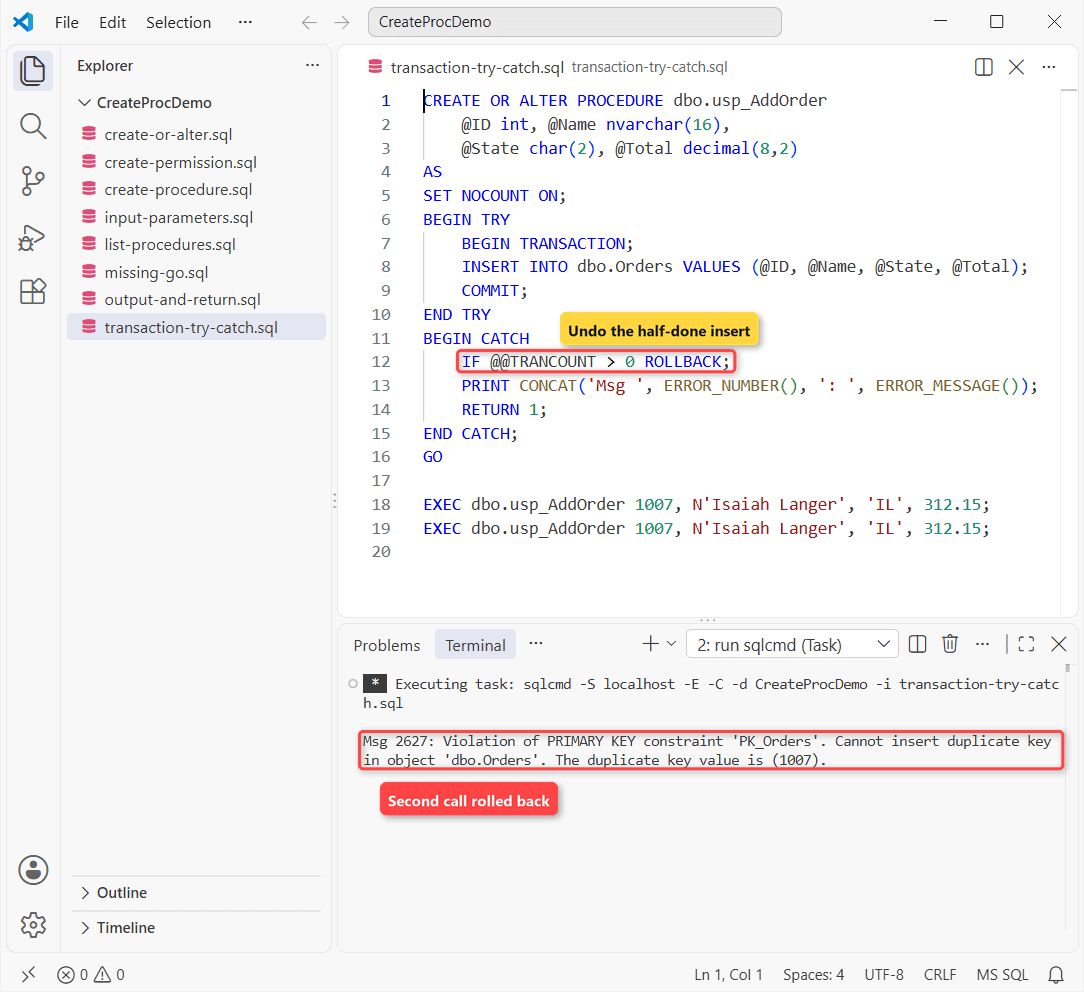
How does this work? The first call commits silently.
The second breaks the primary key, so CATCH rolls back and prints Msg 2627. In production, end the CATCH with THROW; (TRY…CATCH in a stored procedure).
What Permissions Do You Need to Create a Stored Procedure?
CREATE PROCEDURE in the database plus ALTER on the schema, or db_ddladmin. Alex starts with the first only:
CREATE USER AlexWilber WITHOUT LOGIN;
GRANT CREATE PROCEDURE TO AlexWilber;
GO
EXECUTE AS USER = 'AlexWilber';
BEGIN TRY EXEC (N'CREATE PROC dbo.usp_Ping AS SELECT 1;'); END TRY
BEGIN CATCH PRINT CONCAT('Msg ', ERROR_NUMBER(), ': ', ERROR_MESSAGE()); END CATCH;
REVERT;
GO
GRANT ALTER ON SCHEMA::dbo TO AlexWilber;
GRANT EXECUTE ON dbo.usp_OrdersByState TO AlexWilber;
EXECUTE AS USER = 'AlexWilber';
EXEC (N'CREATE PROC dbo.usp_Ping AS SELECT 1;');
EXEC dbo.usp_OrdersByState @State = 'WA';
REVERT;
Output:
Msg 2760: The specified schema name "dbo" either does not exist or you do not have permission to use it.
OrderID     Customer         Total
----------- ---------------- ----------
       1001 Megan Bowen          245.50
How does this work? Alex gets Msg 2760 until GRANT ALTER ON SCHEMA::dbo.
EXECUTE alone lets him read Megan Bowen’s order. Why? The procedure and table share an owner (SQL Server user permissions explains chaining).
Create a Stored Procedure in SSMS
- Open SSMS; in Object Explorer, expand your database > Programmability.
- Right-click Stored Procedures > New > Stored Procedure.
- Select Query > Specify Values for Template Parameters and fill them in.
- Replace the template’s SELECT, then select Execute.
WITH ENCRYPTION, RECOMPILE, EXECUTE AS and sys.procedures
| Option | What it does |
|---|---|
WITH ENCRYPTION | Hides the text (DAC admins can still read it) |
WITH RECOMPILE | No cached plan |
EXECUTE AS OWNER | Runs as the owner |
To list procedures, query sys.procedures with OBJECT_DEFINITION:
CREATE OR ALTER PROCEDURE dbo.usp_OrderCount
WITH ENCRYPTION
AS
    SELECT COUNT(*) AS Orders FROM dbo.Orders;
GO

SET NOCOUNT ON;
SELECT CAST(name AS varchar(18)) AS ProcName,
       LEN(OBJECT_DEFINITION(object_id)) AS DefLength
FROM sys.procedures
ORDER BY name;
Output:
ProcName           DefLength
------------------ --------------------
usp_AddOrder                        395
usp_GetOrders                       156
usp_OrderCount                     NULL
usp_OrdersByState                   244
usp_Ping                             37
usp_StateRevenue                    258
Check the result: encrypted usp_OrderCount shows NULL. Here’s how to view the stored procedure text.
Things to Keep in Mind
- GO before CREATE PROCEDURE, or Msg 111.
- CREATE OR ALTER in scripts you rerun, or Msg 2714.
- Schema-qualify the name and skip
sp_.
Where to go next: execute a stored procedure in SQL Server or create a stored procedure in PostgreSQL.
A few more procedure tasks:
- Rename a stored procedure
- Drop a stored procedure
- Fix Could not find stored procedure
- MariaDB CREATE PROCEDURE
Frequently Asked Questions
Does SQL Server check that tables exist when I create a procedure?
No. A missing table only fails when the procedure runs.
Which statements can’t go inside a stored procedure?
USE database, CREATE SCHEMA, and CREATE/ALTER of a view, function, trigger or procedure. The CREATE PROCEDURE reference lists them.
Where are stored procedures stored in SQL Server?
In their own database. Temporary #name procedures live in tempdb.

Shivam Dogra is a cloud database developer and Team Lead at TSInfo Technologies, where he has worked since June 2021. He writes the SQL Server and Oracle tutorials on DatabaseFAQs.com, covering queries, joins, stored procedures, triggers and permissions. Shivam holds a Master of Computer Applications (MCA) from Chandigarh University.