
Say your dbo.Customers table already holds five customers from Seattle to Boston, and sales now wants a phone number for each one. In SQL Server you add that column with one statement: ALTER TABLE dbo.Customers ADD Phone varchar(12) NULL;
In this tutorial, I’ll show you every SQL Server add column case I run into on SQL Server 2025, from a plain nullable column to IDENTITY, computed and foreign key columns. You’ll also see the errors a table with rows throws at you.
The Sample Customers and Orders Tables We’ll Use
I’m using two small tables in a demo database: five customers from Seattle to Boston, and five 2026 orders imported from a CSV file with no key column. Both have rows on purpose, because that’s where the surprises are.
SET NOCOUNT ON;
DROP TABLE IF EXISTS dbo.Orders;
DROP TABLE IF EXISTS dbo.Customers;
GO

CREATE TABLE dbo.Customers (
    CustomerID int          NOT NULL CONSTRAINT PK_Customers PRIMARY KEY,
    FirstName  nvarchar(12) NOT NULL,
    LastName   nvarchar(12) NOT NULL,
    City       nvarchar(12) NOT NULL,
    State      char(2)      NOT NULL
);
CREATE TABLE dbo.Orders (    -- imported from a CSV file, no key yet
    OrderDate  date          NOT NULL,
    ShipState  char(2)       NOT NULL,
    OrderTotal decimal(10,2) NOT NULL
);
GO

INSERT dbo.Customers VALUES
 (1, N'Megan', N'Bowen',     N'Seattle', 'WA'),
 (2, N'Alex',  N'Wilber',    N'Austin',  'TX'),
 (3, N'Adele', N'Vance',     N'Denver',  'CO'),
 (4, N'Diego', N'Siciliani', N'Chicago', 'IL'),
 (5, N'Lynne', N'Robbins',   N'Boston',  'MA');

INSERT dbo.Orders VALUES
 ('2026-09-14', 'WA',  249.99),
 ('2026-09-22', 'TX', 1250.00),
 ('2026-10-03', 'CO',   89.50),
 ('2026-10-15', 'IL',  640.25),
 ('2026-10-21', 'MA',  312.40);
Prefer clicks? Here’s how to create a table in SQL Server Management Studio.
Method 1: Add a Column With ALTER TABLE … ADD (Recommended)
ALTER TABLE ... ADD is the standard way, and it works the same in Azure SQL Database. The syntax:
ALTER TABLE schema_name.table_name
ADD column_name data_type [NULL | NOT NULL] [CONSTRAINT name DEFAULT value];
Same Customers table: sales wants a phone number. Here’s the script:
SET NOCOUNT ON;
-- Sales wants a phone number for every customer
ALTER TABLE dbo.Customers
ADD Phone varchar(12) NULL;
GO

SELECT CustomerID, FirstName, City, Phone
FROM dbo.Customers;
Output:
CustomerID  FirstName    City         Phone
----------- ------------ ------------ ------------
          1 Megan        Seattle      NULL
          2 Alex         Austin       NULL
          3 Adele        Denver       NULL
          4 Diego        Chicago      NULL
          5 Lynne        Boston       NULL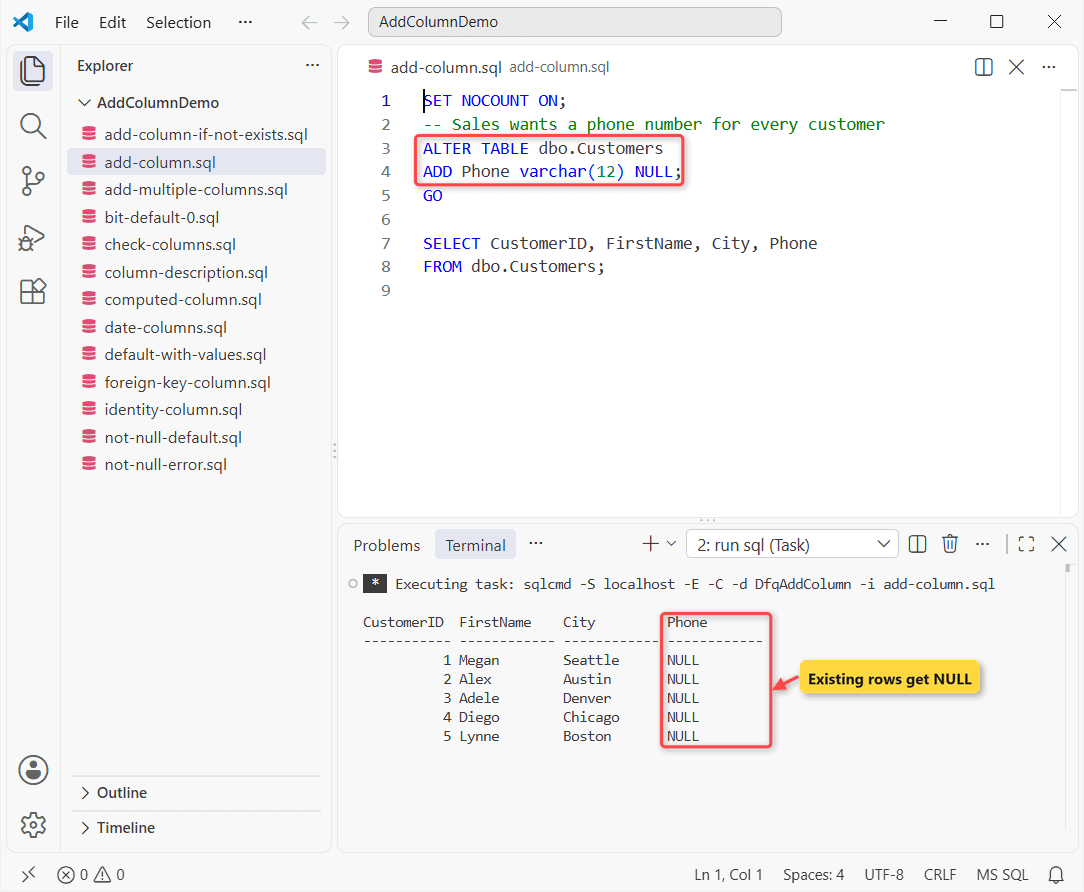
How does this work?
ADD takes the same column definition you’d write in CREATE TABLE, with no COLUMN keyword. Phone allows NULL and has no default, so all five rows show NULL.
The GO matters: SQL Server compiles the whole batch first, so a SELECT in the ALTER’s batch fails with “Invalid column name ‘Phone'”.
The new column lands at the end of the table. To confirm its type, check the data type of a column in SQL Server.
Add multiple columns in one ALTER TABLE statement
To add several columns, list the definitions after a single ADD, separated by commas:
SET NOCOUNT ON;
ALTER TABLE dbo.Customers
ADD Email       nvarchar(40) NULL,
    LoyaltyTier varchar(8)   NULL;
GO

SELECT TOP (2) FirstName, Email, LoyaltyTier
FROM dbo.Customers;
Output:
FirstName    Email                                    LoyaltyTier
------------ ---------------------------------------- -----------
Megan        NULL                                     NULL
Alex         NULL                                     NULL
Both columns arrive in one statement, NULL in every row.
How Do You Add a NOT NULL Column to a Table With Rows?
Now finance wants a credit limit on every customer, and it can’t be blank. The obvious script fails on the same Customers table:
-- Every customer needs a credit limit
ALTER TABLE dbo.Customers
ADD CreditLimit decimal(10,2) NOT NULL;
Output:
Msg 4901, Level 16, State 1, Server YOUR-SERVER, Line 2
ALTER TABLE only allows columns to be added that can contain nulls, or have a DEFAULT definition specified, or the column being added is an identity or timestamp column, or alternatively if none of the previous conditions are satisfied the table must be empty to allow addition of this column. Column 'CreditLimit' cannot be added to non-empty table 'Customers' because it does not satisfy these conditions.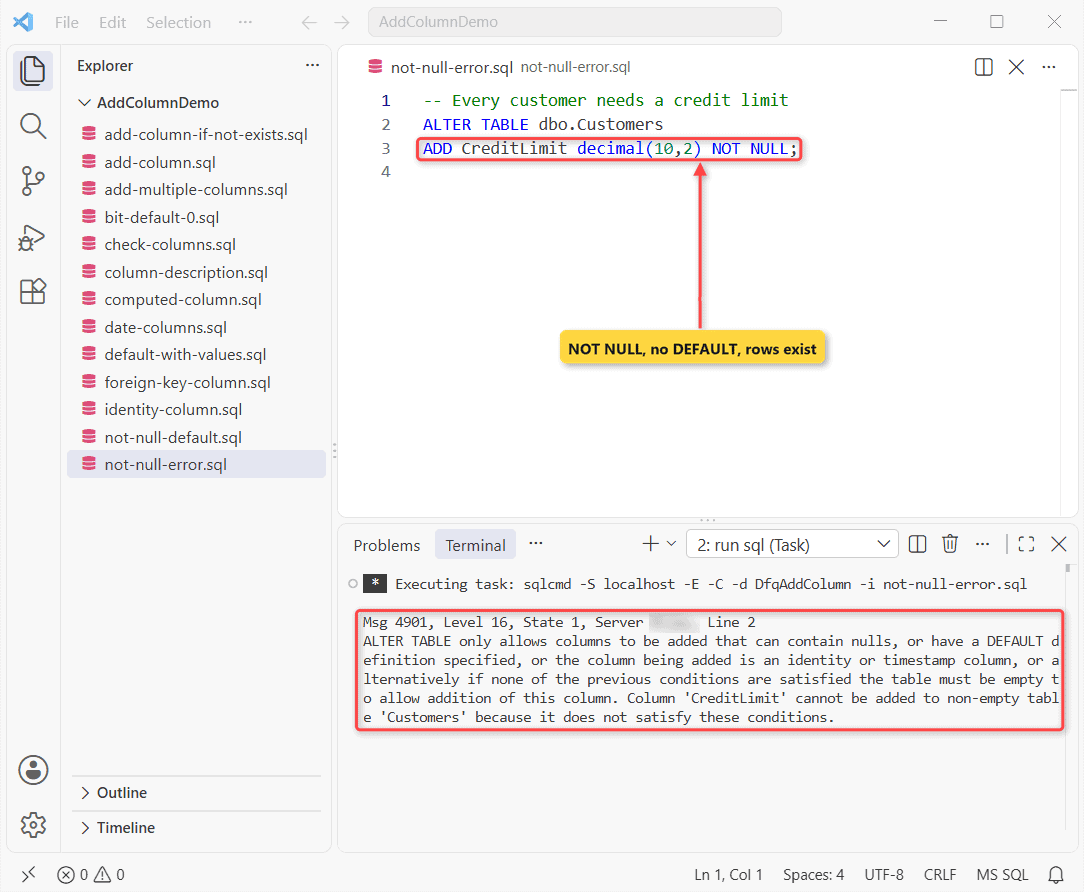
SQL Server can’t add a NOT NULL column to five existing rows without knowing what to store in them. The fix is a DEFAULT definition:
SET NOCOUNT ON;
ALTER TABLE dbo.Customers
ADD CreditLimit decimal(10,2) NOT NULL
    CONSTRAINT DF_Customers_CreditLimit
    DEFAULT (5000.00) WITH VALUES;
GO

SELECT CustomerID, FirstName, CreditLimit
FROM dbo.Customers;
Output:
CustomerID  FirstName    CreditLimit
----------- ------------ ------------
          1 Megan             5000.00
          2 Alex              5000.00
          3 Adele             5000.00
          4 Diego             5000.00
          5 Lynne             5000.00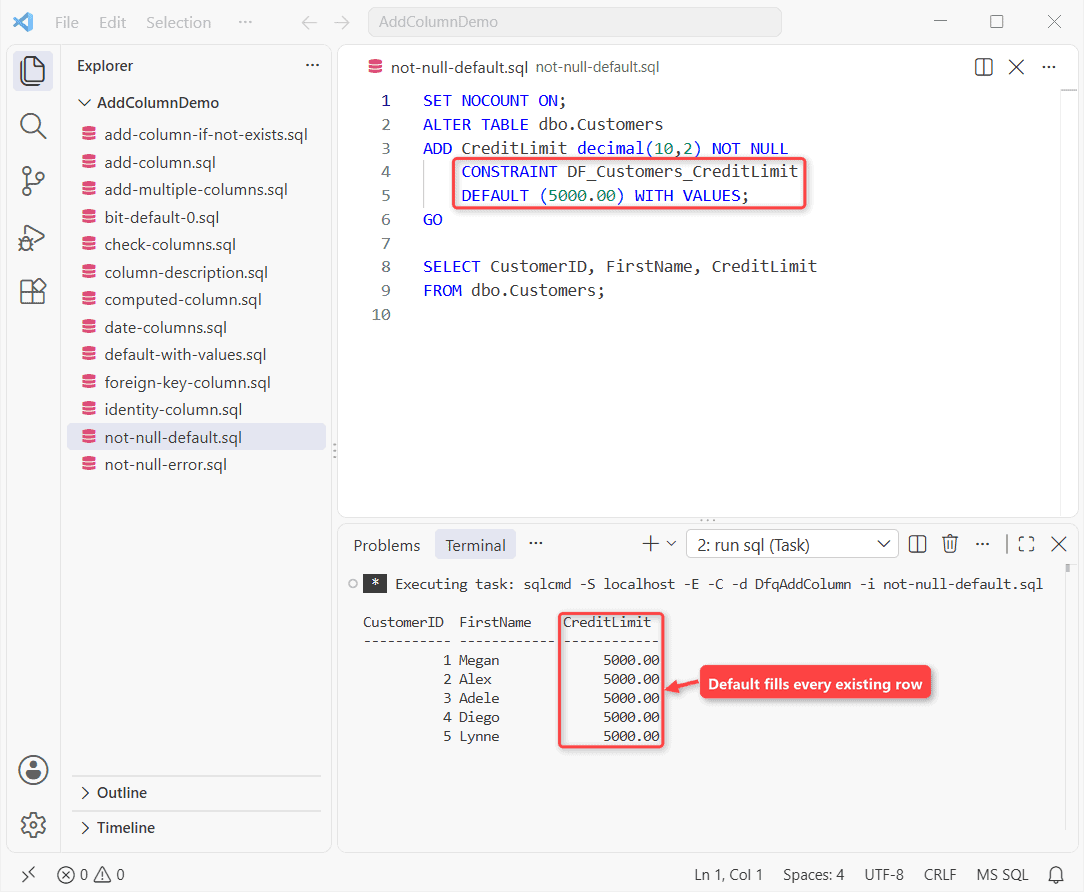
How does this work?
For a NOT NULL column, SQL Server writes the default into every existing row, so all five get 5000.00. WITH VALUES is optional here; it matters for nullable columns.
On Enterprise edition (SQL Server 2012 and later), this add is online when the default is a runtime constant, like a literal or SYSDATETIME(). A per-row default like NEWID() runs offline under a Sch-M lock.
Important: on a big production table, back up the table and use a maintenance window.
Method 2: Add a Column With a DEFAULT Value (Named Constraint)
Same Customers table, two nullable columns with named defaults (DF_Table_Column). Only Country uses WITH VALUES, and then I insert a sixth customer:
SET NOCOUNT ON;
ALTER TABLE dbo.Customers
ADD Segment varchar(8) NULL
    CONSTRAINT DF_Customers_Segment DEFAULT ('Retail');
ALTER TABLE dbo.Customers
ADD Country char(2) NULL
    CONSTRAINT DF_Customers_Country DEFAULT ('US') WITH VALUES;
GO

INSERT dbo.Customers
    (CustomerID, FirstName, LastName, City, State)
VALUES (6, N'Isaiah', N'Langer', N'Phoenix', 'AZ');

SELECT CustomerID, FirstName, Segment, Country
FROM dbo.Customers;
Output:
CustomerID  FirstName    Segment  Country
----------- ------------ -------- -------
          1 Megan        NULL     US
          2 Alex         NULL     US
          3 Adele        NULL     US
          4 Diego        NULL     US
          5 Lynne        NULL     US
          6 Isaiah       Retail   US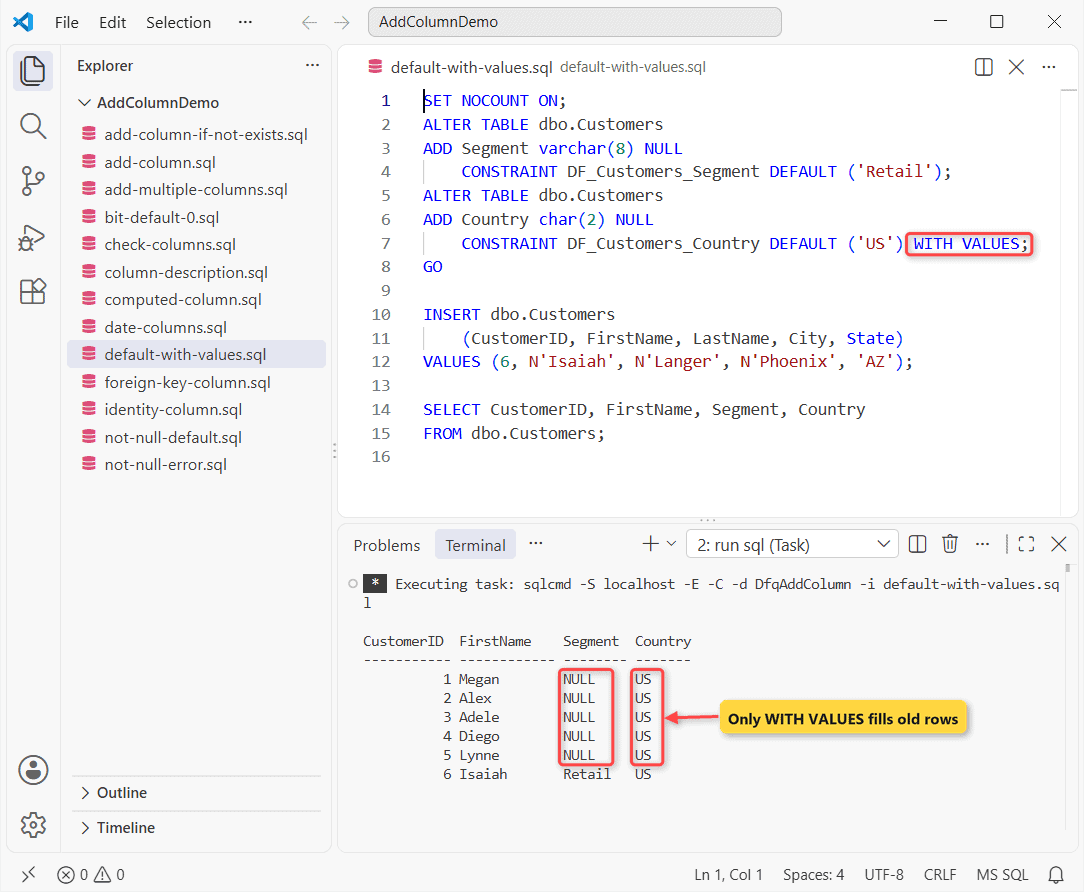
How does this work?
A nullable column with a default leaves existing rows NULL, so customers 1-5 have no Segment. WITH VALUES fills existing rows, so all six show US.
New rows get the default either way, which is why Isaiah in Phoenix gets Retail.
Add a BIT column with default 0
Make yes/no flags NOT NULL with a default of 0, so the flag is never unknown:
SET NOCOUNT ON;
ALTER TABLE dbo.Customers
ADD IsVip bit NOT NULL
    CONSTRAINT DF_Customers_IsVip DEFAULT (0);
GO

UPDATE dbo.Customers SET IsVip = 1 WHERE State = 'WA';

SELECT FirstName, State, IsVip
FROM dbo.Customers;
Output:
FirstName    State IsVip
------------ ----- -----
Megan        WA        1
Alex         TX        0
Adele        CO        0
Diego        IL        0
Lynne        MA        0
Every customer starts at 0, and after the update only Megan in Washington shows 1.
Add a date or datetime2 column
On the Orders table, I want an empty ShipDate and a CreatedAt stamp. I pick datetime2 for new columns (datetime vs datetime2).
SET NOCOUNT ON;
ALTER TABLE dbo.Orders
ADD ShipDate  date NULL,
    CreatedAt datetime2(0) NOT NULL
        CONSTRAINT DF_Orders_CreatedAt DEFAULT (SYSDATETIME());
GO

SELECT OrderDate, OrderTotal, ShipDate,
       CAST(CreatedAt AS date) AS CreatedOn
FROM dbo.Orders;
Output:
OrderDate        OrderTotal   ShipDate         CreatedOn
---------------- ------------ ---------------- ----------------
      2026-09-14       249.99             NULL       2026-10-27
      2026-09-22      1250.00             NULL       2026-10-27
      2026-10-03        89.50             NULL       2026-10-27
      2026-10-15       640.25             NULL       2026-10-27
      2026-10-21       312.40             NULL       2026-10-27
ShipDate stays NULL, and all five rows got 10/27/2026, the day I ran it.
Method 3: Add an IDENTITY Column (Auto-Increment Primary Key)
The imported Orders table has no key. Add an IDENTITY column and make it the primary key in one step:
SET NOCOUNT ON;
-- The imported orders arrived without a key
ALTER TABLE dbo.Orders
ADD OrderID int IDENTITY(1001, 1) NOT NULL
    CONSTRAINT PK_Orders PRIMARY KEY;
GO

SELECT OrderID, OrderDate, ShipState, OrderTotal
FROM dbo.Orders;
Output:
OrderID     OrderDate        ShipState OrderTotal
----------- ---------------- --------- ------------
       1001       2026-09-14 WA              249.99
       1002       2026-09-22 TX             1250.00
       1003       2026-10-03 CO               89.50
       1004       2026-10-15 IL              640.25
       1005       2026-10-21 MA              312.40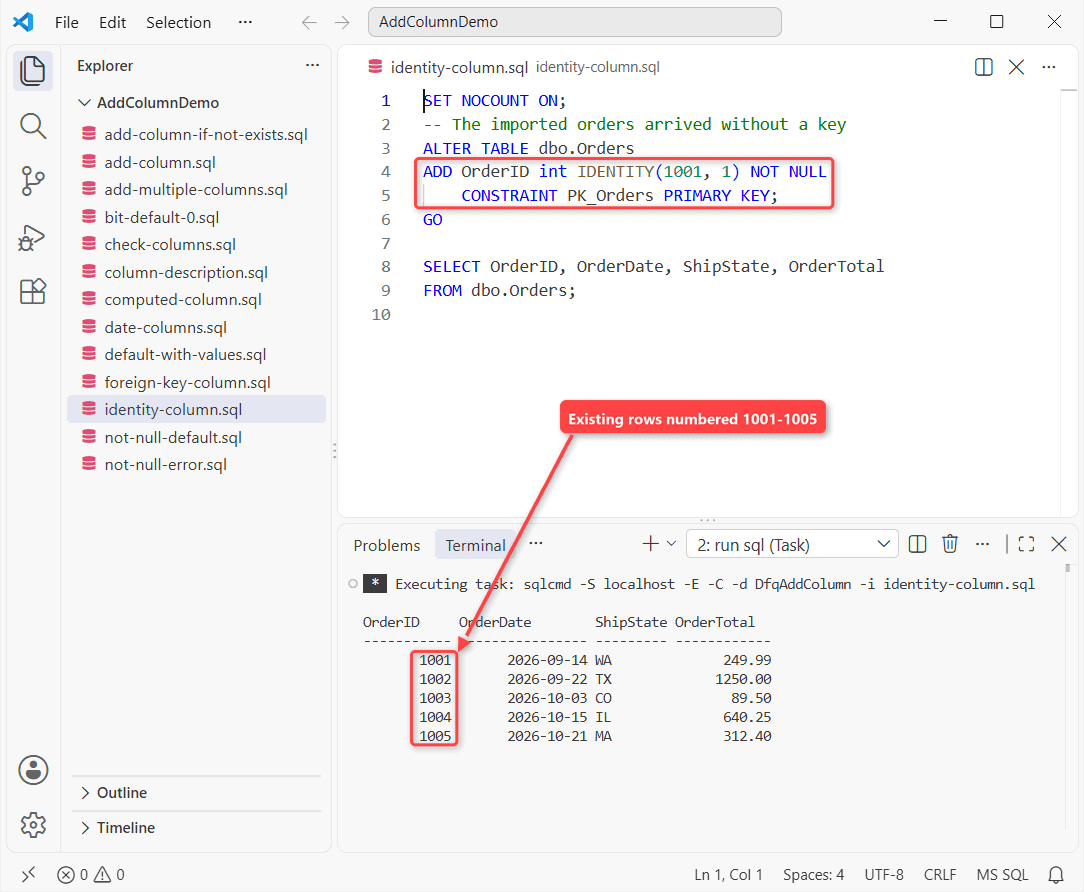
How does this work?
IDENTITY(1001, 1) sets the seed and increment, so the existing orders get 1001 to 1005. Don’t rely on which old row gets which number; SQL Server doesn’t promise an order.
A table allows one identity column, and you can’t turn an existing column into one, so add a new one. More in my IDENTITY column guide, plus the explicit identity value error you’ll hit later.
Method 4: Add a Computed Column in SQL Server
A computed column holds a formula. Same Orders table, now with sales tax:
SET NOCOUNT ON;
-- 7.25% sample sales tax rate
ALTER TABLE dbo.Orders
ADD SalesTax AS CAST(OrderTotal * 0.0725 AS decimal(10,2));
GO

SELECT OrderDate, OrderTotal, SalesTax
FROM dbo.Orders;
Output:
OrderDate        OrderTotal   SalesTax
---------------- ------------ ------------
      2026-09-14       249.99        18.12
      2026-09-22      1250.00        90.63
      2026-10-03        89.50         6.49
      2026-10-15       640.25        46.42
      2026-10-21       312.40        22.65
How does this work?
SQL Server calculates SalesTax when you read it, so the $1,250.00 order shows $90.63. CAST fixes the type at two decimals.
Add PERSISTED after the expression to store the value on disk instead.
Method 5: Add a Foreign Key Column With a Named Constraint
Orders should point to a customer. Add the column and its foreign key together, then test it:
SET NOCOUNT ON;
ALTER TABLE dbo.Orders
ADD CustomerID int NULL
    CONSTRAINT FK_Orders_Customers
    REFERENCES dbo.Customers (CustomerID);
GO

UPDATE dbo.Orders SET CustomerID = 2 WHERE ShipState = 'TX';
UPDATE dbo.Orders SET CustomerID = 9 WHERE ShipState = 'MA';
Output:
Msg 547, Level 16, State 1, Server YOUR-SERVER, Line 3
The UPDATE statement conflicted with the FOREIGN KEY constraint "FK_Orders_Customers". The conflict occurred in database "DfqAddColumn", table "dbo.Customers", column 'CustomerID'.
The statement has been terminated.
How does this work?
CONSTRAINT ... REFERENCES creates the named foreign key in the same statement. The column is nullable, so existing orders are fine.
The Texas order gets customer 2 (Alex), but customer 9 doesn’t exist, so Msg 547 stops it. For ON DELETE rules, see how to create a foreign key in SQL Server.
SQL Server Add Column If Not Exists (COL_LENGTH and sys.columns)
Deployment scripts often run twice. Guard the ALTER TABLE with a check, the same idea as DROP TABLE IF EXISTS. Here are both checks I use:
IF COL_LENGTH('dbo.Customers', 'Phone') IS NULL
BEGIN
    ALTER TABLE dbo.Customers ADD Phone varchar(12) NULL;
    PRINT 'Phone added.';
END
ELSE PRINT 'Phone already exists.';

-- Run the check again, this time with sys.columns
IF NOT EXISTS (SELECT 1 FROM sys.columns
               WHERE object_id = OBJECT_ID('dbo.Customers')
                 AND name = 'Phone')
    ALTER TABLE dbo.Customers ADD Phone varchar(12) NULL;
ELSE PRINT 'Phone already exists.';
Output:
Phone added.
Phone already exists.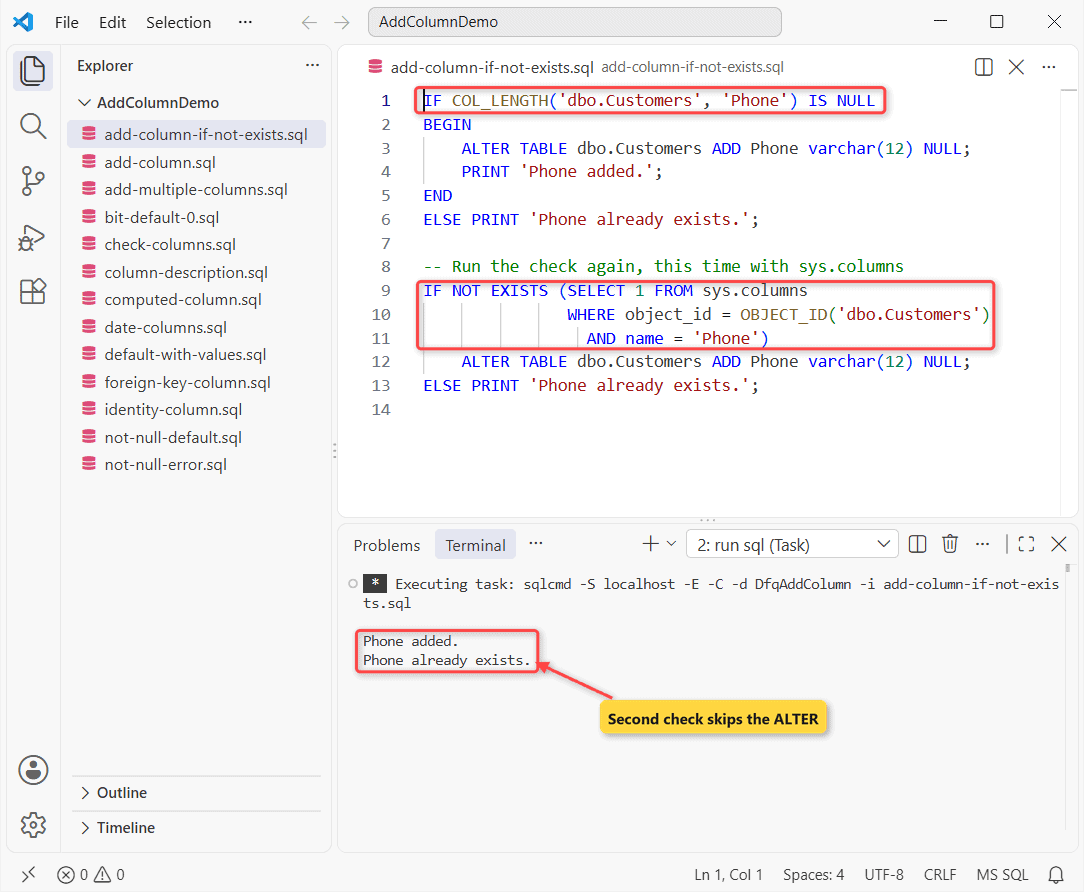
How does this work?
COL_LENGTH returns NULL when the column isn’t there, so the first block adds Phone. The sys.columns check finds it and only prints a message.
Add a Column Description With sp_addextendedproperty
SQL Server stores column descriptions as an extended property named MS_Description, the same field SSMS shows as Description. Same Customers table, with Phone already added:
SET NOCOUNT ON;
EXEC sys.sp_addextendedproperty
    @name = N'MS_Description',
    @value = N'Mobile number, 206-555-0143 format',
    @level0type = N'SCHEMA', @level0name = N'dbo',
    @level1type = N'TABLE',  @level1name = N'Customers',
    @level2type = N'COLUMN', @level2name = N'Phone';

SELECT CAST(objname AS varchar(8))      AS ColumnName,
       CAST(value   AS nvarchar(36))    AS Description
FROM sys.fn_listextendedproperty(N'MS_Description',
     N'SCHEMA', N'dbo', N'TABLE', N'Customers', N'COLUMN', DEFAULT);
Output:
ColumnName Description
---------- ------------------------------------
Phone      Mobile number, 206-555-0143 format
The description is attached to Phone. To list descriptions for a whole table, here’s how to get a column description in SQL Server.
Can You Add a Column After Another Column in SQL Server?
No. T-SQL has no AFTER clause; ALTER TABLE ... ADD always puts the column last. Your options:
- Leave it last. Order doesn’t matter to queries; list columns in your
SELECTinstead. - In SSMS Table Designer, right-click a row, choose Insert Column, and save. SSMS re-creates the table.
- Rebuild it yourself: new table, copy rows with INSERT INTO SELECT, drop the old one, rename.
Microsoft recommends adding columns at the end. A rebuild blocks users and can lose permissions or Change Tracking data.
How to Add a Column in SSMS Table Designer
If you prefer a GUI, SSMS 21 does the same job (here’s how to install SQL Server Management Studio):
- In Object Explorer, expand your database and Tables, right-click the table, and choose Design.
- Select the first blank cell in the Column Name column and type the new name.
- Press Tab, pick a Data Type, and check or clear Allow Nulls.
- For a default, set Default Value or Binding on the Column Properties tab.
- On the File menu, choose Save table name.
If the change needs a table re-create, SSMS blocks it with “Saving changes is not permitted,” controlled by Tools > Options > Designers > Prevent saving changes that require table re-creation.
Microsoft advises leaving that box checked, since a re-create can lose metadata. I use ALTER TABLE instead.
Check the New Columns With INFORMATION_SCHEMA.COLUMNS or sp_help
After every change from this tutorial, here’s the same Customers table as SQL Server sees it, from State onward:
SET NOCOUNT ON;
SELECT ORDINAL_POSITION                  AS Pos,
       CAST(COLUMN_NAME AS varchar(11))  AS ColumnName,
       CAST(DATA_TYPE AS varchar(8))     AS DataType,
       IS_NULLABLE                       AS Nullable,
       CAST(COLUMN_DEFAULT AS varchar(12)) AS DefaultValue
FROM INFORMATION_SCHEMA.COLUMNS
WHERE TABLE_SCHEMA = 'dbo' AND TABLE_NAME = 'Customers'
  AND ORDINAL_POSITION >= 5      -- State + the new columns
ORDER BY ORDINAL_POSITION;
Output:
Pos         ColumnName  DataType Nullable DefaultValue
----------- ----------- -------- -------- ------------
          5 State       char     NO       NULL
          6 Phone       varchar  YES      NULL
          7 Email       nvarchar YES      NULL
          8 LoyaltyTier varchar  YES      NULL
          9 CreditLimit decimal  NO       ((5000.00))
         10 Segment     varchar  YES      ('Retail')
         11 Country     char     YES      ('US')
         12 IsVip       bit      NO       ((0))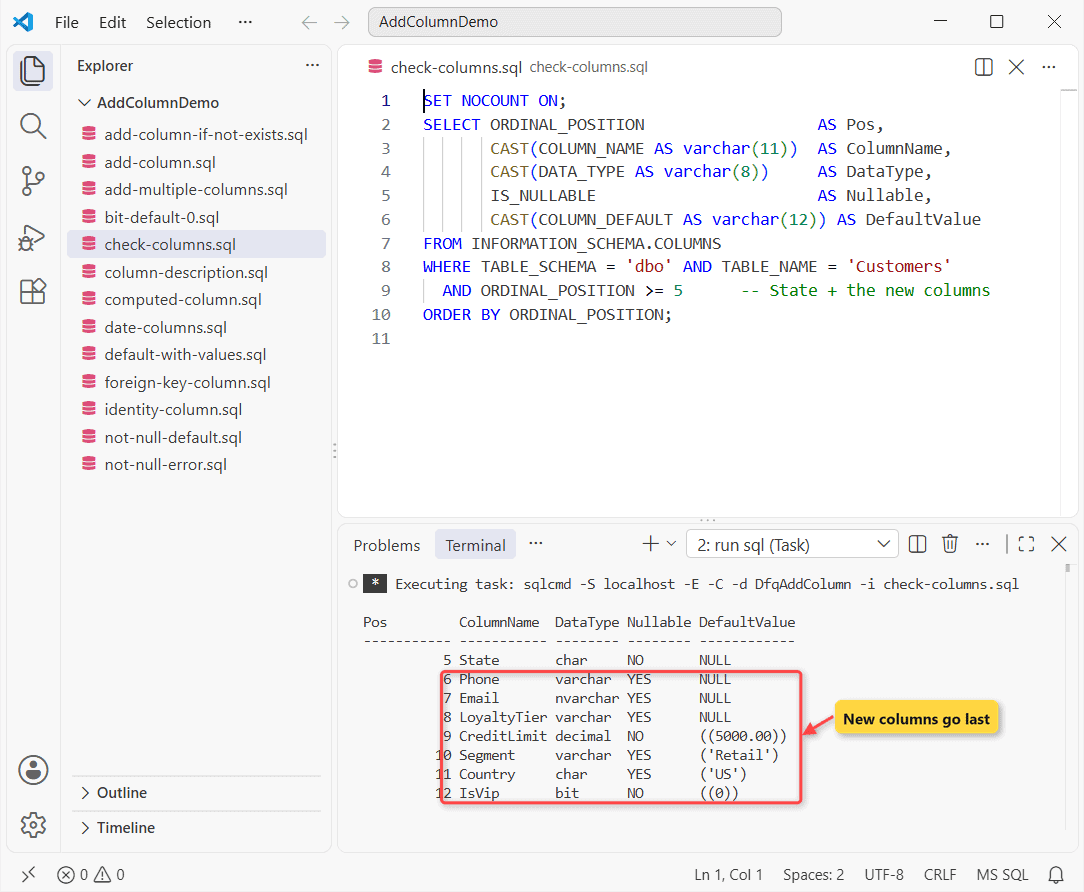
The added columns sit at positions 6 to 12, after State. EXEC sp_help 'dbo.Customers'; shows the same plus constraints and indexes, and Object Explorer can view the table in SQL Server too.
Which Add Column Method Should You Use?
| You need | Use |
|---|---|
| An optional column | ADD col type NULL |
| A required column on a table with rows | NOT NULL + named DEFAULT |
| An auto-number key | IDENTITY + PRIMARY KEY |
| A value derived from other columns | Computed column |
| A rerunnable deployment script | IF COL_LENGTH(...) IS NULL |
Things to Keep in Mind When You Add a Column
- No COLUMN keyword. MySQL-style
ADD COLUMNfails with Msg 156, “Incorrect syntax near the keyword ‘COLUMN’.” - Name your constraints. Dropping a column with a default fails (Msg 5074) until you drop the constraint.
- List columns in INSERTs. An
INSERT ... VALUESwithout a column list fails with Msg 213 once the table has a new column. - Mind big tables. A non-constant default like
NEWID()locks the table while every row is written.
Once your columns are in place, these guides cover the next steps:
- Create a new database in SQL Server
- Create a temp table in SQL Server
- Fill the new column with UPDATE and JOIN
- Convert strings to dates in SQL Server
Frequently Asked Questions
Does ALTER TABLE ADD lock the table in SQL Server?
It takes a schema lock. A NOT NULL column with a runtime-constant default is added online on Enterprise edition; a default like NEWID() runs offline under a Sch-M lock. The ALTER TABLE documentation lists the exceptions.
Is adding a column in Azure SQL Database any different?
No. The same ALTER TABLE ... ADD statements work in Azure SQL Database and Azure SQL Managed Instance.
How do I add a column at a specific position in SQL Server?
T-SQL can’t do it; new columns always go last. SSMS Table Designer can insert a column by re-creating the table, which Microsoft doesn’t recommend (see Change Column Order in a Table).
How do I remove a column I added by mistake?
Run ALTER TABLE dbo.Customers DROP COLUMN Phone;. If the column has a default or foreign key, drop that constraint first, or SQL Server raises Msg 5074.

Shivam Dogra is a cloud database developer and Team Lead at TSInfo Technologies, where he has worked since June 2021. He writes the SQL Server and Oracle tutorials on DatabaseFAQs.com, covering queries, joins, stored procedures, triggers and permissions. Shivam holds a Master of Computer Applications (MCA) from Chandigarh University.