
The UPDATE worked, but the audit row your trigger should write never appeared. To debug trigger in SQL Server code, make it talk: RAISERROR WITH NOWAIT, a log table, and sys.triggers.
Quick answer: put RAISERROR('...', 0, 1) WITH NOWAIT at the top of the trigger and run the statement that should fire it. No message, no firing. My UPDATE on two orders printed:
SET NOCOUNT ON;
UPDATE dbo.Orders
SET    Amount = Amount * 1.05
WHERE  State IN ('TX', 'OH');
sqlcmd printed:
trg_Orders_Check: @@ROWCOUNT=2, inserted=2What You Need Before You Start
Tested on SQL Server 2025 (17.0.1000.7) Developer, sqlcmd in VS Code. You need ALTER on the table. Every example uses this sample (one trigger disabled on purpose):
CREATE TABLE dbo.Orders (
    OrderID  int           PRIMARY KEY,
    Customer nvarchar(20)  NOT NULL,
    State    char(2)       NOT NULL,
    Amount   decimal(10,2) NOT NULL
);
CREATE TABLE dbo.TriggerLog (
    LogID  int IDENTITY PRIMARY KEY,
    Note   varchar(20) NOT NULL,
    RowsIn int         NOT NULL
);
INSERT INTO dbo.Orders VALUES
 (1001, N'Hannah Brooks',  'TX',  249.99),
 (1002, N'Tyler Reed',     'OH',   89.50),
 (1004, N'Marcus Bennett', 'GA',   45.25),
 (1005, N'Olivia Hayes',   'WA',  610.00);
GO
CREATE TRIGGER dbo.trg_Orders_Check ON dbo.Orders
AFTER INSERT, UPDATE
AS
BEGIN
    DECLARE @rc int = @@ROWCOUNT;
    SET NOCOUNT ON;
    DECLARE @ins int = (SELECT COUNT(*) FROM inserted);
    RAISERROR('trg_Orders_Check: @@ROWCOUNT=%d, inserted=%d', 0, 1, @rc, @ins) WITH NOWAIT;
    INSERT INTO dbo.TriggerLog (Note, RowsIn) VALUES ('check fired', @ins);
    IF EXISTS (SELECT 1 FROM inserted WHERE Amount < 0)
    BEGIN
        ROLLBACK TRANSACTION;
        INSERT INTO dbo.TriggerLog (Note, RowsIn) VALUES ('rolled back', @ins);
        RETURN;
    END;
END;
GO
CREATE TRIGGER dbo.trg_Orders_Old ON dbo.Orders
AFTER UPDATE
AS PRINT 'trg_Orders_Old fired';
GO
DISABLE TRIGGER dbo.trg_Orders_Old ON dbo.Orders;
Is the SSMS T-SQL Debugger Still Available?
Not in SSMS. Microsoft Learn now documents T-SQL debugging only in SSDT for Visual Studio. It needs sysadmin, and it doesn’t work against Azure SQL Database.
So I use the T-SQL checks below. New to triggers? Read the SQL Server trigger basics first.
Step 1: Print Inside the Trigger With RAISERROR WITH NOWAIT
Severity 0 is informational, so nothing jumps to CATCH. WITH NOWAIT sends the line now; PRINT waits in the buffer.
I read @@ROWCOUNT first, since DECLARE or SET resets it, then count inserted (see the inserted table in a trigger). Both said 2.
Step 2: Check That the Trigger Exists and Is Enabled
Ask sys.triggers what’s attached and which events fire it:
SET NOCOUNT ON;
SELECT CAST(t.name AS varchar(16))     AS TriggerName,
       t.is_disabled,
       CAST(e.type_desc AS varchar(6)) AS FiresOn
FROM sys.triggers AS t
JOIN sys.trigger_events AS e ON e.object_id = t.object_id
WHERE t.parent_id = OBJECT_ID(N'dbo.Orders')
ORDER BY t.name, e.type_desc;
Output:
TriggerName      is_disabled FiresOn
---------------- ----------- -------
trg_Orders_Check           0 INSERT
trg_Orders_Check           0 UPDATE
trg_Orders_Old             1 UPDATE
is_disabled = 1 explains a silent trigger; see disable and enable triggers. To read its code, get the trigger definition.
Step 3: Reproduce Why a SQL Server Trigger Is Not Firing
SET NOCOUNT ON;
PRINT '1) UPDATE that matches no rows:';
UPDATE dbo.Orders SET Amount = 0 WHERE OrderID = 9999;

PRINT '2) DELETE (no DELETE event on the trigger):';
DELETE FROM dbo.Orders WHERE OrderID = 1004;

PRINT '3) UPDATE: is trg_Orders_Old silent?';
UPDATE dbo.Orders SET State = 'TX' WHERE OrderID = 1005;
Output:
1) UPDATE that matches no rows:
trg_Orders_Check: @@ROWCOUNT=0, inserted=0
2) DELETE (no DELETE event on the trigger):
3) UPDATE: is trg_Orders_Old silent?
trg_Orders_Check: @@ROWCOUNT=1, inserted=1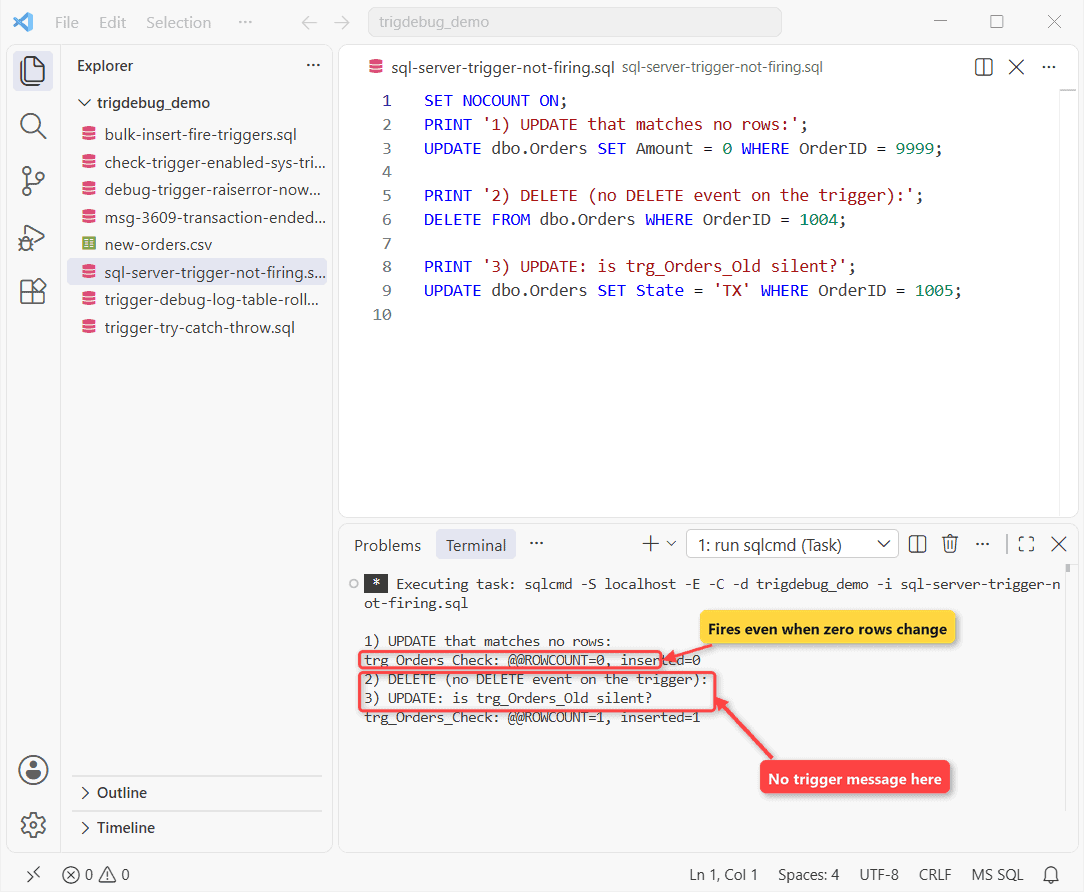
Case 1 surprised me. An AFTER trigger fires once per statement, even for zero rows.
Case 2 has no DELETE event. In case 3, trg_Orders_Old is disabled.
BULK INSERT Skips Triggers Without FIRE_TRIGGERS
My two-row new-orders.csv:
OrderID,Customer,State,Amount
2001,Ethan Cole,NC,75.00
2002,Ava Turner,MN,310.40
SET NOCOUNT ON;
PRINT 'BULK INSERT without FIRE_TRIGGERS:';
BULK INSERT dbo.Orders FROM 'C:\DatabaseFAQsDemo\trigdebug_demo\new-orders.csv'
WITH (FORMAT = 'CSV', FIRSTROW = 2);
DELETE FROM dbo.Orders WHERE OrderID > 2000;
PRINT 'BULK INSERT with FIRE_TRIGGERS:';
BULK INSERT dbo.Orders FROM 'C:\DatabaseFAQsDemo\trigdebug_demo\new-orders.csv'
WITH (FORMAT = 'CSV', FIRSTROW = 2, FIRE_TRIGGERS);Output:
BULK INSERT without FIRE_TRIGGERS:
BULK INSERT with FIRE_TRIGGERS:
trg_Orders_Check: @@ROWCOUNT=2, inserted=2
The first load printed nothing. FORMAT = 'CSV' needs SQL Server 2017+, and TRUNCATE TABLE never fires a DELETE trigger. More in BULK INSERT from a CSV file.
Step 4: Write a Debug Log Table (and Watch ROLLBACK Erase It)
A log table works like any trigger that inserts into another table, so your log INSERT joins the caller’s transaction:
SET NOCOUNT ON;
BEGIN TRANSACTION;
UPDATE dbo.Orders SET Amount = 99.00 WHERE OrderID = 1002;
SELECT COUNT(*) AS LogRowsInsideTran FROM dbo.TriggerLog;
ROLLBACK TRANSACTION;
SELECT COUNT(*) AS LogRowsAfterRollback FROM dbo.TriggerLog;
Output:
trg_Orders_Check: @@ROWCOUNT=1, inserted=1
LogRowsInsideTran
-----------------
                1
LogRowsAfterRollback
--------------------
                   0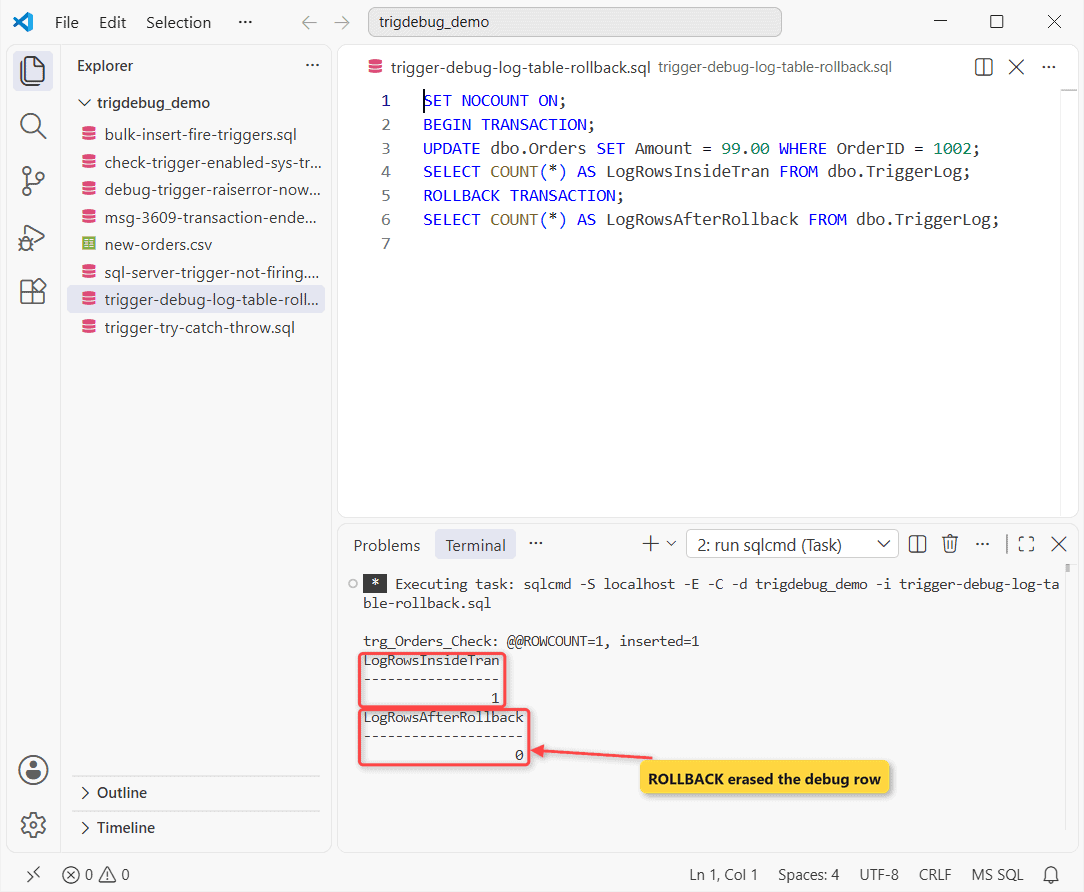
One row inside, zero after. RAISERROR messages aren’t transactional, so I use both.
Step 5: Msg 3609 When the Trigger Rolls Back
I inserted a negative amount for Chloe Parker:
SET NOCOUNT ON;
BEGIN TRY
    INSERT INTO dbo.Orders VALUES (1006, N'Chloe Parker', 'AZ', -20.00);
END TRY
BEGIN CATCH
    PRINT CONCAT('Msg ', ERROR_NUMBER(), ': ', ERROR_MESSAGE());
    PRINT CONCAT('@@TRANCOUNT after the error: ', @@TRANCOUNT);
END CATCH;
SELECT Note, RowsIn FROM dbo.TriggerLog;
Output:
trg_Orders_Check: @@ROWCOUNT=1, inserted=1
Msg 3609: The transaction ended in the trigger. The batch has been aborted.
@@TRANCOUNT after the error: 0
Note                 RowsIn
-------------------- -----------
rolled back                    1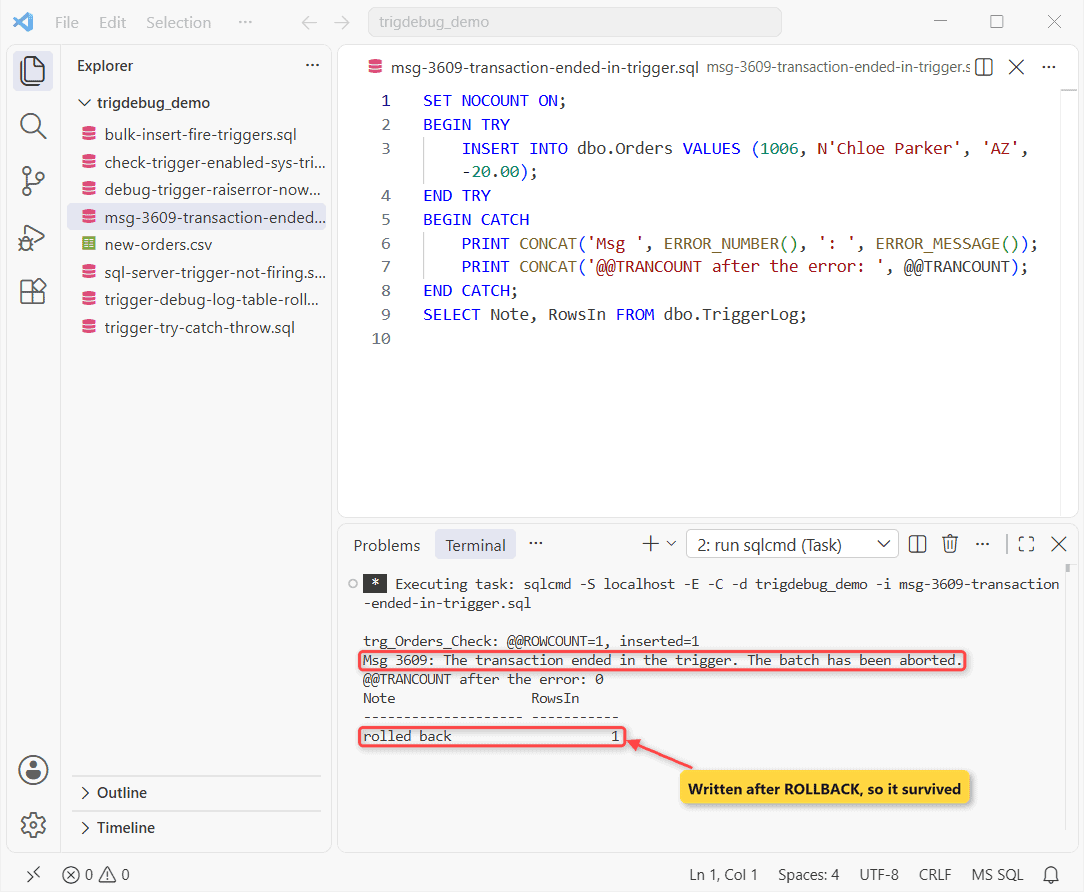
Why it happens: the trigger ended the caller’s transaction, so SQL Server aborts the batch. ‘check fired’ vanished; ‘rolled back’ ran after the ROLLBACK and stayed. Details: Msg 3609, the transaction ended in the trigger.
Step 6: Trigger Error Handling With TRY…CATCH and THROW
Inside a trigger XACT_ABORT defaults to ON, so THROW (SQL Server 2012+) rolls back for you:
SET NOCOUNT ON;
GO
CREATE OR ALTER TRIGGER dbo.trg_Orders_Check ON dbo.Orders
AFTER INSERT, UPDATE
AS
BEGIN
    SET NOCOUNT ON;
    IF EXISTS (SELECT 1 FROM inserted WHERE Amount < 0)
        THROW 50010, 'Amount cannot be negative.', 1;
END;
GO
BEGIN TRY
    INSERT INTO dbo.Orders VALUES (1006, N'Chloe Parker', 'AZ', -20.00);
END TRY
BEGIN CATCH
    PRINT CONCAT('Msg ', ERROR_NUMBER(), ': ', ERROR_MESSAGE());
    PRINT CONCAT('@@TRANCOUNT after the error: ', @@TRANCOUNT);
END CATCH;
SELECT COUNT(*) AS ChloeRows FROM dbo.Orders WHERE OrderID = 1006;
Output:
Msg 50010: Amount cannot be negative.
@@TRANCOUNT after the error: 0
ChloeRows
-----------
          0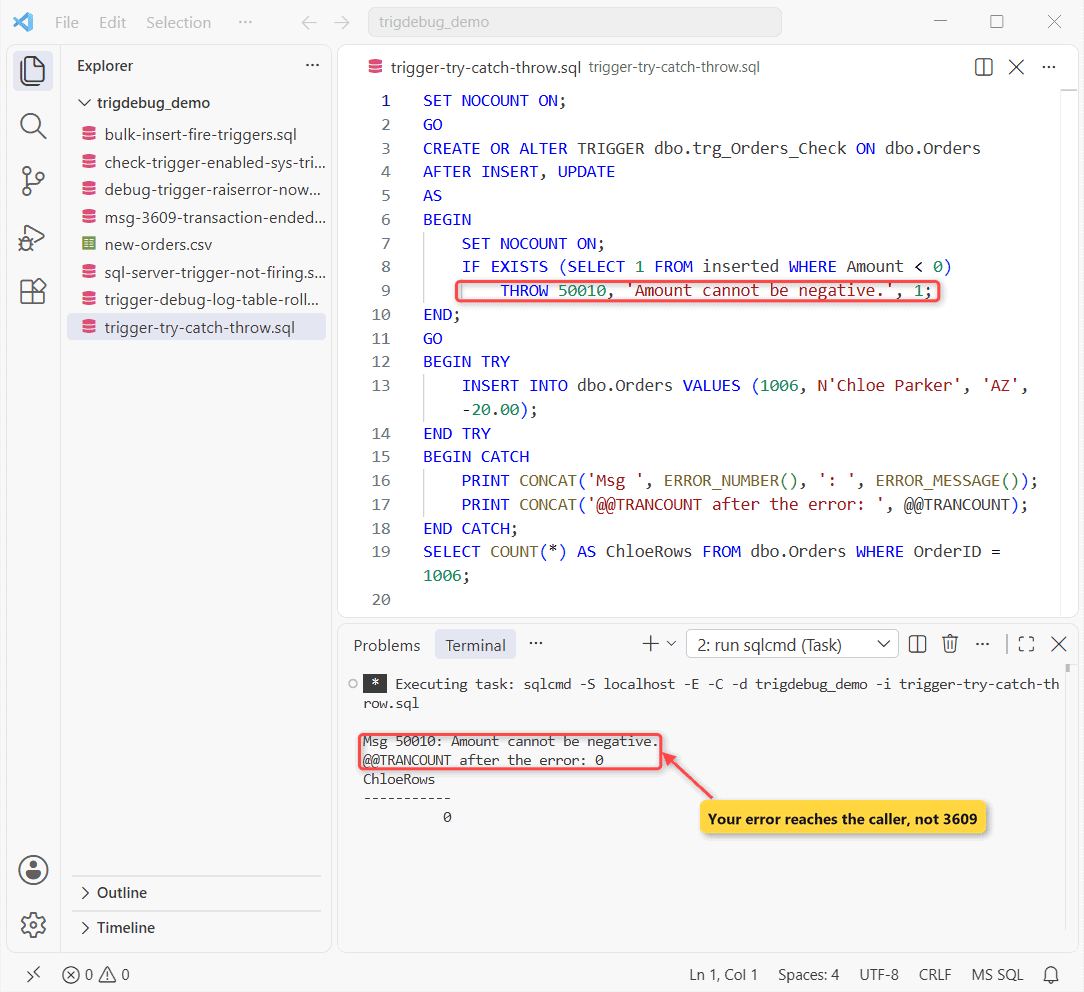
Msg 50010 with my text, @@TRANCOUNT 0, no row for Chloe. RAISERROR ignores XACT_ABORT, so prefer THROW. For a check-first version, see trigger IF EXISTS with an error.
Trigger Debugging Cheat Sheet
| Symptom | Check | Fix |
|---|---|---|
| No message | is_disabled, trigger_events | ENABLE TRIGGER |
| inserted=0 | The statement’s WHERE | Exit on zero rows |
| Bulk rows skip it | BULK INSERT options | FIRE_TRIGGERS |
| Msg 3609 | ROLLBACK in trigger | THROW instead |
Common Mistakes to Avoid
- Reading
@@ROWCOUNTafter a DECLARE. - Debugging with SELECT: trigger result sets are deprecated.
- Leaving RAISERROR lines in production.
Next Steps if Your Trigger Still Fails
If it still fails: no message means Step 2 or 3; a wrong count means your WHERE; Msg 3609 means Step 6. Then fire the trigger on purpose with one test row.
We’d read these next:
- If your trigger calls itself, read recursive triggers
- An AFTER INSERT trigger walk-through
- On MariaDB: MariaDB CREATE TRIGGER
Frequently Asked Questions
Can I still step through a trigger with a debugger?
Yes, in SSDT for Visual Studio: Step Into (F11) opens the trigger the statement fires, per the Transact-SQL debugger docs. Use a test server; sessions hold locks.
Does a SQL Server trigger fire once per row?
No, once per statement. The CREATE TRIGGER reference suggests IF (ROWCOUNT_BIG() = 0) RETURN; first.
Why don’t I see PRINT output from a logon trigger?
Logon trigger messages and errors go to the SQL Server error log, not your client.

Shivam Dogra is a cloud database developer and Team Lead at TSInfo Technologies, where he has worked since June 2021. He writes the SQL Server and Oracle tutorials on DatabaseFAQs.com, covering queries, joins, stored procedures, triggers and permissions. Shivam holds a Master of Computer Applications (MCA) from Chandigarh University.