
Indexed views in SQL Server cut my sales-by-state query from 1,059 logical reads to 2. But only after I named the view and added a hint. Without it, SQL Server 2025 Standard Developer ignored the index.
Quick answer (indexed views in SQL Server): create the view WITH SCHEMABINDING, use two-part table names, add COUNT_BIG(*) next to a GROUP BY, then build a unique clustered index on it. On Standard, read it with WITH (NOEXPAND).
CREATE VIEW dbo.vSalesByState WITH SCHEMABINDING AS
SELECT c.State, COUNT_BIG(*) AS OrderCount, SUM(o.Amount) AS TotalSales
FROM dbo.Orders AS o JOIN dbo.Customers AS c ON c.CustomerID = o.CustomerID
GROUP BY c.State;
GO
CREATE UNIQUE CLUSTERED INDEX IX_vSalesByState ON dbo.vSalesByState (State);
That index stores the view’s result on disk, like a table with a clustered index. That’s why people also call it a SQL Server materialized view. The rest of this page is what I measured, what broke, and what it costs on writes.
How I Tested Indexed Views in SQL Server
Tested on SQL Server 2025 (17.0.1000.7) Standard Developer Edition, Windows auth, sqlcmd in the VS Code terminal. Every read count below is logical reads from SET STATISTICS IO ON; physical reads depend on what’s cached, so I ignore them.
The edition matters more than usual here. SERVERPROPERTY('EngineEdition') returned 2, which means Standard. The free Standard Developer edition in 2025 behaves like Standard, not Enterprise.
The sample is 8 customers and 80,000 orders. It’s small enough for a laptop, big enough that a scan costs real pages. Run it once in an empty database:
SET NUMERIC_ROUNDABORT OFF;
SET ANSI_NULLS, ANSI_PADDING, ANSI_WARNINGS, ARITHABORT,
    CONCAT_NULL_YIELDS_NULL, QUOTED_IDENTIFIER ON;

CREATE TABLE dbo.Customers (
    CustomerID int          PRIMARY KEY,
    FullName   nvarchar(20) NOT NULL,
    City       nvarchar(15) NOT NULL,
    State      char(2)      NOT NULL
);
INSERT INTO dbo.Customers VALUES
(1, N'Hannah Brooks',  N'Austin',      'TX'),
(2, N'Tyler Reed',     N'Dallas',      'TX'),
(3, N'Grace Miller',   N'San Diego',   'CA'),
(4, N'Marcus Bennett', N'Sacramento',  'CA'),
(5, N'Olivia Hayes',   N'Buffalo',     'NY'),
(6, N'Ethan Carter',   N'Tampa',       'FL'),
(7, N'Chloe Ramirez',  N'Orlando',     'FL'),
(8, N'Logan Foster',   N'Seattle',     'WA');

CREATE TABLE dbo.Orders (
    OrderID    int           PRIMARY KEY,
    CustomerID int           NOT NULL REFERENCES dbo.Customers,
    OrderDate  date          NOT NULL,
    Amount     decimal(10,2) NOT NULL,
    ShipNote   nvarchar(60)  NOT NULL
);
-- 80,000 orders spread over 2026 (GENERATE_SERIES needs SQL Server 2022+)
INSERT INTO dbo.Orders
SELECT value,
       value % 8 + 1,
       DATEADD(day, value % 300, '2026-01-01'),
       10 + (value * 37 % 49000) / 100.0,
       N'Leave at front desk, call on arrival'
FROM GENERATE_SERIES(1, 80000);
Here’s the report query with no indexed view yet. It’s a plain COUNT with JOIN and GROUP BY, the kind of rollup a dashboard runs every few seconds:
SET NOCOUNT ON;
SET STATISTICS IO ON;
SELECT c.State, COUNT_BIG(*) AS Orders, SUM(o.Amount) AS Sales
FROM dbo.Orders AS o
JOIN dbo.Customers AS c ON c.CustomerID = o.CustomerID
GROUP BY c.State
ORDER BY c.State;
Output:
State Orders               Sales
----- -------------------- ----------------------------------------
CA                   20000                               5080390.00
FL                   20000                               5080050.00
NY                   10000                               2540110.00
TX                   20000                               5080490.00
WA                   10000                               2539940.00
Table 'Worktable'. Scan count 0, logical reads 0, ...
Table 'Customers'. Scan count 0, logical reads 16, ...
Table 'Workfile'. Scan count 0, logical reads 0, ...
Table 'Orders'. Scan count 1, logical reads 1043, ...
SQL Server scanned all of Orders (1,043 pages) and probed Customers (16 pages) to return five rows. That’s the cost an indexed view is supposed to remove.
Create an Indexed View in SQL Server: SCHEMABINDING, COUNT_BIG and the Unique Clustered Index
A regular view in SQL Server stores only its query. An indexed view stores rows. Microsoft lists six steps to get there, and I’d follow them in this order:
- Check the SET options on every table the view will reference.
- Set the session’s SET options before you create the tables and the view.
- Make sure the view definition is deterministic.
- Keep the view and its base tables under the same owner.
- Create the view
WITH SCHEMABINDING. - Create the unique clustered index, then any nonclustered indexes you need.
Here’s the full script I ran. The SET lines go first because sqlcmd doesn’t start with all of them on:
SET NUMERIC_ROUNDABORT OFF;
SET ANSI_NULLS, ANSI_PADDING, ANSI_WARNINGS, ARITHABORT,
    CONCAT_NULL_YIELDS_NULL, QUOTED_IDENTIFIER ON;
GO
CREATE VIEW dbo.vSalesByState
WITH SCHEMABINDING
AS
SELECT c.State,
       COUNT_BIG(*)  AS OrderCount,
       SUM(o.Amount) AS TotalSales
FROM dbo.Orders AS o
JOIN dbo.Customers AS c ON c.CustomerID = o.CustomerID
GROUP BY c.State;
GO
CREATE UNIQUE CLUSTERED INDEX IX_vSalesByState
    ON dbo.vSalesByState (State);
GO
SET NOCOUNT ON;
SELECT State, OrderCount, TotalSales
FROM dbo.vSalesByState WITH (NOEXPAND)
ORDER BY State;
Output:
State OrderCount           TotalSales
----- -------------------- ----------------------------------------
CA                   20000                               5080390.00
FL                   20000                               5080050.00
NY                   10000                               2540110.00
TX                   20000                               5080490.00
WA                   10000                               2539940.00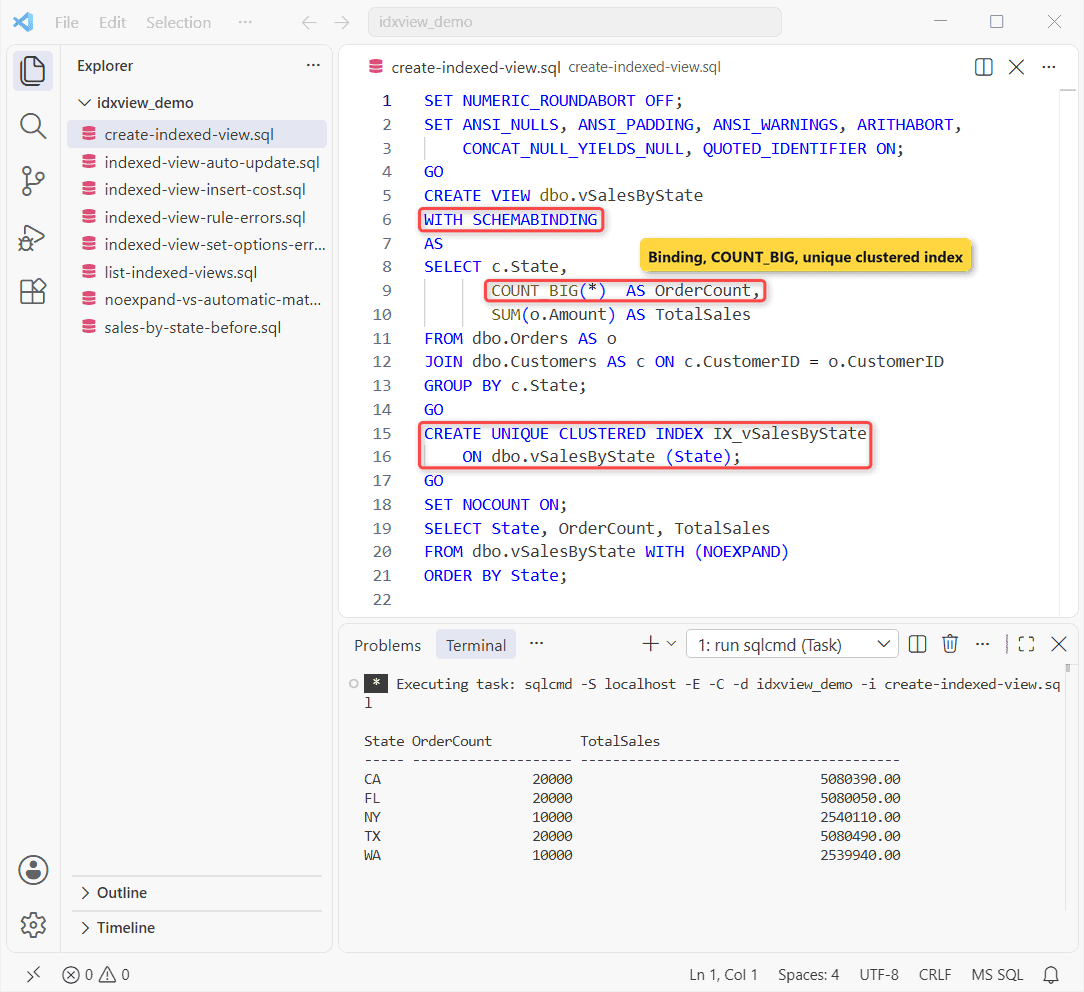
WITH SCHEMABINDING locks the base tables’ schema, so you can’t drop or alter a column the view uses. COUNT_BIG(*) is mandatory with GROUP BY; SQL Server uses it to track how many base rows feed each group.
The index key can only use GROUP BY columns, so State is the key. After that you can add nonclustered indexes on the view, the same way you would on a table.
One trap: ALTER VIEW on an indexed view drops all of its indexes. I confirmed it on a test view: zero indexes left after the ALTER. If you alter a view in SQL Server that’s indexed, script the index again right after.
Indexed View Requirements: The SET Options SQL Server Checks
Indexed views need seven SET options at fixed values. They’re checked when you create the view and index, when anyone runs INSERT, UPDATE or DELETE on a base table, and when the optimizer uses the view.
| SET option | Required | sqlcmd / ODBC default |
|---|---|---|
ANSI_NULLS | ON | ON |
ANSI_PADDING | ON | ON |
ANSI_WARNINGS | ON | ON |
ARITHABORT | ON | OFF (ANSI_WARNINGS ON covers it) |
CONCAT_NULL_YIELDS_NULL | ON | ON |
NUMERIC_ROUNDABORT | OFF | OFF |
QUOTED_IDENTIFIER | ON | OFF in sqlcmd unless you pass -I |
That last row bit me. sqlcmd connects with QUOTED_IDENTIFIER OFF while SSMS turns it on, so a script that works in SSMS can fail from a scheduled job. Here’s the same database from plain sqlcmd:
SET NOCOUNT ON;
-- sqlcmd connects with QUOTED_IDENTIFIER OFF
SELECT CAST(SESSIONPROPERTY('QUOTED_IDENTIFIER') AS int) AS QuotedIdentifier;

BEGIN TRY
    EXEC (N'INSERT INTO dbo.Orders VALUES
      (80001, 1, ''2026-10-30'', 49.99, N''Porch'');');
END TRY
BEGIN CATCH
    PRINT CONCAT('Msg ', ERROR_NUMBER(), ': ', ERROR_MESSAGE());
END CATCH;

EXEC (N'CREATE VIEW dbo.vTexasOrders WITH SCHEMABINDING AS
  SELECT o.OrderID, o.Amount FROM dbo.Orders AS o
  WHERE o.CustomerID IN (1, 2);');
BEGIN TRY
    EXEC (N'CREATE UNIQUE CLUSTERED INDEX IX_vTexasOrders
           ON dbo.vTexasOrders (OrderID);');
END TRY
BEGIN CATCH
    PRINT CONCAT('Msg ', ERROR_NUMBER(), ': ', ERROR_MESSAGE());
END CATCH;
Output:
QuotedIdentifier
----------------
               0
Msg 1934: INSERT failed because the following SET options have incorrect settings: 'QUOTED_IDENTIFIER'. Verify that SET options are correct for use with indexed views and/or indexes on computed columns and/or filtered indexes and/or query notifications and/or XML data type methods and/or spatial index operations.
Msg 1935: Cannot create index. Object 'vTexasOrders' was created with the following SET options off: 'QUOTED_IDENTIFIER'.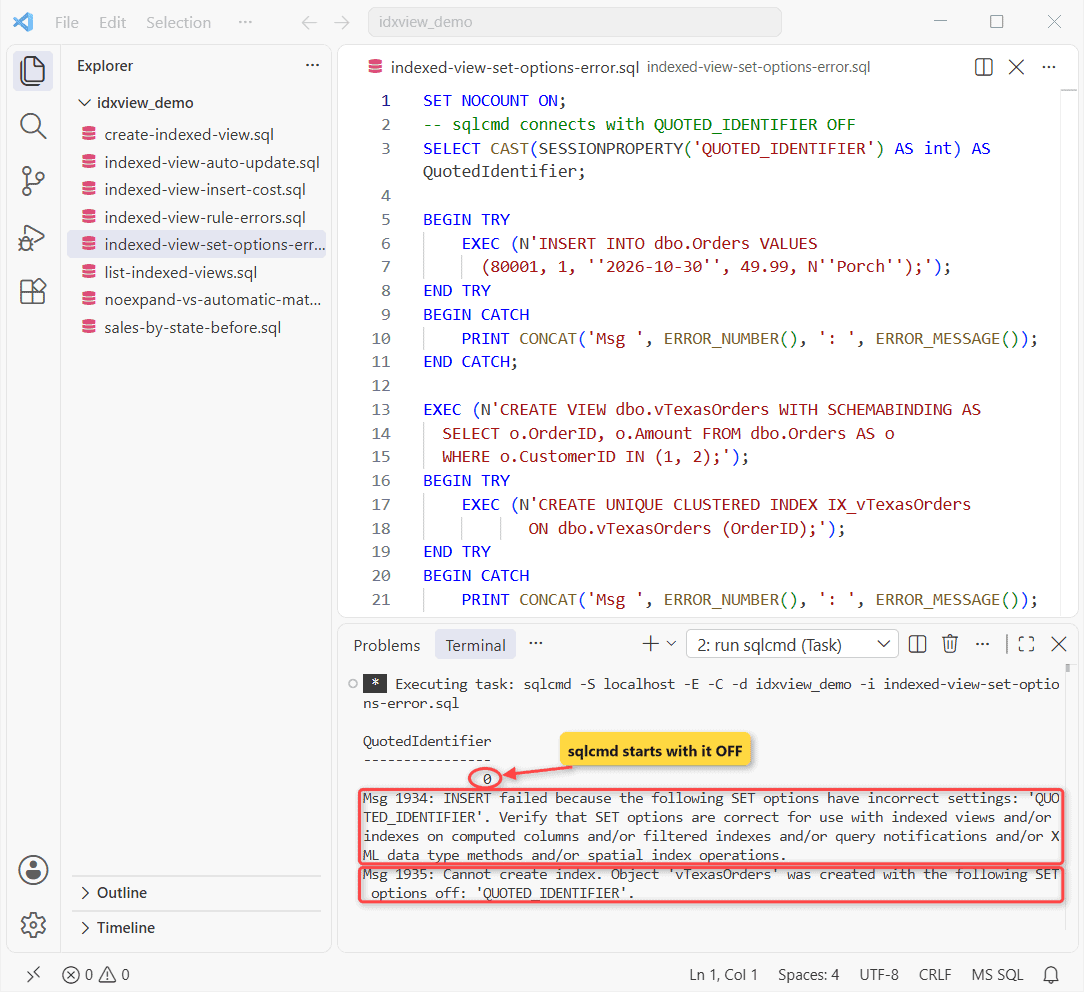
Msg 1934 is the nasty one. The indexed view already existed, and a plain INSERT into Orders failed because the session had the wrong setting.
Every app or job that writes to a base table needs these options right, and BULK INSERT from a CSV file is checked too.
Msg 1935 comes from the view itself: it remembers QUOTED_IDENTIFIER and ANSI_NULLS from creation time. Drop it and recreate it with the options on. Microsoft also recommends ARITHABORT ON server-wide once the first indexed view exists.
Indexed View Errors From Breaking the Rules (Msg 1939, 4512, 10138, 10113, 1949)
Most indexed view requirements only show up when CREATE INDEX runs. So I broke five of them on purpose, in one loop, with TRY…CATCH printing the error number:
SET NUMERIC_ROUNDABORT OFF;
SET ANSI_NULLS, ANSI_PADDING, ANSI_WARNINGS, ARITHABORT,
    CONCAT_NULL_YIELDS_NULL, QUOTED_IDENTIFIER ON;
SET NOCOUNT ON;
DECLARE @bad TABLE (Rule_ varchar(14), Ddl nvarchar(400));
INSERT INTO @bad VALUES
('no binding', N'CREATE VIEW dbo.vBad AS SELECT o.OrderID AS K FROM dbo.Orders AS o'),
('one-part name', N'CREATE VIEW dbo.vBad WITH SCHEMABINDING AS
   SELECT OrderID AS K FROM Orders'),
('no COUNT_BIG', N'CREATE VIEW dbo.vBad WITH SCHEMABINDING AS
   SELECT o.CustomerID AS K, SUM(o.Amount) AS S FROM dbo.Orders AS o
   GROUP BY o.CustomerID'),
('LEFT JOIN', N'CREATE VIEW dbo.vBad WITH SCHEMABINDING AS
   SELECT c.CustomerID, o.OrderID AS K FROM dbo.Customers AS c
   LEFT JOIN dbo.Orders AS o ON o.CustomerID = c.CustomerID'),
('GETDATE()', N'CREATE VIEW dbo.vBad WITH SCHEMABINDING AS
   SELECT o.OrderID AS K, DATEDIFF(day, o.OrderDate, GETDATE()) AS Age
   FROM dbo.Orders AS o');

DECLARE @r varchar(14), @d nvarchar(400);
DECLARE c CURSOR LOCAL FAST_FORWARD FOR SELECT Rule_, Ddl FROM @bad;
OPEN c; FETCH c INTO @r, @d;
WHILE @@FETCH_STATUS = 0
BEGIN
    BEGIN TRY
        IF OBJECT_ID(N'dbo.vBad', N'V') IS NOT NULL DROP VIEW dbo.vBad;
        EXEC (@d);
        EXEC (N'CREATE UNIQUE CLUSTERED INDEX IX_vBad ON dbo.vBad (K);');
    END TRY
    BEGIN CATCH
        PRINT CONCAT(@r, ' -> Msg ', ERROR_NUMBER(), ': ', ERROR_MESSAGE());
    END CATCH;
    FETCH c INTO @r, @d;
END;
IF OBJECT_ID(N'dbo.vBad', N'V') IS NOT NULL DROP VIEW dbo.vBad;
Output:
no binding -> Msg 1939: Cannot create index on view 'vBad' because the view is not schema bound.
one-part name -> Msg 4512: Cannot schema bind view 'dbo.vBad' because name 'Orders' is invalid for schema binding. Names must be in two-part format and an object cannot reference itself.
no COUNT_BIG -> Msg 10138: Cannot create index on view 'idxview_demo.dbo.vBad' because its select list does not include a proper use of COUNT_BIG. Consider adding COUNT_BIG(*) to select list.
LEFT JOIN -> Msg 10113: Cannot create index on view "idxview_demo.dbo.vBad" because it uses a LEFT, RIGHT, or FULL OUTER join, and no OUTER joins are allowed in indexed views. Consider using an INNER join instead.
GETDATE() -> Msg 1949: Cannot create index on view 'idxview_demo.dbo.vBad'. The function 'getdate' yields nondeterministic results. Use a deterministic system function, or modify the user-defined function to return deterministic results.
Only the one-part name fails at CREATE VIEW. Msg 10113 is the one people hit when they turn a LEFT JOIN with COUNT report into an indexed view. The only ways out are an INNER join or a summary table.
The view definition can’t use these either. The right column is Microsoft’s suggested alternative:
| Not allowed | Use instead |
|---|---|
COUNT(*) | COUNT_BIG(*) |
AVG() | SUM() and COUNT_BIG(*), divide in the query |
SUM() of a nullable column | SUM(ISNULL(col, 0)) |
MIN, MAX, STRING_AGG, STDEV | Nothing; keep them out of the view |
SELECT DISTINCT | GROUP BY |
| LEFT, RIGHT, FULL OUTER JOIN, APPLY | INNER JOIN only |
| Subqueries, CTEs, derived tables, self-joins | Rewrite as joins to base tables |
UNION / EXCEPT / INTERSECT | OR / AND NOT / AND in WHERE |
TOP, ORDER BY, HAVING, OFFSET | Put them in the query that reads the view |
| Other views, other databases | Base tables in the same database |
GETDATE() and other nondeterministic functions | Pass dates in from the query |
float in the index key | decimal, or keep float as a non-key column |
ORDER BY is the one I see most in old views, and the rules for ORDER BY in a SQL Server view already make it pointless there. A view with UNION can’t be indexed at all.
Does SQL Server Use an Indexed View Automatically?
Enterprise edition can swap an indexed view into a query that never names it (indexed view matching). Microsoft says automatic use works only in specific editions, and that Standard needs NOEXPAND. I tested all three ways of asking for Texas sales:
SET NOCOUNT ON;
SET QUOTED_IDENTIFIER ON;
SET STATISTICS IO ON;
PRINT '--- 1. base tables (automatic matching?)';
SELECT c.State, SUM(o.Amount) AS Sales FROM dbo.Orders AS o
JOIN dbo.Customers AS c ON c.CustomerID = o.CustomerID
WHERE c.State = 'TX' GROUP BY c.State;
PRINT '--- 2. view, no hint';
SELECT State, TotalSales FROM dbo.vSalesByState
WHERE State = 'TX';
PRINT '--- 3. view WITH (NOEXPAND)';
SELECT State, TotalSales FROM dbo.vSalesByState WITH (NOEXPAND)
WHERE State = 'TX';
Output:
--- 1. base tables (automatic matching?)
State Sales
----- ----------------------------------------
TX                                  5080490.00
Table 'Customers'. Scan count 0, logical reads 16, ...
Table 'Worktable'. Scan count 0, logical reads 0, ...
Table 'Workfile'. Scan count 0, logical reads 0, ...
Table 'Orders'. Scan count 1, logical reads 1043, ...
--- 2. view, no hint
State TotalSales
----- ----------------------------------------
TX                                  5080490.00
Table 'Customers'. Scan count 0, logical reads 16, ...
Table 'Worktable'. Scan count 0, logical reads 0, ...
Table 'Workfile'. Scan count 0, logical reads 0, ...
Table 'Orders'. Scan count 1, logical reads 1043, ...
--- 3. view WITH (NOEXPAND)
State TotalSales
----- ----------------------------------------
TX                                  5080490.00
Table 'vSalesByState'. Scan count 0, logical reads 2, ...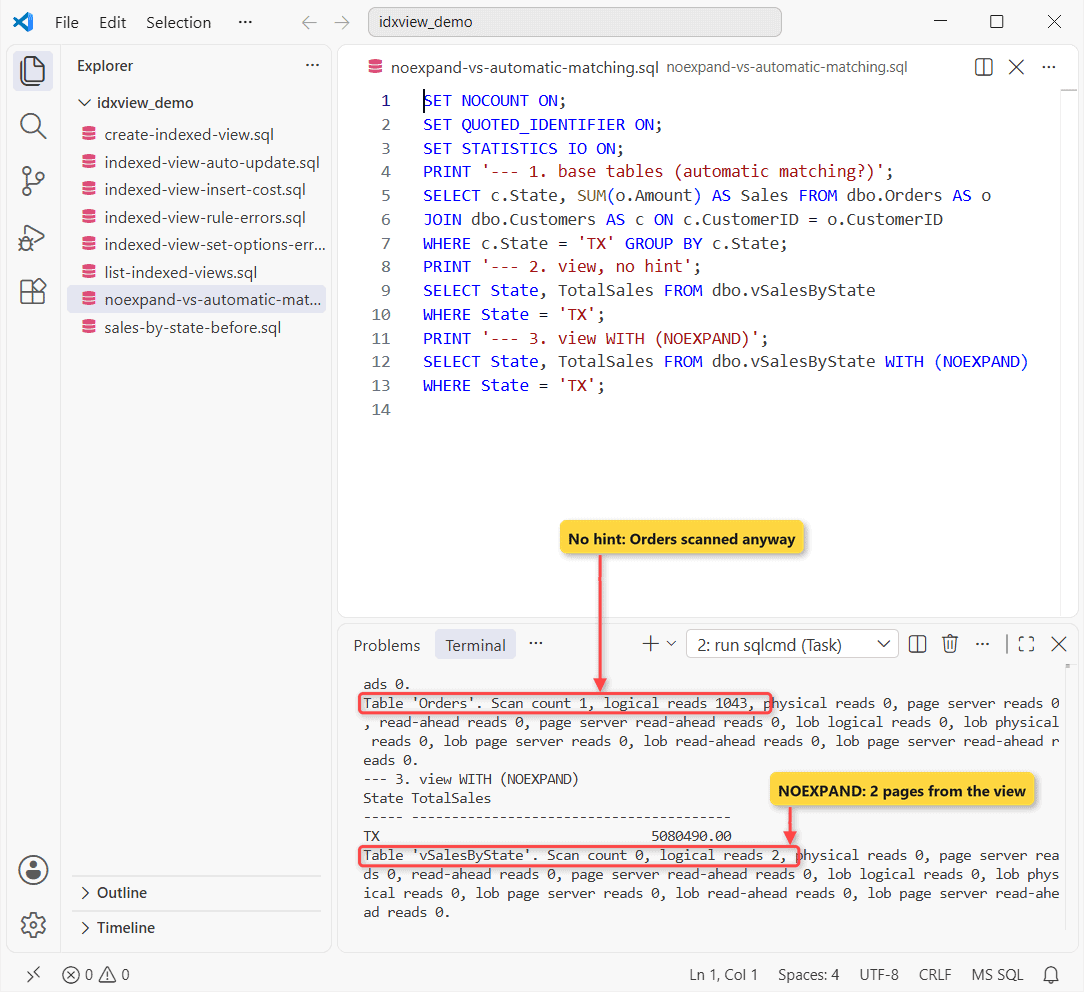
| Query | What SQL Server read | Logical reads |
|---|---|---|
| Base tables, same GROUP BY | Orders + Customers | 1,059 |
| The view, no hint | Orders + Customers | 1,059 |
The view WITH (NOEXPAND) | vSalesByState | 2 |
So on this edition, selecting from the view without a hint expanded it back into the join. The stored rows sat unused while SQL Server read 1,043 pages of Orders. With NOEXPAND it read 2 pages.
I disagree with the common advice to avoid NOEXPAND as “just a hint”. Microsoft notes SQL Server only creates statistics on an indexed view automatically when NOEXPAND is used. I’d put it in every query that reads an indexed view, even on Enterprise.
Azure SQL Database and Azure SQL Managed Instance match indexed views automatically. To block the view in any edition, add OPTION (EXPAND VIEWS). NOEXPAND also needs the same SET options, so a wrong session setting sends you back to the base tables.
To watch which plan each query gets over time, turn on Query Store before you add the hints.
The View Keeps Itself Current: No Refresh Needed
People coming from Oracle or PostgreSQL ask how to refresh an indexed view. You don’t. SQL Server updates it inside the same statement that changes the base table:
SET NOCOUNT ON;
SET QUOTED_IDENTIFIER ON;
SELECT State, OrderCount, TotalSales
FROM dbo.vSalesByState WITH (NOEXPAND) WHERE State = 'WA';

INSERT INTO dbo.Orders VALUES
(80001, 8, '2026-10-30', 149.99, N'Porch');

SELECT State, OrderCount, TotalSales
FROM dbo.vSalesByState WITH (NOEXPAND) WHERE State = 'WA';
Output:
State OrderCount           TotalSales
----- -------------------- ----------------------------------------
WA                   10000                               2539940.00
State OrderCount           TotalSales
----- -------------------- ----------------------------------------
WA                   10001                               2540089.99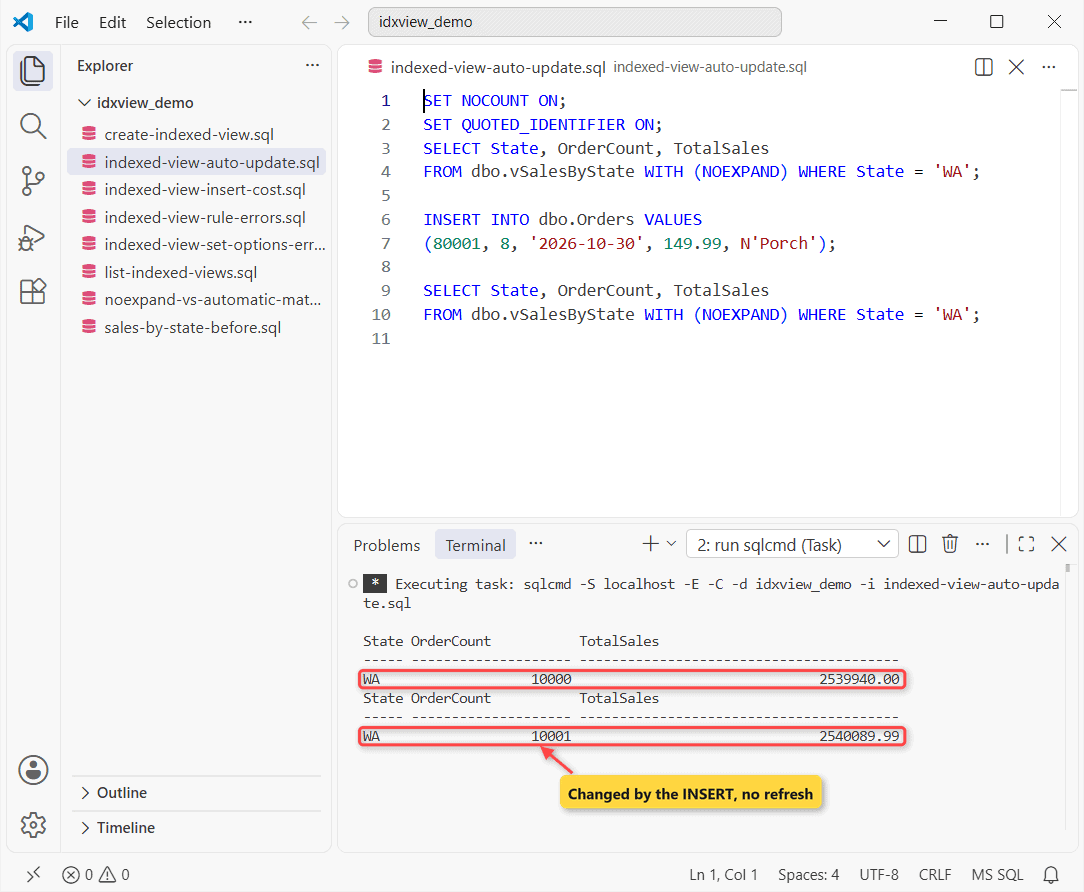
One new $149.99 Seattle order, and WA moved from 10,000 to 10,001 orders and from $2,539,940.00 to $2,540,089.99 right away. A PostgreSQL materialized view needs REFRESH MATERIALIZED VIEW instead; PostgreSQL views covers that side.
Indexed Views Slow Down INSERT: The Write Cost I Measured
That automatic refresh is paid by every writer. I inserted 20,000 orders three times with the indexed view and three times after dropping its index, rolling back each run and timing it with SYSDATETIME():
SET NUMERIC_ROUNDABORT OFF;
SET ANSI_NULLS, ANSI_PADDING, ANSI_WARNINGS, ARITHABORT,
    CONCAT_NULL_YIELDS_NULL, QUOTED_IDENTIFIER ON;
SET NOCOUNT ON;
DECLARE @t TABLE (Mode varchar(10), Ms int);
DECLARE @i int = 1, @s datetime2(7);
WHILE @i <= 6
BEGIN
    IF @i = 4 DROP INDEX IX_vSalesByState ON dbo.vSalesByState;
    BEGIN TRAN;
    SET @s = SYSDATETIME();
    INSERT INTO dbo.Orders
    SELECT value, value % 8 + 1, '2026-11-02', 25.00, N'Side door'
    FROM GENERATE_SERIES(100001, 120000);
    INSERT INTO @t VALUES (IIF(@i <= 3, 'with view', 'no view'),
                           DATEDIFF(millisecond, @s, SYSDATETIME()));
    ROLLBACK;
    SET @i += 1;
END;
SELECT Mode, COUNT(*) AS Runs, AVG(Ms) AS AvgMs, MIN(Ms) AS MinMs, MAX(Ms) AS MaxMs
FROM @t GROUP BY Mode ORDER BY Mode DESC;
Output:
Mode       Runs        AvgMs       MinMs       MaxMs
---------- ----------- ----------- ----------- -----------
with view            3         258         227         310
no view              3         134         121         149
The insert averaged 258 ms with the view and 134 ms without, about 93% slower. Treat the milliseconds as rough (one laptop, three runs each), but the slowest run without the view still beat the fastest run with it.
All 20,000 rows landed on five view rows, so every write also touched the same few hot rows. On a busy OLTP table, that’s where blocking starts: concurrent inserts for one state all update one view row.
How to List Indexed Views in a Database (sys.views + sys.indexes)
An indexed view is just a view with rows in sys.indexes. Join the two catalog views, and add sys.dm_db_partition_stats to see what it stores:
SET NOCOUNT ON;
SELECT CAST(v.name AS varchar(14))      AS ViewName,
       CAST(i.name AS varchar(17))      AS IndexName,
       CAST(i.type_desc AS varchar(10)) AS IndexType,
       ps.row_count                     AS RowsStored,
       ps.used_page_count               AS Pages
FROM sys.views AS v
JOIN sys.indexes AS i ON i.object_id = v.object_id
JOIN sys.dm_db_partition_stats AS ps
  ON ps.object_id = i.object_id AND ps.index_id = i.index_id;
Output:
ViewName       IndexName         IndexType  RowsStored           Pages
-------------- ----------------- ---------- -------------------- --------------------
vSalesByState  IX_vSalesByState  CLUSTERED                     5                    2
Five rows in 2 pages. That’s the trade: 2 pages on disk replace a 1,043-page scan on every read. To read the SELECT behind any view, see the view definition with OBJECT_DEFINITION.
Permissions to Create an Indexed View
CREATE VIEWin the database andALTERon the schema that will hold the view.REFERENCESon a base table that lives in a different schema.- The same owner for the view and its tables (an intact ownership chain).
- Ownership of the view for whoever runs CREATE INDEX, or ALTER on the view (covered by ALTER on the schema).
View vs Indexed View vs SQL Server Materialized View
| Regular view | Indexed view | |
|---|---|---|
| Stores rows | No, only the SELECT | Yes, in its clustered index |
| Read cost | Runs the joins every time | Reads the stored rows (2 pages here) |
| Write cost | None | Every base-table write updates it (+93% here) |
| Refresh | Not needed | Automatic, same statement |
| Rules | Almost none | SCHEMABINDING, SET options, deterministic |
A materialized view is the same idea under another name. SQL Server calls it an indexed view; Azure Synapse Analytics uses the term materialized view. If a nightly snapshot is enough, creating a table from a view is simpler and costs writers nothing.
For how either one differs from a base table, see table vs view in SQL Server.
Where the Answer Flips: When to Use an Indexed View
My numbers favor the indexed view only under specific conditions. The verdict changes when any of these do:
- Read-heavy, write-light tables (reporting, warehouses): use it. The read saving repeats on every query.
- Few groups over many rows: the bigger the collapse (80,000 rows to 5 here), the bigger the win.
- Heavy concurrent inserts into the same groups: skip it, or test blocking first.
- Queries you can’t edit on Standard: no NOEXPAND means no benefit, unless you move to Enterprise or Azure SQL.
- Apps that connect with odd SET options: their writes fail with Msg 1934 until they’re fixed.
My rule of thumb: use an indexed view when one aggregation is read far more often than its tables are written, and you control the queries. Re-test after an edition change or when write volume grows.
Next step: if your report filters on more than the key, add a nonclustered index on the view and re-check the reads. When the joins themselves are slow, start with the SQL Server INNER JOIN guide.
More view tasks on this site:
- Calling a view from queries and procedures
- Passing parameters to a view
- Dropping a view, and its indexes with it
- Inserting rows through a view
Frequently Asked Questions
What happens if I drop the clustered index on an indexed view?
The stored rows go away and the view works like a regular view again. Its nonclustered indexes and auto-created statistics are dropped too; user-created statistics stay.
Can an indexed view reference another view or a table in another database?
No. It can reference only base tables in the same database as the view, per Microsoft’s Create indexed views page.
Can I build an indexed view on a temporal table query?
Not with FOR SYSTEM_TIME. Indexed views aren’t supported on temporal queries; index a view over the history table directly instead.
Can an indexed view be partitioned?
Yes. You can create an indexed view on a partitioned table, and the view itself can be partitioned.

Shivam Dogra is a cloud database developer and Team Lead at TSInfo Technologies, where he has worked since June 2021. He writes the SQL Server and Oracle tutorials on DatabaseFAQs.com, covering queries, joins, stored procedures, triggers and permissions. Shivam holds a Master of Computer Applications (MCA) from Chandigarh University.