
You add ORDER BY to a view and SQL Server refuses it. Or worse, it accepts it and the rows come back unsorted anyway.
Quick answer (SQL Server view ORDER BY): keep ORDER BY out of the view and sort in the query that reads it. That’s the only place SQL Server promises an order:
SELECT FullName, Spend FROM dbo.vCustomers ORDER BY Spend DESC;What You Need Before You Start
Tested on SQL Server 2025 (17.0.1000.7) Developer edition, sqlcmd in VS Code. OFFSET needs SQL Server 2012+. We’ll reuse this table, clustered on CustomerID, which matters in Step 2.
CREATE TABLE dbo.Customers (
    CustomerID int          PRIMARY KEY,
    FullName   nvarchar(14) NOT NULL,
    State      char(2)      NOT NULL,
    Spend      decimal(8,2) NOT NULL
);
INSERT INTO dbo.Customers VALUES
(1, N'Tyler Reed',     'TX', 412.50),
(2, N'Hannah Brooks',  'OH', 1280.00),
(3, N'Marcus Bennett', 'TX',  96.25),
(4, N'Grace Miller',   'CA', 2310.75),
(5, N'Olivia Hayes',   'CA',  640.00);
Step 1: Reproduce Msg 1033 (ORDER BY Clause Is Invalid in Views)
I ran the bad CREATE VIEW inside TRY…CATCH:
SET NOCOUNT ON;
BEGIN TRY
    EXEC (N'CREATE VIEW dbo.vCustomers AS
            SELECT FullName, Spend FROM dbo.Customers
            ORDER BY Spend DESC;');
END TRY
BEGIN CATCH
    PRINT CONCAT('Msg ', ERROR_NUMBER(), ': ', ERROR_MESSAGE());
END CATCH;
Output:
Msg 1033: The ORDER BY clause is invalid in views, inline functions, derived tables, subqueries, and common table expressions, unless TOP, OFFSET or FOR XML is also specified.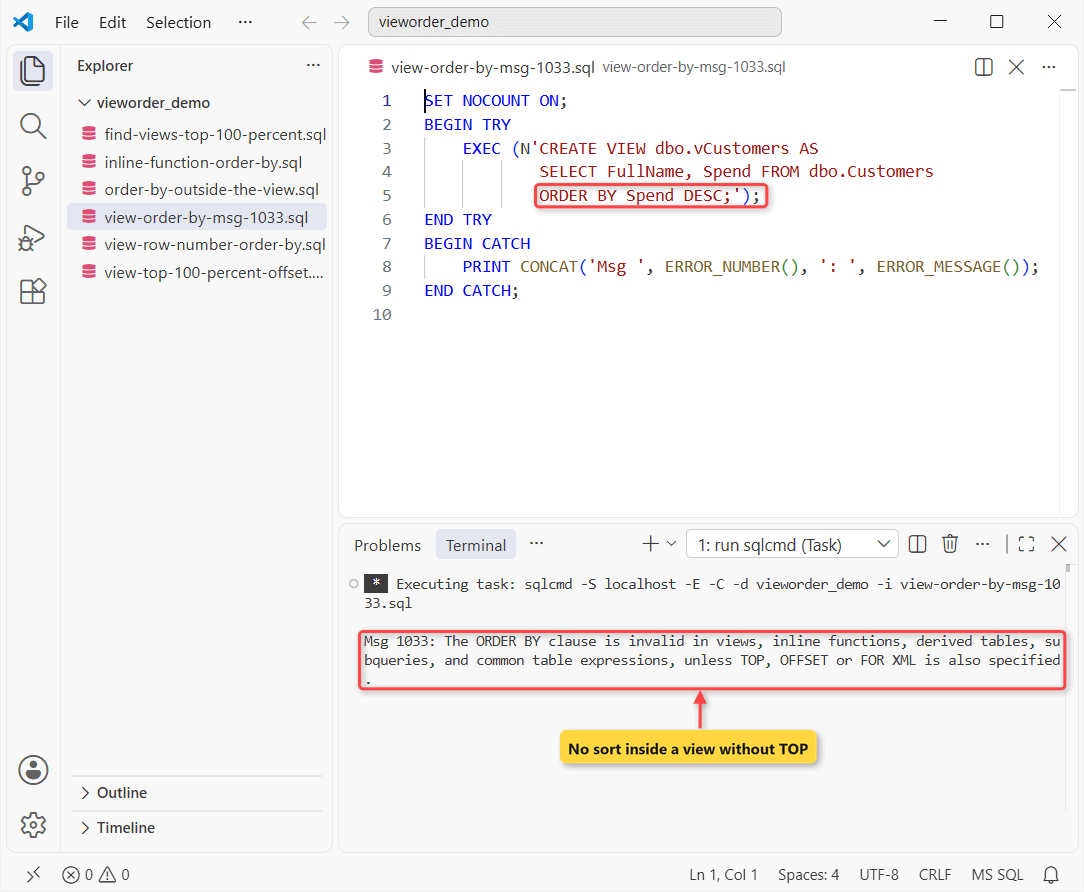
Why it happens: a view is a virtual table, and a table is an unordered set of rows. CTEs and subqueries follow the same rule (new to views? start with how views work in SQL Server).
Step 2: Test the TOP 100 PERCENT, OFFSET 0 ROWS and TOP (n) Work-Arounds
Add TOP or OFFSET and the view compiles. Two views, same ORDER BY Spend DESC, no outer ORDER BY:
CREATE VIEW dbo.vTop100 AS SELECT TOP 100 PERCENT FullName, Spend
FROM dbo.Customers ORDER BY Spend DESC;
GO
CREATE VIEW dbo.vOffset AS SELECT FullName, Spend
FROM dbo.Customers ORDER BY Spend DESC OFFSET 0 ROWS;
GO
SET NOCOUNT ON;
SELECT * FROM dbo.vTop100;
SELECT * FROM dbo.vOffset;
FullName Spend
-------------- ----------
Tyler Reed 412.50
Hannah Brooks 1280.00
Marcus Bennett 96.25
Grace Miller 2310.75
Olivia Hayes 640.00
FullName Spend
-------------- ----------
Grace Miller 2310.75
Hannah Brooks 1280.00
Olivia Hayes 640.00
Tyler Reed 412.50
Marcus Bennett 96.25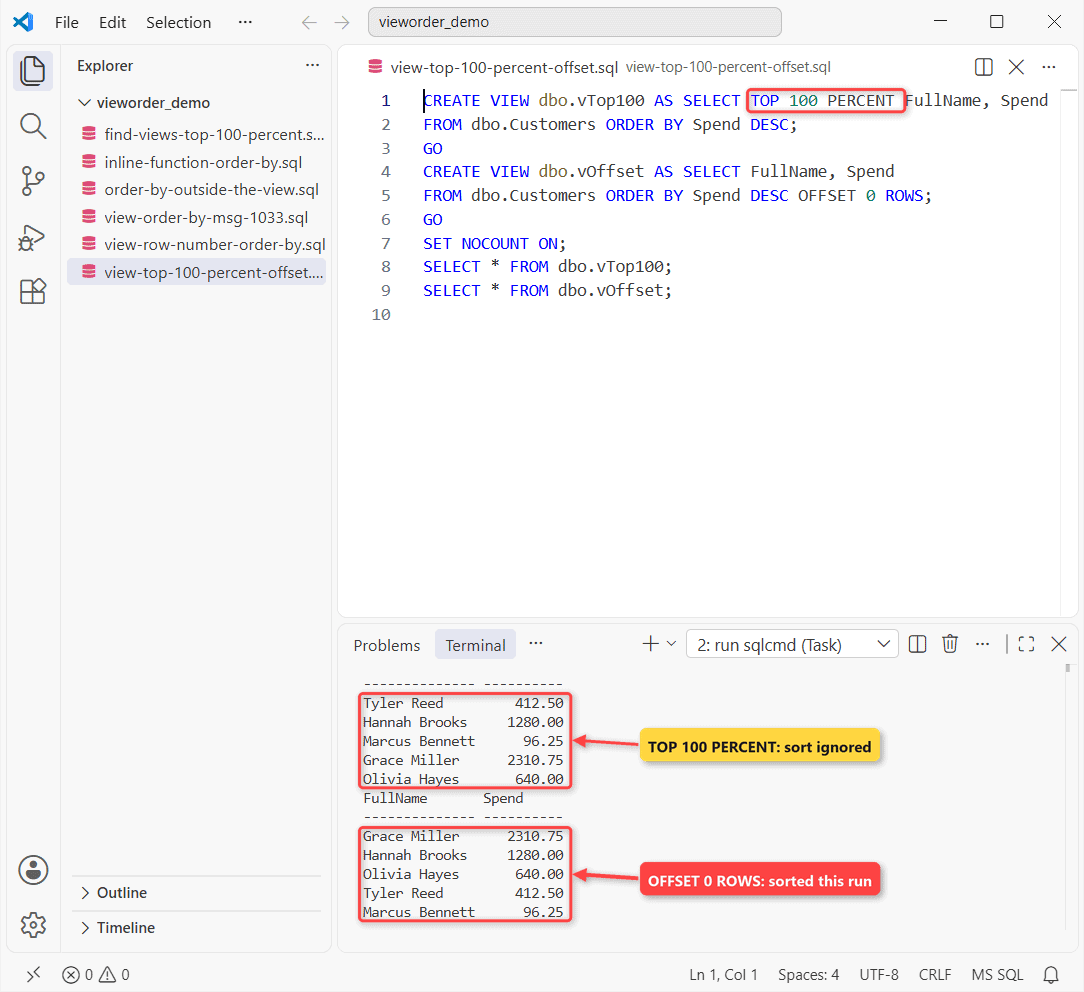
TOP 100 PERCENT came back in CustomerID order. Since every single row qualifies for a 100 percent TOP, the ORDER BY had nothing left to decide, and the optimizer dropped the sort.
OFFSET 0 ROWS came back sorted here. Don’t count on it. The CREATE VIEW docs say ORDER BY in a view only decides which rows TOP or OFFSET returns, with no order promised unless the outer query sorts.
TOP (n) still has a job: picking the biggest spenders. It just isn’t a sort. To change an existing view, see ALTER VIEW in SQL Server.
Step 3: Fix It With ORDER BY in the Outer SELECT
Drop ORDER BY from the view and sort where you query it:
CREATE VIEW dbo.vCustomers AS
SELECT CustomerID, FullName, State, Spend
FROM dbo.Customers;
GO
SET NOCOUNT ON;
SELECT FullName, State, Spend
FROM dbo.vCustomers
WHERE State <> 'OH'
ORDER BY Spend DESC;
FullName State Spend
-------------- ----- ----------
Grace Miller CA 2310.75
Olivia Hayes CA 640.00
Tyler Reed TX 412.50
Marcus Bennett TX 96.25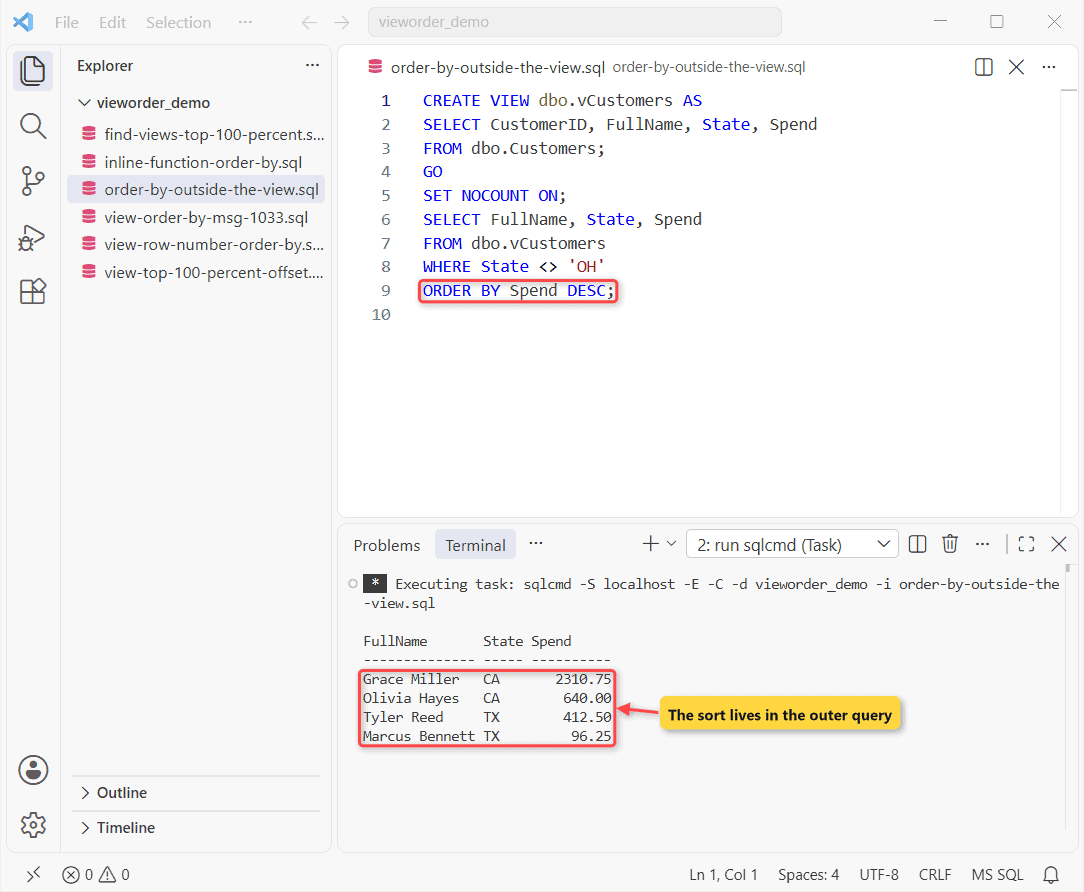
Confirm it’s fixed: four non-Ohio rows, Grace Miller first at $2,310.75. Every query that calls the view needs its own ORDER BY.
Can a View Return Ranked Rows? Use ROW_NUMBER() Inside the View
Yes. ORDER BY inside OVER is allowed. It numbers rows; it doesn’t sort them:
CREATE VIEW dbo.vRanked AS
SELECT FullName, State, Spend,
       ROW_NUMBER() OVER (PARTITION BY State
                          ORDER BY Spend DESC) AS StateRank
FROM dbo.Customers;
GO
SET NOCOUNT ON;
SELECT State, StateRank, FullName, Spend
FROM dbo.vRanked
ORDER BY State, StateRank;
State StateRank FullName Spend
----- -------------------- -------------- ----------
CA 1 Grace Miller 2310.75
CA 2 Olivia Hayes 640.00
OH 1 Hannah Brooks 1280.00
TX 1 Tyler Reed 412.50
TX 2 Marcus Bennett 96.25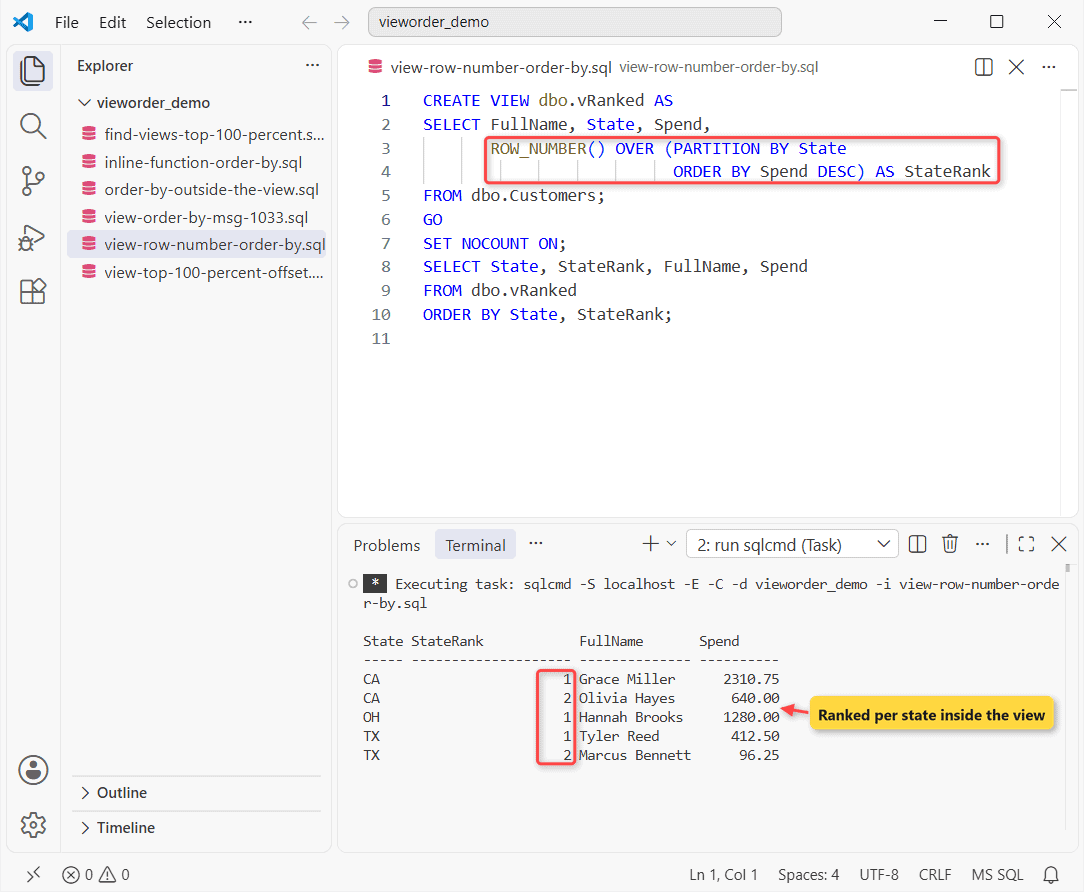
Callers can filter on StateRank (WHERE StateRank = 1 is the top customer per state). Display order still comes from the outer ORDER BY.
Does ORDER BY Work in an Inline Table-Valued Function?
Same Msg 1033 here. With TOP (@n) it compiles and acts like a parameterized view:
CREATE FUNCTION dbo.TopSpenders (@n int)
RETURNS TABLE AS RETURN
SELECT TOP (@n) FullName, Spend
FROM dbo.Customers ORDER BY Spend DESC;
GO
SET NOCOUNT ON;
SELECT FullName, Spend FROM dbo.TopSpenders(2)
ORDER BY Spend DESC;
FullName Spend
-------------- ----------
Grace Miller 2310.75
Hannah Brooks 1280.00More in functions that return a table and passing parameters to a view.
Cheat Sheet: What Each ORDER BY Option Guarantees
| Inside the view | Compiles? | What ORDER BY guarantees |
|---|---|---|
| TOP 100 PERCENT … ORDER BY | Yes | Nothing (sort dropped in my run) |
| OFFSET 0 ROWS (2012+) | Yes | Which rows; not their order |
| TOP (n) … ORDER BY | Yes | Which n rows; not their order |
| ROW_NUMBER() OVER (ORDER BY …) | Yes | Numbering only |
| ORDER BY on the outer SELECT | n/a | Sorted output |
Common Mistakes to Avoid With ORDER BY in Views
- Using TOP 99.99 PERCENT to force a sort. On 100,000 rows it returns 99,990, still with no promised order.
- Expecting OFFSET to work in an indexed view or a view WITH CHECK OPTION. Neither allows it.
How to stop it coming back: search view definitions for the old trick:
CREATE VIEW dbo.vTop100 AS SELECT TOP 100 PERCENT FullName, Spend
FROM dbo.Customers ORDER BY Spend DESC;
GO
SET NOCOUNT ON;
SELECT CAST(OBJECT_NAME(object_id) AS varchar(12)) AS ViewName
FROM sys.sql_modules
WHERE OBJECTPROPERTY(object_id, 'IsView') = 1
  AND definition LIKE '%TOP%100%PERCENT%';
ViewName
------------
vTop100One hit, vTop100. Rewrite each match.
Next Steps for Sorted SQL Server Views
- If it still fails with Msg 1033, look for ORDER BY in a CTE or subquery.
- Rows still unsorted? The ORDER BY is in the view, not the query that reads it.
- Wrong top rows? Make the TOP ORDER BY column unique, or add a tiebreaker.
Porting to PostgreSQL? See PostgreSQL CREATE VIEW.
More view tasks we’ve written up:
Frequently Asked Questions
Does SELECT * FROM a view return rows in clustered index order?
Often, but a different plan, index or join can change that. Only an ORDER BY guarantees order, per the ORDER BY clause reference.
Can I use ORDER BY in a view with UNION?
Not at the end of the view; the CREATE VIEW rule still applies. Sort the combined rows outside, as in our UNION in a SQL Server view example.
Does the same rule apply in Azure SQL Database?
Yes. Azure SQL Database and Managed Instance share the same CREATE VIEW rules and Msg 1033.

Shivam Dogra is a cloud database developer and Team Lead at TSInfo Technologies, where he has worked since June 2021. He writes the SQL Server and Oracle tutorials on DatabaseFAQs.com, covering queries, joins, stored procedures, triggers and permissions. Shivam holds a Master of Computer Applications (MCA) from Chandigarh University.