
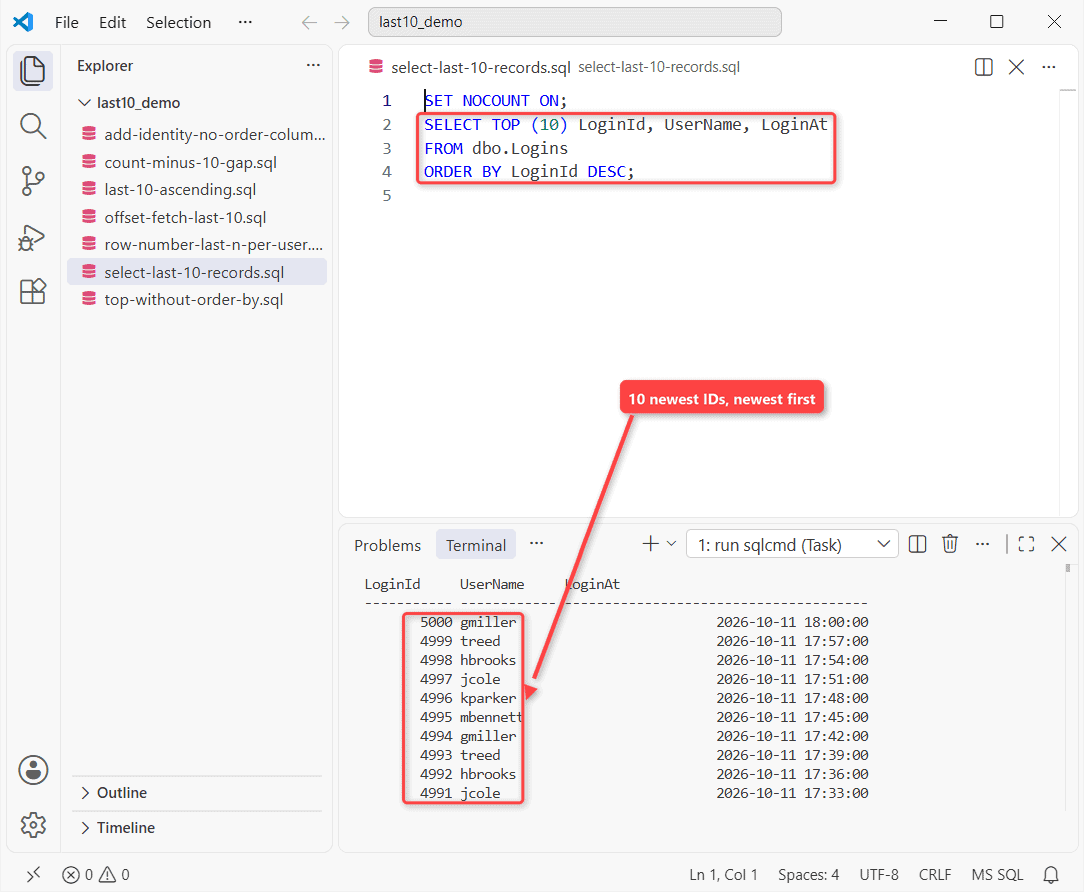
You can’t select last 10 records in SQL Server without sorting. A table has no built-in order, so “last” only exists once a column defines it. So you sort an identity or date column descending and take TOP (10):
SET NOCOUNT ON;
SELECT TOP (10) LoginId, UserName, LoginAt
FROM dbo.Logins
ORDER BY LoginId DESC;
What came back on my run:
LoginId     UserName     LoginAt
----------- ------------ --------------------------------------
       5000 gmiller                         2026-10-11 18:00:00
       4999 treed                           2026-10-11 17:57:00
       4998 hbrooks                         2026-10-11 17:54:00
       4997 jcole                           2026-10-11 17:51:00
       4996 kparker                         2026-10-11 17:48:00
       4995 mbennett                        2026-10-11 17:45:00
       4994 gmiller                         2026-10-11 17:42:00
       4993 treed                           2026-10-11 17:39:00
       4992 hbrooks                         2026-10-11 17:36:00
       4991 jcole                           2026-10-11 17:33:00
On my 5,000-row login table that’s IDs 5000 down to 4991, newest first.
How I Tested: 5,000 Logins on SQL Server 2025
Tested on SQL Server 2025 (17.0.1000.7) Developer, sqlcmd in VS Code. LoginId is an identity column and the clustered key; I deleted two rows to leave gaps:
CREATE TABLE dbo.Logins (
    LoginId  int IDENTITY(1,1) PRIMARY KEY,
    UserName varchar(12)  NOT NULL,
    City     varchar(12)  NOT NULL,
    LoginAt  datetime2(0) NOT NULL
);
INSERT INTO dbo.Logins (UserName, City, LoginAt)
SELECT CHOOSE(n % 6 + 1, 'hbrooks', 'treed', 'gmiller',
                         'mbennett', 'kparker', 'jcole'),
       CHOOSE(n % 4 + 1, 'Denver', 'Austin', 'Boston', 'Phoenix'),
       DATEADD(minute, n * 3, '2026-10-01T08:00:00')
FROM (SELECT TOP (5000) ROW_NUMBER() OVER (ORDER BY (SELECT NULL)) AS n
      FROM sys.all_columns AS a CROSS JOIN sys.all_columns AS b) AS nums;

DELETE FROM dbo.Logins WHERE LoginId IN (100, 200);
TOP Without ORDER BY Returns Whatever the Plan Reads First
You’ll read that rows come back in insert order. They don’t. I ran the same query twice, with one new index in between:
SET NOCOUNT ON;
SELECT TOP (5) LoginId, UserName FROM dbo.Logins;

CREATE INDEX IX_Logins_UserName ON dbo.Logins (UserName);

SELECT TOP (5) LoginId, UserName FROM dbo.Logins;
Run 1, then run 2:
LoginId     UserName
----------- ------------
          1 treed
          2 gmiller
          3 mbennett
          4 kparker
          5 jcole
LoginId     UserName
----------- ------------
          2 gmiller
          8 gmiller
         14 gmiller
         20 gmiller
         26 gmiller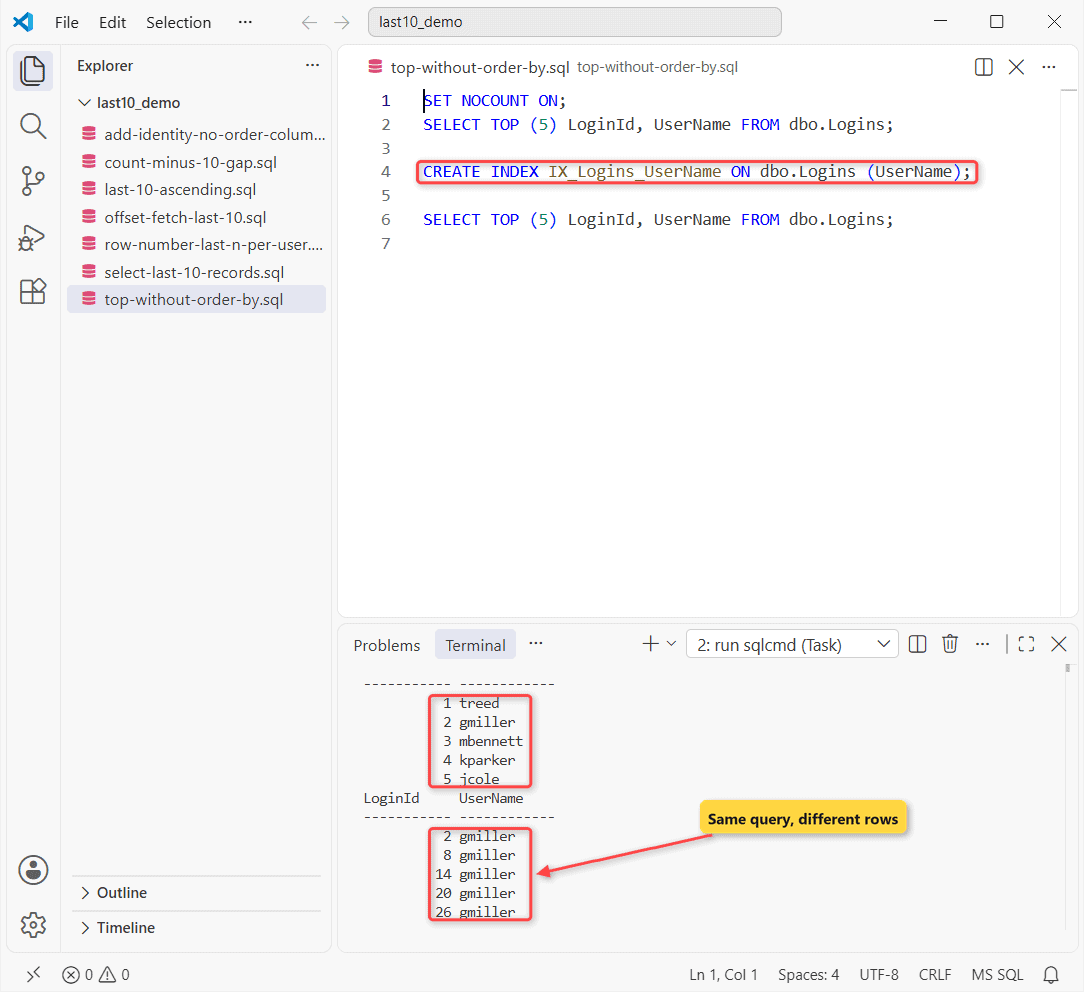
Run 1 read the clustered index (IDs 1 to 5). Run 2 read the new, narrower index, starting at IDs 2, 8, and neither returned the last rows. Microsoft’s TOP page calls this “an undefined order”.
Return the Last 10 Rows in Ascending Order
Want the 10 newest rows oldest-first? Take them descending inside a derived table, then sort again outside:
SET NOCOUNT ON;
SELECT LoginId
FROM (SELECT TOP (10) LoginId
      FROM dbo.Logins
      ORDER BY LoginId DESC) AS last10
ORDER BY LoginId;
Result:
LoginId
-----------
       4991
       4992
       4993
       4994
       4995
       4996
       4997
       4998
       4999
       5000
4991 to 5000, ascending. The outer ORDER BY sorts; the inner one only picks rows, just like ORDER BY in a view.
OFFSET FETCH: Skip to the Last 10 Rows
SQL Server 2012 and later can skip all but the last 10 rows:
SET NOCOUNT ON;
SELECT LoginId
FROM dbo.Logins
ORDER BY LoginId
OFFSET (SELECT COUNT(*) - 10 FROM dbo.Logins) ROWS
FETCH NEXT 10 ROWS ONLY;
Output:
LoginId
-----------
       4991
       4992
       4993
       4994
       4995
       4996
       4997
       4998
       4999
       5000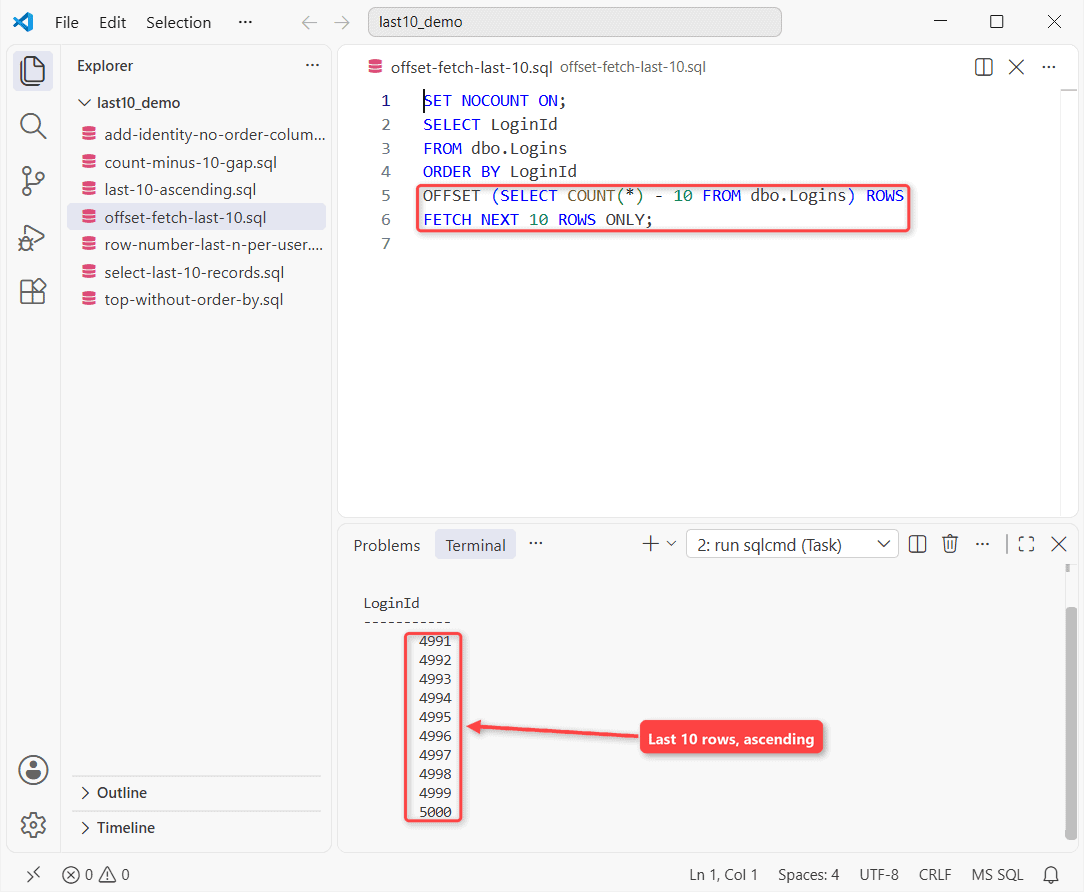
Same IDs, ascending. OFFSET counts rows, not ID values, so gaps don’t matter. Under 10 rows the offset goes negative and fails, so check the table row count first.
Last N Rows per User With ROW_NUMBER
TOP can’t restart per group. ROW_NUMBER with PARTITION BY can; here are the last two logins for two users:
SET NOCOUNT ON;
SELECT UserName, LoginId
FROM (SELECT UserName, LoginId,
             ROW_NUMBER() OVER (PARTITION BY UserName
                                ORDER BY LoginAt DESC) AS rn
      FROM dbo.Logins
      WHERE UserName IN ('hbrooks', 'treed')) AS x
WHERE rn <= 2
ORDER BY UserName, rn;
Two rows per user:
UserName     LoginId
------------ -----------
hbrooks             4998
hbrooks             4992
treed               4999
treed               4993
Newest first per user. For one row per user, see how to select the latest record.
The COUNT(*) – 10 Trick Returns 12 Rows
The old version of this page used WHERE Id > COUNT(*) - 10. It assumes IDs have no gaps. With my two deleted rows:
SET NOCOUNT ON;
SELECT COUNT(*) AS RowsReturned, MIN(LoginId) AS FirstId
FROM dbo.Logins
WHERE LoginId > (SELECT COUNT(*) FROM dbo.Logins) - 10;
Counted:
RowsReturned FirstId
------------ -----------
          12        4989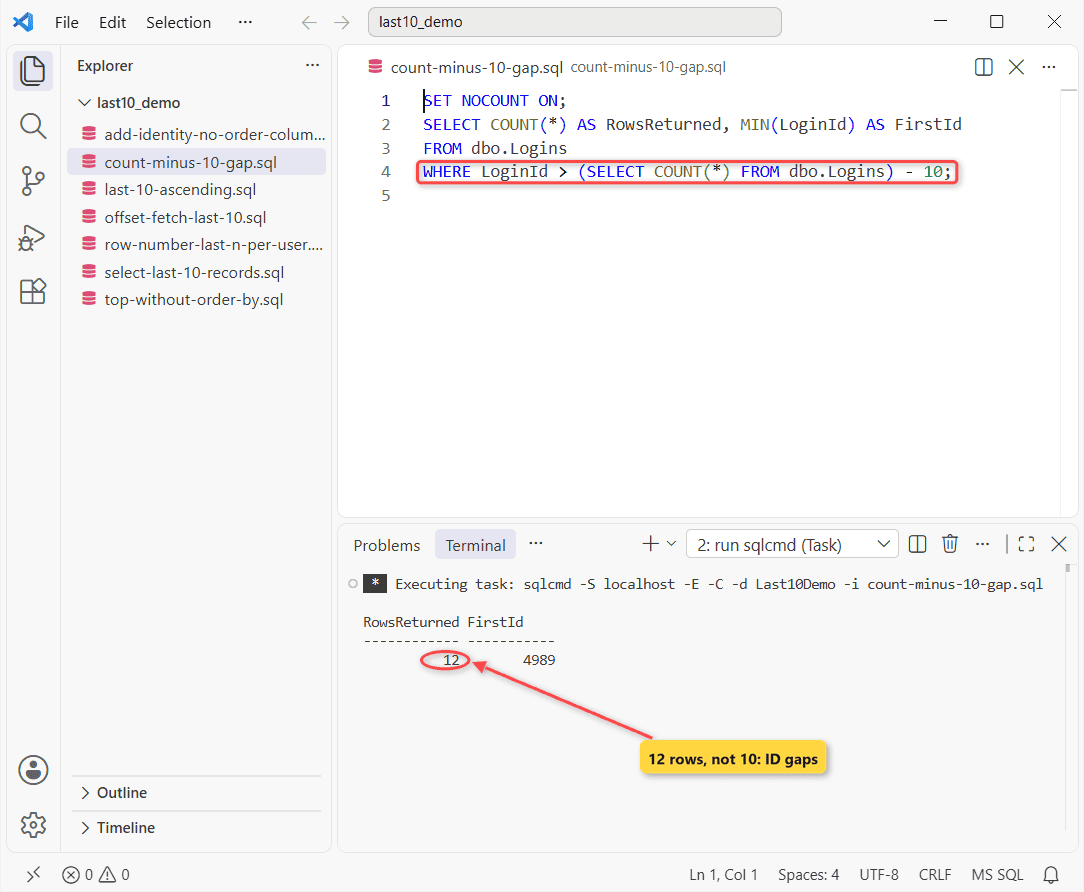
COUNT(*) is 4,998, so the filter starts at 4989. Rollbacks and restarts leave identity gaps too.
What If the Table Has No Identity Column to ORDER BY?
Then there’s no reliable “last”. Add both columns and let new rows fill them, the way ALTER TABLE ADD works:
SET NOCOUNT ON;
CREATE TABLE dbo.ImportRows (City varchar(12) NOT NULL);
INSERT INTO dbo.ImportRows VALUES ('Denver'), ('Austin'), ('Boston');

ALTER TABLE dbo.ImportRows ADD
    RowId    int IDENTITY(1,1) NOT NULL,
    LoadedAt datetime2(0) NOT NULL
        CONSTRAINT DF_ImportRows_LoadedAt DEFAULT SYSDATETIME();

INSERT INTO dbo.ImportRows (City) VALUES ('Phoenix');
SELECT TOP (2) RowId, City FROM dbo.ImportRows ORDER BY RowId DESC;
Newest two rows after the ALTER:
RowId       City
----------- ------------
          4 Phoenix
          3 Boston
Phoenix, inserted after the change, is row 4. The numbers on the old rows don’t prove insert order.
TOP vs OFFSET vs COUNT(*): Where the Answer Flips
| Method | Rows in my run | Same rows every run? | Gaps safe? |
|---|---|---|---|
| TOP (10) … ORDER BY Id DESC | 10, newest first | Yes | Yes |
| Derived table, re-sorted | 10, oldest first | Yes | Yes |
| OFFSET COUNT(*) – 10 | 10, oldest first | Yes | Yes |
| TOP (10), no ORDER BY | 10, but not the last | No | n/a |
| WHERE Id > COUNT(*) – 10 | 12 | Yes | No |
My rule of thumb: use TOP (10) with ORDER BY on the identity column. The answer flips when rows arrive out of key order (backfills, IDENTITY_INSERT): sort by the date column, ID as tie-breaker.
Next step: page back through older rows with OFFSET. On MariaDB, see MariaDB LIMIT examples.
- Top row per group in a join: INNER JOIN with TOP 1
- PostgreSQL ORDER BY for the Postgres sort
- Insert your own IDs with IDENTITY_INSERT
Frequently Asked Questions
Does SQL Server have a LIMIT clause like MySQL?
No. Use TOP (n) or OFFSET … FETCH. Microsoft’s TOP reference also recommends always writing the parentheses.
Does a clustered index guarantee order without ORDER BY?
No. The ORDER BY clause page says result order isn’t guaranteed unless ORDER BY is specified, whatever indexes exist.
How do I get the bottom 10 records with ties?
Use TOP (10) WITH TIES ... ORDER BY LoginAt DESC. Rows sharing the 10th row’s LoginAt are added, so you may get more than 10.

Shivam Dogra is a cloud database developer and Team Lead at TSInfo Technologies, where he has worked since June 2021. He writes the SQL Server and Oracle tutorials on DatabaseFAQs.com, covering queries, joins, stored procedures, triggers and permissions. Shivam holds a Master of Computer Applications (MCA) from Chandigarh University.