
In this guide, I will walk you through exactly what this error “Error 1217 (23000): Cannot delete or update a parent row: a foreign key constraint fails.” means, why it happens, and the professional-grade strategies I use to resolve it without compromising the health of your database.
Cannot Delete Or Update A Parent Row
Let me explain the error I encountered recently with the real-time examples.
First, let’s create two tables using the following query, with a primary key and a foreign key constraint in the example.
CREATE TABLE COUNTRIES(
COUNTRY_ID INT AUTO_INCREMENT PRIMARY KEY,
COUNTRY_NAME VARCHAR(50),
COUNTRY_SHORTFORM VARCHAR(40));

INSERT INTO COUNTRIES (COUNTRY_NAME,COUNTRY_SHORTFORM)
VALUES('UNITED STATES OF AMERICA','US'),
('CANADA','CN'),
('NEW ZEALAND','NZ'),
('AUSTRALIA','AS');

SELECT * FROM COUNTRIES;
Using the above query, we have created a table COUNTRIES by using the CREATE TABLE statement and inserted some records in the COUNTRIES table by using the INSERT INTO statement. If we want to retrieve all records from the COUNTRIES table then we can use the SELECT statement.
CREATE TABLE STATES(
STATE_ID INT AUTO_INCREMENT PRIMARY KEY,
STATE_NAME VARCHAR(50),
COUNTRY_ID INT,
CONSTRAINT fk_country_id
FOREIGN KEY(country_id) references COUNTRIES(country_id));

INSERT INTO STATES(STATE_NAME,COUNTRY_ID)
values('QUEEENS',1),
('CALIFORNIA',1),
('QUEBEC',2),
('BROOKLYN',1);

SELECT * FROM STATES;
Using the above query, we have created a table STATES by using the CREATE TABLE statement and inserted some records in the STATES table by using the INSERT INTO statement. To retrieve all records from the STATES table, we can use a SELECT statement.
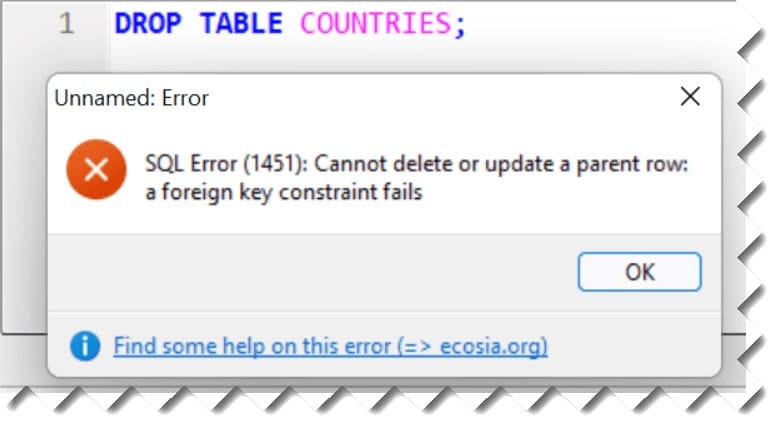
Now, because of the parent-child relationship between the tables, we cannot drop the COUNTRIES table directly. And if we try to drop it, the server returns an error as shown in the screenshot below.
Solution
Now, to properly drop the COUNTRIES table, we need to ignore the foreign key constraint. And for this task, we can run the following query.
SET FOREIGN_KEY_CHECKS = 0;
DROP TABLE countries;
As we see in the above query, we set the foreign_key_checks to 0, then it will easily ignore the constraints, and with the help of the DROP statement, it will delete the COUNTRIES table.
You may also like the following articles:

Rajkishore Sahoo is a Microsoft Azure consultant with more than 14 years of hands-on experience building cloud-native data solutions across Azure and AWS, focused on Azure SQL Database, Azure SQL Managed Instance, and the pipelines that connect them to production apps. Day to day, he provisions Azure SQL instances, configures firewalls and connection strings, tunes queries for cloud workloads, and wires databases into Azure Functions and Logic Apps. Read more