
In this MariaDB tutorial, I’m going to walk you through everything you need to know about the CREATE TABLE statement in MariaDB. We won’t just look at the syntax; we’ll dive into the nuances of data integrity, storage engines, and performance optimization to ensure your tables are built for scale.
How to create a table in MariaDB
The Fundamental Syntax:
To create a table in MariaDB, we use the CREATE TABLE command. At its simplest, you define the table name and a list of columns. However, as an expert, I always recommend using the IF NOT EXISTS clause. This prevents your scripts from failing if the table is already present in the schema.
Basic Syntax Structure
The statement that is used to create a new table in MariaDB is ‘CREATE TABLE tbl_name’, but there are some options that are used with this statement is given below.
CREATE [OR REPLACE] [TEMPORARY] TABLE [IF NOT EXISTS] tbl_name
    (create_definition,...) [table_options    ]... [partition_options]

CREATE [OR REPLACE] [TEMPORARY] TABLE [IF NOT EXISTS] tbl_name
    [(create_definition,...)] [table_options   ]... [partition_options]
    select_statement
CREATE [OR REPLACE] [TEMPORARY] TABLE [IF NOT EXISTS] tbl_name
   { LIKE old_table_name | (LIKE old_table_name) }
The CREATE TABLE statement or command gives the table name followed by the list of columns, indexes, and constraints.
The options with the CREATE TABLE statement is OR REPLACE, TEMPORARY, IF NOT EXISTS.
- OR REPLACE: This options drop the existing table and create a new table.
- IF NOT EXISTS: This option is used to suppress the error 1050, which is generated when the table is created of the same name that already exists.
- TEMPORARY: This option is used to create the temporary table that exists till the current session, when the current session ends then the table is dropped automatically.
SQL
Example
CREATE TABLE IF NOT EXISTS Users (
    UserID INT AUTO_INCREMENT,
    FirstName VARCHAR(50) NOT NULL,
    LastName VARCHAR(50) NOT NULL,
    Email VARCHAR(100) UNIQUE,
    CreatedAt TIMESTAMP DEFAULT CURRENT_TIMESTAMP,
    PRIMARY KEY (UserID)
) ENGINE=InnoDB;
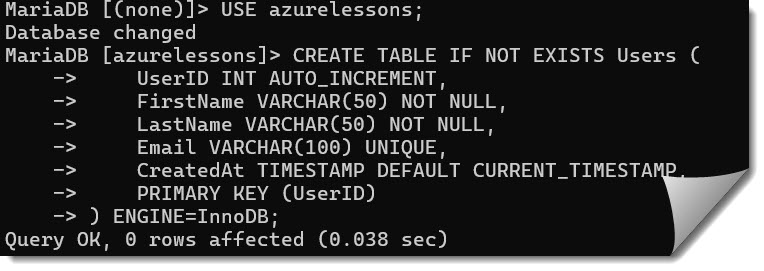
In this snippet, we aren’t just creating a list; we are defining behaviors. Notice the AUTO_INCREMENT attribute—this is the standard way in the tech industry to handle surrogate keys, ensuring every record has a unique, sequential identifier without manual intervention.
After executing the above query, I got the expected output as shown in the screenshot below.
Deep Dive into MariaDB Data Types
Choosing the correct data type is where the “pros” separate themselves from the amateurs. If you store a US Zip Code as an INT, you lose leading zeros (like those in Massachusetts). If you use TEXT where VARCHAR would suffice, you lose the ability to index effectively.
Common MariaDB Data Types for US Applications
| Category | Data Type | Best Use Case | Expert Tip |
| Numeric | INT | Primary IDs, counters. | Use UNSIGNED if the value will never be negative. |
| Numeric | DECIMAL(10,2) | Currency (USD), precise measurements. | Never use FLOAT for money; it leads to rounding errors. |
| String | VARCHAR(N) | Names, addresses, emails. | Allocate only what you need to save memory during sorting. |
| String | CHAR(2) | State abbreviations (e.g., NY, TX). | Use CHAR for fixed-length strings for better performance. |
| Temporal | DATETIME | Event logs, birthdays. | Use TIMESTAMP for “Created At” fields to handle time zones. |
| Modern | JSON | Flexible metadata, settings. | MariaDB maps this to LONGTEXT with a JSON check constraint. |
Enforcing Integrity with Constraints
Constraints are the “rules” of your table. In my experience, the most resilient systems are those where the database refuses to accept bad data.
1. The Primary Key
The PRIMARY KEY is the soul of your table. It must be unique and cannot be null. In MariaDB, defining a primary key automatically creates a Clustered Index, which physically organizes the data on the disk for lightning-fast retrieval by that ID.
The primary key is the unique key for each record in the table of MariaDB.
The primary key is like a vehicle identification number or telephone number. Every relational database should have only one and one primary key.
The syntax to create a primary key is given below.
CREATE TABLE table_name(col_1 int,col_2 varchar, PRIMARY KEY(col_1));In the above syntax, we are creating the table as table_name using the CREATE TABLE statement with two columns col_1, col_2 of data type int and varchar respectively.
After defining columns name and their data type, the primary key is defined using the keyword PRIMARY KEY (name of the column) like here we make col_1 as the primary key of the table table_name.
Let’s create a table with a primary key using the below query.
CREATE TABLE prim_key(id int,data_name varchar,PRIMARY KEY(id));After executing the above query, I got the expected output as shown in the screenshot below.

Here in the above output, we have created the table as prim_key with two columns id, data_name of data type int and varchar respectively.
And the primary key is column id which is defined as PRIMARY KEY(
2. Foreign Keys and Referential Integrity
The foreign key is made up of a column or set of columns in the MariaDB table that denotes a column or a set of columns in other tables.
A table that contains the foreign keys is called a child table and the table to which the foreign key denotes is called the parent table.
Create the table named product_table.
CREATE TABLE product_table(product_id int auto_increment,product_name varchar(100),primary key(product_id));Here, we are creating the table as product_table using the CREATE TABLE statement with two columns named product_id and product_name of data type int and varchar respectively. Where product_id is the primary key.
After executing the above query, I got the expected output as shown in the screenshot below.

Now again, create the table named prouduct_type with a foreign key.
CREATE TABLE product_type(product_type_id int auto_increment,product_id int,product_typ_name varchar(50),
foreign key(product_id) references product_table(product_id),primary key(product_type_id));
In the above code, we are creating a table named product_type with three columns named product_type_id, proudcut_id, product_typ_name. Where product_id is the foreign key that references to column prouduct_id of product_table.
After executing the above query, I got the expected output as shown in the screenshot below.

3. The CHECK Constraint
One of MariaDB’s strongest features over older versions of MySQL is the functional CHECK constraint. Imagine you are building an app for a retail chain. You want to ensure no product is listed with a negative price.
Expert Insight: Always validate at the database level. Application-level validation can be bypassed by a rogue script or a direct SQL injection, but a
CHECKconstraint is an unbreakable wall.
Advanced Table Options: Beyond the Basics
As we move into 2026, MariaDB has introduced features that make data management much easier. One such feature is System-Versioned Tables.
System-Versioning (Temporal Tables)
If you are working in a highly regulated industry—like healthcare or finance—auditing is mandatory. System-versioning allows you to query the table as it existed at any point in history.
SQL
CREATE TABLE SalaryHistory (
    EmployeeID INT,
    Amount DECIMAL(15,2)
) WITH SYSTEM VERSIONING;
After executing the above query, I got the expected output as shown in the screenshot below.
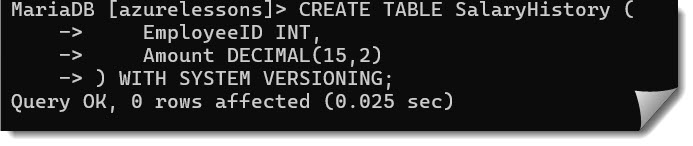
With this, MariaDB automatically tracks every change, allowing you to run a query like SELECT * FROM SalaryHistory FOR SYSTEM_TIME AS OF '2025-01-01'. It is absolute magic for compliance.
Performance Optimization During Creation
Creating a table is just the start. If you want that table to handle 10,000 requests per second from users across the United States, you need to think about indexing.
Smart Indexing Strategies
- Prefix Indexes: If you have a long
VARCHARcolumn like a URL, don’t index the whole thing. Index the first 10-20 characters. - Composite Indexes: If your users always search by
LastNameandFirstNametogether, create a single index on both columns rather than two separate ones. - Virtual Columns: MariaDB allows you to create columns that are calculated on the fly and then index them.
Choosing the Right Storage Engine
MariaDB is famous for its “pluggable” storage engine architecture.
- InnoDB: The gold standard. It supports ACID transactions, row-level locking, and foreign keys. This should be your default choice for 99% of applications.
- Aria: An improvement over the old MyISAM. It’s great for temporary tables or heavy read-only workloads where transaction overhead isn’t needed.
- ColumnStore: Designed for Big Data and analytics. If you are processing billions of rows for a US national census or financial trend analysis, this is your engine.
Checklist for Table Creation
- Normalization: Is the data atomic? Am I repeating the same
StateName1,000 times instead of using a lookup table? - Nullability: Am I allowing
NULLwhere a value is strictly required? (e.g., aSocialSecurityNumbershould usually beNOT NULL). - Character Sets: Am I using
utf8mb4? In a globalized world, even USA-specific apps need to support emojis and international names. - Comments: Am I documenting the intent of the column using the
COMMENTattribute?
SQL
ALTER TABLE CustomerProfiles
MODIFY COLUMN ZipCode VARCHAR(10) COMMENT 'Supports 5+4 US Zip format';
Summary of Best Practices
Building tables in MariaDB is a craft. To summarize what we’ve covered:
- Always use InnoDB for transactional safety.
- Be precise with data types—choose
SMALLINTorTINYINTfor flags and small counts to save disk I/O. - Leverage Constraints to make your database the “Source of Truth.”
- Plan for the future with System Versioning if audit trails are required.
Designing a database is like building a house —the foundation must be strong enough to withstand the “winter” of heavy traffic and complex queries. By following these professional guidelines, you ensure that your MariaDB environment is not just functional, but enterprise-grade.
You may also like the following articles:

Rajkishore Sahoo is a Microsoft Azure consultant with more than 14 years of hands-on experience building cloud-native data solutions across Azure and AWS, focused on Azure SQL Database, Azure SQL Managed Instance, and the pipelines that connect them to production apps. Day to day, he provisions Azure SQL instances, configures firewalls and connection strings, tunes queries for cloud workloads, and wires databases into Azure Functions and Logic Apps. Read more