
Welcome to my definitive guide on PostgreSQL Architecture. In this tutorial, I’ll break down the complete anatomy of the PostgreSQL engine, from the moment a connection lands until data is committed to disk. We’ll explore memory structures, background processes, and the transactional logic that keeps your data secure.
PostgreSQL Architecture
Why PostgreSQL Architecture Matters for Modern Devs
For senior database developers and administrators in the United States, understanding architecture isn’t optional. It’s the foundation of performance tuning, scalability planning, and efficient troubleshooting.
Mastering PostgreSQL architecture gives you:
- Predictability: Know exactly where your queries spend time.
- Performance: Tuned memory means faster responses.
- Reliability: Optimize WAL to balance durable commits and write speed.
Let’s start by visualizing the core system.
PostgreSQL Architecture Diagram: The Big Picture
Before I dive into the individual components, let’s establish a mental model. PostgreSQL uses a robust, modular design. This simplified diagram illustrates the flow of a connection and the main structures involved.
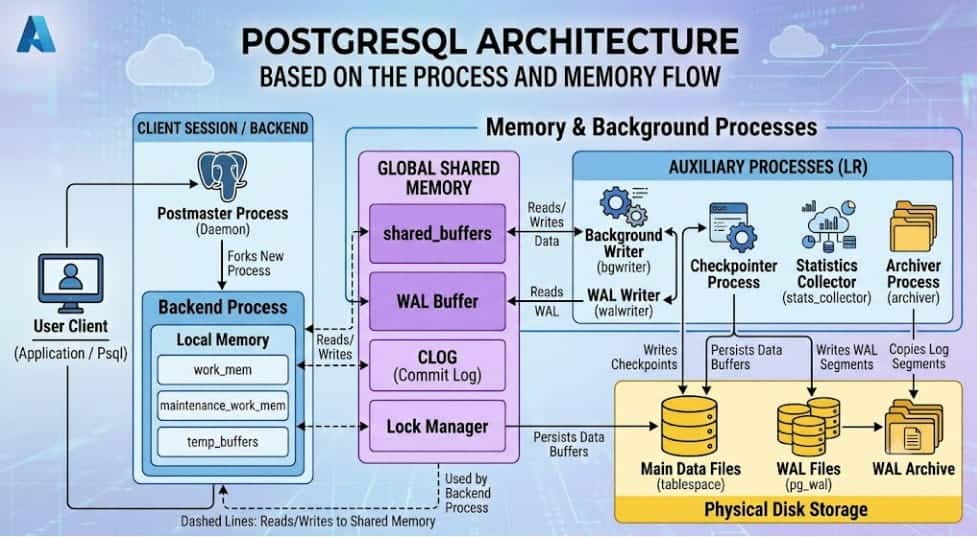
As you can see, PostgreSQL doesn’t manage everything in one gigantic thread. It uses a process-based model. A central daemon spawns dedicated processes for each client, auxiliary processes handle maintenance, and they all coordinate via complex, shared memory structures. This design is rugged and extremely reliable.
The Process Model
I often see confusion between process models (like PostgreSQL’s) and thread models (like MySQL’s default). In PostgreSQL, a process-based approach means greater stability. If one client session experiences a severe failure and crashes, that individual backend process might die, but it rarely takes down the entire database server.
Let’s break down the main actors in this system.
A. The Master Daemon: postmaster
The Postmaster (also named postgres or the PostgreSQL daemon) is the parent process. It’s the very first process that starts up, listens on the database port (typically 5432), and is responsible for managing the entire cluster.
Its primary duties are:
- Startup & Initialization: Prepares shared memory and starts auxiliary processes.
- Connection Handling: Listens for incoming client connections.
- Authentication: Authenticates the user based on
pg_hba.conf. - Forking: Once authenticated, it “forks” itself to create a new, dedicated Backend Process for that specific client session.
B. The Client Servant: The Backend Process
When a postmaster forks, the new process becomes that client’s backend process. This process has one job: manage the relationship and execute commands for that specific connection.
- Lifecycle: This process exists only for the duration of the client connection. When the client disconnects, the backend process terminates.
- Execution: It parses the SQL, optimizes the execution plan, reads necessary data from memory or disk, and returns the result to the client.
- Memory: While it accesses shared memory, it also allocates its own private, local memory.
This process-per-connection model can become a resource bottleneck if thousands of connections are made, which is why connection poolers (like PgBouncer or pgcat) are essential for large-scale US deployments.
The Auxiliary Processes
| Auxiliary Process | Primary Responsibility | Architectural Impact |
Checkpointer (checkpointer) | Synchronizes memory with disk at specific intervals or data volumes (checkpoints). | Minimizes recovery time after a crash; critical for balancing durability and write spikes. |
Background Writer (bgwriter) | Lazily writes dirty buffers (modified data pages) from shared_buffers to disk. | Offloads write I/O from backend processes; keeps shared_buffers healthy for new reads. |
WAL Writer (walwriter) | Writes WAL data from the WAL Buffer (RAM) to the physical WAL Files (disk). | Ensures transactional durability (ACID compliance) before acknowledging commits. |
Archiver (archiver) | Copies filled WAL segment files from the active pg_wal directory to an archival location. | Essential for Continuous Archiving and Point-in-Time Recovery (PITR). |
Statistics Collector (stats_collector) | Collects runtime data (table usage, I/O stats, index usage). | Feeds the query planner (optimizer) with essential data for generating efficient plans. |
Logger Process (syslogger) | Manages the database server’s log output. | Vital for troubleshooting errors and monitoring activity. |
PostgreSQL Memory Architecture: shared_buffers and Local Allocation
A core part of my engineering work is memory management. PostgreSQL’s performance is determined by how effectively it can keep frequently used data in RAM. The memory structure is split into Shared Memory (accessible by all processes) and Local Memory (private to individual backend processes).
A. The Global shared_buffers
This is the most significant memory setting in PostgreSQL and arguably the single most important parameter you can tune. shared_buffers is the database’s main cache. PostgreSQL does not read directly from the physical table file for every query. Instead, it reads 8KB data blocks (“pages”) into shared_buffers.
- Reads: If a query needs data, the engine checks
shared_buffersfirst. If it’s a “hit,” the query is fast. If it’s a “miss,” it must read from disk. - Writes: Updates also happen first in shared_buffers. A modified block is marked “dirty” and eventually persisted to disk by the
bgwriterorcheckpointer. - Tuning: In the US market, I typically recommend starting with a
shared_buffersvalue of about 25% of total system RAM for production workloads. However, don’t set it excessively high, as PostgreSQL also relies heavily on the operating system’s file cache (OS cache).
B. Other Crucial Shared Memory Structures
While shared_buffers is the star, several other shared areas are vital:
- WAL Buffer: Staging area for Write-Ahead Log data before it is written to disk by the
walwriter. This is usually sized to 1/32 ofshared_buffersor a maximum of 16MB. - Lock Manager: Manages all transactional locks (row, table, shared, exclusive locks), preventing conflicting updates. This memory holds the shared state of which transaction holds which lock.
C. Local Memory: Tuning per Process
When a backend process executes a query, it allocates private memory from the OS for its internal operations. You must tune this memory responsibly because it can quickly overwhelm system RAM if hundreds of connections are active.
work_mem: The memory limit used for specific, internal query operations, primarily sorting (ORDER BY) and hash joins. This memory is allocated per complex query operation. A single complex query might spawn multiplework_memallocations. Setting this too low causes sorts to spill to slow temporary files on disk; setting it too high can cause an Out-Of-Memory (OOM) error.maintenance_work_mem: Private memory used for resource-intensive maintenance tasks like vacuuming, analyzing, building indexes (CREATE INDEX), and altering tables. Since this is usually a singleton process at any time, this can be set much higher thanwork_mem(often 128MB to 1GB in US corporate systems).
Data Integrity and Durability: The WAL (Write-Ahead Log)
You cannot discuss database architecture without emphasizing data safety. PostgreSQL guarantees durability (the ‘D’ in ACID) using a mechanism called Write-Ahead Logging (WAL). WAL is designed to ensure that committed data is never lost, even if the database crashes unexpectedly.
The fundamental principle is: No data change is written to the main data files until the corresponding WAL entry describing that change is successfully persisted to disk.
Here’s the architecture of WAL flow:
- WAL Entry: A backend process modifies a data page in
shared_buffers. Before that dirty page can leave RAM, the backend generates a WAL record describing the transformation. - WAL Buffer: This record is written rapidly into the RAM-based WAL Buffer.
- FSYNC: The backend process issues a
commitcommand. The WAL Writer process (or sometimes the backend itself) immediatelyfsync()s (flushes) the necessary WAL entries from the WAL Buffer to the physical WAL Files on disk (pg_waldirectory). - Acknowledgment: Only after the WAL entry is confirmed durable on disk is the commit acknowledged as successful to the client application.
- Checkpoint: The actual data page in
shared_buffersis still “dirty.” It is eventually persisted to the main table files lazily by thebgwriteror forcefully by thecheckpointerduring the next checkpoint operation.
This WAL-centric design is incredibly efficient. Writing sequential log entries to disk is vastly faster than performing random I/O to flush dirty data pages scattered across table files. In US enterprise environments where uptime is critical, WAL enables high performance without compromising data safety.
PostgreSQL Process Flow: Summary and Conclusion
We have explored the process model, the aux processes, the specialized memory structures, and the logic that keeps data safe. To summarize everything, let’s re-trace the logical flow of a single SELECT query landing on a tuned PostgreSQL server:
- A New Connection arrives from the client.
- The parent Postmaster daemon authenticates the connection and forks a new, dedicated Backend Process.
- The Backend Process receives the SQL command.
- It checks the shared Lock Manager memory structure to ensure no conflicting locks are held.
- It requests the required data pages. The backend checks
shared_buffersfirst. If it finds the pages (a “shared block hit”), it proceeds. If it misses, it initiates a read from disk intoshared_buffers. - The backend allocates its private
work_memfor sorting the results. - The final result set is returned to the client.
- Stats Collector notices the table activity and updates the stats cache.
- Meanwhile, the
bgwriterAuxiliary Process is lazily scanningshared_buffersin the background, writing out modified pages to disk. - At a configured interval, the
checkpointerprocess forces a full sync of all modified memory pages.
Mastering this flow and knowing where to tune parameters like shared_buffers, work_mem, and max_wal_size empowers you to build highly responsive, stable, and secure database systems. PostgreSQL architecture is elegant, rugged, and ready for your most critical enterprise workloads.
You may also like the following articles:
- PostgreSQL SELECT
- PostgreSQL System Requirements
- PostgreSQL Password Authentication Failed
- PostgreSQL Latest Version

Rajkishore Sahoo is a Microsoft Azure consultant with more than 14 years of hands-on experience building cloud-native data solutions across Azure and AWS, focused on Azure SQL Database, Azure SQL Managed Instance, and the pipelines that connect them to production apps. Day to day, he provisions Azure SQL instances, configures firewalls and connection strings, tunes queries for cloud workloads, and wires databases into Azure Functions and Logic Apps. Read more